
Does installing Windows 11 24H2 reset customizations in Windows?


classic35mm

Member
Local time
12:33 AM
Posts
57
OS
Windows 11 23H2 22631.3527
I'm running Windows 11 Enterprise, 23H2, build 22631.4751.

Unfortunately, it seems that Windows has downloaded 24H2 on my computer. I have managed to delay installation of this update using Pause updates in Settings > Windows 11.
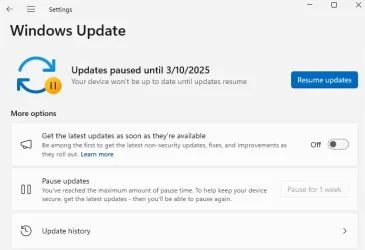
pause_updates.webp

  • Is there any way to prevent this update from being applied now that Windows has downloaded it? Judging from answers to my post from a month ago, it seems the answer is no, unfortunately.
  • Does installing 24H2 reset customizations in Windows? When I first started using Windows 11, I spent a good deal of time setting customization options in Settings, Control Panel, and the like. Many of these customizations are particularly important for me because I have a physical disability and have limited mobility. Will customizations be lost when 24H2 is installed? This post by @dacrone seems to suggest that the answer is yes, unfortunately.
 
Windows Build/Version
11, 23H2, build 22631.4751

My Computer My Computer

At a glance

Windows 11 23H2 22631.3527
OS
Windows 11 23H2 22631.3527
Computer type
PC/Desktop
Manufacturer/Model
Lenovo ThinkStation P3
Windows update Blocker

You might want to try the above, which was posted in your last thread a month ago.
 

My Computers My Computers

  • At a glance

    Windows11 Pro 26200.8728Intel Core i9 14900F (24 -Core, 68 MB Total C...32GB DDR5RTX 4080 Super w/581.95
    OS
    Windows11 Pro 26200.8728
    Computer type
    PC/Desktop
    Manufacturer/Model
    Dell Alienware Aurora R16
    CPU
    Intel Core i9 14900F (24 -Core, 68 MB Total Cache)
    Motherboard
    Dell Alienware
    Memory
    32GB DDR5
    Graphics Card(s)
    RTX 4080 Super w/581.95
    Sound Card
    Realtec
    Monitor(s) Displays
    Corsair XENEON 32QHD165
    Screen Resolution
    2560 X 1440
    Hard Drives
    1-2TB Samsung 990 Pro PCIe NVMe M2 SSD
    1-4TB Samsung 990 Pro PCIe NVMe M2 SSD
    PSU
    1000 Watt Platinum Dell
    Case
    Alienware
    Cooling
    Liquid Closed Loop
    Keyboard
    Corsair Strafe RGB
    Mouse
    Logitech MK270 Wireless
    Internet Speed
    100Gb's Down-20 Up
    Browser
    Firefox 152.0.1
    Antivirus
    Defender
    Other Info
    Very Quiet And Fast
    CyberPower UPS CP1500PFCLCD
  • At a glance

    PClinuxOS Mate (2025.7)13th Gen Inter(R) Core(TM) i3-1315U64 GB DDR4 @3200 MHz.Internal
    Operating System
    PClinuxOS Mate (2025.7)
    Computer type
    PC/Desktop
    Manufacturer/Model
    Intel
    CPU
    13th Gen Inter(R) Core(TM) i3-1315U
    Motherboard
    Intel
    Memory
    64 GB DDR4 @3200 MHz.
    Graphics card(s)
    Internal
    Sound Card
    None
    Monitor(s) Displays
    Dell 2419HGCF
    Screen Resolution
    1920 X 1080
    Hard Drives
    SAMSUNG 980 PRO SSD 2TB, PCIe 4.0 M.2 2280
    PSU
    Chicony 30 Watt
    Case
    Small
    Keyboard
    Dell
    Mouse
    Razor
    Internet Speed
    1GB
    Browser
    Slimjet
did you even try the first response i gave you in the other thread?
 

My Computer My Computer

At a glance

Windows 11 Pro
OS
Windows 11 Pro

My Computers My Computers

  • At a glance

    Windows11 Pro 26200.8728Intel Core i9 14900F (24 -Core, 68 MB Total C...32GB DDR5RTX 4080 Super w/581.95
    OS
    Windows11 Pro 26200.8728
    Computer type
    PC/Desktop
    Manufacturer/Model
    Dell Alienware Aurora R16
    CPU
    Intel Core i9 14900F (24 -Core, 68 MB Total Cache)
    Motherboard
    Dell Alienware
    Memory
    32GB DDR5
    Graphics Card(s)
    RTX 4080 Super w/581.95
    Sound Card
    Realtec
    Monitor(s) Displays
    Corsair XENEON 32QHD165
    Screen Resolution
    2560 X 1440
    Hard Drives
    1-2TB Samsung 990 Pro PCIe NVMe M2 SSD
    1-4TB Samsung 990 Pro PCIe NVMe M2 SSD
    PSU
    1000 Watt Platinum Dell
    Case
    Alienware
    Cooling
    Liquid Closed Loop
    Keyboard
    Corsair Strafe RGB
    Mouse
    Logitech MK270 Wireless
    Internet Speed
    100Gb's Down-20 Up
    Browser
    Firefox 152.0.1
    Antivirus
    Defender
    Other Info
    Very Quiet And Fast
    CyberPower UPS CP1500PFCLCD
  • At a glance

    PClinuxOS Mate (2025.7)13th Gen Inter(R) Core(TM) i3-1315U64 GB DDR4 @3200 MHz.Internal
    Operating System
    PClinuxOS Mate (2025.7)
    Computer type
    PC/Desktop
    Manufacturer/Model
    Intel
    CPU
    13th Gen Inter(R) Core(TM) i3-1315U
    Motherboard
    Intel
    Memory
    64 GB DDR4 @3200 MHz.
    Graphics card(s)
    Internal
    Sound Card
    None
    Monitor(s) Displays
    Dell 2419HGCF
    Screen Resolution
    1920 X 1080
    Hard Drives
    SAMSUNG 980 PRO SSD 2TB, PCIe 4.0 M.2 2280
    PSU
    Chicony 30 Watt
    Case
    Small
    Keyboard
    Dell
    Mouse
    Razor
    Internet Speed
    1GB
    Browser
    Slimjet
did you even try the first response i gave you in the other thread?
@dacrone I'm sorry; I misunderstood the first response you gave in that thread. In hindsight, I realize I was silly; somehow, I assumed that suggestion would only work if 24H2 had not yet been downloaded to my computer. Clearly, this is not the case since your protocol includes the step Delete: "C:\Windows\SoftwareDistribution" , which is obviously deleting some sort of download/distribution. I will try that and get back to you on both threads.
 

My Computer My Computer

At a glance

Windows 11 23H2 22631.3527
OS
Windows 11 23H2 22631.3527
Computer type
PC/Desktop
Manufacturer/Model
Lenovo ThinkStation P3
Does installing 24H2 reset customizations in Windows?

For me, upgrading Windows has never resetted any customizations i have done in Settings and/or Control Panel. This has been true for Win 10 and Win 11 and this was how the 23H2 to 24H2 install was for me as well.
 

My Computer My Computer

At a glance

Windows 11 Pro for WorkstationsIntel Xeon w5-2465X (3.10 GHz)128 GBNvidia RTX A5000
OS
Windows 11 Pro for Workstations
Computer type
PC/Desktop
Manufacturer/Model
HP
CPU
Intel Xeon w5-2465X (3.10 GHz)
Motherboard
HP Z4 G5
Memory
128 GB
Graphics Card(s)
Nvidia RTX A5000
Sound Card
On board, Realtek
Monitor(s) Displays
ASUS Swift PG279Q (27")
Screen Resolution
2560x1440
Hard Drives
Samsung MZVL21T0HCLR-00BH1 m.2 1TB, Samsung 990 Pro m.2 4TB, Kingston SFYRD m.2 4TB, Corsair MP510 m.2 4TB, Corsair MP600 Pro m.2 8TB, Corsair MP600 Pro m.2 8TB, Micron 5300 SATA SSD 8TB.
Other Info
This is a HP Z4 G5 Workstation.
For me, upgrading Windows has never resetted any customizations i have done in Settings and/or Control Panel. This has been true for Win 10 and Win 11 and this was how the 23H2 to 24H2 install was for me as well.
Good to know. Thank you for sharing! Thanks for your time.
 

My Computer My Computer

At a glance

Windows 11 23H2 22631.3527
OS
Windows 11 23H2 22631.3527
Computer type
PC/Desktop
Manufacturer/Model
Lenovo ThinkStation P3
For me, upgrading Windows has never resetted any customizations i have done in Settings and/or Control Panel. This has been true for Win 10 and Win 11 and this was how the 23H2 to 24H2 install was for me as well.
Good to know. Thank you for sharing! Thanks for your time.
For what it’s worth, my post (you linked) was mostly in reference to registry edits I’ve made. Very few alterations it reset were in reference to standard settings (such as ease of access, etc.). Do note that 24H2 has been known to mess up some network drive connectivity though as it disables some stuff, but there are plenty of posts around here to help resolve those. @Dru2 linked a YouTube video that shows how to help fix some of those just yesterday.
(grammar fixed lmao. sorry.. good ol' siri likes to think she knows better than webster)

It's okay -- @Rollback_Jockey is laughing at me for being an idiot who didn't read things carefully.
Only because there is no tone online. My post was fully sincere. I can see both sides of the coin though, as we get many trolls around here that post one time and never return to follow up on threads.
 
Last edited:

My Computer My Computer

At a glance

Windows 11 Pro
OS
Windows 11 Pro
The only customisations changed in such upgrades is to set the font sizes back to their defaults. I then use WinAeroTweaker to set my preferred font sizes.
 

My Computer My Computer

At a glance

Windows 11 ProCore i7-13700K64 GB Kingston Fury Beast DDR5Gigabyte GeForce RTX 2060 Super Gaming OC 8G
OS
Windows 11 Pro
Computer type
PC/Desktop
Manufacturer/Model
Self build
CPU
Core i7-13700K
Motherboard
Asus TUF Gaming Plus WiFi Z790
Memory
64 GB Kingston Fury Beast DDR5
Graphics Card(s)
Gigabyte GeForce RTX 2060 Super Gaming OC 8G
Sound Card
Realtek S1200A
Monitor(s) Displays
Viewsonic VP2770 & Dell (secondary)
Screen Resolution
2560 x 1440
Hard Drives
Kingston KC3000 2TB NVME SSD & SATA HDDs & SSD
PSU
EVGA SuperNova G2 850W
Case
Nanoxia Deep Silence 1
Cooling
Noctua NH-D14
Keyboard
Microsoft Digital Media Pro
Mouse
Logitech Wireless
Internet Speed
80 Mb / s
Browser
Chrome
Antivirus
Defender, Malwarebytes Free & AdwCleaner
I updated to 24H2 in December 5, 2024 and have had seven updates since then (OS Build 26100.3194). I have another update currently waiting to be installed. I don't recall running into any customizations being changed and everything seems to work just fine. They even fixed a few things and my laptop seems to be quicker. In the end, if you don't like the update, you can always back it out.

Is there a real reason you want to prevent it from installation? Before I retired (2011) I was the lead Unix admin for a system of over 600 Unix systems. There were just as many PCs, but another department took care of them. However, due to contract requirements, every computer had to be within 30 days of the latest update. And, yes, they checked. In that time, there were a few bad patches/updates. But they were easy to spot and just as easy to fix. I do find updates to be a little bit annoying, but only because I have to interrupt my development to install them. But, for the most part, updates are the least of my worries.
 

My Computers My Computers

  • At a glance

    Windows 11 Home, 25H2, Latest OS BuildIntel(R) Core(TM) i3-8145U CPU @ 2.10GHz 2.30...8GB
    OS
    Windows 11 Home, 25H2, Latest OS Build
    Computer type
    Laptop
    Manufacturer/Model
    HP 15-dw0xx
    CPU
    Intel(R) Core(TM) i3-8145U CPU @ 2.10GHz 2.30 GHz
    Memory
    8GB
    Screen Resolution
    1366 x 768
    Hard Drives
    930 GB
    Keyboard
    Built In
    Mouse
    Wireless Logitech M325S
    Browser
    Chrome 139.0.7258.128
    Antivirus
    Windows Defender
    Other Info
    Cygwin64
  • At a glance

    Windows 10 Home, Version 22H2, Build19045.3693AMD E-300 with Radeon HD Graphics 1.30 GHz10GBRadeon HD Graphics 1.30 GHz
    Operating System
    Windows 10 Home, Version 22H2, Build19045.3693
    Computer type
    PC/Desktop
    Manufacturer/Model
    HP Pavilion
    CPU
    AMD E-300 with Radeon HD Graphics 1.30 GHz
    Memory
    10GB
    Graphics card(s)
    Radeon HD Graphics 1.30 GHz
    Sound Card
    Realtek
    Monitor(s) Displays
    15"
    Screen Resolution
    1280 x 1024
    Hard Drives
    700 GB
    Keyboard
    Wireless
    Mouse
    Wireless
    Browser
    Chrome
    Antivirus
    Windows Defender
    Other Info
    This computer is connected to my IC-735 radio.
For non-technical people like me, they can use GRC.com's InControl it is a one-button utility which gives users control over all non-security updates to their Windows.

InControl Technical details.
 

My Computer My Computer

At a glance

Windows 11 Home Version 25H2 26200.8328Intel Core i5-12400F 2.5GHZ 18M LGA1700 Proce...Corsair Vengeance RGB RS 16GB (2x8GB) DDR4 32...Gigabyte GeForce RTX 4060 Ti EAGLE 8G Graphic...
OS
Windows 11 Home Version 25H2 26200.8328
Computer type
PC/Desktop
Manufacturer/Model
Centre Com Karuza Taurus Core i5 12400F RTX 4060 Ti Gaming PC
CPU
Intel Core i5-12400F 2.5GHZ 18M LGA1700 Processor
Motherboard
MSI B660M-A PRO WIFI DDR4 DDR4 LGA1700 mATX
Memory
Corsair Vengeance RGB RS 16GB (2x8GB) DDR4 3200MHz C16 RAM
Graphics Card(s)
Gigabyte GeForce RTX 4060 Ti EAGLE 8G Graphics Card
Sound Card
Realtek High Definition Audio
Monitor(s) Displays
27" Benq GW2760
Screen Resolution
1920 x 1080
Hard Drives
Kingston SNV2S/1000G NV2 1TB PCIe 4.0 NVMe M.2 2280 SSD
PSU
Corsair RM750e 80+ Gold 750W Power Supply
Case
Cooler Master MasterBox K501L ARGB Tempered Glass Side Panel MCB-K501L-KGNN-SR3
Cooling
Cooler Master Hyper 212 Spectrum V3 CPU Cooler - Cooler Master MasterFan MF120 Halo ARGB 120mm Fan
Keyboard
Logitech G213
Mouse
Razor Basilik V3 35K
Internet Speed
Download Mbps 940.00 Upload Mbps 96.00
Browser
Firefox 151.0.1 (64-bit)
Antivirus
Eset Smart Security Premium v19.0.14.0
Other Info
Canon iX6860 Inkjet Printer
Brother MFC-L2880DW Laser Printer
Mercusys MR90X AX6000 8-Stream Wi-Fi 6 Router
Logitech 5.1 Speakers
Back
Top Bottom


