Does MS Edge really sync everything?


davede

Member
Local time
1:00 AM
Posts
2
OS
Windows 11
Hello from the other side,

it looks like MS Edge cannot sync all of my data including settings itself. I do use this browser with my microsoft account but for some reason, when I want to login to this browser on the different device that is also running on the Windows 11, it syncs favorites, history, extensions, passwords and so on but for some reason I do have always setup things like sidebar and shortcut to Copilot or different stuff that belong to UI of the browser. Under its settings -> sync there is an option to sync all of the settings. It is enabled but somehow it has NEVER worked correctly.

Do you also have same issue with it? I mean, I do not login into Edge on every device that I have access to, but some weeks ago I installed Windows on my new hard drive and a few days ago -> I logged myself in this browser on my laptop. In the past I did it like 2-3 times but I always had to setup some of the settings of the browser manually...
 
Windows Build/Version
24H2 / 26100.3476

My Computer My Computer

At a glance

Windows 11i5 12600k32GB DDR4Nvidia RTX 2080s
OS
Windows 11
Computer type
PC/Desktop
CPU
i5 12600k
Motherboard
B660I AORUS PRO DDR4 miniITX
Memory
32GB DDR4
Graphics Card(s)
Nvidia RTX 2080s
Screen Resolution
1920x1080
Do you also have same issue with it?
It is not a bug, it is a feature. MS tends to sync shared settings, but not individual, just like for Windows.
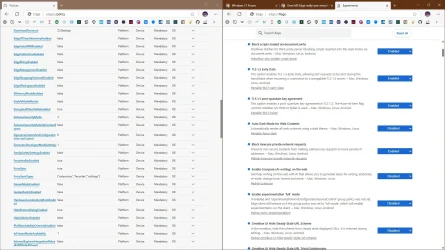
Many settings are device specific. I setup Edge via policies, plus I copy user's folder, it also includes flags.
Code:
%LocalAppData%\Microsoft\Edge

capture_03222025_105828.webp

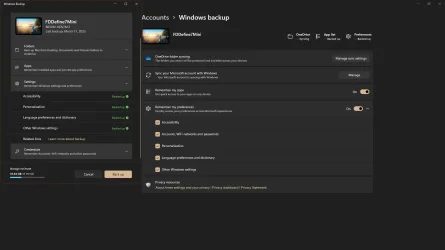
For example this backups virtually nothing, desktop wallpaper and something else? Not even all apps, it is useless.

capture_03222025_105958.webp
 

My Computer My Computer

At a glance

Home26H2CanAMD Ryzen 5 8600G (07/24)2x32GB Kingston FURY DDR5 5600 MHz CL36 @5200...ASROCK Radeon RX 6600 Challenger D 8G @48FPS ...
OS
Home26H2Can
Computer type
PC/Desktop
CPU
AMD Ryzen 5 8600G (07/24)
Motherboard
ASROCK B650M-HDV/M.2 (07/24) BIOS 4.21 AGESA ComboAM5 1.3.0.1 (04/26)
Memory
2x32GB Kingston FURY DDR5 5600 MHz CL36 @5200 CL36 (07/24)
Graphics Card(s)
ASROCK Radeon RX 6600 Challenger D 8G @48FPS (08/24)
Sound Card
Creative Sound BlasterX AE-5 Plus (05/24)
Monitor(s) Displays
24" Philips 24M1N3200ZS/00 (05/24)
Screen Resolution
1920×1080@165Hz via DP1.4
Hard Drives
Kingston KC3000 NVMe 2TB (05/24)
ADATA XPG GAMMIX S11 Pro 512GB (07/19)
PSU
Seasonic Core GM 550 Gold (04/24)
Case
Fractal Design Define 7 Mini with 3x Noctua NF-P14s/12@555rpm (04/24)
Cooling
Noctua NH-U12S with Noctua NF-P12 (04/24)
Keyboard
HP Pavilion Wired Keyboard 300 (07/24) + Rabalux 76017 Parker (01/24)
Mouse
Logitech M330 Silent Plus (01/26)
Internet Speed
500/100 Mbps via RouterOS (05/21) & TCP Optimizer
Browser
Edge, Brave for YouTube, LibreWolf for FB
Antivirus
NextDNS blocking 1/3 Traffic
Other Info
Phone: Motorola Moto G86 (02/26)
Backup: Hasleo Backup Suite (PreOS)
Headphones: Sennheiser RS170 (09/10)
Chair: Huzaro Force 4.4 Grey Mesh (05/24)
Notifier: Xiaomi Mi Band 9 Milanese (10/24)
FlexCore USB-C 3.2 Gen 1 (M) to LAN (F) (08/25)
Hi,

Thanks for you reply.

I forgot to say that I am logged in MS Edge only, not in entire Windows.

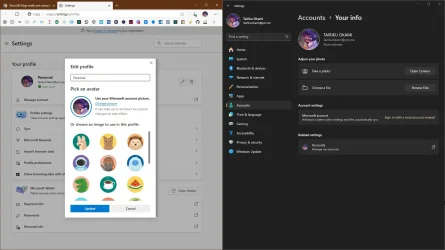
When I go to sync page of the browser you can see that the settings should be synced and they are BUT in my opinion many of them are skipped. As I already mentioned e.g. sidebar (including copilot) or location of my avatar. Even avatar seems to not work correcly, because it dissapears sometimes and it is not synced. IMO Google does it much better.

1742643300324.webp

This may be not a bug, but I think, MS just cannot sync everything for some reason...
 

My Computer My Computer

At a glance

Windows 11i5 12600k32GB DDR4Nvidia RTX 2080s
OS
Windows 11
Computer type
PC/Desktop
CPU
i5 12600k
Motherboard
B660I AORUS PRO DDR4 miniITX
Memory
32GB DDR4
Graphics Card(s)
Nvidia RTX 2080s
Screen Resolution
1920x1080
Even avatar seems to not work correcly, because it dissapears sometimes and it is not synced.
I believe avatar is synced using Windows MSA by default. Edge sort of expects you to use MSA.
 

Attachments

  • capture_03222025_124703.webp
    capture_03222025_124703.webp
    94 KB · Views: 1

My Computer My Computer

At a glance

Home26H2CanAMD Ryzen 5 8600G (07/24)2x32GB Kingston FURY DDR5 5600 MHz CL36 @5200...ASROCK Radeon RX 6600 Challenger D 8G @48FPS ...
OS
Home26H2Can
Computer type
PC/Desktop
CPU
AMD Ryzen 5 8600G (07/24)
Motherboard
ASROCK B650M-HDV/M.2 (07/24) BIOS 4.21 AGESA ComboAM5 1.3.0.1 (04/26)
Memory
2x32GB Kingston FURY DDR5 5600 MHz CL36 @5200 CL36 (07/24)
Graphics Card(s)
ASROCK Radeon RX 6600 Challenger D 8G @48FPS (08/24)
Sound Card
Creative Sound BlasterX AE-5 Plus (05/24)
Monitor(s) Displays
24" Philips 24M1N3200ZS/00 (05/24)
Screen Resolution
1920×1080@165Hz via DP1.4
Hard Drives
Kingston KC3000 NVMe 2TB (05/24)
ADATA XPG GAMMIX S11 Pro 512GB (07/19)
PSU
Seasonic Core GM 550 Gold (04/24)
Case
Fractal Design Define 7 Mini with 3x Noctua NF-P14s/12@555rpm (04/24)
Cooling
Noctua NH-U12S with Noctua NF-P12 (04/24)
Keyboard
HP Pavilion Wired Keyboard 300 (07/24) + Rabalux 76017 Parker (01/24)
Mouse
Logitech M330 Silent Plus (01/26)
Internet Speed
500/100 Mbps via RouterOS (05/21) & TCP Optimizer
Browser
Edge, Brave for YouTube, LibreWolf for FB
Antivirus
NextDNS blocking 1/3 Traffic
Other Info
Phone: Motorola Moto G86 (02/26)
Backup: Hasleo Backup Suite (PreOS)
Headphones: Sennheiser RS170 (09/10)
Chair: Huzaro Force 4.4 Grey Mesh (05/24)
Notifier: Xiaomi Mi Band 9 Milanese (10/24)
FlexCore USB-C 3.2 Gen 1 (M) to LAN (F) (08/25)
Back
Top Bottom