Does Rufus Still Work ?


Ok, going to try again.......currently downloading the W11 ISO file to a flash drive (again).......can someone walk me through using RUFUS to install it on an older laptop please, to by-pass the requirements......in plain and simple terms......TIA.....
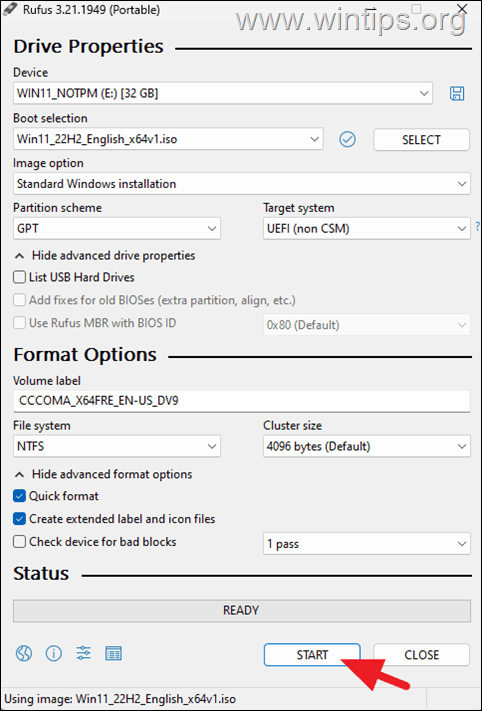
1) download the latest version of rufus from the site (use the 4.7p version (latest) and just execute it.
2) browse to the iso file you've made an image of
3) choose standard windows installation but select the skip secure boot and RAM requirement boxes/
4) if you have an older laptop you need to ensure that the usb format uses fat32 , and not ntfs as some older laptops won't boot ntfs.
5) wait until complete


Now all you have to do is boot the device

Cheers
jimbo
 

My Computer

System One

  • OS
    Windows XP,11 Linux Fedora Rawhide pre-release 45
    Computer type
    PC/Desktop
    CPU
    2 X Intel i7
    Screen Resolution
    4KUHD X 2
Ok thanks.....flash drive is nearly ready........update to follow......
 

My Computer

System One

  • OS
    W 11 Pro Version 25H2
    Manufacturer/Model
    Dell Precision M4800 25H2
Ok, going to try again.......currently downloading the W11 ISO file to a flash drive (again).......can someone walk me through using RUFUS to install it on an older laptop please, to by-pass the requirements......in plain and simple terms......TIA.....
Why are you "downloading" the ISO to a flash drive vs some location on the system drive itself?
 

My Computer

System One

  • OS
    Win 7/10/11
    Computer type
    PC/Desktop
    Other Info
    I'm a computer enthusiast so have quite a few systems that I run. More like an advanced hobby.
1) download the latest version of rufus from the site (use the 4.7p version (latest) and just execute it.

Cheers
jimbo
FYI....4.9/4.9p is the latest.
 

My Computer

System One

  • OS
    Win 7/10/11
    Computer type
    PC/Desktop
    Other Info
    I'm a computer enthusiast so have quite a few systems that I run. More like an advanced hobby.
 

My Computer

System One

  • OS
    WINDOWS 11 WINDOWS 10
    Computer type
    PC/Desktop
    Manufacturer/Model
    HP H8 1360T
    CPU
    Intel(R) Core(TM) i7 -3770K CPU 3.50 GZ 3501 4 CORE
    Motherboard
    PEGATRON 2AD5
    Memory
    32.0 GB (31.9 GB usable)
    Graphics Card(s)
    AMD RADEON TM R5240 INTELL HD GRAPHICS 4600 TIGER 1+1 USB
    Sound Card
    AMD HD . IDT
    Monitor(s) Displays
    AOC WAL MART SPECIAL . HP 2311 IX IPS LED DELL 1708 FP
    Screen Resolution
    1920 X 1080 1600X900 1280X940
    Hard Drives
    1 FAXING S 100 512GB 1 KINGSTON 120 GB SSD 1 X12 SSD 512 GB
    PSU
    300 WATT HP
    Case
    FULL
    Cooling
    ON BOARD FAN
    Keyboard
    LOGITEC K 520 WIRELESS
    Mouse
    LOGITEC M 510 WIRELESS
    Internet Speed
    55 UP 11.2 DOWN
    Browser
    CHROME EDGE
    Antivirus
    WINDOWS SECUIRTY
    Other Info
    NON SUPPORTED HARDWARE FOR WINDOWS 11
Not tried for W11 but Clonezilla was the only thing I could get to work for cloning a linux handheld game emulator sd boot card. Everything else failed to boot.
 

My Computer

System One

  • OS
    11 Pro 25H2
    Computer type
    Laptop
    Manufacturer/Model
    MSI
    CPU
    i7-10750H
    Motherboard
    MSI MS-17F5
    Memory
    16GB Samsung DDR4 3200
    Graphics Card(s)
    Intel + Nvidia RTX3060 Laptop
    Sound Card
    Realtek
    Monitor(s) Displays
    Samsung 24" Curved (HDMI)
    Screen Resolution
    1920x1080
    Hard Drives
    Sabrent Rocket Gen3 1Tb Smasung EVO 870 1TB
    Antivirus
    Bitdefender
Post 25 is jolly informative, thank you......I shall follow it to the letter........update to follow........
 

My Computer

System One

  • OS
    W 11 Pro Version 25H2
    Manufacturer/Model
    Dell Precision M4800 25H2
Mmmhhh......still not working, I can't seem to be able to browse to the ISO file in RUFUS......any suggestions ?.......
 

My Computer

System One

  • OS
    W 11 Pro Version 25H2
    Manufacturer/Model
    Dell Precision M4800 25H2
what are trying to do?
 

My Computer

System One

  • OS
    WINDOWS 11 WINDOWS 10
    Computer type
    PC/Desktop
    Manufacturer/Model
    HP H8 1360T
    CPU
    Intel(R) Core(TM) i7 -3770K CPU 3.50 GZ 3501 4 CORE
    Motherboard
    PEGATRON 2AD5
    Memory
    32.0 GB (31.9 GB usable)
    Graphics Card(s)
    AMD RADEON TM R5240 INTELL HD GRAPHICS 4600 TIGER 1+1 USB
    Sound Card
    AMD HD . IDT
    Monitor(s) Displays
    AOC WAL MART SPECIAL . HP 2311 IX IPS LED DELL 1708 FP
    Screen Resolution
    1920 X 1080 1600X900 1280X940
    Hard Drives
    1 FAXING S 100 512GB 1 KINGSTON 120 GB SSD 1 X12 SSD 512 GB
    PSU
    300 WATT HP
    Case
    FULL
    Cooling
    ON BOARD FAN
    Keyboard
    LOGITEC K 520 WIRELESS
    Mouse
    LOGITEC M 510 WIRELESS
    Internet Speed
    55 UP 11.2 DOWN
    Browser
    CHROME EDGE
    Antivirus
    WINDOWS SECUIRTY
    Other Info
    NON SUPPORTED HARDWARE FOR WINDOWS 11
Trying to install W11 on a W10 laptop, using RUFUS.....it won't recognise the W11 ISO file on the flash drive.....I must be missing something ?
 

My Computer

System One

  • OS
    W 11 Pro Version 25H2
    Manufacturer/Model
    Dell Precision M4800 25H2
did u follow that video i posted ?
 

My Computer

System One

  • OS
    WINDOWS 11 WINDOWS 10
    Computer type
    PC/Desktop
    Manufacturer/Model
    HP H8 1360T
    CPU
    Intel(R) Core(TM) i7 -3770K CPU 3.50 GZ 3501 4 CORE
    Motherboard
    PEGATRON 2AD5
    Memory
    32.0 GB (31.9 GB usable)
    Graphics Card(s)
    AMD RADEON TM R5240 INTELL HD GRAPHICS 4600 TIGER 1+1 USB
    Sound Card
    AMD HD . IDT
    Monitor(s) Displays
    AOC WAL MART SPECIAL . HP 2311 IX IPS LED DELL 1708 FP
    Screen Resolution
    1920 X 1080 1600X900 1280X940
    Hard Drives
    1 FAXING S 100 512GB 1 KINGSTON 120 GB SSD 1 X12 SSD 512 GB
    PSU
    300 WATT HP
    Case
    FULL
    Cooling
    ON BOARD FAN
    Keyboard
    LOGITEC K 520 WIRELESS
    Mouse
    LOGITEC M 510 WIRELESS
    Internet Speed
    55 UP 11.2 DOWN
    Browser
    CHROME EDGE
    Antivirus
    WINDOWS SECUIRTY
    Other Info
    NON SUPPORTED HARDWARE FOR WINDOWS 11
Yes, but RUFUS won't recognise the ISO file.......
 

My Computer

System One

  • OS
    W 11 Pro Version 25H2
    Manufacturer/Model
    Dell Precision M4800 25H2
Trying to install W11 on a W10 laptop, using RUFUS.....it won't recognise the W11 ISO file on the flash drive
Older laptops are generally not UEFI compatible, even if they claim so, have you used MBR or GPT option?

capture_07182025_171437.webp
 

My Computer

System One

  • OS
    Home26H2Can
    Computer type
    PC/Desktop
    CPU
    AMD Ryzen 5 8600G (07/24)
    Motherboard
    ASROCK B650M-HDV/M.2 (07/24) BIOS 4.21 AGESA ComboAM5 1.3.0.1 (04/26)
    Memory
    2x32GB Kingston FURY DDR5 5600 MHz CL36 @5200 CL36 (07/24)
    Graphics Card(s)
    ASROCK Radeon RX 6600 Challenger D 8G @48FPS (08/24)
    Sound Card
    Creative Sound BlasterX AE-5 Plus (05/24)
    Monitor(s) Displays
    24" Philips 24M1N3200ZS/00 (05/24)
    Screen Resolution
    1920×1080@165Hz via DP1.4
    Hard Drives
    Kingston KC3000 NVMe 2TB (05/24)
    ADATA XPG GAMMIX S11 Pro 512GB (07/19)
    PSU
    Seasonic Core GM 550 Gold (04/24)
    Case
    Fractal Design Define 7 Mini with 3x Noctua NF-P14s/12@555rpm (04/24)
    Cooling
    Noctua NH-U12S with Noctua NF-P12 (04/24)
    Keyboard
    HP Pavilion Wired Keyboard 300 (07/24) + Rabalux 76017 Parker (01/24)
    Mouse
    Logitech M330 Silent Plus (01/26)
    Internet Speed
    500/100 Mbps via RouterOS (05/21) & TCP Optimizer
    Browser
    Edge, Brave for YouTube, LibreWolf for FB
    Antivirus
    NextDNS blocking 1/3 Traffic
    Other Info
    Phone: Motorola Moto G86 (02/26)
    Backup: Hasleo Backup Suite (PreOS)
    Headphones: Sennheiser RS170 (09/10)
    Chair: Huzaro Force 4.4 Grey Mesh (05/24)
    Notifier: Xiaomi Mi Band 9 Milanese (10/24)
    FlexCore USB-C 3.2 Gen 1 (M) to LAN (F) (08/25)
Using the MBR option......
 

My Computer

System One

  • OS
    W 11 Pro Version 25H2
    Manufacturer/Model
    Dell Precision M4800 25H2
Do you have the latest BIOS, not sure if it applies to your model, but as for version A21, it should be set to Thorough Mode.
Dell Fast Boot BIOS Feature:
The Dell Windows 8 released BIOS adds a new feature that is called Fast Boot.
When upgrading from a Pre-Windows 8 released BIOS to a Windows 8 released BIOS this feature will be set in Thorough mode.
Setting this feature in minimal causes USB devices/ports to be disabled in the pre-OS environment.
If you are dependent on USB devices in the pre-OS environment this setting should remain in the Thorough mode setting.
 

My Computer

System One

  • OS
    Home26H2Can
    Computer type
    PC/Desktop
    CPU
    AMD Ryzen 5 8600G (07/24)
    Motherboard
    ASROCK B650M-HDV/M.2 (07/24) BIOS 4.21 AGESA ComboAM5 1.3.0.1 (04/26)
    Memory
    2x32GB Kingston FURY DDR5 5600 MHz CL36 @5200 CL36 (07/24)
    Graphics Card(s)
    ASROCK Radeon RX 6600 Challenger D 8G @48FPS (08/24)
    Sound Card
    Creative Sound BlasterX AE-5 Plus (05/24)
    Monitor(s) Displays
    24" Philips 24M1N3200ZS/00 (05/24)
    Screen Resolution
    1920×1080@165Hz via DP1.4
    Hard Drives
    Kingston KC3000 NVMe 2TB (05/24)
    ADATA XPG GAMMIX S11 Pro 512GB (07/19)
    PSU
    Seasonic Core GM 550 Gold (04/24)
    Case
    Fractal Design Define 7 Mini with 3x Noctua NF-P14s/12@555rpm (04/24)
    Cooling
    Noctua NH-U12S with Noctua NF-P12 (04/24)
    Keyboard
    HP Pavilion Wired Keyboard 300 (07/24) + Rabalux 76017 Parker (01/24)
    Mouse
    Logitech M330 Silent Plus (01/26)
    Internet Speed
    500/100 Mbps via RouterOS (05/21) & TCP Optimizer
    Browser
    Edge, Brave for YouTube, LibreWolf for FB
    Antivirus
    NextDNS blocking 1/3 Traffic
    Other Info
    Phone: Motorola Moto G86 (02/26)
    Backup: Hasleo Backup Suite (PreOS)
    Headphones: Sennheiser RS170 (09/10)
    Chair: Huzaro Force 4.4 Grey Mesh (05/24)
    Notifier: Xiaomi Mi Band 9 Milanese (10/24)
    FlexCore USB-C 3.2 Gen 1 (M) to LAN (F) (08/25)

I think you’re complicating things for yourself

RUFUS (rufus-4.9 .exe)

You don’t need to format the USB, RUFUS will do it.

  • Download the latest “ISO”​

    • The latest ISO is available via the Media Creation Tool. (Option One in the tutorial below)
    • At the time of this post, the latest version available from Microsoft is: > Windows 11 Version 24H2 build 26100.4349 ISO
    • After Media Creation Tool as finished downloading Windows 11and when asked, tell Media Creation Tool to create the ISO and not burn to media (USB)


  • Create the install media with Rufus​

    • Download RUFUS
    • #1 Direct RUFUS to your USB
    • #2 Click “Select” and direct RUFUS to the ISO that you downloaded from Microsoft.
    • #3 should sort itself out if the OS drive is partitioned properly. But to be sure, make certain it’s GPT. Your Windows OS really should be partitioned to GPT. Make sure #3 says GPT
    • If you’re running an older system and have no choice but to use MBR (According to your HDD partition structure) then choose MBR at #3 in the image below. Find what partition table is used, in this Tutorial
(Random web images)

IMG_5368.webp


  • When instigating the creation of the media and clicking “Start”, the following options will show. Select your choices.​

    • Select Remove requirement for 4GB+ RAM, Secure Boot and TPM 2.0 (to bypass requirements)
    • With the rest; Deselect/Select whatever you do/don't want (Like the local account options & Bitlocker)

IMG_5358.webp


  • Click OK and the USB install media will be created on the USB​

  • Once Rufus has created the USB installer, you can proceed with the Windows installation.​

 
Last edited:

My Computers

System One System Two

  • OS
    Windows 11 Pro 25H2 Build 26200.8524
    Computer type
    PC/Desktop
    Manufacturer/Model
    Sin-built 2013
    CPU
    Intel(R) Core(TM) i7-4770K CPU @ 3.50GHz
    Motherboard
    ASUS ROG Maximus VI Formula
    Memory
    32.0 GB of I forget and the box is in storage.
    Graphics Card(s)
    Gigabyte nVidia GeForce GTX 1660 Super OC 6GB
    Sound Card
    Onboard thingy
    Monitor(s) Displays
    5 x LG 25MS500-B - 1 x 24MK430H-B - 1 x Wacom Pro 22" Touch Screen Tablet
    Screen Resolution
    All over the place
    Hard Drives
    Too many to list.
    OS on Samsung 1TB 870 QVO SATA
    PSU
    Silverstone 1500
    Case
    NZXT Phantom 820 Full-Tower Case
    Cooling
    Noctua NH-D15 Elite Class Dual Tower CPU Cooler / 6 x EziDIY 120mm / 2 x Corsair 140mm somethings / 1 x 140mm Thermaltake something / 2 x 200mm Corsair.
    Keyboard
    Corsair K95 / Logitech diNovo Edge Wireless
    Mouse
    Logitech: G402 / G502 / Mx Masters / Mx Air Cordless
    Internet Speed
    2000/500Mbps
    Browser
    All sorts
    Antivirus
    Kaspersky Premium
    Other Info
    ㅤㅤㅤㅤㅤㅤㅤㅤㅤㅤㅤㅤㅤㅤㅤㅤㅤㅤㅤㅤㅤㅤㅤㅤㅤㅤㅤㅤㅤㅤㅤㅤㅤㅤㅤㅤㅤㅤㅤㅤ⠀⠀⠀⠀⠀⠀⠀⠀⠀⠀
    TP-Link BE9300 WiFi 7 Bluetooth 5.4 (Archer TBE550E)
    TP-Link TX201 V1 2.5GB Lan

    Grandstream HT812 - VoIP
    ASUS DSL-AX82U - Mesh
    ASUS RT-AC68U - Mesh
    ASUS RT-BE88U Router

    Brother MFC-L2880DW Printer

    I’m on a horse.
  • Operating System
    Windows 11 Pro 25H2 Build 26200.8524
    Computer type
    Laptop
    Manufacturer/Model
    LENOVO Yoga 7 14IRL8 - 7i EVO OLED 14" Touchscreen i5 12 Core 16GB/512GB
    CPU
    Intel Core 12th Gen i5-1240P Processor (1.7 - 4.4GHz)
    Memory
    16GB LPDDR5 RAM
    Graphics card(s)
    Intel Iris Xe Graphics Processor
    Sound Card
    Optimized with Dolby Atmos®
    Screen Resolution
    QHD 2880 x 1800 OLED
    Hard Drives
    M.2 512GB
    Antivirus
    Defender / Malwarebytes
    Other Info
    …still on a horse.
Without internet...........?
 

My Computer

System One

  • OS
    Windows11 Pro 25H2
    Computer type
    PC/Desktop
    Manufacturer/Model
    Asus
    CPU
    i7
    Motherboard
    z97k
    Memory
    32GB
    Graphics Card(s)
    nVidia
    Sound Card
    Realtek
    Hard Drives
    3
    Cooling
    air
    Browser
    Edge
    Antivirus
    ESET
I think you’re complicating things for yourself

RUFUS (rufus-4.9 .exe)

You don’t need to format the USB, RUFUS will do it.

  • Download the latest “ISO”​

    • The latest ISO is available via the Media Creation Tool. (Option One in the tutorial below)
    • At the time of this post, the latest version available from Microsoft is: > Windows 11 Version 24H2 build 26100.4349 ISO
    • After Media Creation Tool as finished downloading Windows 11and when asked, tell Media Creation Tool to create the ISO and not burn to media (USB)


  • Create the install media with Rufus​

    • Download RUFUS
    • #1 Direct RUFUS to your USB
    • #2 Click “Select” and direct RUFUS to the ISO that you downloaded from Microsoft.
    • #3 should sort itself out if the OS drive is partitioned properly. But to be sure, make certain it’s GPT. Your Windows OS really should be partitioned to GPT. Make sure #3 says GPT
(Random web images)

IMG_5368.webp


  • When instigating the creation of the media and clicking “Start”, the following options will show. Select your choices.​

    • Select Remove requirement for 4GB+ RAM, Secure Boot and TPM 2.0 (to bypass requirements)
    • With the rest; Deselect/Select whatever you do/don't want (Like the local account options & Bitlocker)

IMG_5358.webp


  • Click OK and the USB install media will be created on the USB​

  • Once Rufus has created the USB installer, you can proceed with the Windows installation.​

I just tick the first two.
 

My Computers

System One System Two

  • OS
    Windows 11 Home 25H2
    Computer type
    Laptop
    Manufacturer/Model
    HP Pavilion 14-ce3606sa
    CPU
    Core i5-1035G1
    Memory
    32gb
    Hard Drives
    Samsung 870 evo sata ssd
    Cooling
    Could be better
    Internet Speed
    50 mbps Starlink
    Browser
    Firefox
    Other Info
    Originally came installed with a 500gb H10 Optane ssd
  • Operating System
    Windows 11 Home
    Computer type
    Laptop
    Manufacturer/Model
    HP Pavilion ce3606sa
    CPU
    Intel Core i5-1035G1
    Memory
    16gb
    Hard Drives
    Hynix Gold P31 2TB
    Internet Speed
    200mbps Starlink
    Browser
    Firefox
    Antivirus
    Defender

IMO you have not provided enough information about this "older machine". Some Folks jumped the gun and not asked if your cpu handles sse4.2 nor verified your partition table as being GPT or MBR. All this info affects whether or not the usb dire is bootable or even useable.
If your does not handle sse4.2, you can not under any circumstances run Windows 11-24h2 on it. It is not by-passable. You would have to try 23h2

Depending on your disk partitioning, you use the correct Rufus option that is compatible with it..ie GPT or MBR.
currently downloading the W11 ISO file to a flash drive (again)
After several folks advised you, you still downloaded the iso to the flash drive. if you download the official iso from MS, you save it to another location on your computer, not the flash drive.

Here's your step by step to create media. Follow it EXACTLY to comply with your partition table.

I highly advise you to make a full system image before upgrading.


Last edited:

My Computers

System One System Two

  • OS
    Windows 11 Pro 25H2
    Computer type
    PC/Desktop
    Manufacturer/Model
    Dell Optiplex 7080
    CPU
    i9-10900 10 core 20 threads
    Motherboard
    DELL 0J37VM
    Memory
    32 gb
    Graphics Card(s)
    none-Intel UHD Graphics 630
    Sound Card
    Integrated Realtek
    Monitor(s) Displays
    Benq 27
    Screen Resolution
    2560x1440
    Hard Drives
    2x1tb Solidigm m.2 nvme /External drives 512gb Samsung m.2 sata+2tb Kingston m2.nvme
    PSU
    500w
    Case
    MT
    Cooling
    Dell Premium
    Keyboard
    Logitech wired
    Mouse
    Logitech wireless
    Internet Speed
    so slow I'm too embarrassed to tell
    Browser
    #1 Edge #2 Firefox
    Antivirus
    Defender+MWB Premium
  • Operating System
    Windows 11 Pro 24H2 26200.8457
    Computer type
    PC/Desktop
    Manufacturer/Model
    Beelink Mini PC SER5
    CPU
    AMD Ryzen 7 6800U
    Memory
    32 gb
    Graphics card(s)
    integrated
    Sound Card
    integrated
    Monitor(s) Displays
    Benq 27
    Screen Resolution
    2560x1440
    Hard Drives
    1TB Crucial nvme
    Keyboard
    Logitech wired
    Mouse
    Logitech wireless
    Internet Speed
    still too embarrassed to tell
    Browser
    Firefox
    Antivirus
    Defender
    Other Info
    System 3 is non compliant Dell 9020 i7-4770/24gb ram Win11 PRO 26200.8457
Most informative......thank you,
 

My Computer

System One

  • OS
    W 11 Pro Version 25H2
    Manufacturer/Model
    Dell Precision M4800 25H2

Latest Support Threads

Back
Top Bottom