Installation and Upgrade Download Official Windows 11 ISO file from Microsoft

  • Thread starter Thread starter Brink
  • Start date Published: Start date Updated Updated:
  • Featured
  • Tags Tags
    iso

ISO_banner.png

This tutorial will show you how to download an official Windows Server or Windows 11 64-bit or ARM64 ISO file from Microsoft.

Microsoft provides ISO files for Windows Server and Windows 11 to download. You can use these ISO files to clean install or in-place upgrade Windows 11.


The Flight Hub can also help you keep updated on which Windows 11 builds have an ISO available.


Contents

  • Option One: Download Latest Windows 11 64-bit ISO using Media Creation Tool (MCT)
  • Option Two: Download Windows 11 64-bit or ARM64 ISO from Microsoft
  • Option Three: Download Windows 11 Insider 64-bit ISO from Microsoft
  • Option Four: Download Windows Server Insider ISO from Microsoft
  • Option Five: Download Windows 11 64-bit or ARM64 ISO or Windows Server ISO from UUP Dump


See also:


Option One

Download Latest Windows 11 64-bit ISO using Media Creation Tool (MCT)


This will be for a Windows 11 Version 25H2 build 26200.8457 ISO file with install.esd.


1 Click/tap on the Download button below, and click/tap on the Download Now button at Microsoft's site for Create Windows 11 Installation Media. (see screenshot below)


Windows_11_MCT-1.png

2 Save the mediacreationtool.exe file version 10.0.26100.7019 to your desktop, and run it.

Windows_11_MCT-2.webp

3 If prompted by UAC, click/tap on Yes.

4 Click/tap on Accept for the license terms. (see screenshot below)

Windows_11_MCT-3.png

5 Uncheck the Use the recommended options for this PC box. (see screenshot below)

Leaving the Use the recommended options for this PC box checked will have the Media Creation Tool download an ISO that's the same language, edition, and architecture as the current PC.


Windows_11_MCT-4.png

6 Select the Language and Edition you want for the ISO file, and click/tap on Next. (see screenshot below)

The Windows 11 option includes both the Home and Pro editions. The product key you enter during installation (Windows Setup) is what determines which edition gets installed.

Your digital license or product key determines if Home or Pro gets installed during Windows Setup.

If you skip entering a product key during Windows Setup, then you will be prompted to select to install the Home or Pro edition.


Windows_11_MCT_x.png

7 Select (dot) ISO file, and click/tap on Next. (see screenshot below)

Windows_11_MCT-5.png

8 Select where you would like to save the ISO file to, type in a name you want for the ISO file, and click/tap on Save. (see screenshot below)

Windows_11_MCT-6.png

9 The Windows 11 ISO file will now begin to download. (see screenshot below)

Windows_11_MCT-7.png

10 When the download has finished, click/tap on the link where you selected to save the ISO file at to open that location, and click/tap on Finish. (see screenshot below)

Windows_11_MCT-8.png


Option Two

Download Windows 11 64-bit or ARM64 ISO from Microsoft


This will be for a Windows 11 Version 25H2 build 26200.8037 ISO file with install.wim.


1 Click/tap on the Download button below for the 64-bit or ARM64 ISO you want to download.

64-bit ISO

OR​

ARM64 ISO

2 Perform the appropriate action below for 64-bit or ARM64: (see screenshots below)
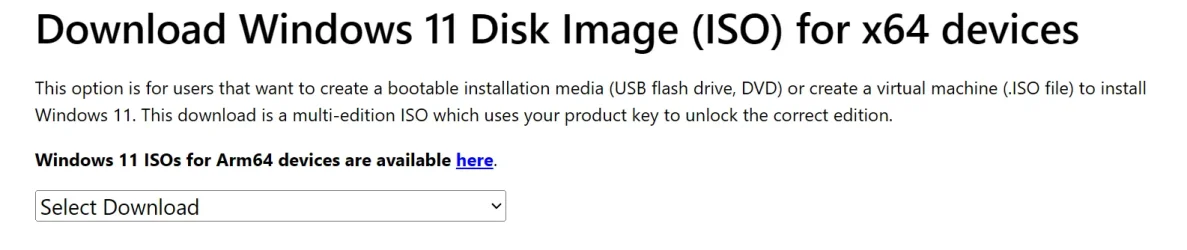
  • Select Windows 11 (multi-edition ISO for x64 devices) in the Download Windows 11 Disk Image (ISO) for x64 devices drop menu, and click/tap on Confirm
  • Select Windows 11 (multi-edition ISO for Arm64) in the drop menu, and click/tap on Download Now.
Download_W11_ISO-1.png
Windows11_ARM_ISO.png

3 Select the language (ex: "English") you want, and click/tap on Confirm. (see screenshot below)

Download_W11_ISO-2.png

4 Click/tap on the 64-bit Download or Download Now (ARM64) button. (see screenshots below)

Download_W11_ISO-3.png
Windows11_ARM_ISO-download_now.png

5 Navigate to and select where (ex: "Desktop") you want to save the ISO file, and click/tap on Save. (see screenshot below)

Download_W11_ISO-4.png


Option Three

Download Windows 11 Insider 64-bit ISO from Microsoft


1 Click/tap on the Download button below to go to the Windows Insider Preview Downloads site by Microsoft below,


2 Scroll down to the Select edtion section, and select the Windows 11 Insider Preview Canary, Dev, Beta, or Release Preview Channel ISO for the build number you want, and click/tap on Confirm. (see screenshots below)

ISO_download.webp
confirm.png

3 Select the language (ex: "English") you want, and click/tap on Confirm. (see screenshot below)

language.png

4 Click/tap on the 64-bit Download button. (see screenshot below)

Download.png

5 Navigate to and select where (ex: "Desktop") you want to save the ISO file, and click/tap on Save. (see screenshot below)

Save.png


Option Four

Download Windows Server Insider ISO from Microsoft


1 Click/tap on the Download button below to go to the Windows Insider Preview Downloads site by Microsoft below,


2 Select the Windows Server VNext Preview ISO for the build number you want, and click/tap on Confirm. (see screenshots below)

W11_Server_Insider-1.webp
W11_Server_Insider-2.png

3 Select the language (ex: "English") you want, and click/tap on Confirm. (see screenshot below)

W11_Server_Insider-3.png

4 Click/tap on the Download Now button. (see screenshot below)

W11_Server_Insider-4.png

5 Navigate to and select where (ex: "Desktop") you want to save the ISO file, and click/tap on Save. (see screenshot below)

W11_Server_Insider-5.png


Option Five

Download Windows 11 64-bit or ARM64 ISO or Windows Server ISO from UUP Dump


You can download an ISO for public and Insider builds using this option.


1 Using the tutorial below, search for and select the Windows version and build ISO you want to download.



That's it,
Shawn Brink


Last edited:
I wrote a script, which determines which ISO version is currently delivered by Media Creation Tool.

Code:
>Current_MCT_Version.bat
Current MCT ISO is build 26200.7623 (January 2026)

It dynamically queries the WU back-end for the latest products.cab, and extracts the build number. You can run the script periodically to confirm if there's a newer version of the ISO available, or if it's the same version as before.
I usually just check this file before I download the whole thing. 😎

1768715220149.webp

1768715357152.webp
 

My Computer

System One

  • OS
    Windows 11 Pro 25H2
    Computer type
    PC/Desktop
    Manufacturer/Model
    Dell XPS 8930
    CPU
    Intel I9-9900K
    Memory
    64GB
    Graphics Card(s)
    NVIDIA RTX 2060
    Sound Card
    NVIDIA High Definition Audio
    Monitor(s) Displays
    4k Samsung
    Screen Resolution
    3840 x 2160
    Hard Drives
    512GB NVMe, ADATA SU 800, 2TB HDD
True. But you have to download & run MCT, before you can inspect the XML file it unpacks.
Your .bat is easier.
Maybe you can make one that checks the multi-edition ISO which is typically a lower version.
Why don't they publish the version directly on that MS web page?

1768716271034.webp
 

Attachments

  • 1768716156297.webp
    1768716156297.webp
    46.1 KB · Views: 19

My Computer

System One

  • OS
    Windows 11 Pro 25H2
    Computer type
    PC/Desktop
    Manufacturer/Model
    Dell XPS 8930
    CPU
    Intel I9-9900K
    Memory
    64GB
    Graphics Card(s)
    NVIDIA RTX 2060
    Sound Card
    NVIDIA High Definition Audio
    Monitor(s) Displays
    4k Samsung
    Screen Resolution
    3840 x 2160
    Hard Drives
    512GB NVMe, ADATA SU 800, 2TB HDD
There are two different strategies in play.

The direct download ISO rarely changes. It's intended for IT pro's, who already know how to properly add updates to a base image. So this one doesn't change as quickly as MCT.

MCT was created for normal users, because it combines the functionality of performing an in-place upgrade and Rufus (making a bootable USB drive). So the MCT gets refreshed a lot more often. And apparently 25H2 gets refreshed a lot more than 24H2 did.

You can tell if MS updated the direct download ISO because the filename gets a v1 or v2 appended to it.
Code:
https://software.download.prss.microsoft.com/dbazure/Win11_25H2_English_x64.iso?.....

Win10_22H2_English_x64v1.iso <- (2nd version)
Win11_English_x64v1.iso <- (2nd version)
Win11_22H2_English_x64v2.iso <- (3rd version)
Win11_23H2_English_x64v2.iso <- (3rd version)
Win11_24H2_English_x64.iso <- never updated
Win11_25H2_English_x64.iso <- never updated (so far)

MS will refresh the download ISO whenever they need to capture some critical changes to the base ISO (usually because some Windows feature is horribly broken, or more likely to bake in a security change). My money is on 25H2 ISO getting a summer update, after all the Secure Boot migrations are mostly done.

The new ISO will finally default to only booting from a CA 2023 UEFI. This solves the problem of the other ISO's can't be booted without modification, and forces users to upgrade to 25H2 or 26H2. Which MS wants you to get off old Windows any way...
 

My Computer

System One

  • OS
    Windows 7
There are two different strategies in play.

The direct download ISO rarely changes. It's intended for IT pro's, who already know how to properly add updates to a base image. So this one doesn't change as quickly as MCT.

MCT was created for normal users, because it combines the functionality of performing an in-place upgrade and Rufus (making a bootable USB drive). So the MCT gets refreshed a lot more often. And apparently 25H2 gets refreshed a lot more than 24H2 did.

You can tell if MS updated the direct download ISO because the filename gets a v1 or v2 appended to it.
Code:
https://software.download.prss.microsoft.com/dbazure/Win11_25H2_English_x64.iso?.....

Win10_22H2_English_x64v1.iso <- (2nd version)
Win11_English_x64v1.iso <- (2nd version)
Win11_22H2_English_x64v2.iso <- (3rd version)
Win11_23H2_English_x64v2.iso <- (3rd version)
Win11_24H2_English_x64.iso <- never updated
Win11_25H2_English_x64.iso <- never updated (so far)

MS will refresh the download ISO whenever they need to capture some critical changes to the base ISO (usually because some Windows feature is horribly broken, or more likely to bake in a security change). My money is on 25H2 ISO getting a summer update, after all the Secure Boot migrations are mostly done.

The new ISO will finally default to only booting from a CA 2023 UEFI. This solves the problem of the other ISO's can't be booted without modification, and forces users to upgrade to 25H2 or 26H2. Which MS wants you to get off old Windows any way...
Users asked several times with FBH reports to add the current version number on the web page, but Microsoft just ignored the suggestions. 🤬🤷‍♂️

The direct multi-edition 25H2 ISO is still 26200.6584, from 9/15/2025. 🤷‍♂️
 
Last edited:

My Computer

System One

  • OS
    Windows 11 Pro 25H2
    Computer type
    PC/Desktop
    Manufacturer/Model
    Dell XPS 8930
    CPU
    Intel I9-9900K
    Memory
    64GB
    Graphics Card(s)
    NVIDIA RTX 2060
    Sound Card
    NVIDIA High Definition Audio
    Monitor(s) Displays
    4k Samsung
    Screen Resolution
    3840 x 2160
    Hard Drives
    512GB NVMe, ADATA SU 800, 2TB HDD
True. But you have to download & run MCT, before you can inspect the XML file it unpacks.

No, you do not. I have a procedure to do this, but not here. I'll find it when back home again and post a reply.
 

My Computers

System One System Two

  • OS
    Win11 Pro 25H2 (RTM+)
    Computer type
    PC/Desktop
    Manufacturer/Model
    Acemagic
    CPU
    Intel i7-14650HX
    Memory
    32 GB
    Graphics Card(s)
    No GPU - Built-in Intel Graphics
    Sound Card
    Integrated
    Monitor(s) Displays
    Varies as machine will often be moved to locations with different monitors
    Screen Resolution
    Varies
    Hard Drives
    1 x 1TB Gen 4 NVMe SSD
    PSU
    120W Power Brick
    Keyboard
    Corsair K70 Max RGB Magnetic Keyboard
    Mouse
    Logitech MX Master 3
    Internet Speed
    1Gb Up / 1 Gb Down
    Browser
    Edge
    Antivirus
    Windows Defender
  • Operating System
    Win11 Pro 25H2 (RTM+)
    Computer type
    Laptop
    Manufacturer/Model
    Lenovo ThinkBook 13x Gen 2
    CPU
    Intel i7-1255U
    Memory
    16 GB
    Graphics card(s)
    Intel Iris Xe Graphics
    Sound Card
    Realtek® ALC3306-CG codec
    Monitor(s) Displays
    13.3-inch IPS Display
    Screen Resolution
    WQXGA (2560 x 1600)
    Hard Drives
    2 TB 4 x 4 NVMe SSD
    PSU
    USB-C / Thunderbolt 4 Power / Charging
    Keyboard
    Backlit, spill resistant keyboard
    Mouse
    Buttonless Glass Precision Touchpad
    Internet Speed
    1Gb Up / 1Gb Down
    Browser
    Edge
    Antivirus
    Windows Defender
    Other Info
    WiFi 6e / Bluetooth 5.1 / Facial Recognition / Fingerprint Sensor / ToF (Time of Flight) Human Presence Sensor
I wrote a script, which determines which ISO version is currently delivered by Media Creation Tool.

Code:
>Current_MCT_Version.bat
Current MCT ISO is build 26200.7623 (January 2026)

It dynamically queries the WU back-end for the latest products.cab, and extracts the build number. You can run the script periodically to confirm if there's a newer version of the ISO available, or if it's the same version as before.
So, we just double click on the .bat file?
 

My Computers

System One System Two

  • OS
    Windows 11 Pro x64 24H2 v26200.5074
    Computer type
    PC/Desktop
    Manufacturer/Model
    Built Myself in 2025
    CPU
    AMD Ryzen 9 3600X 12-Core @ 3.80GHz
    Motherboard
    MSI X570 Gaming Plus
    Memory
    Corsair 32GB DDR4
    Graphics Card(s)
    EVGA GeForce gtx 1660 Super
    Sound Card
    On Board
    Monitor(s) Displays
    2 X AOC 27" , Dell 27"
    Screen Resolution
    1920 X 1080
    Hard Drives
    ~~~~~~~~~~~~~~~~~~~~~~~~~~
    ~ P34A60 512GB NVMe PCIe Gen3x4 M.2
    ~ 6TB Toshiba HDD
    ~ 6TB HDD (Backup)
    ~ SanDisk 250GB SSD
    ~ 2 X 1TB HDD
    ~~~~~~~~~~
    PSU
    eVGA 750w G+
    Case
    GAMDIAS White ATX Mid Tower Gaming Computer PC Case w/Tempered Glass
    Cooling
    AMD Wraith Prism
    Keyboard
    Nulea RT05 Wireless Ergonomic
    Mouse
    Nulea MD280 Wireless Vertical Mouse
    Internet Speed
    761Mbps (Download) / 692Mbps (Upload)
    Browser
    Firefox
    Antivirus
    Malwarebytes
    Other Info
    *This is my Main Computer That I use*
  • Operating System
    Windows 11 Pro x64 24H2 v26100.2894
    Computer type
    PC/Desktop
    CPU
    AMD Ryzen 7 1800X @ 3.60Ghz
    Motherboard
    Asus Crosshair VI Hero
    Memory
    16GB
    Graphics card(s)
    AMD RX580
    Sound Card
    onBoard
    Monitor(s) Displays
    LG 27UK650-W 27", eMachine 22"
    Screen Resolution
    1920 X 1080
    Hard Drives
    250GB SSD
    PSU
    CORSAIR RM850
    Case
    GAMDIAS Black ATX Mid Tower Gaming Computer PC Case w/Tempered Glass
    Cooling
    Liquid
    Keyboard
    Nulea RT05 Wireless Ergonomic
    Mouse
    Nulea MD280 Wireless Vertical Mouse
    Internet Speed
    752Mbps (Download) / 537Mbps (Upload)
    Browser
    Firefox
    Antivirus
    Malwarebytes
    Other Info
    I use this computer for photo/video editing and to track severe weather
You should run it from a PS or CMD shell. Running it from Explorer means the window disappears, right after the script's done.
 

My Computer

System One

  • OS
    Windows 7
So, we just double click on the .bat file?
If you just double-click the .bat you may not see the response because it closes the window.
Here is what I did with command prompt opened as admin.

1768771528248.webp
 

My Computer

System One

  • OS
    Windows 11 Pro 25H2
    Computer type
    PC/Desktop
    Manufacturer/Model
    Dell XPS 8930
    CPU
    Intel I9-9900K
    Memory
    64GB
    Graphics Card(s)
    NVIDIA RTX 2060
    Sound Card
    NVIDIA High Definition Audio
    Monitor(s) Displays
    4k Samsung
    Screen Resolution
    3840 x 2160
    Hard Drives
    512GB NVMe, ADATA SU 800, 2TB HDD
If you just double-click the .bat you may not see the response because it closes the window.
Here is what I did with command prompt opened as admin.

You can also modify the batch file and add a "pause" command as the last line in the file.
 

My Computers

System One System Two

  • OS
    Win11 Pro 25H2 (RTM+)
    Computer type
    PC/Desktop
    Manufacturer/Model
    Acemagic
    CPU
    Intel i7-14650HX
    Memory
    32 GB
    Graphics Card(s)
    No GPU - Built-in Intel Graphics
    Sound Card
    Integrated
    Monitor(s) Displays
    Varies as machine will often be moved to locations with different monitors
    Screen Resolution
    Varies
    Hard Drives
    1 x 1TB Gen 4 NVMe SSD
    PSU
    120W Power Brick
    Keyboard
    Corsair K70 Max RGB Magnetic Keyboard
    Mouse
    Logitech MX Master 3
    Internet Speed
    1Gb Up / 1 Gb Down
    Browser
    Edge
    Antivirus
    Windows Defender
  • Operating System
    Win11 Pro 25H2 (RTM+)
    Computer type
    Laptop
    Manufacturer/Model
    Lenovo ThinkBook 13x Gen 2
    CPU
    Intel i7-1255U
    Memory
    16 GB
    Graphics card(s)
    Intel Iris Xe Graphics
    Sound Card
    Realtek® ALC3306-CG codec
    Monitor(s) Displays
    13.3-inch IPS Display
    Screen Resolution
    WQXGA (2560 x 1600)
    Hard Drives
    2 TB 4 x 4 NVMe SSD
    PSU
    USB-C / Thunderbolt 4 Power / Charging
    Keyboard
    Backlit, spill resistant keyboard
    Mouse
    Buttonless Glass Precision Touchpad
    Internet Speed
    1Gb Up / 1Gb Down
    Browser
    Edge
    Antivirus
    Windows Defender
    Other Info
    WiFi 6e / Bluetooth 5.1 / Facial Recognition / Fingerprint Sensor / ToF (Time of Flight) Human Presence Sensor

My Computer

System One

  • OS
    Windows 11 Pro 25H2
    Computer type
    PC/Desktop
    Manufacturer/Model
    Dell XPS 8930
    CPU
    Intel I9-9900K
    Memory
    64GB
    Graphics Card(s)
    NVIDIA RTX 2060
    Sound Card
    NVIDIA High Definition Audio
    Monitor(s) Displays
    4k Samsung
    Screen Resolution
    3840 x 2160
    Hard Drives
    512GB NVMe, ADATA SU 800, 2TB HDD
You can also modify the batch file and add a "pause" command as the last line in the file.
And if you just add a Read-Host, then the window will not be additionally supplemented with the message - Press Enter to continue...
 

My Computer

System One

  • OS
    Windows 11 Stable, Beta, Dev, Canary
    Computer type
    PC/Desktop
    Manufacturer/Model
    Micro-Star International Co., Ltd. MS-7D54
    CPU
    AMD Ryzen 9 PRO 5950X
    Motherboard
    MSI MAG X570S Tomahawk Max WiFi (MS-7D54) (2 PCI-E x1, 2 PCI-E x16, 2 M.2, 4 DDR4 DIMM, Audio, Video, 2.5GbE LAN, WiFi)
    Memory
    128 Gb
    Graphics Card(s)
    Intel(R) Arc(TM) A380 Graphics (2 ГБ)
    Sound Card
    Устройство с поддержкой High Definition Audio
    Monitor(s) Displays
    HP X34 [34" LCD] (6CM1300J5J) {2021}
    Screen Resolution
    3440x1440
    Hard Drives
    KINGSTON SFYRD2000G (2000 ГБ, PCI-E 4.0 x4)
    PSU
    Be Quiet! Dark Rock Pro 4
    Case
    Cooler Master HAF XB EVO
    Internet Speed
    1000 Mb/s
    Browser
    Chrome
    Antivirus
    Windows Defender
And if you just add a Read-Host, then the window will not be additionally supplemented with the message - Press Enter to continue...

Like this. 😂

1768806531665.webp
 

My Computer

System One

  • OS
    Windows 11 Pro 25H2
    Computer type
    PC/Desktop
    Manufacturer/Model
    Dell XPS 8930
    CPU
    Intel I9-9900K
    Memory
    64GB
    Graphics Card(s)
    NVIDIA RTX 2060
    Sound Card
    NVIDIA High Definition Audio
    Monitor(s) Displays
    4k Samsung
    Screen Resolution
    3840 x 2160
    Hard Drives
    512GB NVMe, ADATA SU 800, 2TB HDD

My Computer

System One

  • OS
    Windows 11 Stable, Beta, Dev, Canary
    Computer type
    PC/Desktop
    Manufacturer/Model
    Micro-Star International Co., Ltd. MS-7D54
    CPU
    AMD Ryzen 9 PRO 5950X
    Motherboard
    MSI MAG X570S Tomahawk Max WiFi (MS-7D54) (2 PCI-E x1, 2 PCI-E x16, 2 M.2, 4 DDR4 DIMM, Audio, Video, 2.5GbE LAN, WiFi)
    Memory
    128 Gb
    Graphics Card(s)
    Intel(R) Arc(TM) A380 Graphics (2 ГБ)
    Sound Card
    Устройство с поддержкой High Definition Audio
    Monitor(s) Displays
    HP X34 [34" LCD] (6CM1300J5J) {2021}
    Screen Resolution
    3440x1440
    Hard Drives
    KINGSTON SFYRD2000G (2000 ГБ, PCI-E 4.0 x4)
    PSU
    Be Quiet! Dark Rock Pro 4
    Case
    Cooler Master HAF XB EVO
    Internet Speed
    1000 Mb/s
    Browser
    Chrome
    Antivirus
    Windows Defender
Now that's a very useful bat file. Thanks Garlin, for that file, and all the work you do on this forum!

peace
wanna
 

My Computers

System One System Two

  • OS
    Windows 11 Pro 64 bit
    Computer type
    PC/Desktop
    Manufacturer/Model
    Acme Mail Order (meep meep)
    CPU
    Intel® Core™ i5-14600K
    Motherboard
    MSI PRO Z790-A MAX WiFi bios 7E07vMA
    Memory
    G.SKILL Ripjaws S5 Series DDR5 (2x16GB) 6400MT/s CL32
    Graphics Card(s)
    PNY RTX 5060 Ti OC 16GB
    Sound Card
    Onboard Realtek® ALC4080 Codec
    Monitor(s) Displays
    2 x Dell - S3222DGM 32" LED Curved QHD FreeSync Gaming Monitor
    Screen Resolution
    2560x1440
    Hard Drives
    990 PRO PCIe 4.0 NVMe®1TB OS
    970 EVO PCIe 3.0 NVMe® SSD 500GB Games
    860 EVO SATA 2.5" SSD 1TB Storage
    PSU
    RMx Series™ RM850x — 80 PLUS® Gold
    Case
    LIAN LI PC-G70B Black Aluminum Full Tower
    Cooling
    Custom loop Optimus Foundation Block, MCP655-PWM D5 pump, MCR320 QP rad
    Keyboard
    Razer Black Widow Ultimate
    Mouse
    Razer Death Adder Elite
    Internet Speed
    500 down 20 up
    Browser
    Edge / Chrome
    Antivirus
    Microsoft Defender
    Other Info
    Always switching installs testing out the latest and greatest.
  • Operating System
    Windows 11 Pro 64 bit latest public release
    Computer type
    PC/Desktop
    Manufacturer/Model
    Acme Mail Order (meep meep) Wife's PC Edition
    CPU
    Intel® Core™ i5-11600K
    Motherboard
    MSI - Z590 A Pro - bios 7D09v1A
    Memory
    G.SKILL Ripjaws V Series 16GB DDR4 3600 (16-16-16-36)
    Graphics card(s)
    EVGA GeForce RTX 3060 XC GAMING 12GB
    Sound Card
    Onboard Realtek® ALC897 Codec
    Monitor(s) Displays
    2 x 27'' ACER S271HL
    Screen Resolution
    1920x1080
    Hard Drives
    980 PRO PCIe 4.0 NVMe® SSD 250GB OS
    Samsung 128GB 850 PRO SATA III for Storage
    PSU
    CORSAIR - CX-M Series 650W
    Case
    LIAN LI PC-A16B Black Aluminum ATX Mid Tower
    Cooling
    Thermalright Phantom Spirit 120SE Air Cooler
    Keyboard
    Logitech - K740 Illuminated
    Mouse
    Razer Death Adder Elite
    Internet Speed
    500 down 20 up
    Browser
    Chrome
    Antivirus
    Windows Defender
    Other Info
    Stock clocked, over cooled, and unmolested for a rock solid, whisper quiet, Wifey approved user experience.
Here's an improved version of the batch file, which pauses if you're running it from the File Explorer. If you're running the script from CMD or PowerShell, it ends without closing any windows.

Everyone should be happy now.
Thanks.
1768893180851.webp
 

My Computer

System One

  • OS
    Windows 11 Pro 25H2
    Computer type
    PC/Desktop
    Manufacturer/Model
    Dell XPS 8930
    CPU
    Intel I9-9900K
    Memory
    64GB
    Graphics Card(s)
    NVIDIA RTX 2060
    Sound Card
    NVIDIA High Definition Audio
    Monitor(s) Displays
    4k Samsung
    Screen Resolution
    3840 x 2160
    Hard Drives
    512GB NVMe, ADATA SU 800, 2TB HDD
Hello all:

Can anyone please share what is the quickest/most efficient way to get the latest products CAB/XML? I found the one used by the MCT using Fiddler, but that is definitely out of date and it's not clear where the ones found in C:\$Windows.~WS\Sources when the MCT is running are coming from. I have a script that does in-place upgrades (inspired by OSDCloud functionality) and it would be great if I could get the latest ESD dynamically.

That's a killer batch file provided by garlin last week and I could probably leverage that, just wondering if that CAB file is "easily" accessible online.

Thanks!
 

My Computer

System One

  • OS
    Win11 25H2
    Computer type
    PC/Desktop
    Manufacturer/Model
    MS Surface Laptop 7
MS significantly changed the way products.cab is delivered.

Prior to 25H2, it was a fixed URL which you could visit.

Opening the W11 URL gets you an outdated products.cab from 2024. The CAB's are still valuable if you wanted to download a legacy version of an ISO using MCT's selfhost option to use a private CAB file.

Now you need a back-end API call to find the download file (which is dynamically created as an expiring URL link).

Since the script has to download the products.cab to extract the XML file, you can change the Remove-Item to a Move-Item command.
Code:
<# : batch script
@echo off
powershell -nop Invoke-Expression ([System.IO.File]::ReadAllText('%~f0'))
goto :eof
#>

[Net.ServicePointManager]::SecurityProtocol = [Net.SecurityProtocolType]::Tls12
$ProgressPreference = 'SilentlyContinue'

$Header = [ordered]@{'Accept' = "application/json"; 'Content-Type' = "application/json"}
$Body = @'
{"Products":"PN=Windows.Products.Cab.amd64&V=0.0.0.0","DeviceAttributes":"DUScan=1;OSVersion=10.0.26100.1"}
'@

$Response = Invoke-RestMethod -UseBasicParsing -Method POST -Uri 'https://fe3.delivery.mp.microsoft.com/UpdateMetadataService/updates/search/v1/bydeviceinfo/' -Headers $Header -Body '{"Products":"PN=Windows.Products.Cab.amd64&V=0.0.0.0","DeviceAttributes":"DUScan=1;OSVersion=10.0.26100.1"}'
Invoke-WebRequest -Uri $Response.FileLocations.Url -UseBasicParsing -OutFile "$env:TEMP\products.cab"

$null = New-Item -Path "$env:TEMP\MCT" -ItemType Directory -Force
& expand "$env:TEMP\products.cab" -F:* "$env:TEMP\MCT" | Out-Null

$XML = [xml]([System.IO.File]::ReadAllText((Get-Item "$env:TEMP\MCT\products.cab")))

$elem = ($XML.MCT.Catalogs.Catalog.PublishedMedia.Files.File.FileName | select -First 1) -split '\.'
$Version = $elem[0..2] -join '.'

Move-Item "$env:TEMP\products.cab" "${Version}.products.cab"

File saved in current folder as:
Code:
26200.7623.260109-1650.products.cab
 

My Computer

System One

  • OS
    Windows 7
Thanks! I'm more surprised they made it so easy to find the Enterprise ESD than that they changed the process to this extent. And I'm always surprised (and grateful) how the community is able to crack whatever comes up so we can develop even better solutions!

BTW - minor change
$XML = [xml]([System.IO.File]::ReadAllText((Get-Item "$env:TEMP\MCT\products.cab")))

should be
$XML = [xml]([System.IO.File]::ReadAllText((Get-Item "$env:TEMP\MCT\products.xml")))
 

My Computer

System One

  • OS
    Win11 25H2
    Computer type
    PC/Desktop
    Manufacturer/Model
    MS Surface Laptop 7
Back
Top Bottom