Installation and Upgrade Download Official Windows 11 ISO file from Microsoft

  • Thread starter Thread starter Brink
  • Start date Published: Start date Updated Updated:
  • Featured
  • Tags Tags
    iso

ISO_banner.png

This tutorial will show you how to download an official Windows Server or Windows 11 64-bit or ARM64 ISO file from Microsoft.

Microsoft provides ISO files for Windows Server and Windows 11 to download. You can use these ISO files to clean install or in-place upgrade Windows 11.


The Flight Hub can also help you keep updated on which Windows 11 builds have an ISO available.


Contents

  • Option One: Download Latest Windows 11 64-bit ISO using Media Creation Tool (MCT)
  • Option Two: Download Windows 11 64-bit or ARM64 ISO from Microsoft
  • Option Three: Download Windows 11 Insider 64-bit ISO from Microsoft
  • Option Four: Download Windows Server Insider ISO from Microsoft
  • Option Five: Download Windows 11 64-bit or ARM64 ISO or Windows Server ISO from UUP Dump


See also:


Option One

Download Latest Windows 11 64-bit ISO using Media Creation Tool (MCT)


This will be for a Windows 11 Version 25H2 build 26200.8653 ISO file with install.esd.


1 Click/tap on the Download button below, and click/tap on the Download Now button at Microsoft's site for Create Windows 11 Installation Media. (see screenshot below)


Windows_11_MCT-1.png

2 Save the mediacreationtool.exe file version 10.0.26100.7019 to your desktop, and run it.

Windows_11_MCT-2.webp

3 If prompted by UAC, click/tap on Yes.

4 Click/tap on Accept for the license terms. (see screenshot below)

Windows_11_MCT-3.png

5 Uncheck the Use the recommended options for this PC box. (see screenshot below)

Leaving the Use the recommended options for this PC box checked will have the Media Creation Tool download an ISO that's the same language, edition, and architecture as the current PC.


Windows_11_MCT-4.png

6 Select the Language and Edition you want for the ISO file, and click/tap on Next. (see screenshot below)

The Windows 11 option includes both the Home and Pro editions. The product key you enter during installation (Windows Setup) is what determines which edition gets installed.

Your digital license or product key determines if Home or Pro gets installed during Windows Setup.

If you skip entering a product key during Windows Setup, then you will be prompted to select to install the Home or Pro edition.


Windows_11_MCT_x.png

7 Select (dot) ISO file, and click/tap on Next. (see screenshot below)

Windows_11_MCT-5.png

8 Select where you would like to save the ISO file to, type in a name you want for the ISO file, and click/tap on Save. (see screenshot below)

Windows_11_MCT-6.png

9 The Windows 11 ISO file will now begin to download. (see screenshot below)

Windows_11_MCT-7.png

10 When the download has finished, click/tap on the link where you selected to save the ISO file at to open that location, and click/tap on Finish. (see screenshot below)

Windows_11_MCT-8.png


Option Two

Download Windows 11 64-bit or ARM64 ISO from Microsoft


This will be for a Windows 11 Version 25H2 build 26200.8037 ISO file with install.wim.


1 Click/tap on the Download button below for the 64-bit or ARM64 ISO you want to download.

64-bit ISO

OR​

ARM64 ISO

2 Perform the appropriate action below for 64-bit or ARM64: (see screenshots below)
  • Select Windows 11 (multi-edition ISO for x64 devices) in the Download Windows 11 Disk Image (ISO) for x64 devices drop menu, and click/tap on Confirm
  • Select Windows 11 (multi-edition ISO for Arm64) in the drop menu, and click/tap on Download Now.
Download_W11_ISO-1.png
Windows11_ARM_ISO.png

3 Select the language (ex: "English") you want, and click/tap on Confirm. (see screenshot below)

Download_W11_ISO-2.png

4 Click/tap on the 64-bit Download or Download Now (ARM64) button. (see screenshots below)

Download_W11_ISO-3.png
Windows11_ARM_ISO-download_now.png

5 Navigate to and select where (ex: "Desktop") you want to save the ISO file, and click/tap on Save. (see screenshot below)

Download_W11_ISO-4.png


Option Three

Download Windows 11 Insider 64-bit ISO from Microsoft


1 Click/tap on the Download button below to go to the Windows Insider Preview Downloads site by Microsoft below,


2 Scroll down to the Select edtion section, and select the Windows 11 Insider Preview Canary, Dev, Beta, or Release Preview Channel ISO for the build number you want, and click/tap on Confirm. (see screenshots below)

ISO_download.webp
confirm.png

3 Select the language (ex: "English") you want, and click/tap on Confirm. (see screenshot below)

language.png

4 Click/tap on the 64-bit Download button. (see screenshot below)

Download.png

5 Navigate to and select where (ex: "Desktop") you want to save the ISO file, and click/tap on Save. (see screenshot below)

Save.png


Option Four

Download Windows Server Insider ISO from Microsoft


1 Click/tap on the Download button below to go to the Windows Insider Preview Downloads site by Microsoft below,


2 Select the Windows Server VNext Preview ISO for the build number you want, and click/tap on Confirm. (see screenshots below)

W11_Server_Insider-1.webp
W11_Server_Insider-2.png

3 Select the language (ex: "English") you want, and click/tap on Confirm. (see screenshot below)

W11_Server_Insider-3.png

4 Click/tap on the Download Now button. (see screenshot below)

W11_Server_Insider-4.png

5 Navigate to and select where (ex: "Desktop") you want to save the ISO file, and click/tap on Save. (see screenshot below)

W11_Server_Insider-5.png


Option Five

Download Windows 11 64-bit or ARM64 ISO or Windows Server ISO from UUP Dump


You can download an ISO for public and Insider builds using this option.


1 Using the tutorial below, search for and select the Windows version and build ISO you want to download.



That's it,
Shawn Brink


Last edited:
Yes Ashley I hope they do lower the compatibility of the CPU's as the Ivy Bridge is a blinder when I crank it up to 4.1GHz. I can understand some of the really older Pentiums could not handle 11 but I think that anything after the Sandy Bridge should handle the requirements of the system as I do have another build of mine that is Sandy Bridge based and another laptop with a Haswell CPU - an Asus ROG machine that is super quick.
As for the TPM well I am in no rush and the covid situation is pretty bad eh?
 

My Computers My Computers

  • At a glance

    Windows 11 Pro 23H2 (OS Build 22631.4169) Des...i7 -10510U / Intel i5 3750KSamsung 16GB DDR4 2666 MHz & G-Skill 16GB DDR...On board Intel CPU graphics & Nvidia GeForce ...
    OS
    Windows 11 Pro 23H2 (OS Build 22631.4169) Desktop (OS Build 22621.4317)
    Computer type
    Laptop
    Manufacturer/Model
    Asus Vivo notebook X712FA or Desktop Ivy Bridge build
    CPU
    i7 -10510U / Intel i5 3750K
    Motherboard
    Asus generic & Asus P8Z77-V
    Memory
    Samsung 16GB DDR4 2666 MHz & G-Skill 16GB DDR3 2134MHz
    Graphics Card(s)
    On board Intel CPU graphics & Nvidia GeForce GTX 1050Ti
    Sound Card
    Laptop onboard & Xonar DSX Card
    Monitor(s) Displays
    Generic & Samsung 27" SAM0C4C
    Hard Drives
    Samsung 970 Pro NMe & Samsung 870 EVO 500GB
    PSU
    N/A
    Case
    N/A
    Cooling
    Asus in built
    Keyboard
    Generic
    Mouse
    Logitec Wireless
    Internet Speed
    50Mbs max allowance - occasionally up to 75Mbs
    Browser
    Brave
    Antivirus
    ESET Ultimate Security on both
    Other Info
    Desktop running Windows11 Pro with unsupported hardware fix
  • At a glance

    Windows 11 Pro OS build 22000.376i53750K16GB DDR3 @ 2133MHzAsus GTX 650TI
    Operating System
    Windows 11 Pro OS build 22000.376
    Computer type
    PC/Desktop
    Manufacturer/Model
    Home build
    CPU
    i53750K
    Motherboard
    Asus P8Z77-V
    Memory
    16GB DDR3 @ 2133MHz
    Graphics card(s)
    Asus GTX 650TI
    Sound Card
    Asus Xonar DSX
    Monitor(s) Displays
    Samsung 4K
    Screen Resolution
    3840x2160
    Hard Drives
    Samsung EVO 970
    PSU
    Corsair HX1100
    Case
    Coolermaster HAF -M
    Cooling
    Liquid
    Keyboard
    Microsoft Sidewinder 6
    Mouse
    Logitec
    Internet Speed
    50Mbs
    Browser
    Edge
    Antivirus
    Only Windows at the moment
Went on to the Insider site today and downloaded the Windows 11 Insider Dev Build 22000.132 and am installing it on one of my Intel Nuc's. The installer looks pretty nice. It did the install and is now running the updates part of the install.

And it's activated with a Digital License, for Windows 11 Pro...so that is great.
 

My Computers My Computers

  • At a glance

    Windows 11 ProIntel Core i5-8279u32GB DDR4 2666MhzIntel Iris Plus 655
    OS
    Windows 11 Pro
    Computer type
    PC/Desktop
    Manufacturer/Model
    Beelink SEI8
    CPU
    Intel Core i5-8279u
    Motherboard
    AZW SEI
    Memory
    32GB DDR4 2666Mhz
    Graphics Card(s)
    Intel Iris Plus 655
    Sound Card
    Intel SST
    Monitor(s) Displays
    Asus ProArt PA278QV
    Screen Resolution
    2560x1440
    Hard Drives
    512GB NVMe
    PSU
    NA
    Case
    NA
    Cooling
    NA
    Keyboard
    NA
    Mouse
    NA
    Internet Speed
    500/50
    Browser
    Edge
    Antivirus
    Defender
    Other Info
    Mini PC used for testing Windows 11.
  • At a glance

    Windows 10 ProRyzen 9 5900x64GB DDR4-3600EVGA GeForce 3080 FT3 Ultra
    Operating System
    Windows 10 Pro
    Computer type
    PC/Desktop
    Manufacturer/Model
    Custom
    CPU
    Ryzen 9 5900x
    Motherboard
    Asus Rog Strix X570-E Gaming
    Memory
    64GB DDR4-3600
    Graphics card(s)
    EVGA GeForce 3080 FT3 Ultra
    Sound Card
    Onboard
    Monitor(s) Displays
    ASUS TUF Gaming VG27AQ. ASUS ProArt Display PA278QV 27” WQHD
    Screen Resolution
    2560x1440
    Hard Drives
    2TB WD SN850 PCI-E Gen 4 NVMe
    2TB Sandisk Ultra 2.5" SATA SSD
    PSU
    Seasonic Focus 850
    Case
    Fractal Meshify S2 in White
    Cooling
    Dark Rock Pro CPU cooler, 3 x 140mm case fans
    Keyboard
    Corsiar K65 RGB Lux
    Mouse
    Logitech G9 Laser Mouse
    Internet Speed
    500/50
    Browser
    Chrome
    Antivirus
    Defender.
@pparks1

Prompted me to check mine - all good!

1630024741659.png
 

My Computers My Computers

  • At a glance

    Windows 10 Pro 22H2Intel Core i7-8565U16GBIntegrated
    OS
    Windows 10 Pro 22H2
    Computer type
    Laptop
    Manufacturer/Model
    HP EliteBook 840 G6
    CPU
    Intel Core i7-8565U
    Memory
    16GB
    Graphics Card(s)
    Integrated
    Sound Card
    Integrated
    Screen Resolution
    1920 x 1080
    Hard Drives
    SSD NVMe
    Other Info
    Win 11 Upgrade compatible.
  • At a glance

    Win 11 Pro 25H2Intel Core i7-7600U8GBIntegrated
    Operating System
    Win 11 Pro 25H2
    Computer type
    Laptop
    Manufacturer/Model
    HP eliteBook 840 G4
    CPU
    Intel Core i7-7600U
    Memory
    8GB
    Graphics card(s)
    Integrated
    Sound Card
    Integrated
    Screen Resolution
    1920 x 1080
    Hard Drives
    SSD
    Other Info
    My Crash&Burn system.
    Initially clean installed to Win 11 for testing of the new OS.
    TPM 2.0 Installed.
    CPU does not pass the MS Health Check.
Yes Ashley I hope they do lower the compatibility of the CPU's as the Ivy Bridge is a blinder when I crank it up to 4.1GHz. I can understand some of the really older Pentiums could not handle 11 but I think that anything after the Sandy Bridge should handle the requirements of the system as I do have another build of mine that is Sandy Bridge based and another laptop with a Haswell CPU - an Asus ROG machine that is super quick.
As for the TPM well I am in no rush and the covid situation is pretty bad eh?
My old i5-3550 lasted me till around 2 years ago, was a great chip for me, bought it in 2012 sold it (with board/ram) in 2018(19)?
 

My Computers My Computers

  • At a glance

    Win 11 Pro 25H2 26200.8737Intel i5-12400F2 x16gb DDR4 Patriot Viper Elite II 4000MHzASUS GeForce RTX 3060 Dual OC 12GB
    OS
    Win 11 Pro 25H2 26200.8737
    Computer type
    PC/Desktop
    Manufacturer/Model
    Custom
    CPU
    Intel i5-12400F
    Motherboard
    MSI PRO B760M P
    Memory
    2 x16gb DDR4 Patriot Viper Elite II 4000MHz
    Graphics Card(s)
    ASUS GeForce RTX 3060 Dual OC 12GB
    Sound Card
    onboard Realtek
    Monitor(s) Displays
    KTC 32 inch 180Hz Curved Gaming Monitor
    Screen Resolution
    2560x1440
    Hard Drives
    1x SP 512GB NVME (Windows)
    1x 2TB SSD (Downloads)
    1x 2TB BX500 (Games)
    1x 2TB NVME (Steam)
    1x 1TB NVME (Macrium, Stuff)
    PSU
    CORSAIR RM750e (2025) Platinum Fully Modular
    Case
    CORSAIR Frame 4000D RS White
    Cooling
    Thermalright Assassin X120 SE ARGB White
    Keyboard
    Z-88 RGB Mechanical White
    Mouse
    Red Dragon 612 Predator RGB
    Internet Speed
    750/50
    Browser
    Chrome
    Antivirus
    Windows
  • At a glance

    Windows XPAthlon 64 Socket 7542x 1GB (PC3200)Onboard
    Operating System
    Windows XP
    Computer type
    PC/Desktop
    Manufacturer/Model
    HP Pavilion (modded)
    CPU
    Athlon 64 Socket 754
    Motherboard
    ASUS K8S-LA
    Memory
    2x 1GB (PC3200)
    Graphics card(s)
    Onboard
    Sound Card
    Onboard
    Monitor(s) Displays
    Whatever is available
    Screen Resolution
    800x600
    Hard Drives
    120gb Samsung SSD
My old i5-3550 lasted me till around 2 years ago, was a great chip for me, bought it in 2012 sold it (with board/ram) in 2018(19)?
Yes well I reckon if I knew back then that Windows would turn out this way I would've made contingency plans to upgrade my build but I am too disinterested now to do that and bedsides components now are so ridiculously expensive I cannot afford to do it.
It's a shame that Microsoft has gone down this path after the 7 to 10 debacle which I resisted for some time and now being happy with 10 - this has to happen. I also guess I expect in a few years time there will be Windows 12, 13, 14 ad infinitum.
Well, what I am going to do when I can afford it and they are available is wait for a new desktop with 11 pre-installed on it - though it will mean that I shall be forced to use a machine that is nowhere near the Ivy Bridge build I did..
 

My Computers My Computers

  • At a glance

    Windows 11 Pro 23H2 (OS Build 22631.4169) Des...i7 -10510U / Intel i5 3750KSamsung 16GB DDR4 2666 MHz & G-Skill 16GB DDR...On board Intel CPU graphics & Nvidia GeForce ...
    OS
    Windows 11 Pro 23H2 (OS Build 22631.4169) Desktop (OS Build 22621.4317)
    Computer type
    Laptop
    Manufacturer/Model
    Asus Vivo notebook X712FA or Desktop Ivy Bridge build
    CPU
    i7 -10510U / Intel i5 3750K
    Motherboard
    Asus generic & Asus P8Z77-V
    Memory
    Samsung 16GB DDR4 2666 MHz & G-Skill 16GB DDR3 2134MHz
    Graphics Card(s)
    On board Intel CPU graphics & Nvidia GeForce GTX 1050Ti
    Sound Card
    Laptop onboard & Xonar DSX Card
    Monitor(s) Displays
    Generic & Samsung 27" SAM0C4C
    Hard Drives
    Samsung 970 Pro NMe & Samsung 870 EVO 500GB
    PSU
    N/A
    Case
    N/A
    Cooling
    Asus in built
    Keyboard
    Generic
    Mouse
    Logitec Wireless
    Internet Speed
    50Mbs max allowance - occasionally up to 75Mbs
    Browser
    Brave
    Antivirus
    ESET Ultimate Security on both
    Other Info
    Desktop running Windows11 Pro with unsupported hardware fix
  • At a glance

    Windows 11 Pro OS build 22000.376i53750K16GB DDR3 @ 2133MHzAsus GTX 650TI
    Operating System
    Windows 11 Pro OS build 22000.376
    Computer type
    PC/Desktop
    Manufacturer/Model
    Home build
    CPU
    i53750K
    Motherboard
    Asus P8Z77-V
    Memory
    16GB DDR3 @ 2133MHz
    Graphics card(s)
    Asus GTX 650TI
    Sound Card
    Asus Xonar DSX
    Monitor(s) Displays
    Samsung 4K
    Screen Resolution
    3840x2160
    Hard Drives
    Samsung EVO 970
    PSU
    Corsair HX1100
    Case
    Coolermaster HAF -M
    Cooling
    Liquid
    Keyboard
    Microsoft Sidewinder 6
    Mouse
    Logitec
    Internet Speed
    50Mbs
    Browser
    Edge
    Antivirus
    Only Windows at the moment
Thanks.
 

My Computer My Computer

At a glance

Windows 11Intel16GBUMA
OS
Windows 11
Computer type
Laptop
Manufacturer/Model
Lenovo
CPU
Intel
Motherboard
Compal
Memory
16GB
Graphics Card(s)
UMA
Sound Card
Integrated
Monitor(s) Displays
LED
Well I see that the Windows 11 OS is set for official release on the 5th October 2021

So at least that means that those of us who have 10 and supported machines might have to keep an eye out for it just in case it comes as a free upgrade.
As for my Ivy Bridge I shall keep 10 until I can afford a new desktop that comes with 11 preinstalled.
 
Last edited by a moderator:

My Computers My Computers

  • At a glance

    Windows 11 Pro 23H2 (OS Build 22631.4169) Des...i7 -10510U / Intel i5 3750KSamsung 16GB DDR4 2666 MHz & G-Skill 16GB DDR...On board Intel CPU graphics & Nvidia GeForce ...
    OS
    Windows 11 Pro 23H2 (OS Build 22631.4169) Desktop (OS Build 22621.4317)
    Computer type
    Laptop
    Manufacturer/Model
    Asus Vivo notebook X712FA or Desktop Ivy Bridge build
    CPU
    i7 -10510U / Intel i5 3750K
    Motherboard
    Asus generic & Asus P8Z77-V
    Memory
    Samsung 16GB DDR4 2666 MHz & G-Skill 16GB DDR3 2134MHz
    Graphics Card(s)
    On board Intel CPU graphics & Nvidia GeForce GTX 1050Ti
    Sound Card
    Laptop onboard & Xonar DSX Card
    Monitor(s) Displays
    Generic & Samsung 27" SAM0C4C
    Hard Drives
    Samsung 970 Pro NMe & Samsung 870 EVO 500GB
    PSU
    N/A
    Case
    N/A
    Cooling
    Asus in built
    Keyboard
    Generic
    Mouse
    Logitec Wireless
    Internet Speed
    50Mbs max allowance - occasionally up to 75Mbs
    Browser
    Brave
    Antivirus
    ESET Ultimate Security on both
    Other Info
    Desktop running Windows11 Pro with unsupported hardware fix
  • At a glance

    Windows 11 Pro OS build 22000.376i53750K16GB DDR3 @ 2133MHzAsus GTX 650TI
    Operating System
    Windows 11 Pro OS build 22000.376
    Computer type
    PC/Desktop
    Manufacturer/Model
    Home build
    CPU
    i53750K
    Motherboard
    Asus P8Z77-V
    Memory
    16GB DDR3 @ 2133MHz
    Graphics card(s)
    Asus GTX 650TI
    Sound Card
    Asus Xonar DSX
    Monitor(s) Displays
    Samsung 4K
    Screen Resolution
    3840x2160
    Hard Drives
    Samsung EVO 970
    PSU
    Corsair HX1100
    Case
    Coolermaster HAF -M
    Cooling
    Liquid
    Keyboard
    Microsoft Sidewinder 6
    Mouse
    Logitec
    Internet Speed
    50Mbs
    Browser
    Edge
    Antivirus
    Only Windows at the moment
Well I see from an email from How To Geek that the Windows 11 OS is set for official release on the 5th October 2021 It’s Official: Windows 11 Has a Release Date

So at least that means that those of us who have 10 and supported machines might have to keep an eye out for it just in case it comes as a free upgrade.
As for my Ivy Bridge I shall keep 10 until I can afford a new desktop that comes with 11 preinstalled.
(y)


My Computers My Computers

  • At a glance

    Windows 11 Pro for WorkstationsIntel i7-8700K 5 GHz64 GB (4x16GB) G.SKILL TridentZ RGB DDR4 3600...ASUS ROG-STRIX-GTX1080TI-O11G-GAMING (11GB GD...
    OS
    Windows 11 Pro for Workstations
    Computer type
    PC/Desktop
    Manufacturer/Model
    Custom self build
    CPU
    Intel i7-8700K 5 GHz
    Motherboard
    ASUS ROG Maximus XI Formula Z390
    Memory
    64 GB (4x16GB) G.SKILL TridentZ RGB DDR4 3600 MHz (F4-3600C18D-32GTZR)
    Graphics Card(s)
    ASUS ROG-STRIX-GTX1080TI-O11G-GAMING (11GB GDDR5X)
    Sound Card
    Integrated Digital Audio (S/PDIF)
    Monitor(s) Displays
    2 x Samsung Odyssey G75 27"
    Screen Resolution
    2560x1440
    Hard Drives
    1TB Samsung 990 PRO M.2,
    4TB Samsung 990 PRO M.2,
    TerraMaster F8 SSD Plus NAS
    PSU
    Seasonic Prime Titanium 850W
    Case
    Thermaltake Core P3 wall mounted
    Cooling
    Corsair Hydro H115i
    Keyboard
    Amazon Basics Wired Full Keyboard MD005
    Mouse
    Logitech MX Master 4
    Internet Speed
    2 Gbps Download and 100 Mbps Upload
    Browser
    Chrome and Edge
    Antivirus
    Microsoft Defender
    Other Info
    Logitech Z625 speaker system,
    Logitech BRIO 4K Pro webcam,
    HP Color LaserJet Pro MFP M477fdn,
    CyberPower CP1500PFCLCD
    Galaxy S23 Plus phone
  • At a glance

    Windows 11 ProSnapdragon X Elite (12 core) 3.42 GHz16 GB LPDDR5x-7467 MHz
    Operating System
    Windows 11 Pro
    Computer type
    Laptop
    Manufacturer/Model
    Surface Laptop 7 Copilot+ PC
    CPU
    Snapdragon X Elite (12 core) 3.42 GHz
    Memory
    16 GB LPDDR5x-7467 MHz
    Monitor(s) Displays
    15" HDR
    Screen Resolution
    2496 x 1664
    Hard Drives
    1 TB SSD
    Internet Speed
    Wi-Fi 7 and Bluetooth 5.4
    Browser
    Chrome and Edge
    Antivirus
    Microsoft Defender
Hello Shawn yes mate I am going to do just that but am still disappointed about my Ivy Bridge build:( because I am not savvy enough to know why the CPU could not be supported after all it is only a processor eh?
 

My Computers My Computers

  • At a glance

    Windows 11 Pro 23H2 (OS Build 22631.4169) Des...i7 -10510U / Intel i5 3750KSamsung 16GB DDR4 2666 MHz & G-Skill 16GB DDR...On board Intel CPU graphics & Nvidia GeForce ...
    OS
    Windows 11 Pro 23H2 (OS Build 22631.4169) Desktop (OS Build 22621.4317)
    Computer type
    Laptop
    Manufacturer/Model
    Asus Vivo notebook X712FA or Desktop Ivy Bridge build
    CPU
    i7 -10510U / Intel i5 3750K
    Motherboard
    Asus generic & Asus P8Z77-V
    Memory
    Samsung 16GB DDR4 2666 MHz & G-Skill 16GB DDR3 2134MHz
    Graphics Card(s)
    On board Intel CPU graphics & Nvidia GeForce GTX 1050Ti
    Sound Card
    Laptop onboard & Xonar DSX Card
    Monitor(s) Displays
    Generic & Samsung 27" SAM0C4C
    Hard Drives
    Samsung 970 Pro NMe & Samsung 870 EVO 500GB
    PSU
    N/A
    Case
    N/A
    Cooling
    Asus in built
    Keyboard
    Generic
    Mouse
    Logitec Wireless
    Internet Speed
    50Mbs max allowance - occasionally up to 75Mbs
    Browser
    Brave
    Antivirus
    ESET Ultimate Security on both
    Other Info
    Desktop running Windows11 Pro with unsupported hardware fix
  • At a glance

    Windows 11 Pro OS build 22000.376i53750K16GB DDR3 @ 2133MHzAsus GTX 650TI
    Operating System
    Windows 11 Pro OS build 22000.376
    Computer type
    PC/Desktop
    Manufacturer/Model
    Home build
    CPU
    i53750K
    Motherboard
    Asus P8Z77-V
    Memory
    16GB DDR3 @ 2133MHz
    Graphics card(s)
    Asus GTX 650TI
    Sound Card
    Asus Xonar DSX
    Monitor(s) Displays
    Samsung 4K
    Screen Resolution
    3840x2160
    Hard Drives
    Samsung EVO 970
    PSU
    Corsair HX1100
    Case
    Coolermaster HAF -M
    Cooling
    Liquid
    Keyboard
    Microsoft Sidewinder 6
    Mouse
    Logitec
    Internet Speed
    50Mbs
    Browser
    Edge
    Antivirus
    Only Windows at the moment
Hello Shawn yes mate I am going to do just that but am still disappointed about my Ivy Bridge build:( because I am not savvy enough to know why the CPU could not be supported after all it is only a processor eh?
I believe it has to do with required security features supported by the CPU or not.
 

My Computers My Computers

  • At a glance

    Windows 11 Pro for WorkstationsIntel i7-8700K 5 GHz64 GB (4x16GB) G.SKILL TridentZ RGB DDR4 3600...ASUS ROG-STRIX-GTX1080TI-O11G-GAMING (11GB GD...
    OS
    Windows 11 Pro for Workstations
    Computer type
    PC/Desktop
    Manufacturer/Model
    Custom self build
    CPU
    Intel i7-8700K 5 GHz
    Motherboard
    ASUS ROG Maximus XI Formula Z390
    Memory
    64 GB (4x16GB) G.SKILL TridentZ RGB DDR4 3600 MHz (F4-3600C18D-32GTZR)
    Graphics Card(s)
    ASUS ROG-STRIX-GTX1080TI-O11G-GAMING (11GB GDDR5X)
    Sound Card
    Integrated Digital Audio (S/PDIF)
    Monitor(s) Displays
    2 x Samsung Odyssey G75 27"
    Screen Resolution
    2560x1440
    Hard Drives
    1TB Samsung 990 PRO M.2,
    4TB Samsung 990 PRO M.2,
    TerraMaster F8 SSD Plus NAS
    PSU
    Seasonic Prime Titanium 850W
    Case
    Thermaltake Core P3 wall mounted
    Cooling
    Corsair Hydro H115i
    Keyboard
    Amazon Basics Wired Full Keyboard MD005
    Mouse
    Logitech MX Master 4
    Internet Speed
    2 Gbps Download and 100 Mbps Upload
    Browser
    Chrome and Edge
    Antivirus
    Microsoft Defender
    Other Info
    Logitech Z625 speaker system,
    Logitech BRIO 4K Pro webcam,
    HP Color LaserJet Pro MFP M477fdn,
    CyberPower CP1500PFCLCD
    Galaxy S23 Plus phone
  • At a glance

    Windows 11 ProSnapdragon X Elite (12 core) 3.42 GHz16 GB LPDDR5x-7467 MHz
    Operating System
    Windows 11 Pro
    Computer type
    Laptop
    Manufacturer/Model
    Surface Laptop 7 Copilot+ PC
    CPU
    Snapdragon X Elite (12 core) 3.42 GHz
    Memory
    16 GB LPDDR5x-7467 MHz
    Monitor(s) Displays
    15" HDR
    Screen Resolution
    2496 x 1664
    Hard Drives
    1 TB SSD
    Internet Speed
    Wi-Fi 7 and Bluetooth 5.4
    Browser
    Chrome and Edge
    Antivirus
    Microsoft Defender
Ok Shawn well I have to accept that I will have to replace my desktop machine when I can afford a new machine with Windows 11 preinstalled as I just cannot afford to build again. But at least she will run 10 until the axe falls eh?
 

My Computers My Computers

  • At a glance

    Windows 11 Pro 23H2 (OS Build 22631.4169) Des...i7 -10510U / Intel i5 3750KSamsung 16GB DDR4 2666 MHz & G-Skill 16GB DDR...On board Intel CPU graphics & Nvidia GeForce ...
    OS
    Windows 11 Pro 23H2 (OS Build 22631.4169) Desktop (OS Build 22621.4317)
    Computer type
    Laptop
    Manufacturer/Model
    Asus Vivo notebook X712FA or Desktop Ivy Bridge build
    CPU
    i7 -10510U / Intel i5 3750K
    Motherboard
    Asus generic & Asus P8Z77-V
    Memory
    Samsung 16GB DDR4 2666 MHz & G-Skill 16GB DDR3 2134MHz
    Graphics Card(s)
    On board Intel CPU graphics & Nvidia GeForce GTX 1050Ti
    Sound Card
    Laptop onboard & Xonar DSX Card
    Monitor(s) Displays
    Generic & Samsung 27" SAM0C4C
    Hard Drives
    Samsung 970 Pro NMe & Samsung 870 EVO 500GB
    PSU
    N/A
    Case
    N/A
    Cooling
    Asus in built
    Keyboard
    Generic
    Mouse
    Logitec Wireless
    Internet Speed
    50Mbs max allowance - occasionally up to 75Mbs
    Browser
    Brave
    Antivirus
    ESET Ultimate Security on both
    Other Info
    Desktop running Windows11 Pro with unsupported hardware fix
  • At a glance

    Windows 11 Pro OS build 22000.376i53750K16GB DDR3 @ 2133MHzAsus GTX 650TI
    Operating System
    Windows 11 Pro OS build 22000.376
    Computer type
    PC/Desktop
    Manufacturer/Model
    Home build
    CPU
    i53750K
    Motherboard
    Asus P8Z77-V
    Memory
    16GB DDR3 @ 2133MHz
    Graphics card(s)
    Asus GTX 650TI
    Sound Card
    Asus Xonar DSX
    Monitor(s) Displays
    Samsung 4K
    Screen Resolution
    3840x2160
    Hard Drives
    Samsung EVO 970
    PSU
    Corsair HX1100
    Case
    Coolermaster HAF -M
    Cooling
    Liquid
    Keyboard
    Microsoft Sidewinder 6
    Mouse
    Logitec
    Internet Speed
    50Mbs
    Browser
    Edge
    Antivirus
    Only Windows at the moment

My Computers My Computers

  • At a glance

    Windows 11 Pro for WorkstationsIntel i7-8700K 5 GHz64 GB (4x16GB) G.SKILL TridentZ RGB DDR4 3600...ASUS ROG-STRIX-GTX1080TI-O11G-GAMING (11GB GD...
    OS
    Windows 11 Pro for Workstations
    Computer type
    PC/Desktop
    Manufacturer/Model
    Custom self build
    CPU
    Intel i7-8700K 5 GHz
    Motherboard
    ASUS ROG Maximus XI Formula Z390
    Memory
    64 GB (4x16GB) G.SKILL TridentZ RGB DDR4 3600 MHz (F4-3600C18D-32GTZR)
    Graphics Card(s)
    ASUS ROG-STRIX-GTX1080TI-O11G-GAMING (11GB GDDR5X)
    Sound Card
    Integrated Digital Audio (S/PDIF)
    Monitor(s) Displays
    2 x Samsung Odyssey G75 27"
    Screen Resolution
    2560x1440
    Hard Drives
    1TB Samsung 990 PRO M.2,
    4TB Samsung 990 PRO M.2,
    TerraMaster F8 SSD Plus NAS
    PSU
    Seasonic Prime Titanium 850W
    Case
    Thermaltake Core P3 wall mounted
    Cooling
    Corsair Hydro H115i
    Keyboard
    Amazon Basics Wired Full Keyboard MD005
    Mouse
    Logitech MX Master 4
    Internet Speed
    2 Gbps Download and 100 Mbps Upload
    Browser
    Chrome and Edge
    Antivirus
    Microsoft Defender
    Other Info
    Logitech Z625 speaker system,
    Logitech BRIO 4K Pro webcam,
    HP Color LaserJet Pro MFP M477fdn,
    CyberPower CP1500PFCLCD
    Galaxy S23 Plus phone
  • At a glance

    Windows 11 ProSnapdragon X Elite (12 core) 3.42 GHz16 GB LPDDR5x-7467 MHz
    Operating System
    Windows 11 Pro
    Computer type
    Laptop
    Manufacturer/Model
    Surface Laptop 7 Copilot+ PC
    CPU
    Snapdragon X Elite (12 core) 3.42 GHz
    Memory
    16 GB LPDDR5x-7467 MHz
    Monitor(s) Displays
    15" HDR
    Screen Resolution
    2496 x 1664
    Hard Drives
    1 TB SSD
    Internet Speed
    Wi-Fi 7 and Bluetooth 5.4
    Browser
    Chrome and Edge
    Antivirus
    Microsoft Defender
Any idea where to download 22000.132 ISO directly?
UUdump is unable to boot and MS download fails.

capture_09102021_233714.jpg

EDIT: Nevermind.
 
Last edited:

My Computer My Computer

At a glance

Home26H2CanAMD Ryzen 5 8600G (07/24)2x32GB Kingston FURY DDR5 5600 MHz CL36 @5200...ASROCK Radeon RX 6600 Challenger D 8G @48FPS ...
OS
Home26H2Can
Computer type
PC/Desktop
CPU
AMD Ryzen 5 8600G (07/24)
Motherboard
ASROCK B650M-HDV/M.2 (07/24) BIOS 4.21 AGESA ComboAM5 1.3.0.1 (04/26)
Memory
2x32GB Kingston FURY DDR5 5600 MHz CL36 @5200 CL36 (07/24)
Graphics Card(s)
ASROCK Radeon RX 6600 Challenger D 8G @48FPS (08/24)
Sound Card
Creative Sound BlasterX AE-5 Plus (05/24)
Monitor(s) Displays
24" Philips 24M1N3200ZS/00 (05/24)
Screen Resolution
1920×1080@165Hz via DP1.4
Hard Drives
Kingston KC3000 NVMe 2TB (05/24)
ADATA XPG GAMMIX S11 Pro 512GB (07/19)
PSU
Seasonic Core GM 550 Gold (04/24)
Case
Fractal Design Define 7 Mini with 3x Noctua NF-P14s/12@555rpm (04/24)
Cooling
Noctua NH-U12S with Noctua NF-P12 (04/24)
Keyboard
HP Pavilion Wired Keyboard 300 (07/24) + Rabalux 76017 Parker (01/24)
Mouse
Logitech M330 Silent Plus (01/26)
Internet Speed
500/100 Mbps via RouterOS (05/21) & TCP Optimizer
Browser
Edge, Brave for YouTube, LibreWolf for FB
Antivirus
NextDNS blocking 1/3 Traffic
Other Info
Phone: Motorola Moto G86 (02/26)
Backup: Hasleo Backup Suite (PreOS)
Headphones: Sennheiser RS170 (09/10)
Chair: Huzaro Force 4.4 Grey Mesh (05/24)
Notifier: Xiaomi Mi Band 9 Milanese (10/24)
FlexCore USB-C 3.2 Gen 1 (M) to LAN (F) (08/25)
Hello, Shawn is this dev version going to be close to the official released one in October and I am a little confused because so much is being put around by different sources.
But if I upgrade when that time comes as I would prefer that for the official release a) will it be free and b) will it keep all of my apps and how I have the machine set up? For example, I have Open Shell running, transparency and icons I like to keep on the desktop that I refer to quite a lot etc etc.
I know the layout will be different and certain things like checking updates and stuff like that will be different I am just more concerned with my setup as it is now in 10.
 

My Computers My Computers

  • At a glance

    Windows 11 Pro 23H2 (OS Build 22631.4169) Des...i7 -10510U / Intel i5 3750KSamsung 16GB DDR4 2666 MHz & G-Skill 16GB DDR...On board Intel CPU graphics & Nvidia GeForce ...
    OS
    Windows 11 Pro 23H2 (OS Build 22631.4169) Desktop (OS Build 22621.4317)
    Computer type
    Laptop
    Manufacturer/Model
    Asus Vivo notebook X712FA or Desktop Ivy Bridge build
    CPU
    i7 -10510U / Intel i5 3750K
    Motherboard
    Asus generic & Asus P8Z77-V
    Memory
    Samsung 16GB DDR4 2666 MHz & G-Skill 16GB DDR3 2134MHz
    Graphics Card(s)
    On board Intel CPU graphics & Nvidia GeForce GTX 1050Ti
    Sound Card
    Laptop onboard & Xonar DSX Card
    Monitor(s) Displays
    Generic & Samsung 27" SAM0C4C
    Hard Drives
    Samsung 970 Pro NMe & Samsung 870 EVO 500GB
    PSU
    N/A
    Case
    N/A
    Cooling
    Asus in built
    Keyboard
    Generic
    Mouse
    Logitec Wireless
    Internet Speed
    50Mbs max allowance - occasionally up to 75Mbs
    Browser
    Brave
    Antivirus
    ESET Ultimate Security on both
    Other Info
    Desktop running Windows11 Pro with unsupported hardware fix
  • At a glance

    Windows 11 Pro OS build 22000.376i53750K16GB DDR3 @ 2133MHzAsus GTX 650TI
    Operating System
    Windows 11 Pro OS build 22000.376
    Computer type
    PC/Desktop
    Manufacturer/Model
    Home build
    CPU
    i53750K
    Motherboard
    Asus P8Z77-V
    Memory
    16GB DDR3 @ 2133MHz
    Graphics card(s)
    Asus GTX 650TI
    Sound Card
    Asus Xonar DSX
    Monitor(s) Displays
    Samsung 4K
    Screen Resolution
    3840x2160
    Hard Drives
    Samsung EVO 970
    PSU
    Corsair HX1100
    Case
    Coolermaster HAF -M
    Cooling
    Liquid
    Keyboard
    Microsoft Sidewinder 6
    Mouse
    Logitec
    Internet Speed
    50Mbs
    Browser
    Edge
    Antivirus
    Only Windows at the moment
...is this dev version going to be close to the official released one in October and I am a little confused because so much is being put around by different sources.
The Insider Dev channel is going beyond the release build. Its on build 22454 now. The Insider Beta channel is the build that's leading up to the release version, that's currently on build 22000.184. The release will be a 22000 build, but with a higher minor build number.

But if I upgrade when that time comes as I would prefer that for the official release a) will it be free and b) will it keep all of my apps and how I have the machine set up?
The upgrade to W11 will be free, and will activate from the same digital licence that your W10 machine has. However, you will only be offered the upgrade through Windows Update if your PC meets all the W11 requirements: UEFI/GPT, secure boot, TPM 2.0, and a supported processor (for Intel that means 8th gen or newer). In general, only PCs built in 2018 or later have any chance of meeting all the requirements for W11.

edit: the 10th gen i7 in your specs more than meets the processor requirement.

Your installed apps should have no issues. I have tested upgrading a clone of my main machine from W10 to W11. All my apps (some of them more than 20 years old) still work in W11, just the same as they did in W10.
 

My Computers My Computers

  • At a glance

    Windows 11 HomeAMD Athlon Silver 3050U8GBRadeon Graphics
    OS
    Windows 11 Home
    Computer type
    Laptop
    Manufacturer/Model
    Acer Aspire 3 A315-23-R9VY
    CPU
    AMD Athlon Silver 3050U
    Memory
    8GB
    Graphics Card(s)
    Radeon Graphics
    Monitor(s) Displays
    laptop screen
    Screen Resolution
    1366x768 native resolution, up to 2560x1440 with Radeon Virtual Super Resolution
    Hard Drives
    1TB Samsung EVO 870 SSD (from April 2026: 250GB EVO 850)
    Internet Speed
    150 Mbps
    Browser
    Edge, Firefox
    Antivirus
    Defender
    Other Info
    fully 'Windows 11 ready' laptop. Windows 10 C: partition migrated from my old unsupported 'main machine' then upgraded to 11. A test migration ran Insider builds for 2 months. When 11 was released on 5th October 2021 it was re-imaged back to 10 and was offered the upgrade in Windows Update on 20th October. Windows Update offered the 22H2 Feature Update on 20th September 2022. It got the 23H2 Feature Update on 4th November 2023 through Windows Update, 24H2 on 3rd October 2024 through Windows Update by setting the Target Release Version for 24H2, and 25H2 on 30th September 2025 through Windows Update by setting the Target Release Version for 25H2.

    UPDATE - 11 April 2026: due to mechanical deterioration this PC has been retired from active duty. The OS with all software and files has been migrated to my System Seven in 'Other systems' to carry on as my general purpose 'main machine'.
  • At a glance

    Windows 11 ProIntel® Core™ i5-520M8GB(integrated graphics) Intel HD Graphics
    Operating System
    Windows 11 Pro
    Computer type
    Laptop
    Manufacturer/Model
    Dell Latitude E4310
    CPU
    Intel® Core™ i5-520M
    Motherboard
    0T6M8G
    Memory
    8GB
    Graphics card(s)
    (integrated graphics) Intel HD Graphics
    Screen Resolution
    1366x768
    Hard Drives
    500GB Crucial MX500 SSD
    Browser
    Firefox, Edge
    Antivirus
    Defender
    Other Info
    unsupported machine: Legacy bios, MBR, TPM 1.2, upgraded from W10 to W11 using W10/W11 hybrid install media workaround.

    In-place upgrade to 22H2 using ISO and a workaround.
    Feature Update to 23H2 by manually installing the Enablement Package.
    In-place upgrade to 24H2 using hybrid 23H2/24H2 install media.
    Upgraded to 25H2 by Enablement Package.

    Also running Insider Dev, and Canary builds and Windows 10 as native boot .vhdx.
  • My SYSTEM THREE is a Dell Latitude 5410, i7-10610U, 32GB RAM, 512GB NVMe ssd, supported device running Windows 11 Pro.

    My SYSTEM FOUR is a 2-in-1 convertible Lenovo Yoga 11e 20DA, Celeron N2930, 8GB RAM, 256GB ssd. Unsupported device: currently running Win10 Pro, plus Win11 Pro RTM and Insider Dev, Beta, and RP 24H2 as native boot vhdx.

    My SYSTEM FIVE is a Dell Latitude 3190 2-in-1, Pentium Silver N5030, 8GB RAM, 1TB NVMe ssd, supported device running Windows 11 Pro, plus Insider Beta, Dev, and Canary builds (and a few others) as a native boot .vhdx.

    My SYSTEM SIX is a Dell Latitude 5550, Core Ultra 7 165H, 64GB RAM, 1TB NVMe SSD, supported device, Windows 11 Pro 24H2, Hyper-V host machine. Updated to 25H2 on 30th September 2025.

    My SYSTEM SEVEN is a Lenovo Thinkpad T580, Intel Core i7-8650U, 16GB RAM, 512GB NVMe SSD + 2nd 512GB NVMe SSD, a supported device for Windows 11. This is my current general purpose 'main machine'. The installed Windows 11 Home from my System One has been migrated to this machine.
All my apps (some of them more than 20 years old) still work in W11, just the same as they did in W10.
I sure wish mine did. T-Clock Redux, a clock that replaces the Windows system tray one, runs flawlessly in 10, but won't even open in 11.

T-Clock Redux.jpg
 

My Computer My Computer

At a glance

Windows 11 ProIntel Core Ultra 265KTeamGroup T-Force Vulcan DDR5 6400MHz 32GBMSI GeForce RTX 3050
OS
Windows 11 Pro
Computer type
PC/Desktop
Manufacturer/Model
Self Build
CPU
Intel Core Ultra 265K
Motherboard
Gigabyte Z890 AOROS Elite
Memory
TeamGroup T-Force Vulcan DDR5 6400MHz 32GB
Graphics Card(s)
MSI GeForce RTX 3050
Sound Card
GPU NVIDIA High Definition Audio via HDMI to Denon AVR-S670BT Receiver
Monitor(s) Displays
LG 32UN650 32" 4k
Screen Resolution
3840x2160 @ 60Hz (175% scaling)
Hard Drives
Samsung 980 Pro NVMe 1TB x2
PSU
Corsair RM850x
Case
be quiet! Pure Base 600
Cooling
Thermalright Phantom Spirit 120SE & be quiet! Silent Wings Pro x3 case fans
Keyboard
Arteck Backlit USB Wired
Mouse
Logitech M510
Internet Speed
500Mb down/12Mb up
Browser
Firefox & Edge
Antivirus
Windows Defender & Free MBAM
Other Info
Main PC
The Insider Dev channel is going beyond the release build. Its on build 22454 now. The Insider Beta channel is the build that's leading up to the release version, that's currently on build 22000.184. The release will be a 22000 build, but with a higher minor build number.


The upgrade to W11 will be free, and will activate from the same digital licence that your W10 machine has. However, you will only be offered the upgrade through Windows Update if your PC meets all the W11 requirements: UEFI/GPT, secure boot, TPM 2.0, and a supported processor (for Intel that means 8th gen or newer). In general, only PCs built in 2018 or later have any chance of meeting all the requirements for W11.

edit: the 10th gen i7 in your specs more than meets the processor requirement.

Your installed apps should have no issues. I have tested upgrading a clone of my main machine from W10 to W11. All my apps (some of them more than 20 years old) still work in W11, just the same as they did in W10.
Thanks, Bree that is a relief the machine that I have does comply the only thing is in the BIOS which seems rather simplistic to me I have to check whether the secure boot is on as the last time I looked I couldn't find any reference to it however system information tells me it is.
 

My Computers My Computers

  • At a glance

    Windows 11 Pro 23H2 (OS Build 22631.4169) Des...i7 -10510U / Intel i5 3750KSamsung 16GB DDR4 2666 MHz & G-Skill 16GB DDR...On board Intel CPU graphics & Nvidia GeForce ...
    OS
    Windows 11 Pro 23H2 (OS Build 22631.4169) Desktop (OS Build 22621.4317)
    Computer type
    Laptop
    Manufacturer/Model
    Asus Vivo notebook X712FA or Desktop Ivy Bridge build
    CPU
    i7 -10510U / Intel i5 3750K
    Motherboard
    Asus generic & Asus P8Z77-V
    Memory
    Samsung 16GB DDR4 2666 MHz & G-Skill 16GB DDR3 2134MHz
    Graphics Card(s)
    On board Intel CPU graphics & Nvidia GeForce GTX 1050Ti
    Sound Card
    Laptop onboard & Xonar DSX Card
    Monitor(s) Displays
    Generic & Samsung 27" SAM0C4C
    Hard Drives
    Samsung 970 Pro NMe & Samsung 870 EVO 500GB
    PSU
    N/A
    Case
    N/A
    Cooling
    Asus in built
    Keyboard
    Generic
    Mouse
    Logitec Wireless
    Internet Speed
    50Mbs max allowance - occasionally up to 75Mbs
    Browser
    Brave
    Antivirus
    ESET Ultimate Security on both
    Other Info
    Desktop running Windows11 Pro with unsupported hardware fix
  • At a glance

    Windows 11 Pro OS build 22000.376i53750K16GB DDR3 @ 2133MHzAsus GTX 650TI
    Operating System
    Windows 11 Pro OS build 22000.376
    Computer type
    PC/Desktop
    Manufacturer/Model
    Home build
    CPU
    i53750K
    Motherboard
    Asus P8Z77-V
    Memory
    16GB DDR3 @ 2133MHz
    Graphics card(s)
    Asus GTX 650TI
    Sound Card
    Asus Xonar DSX
    Monitor(s) Displays
    Samsung 4K
    Screen Resolution
    3840x2160
    Hard Drives
    Samsung EVO 970
    PSU
    Corsair HX1100
    Case
    Coolermaster HAF -M
    Cooling
    Liquid
    Keyboard
    Microsoft Sidewinder 6
    Mouse
    Logitec
    Internet Speed
    50Mbs
    Browser
    Edge
    Antivirus
    Only Windows at the moment
I sure wish mine did. T-Clock Redux, a clock that replaces the Windows system tray one, runs flawlessly in 10, but won't even open in 11.
Ah, the Taskbar has been completely rewritten for W11. Apps that modify Taskbar behaviour would be the one exception to the rule. Apps such as CoreTemp that just add their icon to the system tray continue to works as before.
 

My Computers My Computers

  • At a glance

    Windows 11 HomeAMD Athlon Silver 3050U8GBRadeon Graphics
    OS
    Windows 11 Home
    Computer type
    Laptop
    Manufacturer/Model
    Acer Aspire 3 A315-23-R9VY
    CPU
    AMD Athlon Silver 3050U
    Memory
    8GB
    Graphics Card(s)
    Radeon Graphics
    Monitor(s) Displays
    laptop screen
    Screen Resolution
    1366x768 native resolution, up to 2560x1440 with Radeon Virtual Super Resolution
    Hard Drives
    1TB Samsung EVO 870 SSD (from April 2026: 250GB EVO 850)
    Internet Speed
    150 Mbps
    Browser
    Edge, Firefox
    Antivirus
    Defender
    Other Info
    fully 'Windows 11 ready' laptop. Windows 10 C: partition migrated from my old unsupported 'main machine' then upgraded to 11. A test migration ran Insider builds for 2 months. When 11 was released on 5th October 2021 it was re-imaged back to 10 and was offered the upgrade in Windows Update on 20th October. Windows Update offered the 22H2 Feature Update on 20th September 2022. It got the 23H2 Feature Update on 4th November 2023 through Windows Update, 24H2 on 3rd October 2024 through Windows Update by setting the Target Release Version for 24H2, and 25H2 on 30th September 2025 through Windows Update by setting the Target Release Version for 25H2.

    UPDATE - 11 April 2026: due to mechanical deterioration this PC has been retired from active duty. The OS with all software and files has been migrated to my System Seven in 'Other systems' to carry on as my general purpose 'main machine'.
  • At a glance

    Windows 11 ProIntel® Core™ i5-520M8GB(integrated graphics) Intel HD Graphics
    Operating System
    Windows 11 Pro
    Computer type
    Laptop
    Manufacturer/Model
    Dell Latitude E4310
    CPU
    Intel® Core™ i5-520M
    Motherboard
    0T6M8G
    Memory
    8GB
    Graphics card(s)
    (integrated graphics) Intel HD Graphics
    Screen Resolution
    1366x768
    Hard Drives
    500GB Crucial MX500 SSD
    Browser
    Firefox, Edge
    Antivirus
    Defender
    Other Info
    unsupported machine: Legacy bios, MBR, TPM 1.2, upgraded from W10 to W11 using W10/W11 hybrid install media workaround.

    In-place upgrade to 22H2 using ISO and a workaround.
    Feature Update to 23H2 by manually installing the Enablement Package.
    In-place upgrade to 24H2 using hybrid 23H2/24H2 install media.
    Upgraded to 25H2 by Enablement Package.

    Also running Insider Dev, and Canary builds and Windows 10 as native boot .vhdx.
  • My SYSTEM THREE is a Dell Latitude 5410, i7-10610U, 32GB RAM, 512GB NVMe ssd, supported device running Windows 11 Pro.

    My SYSTEM FOUR is a 2-in-1 convertible Lenovo Yoga 11e 20DA, Celeron N2930, 8GB RAM, 256GB ssd. Unsupported device: currently running Win10 Pro, plus Win11 Pro RTM and Insider Dev, Beta, and RP 24H2 as native boot vhdx.

    My SYSTEM FIVE is a Dell Latitude 3190 2-in-1, Pentium Silver N5030, 8GB RAM, 1TB NVMe ssd, supported device running Windows 11 Pro, plus Insider Beta, Dev, and Canary builds (and a few others) as a native boot .vhdx.

    My SYSTEM SIX is a Dell Latitude 5550, Core Ultra 7 165H, 64GB RAM, 1TB NVMe SSD, supported device, Windows 11 Pro 24H2, Hyper-V host machine. Updated to 25H2 on 30th September 2025.

    My SYSTEM SEVEN is a Lenovo Thinkpad T580, Intel Core i7-8650U, 16GB RAM, 512GB NVMe SSD + 2nd 512GB NVMe SSD, a supported device for Windows 11. This is my current general purpose 'main machine'. The installed Windows 11 Home from my System One has been migrated to this machine.

My Computer My Computer

At a glance

windows 11 25H2 7623i5-1250016MBIntel UHD 770
OS
windows 11 25H2 7623
Computer type
PC/Desktop
Manufacturer/Model
Dell Optiplex 7400 AIO
CPU
i5-12500
Motherboard
DELL 00RG59
Memory
16MB
Graphics Card(s)
Intel UHD 770
Sound Card
REALTEK
Monitor(s) Displays
DEL940B
Screen Resolution
1920x1080
Hard Drives
Micron 3400 NVMe 512G (NVM Express 1.4)
Samsung 860 SSD 256G
Realtek RTL9210 NVMe SCSI 1TB Disk (NVM Express 2.0)
Realtek RTL9210 NVMe SCSI 2TB Disk (NVM Express 1.4)
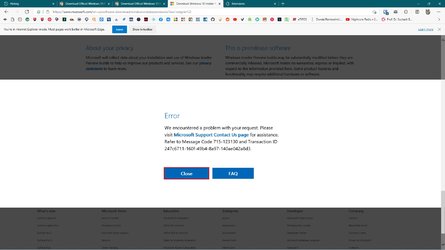
You need to run it by reload in internet explorer mode if you are use MS edge chrome, as shown below.
Nope, still nothing and the previous link never finishes download, so still looking for ISO. :tears:

capture_09112021_111933.jpg

EDIT: Found a torrent, so I should finally get Windows 11 in about 11 hours. :eyeroll:

capture_09112021_200624.jpg

EDIT: Torrent died, but found a working download, downloaded in 3 mins. The hash does not match, but I am out of options.

capture_09122021_003036.jpg
 

Attachments

  • capture_09112021_112312.jpg
    capture_09112021_112312.jpg
    112.6 KB · Views: 173
  • capture_09122021_003036.jpg
    capture_09122021_003036.jpg
    16 KB · Views: 188
Last edited:

My Computer My Computer

At a glance

Home26H2CanAMD Ryzen 5 8600G (07/24)2x32GB Kingston FURY DDR5 5600 MHz CL36 @5200...ASROCK Radeon RX 6600 Challenger D 8G @48FPS ...
OS
Home26H2Can
Computer type
PC/Desktop
CPU
AMD Ryzen 5 8600G (07/24)
Motherboard
ASROCK B650M-HDV/M.2 (07/24) BIOS 4.21 AGESA ComboAM5 1.3.0.1 (04/26)
Memory
2x32GB Kingston FURY DDR5 5600 MHz CL36 @5200 CL36 (07/24)
Graphics Card(s)
ASROCK Radeon RX 6600 Challenger D 8G @48FPS (08/24)
Sound Card
Creative Sound BlasterX AE-5 Plus (05/24)
Monitor(s) Displays
24" Philips 24M1N3200ZS/00 (05/24)
Screen Resolution
1920×1080@165Hz via DP1.4
Hard Drives
Kingston KC3000 NVMe 2TB (05/24)
ADATA XPG GAMMIX S11 Pro 512GB (07/19)
PSU
Seasonic Core GM 550 Gold (04/24)
Case
Fractal Design Define 7 Mini with 3x Noctua NF-P14s/12@555rpm (04/24)
Cooling
Noctua NH-U12S with Noctua NF-P12 (04/24)
Keyboard
HP Pavilion Wired Keyboard 300 (07/24) + Rabalux 76017 Parker (01/24)
Mouse
Logitech M330 Silent Plus (01/26)
Internet Speed
500/100 Mbps via RouterOS (05/21) & TCP Optimizer
Browser
Edge, Brave for YouTube, LibreWolf for FB
Antivirus
NextDNS blocking 1/3 Traffic
Other Info
Phone: Motorola Moto G86 (02/26)
Backup: Hasleo Backup Suite (PreOS)
Headphones: Sennheiser RS170 (09/10)
Chair: Huzaro Force 4.4 Grey Mesh (05/24)
Notifier: Xiaomi Mi Band 9 Milanese (10/24)
FlexCore USB-C 3.2 Gen 1 (M) to LAN (F) (08/25)

Latest Support Threads

Back
Top Bottom