Installation and Upgrade Download Official Windows 11 ISO file from Microsoft

  • Thread starter Thread starter Brink
  • Start date Published: Start date Updated Updated:
  • Featured
  • Tags Tags
    iso

ISO_banner.png

This tutorial will show you how to download an official Windows Server or Windows 11 64-bit or ARM64 ISO file from Microsoft.

Microsoft provides ISO files for Windows Server and Windows 11 to download. You can use these ISO files to clean install or in-place upgrade Windows 11.


The Flight Hub can also help you keep updated on which Windows 11 builds have an ISO available.


Contents

  • Option One: Download Latest Windows 11 64-bit ISO using Media Creation Tool (MCT)
  • Option Two: Download Windows 11 64-bit or ARM64 ISO from Microsoft
  • Option Three: Download Windows 11 Insider 64-bit ISO from Microsoft
  • Option Four: Download Windows Server Insider ISO from Microsoft
  • Option Five: Download Windows 11 64-bit or ARM64 ISO or Windows Server ISO from UUP Dump


See also:


Option One

Download Latest Windows 11 64-bit ISO using Media Creation Tool (MCT)


This will be for a Windows 11 Version 25H2 build 26200.8875 ISO file with install.esd.


1 Click/tap on the Download button below, and click/tap on the Download Now button at Microsoft's site for Create Windows 11 Installation Media. (see screenshot below)


Windows_11_MCT-1.png

2 Save the mediacreationtool.exe file version 10.0.26100.7019 to your desktop, and run it.

Windows_11_MCT-2.webp

3 If prompted by UAC, click/tap on Yes.

4 Click/tap on Accept for the license terms. (see screenshot below)

Windows_11_MCT-3.png

5 Uncheck the Use the recommended options for this PC box. (see screenshot below)

Leaving the Use the recommended options for this PC box checked will have the Media Creation Tool download an ISO that's the same language, edition, and architecture as the current PC.


Windows_11_MCT-4.png

6 Select the Language and Edition you want for the ISO file, and click/tap on Next. (see screenshot below)

The Windows 11 option includes both the Home and Pro editions. The product key you enter during installation (Windows Setup) is what determines which edition gets installed.

Your digital license or product key determines if Home or Pro gets installed during Windows Setup.

If you skip entering a product key during Windows Setup, then you will be prompted to select to install the Home or Pro edition.


Windows_11_MCT_x.png

7 Select (dot) ISO file, and click/tap on Next. (see screenshot below)

Windows_11_MCT-5.png

8 Select where you would like to save the ISO file to, type in a name you want for the ISO file, and click/tap on Save. (see screenshot below)

Windows_11_MCT-6.png

9 The Windows 11 ISO file will now begin to download. (see screenshot below)

Windows_11_MCT-7.png

10 When the download has finished, click/tap on the link where you selected to save the ISO file at to open that location, and click/tap on Finish. (see screenshot below)

Windows_11_MCT-8.png


Option Two

Download Windows 11 64-bit or ARM64 ISO from Microsoft


This will be for a Windows 11 Version 25H2 build 26200.8037 ISO file with install.wim.


1 Click/tap on the Download button below for the 64-bit or ARM64 ISO you want to download.

64-bit ISO

OR​

ARM64 ISO

2 Perform the appropriate action below for 64-bit or ARM64: (see screenshots below)
  • Select Windows 11 (multi-edition ISO for x64 devices) in the Download Windows 11 Disk Image (ISO) for x64 devices drop menu, and click/tap on Confirm
  • Select Windows 11 (multi-edition ISO for Arm64) in the drop menu, and click/tap on Download Now.
Download_W11_ISO-1.png
Windows11_ARM_ISO.png

3 Select the language (ex: "English") you want, and click/tap on Confirm. (see screenshot below)

Download_W11_ISO-2.png

4 Click/tap on the 64-bit Download or Download Now (ARM64) button. (see screenshots below)

Download_W11_ISO-3.png
Windows11_ARM_ISO-download_now.png

5 Navigate to and select where (ex: "Desktop") you want to save the ISO file, and click/tap on Save. (see screenshot below)

Download_W11_ISO-4.png


Option Three

Download Windows 11 Insider 64-bit ISO from Microsoft


1 Click/tap on the Download button below to go to the Windows Insider Preview Downloads site by Microsoft below,


2 Scroll down to the Select edtion section, and select the Windows 11 Insider Preview Eperimental, Beta, or Release Preview Channel ISO for the build number you want, and click/tap on Confirm. (see screenshots below)

ISO_download.webp
confirm.png

3 Select the language (ex: "English") you want, and click/tap on Confirm. (see screenshot below)

language.png

4 Click/tap on the 64-bit Download button. (see screenshot below)

Download.png

5 Navigate to and select where (ex: "Desktop") you want to save the ISO file, and click/tap on Save. (see screenshot below)

Save.png


Option Four

Download Windows Server Insider ISO from Microsoft


1 Click/tap on the Download button below to go to the Windows Insider Preview Downloads site by Microsoft below,


2 Select the Windows Server VNext Preview ISO for the build number you want, and click/tap on Confirm. (see screenshots below)

W11_Server_Insider-1.webp
W11_Server_Insider-2.png

3 Select the language (ex: "English") you want, and click/tap on Confirm. (see screenshot below)

W11_Server_Insider-3.png

4 Click/tap on the Download Now button. (see screenshot below)

W11_Server_Insider-4.png

5 Navigate to and select where (ex: "Desktop") you want to save the ISO file, and click/tap on Save. (see screenshot below)

W11_Server_Insider-5.png


Option Five

Download Windows 11 64-bit or ARM64 ISO or Windows Server ISO from UUP Dump


You can download an ISO for public and Insider builds using this option.


1 Using the tutorial below, search for and select the Windows version and build ISO you want to download.



That's it,
Shawn Brink


Last edited:
7-Zip 25.01
Current version is 26.02

Release notes are sparse, but found a reference online that 26.02 "Fixed parsing errors and memory-safety issues in WIM images and UDF disc files."
 
Last edited:

My Computer My Computer

At a glance

Windows 11 Pro 25H2
OS
Windows 11 Pro 25H2
Computer type
Laptop
Manufacturer/Model
Toshiba
Not fixed in 7-Zip 26.02.
Code:
D:\sources>c:7z.exe l install.swm

7-Zip 26.02 (x64) : Copyright (c) 1999-2026 Igor Pavlov : 2026-06-25

Scanning the drive for archives:
1 file, 3957088176 bytes (3774 MiB)

Listing archive: install.swm

ERROR: install.swm : install.swm
Open ERROR: Cannot open the file as [wim] archive

WARNINGS:
There are data after the end of archive

Errors: 1
 

My Computer My Computer

At a glance

Windows 7
OS
Windows 7
looks like it gets confused because of the expected compression... It can open an install.esd but not an install.swm that was created by splitting the install.esd.

what happens if you rename install.swm to install.esd, rename install2.swm to install2.esd etc.
 

My Computers My Computers

  • At a glance

    Win7,Win11i7-97002x16gb 3600mhz
    OS
    Win7,Win11
    Computer type
    PC/Desktop
    CPU
    i7-9700
    Motherboard
    gigabyte b365m ds3h
    Memory
    2x16gb 3600mhz
    Monitor(s) Displays
    benq gw2480
    PSU
    bequiet pure power 11 400CM
    Cooling
    cryorig m9i
  • At a glance

    win7,win11i5-84002x8gb 3200
    Operating System
    win7,win11
    Computer type
    PC/Desktop
    CPU
    i5-8400
    Motherboard
    gigabyte b365m ds3h
    Memory
    2x8gb 3200
    PSU
    xfx pro 450
update laptop

Screenshot 2026-08-02 0224464444.webp
 

My Computers My Computers

  • At a glance

    Windows 11 Pro Insider OS Build 29617.1000i9-9900 8C/16T Coffee Lake(2 x 8 GB) 16 GB DDR-4 @3000 Mhz Patriot ViperNvidea RTX-2080 Ti 11 GB asus
    OS
    Windows 11 Pro Insider OS Build 29617.1000
    Computer type
    PC/Desktop
    Manufacturer/Model
    Build Aswin😂😂👍
    CPU
    i9-9900 8C/16T Coffee Lake
    Motherboard
    MSI-B360 Gaming Pro Carbon-ATX(update bios 2D2(2021) to 2D0 (2022)
    Memory
    (2 x 8 GB) 16 GB DDR-4 @3000 Mhz Patriot Viper
    Graphics Card(s)
    Nvidea RTX-2080 Ti 11 GB asus
    Sound Card
    Speaker(Realtek audio)(standby) and Lg Speaker build in
    Monitor(s) Displays
    Monitors LG TV 43 inch 43NANO75TPA,(4K,60 Hz,WCG,HLG,HDR10+): Hdmi 2.0b x3
    Screen Resolution
    Desktop mode 4096 x 2160/60 Hz Active Signal Mode 4096 x 2160/60 Hz,HDR Enable: Destop Mode 4096x2160/60Hz Active Signal Mode 4096 x2160/60 Hz
    Hard Drives
    1.M2.Nvme SSD Gen 3 x4,1 TB KYO Utimate K350 (OS) with heat sink 2.M2.Nvme SSD gen 3 x 4-512 GB KYO ULTIMATE K350 with heat Sink 3. SSD SATA 500 GB WD 4.SSD SATA120 GB Kingston....5. HDD 1TB Seagate
    PSU
    850 w full modular 80 gold gamemax
    Case
    Aigo DarkFlash phantom ATX(with 8 RGB Fans(4 Front+ 2 Rear (exhaust)+ 2 bottom side) DR 12) Tempered glass -Full Tower.
    Cooling
    AIO gamemax(CPU liquid cooler) L240 RGB-Top side(exhaust)
    Keyboard
    Logitech
    Mouse
    logitech
    Internet Speed
    Cable LAN CAT 6 E(25 meters) ,TP-link switch adapter 5 ports 1000/1000 Mbps Download 141 Mbps Upload 141 Mbps, Intel® I219-V Gigabit LAN controller
    Browser
    edge stable
    Antivirus
    MS defender A/V
    Other Info
    This PC on second floor, GPON ONT (optic network terminal ISP term) on ist floor
    2021
    add 2 fans 120 mm in bottom side😊👍.oct
    2022
    Replace TP link switch adapter 100/100 to 1000/1000 may
    2023 jan
    detected 1 Ram 3200 Mhz Hyper X kingston problem -> replace both with patriot DDR4 3000 Mhz from ex i7-9700😁
    2023 jan
    update bios 2D2(2021) --->> 2D0 (2022)
    2023 March
    Change storage : SSD SATA ------>>>>M2.NVme SSD (OS)
    2023 April
    Change storage for OS Nvme 512GB ---->>> 1TB
    2024
    PSU 650 w 80 plus bronze -------> 850 w full modular 80 gold
    GTX 1060 6 GB galax-------> RTX 2080 Ti Asrock 2 x 8 pin
    update bios from 2D0------>>> 2E0
    change cable Hdmi 2.0b to hdmi 2.1 and resetting Nvidia control panel
    just testing after new processor come will replace with hdmi2.0b .

    26 March 2026 update bios from 2D0(2022) to 2E0 (2024)
  • At a glance

    Windows 11 Pro Insider OS ver 26 H2 26300.9032Intel core i5-9300H [email protected] GHz 4C/8T Coffee ...DDR4 16 GB 2 x 8 GB, 2666 Mhz Sk Hynix- Jedec...1. Intel graphic UHD 630 2. Nvidea Geforce GT...
    Operating System
    Windows 11 Pro Insider OS ver 26 H2 26300.9032
    Computer type
    Laptop
    Manufacturer/Model
    Acer Nitro AN515-54
    CPU
    Intel core i5-9300H [email protected] GHz 4C/8T Coffee Lake
    Motherboard
    Manufacturer CFL , Model Octavia_CFS , Bios Version V1.33( 11/17/2020)
    Memory
    DDR4 16 GB 2 x 8 GB, 2666 Mhz Sk Hynix- Jedec 11 : CL : 20-19-19-43-61/1.2 V
    Graphics card(s)
    1. Intel graphic UHD 630 2. Nvidea Geforce GTX 1650 , 4 GB
    Sound Card
    1.Realtek Version 6.0.8929.1 2. NVIDIA Version 4.39.0.0 ( Virtual Audio Device ( Wave Extensible) (WDM)
    Monitor(s) Displays
    15.6"
    Screen Resolution
    1920 x 1080
    Hard Drives
    1.M2.Nvme SSD gen 3 x 4-1TB (OS) XPG SX8200 Pro with Heatsink 2. M2. SATA 1 TB 3. HDD 1 TB
    PSU
    Acer
    Case
    Acer
    Cooling
    Double Cooling Fans
    Keyboard
    1.Acer 2.Votre(wired)
    Mouse
    Optical mouse(FO)
    Internet Speed
    1. Cable Lan Cat 6E (25 meters) 2. Intel Wireless-AC 9560 160 Mhz 3. Realtek Gaming GBe Family cont (RJ45). TP-link switch adapter 1000/1000 Mbps Download : 187 Mbps Upload : 87 Mbps
    Browser
    Edge Stable
    Antivirus
    MS A/V
    Other Info
    This Laptop on second Floor , GPON ONT(optic network terminal ISP term ) on 1st Floor
    2022
    1. Upgraded from Windows 11 Home to Pro------May
    2. Replace TP link switch adapter 100/100 to 1000/1000→→→May
    2023
    3.Repale Storage(OS) from SATA to NVME---->> Feb
    4. ugrade ram 12 GB to 16 GB------>>>>April
    2024
    nvme 512GB replace to 1 TB
    M2 sata 240 GB replace to 1 TB
Let's convert MCT's SWM back to a normal WIM...
Code:
DISM /export-image /sourceimagefile:D:\sources\install.swm /swmfile:D:\sources\install*.swm /sourceindex:1 /destinationimagefile:install.wim

1. wimlib can't read the WIM
2. 7z.exe can extract wlanapi.dll

You don't mind creating a 5.28 GB temp file (install.wim) just for this?!

To cap our headache:
  • When MCT saves to a local ISO file, files from the ESD image can be extracted without the expense of mounting the ESD image. But we cannot re-use the same ISO file (within MCT) to create an USB drive. You must use Rufus or other means.

  • When MCT saves to a local USB, files from the SWM image cannot be extracted. You can't mount a set of SWM files, so they must be converted back to WIM or ESD first. This requires having quite a bit of free disk space.

  • If you use DISM to convert the original ESD file (from save to ISO) as SWM, this works. But MCT's conversion process changes the format to break 3rd-party tools. Why would MS decide to have MCT perform the conversion differently from DISM??
 

My Computer My Computer

At a glance

Windows 7
OS
Windows 7
Not fixed in 7-Zip 26.02.
Code:
D:\sources>c:7z.exe l install.swm

7-Zip 26.02 (x64) : Copyright (c) 1999-2026 Igor Pavlov : 2026-06-25

Scanning the drive for archives:
1 file, 3957088176 bytes (3774 MiB)

Listing archive: install.swm

ERROR: install.swm : install.swm
Open ERROR: Cannot open the file as [wim] archive

WARNINGS:
There are data after the end of archive

Errors: 1
Yeah...

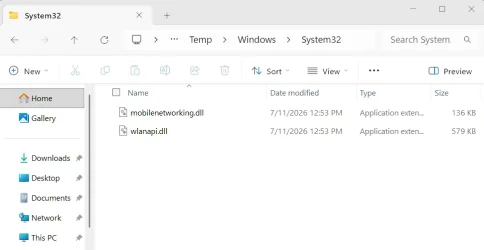
I was able to get the two DLLs in AppData\Local\Temp this way, without mounting anything...

cd C:\Program Files\7-Zip

Dism /Export-Image /SourceImageFile:E:\sources\install.swm /SWMFile:E:\sources\install*.swm /SourceIndex:1 /DestinationImageFile:C:\Users\Jim\AppData\Local\Temp\NewInstall.wim

Then -

7z x "C:\Users\Jim\AppData\Local\Temp\NewInstall.wim" "Windows\System32\wlanapi.dll" "Windows\System32\mobilenetworking.dll" -o"C:\Users\Jim\AppData\Local\Temp"

Note: This extraction approach created Windows\System32 folders in AppData\Local\Temp

Extracted DLLs.webp

I'm sure you'll come up with a cleaner way.
 

My Computer My Computer

At a glance

Windows 11 Pro 25H2
OS
Windows 11 Pro 25H2
Computer type
Laptop
Manufacturer/Model
Toshiba
I also appened the extended path to the DLLs in the script add and remove lines...

add $TEMP_DIR\Windows\System32\wlanapi.dll /Windows/System32/wlanapi.dll
add $TEMP_DIR\Windows\System32\mobilenetworking.dll /Windows/System32/mobilenetworking.dll

Remove-Item "$TEMP_DIR\\Windows\System32\wlanapi.dll","$TEMP_DIR\\Windows\System32\mobilenetworking.dll"

Booted from the MCT USB, and accessed the Repair function with no issues.
 

My Computer My Computer

At a glance

Windows 11 Pro 25H2
OS
Windows 11 Pro 25H2
Computer type
Laptop
Manufacturer/Model
Toshiba
Let's convert MCT's SWM back to a normal WIM...
Code:
DISM /export-image /sourceimagefile:D:\sources\install.swm /swmfile:D:\sources\install*.swm /sourceindex:1 /destinationimagefile:install.wim

1. wimlib can't read the WIM
2. 7z.exe can extract wlanapi.dll

You don't mind creating a 5.28 GB temp file (install.wim) just for this?!

To cap our headache:
  • When MCT saves to a local ISO file, files from the ESD image can be extracted without the expense of mounting the ESD image. But we cannot re-use the same ISO file (within MCT) to create an USB drive. You must use Rufus or other means.

  • When MCT saves to a local USB, files from the SWM image cannot be extracted. You can't mount a set of SWM files, so they must be converted back to WIM or ESD first. This requires having quite a bit of free disk space.

  • If you use DISM to convert the original ESD file (from save to ISO) as SWM, this works. But MCT's conversion process changes the format to break 3rd-party tools. Why would MS decide to have MCT perform the conversion differently from DISM??
I tried this:
I converted the original install.esd created in the MCT ISO into an install.wim and then split it into .swm files that can be opened by 7-zip.
Here is a sample extracting Windows11 Pro edition.
dism /export-image /SourceImageFile:"E:\Temp\install.esd" /SourceIndex:6 /DestinationImageFile:"E:\Temp\install.wim" /Compress:fast /CheckIntegrity (Standard wim compression)

Dism /Split-Image /ImageFile:E:\Temp\install.wim /SWMFile:E:\Temp\install.swm /FileSize:3800
 

My Computer My Computer

At a glance

Windows 11 Pro 25H2Intel I9-9900K64GBNVIDIA RTX 2060
OS
Windows 11 Pro 25H2
Computer type
PC/Desktop
Manufacturer/Model
Dell XPS 8930
CPU
Intel I9-9900K
Memory
64GB
Graphics Card(s)
NVIDIA RTX 2060
Sound Card
NVIDIA High Definition Audio
Monitor(s) Displays
4k Samsung
Screen Resolution
3840 x 2160
Hard Drives
512GB NVMe, ADATA SU 800, 2TB HDD
You might only need to do the extraction once. When you have those two dll files they will probabaly work in later versions of boot.wim

When I was fiddling with my simple pe builds ( those have the menu) using either a matching or earlier version of explorerframe.dll works . So probably also applies to those two dll files

I like explorerframe in there for copy to and move to.

Did a little batch file to copy winre.wim from wherever it is on the disk ( or browse to any other bootable wim files such as ms boot.wim ) and shove a few things into it .

Or you might be able to copy the two dll from your running %windir%\system32 . That is how I get the exploreframe.dll mentioned above.

some clips as an example

Code:
    IF %HOSTBUILD% LEQ %WIMBUILD% (

      COPY /Y "%windir%\system32\ExplorerFrame.dll" "%TP%\BIN\WINDOWS\SYSTEM32"

      GOTO :PROCESSWIM

      )


     IF %HOSTBUILD% GTR %WIMBUILD% (

      IF EXIST "%WINDIR%\WinSxS\amd64_microsoft-windows-explorerframe_31bf3856ad364e35_10.0.26100.7920_none_5e0ae50023fe51ca\ExplorerFrame.dll" (

      COPY /Y "%WINDIR%\WinSxS\amd64_microsoft-windows-explorerframe_31bf3856ad364e35_10.0.26100.7920_none_5e0ae50023fe51ca\ExplorerFrame.dll" "%TP%\BIN\WINDOWS\SYSTEM32"

      GOTO :PROCESSWIM

      )

     )


   :PROCESSWIM


    if exist "%tp%\bin\windows" (

    %wimlib% update "%wimpath%" %indexboot% --command="add '%tp%/bin/Windows' '/Windows'"

     )

.

The code tag thing only offers to include the first of the lines that have been highlighted, so I paste it all in again.

code-tags.webp
 
Last edited:

My Computers My Computers

  • At a glance

    Win7,Win11i7-97002x16gb 3600mhz
    OS
    Win7,Win11
    Computer type
    PC/Desktop
    CPU
    i7-9700
    Motherboard
    gigabyte b365m ds3h
    Memory
    2x16gb 3600mhz
    Monitor(s) Displays
    benq gw2480
    PSU
    bequiet pure power 11 400CM
    Cooling
    cryorig m9i
  • At a glance

    win7,win11i5-84002x8gb 3200
    Operating System
    win7,win11
    Computer type
    PC/Desktop
    CPU
    i5-8400
    Motherboard
    gigabyte b365m ds3h
    Memory
    2x8gb 3200
    PSU
    xfx pro 450
Finally!! I wasted an hour, before realizing the script can got tripped up on race conditions. After you convert the SWM to a WIM file, sometimes 7z.exe cannot correctly read the WIM immediately afterwards.

You have to give it a slight pause, and then the writes get flushed (or something).

Code:
PS C:\Users\GARLIN\Downloads> .\Repair_My_BootWIM.ps1 D:
Making file updates to D:\sources\boot.wim
Converting from D:\sources SWM to temporary WIM
Please be patient...
Adding files to boot.wim
Performing clean-up on boot WIM.

PS C:\Users\GARLIN\Downloads> .\Repair_My_BootWIM.ps1 D:
D:\sources\boot.wim is already updated.
 

Attachments

My Computer My Computer

At a glance

Windows 7
OS
Windows 7
Splitting the install.esd is a real PITA. If I need a FAT32 boot usb, I'll just make a usb stick with a fat32 boot partition and an NTFS partition for the install.esd. I find that much easier than splitting install.esd.
Agree...

I don't think much is gained disk space wise.

Some numbers from the recent MCT ISO...

ESD - 5.62 GB

WIM - 6.92 GB (converted from ESD).

SWM and SWM2 - 3.68 GB and 1.91 GB respectively = 5.59 GB total

SWMs combined are .03 GB smaller than ESD, and 1.33 GB smaller than WIM
 

My Computer My Computer

At a glance

Windows 11 Pro 25H2
OS
Windows 11 Pro 25H2
Computer type
Laptop
Manufacturer/Model
Toshiba
Finally!!
Works (y)


Microsoft Windows [Version 10.0.26200.8875]

(c) Microsoft Corporation. All rights reserved.

C:\Users\Jim>cd C:\Users\Jim\Downloads

C:\Users\Jim\Downloads>powershell -ep bypass -f C:\Users\Jim\Downloads\Repair_My_BootWIM.ps1 E:
Making file updates to E:\sources\boot.wim
Converting from E:\sources SWM to temporary WIM
Please be patient...
Adding files to boot.wim
Performing clean-up on boot WIM.

C:\Users\Jim\Downloads>
 

My Computer My Computer

At a glance

Windows 11 Pro 25H2
OS
Windows 11 Pro 25H2
Computer type
Laptop
Manufacturer/Model
Toshiba
Agree...

I don't think much is gained disk space wise.

Some numbers from the recent MCT ISO...

ESD - 5.62 GB

WIM - 6.92 GB (converted from ESD).

SWM and SWM2 - 3.68 GB and 1.91 GB respectively = 5.59 GB total

SWMs combined are .03 GB smaller than ESD, and 1.33 GB smaller than WIM
Not a matter of saving space, they need to keep the file sizes below 4GiB which is the limit for a FAT32 formatted device.
MCT should prepare an ISO that can be used directly to create the FAT32 USB media.
It is silly that they let the users deal with that annoying problem. The original idea of the .esd compression was to limit the size of the install.esd to stay below the 4GiB size limit of FAT32, but that is no longer the case, on most of Windows 11 builds the install.esd is still bigger than 4GiB so it is not good for a FAT32 USB Drive. 🤣
That is why users rely on Rufus or other methods to make an UEFI bootable installation media. 😵‍💫🤬🤷‍♂️
 
Last edited:

My Computer My Computer

At a glance

Windows 11 Pro 25H2Intel I9-9900K64GBNVIDIA RTX 2060
OS
Windows 11 Pro 25H2
Computer type
PC/Desktop
Manufacturer/Model
Dell XPS 8930
CPU
Intel I9-9900K
Memory
64GB
Graphics Card(s)
NVIDIA RTX 2060
Sound Card
NVIDIA High Definition Audio
Monitor(s) Displays
4k Samsung
Screen Resolution
3840 x 2160
Hard Drives
512GB NVMe, ADATA SU 800, 2TB HDD
"For the want of a nail the shoe was lost,
For the want of a shoe the horse was lost,
For the want of a horse the rider was lost,
For the want of a rider the battle was lost,
For the want of a battle the kingdom was lost,
And all for the want of a horseshoe-nail."


MCT and me...
 

My Computer My Computer

At a glance

Windows 7
OS
Windows 7
Not a matter of saving space, they need to keep the file sizes below 4GiB which is the limit for a FAT32 formatted device.
MCT should prepare an ISO that can be used drirectly to create the FAT32 USB media.
It is silly that they let the users deal with that annoying problem. The original idea of the .esd compression was to limit the size of the install.esd to stay below the 4GiB size limit of FAT32, but that is no longer the case, on most of Windows 11 builds the install.esd is still bigger than 4GiB so it is not good for a FAT32 USB Drive. 🤣
That is why users rely on Rufus or other methods to make an UEFI bootable installation media. 😵‍💫🤬🤷‍♂️
I get that.

One of the reasons I said I agree with @wabbit

FAT32 boot partition, and NTFS for the install file.

I mean we could go on for hours about how MS should do this or that...

When it doesn't happen, modders find a way.
 

My Computer My Computer

At a glance

Windows 11 Pro 25H2
OS
Windows 11 Pro 25H2
Computer type
Laptop
Manufacturer/Model
Toshiba
I get that.

One of the reasons I said I agree with @wabbit

FAT32 boot partition, and NTFS for the install file.

I mean we could go on for hours about how MS should do this or that...

When it doesn't happen, modders find a way.
The users should force Microsoft to do things properly rather than rely on workarounds. 🤣🤣🤷‍♂️

 
Last edited:

My Computer My Computer

At a glance

Windows 11 Pro 25H2Intel I9-9900K64GBNVIDIA RTX 2060
OS
Windows 11 Pro 25H2
Computer type
PC/Desktop
Manufacturer/Model
Dell XPS 8930
CPU
Intel I9-9900K
Memory
64GB
Graphics Card(s)
NVIDIA RTX 2060
Sound Card
NVIDIA High Definition Audio
Monitor(s) Displays
4k Samsung
Screen Resolution
3840 x 2160
Hard Drives
512GB NVMe, ADATA SU 800, 2TB HDD
"For the want of a nail the shoe was lost,
For the want of a shoe the horse was lost,
For the want of a horse the rider was lost,
For the want of a rider the battle was lost,
For the want of a battle the kingdom was lost,
And all for the want of a horseshoe-nail."


MCT and me...
MCT just sucks. Typical Microsoft!
 

My Computer My Computer

At a glance

Windows 11 Pro 25H2Intel I9-9900K64GBNVIDIA RTX 2060
OS
Windows 11 Pro 25H2
Computer type
PC/Desktop
Manufacturer/Model
Dell XPS 8930
CPU
Intel I9-9900K
Memory
64GB
Graphics Card(s)
NVIDIA RTX 2060
Sound Card
NVIDIA High Definition Audio
Monitor(s) Displays
4k Samsung
Screen Resolution
3840 x 2160
Hard Drives
512GB NVMe, ADATA SU 800, 2TB HDD
I get that.

One of the reasons I said I agree with @wabbit

FAT32 boot partition, and NTFS for the install file.

I mean we could go on for hours about how MS should do this or that...

When it doesn't happen, modders find a way.
One work around I use is I'll download the latest iso using the MCT. Then I'll make a bootable usb using Rufus with some of the customizations. Next, I'll run the script "Repair_My_Boot.WIM ps1 D:", where D is the drive letter of the usb, not the Rufus_Boot partition. Then, I'll test boot the Rufus usb to see if I can get to "Repair my PC,: If successful, I'll make an iso from the Rufus usb's main partition, not the Rufus_boot one. I did create a usb stick from the Rufus iso with a fat32 boot partition and an NTFS partition. That was successful.

Hoping MS can fix this issue by the next Patch Tuesday.
 

My Computers My Computers

  • At a glance

    Windows 11 Pro 25H2AMD Ryzen 9 7940HS32 GBRadeon 780M Graphics
    OS
    Windows 11 Pro 25H2
    Computer type
    PC/Desktop
    Manufacturer/Model
    Geekom AX7 Pro
    CPU
    AMD Ryzen 9 7940HS
    Memory
    32 GB
    Graphics Card(s)
    Radeon 780M Graphics
    Monitor(s) Displays
    Dell S2425H 24"
    Screen Resolution
    1920 x 1080
    Hard Drives
    2 TB NVMe SSD
    Internet Speed
    100 Mbs
    Browser
    Microsoft Edge / Firefox
    Antivirus
    F-Secure Security Suite
    Other Info
    All secure boot certificates updated to CA 2023
    Windows Production PCA 2011 certificate has been revoked.
  • At a glance

    Windows 11 Pro 25H212th Gen Intel Core i7-12700 processor (12-Co...16 GBIntel(R) UHD Graphics 770 with shared graphic...
    Operating System
    Windows 11 Pro 25H2
    Computer type
    PC/Desktop
    Manufacturer/Model
    Dell Inspiron 3910
    CPU
    12th Gen Intel Core i7-12700 processor (12-Core, 25M Cache, 2.1GHz to 4.8GHz)
    Motherboard
    Dell 0KHP4K
    Memory
    16 GB
    Graphics card(s)
    Intel(R) UHD Graphics 770 with shared graphics memory
    Monitor(s) Displays
    Dell 27" Monitor S2721DS,
    Screen Resolution
    QHD 2560 x 1440 @ 75 Hz
    Hard Drives
    1TB M.2, PCIe NVMe, SSD
    Internet Speed
    100 Mbps
    Browser
    Edge
    Antivirus
    F-Secure Security Suite
    Other Info
    All secure boot certificates updated to CA 2023
    Windows Production PCA 2011 certificate has been revoked.
  • HP Laptop 15-fd0xxx
    OS: Windows 11 Home 25H2
    Processor: 13th Gen Intel(R) Core(TM) i7-1355U (1.70 GHz), 10 Cores, 12 Logical Processors
    BIOS Version: AMI F.26 4/22/2026
    RAM: 16 GB
    SSD: 1 TB
    Screen Resolution: 1920 x 1080
    All secure boot certificates updated to CA 2023 by factory.
New Insider ISOs. :alien:


New_Insider_ISO.webp
 

My Computers My Computers

  • At a glance

    Windows 11 Pro for WorkstationsIntel i7-8700K 5 GHz64 GB (4x16GB) G.SKILL TridentZ RGB DDR4 3600...ASUS ROG-STRIX-GTX1080TI-O11G-GAMING (11GB GD...
    OS
    Windows 11 Pro for Workstations
    Computer type
    PC/Desktop
    Manufacturer/Model
    Custom self build
    CPU
    Intel i7-8700K 5 GHz
    Motherboard
    ASUS ROG Maximus XI Formula Z390
    Memory
    64 GB (4x16GB) G.SKILL TridentZ RGB DDR4 3600 MHz (F4-3600C18D-32GTZR)
    Graphics Card(s)
    ASUS ROG-STRIX-GTX1080TI-O11G-GAMING (11GB GDDR5X)
    Sound Card
    Integrated Digital Audio (S/PDIF)
    Monitor(s) Displays
    2 x Samsung Odyssey G75 27"
    Screen Resolution
    2560x1440
    Hard Drives
    1TB Samsung 990 PRO M.2,
    4TB Samsung 990 PRO M.2,
    TerraMaster F8 SSD Plus NAS
    PSU
    Seasonic Prime Titanium 850W
    Case
    Thermaltake Core P3 wall mounted
    Cooling
    Corsair Hydro H115i
    Keyboard
    Amazon Basics Wired Full Keyboard MD005
    Mouse
    Logitech MX Master 4
    Internet Speed
    2 Gbps Download and 100 Mbps Upload
    Browser
    Chrome and Edge
    Antivirus
    Microsoft Defender
    Other Info
    Logitech Z625 speaker system,
    Logitech BRIO 4K Pro webcam,
    HP Color LaserJet Pro MFP M477fdn,
    CyberPower CP1500PFCLCD
    Galaxy S23 Plus phone
  • At a glance

    Windows 11 ProSnapdragon X Elite (12 core) 3.42 GHz16 GB LPDDR5x-7467 MHz
    Operating System
    Windows 11 Pro
    Computer type
    Laptop
    Manufacturer/Model
    Surface Laptop 7 Copilot+ PC
    CPU
    Snapdragon X Elite (12 core) 3.42 GHz
    Memory
    16 GB LPDDR5x-7467 MHz
    Monitor(s) Displays
    15" HDR
    Screen Resolution
    2496 x 1664
    Hard Drives
    1 TB SSD
    Internet Speed
    Wi-Fi 7 and Bluetooth 5.4
    Browser
    Chrome and Edge
    Antivirus
    Microsoft Defender
Back
Top Bottom