
Solved Driver power state failure BSOD, some help please.


Please open an elevated command prompt and then enter the following commands:

Code:
reg query "HKEY_LOCAL_MACHINE\SYSTEM\CurrentControlSet\Enum\ACPI\AMDI0010\0" /s >> %userprofile%\Desktop\devices.txt
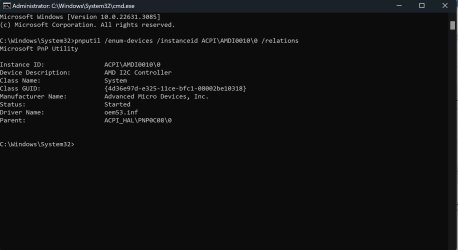
pnputil /enum-devices /instanceid ACPI\AMDI0010\0 /relations

Please attach the service.txt file which would have been saved to your Desktop in your next post. I have a similar chipset to yourself and that AMD driver is used with HID devices, I just noticed from your logs that you have few third-party ones like Steel Series and Logitech. What kind of mouse and keyboard are using? Is there is anything connected to the USB ports at the time of the crash?

Code:
9: kd> !devnode ffff818f6c49e8e0
DevNode 0xffff818f6c49e8e0 for PDO 0xffff818f6a5e5de0
  Parent 0xffff818f6a6f2bf0   Sibling 0xffff818f6c4af8e0   Child 0xffff818f72c63250   
  InstancePath is "ACPI\AMDI0010\0"
  ServiceName is "amdi2c"
  TargetDeviceNotify List - f 0xffffe781140fcf10  b 0xffffe781140fd290
  State = DeviceNodeStarted (0x30a) @ 2024 Feb 04 18:53:05.135
  Previous State = DeviceNodeEnumerateCompletion (0x30f) @ 2024 Feb 04 18:53:05.135
  StateHistory[12] = DeviceNodeEnumerateCompletion (0x30f)
  StateHistory[11] = DeviceNodeEnumeratePending (0x30e)
  StateHistory[10] = DeviceNodeStarted (0x30a)
  StateHistory[09] = DeviceNodeEnumerateCompletion (0x30f)
  StateHistory[08] = DeviceNodeEnumeratePending (0x30e)
  StateHistory[07] = DeviceNodeStarted (0x30a)
  StateHistory[06] = DeviceNodeStartPostWork (0x309)
  StateHistory[05] = DeviceNodeStartCompletion (0x308)
  StateHistory[04] = DeviceNodeStartPending (0x307)
  StateHistory[03] = DeviceNodeResourcesAssigned (0x306)
  StateHistory[02] = DeviceNodeDriversAdded (0x305)
  StateHistory[01] = DeviceNodeInitialized (0x304)
  StateHistory[00] = DeviceNodeUninitialized (0x301)
  StateHistory[19] = Unknown State (0x0)
  StateHistory[18] = Unknown State (0x0)
  StateHistory[17] = Unknown State (0x0)
  StateHistory[16] = Unknown State (0x0)
  StateHistory[15] = Unknown State (0x0)
  StateHistory[14] = Unknown State (0x0)
  StateHistory[13] = Unknown State (0x0)
  Flags (0x6c0000f0)  DNF_ENUMERATED, DNF_IDS_QUERIED, 
                      DNF_HAS_BOOT_CONFIG, DNF_BOOT_CONFIG_RESERVED, 
                      DNF_NO_LOWER_DEVICE_FILTERS, DNF_NO_LOWER_CLASS_FILTERS, 
                      DNF_NO_UPPER_DEVICE_FILTERS, DNF_NO_UPPER_CLASS_FILTERS
  CapabilityFlags (0x000000c0)  UniqueID, SilentInstall
 

My Computer My Computer

At a glance

Windows 11, Windows 10, Linux Fedora Cinnamon
OS
Windows 11, Windows 10, Linux Fedora Cinnamon
  • Helpful
Reactions: G47
Yes, I had everything plugged in. That is my wireless keyboard dongle (Redragon Vishnu), my wireless mouse g502x, the wireless dongle of my headphones (not switched on), my webcam, my audio dac and the ups's USB. I should unplug everything right?

Also excuse my ignorance, I can't make out the commands. The first one should be HKEY_LOCAL_MACHINE\SYSTEM\CurrentControlSet\Enum\ACPI\AMDI0010\0

but I don't know about the rest.
 
Last edited:

My Computer My Computer

At a glance

Windows 117800X3DG.Skill Trident Z5 Neo RGB 32GB DDR5 RAM (2x1...MSI Suprim 4090
OS
Windows 11
Computer type
PC/Desktop
CPU
7800X3D
Motherboard
Asus X670E -E GAMING
Memory
G.Skill Trident Z5 Neo RGB 32GB DDR5 RAM (2x16Gb)
Graphics Card(s)
MSI Suprim 4090
Monitor(s) Displays
Asus PG38UQ
Screen Resolution
4K
Hard Drives
2X Crucial T700 SSD 1TB M.2 NVMe PCI Express 5.0
PSU
Corsair HX1000i 1000W Full Modular 80 Plus Platinum
Case
Asus TUF GT502
Cooling
Asus ROG Ryujin III 360
Keyboard
Reddragon Vishnu
Mouse
G502X
Browser
Chrome
Antivirus
Bitdefender total security
The first one should be HKEY_LOCAL_MACHINE\SYSTEM\CurrentControlSet\Enum\ACPI\AMDI0010\0
The first one should be:

Code:
reg query "HKEY_LOCAL_MACHINE\SYSTEM\CurrentControlSet\Enum\ACPI\AMDI0010\0" /s >> %userprofile%\Desktop\devices.txt

That command will simply query the specified registry key and it's subkeys. The output will be then automatically saved to a text file named devices.txt on your Desktop.

The second command would be:

Code:
pnputil /enum-devices /instanceid ACPI\AMDI0010\0 /relations

It will enumerate the device relations for that particular device node. It can sometimes be useful in establishing which devices are connected to the given device.

I should unplug everything right?
I would unplug everything apart from your keyboard and mouse for now, then see if the system crashes, then look at updating the drivers for the mouse and keyboard. It will be a process of elimination unfortunately; we may have to disable some of the drivers from loading but it seems most of them were set to start on demand.
 

My Computer My Computer

At a glance

Windows 11, Windows 10, Linux Fedora Cinnamon
OS
Windows 11, Windows 10, Linux Fedora Cinnamon
  • Helpful
Reactions: G47
Please see the attached.
I unplugged everything and I'm waiting for the blue screen.
Nothing yet, at this point I should get one judging from how soon I got a bsod after startup.
So maybe we are getting somewhere.
 

Attachments

  • devices.txt
    devices.txt
    2.4 KB · Views: 1
  • Untitled.jpg
    Untitled.jpg
    93.2 KB · Views: 5
  • Untitled2.jpg
    Untitled2.jpg
    68.9 KB · Views: 4
Last edited:

My Computer My Computer

At a glance

Windows 117800X3DG.Skill Trident Z5 Neo RGB 32GB DDR5 RAM (2x1...MSI Suprim 4090
OS
Windows 11
Computer type
PC/Desktop
CPU
7800X3D
Motherboard
Asus X670E -E GAMING
Memory
G.Skill Trident Z5 Neo RGB 32GB DDR5 RAM (2x16Gb)
Graphics Card(s)
MSI Suprim 4090
Monitor(s) Displays
Asus PG38UQ
Screen Resolution
4K
Hard Drives
2X Crucial T700 SSD 1TB M.2 NVMe PCI Express 5.0
PSU
Corsair HX1000i 1000W Full Modular 80 Plus Platinum
Case
Asus TUF GT502
Cooling
Asus ROG Ryujin III 360
Keyboard
Reddragon Vishnu
Mouse
G502X
Browser
Chrome
Antivirus
Bitdefender total security
Thanks for providing the requested information, let me know if you have any crashes with everything unplugged, if you do then please upload the dump file(s).
 

My Computer My Computer

At a glance

Windows 11, Windows 10, Linux Fedora Cinnamon
OS
Windows 11, Windows 10, Linux Fedora Cinnamon
The WDV created crash indicates a misbehaving driver.

When available please update the progress with post #18.
 

My Computer My Computer

At a glance

Windows 10Intel(R) Core(TM) i7-4800MQ CPU @ 2.70GHz16 GB Total: Manufacturer : Samsung MemoryTyp...NVIDIA Quadro K3100M; Intel(R) HD Graphics 4600
OS
Windows 10
Computer type
Laptop
Manufacturer/Model
HP
CPU
Intel(R) Core(TM) i7-4800MQ CPU @ 2.70GHz
Motherboard
Product : 190A Version : KBC Version 94.56
Memory
16 GB Total: Manufacturer : Samsung MemoryType : DDR3 FormFactor : SODIMM Capacity : 8GB Speed : 1600
Graphics Card(s)
NVIDIA Quadro K3100M; Intel(R) HD Graphics 4600
Sound Card
IDT High Definition Audio CODEC; PNP Device ID HDAUDIO\FUNC_01&VEN_111D&DEV_76E0
Hard Drives
Model Hitachi HTS727575A9E364
Antivirus
Microsoft Defender
Other Info
Mobile Workstation
I'll concede this thread over to @zbook.
 

My Computer My Computer

At a glance

Windows 11, Windows 10, Linux Fedora Cinnamon

OS
Windows 11, Windows 10, Linux Fedora Cinnamon

So....I consider the problem solved but in a weird way.
I was preparing for another round of WDV but just for the shake of it, I unplugged every usb device except my keyboard and mouse.
No bsod after several reboots, so that was something.
To make it clear, there was no overclock on my pc.
I tried plugging in the usb devices one by one with several reboots and many hours of work in between, that's why it took so many days to respond.
Still no bsod.
Then I tried to restore my saved overclock profile (which was stable from the time I bought my pc until this whole mess started) just to see what will happen.
I got a bsod but with the error message this time being "critical process died".
It was so bad that it broke my pc, couldn't boot into windows, couldn't use the restore point, even with default bios values, so I ended up resetting my pc.
It was stable once more.
I tried to overclock using the Asus oc preset and it was fine, except high temps.
I run it for a few days, got tired of the high temps and tried to manually teak a new overclocking profile.
And this is where we are now, no bsod, perfectly stable (stress tests and everything), no high temps and no idea about how this whole thing started and ended.
Thank you guys, especially @x BlueRobot and @zbook for all the help.
 

My Computer My Computer

At a glance

Windows 117800X3DG.Skill Trident Z5 Neo RGB 32GB DDR5 RAM (2x1...MSI Suprim 4090
OS
Windows 11
Computer type
PC/Desktop
CPU
7800X3D
Motherboard
Asus X670E -E GAMING
Memory
G.Skill Trident Z5 Neo RGB 32GB DDR5 RAM (2x16Gb)
Graphics Card(s)
MSI Suprim 4090
Monitor(s) Displays
Asus PG38UQ
Screen Resolution
4K
Hard Drives
2X Crucial T700 SSD 1TB M.2 NVMe PCI Express 5.0
PSU
Corsair HX1000i 1000W Full Modular 80 Plus Platinum
Case
Asus TUF GT502
Cooling
Asus ROG Ryujin III 360
Keyboard
Reddragon Vishnu
Mouse
G502X
Browser
Chrome
Antivirus
Bitdefender total security
Back
Top Bottom


