[DRIVERS] Realtek Audio (AMD 3xx/4xx/5xx/6xx/8xx & Intel 2xx/3xx/4xx/5xx/6xx/7xx/8xx)


It's best to plug into the motherboard directly at the back for the best signal strength and sound quality.
Thats what I thought, but started to convince myself otherwise lol! appreciate the response!
 

My Computer My Computer

At a glance

Windows 11i9-9900K32GB G.Skill Trident 3200mhzEVGA 2080-TI Hybrid XC
OS
Windows 11
Computer type
PC/Desktop
CPU
i9-9900K
Motherboard
Asus ROG Maximus XI Hero (Wi-Fi)
Memory
32GB G.Skill Trident 3200mhz
Graphics Card(s)
EVGA 2080-TI Hybrid XC
Hard Drives
Samsung 970 EVO Pro
PSU
BeQuiet! 1000w
Case
Phanteks
Cooling
NZXT Kraken Z73
Keyboard
Logitech G915 TKL
Mouse
Logitech GPRO Superlight
Hi everyone,

- Realtek Audio Drivers (UAD - ASUS ROG SS3) :
Drivers : 6.0.9452.1 WHQL [06/12/2022]​


Download : Link

- Realtek Audio Drivers (UAD - ASUS ROG SS3-DTS) :
Drivers : 6.0.9452.1 WHQL [06/12/2022]​


Download : Link

- Realtek Audio Drivers (UAD - ASUS ROG/TUF/PRIME RTK) :
Drivers : 6.0.9452.1 WHQL [06/12/2022]​
Download : Link

- Realtek Audio Drivers (UAD - ASUS TUF/PRIME DTSX Ultra) :
Drivers : 6.0.9452.1 WHQL [06/12/2022]​


Download : Link

- Realtek Audio Drivers (UAD - ASUS TUF/PRIME DTS AP) :
Drivers : 6.0.9452.1 WHQL [06/12/2022]​


Download : Link

- Realtek Audio Drivers (UAD - ASUS TUF/PRIME DTS HPXv1) :
Drivers : 6.0.9452.1 WHQL [06/12/2022]​


Download : Link

- Realtek Audio Drivers (UAD - ASUS TUF/PRIME DTS Custom) :
Drivers : 6.0.9452.1 WHQL [06/12/2022]​


Download : Link


Thread updated.
Thanks Man !
 

My Computer My Computer

At a glance

Windows 11 Pro, Linux UbuntuIntel 13700K2 x 16 DDR5 7200 Mhz CAS 34 Dominator CorsairAsus 4070 TI OC
OS
Windows 11 Pro, Linux Ubuntu
Computer type
PC/Desktop
CPU
Intel 13700K
Motherboard
Asus Maximus Extreme Z690
Memory
2 x 16 DDR5 7200 Mhz CAS 34 Dominator Corsair
Graphics Card(s)
Asus 4070 TI OC
Sound Card
Motherboard
Monitor(s) Displays
34 Acer
Screen Resolution
3440 x 1440 144 Mhz
Hard Drives
2 x SATA WD Black 10 TO and 4 TO
2 x Samsung 990 Pro 2TO
PSU
Be quiet! Dark Power 12 – 850W
Case
Lian Li Rog 011 XL
Cooling
Watercooling on CPU with AIO
Keyboard
Logitech
Mouse
Logitech and Razer
Internet Speed
Fiber
Browser
Chrome
Antivirus
Bitdefender
Thanks @MoKiChU, always delivering the goods!
 

My Computer My Computer

At a glance

Windows 11 ProIntel i9 9900K32GB HyperX Predator RGB DDR4 3200MHzROG Strix GeForce RTX™ 3070 Ti OC - ROG Strix...
OS
Windows 11 Pro
Computer type
PC/Desktop
CPU
Intel i9 9900K
Motherboard
ASUS Rog Strix Z390-F Gaming
Memory
32GB HyperX Predator RGB DDR4 3200MHz
Graphics Card(s)
ROG Strix GeForce RTX™ 3070 Ti OC - ROG Strix GeForce® RTX 2070 SUPER™ OC - ROG Strix GeForce® GTX 1070 OC
Monitor(s) Displays
ViewSonic Elite XG270QG
Screen Resolution
1440p
Hard Drives
Samsung 970 EVO Plus 2TB M.2 NVMe
Samsung 860 EVO 2TB
PSU
SeaSonic 850W Focus PLUS Platinum
Case
Lian Li Lancool III
Cooling
NZXT Kraken X52
Keyboard
HyperX Alloy Elite RGB
Mouse
Asus ROG Chakram X
Internet Speed
Australian
Antivirus
Common Sense
Thank you, Mokichu.
 

My Computer My Computer

At a glance

Windows 11
OS
Windows 11
Thank you MoKiChU (y)

I'm using the "Realtek Audio Drivers (UAD - ASUS ROG SS3-DTS)" driver for my Strix B550-F. As already mentioned it is mandatory to install SS3 to have all options available for a 5.1 speaker setup. Without SS3, my subwoofer did not work with stereo sources.

Is there a chance to adjust the crossover frequency for the subwoofer? I had used a HDA driver in the past and was able to adjust the crossover frequency in the registry.
 
Last edited:

My Computer My Computer

At a glance

Win 10 Pro & 11 ProAMD Ryzen 5 5600XG.Skill Aegis Kit 16GB, DDR4-3200Nvidia GeForce 3060ti FE
OS
Win 10 Pro & 11 Pro
Computer type
PC/Desktop
CPU
AMD Ryzen 5 5600X
Motherboard
Asus ROG Strix BB50-F Gaming
Memory
G.Skill Aegis Kit 16GB, DDR4-3200
Graphics Card(s)
Nvidia GeForce 3060ti FE
Sound Card
OnBoard & Aune X8 Magic DAC
Monitor(s) Displays
BenQ EX3501R
Screen Resolution
3440x1440
Hard Drives
Crucial MX500 M.2 500 GB 2280
Crucial MX500 1 TB
PSU
Seasonic Platinum-660
Case
Lian Li PC-7FNW Mod
Cooling
CPU Water & GPU Air
Keyboard
Roccat Vulcan 121 Aimo schwarz
Mouse
Roccat Kone Aimo Remastered
Thank you, Mokichu.
Which package should i use for TUF GAMING Z690-PLUS WIFI D4?
 

My Computer My Computer

At a glance

Windows 11
OS
Windows 11
For the ASUS ROG STRIX B550-F GAMING (WIFI) which one i need to download:

(UAD - ASUS ROG SS3-DTS) or ASUS ROG SS3|DTS Sound Unbound?

Thx.

Screenshot_21.jpg

Looks like the second one right?

It comes with the DTS?

💡Also, very important for me.

I'm using the AI Cancellation Noise Reduction Tool from ASUS:

Screenshot_21.jpg

The configuration will keep intact after uninstalling and installing the new drivers?
 
Last edited:

My Computer My Computer

At a glance

Windows 10Ryzen 9 5900XCORSAIR 2x16 3000 Mhz CMW32GX4M2C3000C15MSI GTX 1080TI 11GB GAMING X
OS
Windows 10
Computer type
PC/Desktop
Manufacturer/Model
ASUS
CPU
Ryzen 9 5900X
Motherboard
ASUS ROG STRIX B550-F GAMING (WIFI)
Memory
CORSAIR 2x16 3000 Mhz CMW32GX4M2C3000C15
Graphics Card(s)
MSI GTX 1080TI 11GB GAMING X
Screen Resolution
1080p
Thank you, Mokichu.
Which package should i use for TUF GAMING Z690-PLUS WIFI D4?

Hi,

You have an ASUS TUF DTS Audio Processing motherboard, so :

You need Realtek Audio Drivers (UAD - ASUS TUF/PRIME DTS AP) from the first post of this thread.

Follow scrupulously your CLEANUP process then your INSTALL process, for the next drivers packages that I would release, you will can directly follow your UPDATE process.

For the ASUS ROG STRIX B550-F GAMING (WIFI) which one i need to download

Hi,

You have an ASUS ROG SS3|DTS Sound Unbound motherboard, so :

You need Realtek Audio Drivers (UAD - ASUS ROG SS3-DTS) from the first post of this thread.

Follow scrupulously your CLEANUP process then your INSTALL process, for the next drivers packages that I would release, you will can directly follow your UPDATE process.

💡Also, very important for me.

I'm using the AI Cancellation Noise Reduction Tool from ASUS:

View attachment 48741

The configuration will keep intact after uninstalling and installing the new drivers?

Yes don't worry, the drivers are not linked.
 
Last edited:

My Computer My Computer

At a glance

Windows 11 ProAMD Ryzen 7 7800X3DG.Skill Trident Z5 Neo RGB DDR5 6000MHz CL30 ...ASUS ROG Strix RTX 4080 OC
OS
Windows 11 Pro
Computer type
PC/Desktop
CPU
AMD Ryzen 7 7800X3D
Motherboard
ASUS ROG Strix B650E-F Gaming WiFi
Memory
G.Skill Trident Z5 Neo RGB DDR5 6000MHz CL30 - 32GB (2 x 16GB)
Graphics Card(s)
ASUS ROG Strix RTX 4080 OC
Monitor(s) Displays
ASUS ROG Strix XG35VQ
Screen Resolution
3440 x 1440 Full RGB @ 100Hz
Hard Drives
SSD Samsung 990 PRO 1TB
SSD Samsung 970 EVO Plus 500GB
PSU
Seasonic Focus GX 850W ATX 3.0
Case
NZXT H5 Flow
Cooling
NZXT Kraken X53
Keyboard
Logitech G513
Mouse
Logitech G502
Hi,

You have an ASUS ROG SS3|DTS Sound Unbound motherboard, so :

You need Realtek Audio Drivers (UAD - ASUS ROG SS3-DTS) from the first post of this thread.

Follow scrupulously your CLEANUP process then your INSTALL process, for the next drivers packages that I would release, you will can directly follow your UPDATE process.


Yes don't worry, the drivers are not linked.

Thank you.
 

My Computer My Computer

At a glance

Windows 10Ryzen 9 5900XCORSAIR 2x16 3000 Mhz CMW32GX4M2C3000C15MSI GTX 1080TI 11GB GAMING X
OS
Windows 10
Computer type
PC/Desktop
Manufacturer/Model
ASUS
CPU
Ryzen 9 5900X
Motherboard
ASUS ROG STRIX B550-F GAMING (WIFI)
Memory
CORSAIR 2x16 3000 Mhz CMW32GX4M2C3000C15
Graphics Card(s)
MSI GTX 1080TI 11GB GAMING X
Screen Resolution
1080p
I have an ASUS ROG STRIX Z490-I GAMING motherboard. Which drivers do I need?

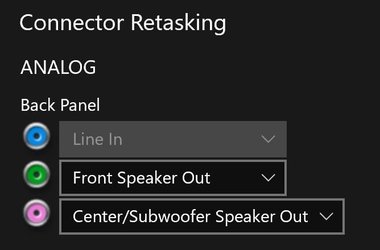
The main reason that I ended up here is because I am not able to retask the audio jack on the motherboard (rear jack) for rear speakers. It is set to Line In and greyed out. If I unplug and re-insert the jack, it detects the action, but the drop down on the pop up won't give me any other options besides "Line In".
Connector Restasking.jpg
 

My Computer My Computer

At a glance

Windows 11Intel Core i9-10900KKingston KHX3600C18D4/32GXNVIDIA GeForce RTX 3060
OS
Windows 11
Computer type
PC/Desktop
Manufacturer/Model
ASUS
CPU
Intel Core i9-10900K
Motherboard
ASUS ROG STRIX Z490-I GAMING
Memory
Kingston KHX3600C18D4/32GX
Graphics Card(s)
NVIDIA GeForce RTX 3060
Sound Card
Realtek Audio
Monitor(s) Displays
LG HDR 4K
Screen Resolution
3840 x 2160
Hard Drives
SK hynix Gold P31 1TB
Case
Rajintek Ophion Evo
followed the update and successfully updated my Realtek audio driver. thank you MoKiChU!
 

My Computer My Computer

At a glance

windows 11Intel Core i5 12600KFCorsair DDR5-5600NVIDIA Geforce RTX 2060 SUPER
OS
windows 11
Computer type
PC/Desktop
CPU
Intel Core i5 12600KF
Motherboard
PRIME Z690-P
Memory
Corsair DDR5-5600
Graphics Card(s)
NVIDIA Geforce RTX 2060 SUPER
Monitor(s) Displays
BenQ XL2420T
Screen Resolution
1080p
Hard Drives
Seagate FireCuda 530 ZP1000GM30013
I have an ASUS ROG STRIX Z490-I GAMING motherboard. Which drivers do I need?

Hi,

You have an ASUS ROG SS3|DTS Sound Unbound motherboard, so :

You need Realtek Audio Drivers (UAD - ASUS ROG SS3-DTS) from the first post of this thread.

Follow scrupulously your CLEANUP process then your INSTALL process, for the next drivers packages that I would release, you will can directly follow your UPDATE process.
 

My Computer My Computer

At a glance

Windows 11 ProAMD Ryzen 7 7800X3DG.Skill Trident Z5 Neo RGB DDR5 6000MHz CL30 ...ASUS ROG Strix RTX 4080 OC
OS
Windows 11 Pro
Computer type
PC/Desktop
CPU
AMD Ryzen 7 7800X3D
Motherboard
ASUS ROG Strix B650E-F Gaming WiFi
Memory
G.Skill Trident Z5 Neo RGB DDR5 6000MHz CL30 - 32GB (2 x 16GB)
Graphics Card(s)
ASUS ROG Strix RTX 4080 OC
Monitor(s) Displays
ASUS ROG Strix XG35VQ
Screen Resolution
3440 x 1440 Full RGB @ 100Hz
Hard Drives
SSD Samsung 990 PRO 1TB
SSD Samsung 970 EVO Plus 500GB
PSU
Seasonic Focus GX 850W ATX 3.0
Case
NZXT H5 Flow
Cooling
NZXT Kraken X53
Keyboard
Logitech G513
Mouse
Logitech G502
Hello I have a Prime Z270-a so as usual, I ran the update processs for Realtek Audio Drivers (UAD - ASUS TUF/PRIME DTS HPXv1)

Unfortunately immediately after installing this latest version 6.0.9452.1 WHQL [06/12/2022] the sound is way louder and distorted, also giving me pops and crackles

I don't suppose you have an archive of your previous releases? I'm not sure what to do now because I can't roll back since I used Driver Store Explorer to delete the old versions as per the instructions.

Thanks for your help!
 

My Computer My Computer

At a glance

Windows 11
OS
Windows 11
Before rolling back or installing older version, have you checked all your settings?
I mean all, Realtek audio control, windows settings app sound, and the one in control panel.
Also depending if you have sonic studio or DTS that too.
 

My Computers My Computers

  • At a glance

    Win10 Pro, Win10 Pro N, Win10 Home, Windows 8...Intel Core i9 9900K32 GB Quad Kit, G.Skill Trident Z RGB Series ...ASUS GeForce RTX 3090 ROG Strix O24G, 24576 M...
    OS
    Win10 Pro, Win10 Pro N, Win10 Home, Windows 8.1 Pro, Ubuntu
    Computer type
    PC/Desktop
    Manufacturer/Model
    ۞ΞЖ†ԘΜΞ۞
    CPU
    Intel Core i9 9900K
    Motherboard
    ASUS ROG Maximus X Hero
    Memory
    32 GB Quad Kit, G.Skill Trident Z RGB Series schwarz, DDR4-3866, 18-19-19-39-2T
    Graphics Card(s)
    ASUS GeForce RTX 3090 ROG Strix O24G, 24576 MB GDDR6X
    Sound Card
    (1) HD Webcam C270 (2) NVIDIA High Definition Audio (3) Realtek High Definition Audio
    Monitor(s) Displays
    BenQ BL2711U(4K) and a hp 27vx(1080p)
    Hard Drives
    C: Samsung 960 EVO NVMe M.2 SSD
    E: & O: Libraries & OneDrive-> Samsung 850 EVO 1TB
    D: Hyper-V VM's -> Samsung PM951 Client M.2 512Gb SSD
    G: System Images -> Samsung 860 Pro 2TB
    PSU
    Corsair HX1000i High Performance ATX Power Supply 80+ Platinum
    Case
    Phanteks Enthoo Pro TG
    Cooling
    Thermaltake Floe Riing RGB TT Premium-Edition 360mm and 2x120 Phantek& Halo front, and 1x140 Phanteks
    Keyboard
    Trust GTX THURA
    Mouse
    Trust GTX 148
    Internet Speed
    25+/5+ (+usually faster)
    Browser
    Edge; Chrome;
    Antivirus
    Windows Defender of course & Malwarebytes Anti-Exploit as an added layer between browser & OS
    Other Info
    Router: FRITZ!Box 7590 AX V2
    Sound system: SHARP HT-SBW460 Dolby Atmos Soundbar
    Webcam: Logitech BRIO ULTRA HD PRO WEBCAM 4K webcam with HDR
  • At a glance

    Windoes 10 HomeIntel Ii 6700K32GB DDR4 Corsair Vengeance Blue 3000MHzZOTAC GAMING GeForce RTX 1080 Ti AMP Extreme ...
    Operating System
    Windoes 10 Home
    Computer type
    PC/Desktop
    Manufacturer/Model
    Hyrican
    CPU
    Intel Ii 6700K
    Motherboard
    MSI Z170A PC MATE
    Memory
    32GB DDR4 Corsair Vengeance Blue 3000MHz
    Graphics card(s)
    ZOTAC GAMING GeForce RTX 1080 Ti AMP Extreme Core
    Sound Card
    Connected via HDMI from graics card to home theater system
    Monitor(s) Displays
    Samsung 50" Crystal UHD 4K TU7179 (2020)
    Screen Resolution
    4K
    Hard Drives
    two 256GB San Disk SSD Plus
    PSU
    Corsair 650W CX650M (80+ Bronze)
    Case
    Inwin 303
    Cooling
    Arctic Freezer i11 for CPU and 3 Corsair fans on top ans 3 on the bottom
    Keyboard
    Old generic from Lenovo
    Mouse
    Old generic from Lenovo
    Internet Speed
    25/5
    Browser
    Edge, Chrome
    Antivirus
    Windows Security(Defender)
installed
Before rolling back or installing older version, have you checked all your settings?
I mean all, Realtek audio control, windows settings app sound, and the one in control panel.
Also depending if you have sonic studio or DTS that too.
I have noted that the volume Amplify level always re-defaults to [Extreme] and I have to re-lower it to [Powerful] level.
When I update my UAD Realtek audio driver..
 

My Computers My Computers

  • At a glance

    Windows 11 Pro (x64)(v25H2)(26200.8894)AMD Ryzen 9 3900X 12-Core/24-threads64GB, 2x G.Skill 32GB (PC3200)(DDR4-2137)ASUS PRIME GeForce RTX 5070 12GB OC Edition, ...
    OS
    Windows 11 Pro (x64)(v25H2)(26200.8894)
    Computer type
    PC/Desktop
    Manufacturer/Model
    [Self-built](custom-build)(June 2020)
    CPU
    AMD Ryzen 9 3900X 12-Core/24-threads
    Motherboard
    Asus PRIME X570-PRO (BIOS_r5044 [01/04/2026])
    Memory
    64GB, 2x G.Skill 32GB (PC3200)(DDR4-2137)
    Graphics Card(s)
    ASUS PRIME GeForce RTX 5070 12GB OC Edition, GPU by NVIDIA.
    Sound Card
    Realtek® ALC1220A 8-Channel High Definition Audio CODEC
    Monitor(s) Displays
    24" DELL Gaming Monitor - G2422HS - DisplayPort used
    Screen Resolution
    1920x1080p at 165Hz (16:9 Aspect Ratio)
    Hard Drives
    2TB Samsung 980 Pro (NVMe)(SSD)
    4TB Samsung 990 Pro (NVMe)(SSD)
    2TB Samsung 870 EVO (SSD)

    NVMe 2TB
    -- OS(Win11 Pro x64),
    -- programs,
    -- programming(MS Visual Studios 2022 Community Ed.),
    -- music

    NVMe 4TB
    video game installs.

    #3 FILE Server!
    PSU
    Thermaltake TOUGHPOWER DPS G RGB Titanium Certified 1250Watt
    Case
    Corsair Graphite Series 780T Full Tower PC Case
    Cooling
    AMD Wraith cooler (stock) & 3x Corsair case fans
    Keyboard
    Redragon K580 VATA RGB LED Backlit Mechanical Gaming Keyboard (brown switches).
    Mouse
    Redragon M602 RGB Wired USB Gaming mouse
    Internet Speed
    2,100Mbps Download, 300Mbps Upload
    Browser
    Firefox & Google Chrome
    Antivirus
    n/a aka "ABOVE TOP SECRET!" lol ;)
    Other Info
    My System is the ULTIMATE GAMING RIG ^_^
    TP-Link BE9300 Tri-Band Wi-Fi 7 Wireless 2.5Gigabit Router
    Model Archer BE550 (v1.0)
    Arris S34 Cable Modem

    printer/scanner/copier: Brother DCP-7065DN

    Nvidia GFX Drivers: (v610.74)
    Realtek UAD Drivers: (v6.0.10010.1)
    Realtek LAN Drivers:(v1125.30.50.508)(2026-06-21)
    Intel LAN Drivers: (v14.01.24.00)(2025-10-03)
  • At a glance

    Windows 11 Pro x64AMD Ryzen 7 5800H32GB GSkill DDR4 2x 16GB sticksRyzen 7 5800H integrated AMD Radeon Graphics ...
    Operating System
    Windows 11 Pro x64
    Computer type
    Laptop
    Manufacturer/Model
    DELL G15 Ryzen edition, model 5515
    CPU
    AMD Ryzen 7 5800H
    Motherboard
    DELL G15 Ryzen edition
    Memory
    32GB GSkill DDR4 2x 16GB sticks
    Graphics card(s)
    Ryzen 7 5800H integrated AMD Radeon Graphics and Nvidia GeForce 3060 6GB
    Sound Card
    Realtek ALC3254 with Nahimic 3D Audio for Gamers
    Monitor(s) Displays
    built-in
    Screen Resolution
    1920x1080
    Hard Drives
    512GB NVMe SSD, 1TB Samsung 970 EVO NVMe SSD
    PSU
    unknown
    Case
    laptop
    Keyboard
    built-in
    Mouse
    Logitech B100 USB
    Internet Speed
    2,100Mbps download, 300Mbps upload
    Browser
    Firefox & Google Chrome
- Realtek Audio Drivers (UAD - ASUS TUF/PRIME DTS HPXv1) :
Drivers : 6.0.9452.1 WHQL [06/12/2022]​


Thread updated.
As always Thank you MoKiChU. You are appreciated. STAY WELL!
 

My Computer My Computer

At a glance

Windows 11 ProIntel® Core™ i5-9600K 5.2GHzG.SKILL Ripjaws V Series 32GB (2 x 16GB) 288-...
OS
Windows 11 Pro
Computer type
PC/Desktop
CPU
Intel® Core™ i5-9600K 5.2GHz
Motherboard
ASUS Prime Z390-A
Memory
G.SKILL Ripjaws V Series 32GB (2 x 16GB) 288-Pin PC RAM DDR4 3600
Before rolling back or installing older version, have you checked all your settings?
I mean all, Realtek audio control, windows settings app sound, and the one in control panel.
Also depending if you have sonic studio or DTS that too.

installed

I have noted that the volume Amplify level always re-defaults to [Extreme] and I have to re-lower it to [Powerful] level.
When I update my UAD Realtek audio driver..

I took a look in the various settings and tried some things but i could fix the overblown sound. with nothing else changed, its at least twice as loud as before with the new drivers installed.

I didnt see the amplify setting though and admit that makes sense to check. where could i find that?

thank you
 

My Computer My Computer

At a glance

Windows 11
OS
Windows 11
I took a look in the various settings and tried some things but i could fix the overblown sound. with nothing else changed, its at least twice as loud as before with the new drivers installed.

I didnt see the amplify setting though and admit that makes sense to check. where could i find that?

thank you
Realtek Audio Console_Amplify levels.png
It is under the playback devices, for me under speakers its there in the screenshot...
 

My Computers My Computers

  • At a glance

    Windows 11 Pro (x64)(v25H2)(26200.8894)AMD Ryzen 9 3900X 12-Core/24-threads64GB, 2x G.Skill 32GB (PC3200)(DDR4-2137)ASUS PRIME GeForce RTX 5070 12GB OC Edition, ...
    OS
    Windows 11 Pro (x64)(v25H2)(26200.8894)
    Computer type
    PC/Desktop
    Manufacturer/Model
    [Self-built](custom-build)(June 2020)
    CPU
    AMD Ryzen 9 3900X 12-Core/24-threads
    Motherboard
    Asus PRIME X570-PRO (BIOS_r5044 [01/04/2026])
    Memory
    64GB, 2x G.Skill 32GB (PC3200)(DDR4-2137)
    Graphics Card(s)
    ASUS PRIME GeForce RTX 5070 12GB OC Edition, GPU by NVIDIA.
    Sound Card
    Realtek® ALC1220A 8-Channel High Definition Audio CODEC
    Monitor(s) Displays
    24" DELL Gaming Monitor - G2422HS - DisplayPort used
    Screen Resolution
    1920x1080p at 165Hz (16:9 Aspect Ratio)
    Hard Drives
    2TB Samsung 980 Pro (NVMe)(SSD)
    4TB Samsung 990 Pro (NVMe)(SSD)
    2TB Samsung 870 EVO (SSD)

    NVMe 2TB
    -- OS(Win11 Pro x64),
    -- programs,
    -- programming(MS Visual Studios 2022 Community Ed.),
    -- music

    NVMe 4TB
    video game installs.

    #3 FILE Server!
    PSU
    Thermaltake TOUGHPOWER DPS G RGB Titanium Certified 1250Watt
    Case
    Corsair Graphite Series 780T Full Tower PC Case
    Cooling
    AMD Wraith cooler (stock) & 3x Corsair case fans
    Keyboard
    Redragon K580 VATA RGB LED Backlit Mechanical Gaming Keyboard (brown switches).
    Mouse
    Redragon M602 RGB Wired USB Gaming mouse
    Internet Speed
    2,100Mbps Download, 300Mbps Upload
    Browser
    Firefox & Google Chrome
    Antivirus
    n/a aka "ABOVE TOP SECRET!" lol ;)
    Other Info
    My System is the ULTIMATE GAMING RIG ^_^
    TP-Link BE9300 Tri-Band Wi-Fi 7 Wireless 2.5Gigabit Router
    Model Archer BE550 (v1.0)
    Arris S34 Cable Modem

    printer/scanner/copier: Brother DCP-7065DN

    Nvidia GFX Drivers: (v610.74)
    Realtek UAD Drivers: (v6.0.10010.1)
    Realtek LAN Drivers:(v1125.30.50.508)(2026-06-21)
    Intel LAN Drivers: (v14.01.24.00)(2025-10-03)
  • At a glance

    Windows 11 Pro x64AMD Ryzen 7 5800H32GB GSkill DDR4 2x 16GB sticksRyzen 7 5800H integrated AMD Radeon Graphics ...
    Operating System
    Windows 11 Pro x64
    Computer type
    Laptop
    Manufacturer/Model
    DELL G15 Ryzen edition, model 5515
    CPU
    AMD Ryzen 7 5800H
    Motherboard
    DELL G15 Ryzen edition
    Memory
    32GB GSkill DDR4 2x 16GB sticks
    Graphics card(s)
    Ryzen 7 5800H integrated AMD Radeon Graphics and Nvidia GeForce 3060 6GB
    Sound Card
    Realtek ALC3254 with Nahimic 3D Audio for Gamers
    Monitor(s) Displays
    built-in
    Screen Resolution
    1920x1080
    Hard Drives
    512GB NVMe SSD, 1TB Samsung 970 EVO NVMe SSD
    PSU
    unknown
    Case
    laptop
    Keyboard
    built-in
    Mouse
    Logitech B100 USB
    Internet Speed
    2,100Mbps download, 300Mbps upload
    Browser
    Firefox & Google Chrome
View attachment 48794
It is under the playback devices, for me under speakers its there in the screenshot...

that definitely helped! i dont recall changing that setting before but i must have (if it resets after updating) and just don't remember.

Regardless thank you very much everyone
 

My Computer My Computer

At a glance

Windows 11
OS
Windows 11
Hi,

You have an ASUS ROG SS3|DTS Sound Unbound motherboard, so :

You need Realtek Audio Drivers (UAD - ASUS ROG SS3-DTS) from the first post of this thread.

Follow scrupulously your CLEANUP process then your INSTALL process, for the next drivers packages that I would release, you will can directly follow your UPDATE process.
I downloaded and followed the CLEANUP and INSTALL instructions exactly. When done, I experienced a BSOD. I rebooted and did not have any more BSODs so far.

I am now running the latest Realtek Audio Drivers.

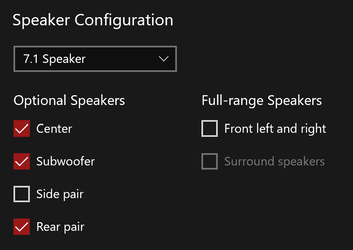
I also discovered that I need to set the speaker configuration to 7.1 Speaker to be able to RETASK the Back Panel jacks. This probably would have solve my original problem with the exisint drivers that were installed.

1672522721837.png1672522764668.png
 

My Computer My Computer

At a glance

Windows 11Intel Core i9-10900KKingston KHX3600C18D4/32GXNVIDIA GeForce RTX 3060
OS
Windows 11
Computer type
PC/Desktop
Manufacturer/Model
ASUS
CPU
Intel Core i9-10900K
Motherboard
ASUS ROG STRIX Z490-I GAMING
Memory
Kingston KHX3600C18D4/32GX
Graphics Card(s)
NVIDIA GeForce RTX 3060
Sound Card
Realtek Audio
Monitor(s) Displays
LG HDR 4K
Screen Resolution
3840 x 2160
Hard Drives
SK hynix Gold P31 1TB
Case
Rajintek Ophion Evo

Latest Support Threads

Back
Top Bottom