DVD RW Drives Not seen in w11pro


developerlse

New member
Local time
5:11 AM
Posts
8
OS
w11
DVD RW Drives Not seen in w11pro
Applied Required & Optional updates

Restarted but same

Is a dual boot system w10pro + w11pro
well?


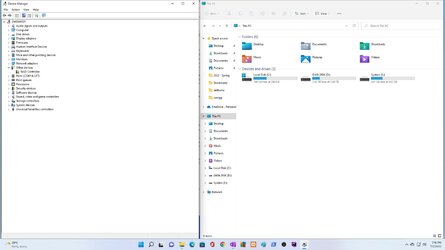
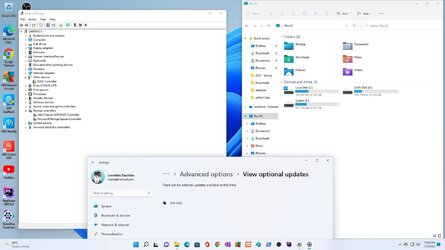
error-optical-drives-not-seem-z440w11pro.jpg
 

My Computer My Computer

At a glance

w11
OS
w11
Can we assume that you can see the DVD-RW drives in Windows 10? Perhaps it's a driver issue, then. See if you can locate either a new or legacy driver for the drive in question and install it.
 

My Computers My Computers

  • At a glance

    Windows 11 Pro 25H2 RP channelRyzen 9 5900XCorsair Vengeance RGB PRO 64GB (2x32GB) DDR4 ...ASUS GeForce RTX 4070 Super OC 12GB DDR6 / ZO...
    OS
    Windows 11 Pro 25H2 RP channel
    Computer type
    PC/Desktop
    Manufacturer/Model
    Home built
    CPU
    Ryzen 9 5900X
    Motherboard
    MSI MPG X570S Edge Max WiFi
    Memory
    Corsair Vengeance RGB PRO 64GB (2x32GB) DDR4 3600 (PC4-28800) C18
    Graphics Card(s)
    ASUS GeForce RTX 4070 Super OC 12GB DDR6 / ZOTAC RTX 3060 Twin Edge OC 12GB GDDR6
    Sound Card
    Proprietary on MB / FiiO K5Pro DAC
    Monitor(s) Displays
    ViewSonic XG2530 25"/Benq XL2411P 24"/ ASUS VA24DQSB) 23.8"
    Screen Resolution
    1920x1080 240Hz/144Hz/60Hz (based on monitor setup above)
    Hard Drives
    SK hynix Gold P31 1TB PCIe NVMe Gen3 M.2 2280 Internal SSD
    ADATA XPG SX8200 Pro 1TB
    Samsung SSD 860 EVO 1TB 2.5 Inch SATA III Internal SSD
    PSU
    Corsair RM1000e
    Case
    Phanteks Enthoo Pro Full Tower Chassis with Window
    Cooling
    Corsair iCUE H60i RGB PRO XT Liquid CPU Cooler
    Keyboard
    Corsair K70
    Mouse
    Logitech MX Master 3
    Internet Speed
    ~950Mb/s download / ~700Mb/s upload
    Browser
    Edge (Chromium)
    Antivirus
    Norton 360
  • At a glance

    Windows 11 ProRyzen 7 3700X32MB DDR4I forget, but it's old. I can't see the need ...
    Operating System
    Windows 11 Pro
    Computer type
    PC/Desktop
    Manufacturer/Model
    Home Built
    CPU
    Ryzen 7 3700X
    Motherboard
    MSI B550 Gaming GEN3 Gaming Motherboard
    Memory
    32MB DDR4
    Graphics card(s)
    I forget, but it's old. I can't see the need to upgrade it.
    Sound Card
    Propietary
    Monitor(s) Displays
    ACER LED 24"
    Screen Resolution
    1920X1080
    Hard Drives
    1TB Samsung SSD 3.5"
    Case
    Corsair
    Cooling
    Stock
    Keyboard
    Logitech
    Mouse
    Logitech
    Internet Speed
    ~750Mb/s download / ~750Mb/s upload
    Browser
    Edge
    Antivirus
    Defender and Malware Bytes
  • ASUS Vivobook 16X, 16" WUXGA(1920x1200) Business Laptop Computer, AMD Ryzen 7, 16GB DDR4 RAM, 1TB SSD, Windows 11 Pro, Wi-Fi 6, USB-C, Full-Sized Keyboard, Webcam, HDMI
If you mean that it is detected & shown in Windows 10 then I suggest you compare the Device manager entries in both OS in the hope of identifying a missing Windows 11 driver.

Denis
 

My Computer My Computer

At a glance

Windows 11 Home x64 Version 25H2 Build 26200....
OS
Windows 11 Home x64 Version 25H2 Build 26200.8037
yes in w10pro all OK, seem ok...

My w11pro system is a hp z440 workstation...

The processor does Not support w11pro but installed w11pro by unsupported solutions that exist on the internet

===

well...?
 

My Computer My Computer

At a glance

w11
OS
w11
Try the suggestions here:

Try this too:
Right click Start>Run & type regedit & click enter, find HKEY_LOCAL_MACHINE\SYSTEM\CurrentControlSet\Control\Class\{4D36E965-E325-11CE-BFC1-08002BE10318}
Click on this folder - {4D36E965-E325-11CE-BFC1-08002BE10318} & under the right-hand pane right click on UpperFilters & choose delete. If the filter is named UpperFilters.bak then please do not delete this.
If there is no UpperFilters entry then proceed to delete the LowerFilters entry.
Close regedit & reboot your PC.

If this doesn’t work try this fix by Kapil Arya:

Try these steps:

1. Open the Command Prompt with administrative privileges.

2. Type the following command and hit Enter key:

reg.exe add “HKLM\System\CurrentControlSet\Services\atapi\Controller0” /f /v EnumDevice1 /t REG_DWORD /d 0x00000001

3. Exit the Command Prompt and reboot. Insert a disk to test and the optical or DVD drive should be visible now.

 

My Computers My Computers

  • At a glance

    Windows 11 Pro 64bit6th Gen Intel Core i7-6700HQ Quad Core proces...16GB HyperX IMPACT 1600MHz SODIMM DDR3 (2 x 8GB)NVIDIA® GeForce® GTX 960M - 2.0GB DDR5 Video ...
    OS
    Windows 11 Pro 64bit
    Computer type
    Laptop
    Manufacturer/Model
    PC Specialist Optimus VII V17-960 Gaming Laptop.
    CPU
    6th Gen Intel Core i7-6700HQ Quad Core processor.
    Memory
    16GB HyperX IMPACT 1600MHz SODIMM DDR3 (2 x 8GB)
    Graphics Card(s)
    NVIDIA® GeForce® GTX 960M - 2.0GB DDR5 Video RAM - DirectX® 12
    Sound Card
    Intel 2 Channel High Def. Audio + SoundBlaster™ Cinema 2 & Realtek
    Monitor(s) Displays
    Optimus Series: 17.3" Matte Full HD IPS LED Widescreen (1920x1080)
    Screen Resolution
    Full HD IPS display (1920 x 1080).
    Hard Drives
    4TB SSD (internal).
    1x 1TB & 1x 5TB external HDDs.
    Cooling
    STANDARD THERMAL PASTE FOR SUFFICIENT COOLING
    Keyboard
    Logitech K800 wireless keyboard
    Mouse
    Logitech M705 wireless mouse
    Internet Speed
    Upto 100Mbps
    Browser
    Edge.
    Antivirus
    Windows Defender & MalwareBytes pro.
  • At a glance

    IOS 14.6
    Operating System
    IOS 14.6
    Computer type
    Tablet
    Manufacturer/Model
    Apple
Try the suggestions here:

Try this too:
Right click Start>Run & type regedit & click enter, find HKEY_LOCAL_MACHINE\SYSTEM\CurrentControlSet\Control\Class\{4D36E965-E325-11CE-BFC1-08002BE10318}
Click on this folder - {4D36E965-E325-11CE-BFC1-08002BE10318} & under the right-hand pane right click on UpperFilters & choose delete. If the filter is named UpperFilters.bak then please do not delete this.
If there is no UpperFilters entry then proceed to delete the LowerFilters entry.
Close regedit & reboot your PC.

If this doesn’t work try this fix by Kapil Arya:

Try these steps:

1. Open the Command Prompt with administrative privileges.

2. Type the following command and hit Enter key:

reg.exe add “HKLM\System\CurrentControlSet\Services\atapi\Controller0” /f /v EnumDevice1 /t REG_DWORD /d 0x00000001

3. Exit the Command Prompt and reboot. Insert a disk to test and the optical or DVD drive should be visible now.
I'm pretty sure it's not Win 11 - I installed Win 11 on a lot older PC and my DVD works fine - in fact I had to burn a DVD to update the bios ..

Almost certainly a driver issue - (as an aside I'm having issues on the T61 with an SSD not being recognised in the bios)
 

My Computer My Computer

At a glance

Windows
OS
Windows
It has nothing to do with your dvd drive, but I'm curious to know why you haven't installed your raid driver. That would be Intel IRST.
 

My Computers My Computers

  • At a glance

    Windows 11 Pro 25H2 26200.8655i9-10900 10 core 20 threads32 gbnone-Intel UHD Graphics 630
    OS
    Windows 11 Pro 25H2 26200.8655
    Computer type
    PC/Desktop
    Manufacturer/Model
    Dell Optiplex 7080
    CPU
    i9-10900 10 core 20 threads
    Motherboard
    DELL 0J37VM
    Memory
    32 gb
    Graphics Card(s)
    none-Intel UHD Graphics 630
    Sound Card
    Integrated Realtek
    Monitor(s) Displays
    Benq 27
    Screen Resolution
    2560x1440
    Hard Drives
    2x1tb Solidigm m.2 nvme /External drives 512gb Samsung m.2 sata+2tb Kingston m2.nvme
    PSU
    500w
    Case
    MT
    Cooling
    Dell Premium
    Keyboard
    Logitech wired
    Mouse
    Logitech wireless
    Internet Speed
    so slow I'm too embarrassed to tell
    Browser
    #1 Edge #2 Firefox
    Antivirus
    Defender+MWB Premium
  • At a glance

    Windows 11 Pro 24H2 26200.8457AMD Ryzen 7 6800U32 gbintegrated
    Operating System
    Windows 11 Pro 24H2 26200.8457
    Computer type
    PC/Desktop
    Manufacturer/Model
    Beelink Mini PC SER5
    CPU
    AMD Ryzen 7 6800U
    Memory
    32 gb
    Graphics card(s)
    integrated
    Sound Card
    integrated
    Monitor(s) Displays
    Benq 27
    Screen Resolution
    2560x1440
    Hard Drives
    1TB Crucial nvme
    Keyboard
    Logitech wired
    Mouse
    Logitech wireless
    Internet Speed
    still too embarrassed to tell
    Browser
    Firefox
    Antivirus
    Defender
    Other Info
    System 3 is non compliant Dell 9020 i7-4770/24gb ram Win11 PRO 26200.8457
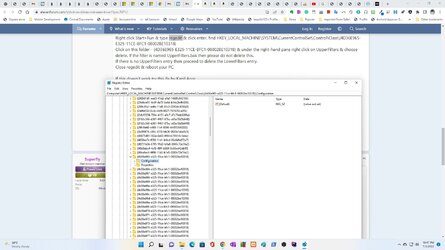
tried ALL above but,

No result

see shots below

well...?

4-debugging-result.jpg

3-debugging-regedit.jpg


2-debugging-regedit.jpg

1-debugging-cmd.jpg
 

My Computer My Computer

At a glance

w11
OS
w11
Have you restarted the pc?
 

My Computers My Computers

  • At a glance

    Windows 11 Pro 64bit6th Gen Intel Core i7-6700HQ Quad Core proces...16GB HyperX IMPACT 1600MHz SODIMM DDR3 (2 x 8GB)NVIDIA® GeForce® GTX 960M - 2.0GB DDR5 Video ...
    OS
    Windows 11 Pro 64bit
    Computer type
    Laptop
    Manufacturer/Model
    PC Specialist Optimus VII V17-960 Gaming Laptop.
    CPU
    6th Gen Intel Core i7-6700HQ Quad Core processor.
    Memory
    16GB HyperX IMPACT 1600MHz SODIMM DDR3 (2 x 8GB)
    Graphics Card(s)
    NVIDIA® GeForce® GTX 960M - 2.0GB DDR5 Video RAM - DirectX® 12
    Sound Card
    Intel 2 Channel High Def. Audio + SoundBlaster™ Cinema 2 & Realtek
    Monitor(s) Displays
    Optimus Series: 17.3" Matte Full HD IPS LED Widescreen (1920x1080)
    Screen Resolution
    Full HD IPS display (1920 x 1080).
    Hard Drives
    4TB SSD (internal).
    1x 1TB & 1x 5TB external HDDs.
    Cooling
    STANDARD THERMAL PASTE FOR SUFFICIENT COOLING
    Keyboard
    Logitech K800 wireless keyboard
    Mouse
    Logitech M705 wireless mouse
    Internet Speed
    Upto 100Mbps
    Browser
    Edge.
    Antivirus
    Windows Defender & MalwareBytes pro.
  • At a glance

    IOS 14.6
    Operating System
    IOS 14.6
    Computer type
    Tablet
    Manufacturer/Model
    Apple

My Computer My Computer

At a glance

Windows 11 Pro 25H2 (RP channel)AMD Ryzen 7 9800X3D 8-core64GB Corsair Titanium 6000/CL30MSI Suprim 5080 SOC
OS
Windows 11 Pro 25H2 (RP channel)
Computer type
PC/Desktop
Manufacturer/Model
MSI
CPU
AMD Ryzen 7 9800X3D 8-core
Motherboard
MEG X870E Godlike
Memory
64GB Corsair Titanium 6000/CL30
Graphics Card(s)
MSI Suprim 5080 SOC
Sound Card
Soundblaster AE-9
Monitor(s) Displays
ASUS TUF Gaming VG289Q
Screen Resolution
3840x2160
Hard Drives
Samsung 9100 Pro 4TB (gen 5 x4, system drive/games)
Samsung 990 Pro 2TB
Samsung 980 Pro 2TB
Samsung 870 Evo 4TB
Samsung 870 Evo 2TB
Samsung T9 4TB
PSU
Seasonic PX-2200
Case
Bequiet! Dark Base Pro 901
Cooling
Noctua NH-D15S Chromax black
Keyboard
Logitech G915 X (wired)
Mouse
Logitech G903 with PowerPlay charger
Internet Speed
900Mb/sec
Browser
Microsoft Edge
Antivirus
Windows Defender
No are two SATA 3 internal DVD-R/DL Drives, and work in w10pro but do NOT seem in w11pro
 

My Computer My Computer

At a glance

w11
OS
w11
@developerlse

For Non USB type -- see if Bios recognises those as Disks in W11 boot, or see if any drivers from W10 can be used on W11.

For USB types - no prob.


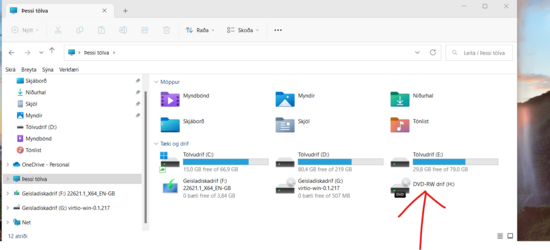
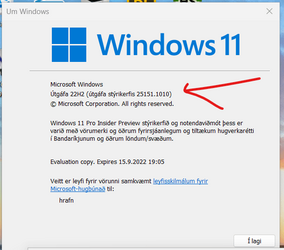
No problem here (on Windows 11 25151 pre_release build) Samsung portable USB Multi format DVD drive - old one USB 2 but works perfectly.

Skjámynd 2022-07-04 095030.png

Windows rel

Skjámynd 2022-07-04 095307.png


Cheers
jimbo
 

My Computer My Computer

At a glance

Windows XP,11 Linux Fedora Rawhide pre-releas...2 X Intel i7
OS
Windows XP,11 Linux Fedora Rawhide pre-release 45
Computer type
PC/Desktop
CPU
2 X Intel i7
Screen Resolution
4KUHD X 2
WENT INSTALL Intel DRIVER
SEE

but getting errors...

Available Downloads​

DownloadSetupRST.exe
  • Windows 8 family*, Windows 10 Family*, Windows Server 2016 family*
  • Size: 21 MB
  • SHA1: 1F53BD47BDC9D8C54AC7B9B1652C41CD1AA59F42
 

My Computer My Computer

At a glance

w11
OS
w11
We know absolutely nothing about your hardware as you have not completed your system specs in your profile. It would be helpful if we knew what you're working with here. If it is a brand computer what is the make/model/cpu. If it is a home built computer what is motherboard/cpu/etc

You say you are getting errors on your raid driver but I found your post on MS forum with a screenshot that the raid driver would not install because your platform is not supported.

Yet in screenshot in post 8 above under storage controllers it appears you do have IRST installed. Granted, the raid controller should have nothing to do with optical drives, but we do not know enough about your system to even guess how it is seeing your hardware. For the unidentified device, under 'other devices' right click on the unidentified raid controller-select properties-details tab-There should be PCI/Ven info there. What is it?

In your Windows 11 install, did you install your own drivers or did you let Windows update install them.?

As far as any registry entries pertaining to your optical drives, they should be the same in 11 as they are in 10 since the dvd drives are working in 10.
 

My Computers My Computers

  • At a glance

    Windows 11 Pro 25H2 26200.8655i9-10900 10 core 20 threads32 gbnone-Intel UHD Graphics 630
    OS
    Windows 11 Pro 25H2 26200.8655
    Computer type
    PC/Desktop
    Manufacturer/Model
    Dell Optiplex 7080
    CPU
    i9-10900 10 core 20 threads
    Motherboard
    DELL 0J37VM
    Memory
    32 gb
    Graphics Card(s)
    none-Intel UHD Graphics 630
    Sound Card
    Integrated Realtek
    Monitor(s) Displays
    Benq 27
    Screen Resolution
    2560x1440
    Hard Drives
    2x1tb Solidigm m.2 nvme /External drives 512gb Samsung m.2 sata+2tb Kingston m2.nvme
    PSU
    500w
    Case
    MT
    Cooling
    Dell Premium
    Keyboard
    Logitech wired
    Mouse
    Logitech wireless
    Internet Speed
    so slow I'm too embarrassed to tell
    Browser
    #1 Edge #2 Firefox
    Antivirus
    Defender+MWB Premium
  • At a glance

    Windows 11 Pro 24H2 26200.8457AMD Ryzen 7 6800U32 gbintegrated
    Operating System
    Windows 11 Pro 24H2 26200.8457
    Computer type
    PC/Desktop
    Manufacturer/Model
    Beelink Mini PC SER5
    CPU
    AMD Ryzen 7 6800U
    Memory
    32 gb
    Graphics card(s)
    integrated
    Sound Card
    integrated
    Monitor(s) Displays
    Benq 27
    Screen Resolution
    2560x1440
    Hard Drives
    1TB Crucial nvme
    Keyboard
    Logitech wired
    Mouse
    Logitech wireless
    Internet Speed
    still too embarrassed to tell
    Browser
    Firefox
    Antivirus
    Defender
    Other Info
    System 3 is non compliant Dell 9020 i7-4770/24gb ram Win11 PRO 26200.8457
Yes best thing I'd do is install Driver Booster and only see for *Missing driver or a unknown title one and that's your DVD drive
 

My Computers My Computers

  • At a glance

    WiN11 ProXeon E5450 3.0GHZ (OC 3.6GHZ)8GB (2GBX4)NVIDIA Quadro K2200 4GB
    OS
    WiN11 Pro
    Computer type
    PC/Desktop
    Manufacturer/Model
    Custom 775 System
    CPU
    Xeon E5450 3.0GHZ (OC 3.6GHZ)
    Motherboard
    ASUS PQ5-EM
    Memory
    8GB (2GBX4)
    Graphics Card(s)
    NVIDIA Quadro K2200 4GB
    Sound Card
    Onboard
    Monitor(s) Displays
    ASUS 24"
    Screen Resolution
    1080p
    Hard Drives
    1TB|750GB USB, 3 SSDs 2 240GB 1 128GB, 750GB HDD
    PSU
    650WATT Rosewill
    Case
    Rosewill with side Window
    Cooling
    5 Fans and a big HSK for cpu
    Keyboard
    Rosewill RGB
    Mouse
    Rosewill RGB
    Internet Speed
    AT&T 150MB DL\UP
    Browser
    FireFox
    Antivirus
    None
    Other Info
    I'm lucky to even be here after 6yrs from my car accident
  • At a glance

    WiN10 LTSCi7 2670QM 2.20GHZ8GB (2X4GB) DUAL ChannelIntel HD Graphics 3000
    Operating System
    WiN10 LTSC
    Computer type
    Laptop
    Manufacturer/Model
    Hp 8460p
    CPU
    i7 2670QM 2.20GHZ
    Motherboard
    Hp 161C
    Memory
    8GB (2X4GB) DUAL Channel
    Graphics card(s)
    Intel HD Graphics 3000
    Sound Card
    Intel high Def (basically onboard)
    Screen Resolution
    1366x768
    Hard Drives
    OS 128GB l Storage (caddy) 320GB
    PSU
    AC (IDK the watts)
    Browser
    Firefox
    Antivirus
    Defender
    Other Info
    A USB 3.0 in the Express Card Slot
PC is a
HP Z440 Base model 32GB Ram

Do you mean connect an external DVD DRIVE USB??? I WILL TRY SOON - I have a USB external BD-R Burner
 

My Computer My Computer

At a glance

w11
OS
w11
New Update

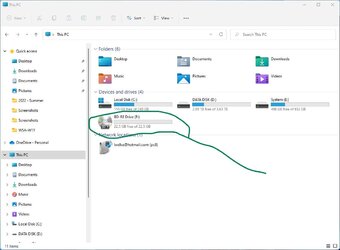
I connected External USB 3 BD-R/DVDRW/DVDRDL/CDRW And seems OK --- but Internal DVDRW/CDRW Drives STILL NOT SEEM

Well,...?

Screenshot 2022-08-20 214221--external BD-R drive OK.jpg
 

My Computer My Computer

At a glance

Windows 11 ProXEON 4-core32GBQuadro 2200
OS
Windows 11 Pro
Computer type
PC/Desktop
Manufacturer/Model
hp z440
CPU
XEON 4-core
Memory
32GB
Graphics Card(s)
Quadro 2200
Monitor(s) Displays
LG 4K
Screen Resolution
4K

Latest Support Threads

Back
Top Bottom