Each half an hour or hour or a few times a day for a few seconds the computer is blocked?


Donk

Well-known member
Local time
6:53 AM
Posts
152
OS
Win 11
On my Lenovo IdeaPad 3 17ABA7 often (not always) about each half an hour or hour or a few times a day for a few seconds the computer is blocked (not accessible then, but running, I assume, very slowly), runs very slowly a noise appears, obviously somehow the music of the music player is hesitated somehow or so, it sounds like a short echo or as if the music were played jerked or so. Sometimes I have to start the video player (Kodi) that does not work anymore after to continue watching.

How could I find out what this is caused by? May be there is a program that could log what processes cause CPU or RAM peeks or so?
 

My Computer My Computer

At a glance

Win 1116 GB
OS
Win 11
Computer type
Laptop
Manufacturer/Model
Lenovo IdeaPad 3 17ABA7 Laptop - Type 82RQ (Lenovo IdeaPad 3 82RQ003EGE)
Memory
16 GB
somehow the music of the music player is hesitated somehow or so, it sounds like a short echo or as if the music were played jerked or so. Sometimes I have to start the video player (Kodi) that does not work anymore after to continue watching.
In order to check that the issue is not related to Kodi have you tried another player to see if it happens with that as well? 'VLC Media Player' has a good reputation and it is free so it won't cost you anything to try it. You can always uninstall it if it does not fix the issue.
 

My Computers My Computers

  • At a glance

    Windows 11 ProAMD Ryzen 9 8945HS32GB DDR5 SO-DIMMIntegrated AMD Radeon 780M (4.00 GHz)
    OS
    Windows 11 Pro
    Computer type
    PC/Desktop
    Manufacturer/Model
    GMKtec K11
    CPU
    AMD Ryzen 9 8945HS
    Memory
    32GB DDR5 SO-DIMM
    Graphics Card(s)
    Integrated AMD Radeon 780M (4.00 GHz)
    Monitor(s) Displays
    Benq 2250HM
    Screen Resolution
    1920 x 1080
    Hard Drives
    1 TB PCIe 4.0 NVMe M.2 SSD
  • At a glance

    Windows 11 HomeIntel® Core™ Ultra 7 - 255H processor16 GB LPDDR5 SDRAMIntel Arc 140T onboard graphics
    Operating System
    Windows 11 Home
    Computer type
    Laptop
    Manufacturer/Model
    ASUS Zenbook 14 OLED 14" Laptop - UX3405CA-QL192W
    CPU
    Intel® Core™ Ultra 7 - 255H processor
    Memory
    16 GB LPDDR5 SDRAM
    Graphics card(s)
    Intel Arc 140T onboard graphics
    Screen Resolution
    1920 x 1200 (16:10 WUXGA resolution) OLED Touchscreen
    Hard Drives
    1TB SSD
In order to check that the issue is not related to Kodi have you tried another player to see if it happens with that as well?
Well, it happens with the music player as well. When Kodi does not run it happens as well. I would defenitely consider Kodi not to be the cause. Even other / all programs are effected.

VLC Media Player' has a good reputation and it is free so it won't cost you anything to try it. You can always uninstall it if it does not fix the issue.
Thank you for the link. Yes, I have the portable version.
 

My Computer My Computer

At a glance

Win 1116 GB
OS
Win 11
Computer type
Laptop
Manufacturer/Model
Lenovo IdeaPad 3 17ABA7 Laptop - Type 82RQ (Lenovo IdeaPad 3 82RQ003EGE)
Memory
16 GB
Try doing a Clean Boot. If that works, you can keep it this way. Or you can add 1 Service or Startup Item until the freezing starts, then you will know the culprit.
 

My Computer My Computer

At a glance

Windows 11 Pro Insider 64 bit 25H2 26200.5742Intel Core i7 9700K 3.6016 GBnVidia GEForce RTX 2060 Super
OS
Windows 11 Pro Insider 64 bit 25H2 26200.5742
Computer type
PC/Desktop
Manufacturer/Model
Gigabyte Z390 UD
CPU
Intel Core i7 9700K 3.60
Motherboard
Gigabyte Z390 UD
Memory
16 GB
Graphics Card(s)
nVidia GEForce RTX 2060 Super
Sound Card
onboard
Monitor(s) Displays
Two 27" Dell 4K monitors
Screen Resolution
3840 x 2160
Hard Drives
M.2 NVME SSD, 500 GB; Two 2TB Mechanical HDD's
PSU
850w PSU
Case
Cyberpower PC
Cooling
Water cooled
Keyboard
Backlit Cyberpower gaming keyboard
Mouse
Backlit Cyberpower gaming mouse
Internet Speed
1 GB mbps
Browser
Brave
Antivirus
Windows Security
Thank you for the link.

I would not consider this as a freezing as the the elements on the monitor are moving, but extremely slow.

Sometimes the issue does not occur for a day or even longer. So using the computer in the state after the clean reboot, wihtout the programs I need might be hardly to do. I had begun trying it vice versa, so close programs / processess. But without success.

On my old Notebook I hadn't have that problem. I now use (almost all of) the same programs. May be it it some process from Lenovo, some software from Lenovo.
 

My Computer My Computer

At a glance

Win 1116 GB
OS
Win 11
Computer type
Laptop
Manufacturer/Model
Lenovo IdeaPad 3 17ABA7 Laptop - Type 82RQ (Lenovo IdeaPad 3 82RQ003EGE)
Memory
16 GB
Try this and see if it helps: Power Down, remove all peripheral devices and the power cable.
Press Power Button for about 15 sec.
Connect power cable and boot.

I have a lenovo z710 and I have the feeling Sound Chip is causing issues, mostly noticable slowing down SSD and System.
It can also be the Energy Manager from Lenovo when I set the conservation mode.
I am not sure, it is not easy to find the culprit.
The only way to get back normal speed is the Power Button solution.
 

My Computer My Computer

At a glance

Win 11
OS
Win 11
OK, thank you, I will try that at the next occasion.

That Energy Manager cannot be turned off, I assume.

Yes, could be hard to find.
 

My Computer My Computer

At a glance

Win 1116 GB
OS
Win 11
Computer type
Laptop
Manufacturer/Model
Lenovo IdeaPad 3 17ABA7 Laptop - Type 82RQ (Lenovo IdeaPad 3 82RQ003EGE)
Memory
16 GB
I am "investigating" further.
Yesterday I re-install Sound Drivers, and I did not set Conservation Mode. now seems the problem is gone.

So, I sugest you re-install Sound Driver and Bluetooth Driver.
Next open a Terminal Windos (Alt+x shows it). Type "SFC /scannow". If there is a message other than "no erros found", run it again.
If there is still errors, type at command prompt:
DISM /Online /Cleanup-Image /ScanHealth
If there is a message other than "no corrupt files found" then type:
DISM /Online /Cleanup-Image /RestoreHealth. For this you must have a Internet connecting.

After all that, run Windows Update and have a look under advanced options> Optional Updates and see if there are Drivers to update.
That is all I can suggest you to do.
 

My Computer My Computer

At a glance

Win 11
OS
Win 11
A Clean Boot does not remove any programs. It stops non essential programs and apps from Starting automatically with Windows. The computer will run like normal in this state. If ever you want to restore to the non selective startup default, there is just one button to press. All programs and apps are still available and can be started manually.
A Clean Boot allows you to troubleshoot services or apps that may be running in the background that are causing problems.
 

My Computer My Computer

At a glance

Windows 11 Pro Insider 64 bit 25H2 26200.5742Intel Core i7 9700K 3.6016 GBnVidia GEForce RTX 2060 Super
OS
Windows 11 Pro Insider 64 bit 25H2 26200.5742
Computer type
PC/Desktop
Manufacturer/Model
Gigabyte Z390 UD
CPU
Intel Core i7 9700K 3.60
Motherboard
Gigabyte Z390 UD
Memory
16 GB
Graphics Card(s)
nVidia GEForce RTX 2060 Super
Sound Card
onboard
Monitor(s) Displays
Two 27" Dell 4K monitors
Screen Resolution
3840 x 2160
Hard Drives
M.2 NVME SSD, 500 GB; Two 2TB Mechanical HDD's
PSU
850w PSU
Case
Cyberpower PC
Cooling
Water cooled
Keyboard
Backlit Cyberpower gaming keyboard
Mouse
Backlit Cyberpower gaming mouse
Internet Speed
1 GB mbps
Browser
Brave
Antivirus
Windows Security
Thank you very much!

So, I sugest you re-install Sound Driver and Bluetooth Driver.
So I have to first remove the sound driver and the bluetooth driver. And then just install it again. The driver I get from the Lenovo website?

And after installing doing that(?):
Next open a Terminal Windos (Alt+x shows it). Type "SFC /scannow". If there is a message other than "no erros found", run it again.
If there is still errors, type at command prompt:
DISM /Online /Cleanup-Image /ScanHealth
If there is a message other than "no corrupt files found" then type:
DISM /Online /Cleanup-Image /RestoreHealth. For this you must have a Internet connecting.

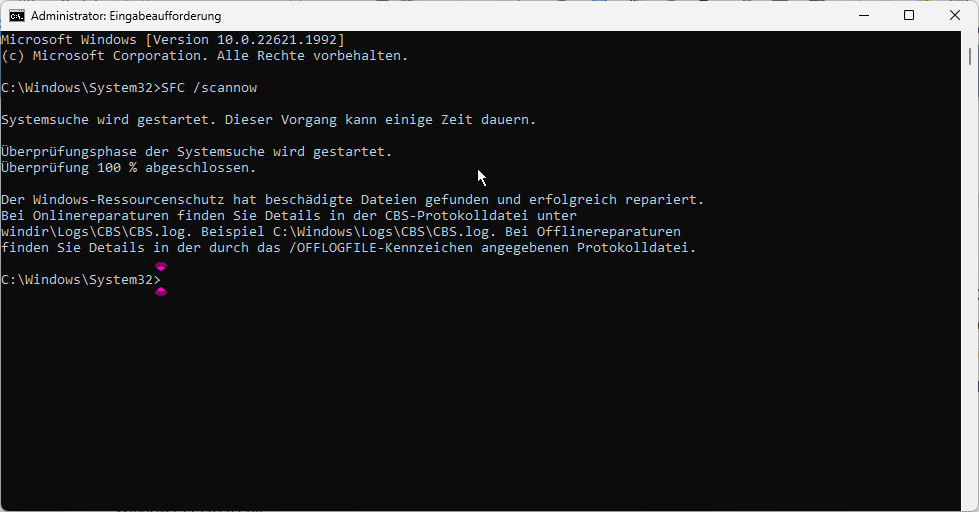
Next open a Terminal Windos (Alt+x shows it). Type "SFC /scannow".
After doing this this is shown:

iOxuFzz.png


Means:

System search is started. This process can take some time.

The verification phase of the system search is started.
Verification 100% complete.

Windows Resource Protection found corrupted files and successfully repaired them.
For online repairs, see the CBS log file for details
windir\Logs\CBS\CBS.log. Example C:\Windows\Logs\CBS\CBS.log. For offline repairs
see the log file specified by the /OFFLOGFILE flag for details.

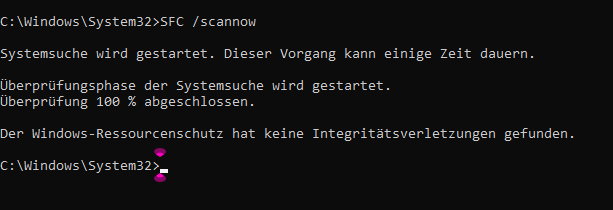
If there is a message other than "no erros found", run it again.
The second run shows:

S9IduSz.png


Means:

C:\Windows\System32>SFC /scannow

System search is started. This process can take some time.

The verification phase of the system search is started.
Verification 100% complete.

Windows Resource Protection did not find any integrity violations.

C:\Windows\System32>

Still doing the rest? After or before installation of the drivers?

If ever you want to restore to the non selective startup default, there is just one button to press. All programs and apps are still available and can be started manually.
OK. So after pressing the button the computer runs as usual?
 

My Computer My Computer

At a glance

Win 1116 GB
OS
Win 11
Computer type
Laptop
Manufacturer/Model
Lenovo IdeaPad 3 17ABA7 Laptop - Type 82RQ (Lenovo IdeaPad 3 82RQ003EGE)
Memory
16 GB
You should first uninstall driver and then re-install them.
Yes, have a look in Lenovo Website to get the latest Drivers.
Afterwords, run sfc /scannow
Then, DISM /Online /Cleanup-Image /ScanHealth
If there is a message other "no corrupt files found" then run
DISM /Online /Cleanup-Image /RestoreHealth
After this run Windows Update a look in Optional Updates if there Drivers to be updated.

The Power On Button is solving my slow down of system, is the only way to get back to normal. It is a well know and old solution.

As Spunk said above, a clean boot is also sometimes helping.
 

My Computer My Computer

At a glance

Win 11
OS
Win 11
OK, I will try both ways, many thanks!
 

My Computer My Computer

At a glance

Win 1116 GB
OS
Win 11
Computer type
Laptop
Manufacturer/Model
Lenovo IdeaPad 3 17ABA7 Laptop - Type 82RQ (Lenovo IdeaPad 3 82RQ003EGE)
Memory
16 GB
Back
Top Bottom