Solved Edge browser slow closing...


Sir_George

Well-known member
Power User
VIP
Local time
11:08 AM
Posts
350
Location
Denver, CO
OS
Windows 11 Professional
Lately when I click the red X in the upper right corner of the screen it takes Edge about 6 seconds to respond/close. I can double click the red X and it responds immediately. I have already cleared all cache entries with no effect. At the time this happens it can occur when I have only one tab or several. I have, also, tried doing a repair install of Edge with no change. Any ideas?
 

My Computer My Computer

At a glance

Windows 11 ProfessionalIntel Core i5-940032GBIntegrated Intel UHD Graphics 630
OS
Windows 11 Professional
Computer type
PC/Desktop
Manufacturer/Model
Microcenter B677
CPU
Intel Core i5-9400
Motherboard
ASRock H310CM-HDV/M.2
Memory
32GB
Graphics Card(s)
Integrated Intel UHD Graphics 630
Sound Card
Intel Kaby Lake - High Definition Audio / cAVS (Audio, Voice, Speech) [A0]
Monitor(s) Displays
LG Model: GSM59F1
Screen Resolution
2560x1080
Case
Lian Li 205M
Antivirus
Kaspersky AV
Do you have this issue with any other Browser? (ie) Firefox, Chrome etc?
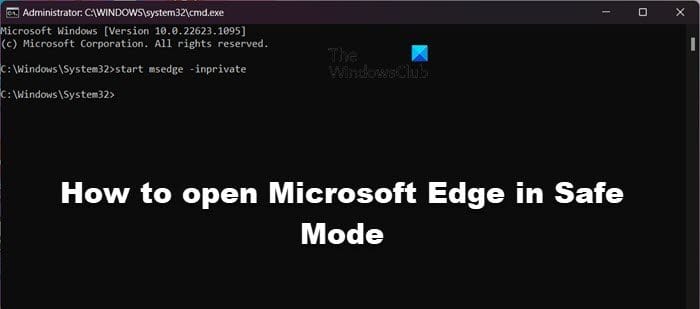
Have you tried running Edge in Private Browsing Mode (Safe Mode)? for testing purposes.
If that works, then it is one of the extensions that is installed in Edge.
 

My Computer My Computer

At a glance

Windows 11 Pro Insider 64 bit 25H2 26200.5742Intel Core i7 9700K 3.6016 GBnVidia GEForce RTX 2060 Super
OS
Windows 11 Pro Insider 64 bit 25H2 26200.5742
Computer type
PC/Desktop
Manufacturer/Model
Gigabyte Z390 UD
CPU
Intel Core i7 9700K 3.60
Motherboard
Gigabyte Z390 UD
Memory
16 GB
Graphics Card(s)
nVidia GEForce RTX 2060 Super
Sound Card
onboard
Monitor(s) Displays
Two 27" Dell 4K monitors
Screen Resolution
3840 x 2160
Hard Drives
M.2 NVME SSD, 500 GB; Two 2TB Mechanical HDD's
PSU
850w PSU
Case
Cyberpower PC
Cooling
Water cooled
Keyboard
Backlit Cyberpower gaming keyboard
Mouse
Backlit Cyberpower gaming mouse
Internet Speed
1 GB mbps
Browser
Brave
Antivirus
Windows Security
Lately when I click the red X in the upper right corner of the screen it takes Edge about 6 seconds to respond/close. I can double click the red X and it responds immediately. ... At the time this happens it can occur when I have only one tab or several. I have, also, tried doing a repair install of Edge with no change. Any ideas?
I've complained about this a number of times through Edge > Feedback. Feedback is useless. You can try un-selecting History and Cache in Settings > Privacy ... > Choose what to clear every time you close the browser. It won't necessarily fix it but you may find it helps with the delay,

Edge has some great basic features like Tracking Protection but way too much "feature" bloat. Try using Brave, as it provides more ability to disable unwanted Chromium/Chrome features like Sidebar with user-friendly settings. It takes a bit of time getting your configuration set but once done they won't be undone by updates, unlike Edge.
 

My Computer My Computer

At a glance

Windows 11 Pro 25H2 26200.7840Intel Core i3-8145U16GB
OS
Windows 11 Pro 25H2 26200.7840
Computer type
Laptop
Manufacturer/Model
Lenovo IdeaPad L340
CPU
Intel Core i3-8145U
Memory
16GB
Hard Drives
500 GB M2 1 TB HDD
Internet Speed
400 MB
Browser
Chrome | Edge
Antivirus
Microsoft Defender | Block unknown executables | Various ASR rules enabled | Smart App Control
Do you have this issue with any other Browser? (ie) Firefox, Chrome etc?
Have you tried running Edge in Private Browsing Mode (Safe Mode)? for testing purposes.
If that works, then it is one of the extensions that is installed in Edge.
You nailed it! It was an extension I must have added sometime ago, because I don't remember ever installing it. Odd that it would still close after a few seconds delay.
Don't Close Window.jpg
 

My Computer My Computer

At a glance

Windows 11 ProfessionalIntel Core i5-940032GBIntegrated Intel UHD Graphics 630
OS
Windows 11 Professional
Computer type
PC/Desktop
Manufacturer/Model
Microcenter B677
CPU
Intel Core i5-9400
Motherboard
ASRock H310CM-HDV/M.2
Memory
32GB
Graphics Card(s)
Integrated Intel UHD Graphics 630
Sound Card
Intel Kaby Lake - High Definition Audio / cAVS (Audio, Voice, Speech) [A0]
Monitor(s) Displays
LG Model: GSM59F1
Screen Resolution
2560x1080
Case
Lian Li 205M
Antivirus
Kaspersky AV

Latest Support Threads

Back
Top Bottom