Edge Canary 142.3589 fails to start


Ibanez

Well-known member
Local time
12:58 AM
Posts
21
OS
Windows 11 Pro
After the Canary 3582.0 version update it failed to start, so i waited till this release.
I uninstalled it and still it wont start at all,
What can be wrong, is it wrong Edge redriver, or what it is called.
It just wont start, like it would be blocked, but nothing is there to block it for what i know of, smartscreen, virus is shut off, via GPO, firewall and UAC is disabled in menus.
The exe just makes the file explorer to make an short blink, nothing in event log niether.

Some guidance would be nice.
I tend to solve theses issues, but now when i made an total of uninstall it and reinstalled it, it should have been starting. I cant even start In-private window, the alternative is not there.

Thanks in advance.
 

My Computer My Computer

At a glance

Windows 11 ProAMD 5800x64GB Corsair Pro SLSapphire 5700XT
OS
Windows 11 Pro
Computer type
PC/Desktop
Manufacturer/Model
DIY
CPU
AMD 5800x
Motherboard
Rog Strix x570-E Gaming Wifi
Memory
64GB Corsair Pro SL
Graphics Card(s)
Sapphire 5700XT
Sound Card
Antelope Audio, Orio Studio Synergy Core
Monitor(s) Displays
Innocn 27M2V
Screen Resolution
3840x2160
Hard Drives
System: Sansdisk SDSSH 225GB
Storage: Toshiba HDWQ140 4TB
Storage: Samsung HD103UJ 1TB
Game Disk: Samsung 980 Pro 512GB
Game Disk 2: Samsung 980 Peo 2TB
PSU
EVGA G2 750W
Case
Chieftec Mesh Super old fulltower (20kg empty)
Cooling
Noctua D15.cgromax.black with two fans,
Keyboard
Dell RT7D40 Enhanced Multimedia Keyboard
Mouse
ell T0179 (M-RAC67B)
Internet Speed
500 / 500 Mbit
Browser
Edge Canary 64 Bit
Antivirus
None, disabled in WIndows 11 by GPO
After the Canary 3582.0 version update it failed to start, so i waited till this release.
I uninstalled it and still it wont start at all,
What can be wrong, is it wrong Edge redriver, or what it is called.
It just wont start, like it would be blocked, but nothing is there to block it for what i know of, smartscreen, virus is shut off, via GPO, firewall and UAC is disabled in menus.
The exe just makes the file explorer to make an short blink, nothing in event log niether.

Some guidance would be nice.
I tend to solve theses issues, but now when i made an total of uninstall it and reinstalled it, it should have been starting. I cant even start In-private window, the alternative is not there.

Thanks in advance.
Hi,
I haven't been having issues with those latest releases.
Maybe your profile is corrupt.

Try to delete User Data folder in

Code:
C:\Users\YourUserName\AppData\Local\Microsoft\Edge SxS\
Of course, replace YourUserName.
Then see if you can launch the browser.
 

My Computers My Computers

  • At a glance

    All Branches but ReleaseAMD Ryzen 7 7735HS 3200-4500 Mhz 8 cores x 232 GB DDR5Radeon Graphic / NVIDIA GeForce RTX 4060 8 GB...
    OS
    All Branches but Release
    Computer type
    Laptop
    Manufacturer/Model
    Acer Nitro ANV15-51
    CPU
    AMD Ryzen 7 7735HS 3200-4500 Mhz 8 cores x 2
    Motherboard
    Sportage_RBH
    Memory
    32 GB DDR5
    Graphics Card(s)
    Radeon Graphic / NVIDIA GeForce RTX 4060 8 GB GDDR6
    Sound Card
    AMD/Realtek(R) Audio
    Monitor(s) Displays
    Integrated Monitor (15.3"vis)
    Screen Resolution
    FHD 1920X1080 16:9 144Hz
    Hard Drives
    KINGSTON OM8SEP4512Q-AA 1TB
    Western Digital 256GB
    PSU
    19V DC 6.32 A 120 W
    Cooling
    Dual Fans
    Mouse
    MS Bluetooth
    Internet Speed
    Fiber 1GB Cox -us & 1GB Orange-fr
    Browser
    Edge Canary- Firefox Nightly-Chrome Dev-Chrome Dev
    Antivirus
    Windows Defender
  • At a glance

    Windows 11 BetaAMD A9-94208 GB of DDR4AMD Radeon R5
    Operating System
    Windows 11 Beta
    Computer type
    Laptop
    Manufacturer/Model
    Asus X751BP
    CPU
    AMD A9-9420
    Memory
    8 GB of DDR4
    Graphics card(s)
    AMD Radeon R5
    Screen Resolution
    1600x900
    Hard Drives
    Seagate 1 TB

My Computers My Computers

  • At a glance

    Windows 11 Pro 25H2 26200.8655i9-10900 10 core 20 threads32 gbnone-Intel UHD Graphics 630
    OS
    Windows 11 Pro 25H2 26200.8655
    Computer type
    PC/Desktop
    Manufacturer/Model
    Dell Optiplex 7080
    CPU
    i9-10900 10 core 20 threads
    Motherboard
    DELL 0J37VM
    Memory
    32 gb
    Graphics Card(s)
    none-Intel UHD Graphics 630
    Sound Card
    Integrated Realtek
    Monitor(s) Displays
    Benq 27
    Screen Resolution
    2560x1440
    Hard Drives
    2x1tb Solidigm m.2 nvme /External drives 512gb Samsung m.2 sata+2tb Kingston m2.nvme
    PSU
    500w
    Case
    MT
    Cooling
    Dell Premium
    Keyboard
    Logitech wired
    Mouse
    Logitech wireless
    Internet Speed
    so slow I'm too embarrassed to tell
    Browser
    #1 Edge #2 Firefox
    Antivirus
    Defender+MWB Premium
  • At a glance

    Windows 11 Pro 24H2 26200.8457AMD Ryzen 7 6800U32 gbintegrated
    Operating System
    Windows 11 Pro 24H2 26200.8457
    Computer type
    PC/Desktop
    Manufacturer/Model
    Beelink Mini PC SER5
    CPU
    AMD Ryzen 7 6800U
    Memory
    32 gb
    Graphics card(s)
    integrated
    Sound Card
    integrated
    Monitor(s) Displays
    Benq 27
    Screen Resolution
    2560x1440
    Hard Drives
    1TB Crucial nvme
    Keyboard
    Logitech wired
    Mouse
    Logitech wireless
    Internet Speed
    still too embarrassed to tell
    Browser
    Firefox
    Antivirus
    Defender
    Other Info
    System 3 is non compliant Dell 9020 i7-4770/24gb ram Win11 PRO 26200.8457
Okey, i actually deleted the User Data folder in SXS,
Uninstall all Edge extensions and restart Edge.

If that doesn't help, test using clean boot. If it doesn't happen in a clean boot, you have some software conflict. You have to use process of elimination to find which one. Perform a Clean Boot in Windows 11 to Troubleshoot Software Conflicts Tutorial

Otherwise, uninstall Edge Canary and use Edge release.
Same result in Clean Boot, rann an SFC / scannow, but nothing changed.
This is tested
Clean Boot with removing UserData folder first, and reinstalling. Not working
Repairing. Not working
It makes that File Explorer 0.5 sec blink during install also, which i doesn't see when installed Dev, and dev is starting

I just broke on the 3582. update, and it seems i am not alone in this camp, found an article guid on how to fix it.
By downloading an older version of an MSI offline installer and extracting it and copying all data off the Application folder, but it autoupdated to the newest and it wailed to start again.

I would need an offline installer off the latest version, that i could extract the files from ad see if i manage to copy same folder and get it running again.
But i can't find any offline installers.
 

My Computer My Computer

At a glance

Windows 11 ProAMD 5800x64GB Corsair Pro SLSapphire 5700XT
OS
Windows 11 Pro
Computer type
PC/Desktop
Manufacturer/Model
DIY
CPU
AMD 5800x
Motherboard
Rog Strix x570-E Gaming Wifi
Memory
64GB Corsair Pro SL
Graphics Card(s)
Sapphire 5700XT
Sound Card
Antelope Audio, Orio Studio Synergy Core
Monitor(s) Displays
Innocn 27M2V
Screen Resolution
3840x2160
Hard Drives
System: Sansdisk SDSSH 225GB
Storage: Toshiba HDWQ140 4TB
Storage: Samsung HD103UJ 1TB
Game Disk: Samsung 980 Pro 512GB
Game Disk 2: Samsung 980 Peo 2TB
PSU
EVGA G2 750W
Case
Chieftec Mesh Super old fulltower (20kg empty)
Cooling
Noctua D15.cgromax.black with two fans,
Keyboard
Dell RT7D40 Enhanced Multimedia Keyboard
Mouse
ell T0179 (M-RAC67B)
Internet Speed
500 / 500 Mbit
Browser
Edge Canary 64 Bit
Antivirus
None, disabled in WIndows 11 by GPO
If someone could zip the Application folder folder in C:\Users\yourusename\AppData\Local\Microsoft\Edge SxS\ from the latest release of Canary install so could test just uzipping it and replace the whole folder to my install folder.
It worked doing so from the super old version, but as soon as i updated to the version 3582.0 it wont start anymore, and the story repeats when doing so with latest version also (3594 or how high the number is by now)
Completely uninstalling and removing the folder does nothing, it installs, with that strange explorer blink, like it is blocked or something similar.

And why i use canary is because os the stable still want to hog my system for some strange reason.
And also that youtube have had serve issues on stable when i have used it in UHD / HDR and DX11 as angle
i have disabled efficiency mode, but it still seems to be throttling according to taskmanager, in details view.
 

My Computer My Computer

At a glance

Windows 11 ProAMD 5800x64GB Corsair Pro SLSapphire 5700XT
OS
Windows 11 Pro
Computer type
PC/Desktop
Manufacturer/Model
DIY
CPU
AMD 5800x
Motherboard
Rog Strix x570-E Gaming Wifi
Memory
64GB Corsair Pro SL
Graphics Card(s)
Sapphire 5700XT
Sound Card
Antelope Audio, Orio Studio Synergy Core
Monitor(s) Displays
Innocn 27M2V
Screen Resolution
3840x2160
Hard Drives
System: Sansdisk SDSSH 225GB
Storage: Toshiba HDWQ140 4TB
Storage: Samsung HD103UJ 1TB
Game Disk: Samsung 980 Pro 512GB
Game Disk 2: Samsung 980 Peo 2TB
PSU
EVGA G2 750W
Case
Chieftec Mesh Super old fulltower (20kg empty)
Cooling
Noctua D15.cgromax.black with two fans,
Keyboard
Dell RT7D40 Enhanced Multimedia Keyboard
Mouse
ell T0179 (M-RAC67B)
Internet Speed
500 / 500 Mbit
Browser
Edge Canary 64 Bit
Antivirus
None, disabled in WIndows 11 by GPO
If someone could zip the Application folder folder in C:\Users\yourusename\AppData\Local\Microsoft\Edge SxS\ from the latest release of Canary install so could test just uzipping it and replace the whole folder to my install folder.
Application.zip
 

My Computers My Computers

  • At a glance

    All Branches but ReleaseAMD Ryzen 7 7735HS 3200-4500 Mhz 8 cores x 232 GB DDR5Radeon Graphic / NVIDIA GeForce RTX 4060 8 GB...
    OS
    All Branches but Release
    Computer type
    Laptop
    Manufacturer/Model
    Acer Nitro ANV15-51
    CPU
    AMD Ryzen 7 7735HS 3200-4500 Mhz 8 cores x 2
    Motherboard
    Sportage_RBH
    Memory
    32 GB DDR5
    Graphics Card(s)
    Radeon Graphic / NVIDIA GeForce RTX 4060 8 GB GDDR6
    Sound Card
    AMD/Realtek(R) Audio
    Monitor(s) Displays
    Integrated Monitor (15.3"vis)
    Screen Resolution
    FHD 1920X1080 16:9 144Hz
    Hard Drives
    KINGSTON OM8SEP4512Q-AA 1TB
    Western Digital 256GB
    PSU
    19V DC 6.32 A 120 W
    Cooling
    Dual Fans
    Mouse
    MS Bluetooth
    Internet Speed
    Fiber 1GB Cox -us & 1GB Orange-fr
    Browser
    Edge Canary- Firefox Nightly-Chrome Dev-Chrome Dev
    Antivirus
    Windows Defender
  • At a glance

    Windows 11 BetaAMD A9-94208 GB of DDR4AMD Radeon R5
    Operating System
    Windows 11 Beta
    Computer type
    Laptop
    Manufacturer/Model
    Asus X751BP
    CPU
    AMD A9-9420
    Memory
    8 GB of DDR4
    Graphics card(s)
    AMD Radeon R5
    Screen Resolution
    1600x900
    Hard Drives
    Seagate 1 TB
Thanks i tested this. This was much appreciated.
But to no luck.
I even tested to add an Edge Canary folder and add this folder there in C:\Program Files (x86)\Microsoft\

But this ending in starting Stable version of Edge.

I can't understand why Edge Canary fails to start even after fully uninstalling it and removing the User Data folder in SXS folder and reinstalling it.
Something must block it from installing correctly. But i hadn't changed anything
And a clean install of the program should just work in my opinion.
Dev and beta works they should do, and install correctly.

Is there any specific regkeys that belongs to the side by side loading module related to only Canary version?
 

My Computer My Computer

At a glance

Windows 11 ProAMD 5800x64GB Corsair Pro SLSapphire 5700XT
OS
Windows 11 Pro
Computer type
PC/Desktop
Manufacturer/Model
DIY
CPU
AMD 5800x
Motherboard
Rog Strix x570-E Gaming Wifi
Memory
64GB Corsair Pro SL
Graphics Card(s)
Sapphire 5700XT
Sound Card
Antelope Audio, Orio Studio Synergy Core
Monitor(s) Displays
Innocn 27M2V
Screen Resolution
3840x2160
Hard Drives
System: Sansdisk SDSSH 225GB
Storage: Toshiba HDWQ140 4TB
Storage: Samsung HD103UJ 1TB
Game Disk: Samsung 980 Pro 512GB
Game Disk 2: Samsung 980 Peo 2TB
PSU
EVGA G2 750W
Case
Chieftec Mesh Super old fulltower (20kg empty)
Cooling
Noctua D15.cgromax.black with two fans,
Keyboard
Dell RT7D40 Enhanced Multimedia Keyboard
Mouse
ell T0179 (M-RAC67B)
Internet Speed
500 / 500 Mbit
Browser
Edge Canary 64 Bit
Antivirus
None, disabled in WIndows 11 by GPO
Thanks i tested this. This was much appreciated.
You're welcome.
Not ideal to start putting programs in folders where they do not belong.
You are better off creating another user on your system and test it under that user to see the outcome.
The .reg hive is here:
Code:
HKEY_CURRENT_USER\Software\Microsoft\Edge SxS
 

My Computers My Computers

  • At a glance

    All Branches but ReleaseAMD Ryzen 7 7735HS 3200-4500 Mhz 8 cores x 232 GB DDR5Radeon Graphic / NVIDIA GeForce RTX 4060 8 GB...
    OS
    All Branches but Release
    Computer type
    Laptop
    Manufacturer/Model
    Acer Nitro ANV15-51
    CPU
    AMD Ryzen 7 7735HS 3200-4500 Mhz 8 cores x 2
    Motherboard
    Sportage_RBH
    Memory
    32 GB DDR5
    Graphics Card(s)
    Radeon Graphic / NVIDIA GeForce RTX 4060 8 GB GDDR6
    Sound Card
    AMD/Realtek(R) Audio
    Monitor(s) Displays
    Integrated Monitor (15.3"vis)
    Screen Resolution
    FHD 1920X1080 16:9 144Hz
    Hard Drives
    KINGSTON OM8SEP4512Q-AA 1TB
    Western Digital 256GB
    PSU
    19V DC 6.32 A 120 W
    Cooling
    Dual Fans
    Mouse
    MS Bluetooth
    Internet Speed
    Fiber 1GB Cox -us & 1GB Orange-fr
    Browser
    Edge Canary- Firefox Nightly-Chrome Dev-Chrome Dev
    Antivirus
    Windows Defender
  • At a glance

    Windows 11 BetaAMD A9-94208 GB of DDR4AMD Radeon R5
    Operating System
    Windows 11 Beta
    Computer type
    Laptop
    Manufacturer/Model
    Asus X751BP
    CPU
    AMD A9-9420
    Memory
    8 GB of DDR4
    Graphics card(s)
    AMD Radeon R5
    Screen Resolution
    1600x900
    Hard Drives
    Seagate 1 TB
You're welcome.
Not ideal to start putting programs in folders where they do not belong.
You are better off creating another user on your system and test it under that user to see the outcome.
The .reg hive is here:
Code:
HKEY_CURRENT_USER\Software\Microsoft\Edge SxS
No, i know that it is not ideal to make that folder :-), just tested, and then deleted it.
Will check that regkey, thanks for that one.
 

My Computer My Computer

At a glance

Windows 11 ProAMD 5800x64GB Corsair Pro SLSapphire 5700XT
OS
Windows 11 Pro
Computer type
PC/Desktop
Manufacturer/Model
DIY
CPU
AMD 5800x
Motherboard
Rog Strix x570-E Gaming Wifi
Memory
64GB Corsair Pro SL
Graphics Card(s)
Sapphire 5700XT
Sound Card
Antelope Audio, Orio Studio Synergy Core
Monitor(s) Displays
Innocn 27M2V
Screen Resolution
3840x2160
Hard Drives
System: Sansdisk SDSSH 225GB
Storage: Toshiba HDWQ140 4TB
Storage: Samsung HD103UJ 1TB
Game Disk: Samsung 980 Pro 512GB
Game Disk 2: Samsung 980 Peo 2TB
PSU
EVGA G2 750W
Case
Chieftec Mesh Super old fulltower (20kg empty)
Cooling
Noctua D15.cgromax.black with two fans,
Keyboard
Dell RT7D40 Enhanced Multimedia Keyboard
Mouse
ell T0179 (M-RAC67B)
Internet Speed
500 / 500 Mbit
Browser
Edge Canary 64 Bit
Antivirus
None, disabled in WIndows 11 by GPO
So, now i tested to uninstall it with Total Unistall, the regkeys and folders was deleted.
Reinstallled fom scracth. Not want to open.

I even created a new Windows User, same happening there, it just wont start, even in a fresh user account.
What can actually hinder it to start when a clean boot, new user account and fully deleting the folder and reinstalling wont work?

I am really thankful for all your suggestions and help you have given me, i really believe that all your suggestions should have helped getting it to run again, this is strange, i don't know if any other program is affected by this, but not for what i have found out as of yet anyway.

Thanks to all of you, i will search till i find the fault, or if 25H2 will fix it.
And i will report back if i ever get it to work again without reinstalling the system, which is fairly new installed like two or three months ago.
 

My Computer My Computer

At a glance

Windows 11 ProAMD 5800x64GB Corsair Pro SLSapphire 5700XT
OS
Windows 11 Pro
Computer type
PC/Desktop
Manufacturer/Model
DIY
CPU
AMD 5800x
Motherboard
Rog Strix x570-E Gaming Wifi
Memory
64GB Corsair Pro SL
Graphics Card(s)
Sapphire 5700XT
Sound Card
Antelope Audio, Orio Studio Synergy Core
Monitor(s) Displays
Innocn 27M2V
Screen Resolution
3840x2160
Hard Drives
System: Sansdisk SDSSH 225GB
Storage: Toshiba HDWQ140 4TB
Storage: Samsung HD103UJ 1TB
Game Disk: Samsung 980 Pro 512GB
Game Disk 2: Samsung 980 Peo 2TB
PSU
EVGA G2 750W
Case
Chieftec Mesh Super old fulltower (20kg empty)
Cooling
Noctua D15.cgromax.black with two fans,
Keyboard
Dell RT7D40 Enhanced Multimedia Keyboard
Mouse
ell T0179 (M-RAC67B)
Internet Speed
500 / 500 Mbit
Browser
Edge Canary 64 Bit
Antivirus
None, disabled in WIndows 11 by GPO
So, now i tested to uninstall it with Total Unistall, the regkeys and folders was deleted.
Reinstallled fom scracth. Not want to open.

I even created a new Windows User, same happening there, it just wont start, even in a fresh user account.
What can actually hinder it to start when a clean boot, new user account and fully deleting the folder and reinstalling wont work?

I am really thankful for all your suggestions and help you have given me, i really believe that all your suggestions should have helped getting it to run again, this is strange, i don't know if any other program is affected by this, but not for what i have found out as of yet anyway.

Thanks to all of you, i will search till i find the fault, or if 25H2 will fix it.
And i will report back if i ever get it to work again without reinstalling the system, which is fairly new installed like two or three months ago.
This is quite frustrating and odd at the same time.
You have removed everything and re-installed anew, yet, the problem remains.
It could mean the problem lies on the outside but who knows?
I appreciate the feedback and hope you find a solution soon.
 

My Computers My Computers

  • At a glance

    All Branches but ReleaseAMD Ryzen 7 7735HS 3200-4500 Mhz 8 cores x 232 GB DDR5Radeon Graphic / NVIDIA GeForce RTX 4060 8 GB...
    OS
    All Branches but Release
    Computer type
    Laptop
    Manufacturer/Model
    Acer Nitro ANV15-51
    CPU
    AMD Ryzen 7 7735HS 3200-4500 Mhz 8 cores x 2
    Motherboard
    Sportage_RBH
    Memory
    32 GB DDR5
    Graphics Card(s)
    Radeon Graphic / NVIDIA GeForce RTX 4060 8 GB GDDR6
    Sound Card
    AMD/Realtek(R) Audio
    Monitor(s) Displays
    Integrated Monitor (15.3"vis)
    Screen Resolution
    FHD 1920X1080 16:9 144Hz
    Hard Drives
    KINGSTON OM8SEP4512Q-AA 1TB
    Western Digital 256GB
    PSU
    19V DC 6.32 A 120 W
    Cooling
    Dual Fans
    Mouse
    MS Bluetooth
    Internet Speed
    Fiber 1GB Cox -us & 1GB Orange-fr
    Browser
    Edge Canary- Firefox Nightly-Chrome Dev-Chrome Dev
    Antivirus
    Windows Defender
  • At a glance

    Windows 11 BetaAMD A9-94208 GB of DDR4AMD Radeon R5
    Operating System
    Windows 11 Beta
    Computer type
    Laptop
    Manufacturer/Model
    Asus X751BP
    CPU
    AMD A9-9420
    Memory
    8 GB of DDR4
    Graphics card(s)
    AMD Radeon R5
    Screen Resolution
    1600x900
    Hard Drives
    Seagate 1 TB
This is starting to annoy me, now the Edge Dev also stopped working, in the same way Canary did, just out of nowhere, this evening. Started, used it, and closed it, and when trying to start it just starts like for 0.5 second on taskmanager and then it closes, no window is showing up.
And event viewer doesn't give any clue neither.
And i cant find any logs, else i would have tried to figure that way why they open for a split of a second and then closes.
Now only Beta and Stable works, but for how long is the question.
 

My Computer My Computer

At a glance

Windows 11 ProAMD 5800x64GB Corsair Pro SLSapphire 5700XT
OS
Windows 11 Pro
Computer type
PC/Desktop
Manufacturer/Model
DIY
CPU
AMD 5800x
Motherboard
Rog Strix x570-E Gaming Wifi
Memory
64GB Corsair Pro SL
Graphics Card(s)
Sapphire 5700XT
Sound Card
Antelope Audio, Orio Studio Synergy Core
Monitor(s) Displays
Innocn 27M2V
Screen Resolution
3840x2160
Hard Drives
System: Sansdisk SDSSH 225GB
Storage: Toshiba HDWQ140 4TB
Storage: Samsung HD103UJ 1TB
Game Disk: Samsung 980 Pro 512GB
Game Disk 2: Samsung 980 Peo 2TB
PSU
EVGA G2 750W
Case
Chieftec Mesh Super old fulltower (20kg empty)
Cooling
Noctua D15.cgromax.black with two fans,
Keyboard
Dell RT7D40 Enhanced Multimedia Keyboard
Mouse
ell T0179 (M-RAC67B)
Internet Speed
500 / 500 Mbit
Browser
Edge Canary 64 Bit
Antivirus
None, disabled in WIndows 11 by GPO
This is starting to annoy me, now the Edge Dev also stopped working, in the same way Canary did, just out of nowhere, this evening. Started, used it, and closed it, and when trying to start it just starts like for 0.5 second on taskmanager and then it closes, no window is showing up.
And event viewer doesn't give any clue neither.
And i cant find any logs, else i would have tried to figure that way why they open for a split of a second and then closes.
Now only Beta and Stable works, but for how long is the question.
If I were you, I'd uninstall every version of Edge.
If you live in the EU as your time zone suggest, you can uninstall Edge stable easily.

It would help if you used Revo or BCUninstaller to clean up any left over then cold reboot.
I would say that having 4 versions running on the same system is a bit risky considering those are alpha & beta releases.
So if you follow that route, please do a backup first and once done, re-install starting with Canary.

PS: Keep another browser for the downloads.
 

My Computers My Computers

  • At a glance

    All Branches but ReleaseAMD Ryzen 7 7735HS 3200-4500 Mhz 8 cores x 232 GB DDR5Radeon Graphic / NVIDIA GeForce RTX 4060 8 GB...
    OS
    All Branches but Release
    Computer type
    Laptop
    Manufacturer/Model
    Acer Nitro ANV15-51
    CPU
    AMD Ryzen 7 7735HS 3200-4500 Mhz 8 cores x 2
    Motherboard
    Sportage_RBH
    Memory
    32 GB DDR5
    Graphics Card(s)
    Radeon Graphic / NVIDIA GeForce RTX 4060 8 GB GDDR6
    Sound Card
    AMD/Realtek(R) Audio
    Monitor(s) Displays
    Integrated Monitor (15.3"vis)
    Screen Resolution
    FHD 1920X1080 16:9 144Hz
    Hard Drives
    KINGSTON OM8SEP4512Q-AA 1TB
    Western Digital 256GB
    PSU
    19V DC 6.32 A 120 W
    Cooling
    Dual Fans
    Mouse
    MS Bluetooth
    Internet Speed
    Fiber 1GB Cox -us & 1GB Orange-fr
    Browser
    Edge Canary- Firefox Nightly-Chrome Dev-Chrome Dev
    Antivirus
    Windows Defender
  • At a glance

    Windows 11 BetaAMD A9-94208 GB of DDR4AMD Radeon R5
    Operating System
    Windows 11 Beta
    Computer type
    Laptop
    Manufacturer/Model
    Asus X751BP
    CPU
    AMD A9-9420
    Memory
    8 GB of DDR4
    Graphics card(s)
    AMD Radeon R5
    Screen Resolution
    1600x900
    Hard Drives
    Seagate 1 TB
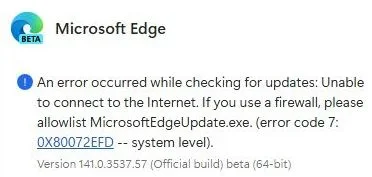
Edge Beta has just updated to 142 and it will not start. Thanks for the preamtive warning.
I have restored the image from yesterday and blocked Edge from updating till they fix this.

Code:
netsh advfirewall firewall add rule name="Edge Update Block" dir=out action=block program="%ProgramFiles(x86)%\Microsoft\EdgeUpdate\MicrosoftEdgeUpdate.exe"
capture_10102025_111439.webp
 
Last edited:

My Computer My Computer

At a glance

Home26H2CanAMD Ryzen 5 8600G (07/24)2x32GB Kingston FURY DDR5 5600 MHz CL36 @5200...ASROCK Radeon RX 6600 Challenger D 8G @48FPS ...
OS
Home26H2Can
Computer type
PC/Desktop
CPU
AMD Ryzen 5 8600G (07/24)
Motherboard
ASROCK B650M-HDV/M.2 (07/24) BIOS 4.21 AGESA ComboAM5 1.3.0.1 (04/26)
Memory
2x32GB Kingston FURY DDR5 5600 MHz CL36 @5200 CL36 (07/24)
Graphics Card(s)
ASROCK Radeon RX 6600 Challenger D 8G @48FPS (08/24)
Sound Card
Creative Sound BlasterX AE-5 Plus (05/24)
Monitor(s) Displays
24" Philips 24M1N3200ZS/00 (05/24)
Screen Resolution
1920×1080@165Hz via DP1.4
Hard Drives
Kingston KC3000 NVMe 2TB (05/24)
ADATA XPG GAMMIX S11 Pro 512GB (07/19)
PSU
Seasonic Core GM 550 Gold (04/24)
Case
Fractal Design Define 7 Mini with 3x Noctua NF-P14s/12@555rpm (04/24)
Cooling
Noctua NH-U12S with Noctua NF-P12 (04/24)
Keyboard
HP Pavilion Wired Keyboard 300 (07/24) + Rabalux 76017 Parker (01/24)
Mouse
Logitech M330 Silent Plus (01/26)
Internet Speed
500/100 Mbps via RouterOS (05/21) & TCP Optimizer
Browser
Edge, Brave for YouTube, LibreWolf for FB
Antivirus
NextDNS blocking 1/3 Traffic
Other Info
Phone: Motorola Moto G86 (02/26)
Backup: Hasleo Backup Suite (PreOS)
Headphones: Sennheiser RS170 (09/10)
Chair: Huzaro Force 4.4 Grey Mesh (05/24)
Notifier: Xiaomi Mi Band 9 Milanese (10/24)
FlexCore USB-C 3.2 Gen 1 (M) to LAN (F) (08/25)

My Computer My Computer

At a glance

Home26H2CanAMD Ryzen 5 8600G (07/24)2x32GB Kingston FURY DDR5 5600 MHz CL36 @5200...ASROCK Radeon RX 6600 Challenger D 8G @48FPS ...
OS
Home26H2Can
Computer type
PC/Desktop
CPU
AMD Ryzen 5 8600G (07/24)
Motherboard
ASROCK B650M-HDV/M.2 (07/24) BIOS 4.21 AGESA ComboAM5 1.3.0.1 (04/26)
Memory
2x32GB Kingston FURY DDR5 5600 MHz CL36 @5200 CL36 (07/24)
Graphics Card(s)
ASROCK Radeon RX 6600 Challenger D 8G @48FPS (08/24)
Sound Card
Creative Sound BlasterX AE-5 Plus (05/24)
Monitor(s) Displays
24" Philips 24M1N3200ZS/00 (05/24)
Screen Resolution
1920×1080@165Hz via DP1.4
Hard Drives
Kingston KC3000 NVMe 2TB (05/24)
ADATA XPG GAMMIX S11 Pro 512GB (07/19)
PSU
Seasonic Core GM 550 Gold (04/24)
Case
Fractal Design Define 7 Mini with 3x Noctua NF-P14s/12@555rpm (04/24)
Cooling
Noctua NH-U12S with Noctua NF-P12 (04/24)
Keyboard
HP Pavilion Wired Keyboard 300 (07/24) + Rabalux 76017 Parker (01/24)
Mouse
Logitech M330 Silent Plus (01/26)
Internet Speed
500/100 Mbps via RouterOS (05/21) & TCP Optimizer
Browser
Edge, Brave for YouTube, LibreWolf for FB
Antivirus
NextDNS blocking 1/3 Traffic
Other Info
Phone: Motorola Moto G86 (02/26)
Backup: Hasleo Backup Suite (PreOS)
Headphones: Sennheiser RS170 (09/10)
Chair: Huzaro Force 4.4 Grey Mesh (05/24)
Notifier: Xiaomi Mi Band 9 Milanese (10/24)
FlexCore USB-C 3.2 Gen 1 (M) to LAN (F) (08/25)
Back
Top Bottom