Hello All,
hope this is the right department …
Here is a phenomenon I cannot figure out.
I try to give you the best description possible.
In short … Edge does not recognize location and Settings > Set Default Location Crashes!
Most importantly … Edge with the exact same settings in another, identical machine DOES recognize
my location.
Be assured, all settings in Edge allow recognizing location, as well as cookies, site permissions, etc … in both machines identical.
Strangely: online weather sites, etc., remember/display my location correctly! … in both machines!
And here is the reason I posted this not under Edge but under Windows / Settings:
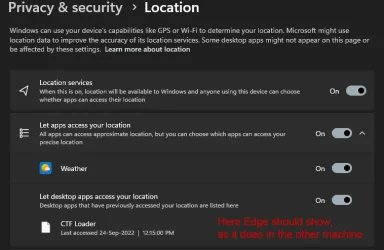
Despite in both machines all Location sliders are ON, the one in question only shows Weather (under “Let apps access your location”) but nothing under “Let desktop apps access your location”) except one dubious “CTF Loader” / white document icon.
There should be, amongst others, Edge being listed under “Let desktop apps …”)
(as is in the comparing machine)
(Please see attachment)
It means, (I guess) - it does not recognize Edge in Settings > Location ???
- Edge does NOT receive GPS information from Settings ???
That might be the reason Edge does not recognize and remember my location and apply it to a website, even though set to “allowed”???
Also: In “Default Location” > “Set Default” it always shows the world map and when trying to
set my location the whole Settings window crashes!! … so, it does not accept my entry.
- I repaired the Settings app … no difference
- repaired Edge … same
- ran sfc
I must mention that I turned off all telemetry options, in case that makes a difference … but also in the other machine … and everything works just fine there
Windows11 Pro, 25H2, 26200.9278, everything uptodate, working fine … both machines same.
Edge 152.0.4191.53
I hope all this is not too confusing and my observations lead to something.
Thanks in advance for looking into this weird issue.
hope this is the right department …
Here is a phenomenon I cannot figure out.
I try to give you the best description possible.
In short … Edge does not recognize location and Settings > Set Default Location Crashes!
Most importantly … Edge with the exact same settings in another, identical machine DOES recognize
my location.
Be assured, all settings in Edge allow recognizing location, as well as cookies, site permissions, etc … in both machines identical.
Strangely: online weather sites, etc., remember/display my location correctly! … in both machines!
And here is the reason I posted this not under Edge but under Windows / Settings:
Despite in both machines all Location sliders are ON, the one in question only shows Weather (under “Let apps access your location”) but nothing under “Let desktop apps access your location”) except one dubious “CTF Loader” / white document icon.
There should be, amongst others, Edge being listed under “Let desktop apps …”)
(as is in the comparing machine)
(Please see attachment)
It means, (I guess) - it does not recognize Edge in Settings > Location ???
- Edge does NOT receive GPS information from Settings ???
That might be the reason Edge does not recognize and remember my location and apply it to a website, even though set to “allowed”???
Also: In “Default Location” > “Set Default” it always shows the world map and when trying to
set my location the whole Settings window crashes!! … so, it does not accept my entry.
- I repaired the Settings app … no difference
- repaired Edge … same
- ran sfc
I must mention that I turned off all telemetry options, in case that makes a difference … but also in the other machine … and everything works just fine there
Windows11 Pro, 25H2, 26200.9278, everything uptodate, working fine … both machines same.
Edge 152.0.4191.53
I hope all this is not too confusing and my observations lead to something.
Thanks in advance for looking into this weird issue.
Attachments
My Computer
At a glance
Windows 11 ProIntel(R) Core(TM) i9-10900K CPU @ 3.70GHz 3.7...16.0GB Dual-Channel DDR4 @ 1066MHz (15-15-15-362047MB NVIDIA GeForce RTX 2060
- OS
- Windows 11 Pro
- Computer type
- PC/Desktop
- Manufacturer/Model
- Custom Built
- CPU
- Intel(R) Core(TM) i9-10900K CPU @ 3.70GHz 3.70 GHz
- Motherboard
- Asus TUF GAMING Z590-PLUS (LGA1200)
- Memory
- 16.0GB Dual-Channel DDR4 @ 1066MHz (15-15-15-36
- Graphics Card(s)
- 2047MB NVIDIA GeForce RTX 2060
- Sound Card
- NVIDIA High Definition Audio - Realtek High Definition Audio
- Monitor(s) Displays
- Asus Pro Art PA 246 / Asus VB 195
- Screen Resolution
- 1280 x 1024
- Hard Drives
- 1863GB Seagate ST2000DM001-9YN164 (SATA )
238GB Samsung SSD 850 PRO 256GB (SATA (SSD)
232GB Samsung SSD 970 EVO Plus 250GB (Unknown (SSD))
- Case
- Corsair
- Internet Speed
- 10 / 1
- Browser
- Edge