Edge to automatically open by default every time you turn on your Windows 11 PC


FrancoDT

Well-known member
Pro User
VIP
Local time
12:18 PM
Posts
2,993
Location
USA-Nevada
OS
Windows 11 25H2
Microsoft is testing a new default behavior for Edge on Windows 11 that will allow the browser to automatically open upon startup. Some users are reporting that a new banner is appearing at the top of the Edge browser that says the app "now launches when you sign into Windows, so it's ready when you want to browse. Change this anytime in Settings."

Windows Central
can confirm that as of the latest Microsoft Edge Beta build, this banner does appear at the top of the interface, and unless you select the "No thanks" button, the browser will automatically appear every time you start up your PC. The good news is that you can disable this, but the bad news is it appears to be opt-out rather than opt-in.


My Computers

System One System Two

  • OS
    Windows 11 25H2
    Computer type
    Laptop
    Manufacturer/Model
    Alienware 18 Area-51
    CPU
    Intel Core Ultra 9 275HX (24-Core)
    Motherboard
    Alienware
    Memory
    64GB DDR5 6400MT/s
    Graphics Card(s)
    NVIDIA GeForce RTX 5080 and Intel UHD Graphics
    Sound Card
    Onboard, Realtek high-performance Audio chips (ALC3329 & ALC1708))
    Monitor(s) Displays
    300HZ 18-inch QHD 500 nit Comfort View+
    Screen Resolution
    2560 x 1600
    Hard Drives
    2TB NVMe M.2 PCIe Gen 5 SSD
    Case
    Magnesium Alloy
    Cooling
    Advanced Cryo-Tech Quad-Fan Cooling system & large vapor chamber
    Keyboard
    Cherry MX ultra low profile mechanical keyboard with per key AlienFX RGB lighting
    Mouse
    Logitech MX Master 4
    Browser
    Vivaldi (main), Firefox, Chrome, Edge
    Antivirus
    MS Defender and Malwarebytes Free
  • Operating System
    Windows 11 25H2
    Computer type
    Laptop
    Manufacturer/Model
    Microsoft Surface Laptop 7
    CPU
    Qualcomm Snapdragon X Elite (12 Core) ARM based CPU
    Motherboard
    Microsoft Corp.
    Memory
    16GB LPDDR5
    Graphics card(s)
    Qualcomm Adreno X1-85
    Sound Card
    Omnisonic speakers with Dolby Atmos spatial sound
    Monitor(s) Displays
    120 Hz 13.8-inch 600 nit PixelSense Flow touchscreen
    Screen Resolution
    2304x1536
    Hard Drives
    1TB NVMe Gen 4 SSD
    Case
    Anodized Aluminum
    Cooling
    Traditional active cooling fan system
    Keyboard
    Mechanical QWERTY, backlit when in use
    Mouse
    Logitech MX Master 4 and Surface Arc Mouse
    Browser
    Vivaldi (main), Firefox, Chrome, Edge
    Antivirus
    MS Defender and Malwarebytes Free
This gives me an idea. I’m pretty lazy. I should put every app I use, even occasionally, in the Startup folder. I’m mad for not thinking of it sooner.
 

My Computer

System One

  • OS
    Windows 11 Pro 25H2
    Computer type
    PC/Desktop
    Manufacturer/Model
    Intel NUC12WSHi7
    CPU
    12th Gen Core i7-1260P
    Motherboard
    NUC12WSBi7
    Memory
    64 GB Micron PC4-25600
    Graphics Card(s)
    Intel Iris Xe Graphics
    Sound Card
    on-board Realtek HD Audio
    Monitor(s) Displays
    Dell U3219Q
    Screen Resolution
    3840 x 2160
    Hard Drives
    Samsung SSD 990 PRO 1TB
    Crucial MX500 2 TB
    Antivirus
    Microsoft Defender
forces? doesn't sound like it.
 

My Computers

System One System Two

  • OS
    Windows 11 Pro x64
    Computer type
    PC/Desktop
    Manufacturer/Model
    📷🔈🎧 🪛 DIY Photoshop/Audio/Game/tinker
    CPU
    i9 14900K P/E 5.8/4.5 GHz, cache 5.0 GHz
    Motherboard
    Asus ROG Maximus Z790 Dark Hero
    Memory
    🐏 96GB (2x48) G.skill Ripjaws 6800 MT/s
    Graphics Card(s)
    Asus ROG Strix 4070 Ti OC
    Sound Card
    🔊Bowers & Wilkins 606 S3 speakers; Audiolabs 7000a integrated amp; RSL 10S Mk2 sub; Creative Pebble Pro Minimilist
    Monitor(s) Displays
    🖥️🖥️ Eizo CG2730 ColorEdge, ViewSonic VP2768
    Screen Resolution
    🖥️🖥️ 2560 x 1440p x 2
    Hard Drives
    💾 WDC SN850X 4TB nvme, SN850 1TB nvme, SK-Hynix 2 TB P41 nvme,. Sabrent USB-C DS-SC5B 5-bay docking station: 6TB WDC Black, 6TB Ironwolf Pro; 2x 2TB WDC Black HDD
    PSU
    ⚡️ 850W Seasonic Vertex PX-850 ATX 3.0/PCI-E 5.0
    Case
    Fractal Design North XL Mesh, Black Walnut
    Cooling
    ❄️ EK Nucleus black 360 AIO w/Phanteks T30-120 fans, 2 Noctua NF-A14 Chromax case fan, 1 T30-120 fan cooling memory
    Keyboard
    ⌨️ Keychron Q3 Max TKL with custom GMK Redsuns Red Samuri keycaps, TX Stabs
    Mouse
    🖱️ Logitech G305 wireless gaming
    Internet Speed
    ⬇️ 500 Mb/s ⬆️ 12 Mb/s
    Browser
    🔥🦊 Firefox
    Antivirus
    🦺 Defender, Macrium Reflect X 🏆
    Other Info
    Phangkey Amaterasu V2 Desk Mat
  • Computer type
    Laptop
    Manufacturer/Model
    💻 Apple 13" Macbook Pro 2020 (m1)
    CPU
    Apple M1
    Screen Resolution
    2560x1600
    Browser
    Firefox
This gives me an idea. I’m pretty lazy. I should put every app I use, even occasionally, in the Startup folder. I’m mad for not thinking of it sooner.
Or you can just go into your account settings and select auto restart

Screenshot 2026-04-02 195856.webp
 

My Computers

System One System Two

  • OS
    Windows 11 25H2
    Computer type
    Laptop
    Manufacturer/Model
    Alienware 18 Area-51
    CPU
    Intel Core Ultra 9 275HX (24-Core)
    Motherboard
    Alienware
    Memory
    64GB DDR5 6400MT/s
    Graphics Card(s)
    NVIDIA GeForce RTX 5080 and Intel UHD Graphics
    Sound Card
    Onboard, Realtek high-performance Audio chips (ALC3329 & ALC1708))
    Monitor(s) Displays
    300HZ 18-inch QHD 500 nit Comfort View+
    Screen Resolution
    2560 x 1600
    Hard Drives
    2TB NVMe M.2 PCIe Gen 5 SSD
    Case
    Magnesium Alloy
    Cooling
    Advanced Cryo-Tech Quad-Fan Cooling system & large vapor chamber
    Keyboard
    Cherry MX ultra low profile mechanical keyboard with per key AlienFX RGB lighting
    Mouse
    Logitech MX Master 4
    Browser
    Vivaldi (main), Firefox, Chrome, Edge
    Antivirus
    MS Defender and Malwarebytes Free
  • Operating System
    Windows 11 25H2
    Computer type
    Laptop
    Manufacturer/Model
    Microsoft Surface Laptop 7
    CPU
    Qualcomm Snapdragon X Elite (12 Core) ARM based CPU
    Motherboard
    Microsoft Corp.
    Memory
    16GB LPDDR5
    Graphics card(s)
    Qualcomm Adreno X1-85
    Sound Card
    Omnisonic speakers with Dolby Atmos spatial sound
    Monitor(s) Displays
    120 Hz 13.8-inch 600 nit PixelSense Flow touchscreen
    Screen Resolution
    2304x1536
    Hard Drives
    1TB NVMe Gen 4 SSD
    Case
    Anodized Aluminum
    Cooling
    Traditional active cooling fan system
    Keyboard
    Mechanical QWERTY, backlit when in use
    Mouse
    Logitech MX Master 4 and Surface Arc Mouse
    Browser
    Vivaldi (main), Firefox, Chrome, Edge
    Antivirus
    MS Defender and Malwarebytes Free
Going to hard for Microsoft to do this on my system.
Do not use Edge and all services related to updating Edge are disabled.
The update tasks in Task Scheduler have also been deleted.

Screenshot 2026-04-02 195850.webp
 

My Computer

System One

  • OS
    Windows 11 Pro

My Computer

System One

  • OS
    Windows 11 Pro 25H2
    Computer type
    PC/Desktop
    Manufacturer/Model
    Intel NUC12WSHi7
    CPU
    12th Gen Core i7-1260P
    Motherboard
    NUC12WSBi7
    Memory
    64 GB Micron PC4-25600
    Graphics Card(s)
    Intel Iris Xe Graphics
    Sound Card
    on-board Realtek HD Audio
    Monitor(s) Displays
    Dell U3219Q
    Screen Resolution
    3840 x 2160
    Hard Drives
    Samsung SSD 990 PRO 1TB
    Crucial MX500 2 TB
    Antivirus
    Microsoft Defender

My Computers

System One System Two

  • OS
    Windows 11 25H2
    Computer type
    Laptop
    Manufacturer/Model
    Alienware 18 Area-51
    CPU
    Intel Core Ultra 9 275HX (24-Core)
    Motherboard
    Alienware
    Memory
    64GB DDR5 6400MT/s
    Graphics Card(s)
    NVIDIA GeForce RTX 5080 and Intel UHD Graphics
    Sound Card
    Onboard, Realtek high-performance Audio chips (ALC3329 & ALC1708))
    Monitor(s) Displays
    300HZ 18-inch QHD 500 nit Comfort View+
    Screen Resolution
    2560 x 1600
    Hard Drives
    2TB NVMe M.2 PCIe Gen 5 SSD
    Case
    Magnesium Alloy
    Cooling
    Advanced Cryo-Tech Quad-Fan Cooling system & large vapor chamber
    Keyboard
    Cherry MX ultra low profile mechanical keyboard with per key AlienFX RGB lighting
    Mouse
    Logitech MX Master 4
    Browser
    Vivaldi (main), Firefox, Chrome, Edge
    Antivirus
    MS Defender and Malwarebytes Free
  • Operating System
    Windows 11 25H2
    Computer type
    Laptop
    Manufacturer/Model
    Microsoft Surface Laptop 7
    CPU
    Qualcomm Snapdragon X Elite (12 Core) ARM based CPU
    Motherboard
    Microsoft Corp.
    Memory
    16GB LPDDR5
    Graphics card(s)
    Qualcomm Adreno X1-85
    Sound Card
    Omnisonic speakers with Dolby Atmos spatial sound
    Monitor(s) Displays
    120 Hz 13.8-inch 600 nit PixelSense Flow touchscreen
    Screen Resolution
    2304x1536
    Hard Drives
    1TB NVMe Gen 4 SSD
    Case
    Anodized Aluminum
    Cooling
    Traditional active cooling fan system
    Keyboard
    Mechanical QWERTY, backlit when in use
    Mouse
    Logitech MX Master 4 and Surface Arc Mouse
    Browser
    Vivaldi (main), Firefox, Chrome, Edge
    Antivirus
    MS Defender and Malwarebytes Free
Going to hard for Microsoft to do this on my system.
Do not use Edge and all services related to updating Edge are disabled.
The update tasks in Task Scheduler have also been deleted.

View attachment 167648
Going to be even harder on my 3 desktop PC's.

In addition to what you've done I've also blocked Edge updates in the Hosts File and blocked the Edge executable in Program Files (x86) > Microsoft > Edge > Application from accessing the Internet with OneClickFirewall.

One day when I'm bored I may decide to fire up Edge again to see if it still does this but I'm really not in any hurry.

Edit: Oh, and I thought I read somewhere recently that MS were going to start listening to their Windows 11 users and make changes and try to be less annoying with ads and other issues (not those words but you get my 'drift').

Might be just me but this doesn't really seem to be a step in the right direction.
 
Last edited:

My Computer

System One

  • OS
    Windows 11 Professional 25H2
    Computer type
    PC/Desktop
    Manufacturer/Model
    Home Built
    CPU
    12th Gen Intel(R) Core(TM) i5-12400F 2.50 GHz
    Motherboard
    Gigabyte B760 DS3H AX DDR4
    Memory
    32GB (4x8GB) Kingston Fury RGB DDR4
    Graphics Card(s)
    NVIDIA GeForce GTX 1650
    Sound Card
    Onboard Sound
    Monitor(s) Displays
    BenQ GL2460 (24 inch - oldie but a goodie)
    Screen Resolution
    1920x1080
    Hard Drives
    Samsung SSD 870 EVO x 2 (250GB and 500GB) plus several external Samsung SSD's.
    PSU
    Corsair HX 750
    Case
    DeepCool
    Cooling
    Stock CPU cooler. 5 case fans (2 front, 2 top and 1 rear)
    Keyboard
    Logitech
    Mouse
    Logitech
    Internet Speed
    500/40 Fibre
    Browser
    Mozilla Firefox and Microsoft Edge
    Antivirus
    Windows Security
Opera Browser did that a while ago.
 

Attachments

  • Opera.webp
    Opera.webp
    35.9 KB · Views: 1

My Computer

System One

  • OS
    Windows 11
    Computer type
    PC/Desktop
    Manufacturer/Model
    Generic
    CPU
    AMD Ryzen 8700G
    Motherboard
    Gigabyte B650 UD AC
    Memory
    64 GB
    Graphics Card(s)
    Onboard
    Sound Card
    Onboard
    Monitor(s) Displays
    Del U2723QE
    Screen Resolution
    3840 x 2160
    Hard Drives
    Corsiar MP600 1TB
    PSU
    Silverstone 750 GOLD
    Case
    Silverstone FARA 513

My Computers

System One System Two

  • OS
    Windows11 Pro 26200.8524
    Computer type
    PC/Desktop
    Manufacturer/Model
    Dell Alienware Aurora R16
    CPU
    Intel Core i9 14900F (24 -Core, 68 MB Total Cache)
    Motherboard
    Dell Alienware
    Memory
    32GB DDR5
    Graphics Card(s)
    RTX 4080 Super w/581.95
    Sound Card
    Realtec
    Monitor(s) Displays
    Corsair XENEON 32QHD165
    Screen Resolution
    2560 X 1440
    Hard Drives
    1-2TB Samsung 990 Pro PCIe NVMe M2 SSD
    1-4TB Samsung 990 Pro PCIe NVMe M2 SSD
    PSU
    1000 Watt Platinum Dell
    Case
    Alienware
    Cooling
    Liquid Closed Loop
    Keyboard
    Logitech MK270 Wireless Keyboard
    Mouse
    Logitech MK270 Wireless
    Internet Speed
    100Gb's Down-20 Up
    Browser
    Firefox 151.0.2
    Antivirus
    Defender
    Other Info
    Very Quiet And Fast
    CyberPower UPS CP1500PFCLCD
  • Operating System
    PClinuxOS Mate (2025.7)
    Computer type
    PC/Desktop
    Manufacturer/Model
    Intel
    CPU
    13th Gen Inter(R) Core(TM) i3-1315U
    Motherboard
    Intel
    Memory
    64 GB DDR4 @3200 MHz.
    Graphics card(s)
    Internal
    Sound Card
    None
    Monitor(s) Displays
    Dell 2419HGCF
    Screen Resolution
    1920 X 1080
    Hard Drives
    SAMSUNG 980 PRO SSD 2TB, PCIe 4.0 M.2 2280
    PSU
    Chicony 30 Watt
    Case
    Small
    Keyboard
    Dell
    Mouse
    Razor
    Internet Speed
    1GB
    Browser
    Slimjet
Mother knows best, now stop whining and eat your spinach! (j/k)
 

My Computers

System One System Two

  • OS
    Win 10 Pro / Win 11 Pro & Home, Linux Mint
    Computer type
    PC/Desktop
    Manufacturer/Model
    Custom builds
    CPU
    AMD Ryzen 7 5700X / A10-7860K
    Motherboard
    MSI PRO B550-VC / ASRock A88M-G/3.1
    Memory
    32GB / 16GB
    Graphics Card(s)
    AMD RX 6650 XT / RX 580
    Monitor(s) Displays
    Samsung 27" / LG 24"
    Screen Resolution
    1920x1080
    Hard Drives
    Toshiba 2 TB
    Toshiba 1 TB
    Toshiba 1 TB
    WD Black SN770 1TB

    PNY 1 TB
    PNY 500 GB
    WD Black SN770 200 GB
    Inland 500 GB
    Inland 256 GB
    Case
    NZXT / Lian LI
    Keyboard
    ROCCAT PYRO / Logitech 148
    Mouse
    Logitech
    Browser
    Firefox, Opera, Waterfox, Tor
  • Operating System
    Windows 11 Home
    Computer type
    Laptop
    Manufacturer/Model
    HP 17
    CPU
    Intel i5
    Memory
    16GB
    Screen Resolution
    1920 x 1080
    Hard Drives
    512 GB
    Browser
    Firefox
If this happens on my PC's, I think I am going to down load the latest version of MacOS into a new MacBook Pro. Enough is enough with the forcing software down users throats.

They come out and say we are wrong with forcing co-pilot etc into users systems, then do this junk? One step forward, three steps back.

It's like Satya wants everyone to leave windows.
 

My Computers

System One System Two

  • OS
    Windows 11 Home
    Computer type
    PC/Desktop
    Manufacturer/Model
    Dell XPS 8940
    CPU
    Intel i7 10700
    Motherboard
    Dell
    Memory
    128gb crucial
    Graphics Card(s)
    nVidia RTX 2070 super
    Sound Card
    Dell
    Monitor(s) Displays
    2 24 inch Dell ultrasharp displays one touch enabled for video and photo editing
    Screen Resolution
    1080p
    Hard Drives
    Main Drive- XPG 2tb, Project drive - Kingston 1tb, Scratch drive - Kingston 512gb, Storage drive - Seagate barracuda 8tb
    PSU
    Dell
    Case
    Dell
    Cooling
    Custom Noctua setup
    Keyboard
    Vital Pro keyboard
    Mouse
    Vital Pro mouse
    Internet Speed
    Bell fibe 1.0 gbps
    Browser
    Edge
    Antivirus
    Defender
    Other Info
    Various printers, card readers, scanners etc for creative work. I built a NAS out of my old acer AC100 4 bay hot swap server with Xeon processor.
  • Operating System
    WIndows 11 Home
    Computer type
    Laptop
    Manufacturer/Model
    Dell Inspiron 5406 2 in 1
    CPU
    intel i7 1165G7
    Motherboard
    dell
    Memory
    64gb of Ballistix DD4 ram
    Graphics card(s)
    Iris Xe
    Sound Card
    dell
    Monitor(s) Displays
    14 inch touchscreen, plus a second 14 inch touchscreen via HDMI while on location
    Screen Resolution
    1080p
    Hard Drives
    Main drive - 2tb XPG, Storage drive - 1tb Seagate portable drive
    PSU
    dell plus a compact charger for travel
    Case
    dell
    Cooling
    repasted stock coolers
    Browser
    Edge
    Antivirus
    defender
    Other Info
    Thinking about getting an eGpu for this system to take on the road with us.
Turn it off in Settings..., Edge has similar...

12858.webp
 

My Computers

System One System Two

  • OS
    Windows 11 Pro
    Computer type
    PC/Desktop
    Manufacturer/Model
    ASUS ROG Strix
  • Operating System
    Windows 11 Pro
    Computer type
    Laptop
    Manufacturer/Model
    ASUS VivoBook

My Computers

System One System Two

  • OS
    Windows 11 Home
    Computer type
    PC/Desktop
    Manufacturer/Model
    Dell XPS 8940
    CPU
    Intel i7 10700
    Motherboard
    Dell
    Memory
    128gb crucial
    Graphics Card(s)
    nVidia RTX 2070 super
    Sound Card
    Dell
    Monitor(s) Displays
    2 24 inch Dell ultrasharp displays one touch enabled for video and photo editing
    Screen Resolution
    1080p
    Hard Drives
    Main Drive- XPG 2tb, Project drive - Kingston 1tb, Scratch drive - Kingston 512gb, Storage drive - Seagate barracuda 8tb
    PSU
    Dell
    Case
    Dell
    Cooling
    Custom Noctua setup
    Keyboard
    Vital Pro keyboard
    Mouse
    Vital Pro mouse
    Internet Speed
    Bell fibe 1.0 gbps
    Browser
    Edge
    Antivirus
    Defender
    Other Info
    Various printers, card readers, scanners etc for creative work. I built a NAS out of my old acer AC100 4 bay hot swap server with Xeon processor.
  • Operating System
    WIndows 11 Home
    Computer type
    Laptop
    Manufacturer/Model
    Dell Inspiron 5406 2 in 1
    CPU
    intel i7 1165G7
    Motherboard
    dell
    Memory
    64gb of Ballistix DD4 ram
    Graphics card(s)
    Iris Xe
    Sound Card
    dell
    Monitor(s) Displays
    14 inch touchscreen, plus a second 14 inch touchscreen via HDMI while on location
    Screen Resolution
    1080p
    Hard Drives
    Main drive - 2tb XPG, Storage drive - 1tb Seagate portable drive
    PSU
    dell plus a compact charger for travel
    Case
    dell
    Cooling
    repasted stock coolers
    Browser
    Edge
    Antivirus
    defender
    Other Info
    Thinking about getting an eGpu for this system to take on the road with us.
... the report I read didn't say there was a turn it off feature available.
I can't confirm it as I don't have Edge..., but, I also read:

When you open the browser, a banner appears at the top stating that the app "now launches when you sign in to Windows, so you're ready to go whenever you want to surf the web." This feature is enabled by default. If you ignore the banner and don't click "No, thanks," the Edge window will greet you every time you start your computer. Of course, you can disable this feature in Microsoft Edge's settings.
 

My Computers

System One System Two

  • OS
    Windows 11 Pro
    Computer type
    PC/Desktop
    Manufacturer/Model
    ASUS ROG Strix
  • Operating System
    Windows 11 Pro
    Computer type
    Laptop
    Manufacturer/Model
    ASUS VivoBook
I see a "browser" called OneStart on some customers' computers that opens automatically when Windows loads. It snags the favorites from Edge and mimicks Edge to an extent where inexperienced people think that are using Edge. Laa.. dee... daa... skipping along using a potentially problematic web program to access your bank, your retirement, your email.
 

My Computers

System One System Two

  • OS
    Windows 11 25H2
    Computer type
    Laptop
    Manufacturer/Model
    Lenovo Yoga 7 14ITL5 (82BH00DLUS)
    CPU
    Intel Core™ i7-1165G7 (4C / 8T, 2.8 / 4.7GHz, 12MB)
    Memory
    12GB Soldered DDR4-3200
    Graphics Card(s)
    Integrated Intel® Iris® Xe Graphics
    Monitor(s) Displays
    14" FHD (1920x1080) IPS 300nits Glossy, 72% NTSC, AGC Dragontrail™ Glass, Touch
    Screen Resolution
    1920x1080
    Hard Drives
    500 GB SSD
    Case
    Aluminum
    Cooling
    Single-fan
    Keyboard
    Backlit, internal
    Mouse
    Logitech M535
    Internet Speed
    With this laptop I usually test around 200/200 connected to UniFi UAP-AC-PRO ceiling units.
    Browser
    Chrome
    Antivirus
    Windows Security and my brain.
    Other Info
    I use this laptop mainly from my recliner. It's purpose is scheduling computer and TV services, closing TV work orders, remote customer support, research and recreation.

    Printers in the office room on my main floor were both acquired from business customers who upgraded equipment, had me handle the upgrade and then haul away the replaced hardware. I have not purchased a printer for myself in 15 years.

    Main: HP LaserJet P3010 (black & white, hardwired, networked)
    Aux: HP Color LaserJet MFP M281fdw (color laser, fax, hardwired, networked)

    Internet in my house is routed through a TP-Link AC3200 with radios disabled. Wireless access points are two (2) strategically-located UniFi UAP-AC-PRO ceiling units which cover my whole house including basement and front/back yards. Netgear gigabit switches and CAT6 cabling are used for wired purposes.
  • Operating System
    Windows 10 22H2
    Computer type
    PC/Desktop
    Manufacturer/Model
    Dell Optiplex 3010
    CPU
    Intel(R) Core(TM) i5-3470 CPU @ 3.20GHz 3.20 GHz
    Memory
    16 GB DDR3
    Graphics card(s)
    Intel(R) HD Graphics 2500
    Sound Card
    Onboard
    Monitor(s) Displays
    ACER KG271 (x2)
    Screen Resolution
    1920x1080
    Hard Drives
    WD 500GB SSD
    Keyboard
    Old Dell wireless
    Mouse
    Old Dell wired
    Internet Speed
    500/500
    Browser
    Chrome
    Antivirus
    Windows Security and my brain
    Other Info
    This computer was acquired from a customer who cleaned out her office. I upgraded it and now use it in my downstairs computer-repair office.

    My home office printer is an old HP LaserJet 3015. I acquired this after a customer passed away and his wife sold their house and downsized. She gave me all his equipment. I still help her with her tech issues.
I have Edge and EdgeUpdate blocked in my Bitdefender firewall. ^^
 

My Computers

System One System Two

  • OS
    Win 11 Home ♦♦♦26200.8457 ♦♦♦♦♦♦♦25H2
    Computer type
    PC/Desktop
    Manufacturer/Model
    Built by Ghot® [May 2020]
    CPU
    AMD Ryzen 7 3700X
    Motherboard
    Asus Pro WS X570-ACE (BIOS 5302)
    Memory
    G.Skill (F4-3200C14D-16GTZKW)
    Graphics Card(s)
    EVGA RTX 2070 (08G-P4-2171-KR)
    Sound Card
    Realtek ALC1220P / ALC S1220A
    Monitor(s) Displays
    Dell U3011 30"
    Screen Resolution
    2560 x 1600
    Hard Drives
    2x Samsung 860 EVO 500GB,
    WD 4TB Black FZBX - SATA III,
    WD 8TB Black FZBX - SATA III,
    DRW-24B1ST CD/DVD Burner
    PSU
    PC Power & Cooling 750W Quad EPS12V
    Case
    Cooler Master ATCS 840 Tower
    Cooling
    CM Hyper 212 EVO (push/pull)
    Keyboard
    Ducky DK9008 Shine II Blue LED
    Mouse
    Logitech Optical M-100
    Internet Speed
    300/300
    Browser
    Firefox (latest)
    Antivirus
    Bitdefender Total Security
    Other Info
    Speakers: Klipsch Pro Media 2.1
  • Operating System
    Windows XP Pro 32bit w/SP3
    Computer type
    PC/Desktop
    Manufacturer/Model
    Built by Ghot® (not in use)
    CPU
    AMD Athlon 64 X2 5000+ (OC'd @ 3.2Ghz)
    Motherboard
    ASUS M2N32-SLI Deluxe Wireless Edition
    Memory
    TWIN2X2048-6400C4DHX (2 x 1GB, DDR2 800)
    Graphics card(s)
    EVGA 256-P2-N758-TR GeForce 8600GT SSC
    Sound Card
    Onboard
    Monitor(s) Displays
    ViewSonic G90FB Black 19" Professional (CRT)
    Screen Resolution
    up to 2048 x 1536
    Hard Drives
    WD 36GB 10,000rpm Raptor SATA
    Seagate 80GB 7200rpm SATA
    Lite-On LTR-52246S CD/RW
    Lite-On LH-18A1P CD/DVD Burner
    PSU
    PC Power & Cooling Silencer 750 Quad EPS12V
    Case
    Generic Beige case, 80mm fans
    Cooling
    ZALMAN 9500A 92mm CPU Cooler
    Keyboard
    Logitech Classic Keybooard 200
    Mouse
    Logitech Optical M-BT96a
    Internet Speed
    300/300
    Browser
    Firefox 3.x ??
    Antivirus
    Symantec (Norton)
    Other Info
    Still assembled, still runs. Haven't turned it on for 15 years?

My Computers

System One System Two

  • OS
    Windows 11 Pro
    Computer type
    PC/Desktop
    Manufacturer/Model
    ASUS ROG Strix
  • Operating System
    Windows 11 Pro
    Computer type
    Laptop
    Manufacturer/Model
    ASUS VivoBook
The one issue with blocking edge update tasks is then WebView2 does not update as it normally updates when Edge updates and WebView2 is used by apps other than Edge.

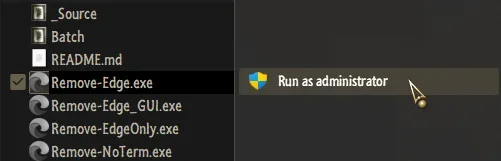
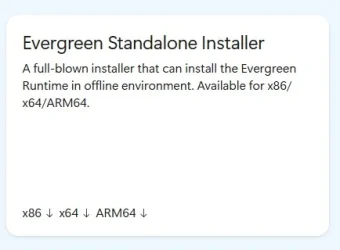
What I do is just download the WebView2 installer then run as admin as otherwise it will not update.

This way WebView2 stays up to date without updating Edge.


I scroll down the page and get the full installer.

Screenshot 2026-04-05 150232.webp
 

My Computer

System One

  • OS
    Windows 11 Pro
  • Like
Reactions: KJW

Latest Support Threads

Back
Top Bottom