
Encryption settings for USB drives different than hard drive


JackR

New member
Local time
4:26 AM
Posts
4
OS
Windows 11 Pro
I encrypted two USB drives with Bitlocker as well as my hard drive.
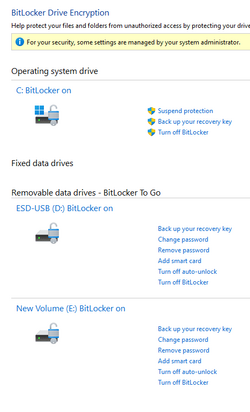
Below is a screenshot of the control panel.

Is that what it is supposed to show? Why are the settngs different for the USB's?

I am logged on as an administrator and have also logged into the as the System- Administrator and it shows the same result

I don't understand why the message shows " some settings are managed by your system administrator".

When I encrypted the USB's, I created a passwords. It did not ask for one when I encrypted the hard drive

I just want to make sure the drives are fully encrypted

Help!!!
1703343423371.png
 
Windows Build/Version
22H2 (OS Build 22621.2861)

My Computer My Computer

At a glance

Windows 11 Pro
OS
Windows 11 Pro
Computer type
Laptop
Manufacturer/Model
HP
Hello JackR,

Here are some answers:

Is that what it is supposed to show? Why are the settngs different for the USB's?
Yes. Normally, the system drive has different options than other drives, for example, you don't "password protect" your system drive because the TPM takes care of it. You have a few more options for other drives how you want to protect the keys to decrypt your drives, including password, smart card, and also "auto-unlock" which pretty much allows TPM to unlock your drive when it's connected to your system.

When I encrypted the USB's, I created a passwords. It did not ask for one when I encrypted the hard drive
Because you don't normally protect the system drive with a password.

I just want to make sure the drives are fully encrypted
Yes, they are. Your drives have the statuses "Bitlocker on"

I would suggest you turn-on the preboot Bitlocker PIN, if possible, on your system. Then, it will be more like password-protecting your Bitlockers.
 

My Computer My Computer

At a glance

Windows 11 Pro 25H2
OS
Windows 11 Pro 25H2
Computer type
PC/Desktop
Thank you for your help. I tried looking at the documentation but there was nothing showing what the results look like.
 

My Computer My Computer

At a glance

Windows 11 Pro
OS
Windows 11 Pro
Computer type
Laptop
Manufacturer/Model
HP
Thank you again. I am going to turn in the pin option.
 

My Computer My Computer

At a glance

Windows 11 Pro
OS
Windows 11 Pro
Computer type
Laptop
Manufacturer/Model
HP
I have my two backup Samsung 2TB T7 SSD drives protected with BitLocker. Because I use them frequently, I chose the option to "auto-unlock" when connected to my BitLocker protected OS SSD. That way they are protected but when I use them, the protection is transparent, and no password is needed.
 
Last edited:

My Computers My Computers

  • At a glance

    Windows 11 ProIntel Series 3 Core Ultra X9 388H64GB LPDDR5x 9600 MT/sIntel Arc graphics B390 Panther Lake
    OS
    Windows 11 Pro
    Computer type
    Laptop
    Manufacturer/Model
    Dell XPS 16 DA16260
    CPU
    Intel Series 3 Core Ultra X9 388H
    Memory
    64GB LPDDR5x 9600 MT/s
    Graphics Card(s)
    Intel Arc graphics B390 Panther Lake
    Monitor(s) Displays
    16" 3.2K Tandem OLED Infinity Edge
    Screen Resolution
    3200 x 2000 16:10 236 PPI
    Hard Drives
    1 Terabyte M.2 PCIe NVMe SSD
    Case
    Black Anodized Aluminum
    Cooling
    Vapor Chamber Cooling
    Mouse
    None
    Internet Speed
    942 Mbps Netgear Mesh + 2 Satellites
    Browser
    Microsoft Edge (Chromium)
    Antivirus
    Windows Security (Defender)
    Other Info
    NPU delivering 67 TOPS
    Microsoft 365 subscription
    Microsoft Office 365
    Microsoft OneDrive 1TB Cloud
    Microsoft Visual Studio
    Microsoft Visual Studio Code
    Microsoft Sysinternals Suite
    Microsoft BitLocker
    Microsoft Copilot
    Dell Support Assist
    Dell Command | Update
    Macrium Reflect X subscription
    1Password Password Manager
    Amazon Kindle for PC
    Lightroom/Photoshop subscription
    Interactive Brokers Trader Workstation
  • At a glance

    Windows 11 ProSnapdragon® X Elite (12 Core) with Hexagon NP...32GB LPDDR5x 8448 MT/sIntegrated Adreno GPU
    Operating System
    Windows 11 Pro
    Computer type
    Laptop
    Manufacturer/Model
    Microsoft Surface Laptop 7
    CPU
    Snapdragon® X Elite (12 Core) with Hexagon NPU delivering 45 TOPS
    Memory
    32GB LPDDR5x 8448 MT/s
    Graphics card(s)
    Integrated Adreno GPU
    Sound Card
    Omnisonic speakers with Dolby Atmos spatial sound
    Monitor(s) Displays
    13.8″ PixelSense Flow touchscreen 120 Hz 600 NIT
    Screen Resolution
    2304 × 1536 (201 PPI), 3:2 aspect ratio
    Hard Drives
    1 TB PCIe NVMe Gen 4 SSD
    Case
    Black Anodized Aluminum
    Cooling
    Vapor Chamber Cooling
    Mouse
    None
    Internet Speed
    942 Mbps Netgear Mesh + 2 Satellites
    Browser
    Microsoft Edge (Chromium)
    Antivirus
    Windows Security (Defender)
    Other Info
    Microsoft 365 subscription (Office)
    Microsoft Office 365
    Microsoft OneDrive 1TB Cloud
    Microsoft Visual Studio 2026
    Microsoft Visual Studio Code
    Interactive Brokers Trader Workstation
    Lightroom/Photoshop subscription
    1Password Password Manager
    Microsoft Sysinternals
    Amazon Kindle for PC
    Microsoft BitLocker
    Microsoft Copilot
Hi Gary

Thank you. I did the same thing. It does make it a lot easier.

Jack
 

My Computer My Computer

At a glance

Windows 11 Pro
OS
Windows 11 Pro
Computer type
Laptop
Manufacturer/Model
HP
Back
Top Bottom




