USB Drives not working with Windows 11


GAW1903

Member
Local time
8:22 PM
Posts
5
OS
Windows 11
Hi all,

Would be grateful for any advice to help resolve this weird issue - my USB drives (mostly) do not work in Windows 11. All devices work fine in the usb ports - keyboard, mouse, controller, headset, mobile phone charger etc, but not the USB drives. It pings on insertion / removal, but nothing happens. Sometimes an error message eventually appears that the drive has malfunction or is not recognised.

I have tried lots to fix this (see below). Strangely, sometimes it has started working after I have tried something, but its always temporary and goes back to not working, seemingly without reason. I have tried the following things, some which I understand, others which I do not:

- all the stuff with drivers for the USB controllers etc - checking they are up to date, deleting them and letting windows reinstall etc
- stuff with power settings (preventing windows turning off ports etc)
- checking the ports are not disabled in the registry (start set is value 3)
- adjusting a plug and play setting from manual to automatic
- installing the file wpdmtp in the INF folder in Windows
- reinstalling the motherboard chipset drivers

The last 3 things each in turn caused it to suddenly start working, but only temporary. The INF file fix worked (temporarily) several times but now does not work any more.

Its really getting me down and Im at my wits end.

One strange effect I have noticed is in device manager: On insertion, the USB drive can appear under "disk drives" with its proper name. Other times it doesn't appear there, but under "USB Controllers" and is called "Unknown USB Device (device descriptor request failed)". if it appears under "disk drives", it still doesnt appear in "devices and drives" in explorer.

But there is definitely nothing wrong with the USB Drive and its definitely a Windows 11 issue and not a hardware issue. I can say this with confidence as I have had the same issue on two identical PC builds - I sent the first back to the builder for this to be checked, but the delivery company managed to smash it and so I can another new build, but the same problem occurs. Plus, I have shown that it can be made to work, albeit only temporarily.

And should there not be an entry something like "USB Mass storage controller" under "USB Controllers" - I dont see that present?

Thanks for reading, grateful for any advice!
 
Windows Build/Version
OS Build 26100.2314

My Computer My Computer

At a glance

Windows 11AMD AM4 RYZEN 7 5700X32 GB DDR4 3200MHZ KINGSTON FURY16 GB AMD ASROCK RADEON RX 7600 XT
OS
Windows 11
Computer type
PC/Desktop
CPU
AMD AM4 RYZEN 7 5700X
Motherboard
ASUS TUF GAMING B550M-PLUS
Memory
32 GB DDR4 3200MHZ KINGSTON FURY
Graphics Card(s)
16 GB AMD ASROCK RADEON RX 7600 XT
Sound Card
ASUS XONAR SE 5.1 PCI-E
Monitor(s) Displays
27" Cooler Master
Screen Resolution
2560 x 1440
Hard Drives
2 x KINGSTON NV2 M.2 NVME SSD 1TB
PSU
CORSAIR PSU 750W RME SERIES RM750E ATX3.0
Case
CORSAIR 3000D RGB AIRFLOW BLACK CASE
Cooling
BE QUIET DARK ROCK PRO 5 CPU COOLER
Keyboard
ASUS TUF GAMING (wired)
Mouse
ASUS TUF GAMING (wired)
Browser
DuckDuckGo
Antivirus
AVG
This is what I have on my Dell Vostro 5890 Desktop which has 2 x 4TB My Book drives and a 1TB drive in a Sabrent case connected through a self-powered USB 3 Hub, haven't been having any issues with the drives:

1733683792496.webp
 

My Computers My Computers

  • At a glance

    Win11 Pro RTM Version 24H2 Build 26100.4202Intel Core i5 11th Gen. 2.40GHz12GB
    OS
    Win11 Pro RTM Version 24H2 Build 26100.4202
    Computer type
    Laptop
    Manufacturer/Model
    Dell Vostro 3400
    CPU
    Intel Core i5 11th Gen. 2.40GHz
    Memory
    12GB
    Hard Drives
    256GB SSD NVMe M.2
  • At a glance

    Win11 Pro RTM Version 24H2 Build 26100.4202Intel Core i5 10th Gen. 2.90GHz16GBOnboard, no VGA, using a DisplayPort-to-VGA a...
    Operating System
    Win11 Pro RTM Version 24H2 Build 26100.4202
    Computer type
    PC/Desktop
    Manufacturer/Model
    Dell Vostro 5890
    CPU
    Intel Core i5 10th Gen. 2.90GHz
    Memory
    16GB
    Graphics card(s)
    Onboard, no VGA, using a DisplayPort-to-VGA adapter
    Monitor(s) Displays
    24" Dell
    Hard Drives
    512GB SSD NVMe, 4TB Seagate HDD
    Browser
    Firefox, Edge
    Antivirus
    Windows Defender/Microsoft Security
Hi @GAW1903 and welcome to Eleven Forums.

Please fill out the full details of your PC in My Computers section of your profile. This will make it easier for those attempting to help you with your issue.
 

My Computers My Computers

  • At a glance

    Windows 11 Pro 25H2Intel Core i9 13900KCorsair Dominator Platinum 64gb 5600MT/s DDR5...Sapphire NITRO+ AMD Radeon RX 7900 XTX Vapor-...
    OS
    Windows 11 Pro 25H2
    Computer type
    PC/Desktop
    Manufacturer/Model
    Homebuilt
    CPU
    Intel Core i9 13900K
    Motherboard
    Asus ProArt Z790 Creator WiFi - Bios 3107
    Memory
    Corsair Dominator Platinum 64gb 5600MT/s DDR5 Dual Channel
    Graphics Card(s)
    Sapphire NITRO+ AMD Radeon RX 7900 XTX Vapor-X 24GB
    Sound Card
    External DAC: Cambridge Audio DACMagic200M - Headphone Amp: Topping L50
    Monitor(s) Displays
    Panasonic MX950 Mini LED 55" TV 120hz
    Screen Resolution
    3840 x 2160 120hz
    Hard Drives
    Samsung 980 Pro 2TB (OS)
    Samsung 980 Pro 1TB (Files)
    Lexar NZ790 4TB
    LaCie d2 Professional 6TB external - USB 3.1
    Seagate Expansion 16TB external - USB 3.2
    Seagate One Touch 18TB external HD - USB 3.0
    PSU
    Corsair RM1200x Shift
    Case
    Corsair RGB Smart Case 5000x (white)
    Cooling
    Corsair iCue H150i Elite Capellix XT
    Keyboard
    Incase Ergonomic USB (Microsoft clone)
    Mouse
    Logitech MX Master 3S
    Internet Speed
    Fibre 900/500 Mbps
    Browser
    Microsoft Edge Chromium
    Antivirus
    Bitdefender Total Security
    Other Info
    AMD Radeon Software & Drivers 26.1.1
    Hasleo Backup Suite
    Dashlane password manager
    Kensington Verimark fingerprint reader
    Logitech Brio 4K webcam
    Orico 10-port powered USB 3.0 hub
  • At a glance

    Windows 11 Pro 25H2Intel® Core™ i9-13900H32GB DDR4-3200 Dual channel*Intel Iris Xᵉ Graphics G7
    Operating System
    Windows 11 Pro 25H2
    Computer type
    Laptop
    Manufacturer/Model
    Asus Vivobook X1605VA
    CPU
    Intel® Core™ i9-13900H
    Motherboard
    Asus X1605VA bios 309
    Memory
    32GB DDR4-3200 Dual channel
    Graphics card(s)
    *Intel Iris Xᵉ Graphics G7
    Sound Card
    Realtek | Intel SST Bluetooth & USB
    Monitor(s) Displays
    16.0-inch, WUXGA 16:10 aspect ratio, IPS-level Panel
    Screen Resolution
    1920 x 1200 60hz
    Hard Drives
    512GB M.2 NVMe™ PCIe® 3.0 SSD
    Mouse
    Logitech MX Ergo Trackball
    Antivirus
    Bitdefender Total Security
    Other Info
    720p Webcam
    WiFi & USB to ethernet
Hi @GAW1903 and welcome to Eleven Forums.

Please fill out the full details of your PC in My Computers section of your profile. This will make it easier for those attempting to help you with your issue.

Thanks for the welcome and the tip Marcus - I have now added my info!
 

My Computer My Computer

At a glance

Windows 11AMD AM4 RYZEN 7 5700X32 GB DDR4 3200MHZ KINGSTON FURY16 GB AMD ASROCK RADEON RX 7600 XT
OS
Windows 11
Computer type
PC/Desktop
CPU
AMD AM4 RYZEN 7 5700X
Motherboard
ASUS TUF GAMING B550M-PLUS
Memory
32 GB DDR4 3200MHZ KINGSTON FURY
Graphics Card(s)
16 GB AMD ASROCK RADEON RX 7600 XT
Sound Card
ASUS XONAR SE 5.1 PCI-E
Monitor(s) Displays
27" Cooler Master
Screen Resolution
2560 x 1440
Hard Drives
2 x KINGSTON NV2 M.2 NVME SSD 1TB
PSU
CORSAIR PSU 750W RME SERIES RM750E ATX3.0
Case
CORSAIR 3000D RGB AIRFLOW BLACK CASE
Cooling
BE QUIET DARK ROCK PRO 5 CPU COOLER
Keyboard
ASUS TUF GAMING (wired)
Mouse
ASUS TUF GAMING (wired)
Browser
DuckDuckGo
Antivirus
AVG
This is what I have on my Dell Vostro 5890 Desktop.....

Thanks a lot Berton. Here are some screen shots of my device manager:

USB Controllers
Normal view of the USB Controllers, with no USB Drive inserted.

USB Controllers.webp

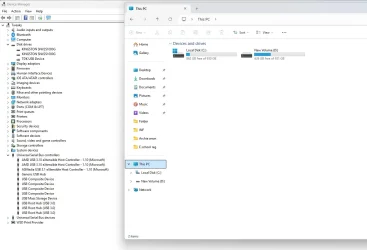
Disk Drives

USB Drive appears under Disk Drives, correctly named, but absent from Explorer. What happens is that it just suddenly refreshes and vanishes from Disk Drives too (seemingly if Windows is aware you are snooping around lol).:

Disk drives.webp

Unknown USB Device

Now the USB Drive appears within USB Controllers, but as an "unknown device". I even managed to catch the occasional error message in bottom RHS.

unknown usb device.webp

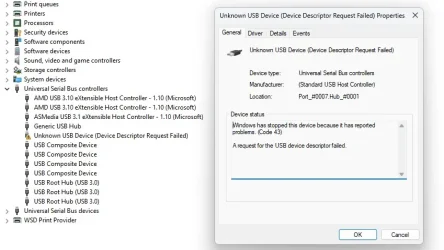
Code 43
What you get if you double click the "unknown device"

Code 43.webp

Hopefully these will help shed some light.

Thanks all!
 

My Computer My Computer

At a glance

Windows 11AMD AM4 RYZEN 7 5700X32 GB DDR4 3200MHZ KINGSTON FURY16 GB AMD ASROCK RADEON RX 7600 XT
OS
Windows 11
Computer type
PC/Desktop
CPU
AMD AM4 RYZEN 7 5700X
Motherboard
ASUS TUF GAMING B550M-PLUS
Memory
32 GB DDR4 3200MHZ KINGSTON FURY
Graphics Card(s)
16 GB AMD ASROCK RADEON RX 7600 XT
Sound Card
ASUS XONAR SE 5.1 PCI-E
Monitor(s) Displays
27" Cooler Master
Screen Resolution
2560 x 1440
Hard Drives
2 x KINGSTON NV2 M.2 NVME SSD 1TB
PSU
CORSAIR PSU 750W RME SERIES RM750E ATX3.0
Case
CORSAIR 3000D RGB AIRFLOW BLACK CASE
Cooling
BE QUIET DARK ROCK PRO 5 CPU COOLER
Keyboard
ASUS TUF GAMING (wired)
Mouse
ASUS TUF GAMING (wired)
Browser
DuckDuckGo
Antivirus
AVG
are these of any help.


best of luck, Steve ..
 

My Computers My Computers

  • At a glance

    Debian 13 KDE .. Windows 11 HomeRyzen 7 5825u64GB DDR4 3200Ryzen 7 5825u
    OS
    Debian 13 KDE .. Windows 11 Home
    Computer type
    PC/Desktop
    Manufacturer/Model
    HP 24" AiO
    CPU
    Ryzen 7 5825u
    Motherboard
    HP
    Memory
    64GB DDR4 3200
    Graphics Card(s)
    Ryzen 7 5825u
    Sound Card
    RealTek
    Monitor(s) Displays
    24" HP AiO
    Screen Resolution
    1920 x 1080 @60 Hz
    Hard Drives
    1TB WD Blue SN580 M2 SSD Partitioned.
    2x 1TB USB HDD External Backup/Storage.
    PSU
    90W external power brick
    Case
    24" All in One
    Cooling
    Default Air Cooling
    Keyboard
    HP WiFi UK extended
    Mouse
    HP WiFi 3 Button
    Internet Speed
    1GB full fibre
    Browser
    Edge & Firefox
    Antivirus
    AVG Internet Security/Windows Defender
    Other Info
    Mainly Open Source Software
  • At a glance

    Ubuntu 22.04.5 LTSi5 7200u16GB DDR4Intel
    Operating System
    Ubuntu 22.04.5 LTS
    Computer type
    Laptop
    Manufacturer/Model
    Dell 13" Latitude 2017
    CPU
    i5 7200u
    Motherboard
    Dell
    Memory
    16GB DDR4
    Graphics card(s)
    Intel
    Sound Card
    Intel
    Monitor(s) Displays
    13" Dell Laptop
    Hard Drives
    250GB Crucial 2.5" SSD
    Mouse
    Generic WiFi 3 button
    Internet Speed
    WiFi only
    Browser
    Firefox
    Antivirus
    ClamAV TK
    Other Info
    Mainly Open Source Software
USB Drive appears under Disk Drives, correctly named, but absent from Explorer. What happens is that it just suddenly refreshes and vanishes from Disk Drives too (seemingly if Windows is aware you are snooping around lol).:
If the drives show in Device Manager and Disk Manager but not in File Explorer be sure a Drive Letter has been assigned in Disk Manager. It's also part of the prompt panels when formatting a drive, can also give it a recognizable name such as Tosh1 for a 1TB Toshiba. USB drives will frequently pick up the first available Letter, usually the main/system/boot drive will be C:, the ODD is D:. Any drive with 2 or more usable partitions can have different letters for each partition and are treated as separate drives when working with files. The C: will have 3 to 5 partitions but only one, the largest, accessible, C:, unless it's big enough to have a second usable partition which may be D:.
 

My Computers My Computers

  • At a glance

    Win11 Pro RTM Version 24H2 Build 26100.4202Intel Core i5 11th Gen. 2.40GHz12GB
    OS
    Win11 Pro RTM Version 24H2 Build 26100.4202
    Computer type
    Laptop
    Manufacturer/Model
    Dell Vostro 3400
    CPU
    Intel Core i5 11th Gen. 2.40GHz
    Memory
    12GB
    Hard Drives
    256GB SSD NVMe M.2
  • At a glance

    Win11 Pro RTM Version 24H2 Build 26100.4202Intel Core i5 10th Gen. 2.90GHz16GBOnboard, no VGA, using a DisplayPort-to-VGA a...
    Operating System
    Win11 Pro RTM Version 24H2 Build 26100.4202
    Computer type
    PC/Desktop
    Manufacturer/Model
    Dell Vostro 5890
    CPU
    Intel Core i5 10th Gen. 2.90GHz
    Memory
    16GB
    Graphics card(s)
    Onboard, no VGA, using a DisplayPort-to-VGA adapter
    Monitor(s) Displays
    24" Dell
    Hard Drives
    512GB SSD NVMe, 4TB Seagate HDD
    Browser
    Firefox, Edge
    Antivirus
    Windows Defender/Microsoft Security
are these of any help.


best of luck, Steve ..

Thanks Steve, much appreciated. I will work through these and report back.

I have looked at some similar videos already and might have tried the solutions, but its worth checking as they all have something different (y)
 

My Computer My Computer

At a glance

Windows 11AMD AM4 RYZEN 7 5700X32 GB DDR4 3200MHZ KINGSTON FURY16 GB AMD ASROCK RADEON RX 7600 XT
OS
Windows 11
Computer type
PC/Desktop
CPU
AMD AM4 RYZEN 7 5700X
Motherboard
ASUS TUF GAMING B550M-PLUS
Memory
32 GB DDR4 3200MHZ KINGSTON FURY
Graphics Card(s)
16 GB AMD ASROCK RADEON RX 7600 XT
Sound Card
ASUS XONAR SE 5.1 PCI-E
Monitor(s) Displays
27" Cooler Master
Screen Resolution
2560 x 1440
Hard Drives
2 x KINGSTON NV2 M.2 NVME SSD 1TB
PSU
CORSAIR PSU 750W RME SERIES RM750E ATX3.0
Case
CORSAIR 3000D RGB AIRFLOW BLACK CASE
Cooling
BE QUIET DARK ROCK PRO 5 CPU COOLER
Keyboard
ASUS TUF GAMING (wired)
Mouse
ASUS TUF GAMING (wired)
Browser
DuckDuckGo
Antivirus
AVG
If the drives show in Device Manager and Disk Manager......

Thanks Berton. Unfortunately, the USB drive never seems to appear in Disk Manager, argh!

I did some more snooping around and found the following:

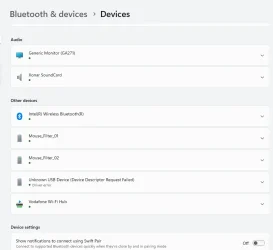
I looked in Bluetooth and Devices and it was appeared there (as an "unrecognised device") and there was a driver error reported.

driver error.webp

Here is disk manager at the exact same time, no recognition at all (just my two hard drives):

disk manager.webp

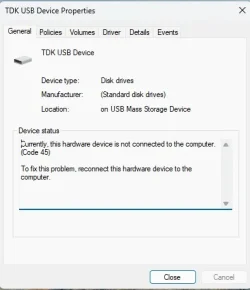
When looking around, I managed to generate a code 45 error, to go with the earlier code 43:

Code 45.webp

The curious thing is, when I do the check drivers routine and uninstall / reinstall drivers for the USB drive and associated, It always says the best drivers are already installed.

Yet, I am getting these errors and a driver error reported? What gives?

Could my drivers be corrupted or similar? Is there an alternative or replacement via download?

Thanks!
 

My Computer My Computer

At a glance

Windows 11AMD AM4 RYZEN 7 5700X32 GB DDR4 3200MHZ KINGSTON FURY16 GB AMD ASROCK RADEON RX 7600 XT
OS
Windows 11
Computer type
PC/Desktop
CPU
AMD AM4 RYZEN 7 5700X
Motherboard
ASUS TUF GAMING B550M-PLUS
Memory
32 GB DDR4 3200MHZ KINGSTON FURY
Graphics Card(s)
16 GB AMD ASROCK RADEON RX 7600 XT
Sound Card
ASUS XONAR SE 5.1 PCI-E
Monitor(s) Displays
27" Cooler Master
Screen Resolution
2560 x 1440
Hard Drives
2 x KINGSTON NV2 M.2 NVME SSD 1TB
PSU
CORSAIR PSU 750W RME SERIES RM750E ATX3.0
Case
CORSAIR 3000D RGB AIRFLOW BLACK CASE
Cooling
BE QUIET DARK ROCK PRO 5 CPU COOLER
Keyboard
ASUS TUF GAMING (wired)
Mouse
ASUS TUF GAMING (wired)
Browser
DuckDuckGo
Antivirus
AVG

Latest Support Threads

Back
Top Bottom