
Reinstall windows 11
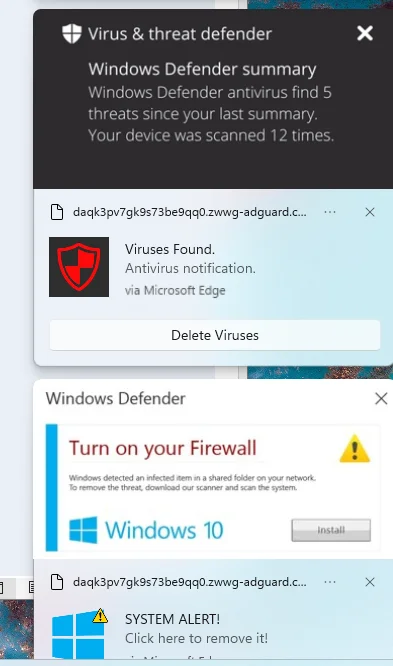
I cannot completely remove McAfee from my computer. I get several popup dialogs dialogs warning me about viruses on my computer. When click the option to remove the virus it opens the Edge browser takes me to a dialog to install McAfee.
I think a complete Windows 11 re-install is needed. BUT, last time that was done Microsoft complained that the product key had already been installed. How do I completely re-install on the same computer with the same product key?
Additional details
I used to use MSDN (Microsoft Developer’s Network) but it has migrated to a new name. I post there, received numerous replies, but they gave up on me without a resolution.
I ran the McAfee tool called MCPR several times. Did not help. Check the task manager and Processes utility for an installed app that looks like “PC App Store” or “PCAppStore” or anything like that. Not present. Use ctl-alt-del > Task Manager to get there.
Below is an image from the right edge of the monitor.
The dialog often post more than one a minute, are modal, and they all open a new tab in the Edge browser. Notice that one suggest to turn on the Firewall for Windows 10. Not windows 11, but 10.
Edit: I did a reinstall of Windows 11 using a utility found on a Microsoft website. It left all my applications in place and did not resolve this problem. I might have done it wrong. Now I suspect a complete reinstall is required. That will mean install all the utilities, but it seems to be a price that must be paid.
I cannot completely remove McAfee from my computer. I get several popup dialogs dialogs warning me about viruses on my computer. When click the option to remove the virus it opens the Edge browser takes me to a dialog to install McAfee.
I think a complete Windows 11 re-install is needed. BUT, last time that was done Microsoft complained that the product key had already been installed. How do I completely re-install on the same computer with the same product key?
Additional details
I used to use MSDN (Microsoft Developer’s Network) but it has migrated to a new name. I post there, received numerous replies, but they gave up on me without a resolution.
I ran the McAfee tool called MCPR several times. Did not help. Check the task manager and Processes utility for an installed app that looks like “PC App Store” or “PCAppStore” or anything like that. Not present. Use ctl-alt-del > Task Manager to get there.
Below is an image from the right edge of the monitor.
The dialog often post more than one a minute, are modal, and they all open a new tab in the Edge browser. Notice that one suggest to turn on the Firewall for Windows 10. Not windows 11, but 10.
Edit: I did a reinstall of Windows 11 using a utility found on a Microsoft website. It left all my applications in place and did not resolve this problem. I might have done it wrong. Now I suspect a complete reinstall is required. That will mean install all the utilities, but it seems to be a price that must be paid.
Last edited:
My Computer
At a glance
Windows 11Intel i5-10400, 2.9GHz32 GIntel UHD Graphics
- OS
- Windows 11
- Computer type
- PC/Desktop
- CPU
- Intel i5-10400, 2.9GHz
- Memory
- 32 G
- Graphics Card(s)
- Intel UHD Graphics
- Sound Card
- Sound blaster
- Monitor(s) Displays
- Two HP monitors
- Screen Resolution
- 1920 x 1080






