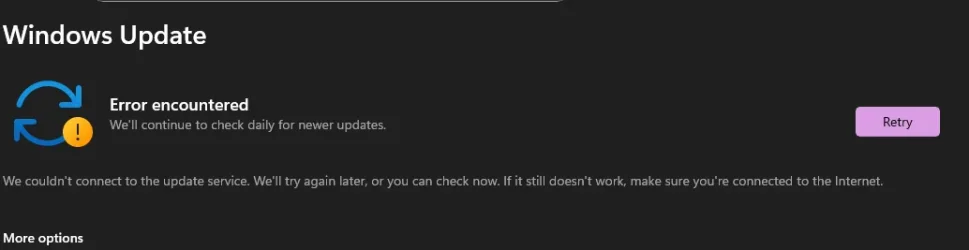
Error: We couldn't connect to the update service


PenguinFluffy

New member
Local time
4:35 PM
Posts
7
OS
Windows 11
how can i fix this had it on w10 and now w11 plss help !!!Screenshot 2026-03-08 203211.webp
 

My Computer My Computer

At a glance

Windows 11ryzen 9 5950xRTX 2070 SUPER
OS
Windows 11
Computer type
PC/Desktop
CPU
ryzen 9 5950x
Motherboard
asus rog strix B550-F gaming
Graphics Card(s)
RTX 2070 SUPER
PSU
850 W
Internet Speed
1000 MB / 1000MB
Run the Windows Update troubleshooter
 

My Computer My Computer

At a glance

Windows 11 25H2 (OS Build 26200.8655)Processor: 11th Gen Intel(R) Core(TM) i5-1135...12GBIntel R Iris R XE Graphics family
OS
Windows 11 25H2 (OS Build 26200.8655)
Computer type
Laptop
Manufacturer/Model
Dell
CPU
Processor: 11th Gen Intel(R) Core(TM) i5-1135G7 @ 2.40G
Motherboard
64-bit operating system Dell 0XMF7W
Memory
12GB
Graphics Card(s)
Intel R Iris R XE Graphics family
Sound Card
Cirrus Speakers High Definition Audio
Monitor(s) Displays
Generic PnP monitor
Screen Resolution
1920 x 1080
Hard Drives
NVMe 670p SSDPEKNU512GZ NVMe I NTEL 512GB
Case
cheap
Mouse
Logitech wireless mouse
Internet Speed
16 Mps download
Browser
Google Chrome
Antivirus
Security: Microsoft Defender & Malwarebytes Premium (with browser guard)
Other Info
Dell model: Inspiron 15 3511

My Computers My Computers

  • At a glance

    Windows 11 Pro - Windows 7 HP 64 - Lubuntui5 6600K - 800MHz to 4400MHz4+4G GSkill DDR4 3000IG - Intel 530
    OS
    Windows 11 Pro - Windows 7 HP 64 - Lubuntu
    Computer type
    PC/Desktop
    Manufacturer/Model
    custom build
    CPU
    i5 6600K - 800MHz to 4400MHz
    Motherboard
    GA-Z170-HD3P
    Memory
    4+4G GSkill DDR4 3000
    Graphics Card(s)
    IG - Intel 530
    Monitor(s) Displays
    Samsung 226BW
    Screen Resolution
    1680x1050
    Hard Drives
    (1) -1 SM951 – 128GB M.2 AHCI PCIe SSD drive for Win 11
    (2) -1 WD SATA 3 - 1T for Data
    (3) -1 WD SATA 3 - 1T for backup
    (4) -1 BX500 SSD - 256G for Windows 7 and Lubuntu
    PSU
    Thermaltake 450W TR2 gold
    Keyboard
    Old and good Chicony mechanical keyboard
    Mouse
    Logitech mX performance - 9 buttons (had to disable some)
    Internet Speed
    500 Mb/s
    Browser
    Firefox 64
  • At a glance

    Windows 11 Proi7-4500U 800- 3000MHz(4+4)G DDR3 1600IG intel 4400 + NVIDIA GeForce GT 745M
    Operating System
    Windows 11 Pro
    Computer type
    Laptop
    Manufacturer/Model
    Asus Q550LF
    CPU
    i7-4500U 800- 3000MHz
    Motherboard
    Asus Q550LF
    Memory
    (4+4)G DDR3 1600
    Graphics card(s)
    IG intel 4400 + NVIDIA GeForce GT 745M
    Sound Card
    Realtek
    Monitor(s) Displays
    LG Display LP156WF4-SPH1
    Screen Resolution
    1920 x 1080
    Hard Drives
    BX500 120G SSD for Windows and programs
    & 1T HDD for data
    Internet Speed
    500 Mb/s
    Browser
    Firefox 64

My Computer My Computer

At a glance

Windows 11ryzen 9 5950xRTX 2070 SUPER
OS
Windows 11
Computer type
PC/Desktop
CPU
ryzen 9 5950x
Motherboard
asus rog strix B550-F gaming
Graphics Card(s)
RTX 2070 SUPER
PSU
850 W
Internet Speed
1000 MB / 1000MB

My Computer My Computer

At a glance

Windows 11ryzen 9 5950xRTX 2070 SUPER
OS
Windows 11
Computer type
PC/Desktop
CPU
ryzen 9 5950x
Motherboard
asus rog strix B550-F gaming
Graphics Card(s)
RTX 2070 SUPER
PSU
850 W
Internet Speed
1000 MB / 1000MB
You should first try to reset WU because doing so fixes many WU problems.
Reset Windows Update - ElevenForumTutorials


Denis
Did you do a Win10 to Win 11 upgrade?
Is the Metered connections enabled?

Did you do a Win10 to Win 11 upgrade?
Is the Metered connections enabled?
doesn't help at all, have done everything I could find on the web every post, i even reinstalled windows like 3 times , services,registry,firewall,dns ,
 

My Computer My Computer

At a glance

Windows 11ryzen 9 5950xRTX 2070 SUPER
OS
Windows 11
Computer type
PC/Desktop
CPU
ryzen 9 5950x
Motherboard
asus rog strix B550-F gaming
Graphics Card(s)
RTX 2070 SUPER
PSU
850 W
Internet Speed
1000 MB / 1000MB
doesn't help at all, have done everything I could find on the web every post, i even reinstalled windows like 3 times , services,registry,firewall,dns ,
Did you do a Repair install or a Clean install?

You didn't answered my question:
Is the Metered connections enabled?

If you did a clean install and WU still don't work (with Metered connections disabled) it probably is your router firewall that is blocking access to MS servers.
 

My Computers My Computers

  • At a glance

    Windows 11 Pro - Windows 7 HP 64 - Lubuntui5 6600K - 800MHz to 4400MHz4+4G GSkill DDR4 3000IG - Intel 530
    OS
    Windows 11 Pro - Windows 7 HP 64 - Lubuntu
    Computer type
    PC/Desktop
    Manufacturer/Model
    custom build
    CPU
    i5 6600K - 800MHz to 4400MHz
    Motherboard
    GA-Z170-HD3P
    Memory
    4+4G GSkill DDR4 3000
    Graphics Card(s)
    IG - Intel 530
    Monitor(s) Displays
    Samsung 226BW
    Screen Resolution
    1680x1050
    Hard Drives
    (1) -1 SM951 – 128GB M.2 AHCI PCIe SSD drive for Win 11
    (2) -1 WD SATA 3 - 1T for Data
    (3) -1 WD SATA 3 - 1T for backup
    (4) -1 BX500 SSD - 256G for Windows 7 and Lubuntu
    PSU
    Thermaltake 450W TR2 gold
    Keyboard
    Old and good Chicony mechanical keyboard
    Mouse
    Logitech mX performance - 9 buttons (had to disable some)
    Internet Speed
    500 Mb/s
    Browser
    Firefox 64
  • At a glance

    Windows 11 Proi7-4500U 800- 3000MHz(4+4)G DDR3 1600IG intel 4400 + NVIDIA GeForce GT 745M
    Operating System
    Windows 11 Pro
    Computer type
    Laptop
    Manufacturer/Model
    Asus Q550LF
    CPU
    i7-4500U 800- 3000MHz
    Motherboard
    Asus Q550LF
    Memory
    (4+4)G DDR3 1600
    Graphics card(s)
    IG intel 4400 + NVIDIA GeForce GT 745M
    Sound Card
    Realtek
    Monitor(s) Displays
    LG Display LP156WF4-SPH1
    Screen Resolution
    1920 x 1080
    Hard Drives
    BX500 120G SSD for Windows and programs
    & 1T HDD for data
    Internet Speed
    500 Mb/s
    Browser
    Firefox 64

My Computer My Computer

At a glance

Windows 11ryzen 9 5950xRTX 2070 SUPER
OS
Windows 11
Computer type
PC/Desktop
CPU
ryzen 9 5950x
Motherboard
asus rog strix B550-F gaming
Graphics Card(s)
RTX 2070 SUPER
PSU
850 W
Internet Speed
1000 MB / 1000MB
You didn't answered my question:
Did you do a Repair install or a Clean install?
 

My Computers My Computers

  • At a glance

    Windows 11 Pro - Windows 7 HP 64 - Lubuntui5 6600K - 800MHz to 4400MHz4+4G GSkill DDR4 3000IG - Intel 530
    OS
    Windows 11 Pro - Windows 7 HP 64 - Lubuntu
    Computer type
    PC/Desktop
    Manufacturer/Model
    custom build
    CPU
    i5 6600K - 800MHz to 4400MHz
    Motherboard
    GA-Z170-HD3P
    Memory
    4+4G GSkill DDR4 3000
    Graphics Card(s)
    IG - Intel 530
    Monitor(s) Displays
    Samsung 226BW
    Screen Resolution
    1680x1050
    Hard Drives
    (1) -1 SM951 – 128GB M.2 AHCI PCIe SSD drive for Win 11
    (2) -1 WD SATA 3 - 1T for Data
    (3) -1 WD SATA 3 - 1T for backup
    (4) -1 BX500 SSD - 256G for Windows 7 and Lubuntu
    PSU
    Thermaltake 450W TR2 gold
    Keyboard
    Old and good Chicony mechanical keyboard
    Mouse
    Logitech mX performance - 9 buttons (had to disable some)
    Internet Speed
    500 Mb/s
    Browser
    Firefox 64
  • At a glance

    Windows 11 Proi7-4500U 800- 3000MHz(4+4)G DDR3 1600IG intel 4400 + NVIDIA GeForce GT 745M
    Operating System
    Windows 11 Pro
    Computer type
    Laptop
    Manufacturer/Model
    Asus Q550LF
    CPU
    i7-4500U 800- 3000MHz
    Motherboard
    Asus Q550LF
    Memory
    (4+4)G DDR3 1600
    Graphics card(s)
    IG intel 4400 + NVIDIA GeForce GT 745M
    Sound Card
    Realtek
    Monitor(s) Displays
    LG Display LP156WF4-SPH1
    Screen Resolution
    1920 x 1080
    Hard Drives
    BX500 120G SSD for Windows and programs
    & 1T HDD for data
    Internet Speed
    500 Mb/s
    Browser
    Firefox 64
You didn't answered my question:
Did you do a Repair install or a Clean instal
first 2 times was repair and the 3 one was clean
 

My Computer My Computer

At a glance

Windows 11ryzen 9 5950xRTX 2070 SUPER
OS
Windows 11
Computer type
PC/Desktop
CPU
ryzen 9 5950x
Motherboard
asus rog strix B550-F gaming
Graphics Card(s)
RTX 2070 SUPER
PSU
850 W
Internet Speed
1000 MB / 1000MB
OMG, it's fixed. This is what I did
Quick Install Steps for Clean Update (Recommended for Your Drops)
  1. Go to Device Manager → Network adapters → Right-click Intel(R) Ethernet Controller I225-V → Uninstall device → Check Delete the driver software for this device → OK.
  2. Reboot (Windows may reinstall a basic driver).
When I rebooted, the error message was there, but then I pressed check update, and then it went through.
 

My Computer My Computer

At a glance

Windows 11ryzen 9 5950xRTX 2070 SUPER
OS
Windows 11
Computer type
PC/Desktop
CPU
ryzen 9 5950x
Motherboard
asus rog strix B550-F gaming
Graphics Card(s)
RTX 2070 SUPER
PSU
850 W
Internet Speed
1000 MB / 1000MB

Latest Support Threads

Back
Top Bottom