Ethernet and wifi question


bimfi

Well-known member
Member
Local time
3:56 PM
Posts
56
OS
Windows 11 Pro (x64) Version 25H2 build 26200.8457
Good afternoon,
I have a PC that I built in 2018. I did not install a PCIe wifi card, because I am running on AT&T Fiber. That being said, I disabled the wifi on my modem and only use ethernet on my PC. I disabled the modem wifi because I needed a mesh system to alleviate any wifi drop-outs or weak wifi. The mesh system provides wifi to all of my other devices.
My issue right now is that my printer is wired into my Fiber modem, so I cannot print from anything except my PC. If I install a PCIe wifi card, will there be any conflict with my PC in regards to internet service? I'm trying to visualize any scenarios that might be conflicted.
I don't want to seem ignorant in this issue, so if anyone can help me, that would be great.
 

My Computer

System One

  • OS
    Windows 11 Pro (x64) Version 25H2 build 26200.8457
    Computer type
    PC/Desktop
    Manufacturer/Model
    custom built
    CPU
    Ryzen 5 5600X
    Motherboard
    Asus Prime X370-pro
    Memory
    G. Skill 4X8GB 288-pin SDRAM DDR4-3000
    Graphics Card(s)
    MSI GeForce GTX 1060 6GB
    Sound Card
    onboard
    Monitor(s) Displays
    Dual ViewSonic VG2753 Series [Monitor] (27.2"vis, October 2017)
    Screen Resolution
    1920 x 1080
    Hard Drives
    1T SSD (C:\); 2T spinner HDD partitioned into virtual drives; 250gb WD Blue SSD;
    PSU
    Seasonic Focus Plus SSR-650FX
    Case
    Cool Master Mastercase Pro 5
    Cooling
    Cryorig H7
    Keyboard
    Logitech wireless
    Mouse
    Logitech wireless
    Internet Speed
    1 Gb fiber optic AT&T
    Browser
    Opera
    Antivirus
    McAfee
    Other Info
    NordVPN installed
If the printer is plugged into the modem (assuming it has a built-in switch) then the printer should have an IP address in which case anything on your network should be able to connect to it and use it.
 

My Computer

System One

  • OS
    Linux Mint
    Computer type
    Laptop
    Manufacturer/Model
    System76 Lemur Pro
To put it plainly, Any device, computer or printer, connected to the same network either wired or wirelessly, can "TALK" to each other.
 

My Computers

System One System Two

  • OS
    Windows 11 Pro 25H2
    Computer type
    PC/Desktop
    Manufacturer/Model
    Dell Optiplex 7080
    CPU
    i9-10900 10 core 20 threads
    Motherboard
    DELL 0J37VM
    Memory
    32 gb
    Graphics Card(s)
    none-Intel UHD Graphics 630
    Sound Card
    Integrated Realtek
    Monitor(s) Displays
    Benq 27
    Screen Resolution
    2560x1440
    Hard Drives
    2x1tb Solidigm m.2 nvme /External drives 512gb Samsung m.2 sata+2tb Kingston m2.nvme
    PSU
    500w
    Case
    MT
    Cooling
    Dell Premium
    Keyboard
    Logitech wired
    Mouse
    Logitech wireless
    Internet Speed
    so slow I'm too embarrassed to tell
    Browser
    #1 Edge #2 Firefox
    Antivirus
    Defender+MWB Premium
  • Operating System
    Windows 11 Pro 24H2 26200.8457
    Computer type
    PC/Desktop
    Manufacturer/Model
    Beelink Mini PC SER5
    CPU
    AMD Ryzen 7 6800U
    Memory
    32 gb
    Graphics card(s)
    integrated
    Sound Card
    integrated
    Monitor(s) Displays
    Benq 27
    Screen Resolution
    2560x1440
    Hard Drives
    1TB Crucial nvme
    Keyboard
    Logitech wired
    Mouse
    Logitech wireless
    Internet Speed
    still too embarrassed to tell
    Browser
    Firefox
    Antivirus
    Defender
    Other Info
    System 3 is non compliant Dell 9020 i7-4770/24gb ram Win11 PRO 26200.8457
The issue is that my wireless mesh network is NOT the same network as my Ethernet network. This is why I'm asking if I can install a Wifi adapter on my PC so that I can connect with my mesh network AND use my ethernet network on the PC also.
 

My Computer

System One

  • OS
    Windows 11 Pro (x64) Version 25H2 build 26200.8457
    Computer type
    PC/Desktop
    Manufacturer/Model
    custom built
    CPU
    Ryzen 5 5600X
    Motherboard
    Asus Prime X370-pro
    Memory
    G. Skill 4X8GB 288-pin SDRAM DDR4-3000
    Graphics Card(s)
    MSI GeForce GTX 1060 6GB
    Sound Card
    onboard
    Monitor(s) Displays
    Dual ViewSonic VG2753 Series [Monitor] (27.2"vis, October 2017)
    Screen Resolution
    1920 x 1080
    Hard Drives
    1T SSD (C:\); 2T spinner HDD partitioned into virtual drives; 250gb WD Blue SSD;
    PSU
    Seasonic Focus Plus SSR-650FX
    Case
    Cool Master Mastercase Pro 5
    Cooling
    Cryorig H7
    Keyboard
    Logitech wireless
    Mouse
    Logitech wireless
    Internet Speed
    1 Gb fiber optic AT&T
    Browser
    Opera
    Antivirus
    McAfee
    Other Info
    NordVPN installed
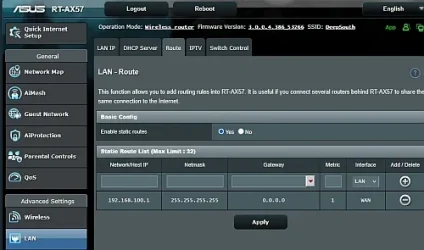
I'll just throw this out as Copilot helped me connect to my modem which had an IP address (192.168.100.1) out of the ASUS router's IP range (192.168.50.1). Does Mesh have a "static route" availability? Here is what Copilot helped me with:
    1. Log into your ASUS router at 192.168.50.1.
    2. Go to LAN → Route → Static Route.
    3. Add a new entry:
      • Network/Host IP: 192.168.100.1
      • Netmask: 255.255.255.255
      • Gateway: 0.0.0.0 (or leave blank if allowed)
      • Metric: 1
      • Interface: WAN
    4. Save and reboot the router.
    5. Test by browsing to http://192.168.100.1.
Copilot exlained:

The key change: use 255.255.255.255 as the mask and point the route to the WAN interface, not the LAN IP. That should restore access to your modem’s status page.

router_static_01.webp
--------------------
I don't know if any of this will help your situation but I thought I'd share anyway.
Much success to you.
John
 

My Computers

System One System Two

  • OS
    Windows 11 Home, ver 25H2 build 26200.8246
    Computer type
    Laptop
    Manufacturer/Model
    Hewlett-Packard Spectre 13-4001 x360 convertable
    CPU
    Intel Core i5 5200U @ 2.20GH
    Motherboard
    Hewlett-Packard 802D
    Memory
    4 GB
    Graphics Card(s)
    Intel HD Graphics 5500 on board
    Sound Card
    Intel Smart Sound Technology (Intel SST)
    Hard Drives
    Micron 256GB M.2 2280 NGFF SSD MTFDDAV256TBN, (SATA 6.0 Gb/s)
    Keyboard
    Model # G01KB
    Antivirus
    Microsoft Defender
    Other Info
    born on date: 25 Feb 2016
  • Operating System
    Win 11 Home 25H2 build 26200.7922
    Computer type
    PC/Desktop
    Manufacturer/Model
    Asus Desktop model M32AD-US019S (DOM: 6/9/2014 )
    CPU
    Intel Core i7 4th Gen 4790 (3.60GHz), Haswell 22nm Technology, SOCKET 1150
    Motherboard
    H81M-E/M51AD/DP_MB
    Memory
    Samsung 16 GB DDR3 (8GB in 2 modules)
    Graphics card(s)
    NVIDIA GeForce GTX 760, 3GB, and on-board Intel HD Graphics 4600 Rev 6
    Monitor(s) Displays
    HP EliteDisplay E241i LED; HP EliteDisplay E243
    Hard Drives
    Samsung 500GB SSD, 870 EVO (SATA 6.0 )
    Micron 250GB SSD, CT250MX500
    Toshiba HDD, 3GB (original drive w/PC)
    Case
    ASUS
    Keyboard
    ASUS-------------------------
    Antivirus
    MS Defender
    Other Info
    Additional Laptops:

    HEWLETT PACKARD
    HP OmniBook X Flip NGAI (Next Gen AI),
    Model: 16-as0023dx
    PT# B5UH1UA#ABA Product #: B5UH1UA
    delivered and setup 7/25/25
    16" 2K Touch-Screen Laptop
    Intel Core Ultra 7 256V '24 Series 2 - CPU
    Boost Clock Frequency 4.8 gigahertz; Neural Processing Unit (NPU) Yes;
    16GB Memory, LPDDR5X
    1TB SSD PCIe 4.0
    Graphics: Intel Arc 140V
    1 x HDMI 2.1
    1 x Thunderbolt 4
    2K Touch-Screen display, LED, IPS; 1920 x 1200 (Full HD+)
    USB Ports: 1 x USB-C 3.1, 2 x USB-A 3.1
    Wi-Fi 6E
    weight 4.15 pounds

    DELL
    Model:I7591-7483BLK-PUS 2-in-1 (7000 Series)
    purchased 12/3/2019,
    15.6 inch 2-IN-1;
    4K Ultra HD Touch-Screen, 3840 x 2160,
    Intel Core i7 10510U CPU 1.80GHz,
    16GB RAM DDR4 SDRAM 2400 megahert (2 slots),
    dedicated graphics Nvidia GeForce MX250 2 GB Graphics,
    PCIe 512GB Intel SSD + 32GB Optane Memory (Intel Optane Memory H10 with solid-state storage),
    wireless-AX & Bluetooth
    Battery: 68wh, Type 4VGMP 4 cell
Yes, you can do that. If your PC is connected to 2 networks, it will connect to only one network at a time depending the metrics you set. However, Your PC may experience conflict if it doesn't know which connection to prioritze in any particular case.
If you want traffic for the Internet to go through one network, while local traffic (like to shared drives or printers) to use the other, your other shared devices would need to use the same network as the printer, Since you have a mesh network, I am guessing they are. Sounds like your PC is the odd man out.

This is from my handy-dandy networking notes. Hope it works. I've never done it.
If you want:
  • One network for Internet
  • The other for local access only
Disable the default gateway on the local-only network. (In your case it would be the wireless one).
  1. Go to Advanced TCP/IP Settings
  2. Uncheck “Automatic metric”
  3. Remove the Default gateway field (leave it blank)

Check Which Network Is Active
To see which interfaces are up and how routing is prioritized, Open Command Prompt and type:

route print
or
ipconfig
 

My Computers

System One System Two

  • OS
    Windows 11 Pro 25H2
    Computer type
    PC/Desktop
    Manufacturer/Model
    Dell Optiplex 7080
    CPU
    i9-10900 10 core 20 threads
    Motherboard
    DELL 0J37VM
    Memory
    32 gb
    Graphics Card(s)
    none-Intel UHD Graphics 630
    Sound Card
    Integrated Realtek
    Monitor(s) Displays
    Benq 27
    Screen Resolution
    2560x1440
    Hard Drives
    2x1tb Solidigm m.2 nvme /External drives 512gb Samsung m.2 sata+2tb Kingston m2.nvme
    PSU
    500w
    Case
    MT
    Cooling
    Dell Premium
    Keyboard
    Logitech wired
    Mouse
    Logitech wireless
    Internet Speed
    so slow I'm too embarrassed to tell
    Browser
    #1 Edge #2 Firefox
    Antivirus
    Defender+MWB Premium
  • Operating System
    Windows 11 Pro 24H2 26200.8457
    Computer type
    PC/Desktop
    Manufacturer/Model
    Beelink Mini PC SER5
    CPU
    AMD Ryzen 7 6800U
    Memory
    32 gb
    Graphics card(s)
    integrated
    Sound Card
    integrated
    Monitor(s) Displays
    Benq 27
    Screen Resolution
    2560x1440
    Hard Drives
    1TB Crucial nvme
    Keyboard
    Logitech wired
    Mouse
    Logitech wireless
    Internet Speed
    still too embarrassed to tell
    Browser
    Firefox
    Antivirus
    Defender
    Other Info
    System 3 is non compliant Dell 9020 i7-4770/24gb ram Win11 PRO 26200.8457
Thank you all for that information. I will investigate what I need to do to make this happen.
 

My Computer

System One

  • OS
    Windows 11 Pro (x64) Version 25H2 build 26200.8457
    Computer type
    PC/Desktop
    Manufacturer/Model
    custom built
    CPU
    Ryzen 5 5600X
    Motherboard
    Asus Prime X370-pro
    Memory
    G. Skill 4X8GB 288-pin SDRAM DDR4-3000
    Graphics Card(s)
    MSI GeForce GTX 1060 6GB
    Sound Card
    onboard
    Monitor(s) Displays
    Dual ViewSonic VG2753 Series [Monitor] (27.2"vis, October 2017)
    Screen Resolution
    1920 x 1080
    Hard Drives
    1T SSD (C:\); 2T spinner HDD partitioned into virtual drives; 250gb WD Blue SSD;
    PSU
    Seasonic Focus Plus SSR-650FX
    Case
    Cool Master Mastercase Pro 5
    Cooling
    Cryorig H7
    Keyboard
    Logitech wireless
    Mouse
    Logitech wireless
    Internet Speed
    1 Gb fiber optic AT&T
    Browser
    Opera
    Antivirus
    McAfee
    Other Info
    NordVPN installed
Back
Top Bottom