Solved Event 41 Kernel Power Task Category 63


Tuneup plus results were excellent.


When available post a share links for post #13 steps #4 and #5.


If there are error messages or codes > post share links


Download to a new desktop folder:



Code:
 Microsoft Windows 11 Pro  Version 24H2 (OS Build 26100.6584)
 
==================================================================

    Started on 2025-09-17 at 20:25:58.29
 
        [SFC /ScanNow]
 
Beginning system scan.  This process will take some time.

Results:
 
Windows Resource Protection did not find any integrity violations.
 
==================================================================

    Started on 2025-09-17 at 20:26:59.43

        [DISM /online /cleanup-image /ScanHealth]

Deployment Image Servicing and Management tool
Version: 10.0.26100.5074

Image Version: 10.0.26100.6584
 
No component store corruption detected.

The operation completed successfully.
 
==================================================================

    Started on 2025-09-17 at 20:28:12.85

        [DISM /online /cleanup-image /RestoreHealth]

Deployment Image Servicing and Management tool
Version: 10.0.26100.5074

Image Version: 10.0.26100.6584
 
The restore operation completed successfully.

The operation completed successfully.
 
==================================================================

The second "SFC /ScanNow" was skipped, as the first output the following:

Windows Resource Protection did not find any integrity violations.
 
==================================================================

    Started on 2025-09-17 at 20:29:05.92

        [ChkDsk /Scan]
 
The type of the file system is NTFS.
Volume label is M.2-500GB-OS.
 
Stage 1: Examining basic file system structure ...
1465856 file records processed.                                                    
File verification completed.
Phase duration (File record verification): 5.57 seconds.
40267 large file records processed.                                
Phase duration (Orphan file record recovery): 15.82 milliseconds.
0 bad file records processed.                                  
Phase duration (Bad file record checking): 0.03 milliseconds.
 
Stage 2: Examining file name linkage ...
2983 reparse records processed.                                  
1697872 index entries processed.                                                    
Index verification completed.
Phase duration (Index verification): 9.21 seconds.
0 unindexed files scanned.                                    
Phase duration (Orphan reconnection): 1.31 seconds.
0 unindexed files recovered to lost and found.                
Phase duration (Orphan recovery to lost and found): 0.06 milliseconds.
2983 reparse records processed.                                  
Phase duration (Reparse point and Object ID verification): 6.85 milliseconds.
 
Stage 3: Examining security descriptors ...
Security descriptor verification completed.
Phase duration (Security descriptor verification): 31.08 milliseconds.
116009 data files processed.                                        
Phase duration (Data attribute verification): 0.06 milliseconds.
CHKDSK is verifying Usn Journal...
38317480 USN bytes processed.                                                        
Usn Journal verification completed.
Phase duration (USN journal verification): 89.54 milliseconds.

Windows has scanned the file system and found no problems.

No further action is required.
 
497934688 KB total disk space.
283881776 KB in 756550 files.
486276 KB in 116010 indexes.
0 KB in bad sectors.
1597732 KB in use by the system.
65536 KB occupied by the log file.
211968904 KB available on disk.
 
4096 bytes in each allocation unit.
124483672 total allocation units on disk.
52992226 allocation units available on disk.
Total duration: 16.24 seconds (16246 ms).
 
==================================================================
 
    Started on 2025-09-17 at 20:29:28.02
 
AutoReboot
 
FALSE    
 
==================================================================
 
        [Set AutoReboot = False]
 
Updating property(s) of '\\AJ007\ROOT\CIMV2:Win32_OSRecoveryConfiguration.Name="Microsoft Windows 11 Pro|C:\\WINDOWS|\\Device\\Harddisk3\\Partition4"'

Property(s) update successful.

==================================================================
 
AutoReboot
 
FALSE    
 
==================================================================
 
DebugInfoType
 
7          
 
==================================================================

        [Set DebugInfoType = 7]

Updating property(s) of '\\AJ007\ROOT\CIMV2:Win32_OSRecoveryConfiguration.Name="Microsoft Windows 11 Pro|C:\\WINDOWS|\\Device\\Harddisk3\\Partition4"'

Property(s) update successful.

==================================================================
 
DebugInfoType
 
7          
 
==================================================================

        [WMIC PageFile list]

AllocatedBaseSize=7424
CurrentUsage=0
Description=C:\pagefile.sys
InstallDate=20230726171631.827033-420
Name=C:\pagefile.sys
PeakUsage=1
Status=
TempPageFile=FALSE
 
==================================================================
 
AutomaticManagedPagefile
 
TRUE                  
 
==================================================================

        [Set AutomaticManagedPagefile = True]

Updating property(s) of '\\AJ007\ROOT\CIMV2:Win32_ComputerSystem.Name="AJ007"'

Property(s) update successful.

==================================================================
 
AutomaticManagedPagefile
 
TRUE                  
 
==================================================================

        [BcdEdit /enum {badmemory}]

RAM Defects
-----------
identifier              {badmemory}
 
==================================================================

    Finished on 2025-09-17 at 20:29:29.12
    It took 3 minutes and 31 seconds to complete the operations.
sorry what you mean by post 13 #4 #5?
here is also my temps in game IMG_3407
 

My Computer

System One

  • OS
    windows 11
    Computer type
    PC/Desktop
    Manufacturer/Model
    Custom
    CPU
    AMD Ryzen 7 7800XD 8 core processor
    Motherboard
    B650 AORUS ELITE AX
    Memory
    CORSAIR VENGEANCE RGB DDR5 RAM 32GB
    Graphics Card(s)
    Asus 4070 ti
    Hard Drives
    SAMSUNG 860 EVO Series 2.5" 1TB SATA
    SAMSUNG 970 PRO M.2 2280 512GB PCIe Gen3
    SAMSUNG 870 EVO SATA III SSD 4TB
    PSU
    EVGA 1000
    Case
    NZXT H710i - ATX Mid Tower PC Gaming Case
    Cooling
    Thermalright Peerless Assassin 120 SE CPU Air Cooler
    Mouse
    Glorious Gaming Mouse - Model O 67 g
    Browser
    Opera
    Antivirus
    windows 11 defualt
For all steps / tests please make sure that share links are posted into this thread.


From post #10:

4) Open MSinfo32 > wait 5 - 10 minutes > save as NFO and save as txt > post separate share links


5) Run gather_additional_dump_files > post a share link


My Computer

System One

  • OS
    Windows 10
    Computer type
    Laptop
    Manufacturer/Model
    HP
    CPU
    Intel(R) Core(TM) i7-4800MQ CPU @ 2.70GHz
    Motherboard
    Product : 190A Version : KBC Version 94.56
    Memory
    16 GB Total: Manufacturer : Samsung MemoryType : DDR3 FormFactor : SODIMM Capacity : 8GB Speed : 1600
    Graphics Card(s)
    NVIDIA Quadro K3100M; Intel(R) HD Graphics 4600
    Sound Card
    IDT High Definition Audio CODEC; PNP Device ID HDAUDIO\FUNC_01&VEN_111D&DEV_76E0
    Hard Drives
    Model Hitachi HTS727575A9E364
    Antivirus
    Microsoft Defender
    Other Info
    Mobile Workstation
Tuneup plus results were excellent.


When available post a share links for post #13 steps #4 and #5.


If there are error messages or codes > post share links


Download to a new desktop folder:


Code:
 Microsoft Windows 11 Pro  Version 24H2 (OS Build 26100.6584)
 
==================================================================

    Started on 2025-09-17 at 20:25:58.29
  
        [SFC /ScanNow]
  
Beginning system scan.  This process will take some time.

Results:
 
Windows Resource Protection did not find any integrity violations.
 
==================================================================

    Started on 2025-09-17 at 20:26:59.43

        [DISM /online /cleanup-image /ScanHealth]

Deployment Image Servicing and Management tool
Version: 10.0.26100.5074

Image Version: 10.0.26100.6584
 
No component store corruption detected.

The operation completed successfully.
 
==================================================================

    Started on 2025-09-17 at 20:28:12.85

        [DISM /online /cleanup-image /RestoreHealth]

Deployment Image Servicing and Management tool
Version: 10.0.26100.5074

Image Version: 10.0.26100.6584
 
The restore operation completed successfully.

The operation completed successfully.
 
==================================================================

The second "SFC /ScanNow" was skipped, as the first output the following:

Windows Resource Protection did not find any integrity violations.
 
==================================================================

    Started on 2025-09-17 at 20:29:05.92

        [ChkDsk /Scan]
 
The type of the file system is NTFS.
Volume label is M.2-500GB-OS.
 
Stage 1: Examining basic file system structure ...
1465856 file records processed.                                                     
File verification completed.
Phase duration (File record verification): 5.57 seconds.
40267 large file records processed.                                 
Phase duration (Orphan file record recovery): 15.82 milliseconds.
0 bad file records processed.                                   
Phase duration (Bad file record checking): 0.03 milliseconds.
 
Stage 2: Examining file name linkage ...
2983 reparse records processed.                                   
1697872 index entries processed.                                                     
Index verification completed.
Phase duration (Index verification): 9.21 seconds.
0 unindexed files scanned.                                     
Phase duration (Orphan reconnection): 1.31 seconds.
0 unindexed files recovered to lost and found.                 
Phase duration (Orphan recovery to lost and found): 0.06 milliseconds.
2983 reparse records processed.                                   
Phase duration (Reparse point and Object ID verification): 6.85 milliseconds.
 
Stage 3: Examining security descriptors ...
Security descriptor verification completed.
Phase duration (Security descriptor verification): 31.08 milliseconds.
116009 data files processed.                                         
Phase duration (Data attribute verification): 0.06 milliseconds.
CHKDSK is verifying Usn Journal...
38317480 USN bytes processed.                                                         
Usn Journal verification completed.
Phase duration (USN journal verification): 89.54 milliseconds.

Windows has scanned the file system and found no problems.

No further action is required.
 
497934688 KB total disk space.
283881776 KB in 756550 files.
486276 KB in 116010 indexes.
0 KB in bad sectors.
1597732 KB in use by the system.
65536 KB occupied by the log file.
211968904 KB available on disk.
 
4096 bytes in each allocation unit.
124483672 total allocation units on disk.
52992226 allocation units available on disk.
Total duration: 16.24 seconds (16246 ms).
 
==================================================================
 
    Started on 2025-09-17 at 20:29:28.02
 
AutoReboot 
 
FALSE     
 
==================================================================
 
        [Set AutoReboot = False]
 
Updating property(s) of '\\AJ007\ROOT\CIMV2:Win32_OSRecoveryConfiguration.Name="Microsoft Windows 11 Pro|C:\\WINDOWS|\\Device\\Harddisk3\\Partition4"'

Property(s) update successful.

==================================================================
 
AutoReboot 
 
FALSE     
 
==================================================================
 
DebugInfoType 
 
7           
 
==================================================================

        [Set DebugInfoType = 7]

Updating property(s) of '\\AJ007\ROOT\CIMV2:Win32_OSRecoveryConfiguration.Name="Microsoft Windows 11 Pro|C:\\WINDOWS|\\Device\\Harddisk3\\Partition4"'

Property(s) update successful.

==================================================================
 
DebugInfoType 
 
7           
 
==================================================================

        [WMIC PageFile list]

AllocatedBaseSize=7424
CurrentUsage=0
Description=C:\pagefile.sys
InstallDate=20230726171631.827033-420
Name=C:\pagefile.sys
PeakUsage=1
Status=
TempPageFile=FALSE
 
==================================================================
 
AutomaticManagedPagefile 
 
TRUE                   
 
==================================================================

        [Set AutomaticManagedPagefile = True]

Updating property(s) of '\\AJ007\ROOT\CIMV2:Win32_ComputerSystem.Name="AJ007"'

Property(s) update successful.

==================================================================
 
AutomaticManagedPagefile 
 
TRUE                   
 
==================================================================

        [BcdEdit /enum {badmemory}]

RAM Defects
-----------
identifier              {badmemory}
 
==================================================================

    Finished on 2025-09-17 at 20:29:29.12
    It took 3 minutes and 31 seconds to complete the operations.
there we go let me know if i did something wrong please
LiveKernel Reports 2025-09-17 (23-28-33).zip
MSinfo32.nfo
 

My Computer

System One

  • OS
    windows 11
    Computer type
    PC/Desktop
    Manufacturer/Model
    Custom
    CPU
    AMD Ryzen 7 7800XD 8 core processor
    Motherboard
    B650 AORUS ELITE AX
    Memory
    CORSAIR VENGEANCE RGB DDR5 RAM 32GB
    Graphics Card(s)
    Asus 4070 ti
    Hard Drives
    SAMSUNG 860 EVO Series 2.5" 1TB SATA
    SAMSUNG 970 PRO M.2 2280 512GB PCIe Gen3
    SAMSUNG 870 EVO SATA III SSD 4TB
    PSU
    EVGA 1000
    Case
    NZXT H710i - ATX Mid Tower PC Gaming Case
    Cooling
    Thermalright Peerless Assassin 120 SE CPU Air Cooler
    Mouse
    Glorious Gaming Mouse - Model O 67 g
    Browser
    Opera
    Antivirus
    windows 11 defualt
Whenever possible use dropbox or google drive instead of onedrive share links.

I've not been able to open Msinfo32 after the downloads.

4) Open MSinfo32 > wait 5 - 10 minutes

a) save as NFO > post a new share link (do not post the previously saved nfo file)

b) save as txt > post a share link

(there should be two new share links)


Post a new V2 share link into the newest post.


Reboot into safe mode (shift + restart).

Run V2 again in safe mode > post another share link
 

My Computer

System One

  • OS
    Windows 10
    Computer type
    Laptop
    Manufacturer/Model
    HP
    CPU
    Intel(R) Core(TM) i7-4800MQ CPU @ 2.70GHz
    Motherboard
    Product : 190A Version : KBC Version 94.56
    Memory
    16 GB Total: Manufacturer : Samsung MemoryType : DDR3 FormFactor : SODIMM Capacity : 8GB Speed : 1600
    Graphics Card(s)
    NVIDIA Quadro K3100M; Intel(R) HD Graphics 4600
    Sound Card
    IDT High Definition Audio CODEC; PNP Device ID HDAUDIO\FUNC_01&VEN_111D&DEV_76E0
    Hard Drives
    Model Hitachi HTS727575A9E364
    Antivirus
    Microsoft Defender
    Other Info
    Mobile Workstation
Tuneup plus results were excellent.


When available post a share links for post #13 steps #4 and #5.


If there are error messages or codes > post share links


Download to a new desktop folder:


Code:
 Microsoft Windows 11 Pro  Version 24H2 (OS Build 26100.6584)
 
==================================================================

    Started on 2025-09-17 at 20:25:58.29
 
        [SFC /ScanNow]
 
Beginning system scan.  This process will take some time.

Results:
 
Windows Resource Protection did not find any integrity violations.
 
==================================================================

    Started on 2025-09-17 at 20:26:59.43

        [DISM /online /cleanup-image /ScanHealth]

Deployment Image Servicing and Management tool
Version: 10.0.26100.5074

Image Version: 10.0.26100.6584
 
No component store corruption detected.

The operation completed successfully.
 
==================================================================

    Started on 2025-09-17 at 20:28:12.85

        [DISM /online /cleanup-image /RestoreHealth]

Deployment Image Servicing and Management tool
Version: 10.0.26100.5074

Image Version: 10.0.26100.6584
 
The restore operation completed successfully.

The operation completed successfully.
 
==================================================================

The second "SFC /ScanNow" was skipped, as the first output the following:

Windows Resource Protection did not find any integrity violations.
 
==================================================================

    Started on 2025-09-17 at 20:29:05.92

        [ChkDsk /Scan]
 
The type of the file system is NTFS.
Volume label is M.2-500GB-OS.
 
Stage 1: Examining basic file system structure ...
1465856 file records processed.                                                   
File verification completed.
Phase duration (File record verification): 5.57 seconds.
40267 large file records processed.                               
Phase duration (Orphan file record recovery): 15.82 milliseconds.
0 bad file records processed.                                 
Phase duration (Bad file record checking): 0.03 milliseconds.
 
Stage 2: Examining file name linkage ...
2983 reparse records processed.                                 
1697872 index entries processed.                                                   
Index verification completed.
Phase duration (Index verification): 9.21 seconds.
0 unindexed files scanned.                                   
Phase duration (Orphan reconnection): 1.31 seconds.
0 unindexed files recovered to lost and found.               
Phase duration (Orphan recovery to lost and found): 0.06 milliseconds.
2983 reparse records processed.                                 
Phase duration (Reparse point and Object ID verification): 6.85 milliseconds.
 
Stage 3: Examining security descriptors ...
Security descriptor verification completed.
Phase duration (Security descriptor verification): 31.08 milliseconds.
116009 data files processed.                                       
Phase duration (Data attribute verification): 0.06 milliseconds.
CHKDSK is verifying Usn Journal...
38317480 USN bytes processed.                                                       
Usn Journal verification completed.
Phase duration (USN journal verification): 89.54 milliseconds.

Windows has scanned the file system and found no problems.

No further action is required.
 
497934688 KB total disk space.
283881776 KB in 756550 files.
486276 KB in 116010 indexes.
0 KB in bad sectors.
1597732 KB in use by the system.
65536 KB occupied by the log file.
211968904 KB available on disk.
 
4096 bytes in each allocation unit.
124483672 total allocation units on disk.
52992226 allocation units available on disk.
Total duration: 16.24 seconds (16246 ms).
 
==================================================================
 
    Started on 2025-09-17 at 20:29:28.02
 
AutoReboot
 
FALSE   
 
==================================================================
 
        [Set AutoReboot = False]
 
Updating property(s) of '\\AJ007\ROOT\CIMV2:Win32_OSRecoveryConfiguration.Name="Microsoft Windows 11 Pro|C:\\WINDOWS|\\Device\\Harddisk3\\Partition4"'

Property(s) update successful.

==================================================================
 
AutoReboot
 
FALSE   
 
==================================================================
 
DebugInfoType
 
7         
 
==================================================================

        [Set DebugInfoType = 7]

Updating property(s) of '\\AJ007\ROOT\CIMV2:Win32_OSRecoveryConfiguration.Name="Microsoft Windows 11 Pro|C:\\WINDOWS|\\Device\\Harddisk3\\Partition4"'

Property(s) update successful.

==================================================================
 
DebugInfoType
 
7         
 
==================================================================

        [WMIC PageFile list]

AllocatedBaseSize=7424
CurrentUsage=0
Description=C:\pagefile.sys
InstallDate=20230726171631.827033-420
Name=C:\pagefile.sys
PeakUsage=1
Status=
TempPageFile=FALSE
 
==================================================================
 
AutomaticManagedPagefile
 
TRUE                 
 
==================================================================

        [Set AutomaticManagedPagefile = True]

Updating property(s) of '\\AJ007\ROOT\CIMV2:Win32_ComputerSystem.Name="AJ007"'

Property(s) update successful.

==================================================================
 
AutomaticManagedPagefile
 
TRUE                 
 
==================================================================

        [BcdEdit /enum {badmemory}]

RAM Defects
-----------
identifier              {badmemory}
 
==================================================================

    Finished on 2025-09-17 at 20:29:29.12
    It took 3 minutes and 31 seconds to complete the operations.
for MSinfo32 it doesn't let me save at as text
 
Last edited:

My Computer

System One

  • OS
    windows 11
    Computer type
    PC/Desktop
    Manufacturer/Model
    Custom
    CPU
    AMD Ryzen 7 7800XD 8 core processor
    Motherboard
    B650 AORUS ELITE AX
    Memory
    CORSAIR VENGEANCE RGB DDR5 RAM 32GB
    Graphics Card(s)
    Asus 4070 ti
    Hard Drives
    SAMSUNG 860 EVO Series 2.5" 1TB SATA
    SAMSUNG 970 PRO M.2 2280 512GB PCIe Gen3
    SAMSUNG 870 EVO SATA III SSD 4TB
    PSU
    EVGA 1000
    Case
    NZXT H710i - ATX Mid Tower PC Gaming Case
    Cooling
    Thermalright Peerless Assassin 120 SE CPU Air Cooler
    Mouse
    Glorious Gaming Mouse - Model O 67 g
    Browser
    Opera
    Antivirus
    windows 11 defualt

My Computer

System One

  • OS
    windows 11
    Computer type
    PC/Desktop
    Manufacturer/Model
    Custom
    CPU
    AMD Ryzen 7 7800XD 8 core processor
    Motherboard
    B650 AORUS ELITE AX
    Memory
    CORSAIR VENGEANCE RGB DDR5 RAM 32GB
    Graphics Card(s)
    Asus 4070 ti
    Hard Drives
    SAMSUNG 860 EVO Series 2.5" 1TB SATA
    SAMSUNG 970 PRO M.2 2280 512GB PCIe Gen3
    SAMSUNG 870 EVO SATA III SSD 4TB
    PSU
    EVGA 1000
    Case
    NZXT H710i - ATX Mid Tower PC Gaming Case
    Cooling
    Thermalright Peerless Assassin 120 SE CPU Air Cooler
    Mouse
    Glorious Gaming Mouse - Model O 67 g
    Browser
    Opera
    Antivirus
    windows 11 defualt

My Computer

System One

  • OS
    windows 11
    Computer type
    PC/Desktop
    Manufacturer/Model
    Custom
    CPU
    AMD Ryzen 7 7800XD 8 core processor
    Motherboard
    B650 AORUS ELITE AX
    Memory
    CORSAIR VENGEANCE RGB DDR5 RAM 32GB
    Graphics Card(s)
    Asus 4070 ti
    Hard Drives
    SAMSUNG 860 EVO Series 2.5" 1TB SATA
    SAMSUNG 970 PRO M.2 2280 512GB PCIe Gen3
    SAMSUNG 870 EVO SATA III SSD 4TB
    PSU
    EVGA 1000
    Case
    NZXT H710i - ATX Mid Tower PC Gaming Case
    Cooling
    Thermalright Peerless Assassin 120 SE CPU Air Cooler
    Mouse
    Glorious Gaming Mouse - Model O 67 g
    Browser
    Opera
    Antivirus
    windows 11 defualt
hi i also did Windows Memory Diagnostic there wasn't any problem with my ram
 

My Computer

System One

  • OS
    windows 11
    Computer type
    PC/Desktop
    Manufacturer/Model
    Custom
    CPU
    AMD Ryzen 7 7800XD 8 core processor
    Motherboard
    B650 AORUS ELITE AX
    Memory
    CORSAIR VENGEANCE RGB DDR5 RAM 32GB
    Graphics Card(s)
    Asus 4070 ti
    Hard Drives
    SAMSUNG 860 EVO Series 2.5" 1TB SATA
    SAMSUNG 970 PRO M.2 2280 512GB PCIe Gen3
    SAMSUNG 870 EVO SATA III SSD 4TB
    PSU
    EVGA 1000
    Case
    NZXT H710i - ATX Mid Tower PC Gaming Case
    Cooling
    Thermalright Peerless Assassin 120 SE CPU Air Cooler
    Mouse
    Glorious Gaming Mouse - Model O 67 g
    Browser
    Opera
    Antivirus
    windows 11 defualt
Make sure that images or share links are posted for all steps / tests.
 

My Computer

System One

  • OS
    Windows 10
    Computer type
    Laptop
    Manufacturer/Model
    HP
    CPU
    Intel(R) Core(TM) i7-4800MQ CPU @ 2.70GHz
    Motherboard
    Product : 190A Version : KBC Version 94.56
    Memory
    16 GB Total: Manufacturer : Samsung MemoryType : DDR3 FormFactor : SODIMM Capacity : 8GB Speed : 1600
    Graphics Card(s)
    NVIDIA Quadro K3100M; Intel(R) HD Graphics 4600
    Sound Card
    IDT High Definition Audio CODEC; PNP Device ID HDAUDIO\FUNC_01&VEN_111D&DEV_76E0
    Hard Drives
    Model Hitachi HTS727575A9E364
    Antivirus
    Microsoft Defender
    Other Info
    Mobile Workstation
Links cannot be viewed when they are set for sign in.
 

My Computer

System One

  • OS
    Windows 10
    Computer type
    Laptop
    Manufacturer/Model
    HP
    CPU
    Intel(R) Core(TM) i7-4800MQ CPU @ 2.70GHz
    Motherboard
    Product : 190A Version : KBC Version 94.56
    Memory
    16 GB Total: Manufacturer : Samsung MemoryType : DDR3 FormFactor : SODIMM Capacity : 8GB Speed : 1600
    Graphics Card(s)
    NVIDIA Quadro K3100M; Intel(R) HD Graphics 4600
    Sound Card
    IDT High Definition Audio CODEC; PNP Device ID HDAUDIO\FUNC_01&VEN_111D&DEV_76E0
    Hard Drives
    Model Hitachi HTS727575A9E364
    Antivirus
    Microsoft Defender
    Other Info
    Mobile Workstation

My Computer

System One

  • OS
    windows 11
    Computer type
    PC/Desktop
    Manufacturer/Model
    Custom
    CPU
    AMD Ryzen 7 7800XD 8 core processor
    Motherboard
    B650 AORUS ELITE AX
    Memory
    CORSAIR VENGEANCE RGB DDR5 RAM 32GB
    Graphics Card(s)
    Asus 4070 ti
    Hard Drives
    SAMSUNG 860 EVO Series 2.5" 1TB SATA
    SAMSUNG 970 PRO M.2 2280 512GB PCIe Gen3
    SAMSUNG 870 EVO SATA III SSD 4TB
    PSU
    EVGA 1000
    Case
    NZXT H710i - ATX Mid Tower PC Gaming Case
    Cooling
    Thermalright Peerless Assassin 120 SE CPU Air Cooler
    Mouse
    Glorious Gaming Mouse - Model O 67 g
    Browser
    Opera
    Antivirus
    windows 11 defualt
Open administrative command prompt and copy and paste:

Code:
PowerShell Compress-Archive -Path "$env:homeDrive\Windows\MEMORY.DMP" -DestinationPath "$env:homeDrive$env:homePath\Desktop\Memory_dmp"

Post a share link.


Open MSinfo32 > wait 5 - 10 minutes > save as NFO and save as txt > post separate share links


My Computer

System One

  • OS
    Windows 10
    Computer type
    Laptop
    Manufacturer/Model
    HP
    CPU
    Intel(R) Core(TM) i7-4800MQ CPU @ 2.70GHz
    Motherboard
    Product : 190A Version : KBC Version 94.56
    Memory
    16 GB Total: Manufacturer : Samsung MemoryType : DDR3 FormFactor : SODIMM Capacity : 8GB Speed : 1600
    Graphics Card(s)
    NVIDIA Quadro K3100M; Intel(R) HD Graphics 4600
    Sound Card
    IDT High Definition Audio CODEC; PNP Device ID HDAUDIO\FUNC_01&VEN_111D&DEV_76E0
    Hard Drives
    Model Hitachi HTS727575A9E364
    Antivirus
    Microsoft Defender
    Other Info
    Mobile Workstation
.....
 

My Computer

System One

  • OS
    Windows 10
    Computer type
    Laptop
    Manufacturer/Model
    HP
    CPU
    Intel(R) Core(TM) i7-4800MQ CPU @ 2.70GHz
    Motherboard
    Product : 190A Version : KBC Version 94.56
    Memory
    16 GB Total: Manufacturer : Samsung MemoryType : DDR3 FormFactor : SODIMM Capacity : 8GB Speed : 1600
    Graphics Card(s)
    NVIDIA Quadro K3100M; Intel(R) HD Graphics 4600
    Sound Card
    IDT High Definition Audio CODEC; PNP Device ID HDAUDIO\FUNC_01&VEN_111D&DEV_76E0
    Hard Drives
    Model Hitachi HTS727575A9E364
    Antivirus
    Microsoft Defender
    Other Info
    Mobile Workstation

My Computer

System One

  • OS
    windows 11
    Computer type
    PC/Desktop
    Manufacturer/Model
    Custom
    CPU
    AMD Ryzen 7 7800XD 8 core processor
    Motherboard
    B650 AORUS ELITE AX
    Memory
    CORSAIR VENGEANCE RGB DDR5 RAM 32GB
    Graphics Card(s)
    Asus 4070 ti
    Hard Drives
    SAMSUNG 860 EVO Series 2.5" 1TB SATA
    SAMSUNG 970 PRO M.2 2280 512GB PCIe Gen3
    SAMSUNG 870 EVO SATA III SSD 4TB
    PSU
    EVGA 1000
    Case
    NZXT H710i - ATX Mid Tower PC Gaming Case
    Cooling
    Thermalright Peerless Assassin 120 SE CPU Air Cooler
    Mouse
    Glorious Gaming Mouse - Model O 67 g
    Browser
    Opera
    Antivirus
    windows 11 defualt
The MSinfo32 link produced an error message

(the file might be corrupt or incompatible with this version of system information)


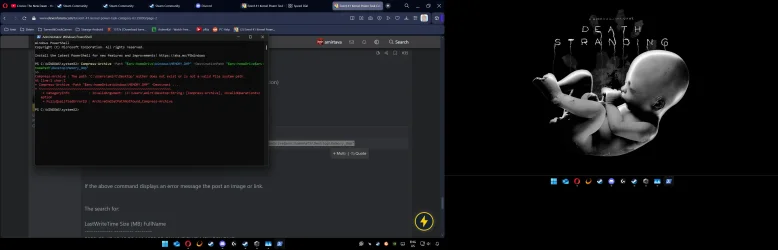
Open administrative PowerShell (PS) and copy and paste:

Code:
Compress-Archive -Path "$env:homeDrive\Windows\MEMORY.DMP" -DestinationPath "$env:homeDrive$env:homePath\Desktop\Memory_dmp"

Post a share link.


If the above command displays an error message the post an image or link.


The search for:

LastWriteTime Size (MB) FullName
------------- --------- --------
2025-09-17 10:48:26 AM 1989.85 C:\WINDOWS\MEMORY.DMP


Compress or zip the 2GB file first then post a share link.
 

My Computer

System One

  • OS
    Windows 10
    Computer type
    Laptop
    Manufacturer/Model
    HP
    CPU
    Intel(R) Core(TM) i7-4800MQ CPU @ 2.70GHz
    Motherboard
    Product : 190A Version : KBC Version 94.56
    Memory
    16 GB Total: Manufacturer : Samsung MemoryType : DDR3 FormFactor : SODIMM Capacity : 8GB Speed : 1600
    Graphics Card(s)
    NVIDIA Quadro K3100M; Intel(R) HD Graphics 4600
    Sound Card
    IDT High Definition Audio CODEC; PNP Device ID HDAUDIO\FUNC_01&VEN_111D&DEV_76E0
    Hard Drives
    Model Hitachi HTS727575A9E364
    Antivirus
    Microsoft Defender
    Other Info
    Mobile Workstation
powershell.webp
 

My Computer

System One

  • OS
    windows 11
    Computer type
    PC/Desktop
    Manufacturer/Model
    Custom
    CPU
    AMD Ryzen 7 7800XD 8 core processor
    Motherboard
    B650 AORUS ELITE AX
    Memory
    CORSAIR VENGEANCE RGB DDR5 RAM 32GB
    Graphics Card(s)
    Asus 4070 ti
    Hard Drives
    SAMSUNG 860 EVO Series 2.5" 1TB SATA
    SAMSUNG 970 PRO M.2 2280 512GB PCIe Gen3
    SAMSUNG 870 EVO SATA III SSD 4TB
    PSU
    EVGA 1000
    Case
    NZXT H710i - ATX Mid Tower PC Gaming Case
    Cooling
    Thermalright Peerless Assassin 120 SE CPU Air Cooler
    Mouse
    Glorious Gaming Mouse - Model O 67 g
    Browser
    Opera
    Antivirus
    windows 11 defualt
i change my psu also to evga 850 so far no shutdowns
 

My Computer

System One

  • OS
    windows 11
    Computer type
    PC/Desktop
    Manufacturer/Model
    Custom
    CPU
    AMD Ryzen 7 7800XD 8 core processor
    Motherboard
    B650 AORUS ELITE AX
    Memory
    CORSAIR VENGEANCE RGB DDR5 RAM 32GB
    Graphics Card(s)
    Asus 4070 ti
    Hard Drives
    SAMSUNG 860 EVO Series 2.5" 1TB SATA
    SAMSUNG 970 PRO M.2 2280 512GB PCIe Gen3
    SAMSUNG 870 EVO SATA III SSD 4TB
    PSU
    EVGA 1000
    Case
    NZXT H710i - ATX Mid Tower PC Gaming Case
    Cooling
    Thermalright Peerless Assassin 120 SE CPU Air Cooler
    Mouse
    Glorious Gaming Mouse - Model O 67 g
    Browser
    Opera
    Antivirus
    windows 11 defualt
That's what was needed:

(DTG1 posts #6, #111 and #14)​


See if an in place upgrade repair can fix /improve the problems with MSinfo32:


My Computer

System One

  • OS
    Windows 10
    Computer type
    Laptop
    Manufacturer/Model
    HP
    CPU
    Intel(R) Core(TM) i7-4800MQ CPU @ 2.70GHz
    Motherboard
    Product : 190A Version : KBC Version 94.56
    Memory
    16 GB Total: Manufacturer : Samsung MemoryType : DDR3 FormFactor : SODIMM Capacity : 8GB Speed : 1600
    Graphics Card(s)
    NVIDIA Quadro K3100M; Intel(R) HD Graphics 4600
    Sound Card
    IDT High Definition Audio CODEC; PNP Device ID HDAUDIO\FUNC_01&VEN_111D&DEV_76E0
    Hard Drives
    Model Hitachi HTS727575A9E364
    Antivirus
    Microsoft Defender
    Other Info
    Mobile Workstation
You may need to update the PSU to an ATX 3.1 compliant unit.
yea so i had to swtich my psu i had another sitting on my desk its same evga but with 850 watt so far no crashes i mark the tread as solve.
i should done it sooner
 

My Computer

System One

  • OS
    windows 11
    Computer type
    PC/Desktop
    Manufacturer/Model
    Custom
    CPU
    AMD Ryzen 7 7800XD 8 core processor
    Motherboard
    B650 AORUS ELITE AX
    Memory
    CORSAIR VENGEANCE RGB DDR5 RAM 32GB
    Graphics Card(s)
    Asus 4070 ti
    Hard Drives
    SAMSUNG 860 EVO Series 2.5" 1TB SATA
    SAMSUNG 970 PRO M.2 2280 512GB PCIe Gen3
    SAMSUNG 870 EVO SATA III SSD 4TB
    PSU
    EVGA 1000
    Case
    NZXT H710i - ATX Mid Tower PC Gaming Case
    Cooling
    Thermalright Peerless Assassin 120 SE CPU Air Cooler
    Mouse
    Glorious Gaming Mouse - Model O 67 g
    Browser
    Opera
    Antivirus
    windows 11 defualt

Latest Support Threads

Back
Top Bottom