
Explorer Patcher / Bringing back quick launch


Yes I ran those scripts. It didn't say whether they had run successfully or not.
 

My Computer

System One

  • OS
    Windows 10 PRO
    Computer type
    PC/Desktop
    Manufacturer/Model
    HP Omen
    CPU
    Intel(R) Core(TM) i7-8700 CPU @ 3.20GHz 3.20 GHz
    Motherboard
    Board: HP 8437 1.3 Serial Number: PGUCR0HP1B90LD Bus Clock: 100 megahertz UEFI: AMI F.53 10/23/2020
    Memory
    64 GB
    Graphics Card(s)
    NVIDIA GeForce GTX 1070
    Sound Card
    NVIDIA High Definition Audio Realtek High Definition Audio
    Monitor(s) Displays
    AOC 2778X [Monitor] (27.2"vis, s/n GJGJ7HA027112, July 2018) DELL U2412M [Monitor] (24.0"vis, s/n XX-00FFXD-XXXXX-529-64AS, February 2015)
    Hard Drives
    c: (NTFS on drive 0) * 999.21 GB 857.61 GB free
    d: (NTFS on drive 1) 1984.45 GB 741.65 GB free
    e: (NTFS on drive 1) 15.95 GB 1.78 GB free
    h: (NTFS on drive 2) 239.93 GB 231.23 GB free
    i: (NTFS on drive 2) 14.81 GB 1.71 GB free
    Keyboard
    Omoton
    Mouse
    Omoton
    Internet Speed
    9Gbps
    Browser
    Chrome Edge and Firefox
    Antivirus
    Kaspersky
    Other Info
    Have discovered 31/01/2022 Internet speed at router 41 mbps. At this PC 9. Internet is via wired ethernet.

My Computers

System One System Two

  • OS
    11 Home
    Computer type
    Laptop
    Manufacturer/Model
    Asus TUF Gaming F16 (2024)
    CPU
    i7 13650HX
    Memory
    16GB DDR5
    Graphics Card(s)
    GeForce RTX 4060 Mobile
    Sound Card
    Eastern Electric MiniMax DAC Supreme; Emotiva UMC-200; Astell & Kern AK240
    Monitor(s) Displays
    Sony Bravia XR-55X90J
    Screen Resolution
    3840×2160
    Hard Drives
    512GB SSD internal
    37TB external
    PSU
    Li-ion
    Cooling
    2× Arc Flow Fans, 4× exhaust vents, 5× heatpipes
    Keyboard
    Logitech K800
    Mouse
    Logitech G402
    Internet Speed
    30Mbit/s up, 500Mbit/s down
    Browser
    FF
    Antivirus
    What's an antivirus?
  • Operating System
    11 Home
    Computer type
    Laptop
    Manufacturer/Model
    Medion S15450
    CPU
    i5 1135G7
    Memory
    16GB DDR4
    Graphics card(s)
    Intel Iris Xe
    Sound Card
    Eastern Electric MiniMax DAC Supreme; Emotiva UMC-200; Astell & Kern AK240
    Monitor(s) Displays
    Sony Bravia XR-55X90J
    Screen Resolution
    3840×2160
    Hard Drives
    2TB SSD internal
    37TB external
    PSU
    Li-ion
    Keyboard
    Logitech K800
    Mouse
    Logitech G402
    Internet Speed
    30Mbit/s up, 500Mbit/s down
    Browser
    FF
No the new toolbar option doesn't show
 

My Computer

System One

  • OS
    Windows 10 PRO
    Computer type
    PC/Desktop
    Manufacturer/Model
    HP Omen
    CPU
    Intel(R) Core(TM) i7-8700 CPU @ 3.20GHz 3.20 GHz
    Motherboard
    Board: HP 8437 1.3 Serial Number: PGUCR0HP1B90LD Bus Clock: 100 megahertz UEFI: AMI F.53 10/23/2020
    Memory
    64 GB
    Graphics Card(s)
    NVIDIA GeForce GTX 1070
    Sound Card
    NVIDIA High Definition Audio Realtek High Definition Audio
    Monitor(s) Displays
    AOC 2778X [Monitor] (27.2"vis, s/n GJGJ7HA027112, July 2018) DELL U2412M [Monitor] (24.0"vis, s/n XX-00FFXD-XXXXX-529-64AS, February 2015)
    Hard Drives
    c: (NTFS on drive 0) * 999.21 GB 857.61 GB free
    d: (NTFS on drive 1) 1984.45 GB 741.65 GB free
    e: (NTFS on drive 1) 15.95 GB 1.78 GB free
    h: (NTFS on drive 2) 239.93 GB 231.23 GB free
    i: (NTFS on drive 2) 14.81 GB 1.71 GB free
    Keyboard
    Omoton
    Mouse
    Omoton
    Internet Speed
    9Gbps
    Browser
    Chrome Edge and Firefox
    Antivirus
    Kaspersky
    Other Info
    Have discovered 31/01/2022 Internet speed at router 41 mbps. At this PC 9. Internet is via wired ethernet.
No the new toolbar option doesn't show
You are not giving very many specific details to go by. Did you restart explorer or did you reboot? Have you already tried uninstalling/reinstalling EP? What does it say in the console when you enable the console in EP?
 

My Computers

System One System Two

  • OS
    11 Home
    Computer type
    Laptop
    Manufacturer/Model
    Asus TUF Gaming F16 (2024)
    CPU
    i7 13650HX
    Memory
    16GB DDR5
    Graphics Card(s)
    GeForce RTX 4060 Mobile
    Sound Card
    Eastern Electric MiniMax DAC Supreme; Emotiva UMC-200; Astell & Kern AK240
    Monitor(s) Displays
    Sony Bravia XR-55X90J
    Screen Resolution
    3840×2160
    Hard Drives
    512GB SSD internal
    37TB external
    PSU
    Li-ion
    Cooling
    2× Arc Flow Fans, 4× exhaust vents, 5× heatpipes
    Keyboard
    Logitech K800
    Mouse
    Logitech G402
    Internet Speed
    30Mbit/s up, 500Mbit/s down
    Browser
    FF
    Antivirus
    What's an antivirus?
  • Operating System
    11 Home
    Computer type
    Laptop
    Manufacturer/Model
    Medion S15450
    CPU
    i5 1135G7
    Memory
    16GB DDR4
    Graphics card(s)
    Intel Iris Xe
    Sound Card
    Eastern Electric MiniMax DAC Supreme; Emotiva UMC-200; Astell & Kern AK240
    Monitor(s) Displays
    Sony Bravia XR-55X90J
    Screen Resolution
    3840×2160
    Hard Drives
    2TB SSD internal
    37TB external
    PSU
    Li-ion
    Keyboard
    Logitech K800
    Mouse
    Logitech G402
    Internet Speed
    30Mbit/s up, 500Mbit/s down
    Browser
    FF
I have installed and un installed 6 or 7 ep so from different websites. What's the console? Isn't t hat what I posted above?
 

My Computer

System One

  • OS
    Windows 10 PRO
    Computer type
    PC/Desktop
    Manufacturer/Model
    HP Omen
    CPU
    Intel(R) Core(TM) i7-8700 CPU @ 3.20GHz 3.20 GHz
    Motherboard
    Board: HP 8437 1.3 Serial Number: PGUCR0HP1B90LD Bus Clock: 100 megahertz UEFI: AMI F.53 10/23/2020
    Memory
    64 GB
    Graphics Card(s)
    NVIDIA GeForce GTX 1070
    Sound Card
    NVIDIA High Definition Audio Realtek High Definition Audio
    Monitor(s) Displays
    AOC 2778X [Monitor] (27.2"vis, s/n GJGJ7HA027112, July 2018) DELL U2412M [Monitor] (24.0"vis, s/n XX-00FFXD-XXXXX-529-64AS, February 2015)
    Hard Drives
    c: (NTFS on drive 0) * 999.21 GB 857.61 GB free
    d: (NTFS on drive 1) 1984.45 GB 741.65 GB free
    e: (NTFS on drive 1) 15.95 GB 1.78 GB free
    h: (NTFS on drive 2) 239.93 GB 231.23 GB free
    i: (NTFS on drive 2) 14.81 GB 1.71 GB free
    Keyboard
    Omoton
    Mouse
    Omoton
    Internet Speed
    9Gbps
    Browser
    Chrome Edge and Firefox
    Antivirus
    Kaspersky
    Other Info
    Have discovered 31/01/2022 Internet speed at router 41 mbps. At this PC 9. Internet is via wired ethernet.
I have installed and un installed 6 or 7 ep so from different websites.
Maybe that explains the problem. To get the latest version of EP, there's only one website that you should be looking at. Look under Releases (on the right).

What's the console? Isn't t hat what I posted above?
Please read my post #11.

EP console.webp
 

My Computers

System One System Two

  • OS
    11 Home
    Computer type
    Laptop
    Manufacturer/Model
    Asus TUF Gaming F16 (2024)
    CPU
    i7 13650HX
    Memory
    16GB DDR5
    Graphics Card(s)
    GeForce RTX 4060 Mobile
    Sound Card
    Eastern Electric MiniMax DAC Supreme; Emotiva UMC-200; Astell & Kern AK240
    Monitor(s) Displays
    Sony Bravia XR-55X90J
    Screen Resolution
    3840×2160
    Hard Drives
    512GB SSD internal
    37TB external
    PSU
    Li-ion
    Cooling
    2× Arc Flow Fans, 4× exhaust vents, 5× heatpipes
    Keyboard
    Logitech K800
    Mouse
    Logitech G402
    Internet Speed
    30Mbit/s up, 500Mbit/s down
    Browser
    FF
    Antivirus
    What's an antivirus?
  • Operating System
    11 Home
    Computer type
    Laptop
    Manufacturer/Model
    Medion S15450
    CPU
    i5 1135G7
    Memory
    16GB DDR4
    Graphics card(s)
    Intel Iris Xe
    Sound Card
    Eastern Electric MiniMax DAC Supreme; Emotiva UMC-200; Astell & Kern AK240
    Monitor(s) Displays
    Sony Bravia XR-55X90J
    Screen Resolution
    3840×2160
    Hard Drives
    2TB SSD internal
    37TB external
    PSU
    Li-ion
    Keyboard
    Logitech K800
    Mouse
    Logitech G402
    Internet Speed
    30Mbit/s up, 500Mbit/s down
    Browser
    FF
This is what I get:

Running on Windows 11, OS Build 10.0.26100.3194.
Loaded symbols
Setup user32 functions done
CAppResolverCacheBuilder::_AddUserPinnedShortcutToStart() = 4CE4C
Setup explorer functions done
Setup uxtheme functions done
ILauncherTipContextMenuVtbl = 6AF808
CLauncherTipContextMenu::ShowLauncherTipContextMenu() = 263680
CLauncherTipContextMenu::GetMenuItemsAsync() = 5B60A0
Setup twinui.pcshell functions done
Setup combase functions done
Setup twinui functions done
Setup stobject functions done
Setup bthprops functions done
Setup shell32 functions done
Setup windows.storage functions done
Setup inputswitch functions done
Setup peopleband functions done
Installed hooks.
Open Start on monitor thread
EP Service Window thread
Started "Open Start on current monitor" thread.
Initialized taskbar centering module.
Progman: 4654040
Progman hook: 66128017
0 0
[EnsureXAML] 94 ms.
[Updates] Starting daemon.
[Updates] Configured update policy on this system: "Check for updates but let me choose whether to download and install them".
 

My Computer

System One

  • OS
    Windows 10 PRO
    Computer type
    PC/Desktop
    Manufacturer/Model
    HP Omen
    CPU
    Intel(R) Core(TM) i7-8700 CPU @ 3.20GHz 3.20 GHz
    Motherboard
    Board: HP 8437 1.3 Serial Number: PGUCR0HP1B90LD Bus Clock: 100 megahertz UEFI: AMI F.53 10/23/2020
    Memory
    64 GB
    Graphics Card(s)
    NVIDIA GeForce GTX 1070
    Sound Card
    NVIDIA High Definition Audio Realtek High Definition Audio
    Monitor(s) Displays
    AOC 2778X [Monitor] (27.2"vis, s/n GJGJ7HA027112, July 2018) DELL U2412M [Monitor] (24.0"vis, s/n XX-00FFXD-XXXXX-529-64AS, February 2015)
    Hard Drives
    c: (NTFS on drive 0) * 999.21 GB 857.61 GB free
    d: (NTFS on drive 1) 1984.45 GB 741.65 GB free
    e: (NTFS on drive 1) 15.95 GB 1.78 GB free
    h: (NTFS on drive 2) 239.93 GB 231.23 GB free
    i: (NTFS on drive 2) 14.81 GB 1.71 GB free
    Keyboard
    Omoton
    Mouse
    Omoton
    Internet Speed
    9Gbps
    Browser
    Chrome Edge and Firefox
    Antivirus
    Kaspersky
    Other Info
    Have discovered 31/01/2022 Internet speed at router 41 mbps. At this PC 9. Internet is via wired ethernet.
We have the same version of Win11, so if it's not the OS, there must be a setting in some software. Have you tried the recommended settings in Defender:

Please include the following files and folders in your antivirus' exclusion list to prevent issues due to antivirus detections:

  • C:\Program Files\ExplorerPatcher
  • %APPDATA%\ExplorerPatcher
  • C:\Windows\dxgi.dll
  • C:\Windows\SystemApps\Microsoft.Windows.StartMenuExperienceHost_cw5n1h2txyewy
  • C:\Windows\SystemApps\ShellExperienceHost_cw5n1h2txyewy
For Defender, you can run the following script in PowerShell as an administrator:

Add-MpPreference -ExclusionPath "C:\Program Files\ExplorerPatcher"
Add-MpPreference -ExclusionPath "$env:APPDATA\ExplorerPatcher"
Add-MpPreference -ExclusionPath "C:\Windows\dxgi.dll"
Add-MpPreference -ExclusionPath "C:\Windows\SystemApps\Microsoft.Windows.StartMenuExperienceHost_cw5n1h2txyewy"
Add-MpPreference -ExclusionPath "C:\Windows\SystemApps\ShellExperienceHost_cw5n1h2txyewy"
I have previously run the commands in powershell
 

My Computer

System One

  • OS
    Windows 10 PRO
    Computer type
    PC/Desktop
    Manufacturer/Model
    HP Omen
    CPU
    Intel(R) Core(TM) i7-8700 CPU @ 3.20GHz 3.20 GHz
    Motherboard
    Board: HP 8437 1.3 Serial Number: PGUCR0HP1B90LD Bus Clock: 100 megahertz UEFI: AMI F.53 10/23/2020
    Memory
    64 GB
    Graphics Card(s)
    NVIDIA GeForce GTX 1070
    Sound Card
    NVIDIA High Definition Audio Realtek High Definition Audio
    Monitor(s) Displays
    AOC 2778X [Monitor] (27.2"vis, s/n GJGJ7HA027112, July 2018) DELL U2412M [Monitor] (24.0"vis, s/n XX-00FFXD-XXXXX-529-64AS, February 2015)
    Hard Drives
    c: (NTFS on drive 0) * 999.21 GB 857.61 GB free
    d: (NTFS on drive 1) 1984.45 GB 741.65 GB free
    e: (NTFS on drive 1) 15.95 GB 1.78 GB free
    h: (NTFS on drive 2) 239.93 GB 231.23 GB free
    i: (NTFS on drive 2) 14.81 GB 1.71 GB free
    Keyboard
    Omoton
    Mouse
    Omoton
    Internet Speed
    9Gbps
    Browser
    Chrome Edge and Firefox
    Antivirus
    Kaspersky
    Other Info
    Have discovered 31/01/2022 Internet speed at router 41 mbps. At this PC 9. Internet is via wired ethernet.
Exclusions
 

Attachments

  • ex.webp
    ex.webp
    49.2 KB · Views: 3

My Computer

System One

  • OS
    Windows 10 PRO
    Computer type
    PC/Desktop
    Manufacturer/Model
    HP Omen
    CPU
    Intel(R) Core(TM) i7-8700 CPU @ 3.20GHz 3.20 GHz
    Motherboard
    Board: HP 8437 1.3 Serial Number: PGUCR0HP1B90LD Bus Clock: 100 megahertz UEFI: AMI F.53 10/23/2020
    Memory
    64 GB
    Graphics Card(s)
    NVIDIA GeForce GTX 1070
    Sound Card
    NVIDIA High Definition Audio Realtek High Definition Audio
    Monitor(s) Displays
    AOC 2778X [Monitor] (27.2"vis, s/n GJGJ7HA027112, July 2018) DELL U2412M [Monitor] (24.0"vis, s/n XX-00FFXD-XXXXX-529-64AS, February 2015)
    Hard Drives
    c: (NTFS on drive 0) * 999.21 GB 857.61 GB free
    d: (NTFS on drive 1) 1984.45 GB 741.65 GB free
    e: (NTFS on drive 1) 15.95 GB 1.78 GB free
    h: (NTFS on drive 2) 239.93 GB 231.23 GB free
    i: (NTFS on drive 2) 14.81 GB 1.71 GB free
    Keyboard
    Omoton
    Mouse
    Omoton
    Internet Speed
    9Gbps
    Browser
    Chrome Edge and Firefox
    Antivirus
    Kaspersky
    Other Info
    Have discovered 31/01/2022 Internet speed at router 41 mbps. At this PC 9. Internet is via wired ethernet.
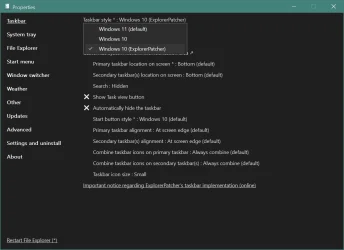
Got quick launch back. Until you mentioned console I didn't realise the properties setting was other than a dispay window. I changed toolbar settings to windows 10 Explorer Patch and now up and running.

Many thanks for all your help.
 

My Computer

System One

  • OS
    Windows 10 PRO
    Computer type
    PC/Desktop
    Manufacturer/Model
    HP Omen
    CPU
    Intel(R) Core(TM) i7-8700 CPU @ 3.20GHz 3.20 GHz
    Motherboard
    Board: HP 8437 1.3 Serial Number: PGUCR0HP1B90LD Bus Clock: 100 megahertz UEFI: AMI F.53 10/23/2020
    Memory
    64 GB
    Graphics Card(s)
    NVIDIA GeForce GTX 1070
    Sound Card
    NVIDIA High Definition Audio Realtek High Definition Audio
    Monitor(s) Displays
    AOC 2778X [Monitor] (27.2"vis, s/n GJGJ7HA027112, July 2018) DELL U2412M [Monitor] (24.0"vis, s/n XX-00FFXD-XXXXX-529-64AS, February 2015)
    Hard Drives
    c: (NTFS on drive 0) * 999.21 GB 857.61 GB free
    d: (NTFS on drive 1) 1984.45 GB 741.65 GB free
    e: (NTFS on drive 1) 15.95 GB 1.78 GB free
    h: (NTFS on drive 2) 239.93 GB 231.23 GB free
    i: (NTFS on drive 2) 14.81 GB 1.71 GB free
    Keyboard
    Omoton
    Mouse
    Omoton
    Internet Speed
    9Gbps
    Browser
    Chrome Edge and Firefox
    Antivirus
    Kaspersky
    Other Info
    Have discovered 31/01/2022 Internet speed at router 41 mbps. At this PC 9. Internet is via wired ethernet.
Got quick launch back. Until you mentioned console I didn't realize the properties setting was other than a display window. I changed toolbar settings to windows 10 Explorer Patch and now up and running.

Many thanks for all your help.
I made an account just to ask you what you did, then finally realized you have to check (enable) "Enable Console" on the Advanced Tab, once the cmd box does its thing then un-enable it again and we're good to go!
 

My Computer

System One

  • OS
    Windows 11
I made an account just to ask you what you did, then finally realized you have to check (enable) "Enable Console" on the Advanced Tab, once the cmd box does its thing then un-enable it again and we're good to go!
Enabling the console and running the command to restart explorer gracefully to verify that EP was loading the symbols turned out to be not necessary in this particular case, as the problem was unrelated to the symbols, and was easily fixed just by going into EP settings and changing Taskbar > Taskbar style > Windows 10 (ExplorerPatcher)—like shown in my post #22—and rebooting after that. However, instead of choosing to reboot, you could also try logoff/logon or restart explorer, but I found that each time after I change one or more settings in EP that require to restart explorer, rebooting is the most surefire way to avoid glitches turning up at some point until I reboot anyway still after all. After the reboot, it runs stable as a rock at least for me, on two completely different laptops (running Windows 11 version 24H2 latest build on both laptops).
 

My Computers

System One System Two

  • OS
    11 Home
    Computer type
    Laptop
    Manufacturer/Model
    Asus TUF Gaming F16 (2024)
    CPU
    i7 13650HX
    Memory
    16GB DDR5
    Graphics Card(s)
    GeForce RTX 4060 Mobile
    Sound Card
    Eastern Electric MiniMax DAC Supreme; Emotiva UMC-200; Astell & Kern AK240
    Monitor(s) Displays
    Sony Bravia XR-55X90J
    Screen Resolution
    3840×2160
    Hard Drives
    512GB SSD internal
    37TB external
    PSU
    Li-ion
    Cooling
    2× Arc Flow Fans, 4× exhaust vents, 5× heatpipes
    Keyboard
    Logitech K800
    Mouse
    Logitech G402
    Internet Speed
    30Mbit/s up, 500Mbit/s down
    Browser
    FF
    Antivirus
    What's an antivirus?
  • Operating System
    11 Home
    Computer type
    Laptop
    Manufacturer/Model
    Medion S15450
    CPU
    i5 1135G7
    Memory
    16GB DDR4
    Graphics card(s)
    Intel Iris Xe
    Sound Card
    Eastern Electric MiniMax DAC Supreme; Emotiva UMC-200; Astell & Kern AK240
    Monitor(s) Displays
    Sony Bravia XR-55X90J
    Screen Resolution
    3840×2160
    Hard Drives
    2TB SSD internal
    37TB external
    PSU
    Li-ion
    Keyboard
    Logitech K800
    Mouse
    Logitech G402
    Internet Speed
    30Mbit/s up, 500Mbit/s down
    Browser
    FF
Thanks to everyone for your suggestions. I have started to go through all the suggestions (a wee bit overwhelming!). Unfortunately, everyday life is intruding on my ability to spend a lot of time on this for the next few days, but I will get back with more questions once I have researched all these ideas.

Thanks
 

My Computer

System One

  • OS
    windows 11 24h2 Pro
    Computer type
    Laptop
    Manufacturer/Model
    Lenovo
    CPU
    Intel(R) Core(TM) i5-8365U CPU @ 1.60GHz, 189
    Motherboard
    Lenovo 20QES3DM00 SDK0J40697 WIN
    Memory
    16GB
    Graphics Card(s)
    Intel UHD Graphics 620
    Sound Card
    Realtec Audio
This is what I get. Is there a way to get new taskbar?
Windows 10 taskbar is not shipped with Win11 24H2. But you can choose the Explorer Patcher taskbar, which looks similar. You have to install the appropriate version of Explorer Patcher.
Alternatively, you can downgrade to Win11 23H2, which includes the Windows 10 taskbar or install the Windows 10 taskbar from Windows 10 itself via Windhawk.
 

My Computer

System One

  • OS
    Windows 11

Latest Support Threads

Back
Top Bottom


