Explorer patcher


woldsweather

Well-known member
Member
VIP
Local time
2:31 PM
Posts
319
OS
Windows 10 PRO
I am fololowing this:


to install explorer patcher on Windows 11 24H2 pc. I have run the powershel script and turned off defender but it still says this cant run on theis machine.

What else do I have to do?
 

My Computer My Computer

At a glance

Windows 10 PROIntel(R) Core(TM) i7-8700 CPU @ 3.20GHz 3.20 GHz64 GBNVIDIA GeForce GTX 1070
OS
Windows 10 PRO
Computer type
PC/Desktop
Manufacturer/Model
HP Omen
CPU
Intel(R) Core(TM) i7-8700 CPU @ 3.20GHz 3.20 GHz
Motherboard
Board: HP 8437 1.3 Serial Number: PGUCR0HP1B90LD Bus Clock: 100 megahertz UEFI: AMI F.53 10/23/2020
Memory
64 GB
Graphics Card(s)
NVIDIA GeForce GTX 1070
Sound Card
NVIDIA High Definition Audio Realtek High Definition Audio
Monitor(s) Displays
AOC 2778X [Monitor] (27.2"vis, s/n GJGJ7HA027112, July 2018) DELL U2412M [Monitor] (24.0"vis, s/n XX-00FFXD-XXXXX-529-64AS, February 2015)
Hard Drives
c: (NTFS on drive 0) * 999.21 GB 857.61 GB free
d: (NTFS on drive 1) 1984.45 GB 741.65 GB free
e: (NTFS on drive 1) 15.95 GB 1.78 GB free
h: (NTFS on drive 2) 239.93 GB 231.23 GB free
i: (NTFS on drive 2) 14.81 GB 1.71 GB free
Keyboard
Omoton
Mouse
Omoton
Internet Speed
9Gbps
Browser
Chrome Edge and Firefox
Antivirus
Kaspersky
Other Info
Have discovered 31/01/2022 Internet speed at router 41 mbps. At this PC 9. Internet is via wired ethernet.
A shot in the dark, but as its an easy one you could try changing the execution policy in PowerShell

Powershell:
Set-ExecutionPolicy Unrestricted -Scope CurrentUser
but remember to set it back to
Powershell:
Set-ExecutionPolicy restricted -Scope CurrentUser
once done
 

My Computers My Computers

  • At a glance

    Windows 11 Enterprise 24h2I7 13700HX32gb DDR6 4800mhz4080
    OS
    Windows 11 Enterprise 24h2
    Computer type
    Laptop
    Manufacturer/Model
    Omen
    CPU
    I7 13700HX
    Memory
    32gb DDR6 4800mhz
    Graphics Card(s)
    4080
    Screen Resolution
    2560 x 1440
    Mouse
    Logitech G502
    Internet Speed
    900mb
    Browser
    Chrome
  • At a glance

    Windows 11 Pro 23H2I9 14900k32gb DDR53080TI
    Operating System
    Windows 11 Pro 23H2
    Computer type
    PC/Desktop
    Manufacturer/Model
    Self
    CPU
    I9 14900k
    Motherboard
    MSI Z790 Ace Max
    Memory
    32gb DDR5
    Graphics card(s)
    3080TI
    Screen Resolution
    1440p
    PSU
    Corsair 1000w
    Case
    Corsair 5000D
    Cooling
    NZXT Kraken
    Keyboard
    Self-Built Wooting
    Mouse
    Corsair M65
    Internet Speed
    900mb
    Browser
    Chrome
Sounds a bit technical for me
 

My Computer My Computer

At a glance

Windows 10 PROIntel(R) Core(TM) i7-8700 CPU @ 3.20GHz 3.20 GHz64 GBNVIDIA GeForce GTX 1070
OS
Windows 10 PRO
Computer type
PC/Desktop
Manufacturer/Model
HP Omen
CPU
Intel(R) Core(TM) i7-8700 CPU @ 3.20GHz 3.20 GHz
Motherboard
Board: HP 8437 1.3 Serial Number: PGUCR0HP1B90LD Bus Clock: 100 megahertz UEFI: AMI F.53 10/23/2020
Memory
64 GB
Graphics Card(s)
NVIDIA GeForce GTX 1070
Sound Card
NVIDIA High Definition Audio Realtek High Definition Audio
Monitor(s) Displays
AOC 2778X [Monitor] (27.2"vis, s/n GJGJ7HA027112, July 2018) DELL U2412M [Monitor] (24.0"vis, s/n XX-00FFXD-XXXXX-529-64AS, February 2015)
Hard Drives
c: (NTFS on drive 0) * 999.21 GB 857.61 GB free
d: (NTFS on drive 1) 1984.45 GB 741.65 GB free
e: (NTFS on drive 1) 15.95 GB 1.78 GB free
h: (NTFS on drive 2) 239.93 GB 231.23 GB free
i: (NTFS on drive 2) 14.81 GB 1.71 GB free
Keyboard
Omoton
Mouse
Omoton
Internet Speed
9Gbps
Browser
Chrome Edge and Firefox
Antivirus
Kaspersky
Other Info
Have discovered 31/01/2022 Internet speed at router 41 mbps. At this PC 9. Internet is via wired ethernet.
Sounds a bit technical for me

If you're trying to follow that patchers' instructions, yet are unable to understand what I posted, I would highly recommend you don't try doing it since there are instructions, like this

Caution

You are downloading a file flagged as malware by Microsoft and very likely by other major antivirus vendors. We believe that this false flag indicates Microsoft's hatred against this software, not because this contains a virus or such.

Please include the following files and folders in your antivirus' exclusion list to prevent issues due to antivirus detections:

  • C:\Program Files\ExplorerPatcher
  • %APPDATA%\ExplorerPatcher
  • C:\Windows\dxgi.dll
  • C:\Windows\SystemApps\Microsoft.Windows.StartMenuExperienceHost_cw5n1h2txyewy
  • C:\Windows\SystemApps\ShellExperienceHost_cw5n1h2txyewy
For Defender, you can run the following script in PowerShell as an administrator:

Powershell:
Add-MpPreference -ExclusionPath "C:\Program Files\ExplorerPatcher"
Add-MpPreference -ExclusionPath "$env:APPDATA\ExplorerPatcher"
Add-MpPreference -ExclusionPath "C:\Windows\dxgi.dll"
Add-MpPreference -ExclusionPath "C:\Windows\SystemApps\Microsoft.Windows.StartMenuExperienceHost_cw5n1h2txyewy"
Add-MpPreference -ExclusionPath "C:\Windows\SystemApps\ShellExperienceHost_cw5n1h2txyewy"

  • If you are downloading from this page, please temporarily disable real-time protection or save to a folder excluded from antivirus scans.
  • Failure to exclude ExplorerPatcher's files may result in inability to install/uninstall EP and explorer.exe being unable to start.
  • If you do not trust this process, please refrain from using ExplorerPatcher and look for alternatives instead.
  • Microsoft, if you are reading this, please reconsider the detections as there are a lot of users who trust this program and that risks from future EP developers are a thing.
  • Issues related to antivirus detections will be closed immediately. Discuss this in #3228.

That would require you to do the same process.
 

My Computers My Computers

  • At a glance

    Windows 11 Enterprise 24h2I7 13700HX32gb DDR6 4800mhz4080
    OS
    Windows 11 Enterprise 24h2
    Computer type
    Laptop
    Manufacturer/Model
    Omen
    CPU
    I7 13700HX
    Memory
    32gb DDR6 4800mhz
    Graphics Card(s)
    4080
    Screen Resolution
    2560 x 1440
    Mouse
    Logitech G502
    Internet Speed
    900mb
    Browser
    Chrome
  • At a glance

    Windows 11 Pro 23H2I9 14900k32gb DDR53080TI
    Operating System
    Windows 11 Pro 23H2
    Computer type
    PC/Desktop
    Manufacturer/Model
    Self
    CPU
    I9 14900k
    Motherboard
    MSI Z790 Ace Max
    Memory
    32gb DDR5
    Graphics card(s)
    3080TI
    Screen Resolution
    1440p
    PSU
    Corsair 1000w
    Case
    Corsair 5000D
    Cooling
    NZXT Kraken
    Keyboard
    Self-Built Wooting
    Mouse
    Corsair M65
    Internet Speed
    900mb
    Browser
    Chrome
If you're trying to follow that patchers' instructions, yet are unable to understand what I posted, I would highly recommend you don't try doing it since there are instructions, like this


That would require you to do the same process.
Most of the exceptions were already there but added those that werent and ran the powershell scripot but app still wont run.
 

My Computer My Computer

At a glance

Windows 10 PROIntel(R) Core(TM) i7-8700 CPU @ 3.20GHz 3.20 GHz64 GBNVIDIA GeForce GTX 1070
OS
Windows 10 PRO
Computer type
PC/Desktop
Manufacturer/Model
HP Omen
CPU
Intel(R) Core(TM) i7-8700 CPU @ 3.20GHz 3.20 GHz
Motherboard
Board: HP 8437 1.3 Serial Number: PGUCR0HP1B90LD Bus Clock: 100 megahertz UEFI: AMI F.53 10/23/2020
Memory
64 GB
Graphics Card(s)
NVIDIA GeForce GTX 1070
Sound Card
NVIDIA High Definition Audio Realtek High Definition Audio
Monitor(s) Displays
AOC 2778X [Monitor] (27.2"vis, s/n GJGJ7HA027112, July 2018) DELL U2412M [Monitor] (24.0"vis, s/n XX-00FFXD-XXXXX-529-64AS, February 2015)
Hard Drives
c: (NTFS on drive 0) * 999.21 GB 857.61 GB free
d: (NTFS on drive 1) 1984.45 GB 741.65 GB free
e: (NTFS on drive 1) 15.95 GB 1.78 GB free
h: (NTFS on drive 2) 239.93 GB 231.23 GB free
i: (NTFS on drive 2) 14.81 GB 1.71 GB free
Keyboard
Omoton
Mouse
Omoton
Internet Speed
9Gbps
Browser
Chrome Edge and Firefox
Antivirus
Kaspersky
Other Info
Have discovered 31/01/2022 Internet speed at router 41 mbps. At this PC 9. Internet is via wired ethernet.
Again, I don't recommend it, but the code I posted
Powershell:
Set-ExecutionPolicy Unrestricted -Scope CurrentUser
but remember to set it back to
Powershell:
Set-ExecutionPolicy restricted -Scope CurrentUser
once done
You put that into powershell.. You run powershell as administrator (like you might at times with command prompt) and paste the first code in and pressing enter. Then try to install, once you've either succeeded or failed, put the other code into powershell the same way (as administrator) to revert the changes you made.
 

My Computers My Computers

  • At a glance

    Windows 11 Enterprise 24h2I7 13700HX32gb DDR6 4800mhz4080
    OS
    Windows 11 Enterprise 24h2
    Computer type
    Laptop
    Manufacturer/Model
    Omen
    CPU
    I7 13700HX
    Memory
    32gb DDR6 4800mhz
    Graphics Card(s)
    4080
    Screen Resolution
    2560 x 1440
    Mouse
    Logitech G502
    Internet Speed
    900mb
    Browser
    Chrome
  • At a glance

    Windows 11 Pro 23H2I9 14900k32gb DDR53080TI
    Operating System
    Windows 11 Pro 23H2
    Computer type
    PC/Desktop
    Manufacturer/Model
    Self
    CPU
    I9 14900k
    Motherboard
    MSI Z790 Ace Max
    Memory
    32gb DDR5
    Graphics card(s)
    3080TI
    Screen Resolution
    1440p
    PSU
    Corsair 1000w
    Case
    Corsair 5000D
    Cooling
    NZXT Kraken
    Keyboard
    Self-Built Wooting
    Mouse
    Corsair M65
    Internet Speed
    900mb
    Browser
    Chrome
Again, I don't recommend it, but the code I posted

You put that into powershell.. You run powershell as administrator (like you might at times with command prompt) and paste the first code in and pressing enter. Then try to install, once you've either succeeded or failed, put the other code into powershell the same way (as administrator) to revert the changes you made.
DOne but still get "This app can't run on this pc"
 

My Computer My Computer

At a glance

Windows 10 PROIntel(R) Core(TM) i7-8700 CPU @ 3.20GHz 3.20 GHz64 GBNVIDIA GeForce GTX 1070
OS
Windows 10 PRO
Computer type
PC/Desktop
Manufacturer/Model
HP Omen
CPU
Intel(R) Core(TM) i7-8700 CPU @ 3.20GHz 3.20 GHz
Motherboard
Board: HP 8437 1.3 Serial Number: PGUCR0HP1B90LD Bus Clock: 100 megahertz UEFI: AMI F.53 10/23/2020
Memory
64 GB
Graphics Card(s)
NVIDIA GeForce GTX 1070
Sound Card
NVIDIA High Definition Audio Realtek High Definition Audio
Monitor(s) Displays
AOC 2778X [Monitor] (27.2"vis, s/n GJGJ7HA027112, July 2018) DELL U2412M [Monitor] (24.0"vis, s/n XX-00FFXD-XXXXX-529-64AS, February 2015)
Hard Drives
c: (NTFS on drive 0) * 999.21 GB 857.61 GB free
d: (NTFS on drive 1) 1984.45 GB 741.65 GB free
e: (NTFS on drive 1) 15.95 GB 1.78 GB free
h: (NTFS on drive 2) 239.93 GB 231.23 GB free
i: (NTFS on drive 2) 14.81 GB 1.71 GB free
Keyboard
Omoton
Mouse
Omoton
Internet Speed
9Gbps
Browser
Chrome Edge and Firefox
Antivirus
Kaspersky
Other Info
Have discovered 31/01/2022 Internet speed at router 41 mbps. At this PC 9. Internet is via wired ethernet.
DOne but still get "This app can't run on this pc"
Yeah, sorry, I did say it was a shot in the dark.. I don't think without looking into what the patch is doing, I'd be able to help further, that is the nature of custom scripts, that they use programs and resources sometimes that require a little creativity to bypass in regards to security and compatibility.

but don't forget to undo that code by using
Code:
Set-ExecutionPolicy restricted -Scope CurrentUser
 

My Computers My Computers

  • At a glance

    Windows 11 Enterprise 24h2I7 13700HX32gb DDR6 4800mhz4080
    OS
    Windows 11 Enterprise 24h2
    Computer type
    Laptop
    Manufacturer/Model
    Omen
    CPU
    I7 13700HX
    Memory
    32gb DDR6 4800mhz
    Graphics Card(s)
    4080
    Screen Resolution
    2560 x 1440
    Mouse
    Logitech G502
    Internet Speed
    900mb
    Browser
    Chrome
  • At a glance

    Windows 11 Pro 23H2I9 14900k32gb DDR53080TI
    Operating System
    Windows 11 Pro 23H2
    Computer type
    PC/Desktop
    Manufacturer/Model
    Self
    CPU
    I9 14900k
    Motherboard
    MSI Z790 Ace Max
    Memory
    32gb DDR5
    Graphics card(s)
    3080TI
    Screen Resolution
    1440p
    PSU
    Corsair 1000w
    Case
    Corsair 5000D
    Cooling
    NZXT Kraken
    Keyboard
    Self-Built Wooting
    Mouse
    Corsair M65
    Internet Speed
    900mb
    Browser
    Chrome
Yes did that thanks for your help.
 

My Computer My Computer

At a glance

Windows 10 PROIntel(R) Core(TM) i7-8700 CPU @ 3.20GHz 3.20 GHz64 GBNVIDIA GeForce GTX 1070
OS
Windows 10 PRO
Computer type
PC/Desktop
Manufacturer/Model
HP Omen
CPU
Intel(R) Core(TM) i7-8700 CPU @ 3.20GHz 3.20 GHz
Motherboard
Board: HP 8437 1.3 Serial Number: PGUCR0HP1B90LD Bus Clock: 100 megahertz UEFI: AMI F.53 10/23/2020
Memory
64 GB
Graphics Card(s)
NVIDIA GeForce GTX 1070
Sound Card
NVIDIA High Definition Audio Realtek High Definition Audio
Monitor(s) Displays
AOC 2778X [Monitor] (27.2"vis, s/n GJGJ7HA027112, July 2018) DELL U2412M [Monitor] (24.0"vis, s/n XX-00FFXD-XXXXX-529-64AS, February 2015)
Hard Drives
c: (NTFS on drive 0) * 999.21 GB 857.61 GB free
d: (NTFS on drive 1) 1984.45 GB 741.65 GB free
e: (NTFS on drive 1) 15.95 GB 1.78 GB free
h: (NTFS on drive 2) 239.93 GB 231.23 GB free
i: (NTFS on drive 2) 14.81 GB 1.71 GB free
Keyboard
Omoton
Mouse
Omoton
Internet Speed
9Gbps
Browser
Chrome Edge and Firefox
Antivirus
Kaspersky
Other Info
Have discovered 31/01/2022 Internet speed at router 41 mbps. At this PC 9. Internet is via wired ethernet.
Strange, I had no issue installing nor running the program.

patcher.webp
 

My Computers My Computers

  • At a glance

    All Branches but ReleaseAMD Ryzen 7 7735HS 3200-4500 Mhz 8 cores x 232 GB DDR5Radeon Graphic / NVIDIA GeForce RTX 4060 8 GB...
    OS
    All Branches but Release
    Computer type
    Laptop
    Manufacturer/Model
    Acer Nitro ANV15-51
    CPU
    AMD Ryzen 7 7735HS 3200-4500 Mhz 8 cores x 2
    Motherboard
    Sportage_RBH
    Memory
    32 GB DDR5
    Graphics Card(s)
    Radeon Graphic / NVIDIA GeForce RTX 4060 8 GB GDDR6
    Sound Card
    AMD/Realtek(R) Audio
    Monitor(s) Displays
    Integrated Monitor (15.3"vis)
    Screen Resolution
    FHD 1920X1080 16:9 144Hz
    Hard Drives
    KINGSTON OM8SEP4512Q-AA 1TB
    Western Digital 256GB
    PSU
    19V DC 6.32 A 120 W
    Cooling
    Dual Fans
    Mouse
    MS Bluetooth
    Internet Speed
    Fiber 1GB Cox -us & 1GB Orange-fr
    Browser
    Edge Canary- Firefox Nightly-Chrome Dev-Chrome Dev
    Antivirus
    Windows Defender
  • At a glance

    Windows 11 BetaAMD A9-94208 GB of DDR4AMD Radeon R5
    Operating System
    Windows 11 Beta
    Computer type
    Laptop
    Manufacturer/Model
    Asus X751BP
    CPU
    AMD A9-9420
    Memory
    8 GB of DDR4
    Graphics card(s)
    AMD Radeon R5
    Screen Resolution
    1600x900
    Hard Drives
    Seagate 1 TB
If you're trying to follow that patchers' instructions, yet are unable to understand what I posted, I would highly recommend you don't try doing it since there are instructions, like this
Firstly, those PowerShell commands are no longer needed, as Windows Defender no longer detects ExplorerPatcher as malware. Secondly, those PowerShell commands only apply to Windows Defender. Look at his specs. He is using Kaspersky.

I don't know if Kaspersky currently detects ExplorerPatcher as malware, but it could be that. To add file/folder scan exclusions in Kaspersky,

Based on the aforementioned PowerShell commands, here is the list of files and folders that might need to be excluded:
  • %ProgramFiles%\ExplorerPatcher
  • %AppData%\ExplorerPatcher
  • %WinDir%\dxgi.dll
  • %WinDir%\SystemApps\Microsoft.Windows.StartMenuExperienceHost_cw5n1h2txyewy
  • %WinDir%\SystemApps\ShellExperienceHost_cw5n1h2txyewy
Please note, I don't know if Kaspersky also detects the file ep_setup.exe as malware when you try to run it after you downloaded it from GitHub. Assuming that you are downloading the file to your Downloads folder, you could add an additional file exclusion in Kaspersky for this purpose:
  • %UserProfile%\Downloads\ep_setup.exe
However, before jumping to the conclusion that Kaspersky is indeed the one to blame, I would open an elevated command prompt and run:
  1. dism /cleanup-image /online /restorehealth
  2. sfc /scannow
Then if either command reported that it found (and was able to fix) corruptions, restart the computer and try running ep_setup.exe again.

If the issue persists, I would repair Windows with an in-place upgrade. That is, only if none of the above helps.
 

My Computers My Computers

  • At a glance

    11 Homei7 13650HX16GB DDR5GeForce RTX 4060 Mobile
    OS
    11 Home
    Computer type
    Laptop
    Manufacturer/Model
    Asus TUF Gaming F16 (2024)
    CPU
    i7 13650HX
    Memory
    16GB DDR5
    Graphics Card(s)
    GeForce RTX 4060 Mobile
    Sound Card
    Eastern Electric MiniMax DAC Supreme; Emotiva UMC-200; Astell & Kern AK240
    Monitor(s) Displays
    Sony Bravia XR-55X90J
    Screen Resolution
    3840×2160
    Hard Drives
    512GB SSD internal
    37TB external
    PSU
    Li-ion
    Cooling
    2× Arc Flow Fans, 4× exhaust vents, 5× heatpipes
    Keyboard
    Logitech K800
    Mouse
    Logitech G402
    Internet Speed
    30Mbit/s up, 500Mbit/s down
    Browser
    FF
    Antivirus
    What's an antivirus?
  • At a glance

    11 Homei5 1135G716GB DDR4Intel Iris Xe
    Operating System
    11 Home
    Computer type
    Laptop
    Manufacturer/Model
    Medion S15450
    CPU
    i5 1135G7
    Memory
    16GB DDR4
    Graphics card(s)
    Intel Iris Xe
    Sound Card
    Eastern Electric MiniMax DAC Supreme; Emotiva UMC-200; Astell & Kern AK240
    Monitor(s) Displays
    Sony Bravia XR-55X90J
    Screen Resolution
    3840×2160
    Hard Drives
    2TB SSD internal
    37TB external
    PSU
    Li-ion
    Keyboard
    Logitech K800
    Mouse
    Logitech G402
    Internet Speed
    30Mbit/s up, 500Mbit/s down
    Browser
    FF
Firstly, those PowerShell commands are no longer needed, as Windows Defender no longer detects ExplorerPatcher as malware. Secondly, those PowerShell commands only apply to Windows Defender. Look at his specs. He is using Kaspersky.

I don't know if Kaspersky currently detects ExplorerPatcher as malware, but it could be that. To add file/folder scan exclusions in Kaspersky,

Based on the aforementioned PowerShell commands, here is the list of files and folders that might need to be excluded:
  • %ProgramFiles%\ExplorerPatcher
  • %AppData%\ExplorerPatcher
  • %WinDir%\dxgi.dll
  • %WinDir%\SystemApps\Microsoft.Windows.StartMenuExperienceHost_cw5n1h2txyewy
  • %WinDir%\SystemApps\ShellExperienceHost_cw5n1h2txyewy
Please note, I don't know if Kaspersky also detects the file ep_setup.exe as malware when you try to run it after you downloaded it from GitHub. Assuming that you are downloading the file to your Downloads folder, you could add an additional file exclusion in Kaspersky for this purpose:
  • %UserProfile%\Downloads\ep_setup.exe
However, before jumping to the conclusion that Kaspersky is indeed the one to blame, I would open an elevated command prompt and run:
  1. dism /cleanup-image /online /restorehealth
  2. sfc /scannow
Then if either command reported that it found (and was able to fix) corruptions, restart the computer and try running ep_setup.exe again.

If the issue persists, I would repair Windows with an in-place upgrade. That is, only if none of the above helps.
The guidance to temporarily adjust the PowerShell execution policy was aimed specifically at facilitating the installation process, irrespective of the antivirus software being used. While Windows Defender may no longer flag ExplorerPatcher as malware (I can see no reason why I should know this for some obscure patcher that I have never heard of or used), the execution policy adjustment isn't exclusively for bypassing Defender’s restrictions. Many installation scripts for system modifications, can be blocked by PowerShell’s default settings regardless of the antivirus software. The suggestion to modify this setting temporarily was to try to get the script run smoothly during the installation, The OP claimed to have followed instructions so I assumed they would have done everything else it deemed necessary.
 
Last edited:

My Computers My Computers

  • At a glance

    Windows 11 Enterprise 24h2I7 13700HX32gb DDR6 4800mhz4080
    OS
    Windows 11 Enterprise 24h2
    Computer type
    Laptop
    Manufacturer/Model
    Omen
    CPU
    I7 13700HX
    Memory
    32gb DDR6 4800mhz
    Graphics Card(s)
    4080
    Screen Resolution
    2560 x 1440
    Mouse
    Logitech G502
    Internet Speed
    900mb
    Browser
    Chrome
  • At a glance

    Windows 11 Pro 23H2I9 14900k32gb DDR53080TI
    Operating System
    Windows 11 Pro 23H2
    Computer type
    PC/Desktop
    Manufacturer/Model
    Self
    CPU
    I9 14900k
    Motherboard
    MSI Z790 Ace Max
    Memory
    32gb DDR5
    Graphics card(s)
    3080TI
    Screen Resolution
    1440p
    PSU
    Corsair 1000w
    Case
    Corsair 5000D
    Cooling
    NZXT Kraken
    Keyboard
    Self-Built Wooting
    Mouse
    Corsair M65
    Internet Speed
    900mb
    Browser
    Chrome
Firstly, those PowerShell commands are no longer needed, as Windows Defender no longer detects ExplorerPatcher as malware. Secondly, those PowerShell commands only apply to Windows Defender. Look at his specs. He is using Kaspersky.

I don't know if Kaspersky currently detects ExplorerPatcher as malware, but it could be that. To add file/folder scan exclusions in Kaspersky,

Based on the aforementioned PowerShell commands, here is the list of files and folders that might need to be excluded:
  • %ProgramFiles%\ExplorerPatcher
  • %AppData%\ExplorerPatcher
  • %WinDir%\dxgi.dll
  • %WinDir%\SystemApps\Microsoft.Windows.StartMenuExperienceHost_cw5n1h2txyewy
  • %WinDir%\SystemApps\ShellExperienceHost_cw5n1h2txyewy
Please note, I don't know if Kaspersky also detects the file ep_setup.exe as malware when you try to run it after you downloaded it from GitHub. Assuming that you are downloading the file to your Downloads folder, you could add an additional file exclusion in Kaspersky for this purpose:
  • %UserProfile%\Downloads\ep_setup.exe
However, before jumping to the conclusion that Kaspersky is indeed the one to blame, I would open an elevated command prompt and run:
  1. dism /cleanup-image /online /restorehealth
  2. sfc /scannow
Then if either command reported that it found (and was able to fix) corruptions, restart the computer and try running ep_setup.exe again.

If the issue persists, I would repair Windows with an in-place upgrade. That is, only if none of the above helps.
Are you suggesting I am using Kaspersky?
 

My Computer My Computer

At a glance

Windows 10 PROIntel(R) Core(TM) i7-8700 CPU @ 3.20GHz 3.20 GHz64 GBNVIDIA GeForce GTX 1070
OS
Windows 10 PRO
Computer type
PC/Desktop
Manufacturer/Model
HP Omen
CPU
Intel(R) Core(TM) i7-8700 CPU @ 3.20GHz 3.20 GHz
Motherboard
Board: HP 8437 1.3 Serial Number: PGUCR0HP1B90LD Bus Clock: 100 megahertz UEFI: AMI F.53 10/23/2020
Memory
64 GB
Graphics Card(s)
NVIDIA GeForce GTX 1070
Sound Card
NVIDIA High Definition Audio Realtek High Definition Audio
Monitor(s) Displays
AOC 2778X [Monitor] (27.2"vis, s/n GJGJ7HA027112, July 2018) DELL U2412M [Monitor] (24.0"vis, s/n XX-00FFXD-XXXXX-529-64AS, February 2015)
Hard Drives
c: (NTFS on drive 0) * 999.21 GB 857.61 GB free
d: (NTFS on drive 1) 1984.45 GB 741.65 GB free
e: (NTFS on drive 1) 15.95 GB 1.78 GB free
h: (NTFS on drive 2) 239.93 GB 231.23 GB free
i: (NTFS on drive 2) 14.81 GB 1.71 GB free
Keyboard
Omoton
Mouse
Omoton
Internet Speed
9Gbps
Browser
Chrome Edge and Firefox
Antivirus
Kaspersky
Other Info
Have discovered 31/01/2022 Internet speed at router 41 mbps. At this PC 9. Internet is via wired ethernet.

Attachments

  • Screenshot 2024-12-24 181024.webp
    Screenshot 2024-12-24 181024.webp
    92.5 KB · Views: 3

My Computers My Computers

  • At a glance

    Windows 11 Enterprise 24h2I7 13700HX32gb DDR6 4800mhz4080
    OS
    Windows 11 Enterprise 24h2
    Computer type
    Laptop
    Manufacturer/Model
    Omen
    CPU
    I7 13700HX
    Memory
    32gb DDR6 4800mhz
    Graphics Card(s)
    4080
    Screen Resolution
    2560 x 1440
    Mouse
    Logitech G502
    Internet Speed
    900mb
    Browser
    Chrome
  • At a glance

    Windows 11 Pro 23H2I9 14900k32gb DDR53080TI
    Operating System
    Windows 11 Pro 23H2
    Computer type
    PC/Desktop
    Manufacturer/Model
    Self
    CPU
    I9 14900k
    Motherboard
    MSI Z790 Ace Max
    Memory
    32gb DDR5
    Graphics card(s)
    3080TI
    Screen Resolution
    1440p
    PSU
    Corsair 1000w
    Case
    Corsair 5000D
    Cooling
    NZXT Kraken
    Keyboard
    Self-Built Wooting
    Mouse
    Corsair M65
    Internet Speed
    900mb
    Browser
    Chrome
in fairness your profile does indicate that..
O right is that collected automatically> I dumped Kaspersky when they Russia) invaded Ukraine. I use Defender (wasn't aware I had a 'profile')
 

My Computer My Computer

At a glance

Windows 10 PROIntel(R) Core(TM) i7-8700 CPU @ 3.20GHz 3.20 GHz64 GBNVIDIA GeForce GTX 1070
OS
Windows 10 PRO
Computer type
PC/Desktop
Manufacturer/Model
HP Omen
CPU
Intel(R) Core(TM) i7-8700 CPU @ 3.20GHz 3.20 GHz
Motherboard
Board: HP 8437 1.3 Serial Number: PGUCR0HP1B90LD Bus Clock: 100 megahertz UEFI: AMI F.53 10/23/2020
Memory
64 GB
Graphics Card(s)
NVIDIA GeForce GTX 1070
Sound Card
NVIDIA High Definition Audio Realtek High Definition Audio
Monitor(s) Displays
AOC 2778X [Monitor] (27.2"vis, s/n GJGJ7HA027112, July 2018) DELL U2412M [Monitor] (24.0"vis, s/n XX-00FFXD-XXXXX-529-64AS, February 2015)
Hard Drives
c: (NTFS on drive 0) * 999.21 GB 857.61 GB free
d: (NTFS on drive 1) 1984.45 GB 741.65 GB free
e: (NTFS on drive 1) 15.95 GB 1.78 GB free
h: (NTFS on drive 2) 239.93 GB 231.23 GB free
i: (NTFS on drive 2) 14.81 GB 1.71 GB free
Keyboard
Omoton
Mouse
Omoton
Internet Speed
9Gbps
Browser
Chrome Edge and Firefox
Antivirus
Kaspersky
Other Info
Have discovered 31/01/2022 Internet speed at router 41 mbps. At this PC 9. Internet is via wired ethernet.
"wasn't aware I had a 'profile'"

Take a look at your system specs, created by you :rolleyes:
 

My Computers My Computers

  • At a glance

    Windows 11 Proi716Gb
    OS
    Windows 11 Pro
    Computer type
    Laptop
    Manufacturer/Model
    Lafite 14
    CPU
    i7
    Memory
    16Gb
    Internet Speed
    150Mbps/39Mbps
    Browser
    Firefox
    Antivirus
    Defender
  • At a glance

    Win 11 Proi58Gb
    Operating System
    Win 11 Pro
    Computer type
    PC/Desktop
    Manufacturer/Model
    PC Specialist
    CPU
    i5
    Memory
    8Gb
    Internet Speed
    150Mbps/39Mbps
    Browser
    Firefox
    Antivirus
    Defender
    Other Info
    Incompatible Win 10 Pro PC upgraded to Win 11 Pro
The guidance to temporarily adjust the PowerShell execution policy was aimed specifically at facilitating the installation process, irrespective of the antivirus software being used.
The guidance, yes of course. But not the PowerShell commands. It states,
"For Defender, you can run the following script in PowerShell as an administrator:"
Emphasis in bold is mine.
While Windows Defender may no longer flag ExplorerPatcher as malware (I can see no reason why I should know this for some obscure patcher that I have never heard of or used)
I wasn't trying to suggest that you should already know this BTW. But ExplorerPatcher is still a very long distance away from being obscure, as it is Open Source and hosted on GitHub. I think it's actually less obscure than the Star of Betlehem.
, the execution policy adjustment isn't exclusively for bypassing Defender’s restrictions. Many installation scripts for system modifications, can be blocked by PowerShell’s default settings regardless of the antivirus software.
ExplorerPatcher does not use any installation scripts. It does not depend on PowerShell in any way, and, it does not modify any system files.
The suggestion to modify this setting temporarily was to try to get the script run smoothly during the installation, The OP claimed to have followed instructions so I assumed they would have done everything else it deemed necessary.
Yes, but if the PowerShell commands failed to run and, for some reason, Defender started to detect ExplorerPatcher as malware again, then you could expect Defender's real-time protection would have popped up a notification to inform the user of that detection. That is, at least if these notifications are enabled (which, by default, they are).
 

My Computers My Computers

  • At a glance

    11 Homei7 13650HX16GB DDR5GeForce RTX 4060 Mobile
    OS
    11 Home
    Computer type
    Laptop
    Manufacturer/Model
    Asus TUF Gaming F16 (2024)
    CPU
    i7 13650HX
    Memory
    16GB DDR5
    Graphics Card(s)
    GeForce RTX 4060 Mobile
    Sound Card
    Eastern Electric MiniMax DAC Supreme; Emotiva UMC-200; Astell & Kern AK240
    Monitor(s) Displays
    Sony Bravia XR-55X90J
    Screen Resolution
    3840×2160
    Hard Drives
    512GB SSD internal
    37TB external
    PSU
    Li-ion
    Cooling
    2× Arc Flow Fans, 4× exhaust vents, 5× heatpipes
    Keyboard
    Logitech K800
    Mouse
    Logitech G402
    Internet Speed
    30Mbit/s up, 500Mbit/s down
    Browser
    FF
    Antivirus
    What's an antivirus?
  • At a glance

    11 Homei5 1135G716GB DDR4Intel Iris Xe
    Operating System
    11 Home
    Computer type
    Laptop
    Manufacturer/Model
    Medion S15450
    CPU
    i5 1135G7
    Memory
    16GB DDR4
    Graphics card(s)
    Intel Iris Xe
    Sound Card
    Eastern Electric MiniMax DAC Supreme; Emotiva UMC-200; Astell & Kern AK240
    Monitor(s) Displays
    Sony Bravia XR-55X90J
    Screen Resolution
    3840×2160
    Hard Drives
    2TB SSD internal
    37TB external
    PSU
    Li-ion
    Keyboard
    Logitech K800
    Mouse
    Logitech G402
    Internet Speed
    30Mbit/s up, 500Mbit/s down
    Browser
    FF
I have a problem with my two Windows 11 PCs.
After updates failing and in.place upgrade fails I tried to uninstall Explorer patcher.
But then the taskbar is completly gone (start, no taskbar, no tray).
Why is this happening? How do I get the Windows 11 taskbar back?
 

My Computers My Computers

  • At a glance

    Windows 10Intel Core i5-6600 3.30Ghz16 GBAsus Nvidia GeForce GTX 960
    OS
    Windows 10
    Computer type
    PC/Desktop
    Manufacturer/Model
    Asus
    CPU
    Intel Core i5-6600 3.30Ghz
    Motherboard
    Asus B150M
    Memory
    16 GB
    Graphics Card(s)
    Asus Nvidia GeForce GTX 960
    Sound Card
    Onboard
    Monitor(s) Displays
    Samsung
    Hard Drives
    Samsung SSD 850 EBO 128 GB
    WDC WD1003FZEX-00MK2A0
  • At a glance

    Windows 1111the Gen Intel Core i5-1135G7 2.40 GHz8 GBIntel Xe
    Operating System
    Windows 11
    Computer type
    Laptop
    Manufacturer/Model
    Asus ExpertBook
    CPU
    11the Gen Intel Core i5-1135G7 2.40 GHz
    Memory
    8 GB
    Graphics card(s)
    Intel Xe
    Sound Card
    Onboard
    Hard Drives
    NVMe WDC PC SN530 SDBPNPZ 256 GB
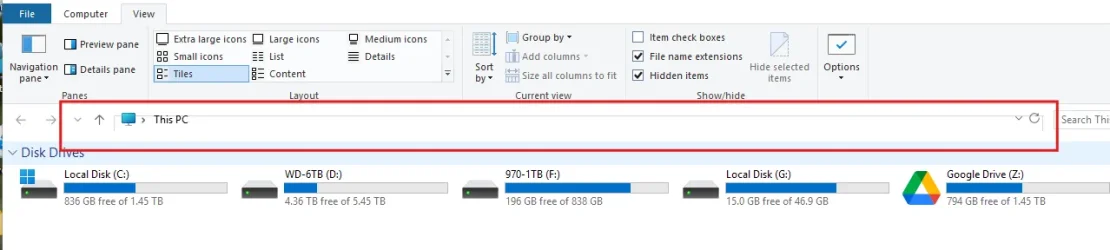
Is anyone having any issues with the Explorer address bar when using the Windows 10 Ribbon? It's misaligned and overlapping in a strange way. It's still functional, but a bit ugly and distracting.

I have been travelling the last month and not exactly sure when this problem started. I think it's probably come up after one of the recent Windows 11 cumulative updates. Perhaps it's not explorer patcher, but I've tried resetting everything I can think of to rectify it and so far nothing seems to fix it. Have also run SFC and DISM to be safe and that's all error free.

I also tried resetting graphics drivers and even forced a few display resolution changes to see if it would have any effect.

I'm on 24H2 26100.6584

1757885969935.webp
 

My Computer My Computer

At a glance

Windows 11 Pro 23H2Intel Core i5-12600KDDR4-3603 / PC4-28800 DDR4 SDRAM UDIMMEVGA RTX 2060 Super XC Ultra Gaming (08G-P4-3...
OS
Windows 11 Pro 23H2
Computer type
PC/Desktop
Manufacturer/Model
Custom Build
CPU
Intel Core i5-12600K
Motherboard
ASUS TUF GAMING Z690-PLUS WIFI D4
Memory
DDR4-3603 / PC4-28800 DDR4 SDRAM UDIMM
Graphics Card(s)
EVGA RTX 2060 Super XC Ultra Gaming (08G-P4-3163)
Hard Drives
Samsung SSD 980 EVO 1TB
PSU
Corsair 750W Gold
Case
Corsair
Cooling
Corsair
Internet Speed
Fibre 1gbps
Is anyone having any issues with the Explorer address bar when using the Windows 10 Ribbon? It's misaligned and overlapping in a strange way. It's still functional, but a bit ugly and distracting.

I have been travelling the last month and not exactly sure when this problem started. I think it's probably come up after one of the recent Windows 11 cumulative updates. Perhaps it's not explorer patcher, but I've tried resetting everything I can think of to rectify it and so far nothing seems to fix it. Have also run SFC and DISM to be safe and that's all error free.

I also tried resetting graphics drivers and even forced a few display resolution changes to see if it would have any effect.

I'm on 24H2 26100.6584

View attachment 145401
Known issues we will address in the short term:
  • Shrink address bar height results in unexpected dimensions on recent 24H2 builds.
For now, as a temporary workaround you can disable this option (in ExplorerPatcher settings > File Explorer). The misalignment is purely cosmetic, though. It has no additional consequences.
 

My Computers My Computers

  • At a glance

    11 Homei7 13650HX16GB DDR5GeForce RTX 4060 Mobile
    OS
    11 Home
    Computer type
    Laptop
    Manufacturer/Model
    Asus TUF Gaming F16 (2024)
    CPU
    i7 13650HX
    Memory
    16GB DDR5
    Graphics Card(s)
    GeForce RTX 4060 Mobile
    Sound Card
    Eastern Electric MiniMax DAC Supreme; Emotiva UMC-200; Astell & Kern AK240
    Monitor(s) Displays
    Sony Bravia XR-55X90J
    Screen Resolution
    3840×2160
    Hard Drives
    512GB SSD internal
    37TB external
    PSU
    Li-ion
    Cooling
    2× Arc Flow Fans, 4× exhaust vents, 5× heatpipes
    Keyboard
    Logitech K800
    Mouse
    Logitech G402
    Internet Speed
    30Mbit/s up, 500Mbit/s down
    Browser
    FF
    Antivirus
    What's an antivirus?
  • At a glance

    11 Homei5 1135G716GB DDR4Intel Iris Xe
    Operating System
    11 Home
    Computer type
    Laptop
    Manufacturer/Model
    Medion S15450
    CPU
    i5 1135G7
    Memory
    16GB DDR4
    Graphics card(s)
    Intel Iris Xe
    Sound Card
    Eastern Electric MiniMax DAC Supreme; Emotiva UMC-200; Astell & Kern AK240
    Monitor(s) Displays
    Sony Bravia XR-55X90J
    Screen Resolution
    3840×2160
    Hard Drives
    2TB SSD internal
    37TB external
    PSU
    Li-ion
    Keyboard
    Logitech K800
    Mouse
    Logitech G402
    Internet Speed
    30Mbit/s up, 500Mbit/s down
    Browser
    FF
Back
Top Bottom