Solved External drives larger than 4TB are no longer recognized


Okay not much i can do if you can't understand me i'm not going to type all that instruction here it will take long time which i don't have.
Thanks for everything anyway. I will read the TestDisk documentation and see if I can use it.
 

My Computer

System One

  • OS
    Windows 11
    Computer type
    Laptop
    Manufacturer/Model
    Alienware A51M R2
    CPU
    Intel(R) Core(TM) i9-10900K CPU @ 3.70GHz
    Memory
    32,0 GB
    Graphics Card(s)
    Nvidia GeForce RTX2080 Super
    Sound Card
    Realtek
    Screen Resolution
    4K
    Hard Drives
    2TB (2x 1TB PCle M.2 SSD) RAID 0 [Boot] + 2TB (2x 1TB
    PCle M.2 SSD) Non-Raid [Storage]
You are very welcome!
 

My Computer

System One

  • OS
    Windows 11
    Computer type
    PC/Desktop
    Manufacturer/Model
    HP Pavilion
    CPU
    AMD Ryzen 7 5700G
    Motherboard
    Erica6
    Memory
    Micron Technology DDR4-3200 16GB
    Graphics Card(s)
    NVIDIA GeForce RTX 3060
    Sound Card
    Realtek ALC671
    Monitor(s) Displays
    Samsung SyncMaster U28E590
    Screen Resolution
    3840 x 2160
    Hard Drives
    SAMSUNG MZVLQ1T0HALB-000H1
Without doing anything, the RAW drive suddenly dropped its drive letter W and replaced it with a red/white cross (like a first aid symbol). It still shows in Explorer as W: and refreshing the tree makes no difference. In diskmgmt I cannot even change its letter because it is shown as unallocated. The only option I am being given is to ititialize the disk, but if I do that it will wipe all the data, won't it?
 

My Computer

System One

  • OS
    Windows 11
    Computer type
    Laptop
    Manufacturer/Model
    Alienware A51M R2
    CPU
    Intel(R) Core(TM) i9-10900K CPU @ 3.70GHz
    Memory
    32,0 GB
    Graphics Card(s)
    Nvidia GeForce RTX2080 Super
    Sound Card
    Realtek
    Screen Resolution
    4K
    Hard Drives
    2TB (2x 1TB PCle M.2 SSD) RAID 0 [Boot] + 2TB (2x 1TB
    PCle M.2 SSD) Non-Raid [Storage]
please have a read of post #2
it may be of help as the drives may need to be set or reset to GPT

it also maybe an idea to do one drive at a time
backups of that drive would be an idea before proceeding.
best of luck Steve ..
 

My Computers

System One System Two

  • OS
    Debian Trixie KDE Windows 11 Home
    Computer type
    PC/Desktop
    Manufacturer/Model
    HP 24" AiO
    CPU
    Ryzen 7 5825u
    Motherboard
    HP
    Memory
    64GB DDR4 3200
    Graphics Card(s)
    Ryzen 7 5825u
    Sound Card
    RealTek
    Monitor(s) Displays
    24" HP AiO
    Screen Resolution
    1920 x 1080 @60 Hz
    Hard Drives
    1TB WD Blue SN580 M2 SSD Partitioned.
    2x 1TB USB HDD External Backup/Storage.
    PSU
    90W external power brick
    Case
    24" All in One
    Cooling
    Default Air Cooling
    Keyboard
    HP WiFi UK extended
    Mouse
    HP WiFi 3 Button
    Internet Speed
    1GB full fibre
    Browser
    Edge & Firefox
    Antivirus
    AVG Internet Security/Windows Defender
    Other Info
    Mainly Open Source Software
  • Operating System
    Ubuntu 22.04.5 LTS
    Computer type
    Laptop
    Manufacturer/Model
    Dell 13" Latitude 2017
    CPU
    i5 7200u
    Motherboard
    Dell
    Memory
    16GB DDR4
    Graphics card(s)
    Intel
    Sound Card
    Intel
    Monitor(s) Displays
    13" Dell Laptop
    Hard Drives
    250GB Crucial 2.5" SSD
    Mouse
    Generic WiFi 3 button
    Internet Speed
    WiFi only
    Browser
    Firefox
    Antivirus
    ClamAV TK
    Other Info
    Mainly Open Source Software
Without doing anything, the RAW drive suddenly dropped its drive letter W and replaced it with a red/white cross (like a first aid symbol). It still shows in Explorer as W: and refreshing the tree makes no difference. In diskmgmt I cannot even change its letter because it is shown as unallocated. The only option I am being given is to ititialize the disk, but if I do that it will wipe all the data, won't it?
So from RAW it has now gone to unallocated. I see that you have one too many disks and also you have been playing with drive letters. In all probability you may need to do a drive (lettter) cleanup and start afresh.

Before that I would like to investigate the disk W:
1. Please furnish complete details of that disk. Manufacturer, Model No, capacity ( most probably it is a 1.5TB )
2. To avoid clutter and remain focussed on that disk, safely remove all external disks, docks, USB hubs, and USB connected printer if any,. In short anything and everything plugged into the USB ports except USB keyboard and USB mouse. Shut down your PC.
3. Reboot and plug in only that faulty disk.
4. Post the screenshot of Windows Disk Management. That should show only your PC's internal disks and this faulty disk. Pictures speak more than words.
 
Last edited:

My Computers

System One System Two

  • OS
    Windows 11 Pro Version:25H2 OS Build: 26200.8524
    Computer type
    PC/Desktop
    Manufacturer/Model
    Beelink Mini PC Model: SEi12
    CPU
    12th Gen Intel core i5-1235U(Alder
    Motherboard
    SEi (manufactured by AZW)
    Memory
    16*2 (32 GB) DDR 4-3200(1600MHz) Crucial Technology
    Graphics Card(s)
    Intel Iris Xe Graphics (Internal)
    Sound Card
    Internal
    Monitor(s) Displays
    BenQ GW2283
    Screen Resolution
    1920*1080
    Hard Drives
    500GB NVME (Kingston SNV2S500G)
    1TB (Crucial CT1000BX500SSD1)
    PSU
    Power Brick 19V-6.32A , 120.08W
    Keyboard
    Dell KB3322Wi (Wireless)
    Mouse
    Dell WM118t (Wireless)
    Internet Speed
    4G/5G
    Browser
    MS Edge, Chrome
    Antivirus
    Malwarebytes Premium - Subscription
  • Operating System
    Windows 11 Home Version 25H2 Build 26200.8524
    Computer type
    PC/Desktop
    Manufacturer/Model
    Dell Inspiron 3280 AIO 22"
    CPU
    Intel Core i3 8145U
    Motherboard
    Dell inc. 027W48
    Memory
    Intel Optane 16GB module + DDR 4 16GB (Optane disabled.)
    Graphics card(s)
    Intel UHD Graphics 620
    Sound Card
    Internal
    Monitor(s) Displays
    Dell Monitor 22"
    Screen Resolution
    1920x1080
    Hard Drives
    Crucial CT1000BX500SSD1 ; 1000,2 GB
    PSU
    Power Brick
    Case
    All-in one
    Keyboard
    Dell Wireless KM636
    Mouse
    Dell Wireless KM 636
    Internet Speed
    4G
    Browser
    Edge, Chrome
    Antivirus
    Malwarebytes
    Other Info
    Upgraded from Windows 10 Home to Windows 11 Home on 28 Oct 2023
please have a read of post #2
it may be of help as the drives may need to be set or reset to GPT

it also maybe an idea to do one drive at a time
backups of that drive would be an idea before proceeding.
best of luck Steve ..
The suggestion in post #2 requires me to format the drive which would wipe it clean of all the data currently stored on it. Only 1 drive is concerned. Backing-up its contents is impossible because the drive cannot be accessed.

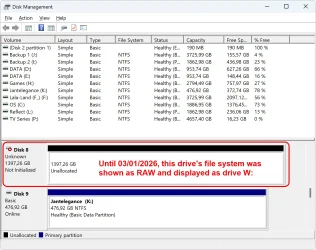
Since my last post, it is no longer visible in Explorer. diskmgmt asks me to initalize the disk as MBR or GPT (default). As far as I am aware, initializing is the same thing as formatting.

diskmgmt.webp
 

My Computer

System One

  • OS
    Windows 11
    Computer type
    Laptop
    Manufacturer/Model
    Alienware A51M R2
    CPU
    Intel(R) Core(TM) i9-10900K CPU @ 3.70GHz
    Memory
    32,0 GB
    Graphics Card(s)
    Nvidia GeForce RTX2080 Super
    Sound Card
    Realtek
    Screen Resolution
    4K
    Hard Drives
    2TB (2x 1TB PCle M.2 SSD) RAID 0 [Boot] + 2TB (2x 1TB
    PCle M.2 SSD) Non-Raid [Storage]
I see that you have one too many disks and also you have been playing with drive letters.
I intend following your instructions, either today or more likely tomorrow as we have guests at the moment. However, I would like to know what you meant when you said I have one too many disks?

Please note that X, Y, and Z are virtual drives created with Elby Virtual Clone Drive. I probably only need a single virtual drive though. Lord knows why I set it to three.
 

My Computer

System One

  • OS
    Windows 11
    Computer type
    Laptop
    Manufacturer/Model
    Alienware A51M R2
    CPU
    Intel(R) Core(TM) i9-10900K CPU @ 3.70GHz
    Memory
    32,0 GB
    Graphics Card(s)
    Nvidia GeForce RTX2080 Super
    Sound Card
    Realtek
    Screen Resolution
    4K
    Hard Drives
    2TB (2x 1TB PCle M.2 SSD) RAID 0 [Boot] + 2TB (2x 1TB
    PCle M.2 SSD) Non-Raid [Storage]
@QuicktellPro
One too many here means, you have many many many disks. That said take your time to respond.

You can disable the virtual drives in the Virtual CloneDrive Settings/Peferences. Choose 0 for the number of Virtual drives. Also disable it from starting with Windows.

If that disk W is only a 1.5 TB disk, there is absolutely no need to convert it into a GPT disk.

Do not initialise the disk.

Edit: Please note my local time.Time Now 9:16 PM. I will be gone to sleep in another hour and will see you my tomorrow morning after about 10 hours from now.
 
Last edited:

My Computers

System One System Two

  • OS
    Windows 11 Pro Version:25H2 OS Build: 26200.8524
    Computer type
    PC/Desktop
    Manufacturer/Model
    Beelink Mini PC Model: SEi12
    CPU
    12th Gen Intel core i5-1235U(Alder
    Motherboard
    SEi (manufactured by AZW)
    Memory
    16*2 (32 GB) DDR 4-3200(1600MHz) Crucial Technology
    Graphics Card(s)
    Intel Iris Xe Graphics (Internal)
    Sound Card
    Internal
    Monitor(s) Displays
    BenQ GW2283
    Screen Resolution
    1920*1080
    Hard Drives
    500GB NVME (Kingston SNV2S500G)
    1TB (Crucial CT1000BX500SSD1)
    PSU
    Power Brick 19V-6.32A , 120.08W
    Keyboard
    Dell KB3322Wi (Wireless)
    Mouse
    Dell WM118t (Wireless)
    Internet Speed
    4G/5G
    Browser
    MS Edge, Chrome
    Antivirus
    Malwarebytes Premium - Subscription
  • Operating System
    Windows 11 Home Version 25H2 Build 26200.8524
    Computer type
    PC/Desktop
    Manufacturer/Model
    Dell Inspiron 3280 AIO 22"
    CPU
    Intel Core i3 8145U
    Motherboard
    Dell inc. 027W48
    Memory
    Intel Optane 16GB module + DDR 4 16GB (Optane disabled.)
    Graphics card(s)
    Intel UHD Graphics 620
    Sound Card
    Internal
    Monitor(s) Displays
    Dell Monitor 22"
    Screen Resolution
    1920x1080
    Hard Drives
    Crucial CT1000BX500SSD1 ; 1000,2 GB
    PSU
    Power Brick
    Case
    All-in one
    Keyboard
    Dell Wireless KM636
    Mouse
    Dell Wireless KM 636
    Internet Speed
    4G
    Browser
    Edge, Chrome
    Antivirus
    Malwarebytes
    Other Info
    Upgraded from Windows 10 Home to Windows 11 Home on 28 Oct 2023
The suggestion in post #2 requires me to format the drive which would wipe it clean of all the data currently stored on it. Only 1 drive is concerned. Backing-up its contents is impossible because the drive cannot be accessed.

Since my last post, it is no longer visible in Explorer. diskmgmt asks me to initalize the disk as MBR or GPT (default). As far as I am aware, initializing is the same thing as formatting.

View attachment 158908

please burn to a USB stick drive a live Linux distro such as Ubuntu using Rufus


then boot into the live Linux desktop
it wont install anything

then plug in your USB HDD and see if the data can be accessed
if the data can be accessed then transfer the data off the HDD.

best of luck Steve ..
 

My Computers

System One System Two

  • OS
    Debian Trixie KDE Windows 11 Home
    Computer type
    PC/Desktop
    Manufacturer/Model
    HP 24" AiO
    CPU
    Ryzen 7 5825u
    Motherboard
    HP
    Memory
    64GB DDR4 3200
    Graphics Card(s)
    Ryzen 7 5825u
    Sound Card
    RealTek
    Monitor(s) Displays
    24" HP AiO
    Screen Resolution
    1920 x 1080 @60 Hz
    Hard Drives
    1TB WD Blue SN580 M2 SSD Partitioned.
    2x 1TB USB HDD External Backup/Storage.
    PSU
    90W external power brick
    Case
    24" All in One
    Cooling
    Default Air Cooling
    Keyboard
    HP WiFi UK extended
    Mouse
    HP WiFi 3 Button
    Internet Speed
    1GB full fibre
    Browser
    Edge & Firefox
    Antivirus
    AVG Internet Security/Windows Defender
    Other Info
    Mainly Open Source Software
  • Operating System
    Ubuntu 22.04.5 LTS
    Computer type
    Laptop
    Manufacturer/Model
    Dell 13" Latitude 2017
    CPU
    i5 7200u
    Motherboard
    Dell
    Memory
    16GB DDR4
    Graphics card(s)
    Intel
    Sound Card
    Intel
    Monitor(s) Displays
    13" Dell Laptop
    Hard Drives
    250GB Crucial 2.5" SSD
    Mouse
    Generic WiFi 3 button
    Internet Speed
    WiFi only
    Browser
    Firefox
    Antivirus
    ClamAV TK
    Other Info
    Mainly Open Source Software
then plug in your USB HDD and see if the data can be accessed
if the data can be accessed then transfer the data off the HDD.
I cannot plug it in because it is not an external HDD. It appears to be a PCIe M.2 SSD. Should I still attempt your Ubuntu solution?
 

My Computer

System One

  • OS
    Windows 11
    Computer type
    Laptop
    Manufacturer/Model
    Alienware A51M R2
    CPU
    Intel(R) Core(TM) i9-10900K CPU @ 3.70GHz
    Memory
    32,0 GB
    Graphics Card(s)
    Nvidia GeForce RTX2080 Super
    Sound Card
    Realtek
    Screen Resolution
    4K
    Hard Drives
    2TB (2x 1TB PCle M.2 SSD) RAID 0 [Boot] + 2TB (2x 1TB
    PCle M.2 SSD) Non-Raid [Storage]

I cannot plug it in because it is not an external HDD. It appears to be a PCIe M.2 SSD. Should I still attempt your Ubuntu solution?
yes
Linux looks and uses drives in a different kinda way then Windows
if the data is recoverable then linux will be able to do it
linux will also check the drive status, its a handy tool to have.

best of luck Steve ..
 

My Computers

System One System Two

  • OS
    Debian Trixie KDE Windows 11 Home
    Computer type
    PC/Desktop
    Manufacturer/Model
    HP 24" AiO
    CPU
    Ryzen 7 5825u
    Motherboard
    HP
    Memory
    64GB DDR4 3200
    Graphics Card(s)
    Ryzen 7 5825u
    Sound Card
    RealTek
    Monitor(s) Displays
    24" HP AiO
    Screen Resolution
    1920 x 1080 @60 Hz
    Hard Drives
    1TB WD Blue SN580 M2 SSD Partitioned.
    2x 1TB USB HDD External Backup/Storage.
    PSU
    90W external power brick
    Case
    24" All in One
    Cooling
    Default Air Cooling
    Keyboard
    HP WiFi UK extended
    Mouse
    HP WiFi 3 Button
    Internet Speed
    1GB full fibre
    Browser
    Edge & Firefox
    Antivirus
    AVG Internet Security/Windows Defender
    Other Info
    Mainly Open Source Software
  • Operating System
    Ubuntu 22.04.5 LTS
    Computer type
    Laptop
    Manufacturer/Model
    Dell 13" Latitude 2017
    CPU
    i5 7200u
    Motherboard
    Dell
    Memory
    16GB DDR4
    Graphics card(s)
    Intel
    Sound Card
    Intel
    Monitor(s) Displays
    13" Dell Laptop
    Hard Drives
    250GB Crucial 2.5" SSD
    Mouse
    Generic WiFi 3 button
    Internet Speed
    WiFi only
    Browser
    Firefox
    Antivirus
    ClamAV TK
    Other Info
    Mainly Open Source Software
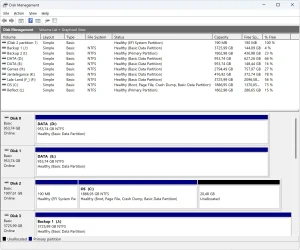
This morning, on start-up, the rogue disk has disappeared. There is no longer any trace of it in diskmgmt. Does this mean Windows automatically resolved the issue, or has the disk died?

diskmgmt-1.webp
 

My Computer

System One

  • OS
    Windows 11
    Computer type
    Laptop
    Manufacturer/Model
    Alienware A51M R2
    CPU
    Intel(R) Core(TM) i9-10900K CPU @ 3.70GHz
    Memory
    32,0 GB
    Graphics Card(s)
    Nvidia GeForce RTX2080 Super
    Sound Card
    Realtek
    Screen Resolution
    4K
    Hard Drives
    2TB (2x 1TB PCle M.2 SSD) RAID 0 [Boot] + 2TB (2x 1TB
    PCle M.2 SSD) Non-Raid [Storage]
please burn to a USB stick drive a live Linux distro such as Ubuntu using Rufus
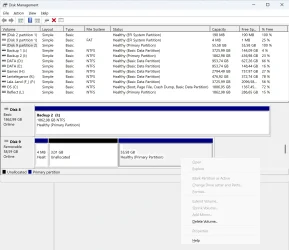
You won't believe this Steve, but I downloaded Ubuntu v25.10 and then plugged in a fresh 64 GB USB drive. Although Windows made its usual "new device connected" sound, the drive did not show in Explorer. I opened diskmgmt and it is shown there as disk 9 with 2 partitions which is odd because it has never been used before. I am unable to assign it a drive letter either. In fact, the only option available is to delete the volume. What should I do please?

diskmgmt-2.webp
 

My Computer

System One

  • OS
    Windows 11
    Computer type
    Laptop
    Manufacturer/Model
    Alienware A51M R2
    CPU
    Intel(R) Core(TM) i9-10900K CPU @ 3.70GHz
    Memory
    32,0 GB
    Graphics Card(s)
    Nvidia GeForce RTX2080 Super
    Sound Card
    Realtek
    Screen Resolution
    4K
    Hard Drives
    2TB (2x 1TB PCle M.2 SSD) RAID 0 [Boot] + 2TB (2x 1TB
    PCle M.2 SSD) Non-Raid [Storage]
You won't believe this Steve, but I downloaded Ubuntu v25.10 and then plugged in a fresh 64 GB USB drive. Although Windows made its usual "new device connected" sound, the drive did not show in Explorer. I opened diskmgmt and it is shown there as disk 9 with 2 partitions which is odd because it has never been used before. I am unable to assign it a drive letter either. In fact, the only option available is to delete the volume. What should I do please?

View attachment 158999

with the USB stick attached to your system restart
and enter the boot menu

on the boot menu scroll down to the USB entry and press enter
the system will restart and boot into Ubuntu.

now open the file manager and check your drive.
best of luck Steve ..
 

My Computers

System One System Two

  • OS
    Debian Trixie KDE Windows 11 Home
    Computer type
    PC/Desktop
    Manufacturer/Model
    HP 24" AiO
    CPU
    Ryzen 7 5825u
    Motherboard
    HP
    Memory
    64GB DDR4 3200
    Graphics Card(s)
    Ryzen 7 5825u
    Sound Card
    RealTek
    Monitor(s) Displays
    24" HP AiO
    Screen Resolution
    1920 x 1080 @60 Hz
    Hard Drives
    1TB WD Blue SN580 M2 SSD Partitioned.
    2x 1TB USB HDD External Backup/Storage.
    PSU
    90W external power brick
    Case
    24" All in One
    Cooling
    Default Air Cooling
    Keyboard
    HP WiFi UK extended
    Mouse
    HP WiFi 3 Button
    Internet Speed
    1GB full fibre
    Browser
    Edge & Firefox
    Antivirus
    AVG Internet Security/Windows Defender
    Other Info
    Mainly Open Source Software
  • Operating System
    Ubuntu 22.04.5 LTS
    Computer type
    Laptop
    Manufacturer/Model
    Dell 13" Latitude 2017
    CPU
    i5 7200u
    Motherboard
    Dell
    Memory
    16GB DDR4
    Graphics card(s)
    Intel
    Sound Card
    Intel
    Monitor(s) Displays
    13" Dell Laptop
    Hard Drives
    250GB Crucial 2.5" SSD
    Mouse
    Generic WiFi 3 button
    Internet Speed
    WiFi only
    Browser
    Firefox
    Antivirus
    ClamAV TK
    Other Info
    Mainly Open Source Software
You didn't understand. Windows cannot see the USB drive so I can't see it in Rufus either, which means I can't write Ubuntu to the drive.

As the only option available is to delete the volume, would doing that solve the problem? The drive has no data on it so it's not as though I'm risking anything other than the loss of a new empty drive.
 

My Computer

System One

  • OS
    Windows 11
    Computer type
    Laptop
    Manufacturer/Model
    Alienware A51M R2
    CPU
    Intel(R) Core(TM) i9-10900K CPU @ 3.70GHz
    Memory
    32,0 GB
    Graphics Card(s)
    Nvidia GeForce RTX2080 Super
    Sound Card
    Realtek
    Screen Resolution
    4K
    Hard Drives
    2TB (2x 1TB PCle M.2 SSD) RAID 0 [Boot] + 2TB (2x 1TB
    PCle M.2 SSD) Non-Raid [Storage]
You didn't understand. Windows cannot see the USB drive so I can't see it in Rufus either, which means I can't write Ubuntu to the drive.

As the only option available is to delete the volume, would doing that solve the problem? The drive has no data on it so it's not as though I'm risking anything other than the loss of a new empty drive.

i have a very strong feeling that its not the drives that have a problem
but the operating system has the problem and thats why it cant see the drives.

please try a repair install which will replace the Windows system but retain
files, folders and data.


best of luck Steve ..
 

My Computers

System One System Two

  • OS
    Debian Trixie KDE Windows 11 Home
    Computer type
    PC/Desktop
    Manufacturer/Model
    HP 24" AiO
    CPU
    Ryzen 7 5825u
    Motherboard
    HP
    Memory
    64GB DDR4 3200
    Graphics Card(s)
    Ryzen 7 5825u
    Sound Card
    RealTek
    Monitor(s) Displays
    24" HP AiO
    Screen Resolution
    1920 x 1080 @60 Hz
    Hard Drives
    1TB WD Blue SN580 M2 SSD Partitioned.
    2x 1TB USB HDD External Backup/Storage.
    PSU
    90W external power brick
    Case
    24" All in One
    Cooling
    Default Air Cooling
    Keyboard
    HP WiFi UK extended
    Mouse
    HP WiFi 3 Button
    Internet Speed
    1GB full fibre
    Browser
    Edge & Firefox
    Antivirus
    AVG Internet Security/Windows Defender
    Other Info
    Mainly Open Source Software
  • Operating System
    Ubuntu 22.04.5 LTS
    Computer type
    Laptop
    Manufacturer/Model
    Dell 13" Latitude 2017
    CPU
    i5 7200u
    Motherboard
    Dell
    Memory
    16GB DDR4
    Graphics card(s)
    Intel
    Sound Card
    Intel
    Monitor(s) Displays
    13" Dell Laptop
    Hard Drives
    250GB Crucial 2.5" SSD
    Mouse
    Generic WiFi 3 button
    Internet Speed
    WiFi only
    Browser
    Firefox
    Antivirus
    ClamAV TK
    Other Info
    Mainly Open Source Software
Microsoft needs to fire Satya Narayana Nadella and get their bs fixed. The fact of the matter is going from windows 11 25H2 to any previous version is an UPGRADE.
 

My Computer

System One

  • OS
    Windows 11 22H2 Pro (X-lite Micro 11 version)
    Computer type
    Laptop
    Manufacturer/Model
    Dell/ Precision 7680
    CPU
    i7 13850HX (20 cores, 28 threads)
    Motherboard
    Dell
    Memory
    32GB DDR5
    Graphics Card(s)
    Intel UHD/ RTX 1000 ADA
    Sound Card
    Realtek
    Monitor(s) Displays
    4K UHD Touchscreen
    Screen Resolution
    3840 x 2400
    Hard Drives
    Samsung 512GB system drive
    WD Blue 1TB game drive
    PSU
    240W AC adapter, 1800W when docked
    Internet Speed
    1 gigabit symmetrical
    Browser
    Firefox, Librewolf
    Antivirus
    None. Manully configured so nobody except me can change any critical system files. (Don't ask how, it's probably against some rule somewhere)
i have a very strong feeling that its not the drives that have a problem
but the operating system has the problem and thats why it cant see the drives.

please try a repair install which will replace the Windows system but retain
files, folders and data.


best of luck Steve ..
I have a very strong feeling you are right.

How do I know which of these I need, please?

which.webp
 

My Computer

System One

  • OS
    Windows 11
    Computer type
    Laptop
    Manufacturer/Model
    Alienware A51M R2
    CPU
    Intel(R) Core(TM) i9-10900K CPU @ 3.70GHz
    Memory
    32,0 GB
    Graphics Card(s)
    Nvidia GeForce RTX2080 Super
    Sound Card
    Realtek
    Screen Resolution
    4K
    Hard Drives
    2TB (2x 1TB PCle M.2 SSD) RAID 0 [Boot] + 2TB (2x 1TB
    PCle M.2 SSD) Non-Raid [Storage]
Microsoft needs to fire Satya Narayana Nadella and get their bs fixed. The fact of the matter is going from windows 11 25H2 to any previous version is an UPGRADE.
Of course, I agree with you. Windows 10 was far superior to this pile of crap. The trouble is 24H2 was loaded with problems so going back to that is a non-starter. I fear that installing 23H2 would create more trouble than it's worth. 😕
 

My Computer

System One

  • OS
    Windows 11
    Computer type
    Laptop
    Manufacturer/Model
    Alienware A51M R2
    CPU
    Intel(R) Core(TM) i9-10900K CPU @ 3.70GHz
    Memory
    32,0 GB
    Graphics Card(s)
    Nvidia GeForce RTX2080 Super
    Sound Card
    Realtek
    Screen Resolution
    4K
    Hard Drives
    2TB (2x 1TB PCle M.2 SSD) RAID 0 [Boot] + 2TB (2x 1TB
    PCle M.2 SSD) Non-Raid [Storage]
Hi @QuicktellPro

I have a strong feeling that the Ubuntu flash drive you created is not proper. I created a Ubuntu flash drive using Rufus and it looks like this. (I used a 32GB Sandisk flash drive)

05-01-2026 20-23-43.webp

I even booted into it on this PC and I got the Ubuntu Desktop but I don't know how to use it :-)

When I booted I got the GRUB menu with "Try or install Ubuntu" highlighted. I got into panic mode because I didn't know what to do with that highlighted.What should I do to make sure that it is only try and not install ? I pushed power button off and shut my PC. I rebooted into Windows and i did some reading that said that I can safely press enter on the highlighted "Try or install " and it will be try mode only. When on the Ubuntu Desktop at the bottom right corner I found the "Install Button" Only if is pressed it will permanently install.

I have also read that Ubuntu cannot see raid with Intel Rapid storage Technology (IRST). Your PC with 2 disks are in Raid mode. Read your own computer specifications in "My Computer"

So be warned on doing something on presumptions and assumptions without really testing.
 
Last edited:

My Computers

System One System Two

  • OS
    Windows 11 Pro Version:25H2 OS Build: 26200.8524
    Computer type
    PC/Desktop
    Manufacturer/Model
    Beelink Mini PC Model: SEi12
    CPU
    12th Gen Intel core i5-1235U(Alder
    Motherboard
    SEi (manufactured by AZW)
    Memory
    16*2 (32 GB) DDR 4-3200(1600MHz) Crucial Technology
    Graphics Card(s)
    Intel Iris Xe Graphics (Internal)
    Sound Card
    Internal
    Monitor(s) Displays
    BenQ GW2283
    Screen Resolution
    1920*1080
    Hard Drives
    500GB NVME (Kingston SNV2S500G)
    1TB (Crucial CT1000BX500SSD1)
    PSU
    Power Brick 19V-6.32A , 120.08W
    Keyboard
    Dell KB3322Wi (Wireless)
    Mouse
    Dell WM118t (Wireless)
    Internet Speed
    4G/5G
    Browser
    MS Edge, Chrome
    Antivirus
    Malwarebytes Premium - Subscription
  • Operating System
    Windows 11 Home Version 25H2 Build 26200.8524
    Computer type
    PC/Desktop
    Manufacturer/Model
    Dell Inspiron 3280 AIO 22"
    CPU
    Intel Core i3 8145U
    Motherboard
    Dell inc. 027W48
    Memory
    Intel Optane 16GB module + DDR 4 16GB (Optane disabled.)
    Graphics card(s)
    Intel UHD Graphics 620
    Sound Card
    Internal
    Monitor(s) Displays
    Dell Monitor 22"
    Screen Resolution
    1920x1080
    Hard Drives
    Crucial CT1000BX500SSD1 ; 1000,2 GB
    PSU
    Power Brick
    Case
    All-in one
    Keyboard
    Dell Wireless KM636
    Mouse
    Dell Wireless KM 636
    Internet Speed
    4G
    Browser
    Edge, Chrome
    Antivirus
    Malwarebytes
    Other Info
    Upgraded from Windows 10 Home to Windows 11 Home on 28 Oct 2023
Back
Top Bottom