External microphones are not recognised


upiware

Member
Local time
6:07 PM
Posts
3
Location
Finland
OS
Windows 11
Hello ElevenForum. I've recently got a new computer which uses Windows 11. It has a combo 3.55mm port for mics and headsets, but it seems to only recognise headphones and headsets.

If I plug in an external mic, it seems to register it as headphones, and the troubleshooter says "This microphone or headset is unplugged". It isn't recognised in any of my software, and when I plug it in, it seems to become the audio output device and I hear no sound from my computer. I'm able to successfully use headsets with built in mics, but not external microphones by themselves.

Is there a solution to this? I've tried two different microphones, and the troubleshooter says it's unplugged for both devices. My drivers are all up to date and the device isn't disabled; even control panel says it's just unplugged.

These devices have worked before on my old computer which ran Win10.
 
Windows Build/Version
Win11 Version 22H2 (OS Build 22621. 1265)

My Computer My Computer

At a glance

Windows 11Intel i5-12400F 12th gen8GBNVIDIA GTX 1650 Super
OS
Windows 11
Computer type
PC/Desktop
Manufacturer/Model
Lenovo
CPU
Intel i5-12400F 12th gen
Memory
8GB
Graphics Card(s)
NVIDIA GTX 1650 Super
Hard Drives
512GB SSD
Internet Speed
91mbps
Browser
Chrome
These devices have worked before on my old computer which ran Win10.
Does the old computer have a separate microphone and headphone connector?

What kind of a connector does the microphone have?

I would suggest getting a mic/headphone splitter. I use a similar one on my laptop (W11), but my old desktop (W10) doesn't need one because it has a separate connector for the microphone.
 

My Computers My Computers

  • At a glance

    Windows 11 Home, 25H2, Latest OS BuildIntel(R) Core(TM) i3-8145U CPU @ 2.10GHz 2.30...8GB
    OS
    Windows 11 Home, 25H2, Latest OS Build
    Computer type
    Laptop
    Manufacturer/Model
    HP 15-dw0xx
    CPU
    Intel(R) Core(TM) i3-8145U CPU @ 2.10GHz 2.30 GHz
    Memory
    8GB
    Screen Resolution
    1366 x 768
    Hard Drives
    930 GB
    Keyboard
    Built In
    Mouse
    Wireless Logitech M325S
    Browser
    Chrome 139.0.7258.128
    Antivirus
    Windows Defender
    Other Info
    Cygwin64
  • At a glance

    Windows 10 Home, Version 22H2, Build19045.3693AMD E-300 with Radeon HD Graphics 1.30 GHz10GBRadeon HD Graphics 1.30 GHz
    Operating System
    Windows 10 Home, Version 22H2, Build19045.3693
    Computer type
    PC/Desktop
    Manufacturer/Model
    HP Pavilion
    CPU
    AMD E-300 with Radeon HD Graphics 1.30 GHz
    Memory
    10GB
    Graphics card(s)
    Radeon HD Graphics 1.30 GHz
    Sound Card
    Realtek
    Monitor(s) Displays
    15"
    Screen Resolution
    1280 x 1024
    Hard Drives
    700 GB
    Keyboard
    Wireless
    Mouse
    Wireless
    Browser
    Chrome
    Antivirus
    Windows Defender
    Other Info
    This computer is connected to my IC-735 radio.

My Computer My Computer

At a glance

WinDOS 25H2Intel & AMDSO-DIMM SK Hynix 15.8 GB Dual-Channel DDR4-26...nVidia RTX 2060 6GB Mobile GPU (TU106M)
OS
WinDOS 25H2
Computer type
Laptop
CPU
Intel & AMD
Memory
SO-DIMM SK Hynix 15.8 GB Dual-Channel DDR4-2666 (2 x 8 GB) 1329MHz (19-19-19-43)
Graphics Card(s)
nVidia RTX 2060 6GB Mobile GPU (TU106M)
Sound Card
Onbord Realtek ALC1220
Screen Resolution
1920 x 1080
Hard Drives
1x Samsung PM981 NVMe PCIe M.2 512GB / 1x Seagate Expansion ST1000LM035 1TB
Does the old computer have a separate microphone and headphone connector?

What kind of a connector does the microphone have?

I would suggest getting a mic/headphone splitter. I use a similar one on my laptop (W11), but my old desktop (W10) doesn't need one because it has a separate connector for the microphone.
The old desktop has a separate microphone and headphone connector, and my new one has a combo jack. I suspect this may be the problem. All my microphones have 3.55mm connectors. I'll try out either a mic/headphone splitter or just a USB mic, thanks for the help 😁
 

My Computer My Computer

At a glance

Windows 11Intel i5-12400F 12th gen8GBNVIDIA GTX 1650 Super
OS
Windows 11
Computer type
PC/Desktop
Manufacturer/Model
Lenovo
CPU
Intel i5-12400F 12th gen
Memory
8GB
Graphics Card(s)
NVIDIA GTX 1650 Super
Hard Drives
512GB SSD
Internet Speed
91mbps
Browser
Chrome
Do you have Realtek Audio Control installed:


Or are you using a custom audio controller made by Lenvo (or its partnership)?
Yes, I am using Realtek Audio Control. It doesn't recognise the mics there, either.
 

My Computer My Computer

At a glance

Windows 11Intel i5-12400F 12th gen8GBNVIDIA GTX 1650 Super
OS
Windows 11
Computer type
PC/Desktop
Manufacturer/Model
Lenovo
CPU
Intel i5-12400F 12th gen
Memory
8GB
Graphics Card(s)
NVIDIA GTX 1650 Super
Hard Drives
512GB SSD
Internet Speed
91mbps
Browser
Chrome
By 3.5 combo - do you mean 2 in 1 (jack + headsets - both connected though one input)? Or do you have 2 x inputs (one for jack + 1 for headsets)? This days - I've seen many OEM Desktops with multiple inputs - both front and back. Yours has only 1 in the back?
 

My Computer My Computer

At a glance

WinDOS 25H2Intel & AMDSO-DIMM SK Hynix 15.8 GB Dual-Channel DDR4-26...nVidia RTX 2060 6GB Mobile GPU (TU106M)
OS
WinDOS 25H2
Computer type
Laptop
CPU
Intel & AMD
Memory
SO-DIMM SK Hynix 15.8 GB Dual-Channel DDR4-2666 (2 x 8 GB) 1329MHz (19-19-19-43)
Graphics Card(s)
nVidia RTX 2060 6GB Mobile GPU (TU106M)
Sound Card
Onbord Realtek ALC1220
Screen Resolution
1920 x 1080
Hard Drives
1x Samsung PM981 NVMe PCIe M.2 512GB / 1x Seagate Expansion ST1000LM035 1TB
By 3.5 combo - do you mean 2 in 1 (jack + headsets - both connected though one input)? Or do you have 2 x inputs (one for jack + 1 for headsets)? This days - I've seen many OEM Desktops with multiple inputs - both front and back. Yours has only 1 in the back?

Single combo jack just like on a smart phone. The is only two solutions. One is to use a splitter, something like this,

1676761693579.png

which is more an adapter (2 into 1) than a splitter. The other is to use a USB mic.
 

My Computer My Computer

At a glance

Windows 11Ryzen 5 5600T-Force Vulcan Z - 32 GB (2x16) @ 3600 MHzSapphire RX 7600
OS
Windows 11
Computer type
PC/Desktop
CPU
Ryzen 5 5600
Motherboard
MSI B550 Tomahawk
Memory
T-Force Vulcan Z - 32 GB (2x16) @ 3600 MHz
Graphics Card(s)
Sapphire RX 7600
Monitor(s) Displays
Sansui ES-G27F2Q
Screen Resolution
2560 x 1440P
Hard Drives
XPG SX8200 240GB M.2 PCIe Gen3x4 NVMe
Samsung 850 EVO 250 GB
Adata SU800 1 TB
WD Black SN750 500GB
PSU
EVGA SuperNOVA 650 G3
Case
Deepcool CK500WH
Cooling
Thermalright Frozen Warframe 240 SE, plus 3 140 MM case fans (2 in front, 1 in rear)
Keyboard
Logitech G213 Prodigy
Mouse
Logitech ERGO M575
Single combo jack just like on a smart phone. The is only two solutions. One is to use a splitter, something like this,

View attachment 53149

which is more an adapter (2 into 1) than a splitter. The other is to use a USB mic.
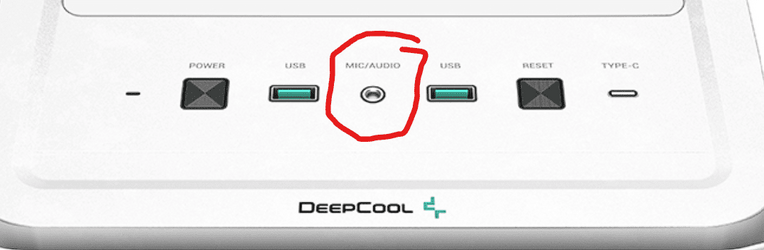
Truly weird/unusual for a OEM Desktop to have a single input combo - when most laptops have them separated. 🤔 Tho, if it's single - then it's working as intended (using a single mic - acts as speaker - without a 2 in 1 combo jack). Then indeed - an adapter is the only solution.
 

My Computer My Computer

At a glance

WinDOS 25H2Intel & AMDSO-DIMM SK Hynix 15.8 GB Dual-Channel DDR4-26...nVidia RTX 2060 6GB Mobile GPU (TU106M)
OS
WinDOS 25H2
Computer type
Laptop
CPU
Intel & AMD
Memory
SO-DIMM SK Hynix 15.8 GB Dual-Channel DDR4-2666 (2 x 8 GB) 1329MHz (19-19-19-43)
Graphics Card(s)
nVidia RTX 2060 6GB Mobile GPU (TU106M)
Sound Card
Onbord Realtek ALC1220
Screen Resolution
1920 x 1080
Hard Drives
1x Samsung PM981 NVMe PCIe M.2 512GB / 1x Seagate Expansion ST1000LM035 1TB
Truly weird/unusual for a OEM Desktop to have a single input combo - when most laptops have them separated.
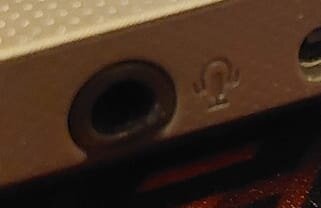
My Rog's got a single input combo, so does my Laptop...

jac.jpg
 

My Computers My Computers

  • At a glance

    Windows 11 Pro
    OS
    Windows 11 Pro
    Computer type
    PC/Desktop
    Manufacturer/Model
    ASUS ROG Strix
  • At a glance

    Windows 11 Pro
    Operating System
    Windows 11 Pro
    Computer type
    Laptop
    Manufacturer/Model
    ASUS VivoBook
  • ASUS VivoBook 'Lite' ~ Windows 11 Home

My Computer My Computer

At a glance

Windows 11Ryzen 5 5600T-Force Vulcan Z - 32 GB (2x16) @ 3600 MHzSapphire RX 7600
OS
Windows 11
Computer type
PC/Desktop
CPU
Ryzen 5 5600
Motherboard
MSI B550 Tomahawk
Memory
T-Force Vulcan Z - 32 GB (2x16) @ 3600 MHz
Graphics Card(s)
Sapphire RX 7600
Monitor(s) Displays
Sansui ES-G27F2Q
Screen Resolution
2560 x 1440P
Hard Drives
XPG SX8200 240GB M.2 PCIe Gen3x4 NVMe
Samsung 850 EVO 250 GB
Adata SU800 1 TB
WD Black SN750 500GB
PSU
EVGA SuperNOVA 650 G3
Case
Deepcool CK500WH
Cooling
Thermalright Frozen Warframe 240 SE, plus 3 140 MM case fans (2 in front, 1 in rear)
Keyboard
Logitech G213 Prodigy
Mouse
Logitech ERGO M575

My Computer My Computer

At a glance

WinDOS 25H2Intel & AMDSO-DIMM SK Hynix 15.8 GB Dual-Channel DDR4-26...nVidia RTX 2060 6GB Mobile GPU (TU106M)
OS
WinDOS 25H2
Computer type
Laptop
CPU
Intel & AMD
Memory
SO-DIMM SK Hynix 15.8 GB Dual-Channel DDR4-2666 (2 x 8 GB) 1329MHz (19-19-19-43)
Graphics Card(s)
nVidia RTX 2060 6GB Mobile GPU (TU106M)
Sound Card
Onbord Realtek ALC1220
Screen Resolution
1920 x 1080
Hard Drives
1x Samsung PM981 NVMe PCIe M.2 512GB / 1x Seagate Expansion ST1000LM035 1TB

My Computers My Computers

  • At a glance

    Windows 11 Pro
    OS
    Windows 11 Pro
    Computer type
    PC/Desktop
    Manufacturer/Model
    ASUS ROG Strix
  • At a glance

    Windows 11 Pro
    Operating System
    Windows 11 Pro
    Computer type
    Laptop
    Manufacturer/Model
    ASUS VivoBook
  • ASUS VivoBook 'Lite' ~ Windows 11 Home

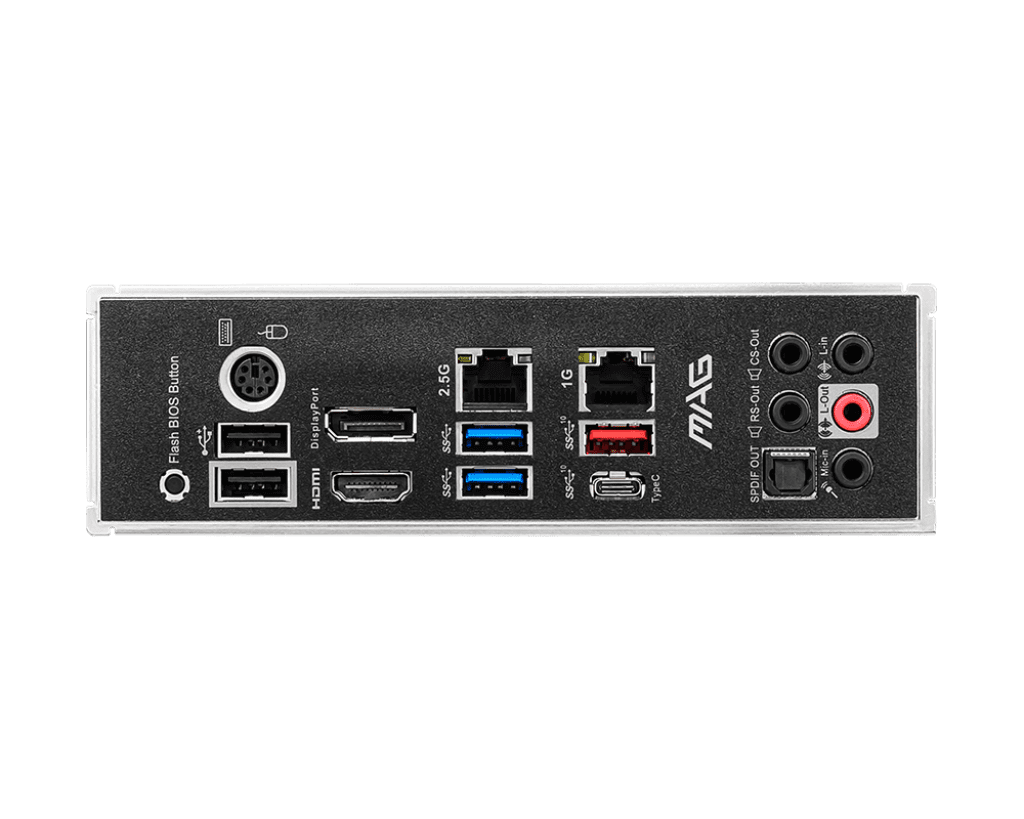
That's only the front panel of the case. In the back connected directly to the mobo (that is - if it's the one in your description: MSI B550 Tomahawk) you should have 5x Audio Ports + SPDIF:

1024.png

My point was/is.... seemed unusual/weird to have a 2 in 1 combo for a Desktop - while also taking the ports on the mobo into account.
 

My Computer My Computer

At a glance

WinDOS 25H2Intel & AMDSO-DIMM SK Hynix 15.8 GB Dual-Channel DDR4-26...nVidia RTX 2060 6GB Mobile GPU (TU106M)
OS
WinDOS 25H2
Computer type
Laptop
CPU
Intel & AMD
Memory
SO-DIMM SK Hynix 15.8 GB Dual-Channel DDR4-2666 (2 x 8 GB) 1329MHz (19-19-19-43)
Graphics Card(s)
nVidia RTX 2060 6GB Mobile GPU (TU106M)
Sound Card
Onbord Realtek ALC1220
Screen Resolution
1920 x 1080
Hard Drives
1x Samsung PM981 NVMe PCIe M.2 512GB / 1x Seagate Expansion ST1000LM035 1TB
No, just on the front.

That's just it - the Mobo itself should have multiple ports. So it seemed weird/unusual "for a Desktop" - to have just the 2 in 1 combo (while also taking the audio ports from the mobo into account).
 

My Computer My Computer

At a glance

WinDOS 25H2Intel & AMDSO-DIMM SK Hynix 15.8 GB Dual-Channel DDR4-26...nVidia RTX 2060 6GB Mobile GPU (TU106M)
OS
WinDOS 25H2
Computer type
Laptop
CPU
Intel & AMD
Memory
SO-DIMM SK Hynix 15.8 GB Dual-Channel DDR4-2666 (2 x 8 GB) 1329MHz (19-19-19-43)
Graphics Card(s)
nVidia RTX 2060 6GB Mobile GPU (TU106M)
Sound Card
Onbord Realtek ALC1220
Screen Resolution
1920 x 1080
Hard Drives
1x Samsung PM981 NVMe PCIe M.2 512GB / 1x Seagate Expansion ST1000LM035 1TB
seemed unusual/weird to have a 2 in 1 combo for a Desktop
I think manufacturer's started doing it because everybody started using wired combo earbuds with in-line mics, a few years back...

jac.jpg
 

My Computers My Computers

  • At a glance

    Windows 11 Pro
    OS
    Windows 11 Pro
    Computer type
    PC/Desktop
    Manufacturer/Model
    ASUS ROG Strix
  • At a glance

    Windows 11 Pro
    Operating System
    Windows 11 Pro
    Computer type
    Laptop
    Manufacturer/Model
    ASUS VivoBook
  • ASUS VivoBook 'Lite' ~ Windows 11 Home
That's just it - the Mobo itself should have multiple ports. So it seemed weird/unusual "for a Desktop" - to have just the 2 in 1 combo (while also taking the audio ports from the mobo into account).
I still have the standard pink/green/blue inputs on the back.
 

My Computers My Computers

  • At a glance

    Windows 11 Pro
    OS
    Windows 11 Pro
    Computer type
    PC/Desktop
    Manufacturer/Model
    ASUS ROG Strix
  • At a glance

    Windows 11 Pro
    Operating System
    Windows 11 Pro
    Computer type
    Laptop
    Manufacturer/Model
    ASUS VivoBook
  • ASUS VivoBook 'Lite' ~ Windows 11 Home
I think manufacturer's started doing it because everybody started using wired combo earbuds with in-line mics, a few years back...

View attachment 53181
Case manufacturers (front side) - not motherboard manufactures (back side). Fortunately.

The thing is - if the OP has only the 2 in 1 combo - then he needs an adapter. Tho, i just didn't get - why he didn't use the ports from the back (on the motherboard). Unless even his mobo has the 2 in 1 combo (which to me - seemed really unusual/weird).
 

My Computer My Computer

At a glance

WinDOS 25H2Intel & AMDSO-DIMM SK Hynix 15.8 GB Dual-Channel DDR4-26...nVidia RTX 2060 6GB Mobile GPU (TU106M)
OS
WinDOS 25H2
Computer type
Laptop
CPU
Intel & AMD
Memory
SO-DIMM SK Hynix 15.8 GB Dual-Channel DDR4-2666 (2 x 8 GB) 1329MHz (19-19-19-43)
Graphics Card(s)
nVidia RTX 2060 6GB Mobile GPU (TU106M)
Sound Card
Onbord Realtek ALC1220
Screen Resolution
1920 x 1080
Hard Drives
1x Samsung PM981 NVMe PCIe M.2 512GB / 1x Seagate Expansion ST1000LM035 1TB
... why he didn't use the ports from the back...
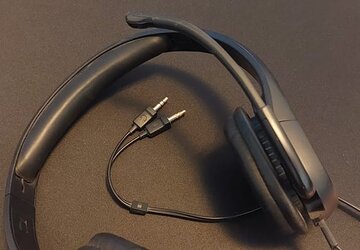
Maybe the OP's got a headset like this one, a pain to plug and unplug from the back all the time...
... in which case, yes, they would need an adapter.

jake.jpg
 

My Computers My Computers

  • At a glance

    Windows 11 Pro
    OS
    Windows 11 Pro
    Computer type
    PC/Desktop
    Manufacturer/Model
    ASUS ROG Strix
  • At a glance

    Windows 11 Pro
    Operating System
    Windows 11 Pro
    Computer type
    Laptop
    Manufacturer/Model
    ASUS VivoBook
  • ASUS VivoBook 'Lite' ~ Windows 11 Home
Back
Top Bottom