External USB Hard Drive keeps disconnecting - Why ?!?


Fun Guy

New member
Local time
3:33 AM
Posts
7
OS
Windows 11
My external HDD every couple of days or so gets kicked off my computer. The way I find this out is I attempt to open a recent file (either from an app like Word or from Windows 11's stupidly titled "Quick Access" section) and my computer declares that this file does not exist. At this point I have to go into Disk Management and re-assign drive letter "Z" to the drive, at which point the drive is back up and running.

I've already checked Power Options --> Advanced Settings to mess with the USB settings, but I don't have any USB settings (see attached). I also don't want my HDD to continue spinning 24/7, so if I change the Hard Disk --> Turn off hard disk after _______ minutes to Never, it will never spin down, correct?
 
Windows Build/Version
Windows 11 Version 21H2 (OS Build 22000.652)

Attachments

  • Win11 Disk Issue.jpg
    Win11 Disk Issue.jpg
    22.4 KB · Views: 4

My Computer My Computer

At a glance

Windows 11
OS
Windows 11
I was having this same issue with a drive I keep permanently attached and fought the problem for months, trying different ports along the way. For me,all I had to do was just open disk management and the drive would be detected using the letter I had permanently assigned it. I did not have to do anything in disk management. By the same token, the drive would be detected as soon as I opened any partitioning software. I moved the drive to a externally powered usb hub and haven't had any problems since with the drive being recognized as it should. The only drawback is the hub is 2.0 and the drive is 3.1. It'll work until I can buy a powered 3.1 hub. It made no sense to me because my external hard drive is also externally powered. All my other devices work fine on any of my usb ports. It's just this one drive which Seatools tests OK but Windows doesn't like.....or my PC doesn't like.
 

My Computers My Computers

  • At a glance

    Windows 11 Pro 25H2 26200.8655i9-10900 10 core 20 threads32 gbnone-Intel UHD Graphics 630
    OS
    Windows 11 Pro 25H2 26200.8655
    Computer type
    PC/Desktop
    Manufacturer/Model
    Dell Optiplex 7080
    CPU
    i9-10900 10 core 20 threads
    Motherboard
    DELL 0J37VM
    Memory
    32 gb
    Graphics Card(s)
    none-Intel UHD Graphics 630
    Sound Card
    Integrated Realtek
    Monitor(s) Displays
    Benq 27
    Screen Resolution
    2560x1440
    Hard Drives
    2x1tb Solidigm m.2 nvme /External drives 512gb Samsung m.2 sata+2tb Kingston m2.nvme
    PSU
    500w
    Case
    MT
    Cooling
    Dell Premium
    Keyboard
    Logitech wired
    Mouse
    Logitech wireless
    Internet Speed
    so slow I'm too embarrassed to tell
    Browser
    #1 Edge #2 Firefox
    Antivirus
    Defender+MWB Premium
  • At a glance

    Windows 11 Pro 24H2 26200.8457AMD Ryzen 7 6800U32 gbintegrated
    Operating System
    Windows 11 Pro 24H2 26200.8457
    Computer type
    PC/Desktop
    Manufacturer/Model
    Beelink Mini PC SER5
    CPU
    AMD Ryzen 7 6800U
    Memory
    32 gb
    Graphics card(s)
    integrated
    Sound Card
    integrated
    Monitor(s) Displays
    Benq 27
    Screen Resolution
    2560x1440
    Hard Drives
    1TB Crucial nvme
    Keyboard
    Logitech wired
    Mouse
    Logitech wireless
    Internet Speed
    still too embarrassed to tell
    Browser
    Firefox
    Antivirus
    Defender
    Other Info
    System 3 is non compliant Dell 9020 i7-4770/24gb ram Win11 PRO 26200.8457
ditto. But It was a fault at the usb port and with me. My 4TB drive is connected via a multi port usb (with buttons) and it seems a container perched on top of the drive was sometimes nudging the connector. I move it forward a bit and the problem stopped. I have winodws sounds on and I could hear when it became unusable.
 
Last edited:

My Computers My Computers

  • At a glance

    Win 11 x 64 HomeAMD Ryzen 5 7600 6-Core ProcessorDDR 5. 32GB (2 x16GB)GeForce RTX 5060i
    OS
    Win 11 x 64 Home
    Computer type
    PC/Desktop
    Manufacturer/Model
    pc specialists build (updated various times)
    CPU
    AMD Ryzen 5 7600 6-Core Processor
    Motherboard
    Gigabyte Technology Co., Ltd. Product:B650M K
    Memory
    DDR 5. 32GB (2 x16GB)
    Graphics Card(s)
    GeForce RTX 5060i
    Sound Card
    2 channel HD Audio + Mic/Hphone jack
    Monitor(s) Displays
    coolermaster 27 inch
    Screen Resolution
    1920 x 1080
    Hard Drives
    three external 3TBs, 4 TBs and 5tb. (Storage) Samsung SSD 970 (C).
    Case
    Coolermaster
    Cooling
    internal fans
    Keyboard
    Logi K270 & Logitech gamer G213
    Mouse
    M310 and Logi Gamer G203
    Internet Speed
    530.85mbps download. 52.70 upload
    Browser
    Opera, Vivaldi, Chrome & Firefox
    Antivirus
    Kaspersky Premium
    Other Info
    Build: 26100.ge_release 240331-1435
  • At a glance

    Android
    Operating System
    Android
    Computer type
    Tablet
    Manufacturer/Model
    Samsung
    Keyboard
    logi K270, when in use.
    Mouse
    Logi M220
    Internet Speed
    500
    Browser
    Opera.Edge. Chrome.Vivaldi
    Antivirus
    Kaspersky Premium
My external HDD every couple of days or so gets kicked off my computer. The way I find this out is I attempt to open a recent file (either from an app like Word or from Windows 11's stupidly titled "Quick Access" section) and my computer declares that this file does not exist. At this point I have to go into Disk Management and re-assign drive letter "Z" to the drive, at which point the drive is back up and running.

I've already checked Power Options --> Advanced Settings to mess with the USB settings, but I don't have any USB settings (see attached). I also don't want my HDD to continue spinning 24/7, so if I change the Hard Disk --> Turn off hard disk after _______ minutes to Never, it will never spin down, correct?

The setting you've enabled seems to pertain to internal drives only. Since you're connecting an external drive, it probably has to do with the port itself being turned off to save power.

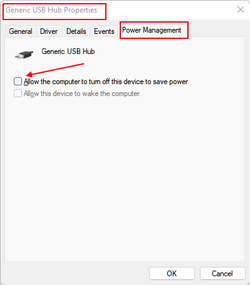
Open Device manager, go to Universal Serial Bus controllers, find the port / hub that your drive is connected to, open the properties page, select the Power Management tab, and uncheck Allow the computer to turn this device off to save power.

As an example:

268.png

See if that helps keep the drive connected. However, you may also have to check to see if that drive has any proprietary that may also enforce power savings.

HTH
 

My Computers My Computers

  • At a glance

    Windows 11 23H2 Current buildAMD Ryzen 9 3950X4 * 32 GB - Corsair Vengeance 3600 MHzEVGA GeForce RTX 3080 Ti XC3 ULTRA GAMING (12...
    OS
    Windows 11 23H2 Current build
    Computer type
    PC/Desktop
    Manufacturer/Model
    HomeBrew
    CPU
    AMD Ryzen 9 3950X
    Motherboard
    MSI MEG X570 GODLIKE
    Memory
    4 * 32 GB - Corsair Vengeance 3600 MHz
    Graphics Card(s)
    EVGA GeForce RTX 3080 Ti XC3 ULTRA GAMING (12G-P5-3955-KR)
    Sound Card
    Realtek® ALC1220 Codec
    Monitor(s) Displays
    2x Eve Spectrum ES07D03 4K Gaming Monitor (Matte) | Eve Spectrum ES07DC9 4K Gaming Monitor (Glossy)
    Screen Resolution
    3x 3840 x 2160
    Hard Drives
    3x Samsung 980 Pro NVMe PCIe 4 M.2 2 TB SSD (MZ-V8P2T0B/AM) } 3x Sabrent Rocket NVMe 4.0 1 TB SSD (USB)
    PSU
    PC Power & Cooling’s Silencer Series 1050 Watt, 80 Plus Platinum
    Case
    Fractal Design Define 7 XL Dark ATX Full Tower Case
    Cooling
    Arctic Liquid Freezer III 420 RGB + Air 3x 140mm case fans (pull front) + 1x 120 mm (push back) and 1 x 120 mm (pull bottom)
    Keyboard
    SteelSeries Apex Pro Wired Gaming Keyboard
    Mouse
    Logitech MX Master 3S | MX Master 3 for Business
    Internet Speed
    AT&T LightSpeed Gigabit Duplex Ftth
    Browser
    Nightly (default) + Firefox (stable), Chrome, Edge , Arc
    Antivirus
    Defender + MB 5 Beta
  • At a glance

    ChromeOS Flex Dev Channel (current)Intel(R) Core(TM) i5-6300U CPU @ 2.40GHz, 250...16 GBIntel(R) HD Graphics 520
    Operating System
    ChromeOS Flex Dev Channel (current)
    Computer type
    Laptop
    Manufacturer/Model
    Dell Latitude E5470
    CPU
    Intel(R) Core(TM) i5-6300U CPU @ 2.40GHz, 2501 Mhz, 2 Core(s), 4 Logical Processor(s)
    Motherboard
    Dell
    Memory
    16 GB
    Graphics card(s)
    Intel(R) HD Graphics 520
    Sound Card
    Intel(R) HD Graphics 520 + RealTek Audio
    Monitor(s) Displays
    Dell laptop display 15"
    Screen Resolution
    1920 * 1080
    Hard Drives
    Toshiba 128GB M.2 22300 drive
    INTEL Cherryville 520 Series SSDSC2CW180A 180 GB SATA III SSD
    PSU
    Dell
    Case
    Dell
    Cooling
    Dell
    Keyboard
    Dell
    Mouse
    Logitech MX Master 3S (shared w. Sys 1) | Dell TouchPad
    Internet Speed
    AT&T LightSpeed Gigabit Duplex Ftth

Latest Support Threads

Back
Top Bottom