Solved Flashing white screen after latest 11 updates


Katerpie

Member
Local time
1:59 PM
Posts
20
OS
Windows 11
win ver is 22h2 build 22621.1992

After this recent set of updates, (first around 8/9 I think) after windows force reboots, the screen will flash white in the background.
After the first time, it was about every half second or so. So I did a system restore. (date was 8/9)
fixed it until the next day, after windows had downloaded and reinstalled the updates again. so I did another system restore.
same for 3rd.
This last time, it flashes white when I do certain things, like open a menu in firefox, (files, bookmarks, etc)
It did not seem to affect as much when I opened system folders and their menus. But I also did not give it much time before I performed another restore.

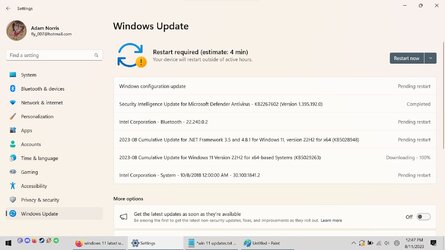
When i looked into the auto updates to see what its downloading and installing, this is what I see

(Downloading to install)
2023-08 Cumulative Update for .NET Framework 3.5 and 4.8.1 for Windows 11, version 22H2 for x64 (KB5028948)
2023-08 Cumulative Update for Windows 11 Version 22H2 for x64-based Systems (KB5029263)
Security Intelligence Update for Microsoft Defender Antivirus - KB2267602 (Version 1.395.192.0)

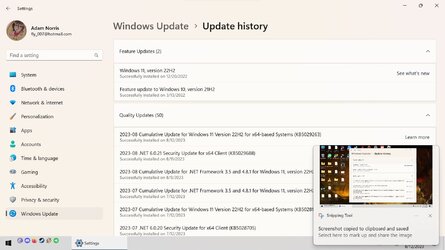
(Previously installed)
2023-08 Cumulative Update for Windows 11 Version 22H2 for x64-based Systems (KB5029263)
2023-08 .NET 6.0.21 Security Update for x64 Client (KB5029688)
2023-08 Cumulative Update for .NET Framework 3.5 and 4.8.1 for Windows 11, version 22H2 for x64 (KB5028948)


Attached screen shots as well, and I know I messed the second one up..

I have since set the auto updates for the max amount of time..


I dont know if this is the right forums for this or not,
I have tried (techcommunity.microsoft.com), but just get into this cycle of the site "trying to sign you in" but never signing me in..
 

Attachments
  • updates 2.jpg
    updates 2.jpg
    141.4 KB · Views: 2
  • updates.jpg
    updates.jpg
    114.4 KB · Views: 3

My Computer My Computer

At a glance

Windows 11Intel i7-10870H @2.20ghz32 GbGeforce rtx 3070 Laptop
OS
Windows 11
Computer type
Laptop
Manufacturer/Model
Gigabyte Aero 15 XC
CPU
Intel i7-10870H @2.20ghz
Memory
32 Gb
Graphics Card(s)
Geforce rtx 3070 Laptop
Sound Card
integrated realtek
Screen Resolution
3840x2160 Set to 1920 x 1080
Hard Drives
#1 1tb m.2 drive
#2 2tb samsung 970 evo
PSU
laptop
Case
laptop
Cooling
laptop
Keyboard
logitech g910
Mouse
random logitech gaming mouse
Internet Speed
9 Mbps up 1 down
Browser
Firefox
Antivirus
windows defender
Last edited:

My Computers My Computers

  • At a glance

    Windows 11 Pro 25H2 26200.9168i9-10900 10 core 20 threads32 gbnone-Intel UHD Graphics 630
    OS
    Windows 11 Pro 25H2 26200.9168
    Computer type
    PC/Desktop
    Manufacturer/Model
    Dell Optiplex 7080
    CPU
    i9-10900 10 core 20 threads
    Motherboard
    DELL 0J37VM
    Memory
    32 gb
    Graphics Card(s)
    none-Intel UHD Graphics 630
    Sound Card
    Integrated Realtek
    Monitor(s) Displays
    Benq 27
    Screen Resolution
    2560x1440
    Hard Drives
    2x1tb Solidigm m.2 nvme /External drives 512gb Samsung m.2 sata+2tb Kingston m2.nvme
    PSU
    500w
    Case
    MT
    Cooling
    Dell Premium
    Keyboard
    Logitech wired
    Mouse
    Logitech wireless
    Internet Speed
    so slow I'm too embarrassed to tell
    Browser
    #1 Edge #2 Firefox
    Antivirus
    Defender+MWB Premium
  • At a glance

    Windows 11 Pro 24H2 26200.9168AMD Ryzen 7 6800U32 gbintegrated
    Operating System
    Windows 11 Pro 24H2 26200.9168
    Computer type
    PC/Desktop
    Manufacturer/Model
    Beelink Mini PC SER5
    CPU
    AMD Ryzen 7 6800U
    Memory
    32 gb
    Graphics card(s)
    integrated
    Sound Card
    integrated
    Monitor(s) Displays
    Benq 27
    Screen Resolution
    2560x1440
    Hard Drives
    1TB Crucial nvme
    Keyboard
    Logitech wired
    Mouse
    Logitech wireless
    Internet Speed
    still too embarrassed to tell
    Browser
    Firefox
    Antivirus
    Defender
  • System 3 is non compliant Dell 9020 i7-4770/24gb ram Win11 PRO 26200.9168
The last driver update was 2/2/23

And i just checked the Definition and Other catagories, (I had never seen those before..)
These two have reinstalled each time apparently.

Definition
Security Intelligence Update for Microsoft Defender Antivirus - KB2267602 (Version 1.395.147.0)

Other
Windows Intelligence Update
 

My Computer My Computer

At a glance

Windows 11Intel i7-10870H @2.20ghz32 GbGeforce rtx 3070 Laptop
OS
Windows 11
Computer type
Laptop
Manufacturer/Model
Gigabyte Aero 15 XC
CPU
Intel i7-10870H @2.20ghz
Memory
32 Gb
Graphics Card(s)
Geforce rtx 3070 Laptop
Sound Card
integrated realtek
Screen Resolution
3840x2160 Set to 1920 x 1080
Hard Drives
#1 1tb m.2 drive
#2 2tb samsung 970 evo
PSU
laptop
Case
laptop
Cooling
laptop
Keyboard
logitech g910
Mouse
random logitech gaming mouse
Internet Speed
9 Mbps up 1 down
Browser
Firefox
Antivirus
windows defender
The release notes for that update state "This update makes brightness settings more accurate." so that is a clear indication it affected graphics in some way.
All I can suggest is for you to see if there is an update for your graphics driver.
You haven't completed the specs for your system in your forum profile so I can't give specifics since I don't know what hardware you are working with so if you could do that it would be helpful.
Be sure to include Make and model along with the other fields there.

The manufacturer web site would be the first place to look. Checking for a bios update would also be advisable.
 

My Computers My Computers

  • At a glance

    Windows 11 Pro 25H2 26200.9168i9-10900 10 core 20 threads32 gbnone-Intel UHD Graphics 630
    OS
    Windows 11 Pro 25H2 26200.9168
    Computer type
    PC/Desktop
    Manufacturer/Model
    Dell Optiplex 7080
    CPU
    i9-10900 10 core 20 threads
    Motherboard
    DELL 0J37VM
    Memory
    32 gb
    Graphics Card(s)
    none-Intel UHD Graphics 630
    Sound Card
    Integrated Realtek
    Monitor(s) Displays
    Benq 27
    Screen Resolution
    2560x1440
    Hard Drives
    2x1tb Solidigm m.2 nvme /External drives 512gb Samsung m.2 sata+2tb Kingston m2.nvme
    PSU
    500w
    Case
    MT
    Cooling
    Dell Premium
    Keyboard
    Logitech wired
    Mouse
    Logitech wireless
    Internet Speed
    so slow I'm too embarrassed to tell
    Browser
    #1 Edge #2 Firefox
    Antivirus
    Defender+MWB Premium
  • At a glance

    Windows 11 Pro 24H2 26200.9168AMD Ryzen 7 6800U32 gbintegrated
    Operating System
    Windows 11 Pro 24H2 26200.9168
    Computer type
    PC/Desktop
    Manufacturer/Model
    Beelink Mini PC SER5
    CPU
    AMD Ryzen 7 6800U
    Memory
    32 gb
    Graphics card(s)
    integrated
    Sound Card
    integrated
    Monitor(s) Displays
    Benq 27
    Screen Resolution
    2560x1440
    Hard Drives
    1TB Crucial nvme
    Keyboard
    Logitech wired
    Mouse
    Logitech wireless
    Internet Speed
    still too embarrassed to tell
    Browser
    Firefox
    Antivirus
    Defender
  • System 3 is non compliant Dell 9020 i7-4770/24gb ram Win11 PRO 26200.9168
I didnt even think about the graphics drivers.. I used to have the nvidia thing installed to help keep it up to date, but apparently its not installed anymore. I am downloading all that right now, and I went ahead and updated my system specs stuff as well. I had the forum site pulled up for a few days while I messed around with stuff, and forgot to finish putting all that in.
I will update if the drivers fixed issue or not once that 600 mb download is done..
 

My Computer My Computer

At a glance

Windows 11Intel i7-10870H @2.20ghz32 GbGeforce rtx 3070 Laptop
OS
Windows 11
Computer type
Laptop
Manufacturer/Model
Gigabyte Aero 15 XC
CPU
Intel i7-10870H @2.20ghz
Memory
32 Gb
Graphics Card(s)
Geforce rtx 3070 Laptop
Sound Card
integrated realtek
Screen Resolution
3840x2160 Set to 1920 x 1080
Hard Drives
#1 1tb m.2 drive
#2 2tb samsung 970 evo
PSU
laptop
Case
laptop
Cooling
laptop
Keyboard
logitech g910
Mouse
random logitech gaming mouse
Internet Speed
9 Mbps up 1 down
Browser
Firefox
Antivirus
windows defender

My Computers My Computers

  • At a glance

    Windows 11 Pro 25H2 26200.9168i9-10900 10 core 20 threads32 gbnone-Intel UHD Graphics 630
    OS
    Windows 11 Pro 25H2 26200.9168
    Computer type
    PC/Desktop
    Manufacturer/Model
    Dell Optiplex 7080
    CPU
    i9-10900 10 core 20 threads
    Motherboard
    DELL 0J37VM
    Memory
    32 gb
    Graphics Card(s)
    none-Intel UHD Graphics 630
    Sound Card
    Integrated Realtek
    Monitor(s) Displays
    Benq 27
    Screen Resolution
    2560x1440
    Hard Drives
    2x1tb Solidigm m.2 nvme /External drives 512gb Samsung m.2 sata+2tb Kingston m2.nvme
    PSU
    500w
    Case
    MT
    Cooling
    Dell Premium
    Keyboard
    Logitech wired
    Mouse
    Logitech wireless
    Internet Speed
    so slow I'm too embarrassed to tell
    Browser
    #1 Edge #2 Firefox
    Antivirus
    Defender+MWB Premium
  • At a glance

    Windows 11 Pro 24H2 26200.9168AMD Ryzen 7 6800U32 gbintegrated
    Operating System
    Windows 11 Pro 24H2 26200.9168
    Computer type
    PC/Desktop
    Manufacturer/Model
    Beelink Mini PC SER5
    CPU
    AMD Ryzen 7 6800U
    Memory
    32 gb
    Graphics card(s)
    integrated
    Sound Card
    integrated
    Monitor(s) Displays
    Benq 27
    Screen Resolution
    2560x1440
    Hard Drives
    1TB Crucial nvme
    Keyboard
    Logitech wired
    Mouse
    Logitech wireless
    Internet Speed
    still too embarrassed to tell
    Browser
    Firefox
    Antivirus
    Defender
  • System 3 is non compliant Dell 9020 i7-4770/24gb ram Win11 PRO 26200.9168
So far, that seems to have fixed it. I try and keep drivers up to date best I can, but as I said, I apparently failed to install the "Experience" this last time. And with working outside in this heat (average of 95 f here in Fl) I havent touched my pc in a few weeks, so it has definitely been neglected, and fried me enough to not think about things like I used to..

But, I thank you for your help with this!
 

My Computer My Computer

At a glance

Windows 11Intel i7-10870H @2.20ghz32 GbGeforce rtx 3070 Laptop
OS
Windows 11
Computer type
Laptop
Manufacturer/Model
Gigabyte Aero 15 XC
CPU
Intel i7-10870H @2.20ghz
Memory
32 Gb
Graphics Card(s)
Geforce rtx 3070 Laptop
Sound Card
integrated realtek
Screen Resolution
3840x2160 Set to 1920 x 1080
Hard Drives
#1 1tb m.2 drive
#2 2tb samsung 970 evo
PSU
laptop
Case
laptop
Cooling
laptop
Keyboard
logitech g910
Mouse
random logitech gaming mouse
Internet Speed
9 Mbps up 1 down
Browser
Firefox
Antivirus
windows defender
OK So... I still get random white flashes, Mostly when opening something actually system related, like My Computer shortcut on the desktop. I will double click to open. Screen flashes white, and does NOT open my computer. When I double click it again, it opens fine.
If I close said window once it opens, the cycle repeats next time I try.
Its the same for Any folders I have on my desktop. Including the recycle bin.
This also happens with opening any folder through the start menu as well. such as just opening file explorer. (Not the actual app folders in the apps menu.)
 

My Computer My Computer

At a glance

Windows 11Intel i7-10870H @2.20ghz32 GbGeforce rtx 3070 Laptop
OS
Windows 11
Computer type
Laptop
Manufacturer/Model
Gigabyte Aero 15 XC
CPU
Intel i7-10870H @2.20ghz
Memory
32 Gb
Graphics Card(s)
Geforce rtx 3070 Laptop
Sound Card
integrated realtek
Screen Resolution
3840x2160 Set to 1920 x 1080
Hard Drives
#1 1tb m.2 drive
#2 2tb samsung 970 evo
PSU
laptop
Case
laptop
Cooling
laptop
Keyboard
logitech g910
Mouse
random logitech gaming mouse
Internet Speed
9 Mbps up 1 down
Browser
Firefox
Antivirus
windows defender
And it is does seem to still be restarting explorer.exe it looks like?
 

My Computer My Computer

At a glance

Windows 11Intel i7-10870H @2.20ghz32 GbGeforce rtx 3070 Laptop
OS
Windows 11
Computer type
Laptop
Manufacturer/Model
Gigabyte Aero 15 XC
CPU
Intel i7-10870H @2.20ghz
Memory
32 Gb
Graphics Card(s)
Geforce rtx 3070 Laptop
Sound Card
integrated realtek
Screen Resolution
3840x2160 Set to 1920 x 1080
Hard Drives
#1 1tb m.2 drive
#2 2tb samsung 970 evo
PSU
laptop
Case
laptop
Cooling
laptop
Keyboard
logitech g910
Mouse
random logitech gaming mouse
Internet Speed
9 Mbps up 1 down
Browser
Firefox
Antivirus
windows defender
I believe I encountered the same issue. After boot and login the desktop would flash white, then wallpaper, then white again in a continuous loop. Spent several hours fighting with it, working by remote complicated the issue. It was possible to bring up taskmanager and cmd prompt, but attempting to enter something at cmd was nearly impossible as each flash interrupted keyboard entry. I had the client force shutdown several times, when it booted up the desktop was normal and there was an "App Could Not Start" error. The offending app was........


Wait for it.........


Cortana!

Go figure.
I disabled Cortana and the problem seems to be resolved.
Hope this helps someone else.
 

My Computer My Computer

At a glance

Windows 10
OS
Windows 10
Cortana!

Go figure.
I disabled Cortana and the problem seems to be resolved.
Hope this helps someone else.

I at least can say Cortana was not the case for me. I disabled that as soon as I had installed 11 in the first place, and have been making sure it stays that way. But the issues it caused are pretty much the same as what I had.

There was an update or something either last night, or at some point during the day today, As I just came back to my log in screen as it had rebooted itself. There is nothing in the update history however...
The good side of that, whatever it was, seems to have fixed the issues I had going on.
 

My Computer My Computer

At a glance

Windows 11Intel i7-10870H @2.20ghz32 GbGeforce rtx 3070 Laptop
OS
Windows 11
Computer type
Laptop
Manufacturer/Model
Gigabyte Aero 15 XC
CPU
Intel i7-10870H @2.20ghz
Memory
32 Gb
Graphics Card(s)
Geforce rtx 3070 Laptop
Sound Card
integrated realtek
Screen Resolution
3840x2160 Set to 1920 x 1080
Hard Drives
#1 1tb m.2 drive
#2 2tb samsung 970 evo
PSU
laptop
Case
laptop
Cooling
laptop
Keyboard
logitech g910
Mouse
random logitech gaming mouse
Internet Speed
9 Mbps up 1 down
Browser
Firefox
Antivirus
windows defender
There is nothing in the update history however...
Scratch that, There were these two..

Security Intelligence Update for Microsoft Defender Antivirus - KB2267602 (Version 1.395.539.0)
Security Intelligence Update for Microsoft Defender Antivirus - KB2267602 (Version 1.395.498.0)
 

My Computer My Computer

At a glance

Windows 11Intel i7-10870H @2.20ghz32 GbGeforce rtx 3070 Laptop
OS
Windows 11
Computer type
Laptop
Manufacturer/Model
Gigabyte Aero 15 XC
CPU
Intel i7-10870H @2.20ghz
Memory
32 Gb
Graphics Card(s)
Geforce rtx 3070 Laptop
Sound Card
integrated realtek
Screen Resolution
3840x2160 Set to 1920 x 1080
Hard Drives
#1 1tb m.2 drive
#2 2tb samsung 970 evo
PSU
laptop
Case
laptop
Cooling
laptop
Keyboard
logitech g910
Mouse
random logitech gaming mouse
Internet Speed
9 Mbps up 1 down
Browser
Firefox
Antivirus
windows defender

Latest Support Threads

Back
Top Bottom