Solved garlin's PowerShell scripts for updating Secure Boot CA 2023


I think the problem is you're not allowed to feed random certs as long as the factory PK is defined. Could be wrong.

Just for confirmation, please run this PS script. I'd like to know if this PK is actually supported or abandoned by Dell. It queries the JSON file on the MS GitHub for your PK's thumbprint, and looks for a possible match.
 

Attachments

My Computer

System One

  • OS
    Windows 7
Thanks! Will try tonight.
 

My Computer

System One

  • OS
    Windows 11
    Computer type
    Laptop
    Manufacturer/Model
    Dell Latitude 3380
    CPU
    Intel Core i3-6006U @ 2.00 GHz
    Motherboard
    Dell 0WM4F
    Memory
    16,0 GB
    Graphics Card(s)
    Intel HD Graphics 520
    Sound Card
    Realtek Audio
    Monitor(s) Displays
    Built-in
    Screen Resolution
    1366 x 768 @ 59 Hz
    Hard Drives
    SK Hynix SC311 SATA 128 GB SSD
    Other Info
    Multi-boot Windows/Ubuntu using rEFInd
I had to delete all the keys before the scripts would insert new keys. Had that failed, I would have restored the factory ones.
 

My Computers

System One System Two

  • OS
    Windows 11 Pro 25H2 26200.8524
    Computer type
    Laptop
    Manufacturer/Model
    Acemagic LX15PRO
    CPU
    AMD Ryzen 7 5825U with Radeon Graphics
    Memory
    16GB
    Screen Resolution
    1920 x 1080
    Hard Drives
    SSD 2TB
    Internet Speed
    30 Mbps
    Browser
    Brave
    Antivirus
    Webroot Secure Anywhere
    Other Info
    System 3

    Acer Swift SF114-34 laptop
    OS Windows 11 Pro 26200.8524
    CPU Pentium Silver N6000
    RAM 4GB
    SSD Samsung 970 EVO Plus SSD 2TB (an upgrade)
  • Operating System
    Windows 11 Pro 23H2 22631.2506
    Computer type
    Laptop
    Manufacturer/Model
    HP Mini 210-1090NR PC (bought in late 2009!)
    CPU
    Atom N450 1.66GHz
    Memory
    2GB
    Browser
    Brave
    Antivirus
    Webroot
Hello peeps.

I'm using the script to check about the new certs and whatnot, and this are my results, for both my PC and laptop:

Desktop:
Powershell:
Windows PowerShell
Copyright (C) Microsoft Corporation. Todos los derechos reservados.

Instale la versión más reciente de PowerShell para obtener nuevas características y mejoras. https://aka.ms/PSWindows

Secure Boot: ON
Virtualization Based Security: ON
BitLocker on (C:) OFF

UEFI KEK Certs
--------------
    Microsoft Corporation KEK CA 2011

UEFI DB Certs
-------------
    Microsoft Corporation UEFI CA 2011
    Microsoft Windows Production PCA 2011

UEFI DBX Certs
--------------
    (NONE)

EFI Files
---------
    Disk 0: Windows Boot Manager [Production PCA 2011] is ALLOWED.

    Registry: WindowsUEFICA2023Capable = 0
        [Windows UEFI CA 2023] not in UEFI DB.

    Disk 0: SkuSiPolicy.p7b (for VBS) is NOT PRESENT.


AUDIT REPORT
============
1.  Update W11 25H2 to KB5066835 (Oct 2025) or later
2.  [Microsoft Corporation KEK 2K CA 2023] is missing from UEFI KEK
3.  [Windows UEFI CA 2023] is missing from UEFI DB
4.  [Microsoft UEFI CA 2023] is missing from UEFI DB
5.  [Microsoft Option ROM UEFI CA 2023] is missing from UEFI DB
6.  [Production PCA 2011] is missing from UEFI DBX
7.  Windows BootMgr SVN is missing from UEFI DBX
8.  Windows Boot Manager [Production PCA 2011] is wrong version
9.  SkuSiPolicy.p7b (for VBS) is missing


REQUIRED ACTION
===============

OPTION 1:  DO NOTHING.  Windows will apply the UEFI updates in 2026 (supported BIOS).

OPTION 2:  To install [UEFI CA 2023] certs WITHOUT REVOKING the [PCA 2011] cert, run the commands:

    reg add HKEY_LOCAL_MACHINE\SYSTEM\CurrentControlSet\Control\Secureboot /v AvailableUpdates /t REG_DWORD /d 0x5944 /f
    powershell Start-ScheduledTask -TaskName "\Microsoft\Windows\PI\Secure-Boot-Update"

OPTION 3:  To install [UEFI CA 2023] certs and REVOKE the [PCA 2011] cert, run the commands:

    reg add HKEY_LOCAL_MACHINE\SYSTEM\CurrentControlSet\Control\Secureboot /v AvailableUpdates /t REG_DWORD /d 0x5bc4 /f
    powershell Start-ScheduledTask -TaskName "\Microsoft\Windows\PI\Secure-Boot-Update"

To install SkuSiPolicy.p7b, run the command:
    Update_UEFI-CA2023.ps1 -SkuSiPolicy

Laptop:
Powershell:
Windows PowerShell
Copyright (C) Microsoft Corporation. Todos los derechos reservados.

Instale la versión más reciente de PowerShell para obtener nuevas características y mejoras. https://aka.ms/PSWindows

Secure Boot: ON
Virtualization Based Security: ON
BitLocker on (C:) OFF

UEFI KEK Certs
--------------
    Microsoft Corporation KEK CA 2011

UEFI DB Certs
-------------
    Microsoft Corporation UEFI CA 2011
    Microsoft Windows Production PCA 2011
    Windows UEFI CA 2023

UEFI DBX Certs
--------------
    (NONE)

EFI Files
---------
    Disk 0: Windows Boot Manager [Production PCA 2011] is ALLOWED.

    Registry: WindowsUEFICA2023Capable = 1
        [Windows UEFI CA 2023] in UEFI DB.

    Disk 0: SkuSiPolicy.p7b (for VBS) is NOT PRESENT.


AUDIT REPORT
============
1.  Update W11 25H2 to KB5066835 (Oct 2025) or later
2.  [Microsoft Corporation KEK 2K CA 2023] is missing from UEFI KEK
3.  [Microsoft UEFI CA 2023] is missing from UEFI DB
4.  [Microsoft Option ROM UEFI CA 2023] is missing from UEFI DB
5.  [Production PCA 2011] is missing from UEFI DBX
6.  Windows BootMgr SVN is missing from UEFI DBX
7.  Windows Boot Manager [Production PCA 2011] is wrong version
8.  SkuSiPolicy.p7b (for VBS) is missing


REQUIRED ACTION
===============

Run the command:
    Update_UEFI-CA2023.ps1 -Revoke

Finish the UEFI steps to manually add the [KEK CA 2023] cert, if the script provided instructions.

Now, I know the script is giving me instructions, but I don't wanna render my systems unbootable so, I kindly ask you some help on what steps I need to do and what to expect in order to update this and get rid of this problem that is giving me headaches with all the many ways to do this. I presume this adds the necessary certs to BIOS... if so, will a BIOS reset will remove all this certs? I need to know because sometimes you need to resent a BIOS for whatever reason and would be a mess if Windows cannot boot because of this...

Second, the batch tells me I can add the cert wothout revoking the 2011, while my HP is telling me to revoke... should I do that?

I have a rescue USB for Macrium to to boot said utility and restore images, how do I update that one? I use Macrium Free 8

I am on W11 version 25H2 26200.6584, I have updates disabled via GPO because Microsoft has been erratic about bricking systems.

And finally, some are saying this is better than using Mosby, because of self signing or something like that... Any inputs on that?

Please, if you can explain this to me like I'm dumb (I'm dumb in this regard...) I'll be greatly thankful.

Thanks a ton for all this effort!!!
 

My Computers

System One System Two

  • OS
    Windows 11 Pro 25H2
    Computer type
    PC/Desktop
    Manufacturer/Model
    Built PC
    CPU
    AMD Ryzen 5 5600G @ 3.9/4.4Ghz
    Motherboard
    MSI B550M-PRO-WiFi Ver. 1.4
    Memory
    2 x 16 GB DDR4 Kingston Fury Beast 3200 Mhz
    Graphics Card(s)
    AMD Radeon RX 6600 XT MSI Mech 2X OC Edition 8 GB
    Sound Card
    Realtek High Definition Audio (Integrated)
    Monitor(s) Displays
    Samsung C50Rx 27" LED / HP S2031 20" LCD
    Screen Resolution
    1920 x 1080 px / 1600 x 900 px
    Hard Drives
    WD Blue SN570 NVME M.2 SSD [1 TB] -- External Drives: - WD Scorpion Blue 250 GB 5400 RPM (Data Backup) - Hitachi 500 GB 5400 RPM (Software / ISOs Backup) - Toshiba MQ01ABD100 1 TB 5400 RPM (OS Images) - HGST TravelStar 7K1000 1 TB, 7200 RPM USB 3.0 - ADATA SU800 2TB SSD USB 3.0
    PSU
    Corsair RM750e 750W Fully Modular
    Case
    Naceb Hydra NA-1602
    Cooling
    Naceb Orpheus x 3 (Front) + Naceb Cepheus 1200 RPM Max (Rear) + ThemalRight Assasin X 90 SE (CPU)
    Keyboard
    Logitech MK470 Wireless
    Mouse
    Logitech MK470 Wireless
    Internet Speed
    120 MB Symetrical
    Browser
    Firefox / Brave / Edge
    Antivirus
    Windows Defender
    Other Info
    - VMs: WMware Player - Windows 8.1 Pro x64 / Windows 11 Pro
    - Wacom Intuos Pro Small Tablet PTH-460
  • Operating System
    Windows 11 Pro 25H2
    Computer type
    Laptop
    Manufacturer/Model
    HP Pavilion 15-eh3000la (80M53LA)
    CPU
    AMD Ryzen 7 7730U @ 2.0/4.5 Ghz
    Motherboard
    HP 8BC7
    Memory
    2 x 16 GB Kingston Fury Impact DDR4 3200 Mhz
    Graphics card(s)
    Radeon (tm) Graphics Vega 8 (512 MB)
    Sound Card
    Realtek High Definition Audio (Integrated)
    Monitor(s) Displays
    AU Optronics
    Screen Resolution
    1920 x 1080 px (125% size)
    Hard Drives
    WD Blue SN570 1TB NVME M.2 Drive
    PSU
    45 Watt Charger
    Cooling
    Laptop Cooling Pad
    Keyboard
    Free Wolf Foldable Portable Keyboard
    Mouse
    Free Wolf Wireless Mouse
    Internet Speed
    120 MB Symetrical
    Browser
    Firefox / Brave / Edge
    Antivirus
    Windows Defender
    Other Info
    - 41mWh battery.
    - Wacom Intuos Pro Small Tablet PTH-460
REQUIRED ACTION
===============

OPTION 1: DO NOTHING. Windows will apply the UEFI updates in 2026 (supported BIOS).

OPTION 2: To install [UEFI CA 2023] certs WITHOUT REVOKING the [PCA 2011] cert, run the commands:

reg add HKEY_LOCAL_MACHINE\SYSTEM\CurrentControlSet\Control\Secureboot /v AvailableUpdates /t REG_DWORD /d 0x5944 /f
powershell Start-ScheduledTask -TaskName "\Microsoft\Windows\PI\Secure-Boot-Update"

OPTION 3: To install [UEFI CA 2023] certs and REVOKE the [PCA 2011] cert, run the commands:

reg add HKEY_LOCAL_MACHINE\SYSTEM\CurrentControlSet\Control\Secureboot /v AvailableUpdates /t REG_DWORD /d 0x5bc4 /f
powershell Start-ScheduledTask -TaskName "\Microsoft\Windows\PI\Secure-Boot-Update"
REQUIRED ACTION
===============

Run the command:
Update_UEFI-CA2023.ps1 -Revoke

Finish the UEFI steps to manually add the [KEK CA 2023] cert, if the script provided instructions.

Unfortunately, not all PC models have fully supported the Secure Boot migration because the OEM has not signed the KEK CA 2023 cert with the Platform Key issued to their BIOS.

1. Your first PC is fully supported. The script has checked your PK, and confirmed it's registered in the KEK list on MS's GitHub. If you do nothing, Windows has all the right files to perform the update by itself later (later this year). If you want to update this PC now, run the instructions under Option 2 or 3.

The difference is Option 3 revokes the CA 2011 cert, so you may have to update any bootable USB drives with a new boot manager. At this point, if you don't want to worry about that, then pick Option 2's instructions.

2. Your second PC doesn't have a supported PK. It may be abandoned by your PC vendor. In that case, you should check if your UEFI has some menu that allows for custom key enrollment. There are many different BIOS'es, so the screens and available options may be different on your PC.

For the laptop, the best we can do is copy the KEK CA 2023 to the EFI partition, and allow you to use the custom key enrollment (from a file) to load the KEK CA 2023 cert. After that, you can restart Windows and re-run the update script to finish the process. The manual process works for some PC's, but other PC's might have weird BIOS issues as reported by other users. It depends on your PC's model.

Another last option for the laptop is to clear all the Secure Boot certs (go to "Setup Mode"). This allows the script to install a Windows OEM Devices PK in place of your OEM's PK, and push all the necessary certs to UEFI.

I would perform the update on PC #1, and check out PC #2's BIOS menus before deciding what to do.
 

My Computer

System One

  • OS
    Windows 7
Okay, will give it a go and post what I've found later.
Thank you so much!
 

My Computers

System One System Two

  • OS
    Windows 11 Pro 25H2
    Computer type
    PC/Desktop
    Manufacturer/Model
    Built PC
    CPU
    AMD Ryzen 5 5600G @ 3.9/4.4Ghz
    Motherboard
    MSI B550M-PRO-WiFi Ver. 1.4
    Memory
    2 x 16 GB DDR4 Kingston Fury Beast 3200 Mhz
    Graphics Card(s)
    AMD Radeon RX 6600 XT MSI Mech 2X OC Edition 8 GB
    Sound Card
    Realtek High Definition Audio (Integrated)
    Monitor(s) Displays
    Samsung C50Rx 27" LED / HP S2031 20" LCD
    Screen Resolution
    1920 x 1080 px / 1600 x 900 px
    Hard Drives
    WD Blue SN570 NVME M.2 SSD [1 TB] -- External Drives: - WD Scorpion Blue 250 GB 5400 RPM (Data Backup) - Hitachi 500 GB 5400 RPM (Software / ISOs Backup) - Toshiba MQ01ABD100 1 TB 5400 RPM (OS Images) - HGST TravelStar 7K1000 1 TB, 7200 RPM USB 3.0 - ADATA SU800 2TB SSD USB 3.0
    PSU
    Corsair RM750e 750W Fully Modular
    Case
    Naceb Hydra NA-1602
    Cooling
    Naceb Orpheus x 3 (Front) + Naceb Cepheus 1200 RPM Max (Rear) + ThemalRight Assasin X 90 SE (CPU)
    Keyboard
    Logitech MK470 Wireless
    Mouse
    Logitech MK470 Wireless
    Internet Speed
    120 MB Symetrical
    Browser
    Firefox / Brave / Edge
    Antivirus
    Windows Defender
    Other Info
    - VMs: WMware Player - Windows 8.1 Pro x64 / Windows 11 Pro
    - Wacom Intuos Pro Small Tablet PTH-460
  • Operating System
    Windows 11 Pro 25H2
    Computer type
    Laptop
    Manufacturer/Model
    HP Pavilion 15-eh3000la (80M53LA)
    CPU
    AMD Ryzen 7 7730U @ 2.0/4.5 Ghz
    Motherboard
    HP 8BC7
    Memory
    2 x 16 GB Kingston Fury Impact DDR4 3200 Mhz
    Graphics card(s)
    Radeon (tm) Graphics Vega 8 (512 MB)
    Sound Card
    Realtek High Definition Audio (Integrated)
    Monitor(s) Displays
    AU Optronics
    Screen Resolution
    1920 x 1080 px (125% size)
    Hard Drives
    WD Blue SN570 1TB NVME M.2 Drive
    PSU
    45 Watt Charger
    Cooling
    Laptop Cooling Pad
    Keyboard
    Free Wolf Foldable Portable Keyboard
    Mouse
    Free Wolf Wireless Mouse
    Internet Speed
    120 MB Symetrical
    Browser
    Firefox / Brave / Edge
    Antivirus
    Windows Defender
    Other Info
    - 41mWh battery.
    - Wacom Intuos Pro Small Tablet PTH-460
Just for confirmation, please run this PS script.
Code:
PK=1

Subject
-------
CN=Dell Inc. Platform Key, O=Dell Inc., L=Round Rock, S=Texas, C=US
KEK=2
CN=Dell Inc. Key Exchange Key, O=Dell Inc., L=Round Rock, S=Texas, C=US
CN=Microsoft Corporation KEK CA 2011, O=Microsoft Corporation, L=Redmond, S=Washington, C=US
DB=5
CN=Dell Inc. UEFI DB, O=Dell Inc., L=Round Rock, S=Texas, C=US
CN=Microsoft Corporation UEFI CA 2011, O=Microsoft Corporation, L=Redmond, S=Washington, C=US
CN=Microsoft Windows Production PCA 2011, O=Microsoft Corporation, L=Redmond, S=Washington, C=US
CN=Microsoft UEFI CA 2023, O=Microsoft Corporation, C=US
CN=Microsoft Option ROM UEFI CA 2023, O=Microsoft Corporation, C=US
DBX=1
CN=Microsoft Windows PCA 2010, O=Microsoft Corporation, L=Redmond, S=Washington, C=US

What does this output indicate?
 

My Computer

System One

  • OS
    Windows 11
    Computer type
    Laptop
    Manufacturer/Model
    Dell Latitude 3380
    CPU
    Intel Core i3-6006U @ 2.00 GHz
    Motherboard
    Dell 0WM4F
    Memory
    16,0 GB
    Graphics Card(s)
    Intel HD Graphics 520
    Sound Card
    Realtek Audio
    Monitor(s) Displays
    Built-in
    Screen Resolution
    1366 x 768 @ 59 Hz
    Hard Drives
    SK Hynix SC311 SATA 128 GB SSD
    Other Info
    Multi-boot Windows/Ubuntu using rEFInd
Ran the commands on my Desktop PC, I decided to not revoke the 2011 cert yet, rebooted 2 times, I get this:

Powershell:
Windows PowerShell
Copyright (C) Microsoft Corporation. Todos los derechos reservados.

Instale la versión más reciente de PowerShell para obtener nuevas características y mejoras. https://aka.ms/PSWindows

Secure Boot: ON
Virtualization Based Security: ON
BitLocker on (C:) OFF

UEFI KEK Certs
--------------
    Microsoft Corporation KEK CA 2011
    Microsoft Corporation KEK 2K CA 2023

UEFI DB Certs
-------------
    Microsoft Corporation UEFI CA 2011
    Microsoft Windows Production PCA 2011
    Microsoft Option ROM UEFI CA 2023
    Microsoft UEFI CA 2023
    Windows UEFI CA 2023

UEFI DBX Certs
--------------
    (NONE)

EFI Files
---------
    Disk 0: Windows Boot Manager [Windows UEFI CA 2023] is ALLOWED.

    Registry: WindowsUEFICA2023Capable = 2
        [Windows UEFI CA 2023] in UEFI DB, and Windows starting from CA 2023 Boot Manager.

    Disk 0: SkuSiPolicy.p7b (for VBS) is NOT PRESENT.


AUDIT REPORT
============
1.  Update W11 25H2 to KB5066835 (Oct 2025) or later
2.  [Production PCA 2011] is missing from UEFI DBX
3.  Windows BootMgr SVN is missing from UEFI DBX
4.  SkuSiPolicy.p7b (for VBS) is missing


REQUIRED ACTION
===============

To revoke the [PCA 2011] cert, run the commands, run the commands:

    reg add HKEY_LOCAL_MACHINE\SYSTEM\CurrentControlSet\Control\Secureboot /v AvailableUpdates /t REG_DWORD /d 0x280 /f
    powershell Start-ScheduledTask -TaskName "\Microsoft\Windows\PI\Secure-Boot-Update"

To install SkuSiPolicy.p7b, run the command:
    Update_UEFI-CA2023.ps1 -SkuSiPolicy

What's this Sku thing? is it needed as well?

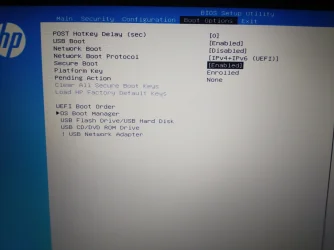
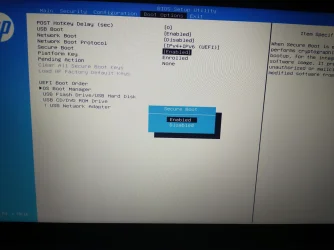
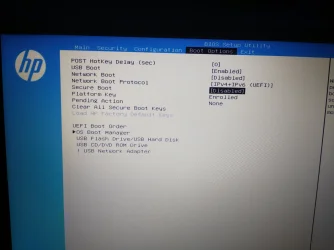
Now, about my HP Laptop, my model is a Pavillion 15-eh3000la, Bios version F.05 (there's an update to F.09, but they have the terrible practice of never saying what it fixes, if at all.) My settings for secure boot go as follows. Apparently, if I disable it, it lets me reset the enrollment keys? I'm not sure, Photos here:
IMG_20260206_210925452_1.webpIMG_20260206_210951134_1.webpIMG_20260206_210959120_1.webp

There you can notice that it enables that option to clear keys if I disable secure boot.

What's my next step with both systems?

Thanks a TON for all your help mate.
 

My Computers

System One System Two

  • OS
    Windows 11 Pro 25H2
    Computer type
    PC/Desktop
    Manufacturer/Model
    Built PC
    CPU
    AMD Ryzen 5 5600G @ 3.9/4.4Ghz
    Motherboard
    MSI B550M-PRO-WiFi Ver. 1.4
    Memory
    2 x 16 GB DDR4 Kingston Fury Beast 3200 Mhz
    Graphics Card(s)
    AMD Radeon RX 6600 XT MSI Mech 2X OC Edition 8 GB
    Sound Card
    Realtek High Definition Audio (Integrated)
    Monitor(s) Displays
    Samsung C50Rx 27" LED / HP S2031 20" LCD
    Screen Resolution
    1920 x 1080 px / 1600 x 900 px
    Hard Drives
    WD Blue SN570 NVME M.2 SSD [1 TB] -- External Drives: - WD Scorpion Blue 250 GB 5400 RPM (Data Backup) - Hitachi 500 GB 5400 RPM (Software / ISOs Backup) - Toshiba MQ01ABD100 1 TB 5400 RPM (OS Images) - HGST TravelStar 7K1000 1 TB, 7200 RPM USB 3.0 - ADATA SU800 2TB SSD USB 3.0
    PSU
    Corsair RM750e 750W Fully Modular
    Case
    Naceb Hydra NA-1602
    Cooling
    Naceb Orpheus x 3 (Front) + Naceb Cepheus 1200 RPM Max (Rear) + ThemalRight Assasin X 90 SE (CPU)
    Keyboard
    Logitech MK470 Wireless
    Mouse
    Logitech MK470 Wireless
    Internet Speed
    120 MB Symetrical
    Browser
    Firefox / Brave / Edge
    Antivirus
    Windows Defender
    Other Info
    - VMs: WMware Player - Windows 8.1 Pro x64 / Windows 11 Pro
    - Wacom Intuos Pro Small Tablet PTH-460
  • Operating System
    Windows 11 Pro 25H2
    Computer type
    Laptop
    Manufacturer/Model
    HP Pavilion 15-eh3000la (80M53LA)
    CPU
    AMD Ryzen 7 7730U @ 2.0/4.5 Ghz
    Motherboard
    HP 8BC7
    Memory
    2 x 16 GB Kingston Fury Impact DDR4 3200 Mhz
    Graphics card(s)
    Radeon (tm) Graphics Vega 8 (512 MB)
    Sound Card
    Realtek High Definition Audio (Integrated)
    Monitor(s) Displays
    AU Optronics
    Screen Resolution
    1920 x 1080 px (125% size)
    Hard Drives
    WD Blue SN570 1TB NVME M.2 Drive
    PSU
    45 Watt Charger
    Cooling
    Laptop Cooling Pad
    Keyboard
    Free Wolf Foldable Portable Keyboard
    Mouse
    Free Wolf Wireless Mouse
    Internet Speed
    120 MB Symetrical
    Browser
    Firefox / Brave / Edge
    Antivirus
    Windows Defender
    Other Info
    - 41mWh battery.
    - Wacom Intuos Pro Small Tablet PTH-460
AUDIT REPORT
============
1. Update W11 25H2 to KB5066835 (Oct 2025) or later
You will need to run Windows Update before running the Secure Boot update script.

October 2025 or later Monthly Updates have the latest version of the required Secure Boot source files. I don't provide the files myself, so they're taken from Windows itself. This allows me to prove the source files are trusted, because they're from the local PC or downloaded from MS's GitHub.

To install SkuSiPolicy.p7b, run the command:
Update_UEFI-CA2023.ps1 -SkuSiPolicy[/CODE]
SkuSiPolicy is one of the policy files that can be installed to help protect Virtualization Based Security.

Now, about my HP Laptop, my model is a Pavillion 15-eh3000la, Bios version F.05 (there's an update to F.09, but they have the terrible practice of never saying what it fixes, if at all.) My settings for secure boot go as follows. Apparently, if I disable it, it lets me reset the enrollment keys? I'm not sure, Photos here:
This BIOS update (sp167176.exe) is dated December 2025, so there's a good chance it may have a Secure Boot update included. So you should try updating Windows on this PC first, and then install this BIOS update. It might be compatible after the changes.
 

My Computer

System One

  • OS
    Windows 7
IIRC, at least the October patch had issues with Task Manager never closing or something... With all what I've seen with latest patches, is there an alternative to get the files needed that is not updating Windows? I really want to wait until Microsoft fixes everything they've introduced since October...

Sorry if I sound bratty, I just don't want my systems to break or misbehave since I do my job with them -_-

As for the HP, I gotta update Windows and install the BIOS in that order or can be the other way around? Again... I'm not trusting Windows Update lately >_>

Thanks!
 

My Computers

System One System Two

  • OS
    Windows 11 Pro 25H2
    Computer type
    PC/Desktop
    Manufacturer/Model
    Built PC
    CPU
    AMD Ryzen 5 5600G @ 3.9/4.4Ghz
    Motherboard
    MSI B550M-PRO-WiFi Ver. 1.4
    Memory
    2 x 16 GB DDR4 Kingston Fury Beast 3200 Mhz
    Graphics Card(s)
    AMD Radeon RX 6600 XT MSI Mech 2X OC Edition 8 GB
    Sound Card
    Realtek High Definition Audio (Integrated)
    Monitor(s) Displays
    Samsung C50Rx 27" LED / HP S2031 20" LCD
    Screen Resolution
    1920 x 1080 px / 1600 x 900 px
    Hard Drives
    WD Blue SN570 NVME M.2 SSD [1 TB] -- External Drives: - WD Scorpion Blue 250 GB 5400 RPM (Data Backup) - Hitachi 500 GB 5400 RPM (Software / ISOs Backup) - Toshiba MQ01ABD100 1 TB 5400 RPM (OS Images) - HGST TravelStar 7K1000 1 TB, 7200 RPM USB 3.0 - ADATA SU800 2TB SSD USB 3.0
    PSU
    Corsair RM750e 750W Fully Modular
    Case
    Naceb Hydra NA-1602
    Cooling
    Naceb Orpheus x 3 (Front) + Naceb Cepheus 1200 RPM Max (Rear) + ThemalRight Assasin X 90 SE (CPU)
    Keyboard
    Logitech MK470 Wireless
    Mouse
    Logitech MK470 Wireless
    Internet Speed
    120 MB Symetrical
    Browser
    Firefox / Brave / Edge
    Antivirus
    Windows Defender
    Other Info
    - VMs: WMware Player - Windows 8.1 Pro x64 / Windows 11 Pro
    - Wacom Intuos Pro Small Tablet PTH-460
  • Operating System
    Windows 11 Pro 25H2
    Computer type
    Laptop
    Manufacturer/Model
    HP Pavilion 15-eh3000la (80M53LA)
    CPU
    AMD Ryzen 7 7730U @ 2.0/4.5 Ghz
    Motherboard
    HP 8BC7
    Memory
    2 x 16 GB Kingston Fury Impact DDR4 3200 Mhz
    Graphics card(s)
    Radeon (tm) Graphics Vega 8 (512 MB)
    Sound Card
    Realtek High Definition Audio (Integrated)
    Monitor(s) Displays
    AU Optronics
    Screen Resolution
    1920 x 1080 px (125% size)
    Hard Drives
    WD Blue SN570 1TB NVME M.2 Drive
    PSU
    45 Watt Charger
    Cooling
    Laptop Cooling Pad
    Keyboard
    Free Wolf Foldable Portable Keyboard
    Mouse
    Free Wolf Wireless Mouse
    Internet Speed
    120 MB Symetrical
    Browser
    Firefox / Brave / Edge
    Antivirus
    Windows Defender
    Other Info
    - 41mWh battery.
    - Wacom Intuos Pro Small Tablet PTH-460
What does this output indicate?
Rather curious about that...

I happened to visit a family member today that has the same Dell Latitude 3380, but where we never tried to migrate Secure Boot.

For that laptop the output is this:
Code:
PK=1

Subject
-------
CN=Dell Inc. Platform Key, O=Dell Inc., L=Round Rock, S=Texas, C=US
KEK=2
CN=Dell Inc. Key Exchange Key, O=Dell Inc., L=Round Rock, S=Texas, C=US
CN=Microsoft Corporation KEK CA 2011, O=Microsoft Corporation, L=Redmond, S=Washington, C=US
DB=3
CN=Dell Inc. UEFI DB, O=Dell Inc., L=Round Rock, S=Texas, C=US
CN=Microsoft Corporation UEFI CA 2011, O=Microsoft Corporation, L=Redmond, S=Washington, C=US
CN=Microsoft Windows Production PCA 2011, O=Microsoft Corporation, L=Redmond, S=Washington, C=US
DBX=1
CN=Microsoft Windows PCA 2010, O=Microsoft Corporation, L=Redmond, S=Washington, C=US
 

My Computer

System One

  • OS
    Windows 11
    Computer type
    Laptop
    Manufacturer/Model
    Dell Latitude 3380
    CPU
    Intel Core i3-6006U @ 2.00 GHz
    Motherboard
    Dell 0WM4F
    Memory
    16,0 GB
    Graphics Card(s)
    Intel HD Graphics 520
    Sound Card
    Realtek Audio
    Monitor(s) Displays
    Built-in
    Screen Resolution
    1366 x 768 @ 59 Hz
    Hard Drives
    SK Hynix SC311 SATA 128 GB SSD
    Other Info
    Multi-boot Windows/Ubuntu using rEFInd
Well... today I risked my butt and installed the BIOS update to my HP... after that, I ran the update script like I did with the desktop. Funny enough, I'm getting the same result for the HP as the former now:
Powershell:
Windows PowerShell
Copyright (C) Microsoft Corporation. Todos los derechos reservados.

Instale la versión más reciente de PowerShell para obtener nuevas características y mejoras. https://aka.ms/PSWindows

Secure Boot: ON
Virtualization Based Security: ON
BitLocker on (C:) OFF

UEFI KEK Certs
--------------
    Microsoft Corporation KEK CA 2011
    Microsoft Corporation KEK 2K CA 2023

UEFI DB Certs
-------------
    Microsoft Corporation UEFI CA 2011
    Microsoft Windows Production PCA 2011
    Microsoft Option ROM UEFI CA 2023
    Microsoft UEFI CA 2023
    Windows UEFI CA 2023

UEFI DBX Certs
--------------
    (NONE)

EFI Files
---------
    Disk 0: Windows Boot Manager [Windows UEFI CA 2023] is ALLOWED.

    Registry: WindowsUEFICA2023Capable = 2
        [Windows UEFI CA 2023] in UEFI DB, and Windows starting from CA 2023 Boot Manager.

    Disk 0: SkuSiPolicy.p7b (for VBS) is NOT PRESENT.


AUDIT REPORT
============
1.  Update W11 25H2 to KB5066835 (Oct 2025) or later
2.  [Production PCA 2011] is missing from UEFI DBX
3.  Windows BootMgr SVN is missing from UEFI DBX
4.  SkuSiPolicy.p7b (for VBS) is missing


REQUIRED ACTION
===============

To revoke the [PCA 2011] cert, run the commands, run the commands:

    reg add HKEY_LOCAL_MACHINE\SYSTEM\CurrentControlSet\Control\Secureboot /v AvailableUpdates /t REG_DWORD /d 0x280 /f
    powershell Start-ScheduledTask -TaskName "\Microsoft\Windows\PI\Secure-Boot-Update"

To install SkuSiPolicy.p7b, run the command:
    Update_UEFI-CA2023.ps1 -SkuSiPolicy

Seems I'm only missing Windows Update... or a way to get the files you describe so I don't need to Update Windows.
Any advice is welcome.

Oh BTW... when doing this, is this permanent? Meaning if I reset my BIOS settings for whatever reason on any PC, will the Certs still be installed in there?

Thanks a bunch again!
 

My Computers

System One System Two

  • OS
    Windows 11 Pro 25H2
    Computer type
    PC/Desktop
    Manufacturer/Model
    Built PC
    CPU
    AMD Ryzen 5 5600G @ 3.9/4.4Ghz
    Motherboard
    MSI B550M-PRO-WiFi Ver. 1.4
    Memory
    2 x 16 GB DDR4 Kingston Fury Beast 3200 Mhz
    Graphics Card(s)
    AMD Radeon RX 6600 XT MSI Mech 2X OC Edition 8 GB
    Sound Card
    Realtek High Definition Audio (Integrated)
    Monitor(s) Displays
    Samsung C50Rx 27" LED / HP S2031 20" LCD
    Screen Resolution
    1920 x 1080 px / 1600 x 900 px
    Hard Drives
    WD Blue SN570 NVME M.2 SSD [1 TB] -- External Drives: - WD Scorpion Blue 250 GB 5400 RPM (Data Backup) - Hitachi 500 GB 5400 RPM (Software / ISOs Backup) - Toshiba MQ01ABD100 1 TB 5400 RPM (OS Images) - HGST TravelStar 7K1000 1 TB, 7200 RPM USB 3.0 - ADATA SU800 2TB SSD USB 3.0
    PSU
    Corsair RM750e 750W Fully Modular
    Case
    Naceb Hydra NA-1602
    Cooling
    Naceb Orpheus x 3 (Front) + Naceb Cepheus 1200 RPM Max (Rear) + ThemalRight Assasin X 90 SE (CPU)
    Keyboard
    Logitech MK470 Wireless
    Mouse
    Logitech MK470 Wireless
    Internet Speed
    120 MB Symetrical
    Browser
    Firefox / Brave / Edge
    Antivirus
    Windows Defender
    Other Info
    - VMs: WMware Player - Windows 8.1 Pro x64 / Windows 11 Pro
    - Wacom Intuos Pro Small Tablet PTH-460
  • Operating System
    Windows 11 Pro 25H2
    Computer type
    Laptop
    Manufacturer/Model
    HP Pavilion 15-eh3000la (80M53LA)
    CPU
    AMD Ryzen 7 7730U @ 2.0/4.5 Ghz
    Motherboard
    HP 8BC7
    Memory
    2 x 16 GB Kingston Fury Impact DDR4 3200 Mhz
    Graphics card(s)
    Radeon (tm) Graphics Vega 8 (512 MB)
    Sound Card
    Realtek High Definition Audio (Integrated)
    Monitor(s) Displays
    AU Optronics
    Screen Resolution
    1920 x 1080 px (125% size)
    Hard Drives
    WD Blue SN570 1TB NVME M.2 Drive
    PSU
    45 Watt Charger
    Cooling
    Laptop Cooling Pad
    Keyboard
    Free Wolf Foldable Portable Keyboard
    Mouse
    Free Wolf Wireless Mouse
    Internet Speed
    120 MB Symetrical
    Browser
    Firefox / Brave / Edge
    Antivirus
    Windows Defender
    Other Info
    - 41mWh battery.
    - Wacom Intuos Pro Small Tablet PTH-460
Well... today I risked my butt and installed the BIOS update to my HP... after that, I ran the update script like I did with the desktop. Funny enough, I'm getting the same result for the HP as the former now:
Powershell:
Windows PowerShell
Copyright (C) Microsoft Corporation. Todos los derechos reservados.

Instale la versión más reciente de PowerShell para obtener nuevas características y mejoras. https://aka.ms/PSWindows

Secure Boot: ON
Virtualization Based Security: ON
BitLocker on (C:) OFF

UEFI KEK Certs
--------------
    Microsoft Corporation KEK CA 2011
    Microsoft Corporation KEK 2K CA 2023

UEFI DB Certs
-------------
    Microsoft Corporation UEFI CA 2011
    Microsoft Windows Production PCA 2011
    Microsoft Option ROM UEFI CA 2023
    Microsoft UEFI CA 2023
    Windows UEFI CA 2023

UEFI DBX Certs
--------------
    (NONE)

EFI Files
---------
    Disk 0: Windows Boot Manager [Windows UEFI CA 2023] is ALLOWED.

    Registry: WindowsUEFICA2023Capable = 2
        [Windows UEFI CA 2023] in UEFI DB, and Windows starting from CA 2023 Boot Manager.

    Disk 0: SkuSiPolicy.p7b (for VBS) is NOT PRESENT.


AUDIT REPORT
============
1.  Update W11 25H2 to KB5066835 (Oct 2025) or later
2.  [Production PCA 2011] is missing from UEFI DBX
3.  Windows BootMgr SVN is missing from UEFI DBX
4.  SkuSiPolicy.p7b (for VBS) is missing


REQUIRED ACTION
===============

To revoke the [PCA 2011] cert, run the commands, run the commands:

    reg add HKEY_LOCAL_MACHINE\SYSTEM\CurrentControlSet\Control\Secureboot /v AvailableUpdates /t REG_DWORD /d 0x280 /f
    powershell Start-ScheduledTask -TaskName "\Microsoft\Windows\PI\Secure-Boot-Update"

To install SkuSiPolicy.p7b, run the command:
    Update_UEFI-CA2023.ps1 -SkuSiPolicy

Seems I'm only missing Windows Update... or a way to get the files you describe so I don't need to Update Windows.
Any advice is welcome.

Oh BTW... when doing this, is this permanent? Meaning if I reset my BIOS settings for whatever reason on any PC, will the Certs still be installed in there?

Thanks a bunch again!

In comparison with mine, yours looks fine.
And as with mine, DBX and SkuSiPolicy.p7b entries should show After you revoke 2011
 

My Computers

System One System Two

  • OS
    Windows 11 Pro 25H2 Build 26200.8524
    Computer type
    PC/Desktop
    Manufacturer/Model
    Sin-built 2013
    CPU
    Intel(R) Core(TM) i7-4770K CPU @ 3.50GHz
    Motherboard
    ASUS ROG Maximus VI Formula
    Memory
    32.0 GB of I forget and the box is in storage.
    Graphics Card(s)
    Gigabyte nVidia GeForce GTX 1660 Super OC 6GB
    Sound Card
    Onboard thingy
    Monitor(s) Displays
    5 x LG 25MS500-B - 1 x 24MK430H-B - 1 x Wacom Pro 22" Touch Screen Tablet
    Screen Resolution
    All over the place
    Hard Drives
    Too many to list.
    OS on Samsung 1TB 870 QVO SATA
    PSU
    Silverstone 1500
    Case
    NZXT Phantom 820 Full-Tower Case
    Cooling
    Noctua NH-D15 Elite Class Dual Tower CPU Cooler / 6 x EziDIY 120mm / 2 x Corsair 140mm somethings / 1 x 140mm Thermaltake something / 2 x 200mm Corsair.
    Keyboard
    Corsair K95 / Logitech diNovo Edge Wireless
    Mouse
    Logitech: G402 / G502 / Mx Masters / Mx Air Cordless
    Internet Speed
    2000/500Mbps
    Browser
    All sorts
    Antivirus
    Kaspersky Premium
    Other Info
    ㅤㅤㅤㅤㅤㅤㅤㅤㅤㅤㅤㅤㅤㅤㅤㅤㅤㅤㅤㅤㅤㅤㅤㅤㅤㅤㅤㅤㅤㅤㅤㅤㅤㅤㅤㅤㅤㅤㅤㅤ⠀⠀⠀⠀⠀⠀⠀⠀⠀⠀
    TP-Link BE9300 WiFi 7 Bluetooth 5.4 (Archer TBE550E)
    TP-Link TX201 V1 2.5GB Lan

    Grandstream HT812 - VoIP
    ASUS DSL-AX82U - Mesh
    ASUS RT-AC68U - Mesh
    ASUS RT-BE88U Router

    Brother MFC-L2880DW Printer

    I’m on a horse.
  • Operating System
    Windows 11 Pro 25H2 Build 26200.8524
    Computer type
    Laptop
    Manufacturer/Model
    LENOVO Yoga 7 14IRL8 - 7i EVO OLED 14" Touchscreen i5 12 Core 16GB/512GB
    CPU
    Intel Core 12th Gen i5-1240P Processor (1.7 - 4.4GHz)
    Memory
    16GB LPDDR5 RAM
    Graphics card(s)
    Intel Iris Xe Graphics Processor
    Sound Card
    Optimized with Dolby Atmos®
    Screen Resolution
    QHD 2880 x 1800 OLED
    Hard Drives
    M.2 512GB
    Antivirus
    Defender / Malwarebytes
    Other Info
    …still on a horse.

I'm really sorry, my memory failed. With the .p7b you need to follow the advice in your report.

There is a zip file in the first post. Download it.

If you copy the file Update_UEFI-CA2023.ps1 to your C drive
Open powershell as admin
Paste c:\Update_UEFI-CA2023.ps1 -SkuSiPolicy into the window and press enter
Reboot

If you get an issue in powershell running the script, pasteSet-ExecutionPolicy Unrestricted into poowershell, press enter, run update again.

If you revoke 2011, then DBX will show and the .p7b should be updated.
 

My Computers

System One System Two

  • OS
    Windows 11 Pro 25H2 Build 26200.8524
    Computer type
    PC/Desktop
    Manufacturer/Model
    Sin-built 2013
    CPU
    Intel(R) Core(TM) i7-4770K CPU @ 3.50GHz
    Motherboard
    ASUS ROG Maximus VI Formula
    Memory
    32.0 GB of I forget and the box is in storage.
    Graphics Card(s)
    Gigabyte nVidia GeForce GTX 1660 Super OC 6GB
    Sound Card
    Onboard thingy
    Monitor(s) Displays
    5 x LG 25MS500-B - 1 x 24MK430H-B - 1 x Wacom Pro 22" Touch Screen Tablet
    Screen Resolution
    All over the place
    Hard Drives
    Too many to list.
    OS on Samsung 1TB 870 QVO SATA
    PSU
    Silverstone 1500
    Case
    NZXT Phantom 820 Full-Tower Case
    Cooling
    Noctua NH-D15 Elite Class Dual Tower CPU Cooler / 6 x EziDIY 120mm / 2 x Corsair 140mm somethings / 1 x 140mm Thermaltake something / 2 x 200mm Corsair.
    Keyboard
    Corsair K95 / Logitech diNovo Edge Wireless
    Mouse
    Logitech: G402 / G502 / Mx Masters / Mx Air Cordless
    Internet Speed
    2000/500Mbps
    Browser
    All sorts
    Antivirus
    Kaspersky Premium
    Other Info
    ㅤㅤㅤㅤㅤㅤㅤㅤㅤㅤㅤㅤㅤㅤㅤㅤㅤㅤㅤㅤㅤㅤㅤㅤㅤㅤㅤㅤㅤㅤㅤㅤㅤㅤㅤㅤㅤㅤㅤㅤ⠀⠀⠀⠀⠀⠀⠀⠀⠀⠀
    TP-Link BE9300 WiFi 7 Bluetooth 5.4 (Archer TBE550E)
    TP-Link TX201 V1 2.5GB Lan

    Grandstream HT812 - VoIP
    ASUS DSL-AX82U - Mesh
    ASUS RT-AC68U - Mesh
    ASUS RT-BE88U Router

    Brother MFC-L2880DW Printer

    I’m on a horse.
  • Operating System
    Windows 11 Pro 25H2 Build 26200.8524
    Computer type
    Laptop
    Manufacturer/Model
    LENOVO Yoga 7 14IRL8 - 7i EVO OLED 14" Touchscreen i5 12 Core 16GB/512GB
    CPU
    Intel Core 12th Gen i5-1240P Processor (1.7 - 4.4GHz)
    Memory
    16GB LPDDR5 RAM
    Graphics card(s)
    Intel Iris Xe Graphics Processor
    Sound Card
    Optimized with Dolby Atmos®
    Screen Resolution
    QHD 2880 x 1800 OLED
    Hard Drives
    M.2 512GB
    Antivirus
    Defender / Malwarebytes
    Other Info
    …still on a horse.
What build do you have? Type winver into search and press enter
Thanks mate!

So the VBS thing resolves itself revoking 2011 certs? Nice to know!

My Current Build is 26200.6584, IIRC that's the September update, and I've been stuck keeping updates disabled since all the bugs that appeared from October onwards... January is still looking gloom sadly...

I'm really sorry, my memory failed. With the .p7b you need to follow the advice in your report.

There is a zip file in the first post. Download it.

If you copy the file Update_UEFI-CA2023.ps1 to your C drive
Open powershell as admin
Paste c:\Update_UEFI-CA2023.ps1 -SkuSiPolicy into the window and press enter
Reboot

If you get an issue in powershell running the script, pasteSet-ExecutionPolicy Unrestricted into poowershell, press enter, run update again.

If you revoke 2011, then DBX will show and the .p7b should be updated.

Ah... I still need to run the command manually then? Or this updates when revoking 2011 certs? I ask twice to be sure lol
 

My Computers

System One System Two

  • OS
    Windows 11 Pro 25H2
    Computer type
    PC/Desktop
    Manufacturer/Model
    Built PC
    CPU
    AMD Ryzen 5 5600G @ 3.9/4.4Ghz
    Motherboard
    MSI B550M-PRO-WiFi Ver. 1.4
    Memory
    2 x 16 GB DDR4 Kingston Fury Beast 3200 Mhz
    Graphics Card(s)
    AMD Radeon RX 6600 XT MSI Mech 2X OC Edition 8 GB
    Sound Card
    Realtek High Definition Audio (Integrated)
    Monitor(s) Displays
    Samsung C50Rx 27" LED / HP S2031 20" LCD
    Screen Resolution
    1920 x 1080 px / 1600 x 900 px
    Hard Drives
    WD Blue SN570 NVME M.2 SSD [1 TB] -- External Drives: - WD Scorpion Blue 250 GB 5400 RPM (Data Backup) - Hitachi 500 GB 5400 RPM (Software / ISOs Backup) - Toshiba MQ01ABD100 1 TB 5400 RPM (OS Images) - HGST TravelStar 7K1000 1 TB, 7200 RPM USB 3.0 - ADATA SU800 2TB SSD USB 3.0
    PSU
    Corsair RM750e 750W Fully Modular
    Case
    Naceb Hydra NA-1602
    Cooling
    Naceb Orpheus x 3 (Front) + Naceb Cepheus 1200 RPM Max (Rear) + ThemalRight Assasin X 90 SE (CPU)
    Keyboard
    Logitech MK470 Wireless
    Mouse
    Logitech MK470 Wireless
    Internet Speed
    120 MB Symetrical
    Browser
    Firefox / Brave / Edge
    Antivirus
    Windows Defender
    Other Info
    - VMs: WMware Player - Windows 8.1 Pro x64 / Windows 11 Pro
    - Wacom Intuos Pro Small Tablet PTH-460
  • Operating System
    Windows 11 Pro 25H2
    Computer type
    Laptop
    Manufacturer/Model
    HP Pavilion 15-eh3000la (80M53LA)
    CPU
    AMD Ryzen 7 7730U @ 2.0/4.5 Ghz
    Motherboard
    HP 8BC7
    Memory
    2 x 16 GB Kingston Fury Impact DDR4 3200 Mhz
    Graphics card(s)
    Radeon (tm) Graphics Vega 8 (512 MB)
    Sound Card
    Realtek High Definition Audio (Integrated)
    Monitor(s) Displays
    AU Optronics
    Screen Resolution
    1920 x 1080 px (125% size)
    Hard Drives
    WD Blue SN570 1TB NVME M.2 Drive
    PSU
    45 Watt Charger
    Cooling
    Laptop Cooling Pad
    Keyboard
    Free Wolf Foldable Portable Keyboard
    Mouse
    Free Wolf Wireless Mouse
    Internet Speed
    120 MB Symetrical
    Browser
    Firefox / Brave / Edge
    Antivirus
    Windows Defender
    Other Info
    - 41mWh battery.
    - Wacom Intuos Pro Small Tablet PTH-460
So the VBS thing resolves itself revoking 2011 certs?
Dont know, but the DBX files will be created. Please see that post as I corrected something:

There is a zip file in the first post. Download it.

If you copy the file Update_UEFI-CA2023.ps1 to your C drive
Open powershell as admin
Paste c:\Update_UEFI-CA2023.ps1 -SkuSiPolicy into the window and press enter
Reboot

If you get an issue in powershell running the script, pasteSet-ExecutionPolicy Unrestricted into powershell, press enter, run the above again.

If you revoke 2011, then DBX will show and the .p7b should be updated.


January is still looking gloom sadly

I'll be honest, my build 25H2 Build 26200.7705, is running quite nicely

EDIT
I think I'm having a stroke, 10 spelling errors corrected.
 

My Computers

System One System Two

  • OS
    Windows 11 Pro 25H2 Build 26200.8524
    Computer type
    PC/Desktop
    Manufacturer/Model
    Sin-built 2013
    CPU
    Intel(R) Core(TM) i7-4770K CPU @ 3.50GHz
    Motherboard
    ASUS ROG Maximus VI Formula
    Memory
    32.0 GB of I forget and the box is in storage.
    Graphics Card(s)
    Gigabyte nVidia GeForce GTX 1660 Super OC 6GB
    Sound Card
    Onboard thingy
    Monitor(s) Displays
    5 x LG 25MS500-B - 1 x 24MK430H-B - 1 x Wacom Pro 22" Touch Screen Tablet
    Screen Resolution
    All over the place
    Hard Drives
    Too many to list.
    OS on Samsung 1TB 870 QVO SATA
    PSU
    Silverstone 1500
    Case
    NZXT Phantom 820 Full-Tower Case
    Cooling
    Noctua NH-D15 Elite Class Dual Tower CPU Cooler / 6 x EziDIY 120mm / 2 x Corsair 140mm somethings / 1 x 140mm Thermaltake something / 2 x 200mm Corsair.
    Keyboard
    Corsair K95 / Logitech diNovo Edge Wireless
    Mouse
    Logitech: G402 / G502 / Mx Masters / Mx Air Cordless
    Internet Speed
    2000/500Mbps
    Browser
    All sorts
    Antivirus
    Kaspersky Premium
    Other Info
    ㅤㅤㅤㅤㅤㅤㅤㅤㅤㅤㅤㅤㅤㅤㅤㅤㅤㅤㅤㅤㅤㅤㅤㅤㅤㅤㅤㅤㅤㅤㅤㅤㅤㅤㅤㅤㅤㅤㅤㅤ⠀⠀⠀⠀⠀⠀⠀⠀⠀⠀
    TP-Link BE9300 WiFi 7 Bluetooth 5.4 (Archer TBE550E)
    TP-Link TX201 V1 2.5GB Lan

    Grandstream HT812 - VoIP
    ASUS DSL-AX82U - Mesh
    ASUS RT-AC68U - Mesh
    ASUS RT-BE88U Router

    Brother MFC-L2880DW Printer

    I’m on a horse.
  • Operating System
    Windows 11 Pro 25H2 Build 26200.8524
    Computer type
    Laptop
    Manufacturer/Model
    LENOVO Yoga 7 14IRL8 - 7i EVO OLED 14" Touchscreen i5 12 Core 16GB/512GB
    CPU
    Intel Core 12th Gen i5-1240P Processor (1.7 - 4.4GHz)
    Memory
    16GB LPDDR5 RAM
    Graphics card(s)
    Intel Iris Xe Graphics Processor
    Sound Card
    Optimized with Dolby Atmos®
    Screen Resolution
    QHD 2880 x 1800 OLED
    Hard Drives
    M.2 512GB
    Antivirus
    Defender / Malwarebytes
    Other Info
    …still on a horse.
I'll be honest, my build 25H2 Build 26200.7705, is running quite nicely

EDIT
I think I'm having a stroke, 10 spelling errors corrected.
I have worse errors, don't worry lol

You... think there could be another way to complete this without having to run updates? Sadly this can vary from system to system and would be a kick in the b*lls if any of my PC's ran into issues because an update broke something, or they have boot or shutdown issues -_-;

Oh also, I'm not looking into revoking certs just yet, maybe when I'm closer to June... is that fine or I absolutely need to?
 

My Computers

System One System Two

  • OS
    Windows 11 Pro 25H2
    Computer type
    PC/Desktop
    Manufacturer/Model
    Built PC
    CPU
    AMD Ryzen 5 5600G @ 3.9/4.4Ghz
    Motherboard
    MSI B550M-PRO-WiFi Ver. 1.4
    Memory
    2 x 16 GB DDR4 Kingston Fury Beast 3200 Mhz
    Graphics Card(s)
    AMD Radeon RX 6600 XT MSI Mech 2X OC Edition 8 GB
    Sound Card
    Realtek High Definition Audio (Integrated)
    Monitor(s) Displays
    Samsung C50Rx 27" LED / HP S2031 20" LCD
    Screen Resolution
    1920 x 1080 px / 1600 x 900 px
    Hard Drives
    WD Blue SN570 NVME M.2 SSD [1 TB] -- External Drives: - WD Scorpion Blue 250 GB 5400 RPM (Data Backup) - Hitachi 500 GB 5400 RPM (Software / ISOs Backup) - Toshiba MQ01ABD100 1 TB 5400 RPM (OS Images) - HGST TravelStar 7K1000 1 TB, 7200 RPM USB 3.0 - ADATA SU800 2TB SSD USB 3.0
    PSU
    Corsair RM750e 750W Fully Modular
    Case
    Naceb Hydra NA-1602
    Cooling
    Naceb Orpheus x 3 (Front) + Naceb Cepheus 1200 RPM Max (Rear) + ThemalRight Assasin X 90 SE (CPU)
    Keyboard
    Logitech MK470 Wireless
    Mouse
    Logitech MK470 Wireless
    Internet Speed
    120 MB Symetrical
    Browser
    Firefox / Brave / Edge
    Antivirus
    Windows Defender
    Other Info
    - VMs: WMware Player - Windows 8.1 Pro x64 / Windows 11 Pro
    - Wacom Intuos Pro Small Tablet PTH-460
  • Operating System
    Windows 11 Pro 25H2
    Computer type
    Laptop
    Manufacturer/Model
    HP Pavilion 15-eh3000la (80M53LA)
    CPU
    AMD Ryzen 7 7730U @ 2.0/4.5 Ghz
    Motherboard
    HP 8BC7
    Memory
    2 x 16 GB Kingston Fury Impact DDR4 3200 Mhz
    Graphics card(s)
    Radeon (tm) Graphics Vega 8 (512 MB)
    Sound Card
    Realtek High Definition Audio (Integrated)
    Monitor(s) Displays
    AU Optronics
    Screen Resolution
    1920 x 1080 px (125% size)
    Hard Drives
    WD Blue SN570 1TB NVME M.2 Drive
    PSU
    45 Watt Charger
    Cooling
    Laptop Cooling Pad
    Keyboard
    Free Wolf Foldable Portable Keyboard
    Mouse
    Free Wolf Wireless Mouse
    Internet Speed
    120 MB Symetrical
    Browser
    Firefox / Brave / Edge
    Antivirus
    Windows Defender
    Other Info
    - 41mWh battery.
    - Wacom Intuos Pro Small Tablet PTH-460
Updates?

The results you posted are fine, or are at least the same that mine were.
From my experience, all that is left to do is run c:\Update_UEFI-CA2023.ps1 -SkuSiPolicy as mentioned above and if you choose to, revoke 2011. Or you can wait until Microsoft revokes it.

c:\Update_UEFI-CA2023.ps1 -SkuSiPolicy will fix the .p7b
Revoking 2011 should fix the DBX
 

My Computers

System One System Two

  • OS
    Windows 11 Pro 25H2 Build 26200.8524
    Computer type
    PC/Desktop
    Manufacturer/Model
    Sin-built 2013
    CPU
    Intel(R) Core(TM) i7-4770K CPU @ 3.50GHz
    Motherboard
    ASUS ROG Maximus VI Formula
    Memory
    32.0 GB of I forget and the box is in storage.
    Graphics Card(s)
    Gigabyte nVidia GeForce GTX 1660 Super OC 6GB
    Sound Card
    Onboard thingy
    Monitor(s) Displays
    5 x LG 25MS500-B - 1 x 24MK430H-B - 1 x Wacom Pro 22" Touch Screen Tablet
    Screen Resolution
    All over the place
    Hard Drives
    Too many to list.
    OS on Samsung 1TB 870 QVO SATA
    PSU
    Silverstone 1500
    Case
    NZXT Phantom 820 Full-Tower Case
    Cooling
    Noctua NH-D15 Elite Class Dual Tower CPU Cooler / 6 x EziDIY 120mm / 2 x Corsair 140mm somethings / 1 x 140mm Thermaltake something / 2 x 200mm Corsair.
    Keyboard
    Corsair K95 / Logitech diNovo Edge Wireless
    Mouse
    Logitech: G402 / G502 / Mx Masters / Mx Air Cordless
    Internet Speed
    2000/500Mbps
    Browser
    All sorts
    Antivirus
    Kaspersky Premium
    Other Info
    ㅤㅤㅤㅤㅤㅤㅤㅤㅤㅤㅤㅤㅤㅤㅤㅤㅤㅤㅤㅤㅤㅤㅤㅤㅤㅤㅤㅤㅤㅤㅤㅤㅤㅤㅤㅤㅤㅤㅤㅤ⠀⠀⠀⠀⠀⠀⠀⠀⠀⠀
    TP-Link BE9300 WiFi 7 Bluetooth 5.4 (Archer TBE550E)
    TP-Link TX201 V1 2.5GB Lan

    Grandstream HT812 - VoIP
    ASUS DSL-AX82U - Mesh
    ASUS RT-AC68U - Mesh
    ASUS RT-BE88U Router

    Brother MFC-L2880DW Printer

    I’m on a horse.
  • Operating System
    Windows 11 Pro 25H2 Build 26200.8524
    Computer type
    Laptop
    Manufacturer/Model
    LENOVO Yoga 7 14IRL8 - 7i EVO OLED 14" Touchscreen i5 12 Core 16GB/512GB
    CPU
    Intel Core 12th Gen i5-1240P Processor (1.7 - 4.4GHz)
    Memory
    16GB LPDDR5 RAM
    Graphics card(s)
    Intel Iris Xe Graphics Processor
    Sound Card
    Optimized with Dolby Atmos®
    Screen Resolution
    QHD 2880 x 1800 OLED
    Hard Drives
    M.2 512GB
    Antivirus
    Defender / Malwarebytes
    Other Info
    …still on a horse.
As I mentioned, my results were exactly the same as yours. After doing the two things mentioned, now it shows the following:


Code:
Secure Boot: ON
Virtualization Based Security: ON
BitLocker on (C:) OFF

UEFI KEK Certs
--------------
    Microsoft Corporation KEK CA 2011
    Microsoft Corporation KEK 2K CA 2023

UEFI DB Certs
-------------
    Microsoft Corporation UEFI CA 2011
    Microsoft Windows Production PCA 2011
    Microsoft Option ROM UEFI CA 2023
    Microsoft UEFI CA 2023
    Windows UEFI CA 2023

UEFI DBX Certs
--------------
    Microsoft Windows Production PCA 2011
    Windows BootMgr SVN 7.0

EFI Files
---------
    Disk 0: Windows Boot Manager [Windows UEFI CA 2023] is ALLOWED.

    Registry: WindowsUEFICA2023Capable = 2
        [Windows UEFI CA 2023] in UEFI DB, and Windows starting from CA 2023 Boot Manager.

    Disk 0: SkuSiPolicy.p7b (for VBS) is CURRENT.

STATUS REPORT
-------------
    Registry: UEFICA2023Status = Updated

SUCCESS: NO UPDATES ARE REQUIRED.
 

My Computers

System One System Two

  • OS
    Windows 11 Pro 25H2 Build 26200.8524
    Computer type
    PC/Desktop
    Manufacturer/Model
    Sin-built 2013
    CPU
    Intel(R) Core(TM) i7-4770K CPU @ 3.50GHz
    Motherboard
    ASUS ROG Maximus VI Formula
    Memory
    32.0 GB of I forget and the box is in storage.
    Graphics Card(s)
    Gigabyte nVidia GeForce GTX 1660 Super OC 6GB
    Sound Card
    Onboard thingy
    Monitor(s) Displays
    5 x LG 25MS500-B - 1 x 24MK430H-B - 1 x Wacom Pro 22" Touch Screen Tablet
    Screen Resolution
    All over the place
    Hard Drives
    Too many to list.
    OS on Samsung 1TB 870 QVO SATA
    PSU
    Silverstone 1500
    Case
    NZXT Phantom 820 Full-Tower Case
    Cooling
    Noctua NH-D15 Elite Class Dual Tower CPU Cooler / 6 x EziDIY 120mm / 2 x Corsair 140mm somethings / 1 x 140mm Thermaltake something / 2 x 200mm Corsair.
    Keyboard
    Corsair K95 / Logitech diNovo Edge Wireless
    Mouse
    Logitech: G402 / G502 / Mx Masters / Mx Air Cordless
    Internet Speed
    2000/500Mbps
    Browser
    All sorts
    Antivirus
    Kaspersky Premium
    Other Info
    ㅤㅤㅤㅤㅤㅤㅤㅤㅤㅤㅤㅤㅤㅤㅤㅤㅤㅤㅤㅤㅤㅤㅤㅤㅤㅤㅤㅤㅤㅤㅤㅤㅤㅤㅤㅤㅤㅤㅤㅤ⠀⠀⠀⠀⠀⠀⠀⠀⠀⠀
    TP-Link BE9300 WiFi 7 Bluetooth 5.4 (Archer TBE550E)
    TP-Link TX201 V1 2.5GB Lan

    Grandstream HT812 - VoIP
    ASUS DSL-AX82U - Mesh
    ASUS RT-AC68U - Mesh
    ASUS RT-BE88U Router

    Brother MFC-L2880DW Printer

    I’m on a horse.
  • Operating System
    Windows 11 Pro 25H2 Build 26200.8524
    Computer type
    Laptop
    Manufacturer/Model
    LENOVO Yoga 7 14IRL8 - 7i EVO OLED 14" Touchscreen i5 12 Core 16GB/512GB
    CPU
    Intel Core 12th Gen i5-1240P Processor (1.7 - 4.4GHz)
    Memory
    16GB LPDDR5 RAM
    Graphics card(s)
    Intel Iris Xe Graphics Processor
    Sound Card
    Optimized with Dolby Atmos®
    Screen Resolution
    QHD 2880 x 1800 OLED
    Hard Drives
    M.2 512GB
    Antivirus
    Defender / Malwarebytes
    Other Info
    …still on a horse.
Back
Top Bottom