Solved garlin's PowerShell scripts for updating Secure Boot CA 2023


Thanks for the suggestions, I did try it a different USB boot stick with a 26H1 iso, same issue. One thing I found odd is Rufus was really slow building the USB stick, but it's really fast building one on an old unsupported device. I'll try to get the exact error message and post it for others to see as I'm sure it would be helpful.View attachment 162974


Unable to enter WinRE: The digital signature for winload.efi couldn't be verified

garlin's PowerShell scripts for updating Secure Boot CA 2023. Post-704560

May I ask:

1. Why the "SAFE_OS phase with an error during BOOT operation" error?
2. Why the "winload.efi digital signature for this file couldn't be verified" error?
3. How can I access WinRe again?
4. What is the correct procedure to make an ISO from UUP with Rufus
that is able to be installed on an Windows CA 2023 updated machine?

Thank you all in advance.
 

My Computer My Computer

At a glance

Windows 11
OS
Windows 11
I think I might have a problem with the default values? This doesn't look right.

C:\SecureBoot-CA-2023-Updates>powershell -nop -ep bypass -f C:\SecureBoot-CA-2023-Updates\check_uefi-ca2023.ps1 -verbose -audit
Windows 11 25H2 (26200.7840)

Secure Boot: ON
Virtualization Based Security: ON
BitLocker on (C:) OFF

BIOS Firmware
-------------
LENOVO 20VD
Version: F8CN59WW(V2.22)
Date: 2024-06-14

Factory Default UEFI PK Cert
----------------------------
Ideapad Products

UEFI PK Cert
------------
Ideapad Products

Factory Default UEFI KEK Certs
------------------------------
Microsoft Corporation KEK CA 2011

UEFI KEK Certs
--------------
Microsoft Corporation KEK CA 2011
Microsoft Corporation KEK 2K CA 2023

Factory Default UEFI DB Certs
-----------------------------
Microsoft Corporation UEFI CA 2011
Microsoft Windows Production PCA 2011

UEFI DB Certs
-------------
Microsoft Corporation UEFI CA 2011
Microsoft Windows Production PCA 2011
Microsoft Option ROM UEFI CA 2023
Microsoft UEFI CA 2023
Windows UEFI CA 2023

Factory Default UEFI DBX Certs
------------------------------
(NONE)
EFI_CERT_SHA256_GUID Signatures: 33

UEFI DBX Certs
--------------
Microsoft Windows Production PCA 2011
Windows BootMgr SVN 7.0
EFI_CERT_SHA256_GUID Signatures: 437

EFI Files
---------
Disk 0: Windows Boot Manager [Windows UEFI CA 2023] is ALLOWED.
bootmgfw.efi File version: 26100.30227

Registry: WindowsUEFICA2023Capable = 2
[Windows UEFI CA 2023] in UEFI DB, and Windows starting from CA 2023 Boot Manager.

Disk 0: SkuSiPolicy.p7b (for VBS) is CURRENT.


AUDIT REPORT
============


STATUS REPORT
-------------
Registry: UEFICA2023Status = Updated

SUCCESS: NO UPDATES ARE REQUIRED.
 

My Computers My Computers

  • At a glance

    Windows 11 ProIntel Core i5-12600K 3.7 GHz 10-Core ProcessorCorsair Vengeance LPX 64 GB (2 x 32 GB) DDR4-...Integrated Intel UHD Graphics 770
    OS
    Windows 11 Pro
    Computer type
    PC/Desktop
    Manufacturer/Model
    Self built PC by me.
    CPU
    Intel Core i5-12600K 3.7 GHz 10-Core Processor
    Motherboard
    Gigabyte B760M H DDR4 Micro ATX LGA1700 Motherboard
    Memory
    Corsair Vengeance LPX 64 GB (2 x 32 GB) DDR4-3200 CL16 Memory
    Graphics Card(s)
    Integrated Intel UHD Graphics 770
    Sound Card
    Realtek
    Monitor(s) Displays
    LG
    Hard Drives
    Samsung 990 Pro 1 TB M.2-2280 PCIe 4.0 X4 NVME Solid State Drive
    Samsung 990 Pro 2 TB M.2-2280 PCIe 4.0 X4 NVME Solid State Drive
    PSU
    NZXT 850w ATX 3.1 Gold Fully Modular Power Supply
    Case
    Thermaltake Versa H25 ATX Mid Tower Case
    Cooling
    CPU Cooler Thermalright Assassin Spirit 120 EVO ARGB (ARGB Disabled) - Case Fans BlackThermalright TL-C12C-S X3 66.17 CFM 120 mm Fans 3-Pack (ARGB disabled)
    Internet Speed
    1 Gbps
    Other Info
    I hate ARGB.
  • At a glance

    Windows 11 Pro
    Operating System
    Windows 11 Pro
    Computer type
    Laptop
    Manufacturer/Model
    Lenovo ThinkBook 14 G2 ITL
I think I might have a problem with the default values? This doesn't look right.

C:\SecureBoot-CA-2023-Updates>powershell -nop -ep bypass -f C:\SecureBoot-CA-2023-Updates\check_uefi-ca2023.ps1 -verbose -audit
Windows 11 25H2 (26200.7840)

Secure Boot: ON
Virtualization Based Security: ON
BitLocker on (C:) OFF

BIOS Firmware
-------------
LENOVO 20VD
Version: F8CN59WW(V2.22)
Date: 2024-06-14

Factory Default UEFI PK Cert
----------------------------
Ideapad Products

UEFI PK Cert
------------
Ideapad Products

Factory Default UEFI KEK Certs
------------------------------
Microsoft Corporation KEK CA 2011

UEFI KEK Certs
--------------
Microsoft Corporation KEK CA 2011
Microsoft Corporation KEK 2K CA 2023

Factory Default UEFI DB Certs
-----------------------------
Microsoft Corporation UEFI CA 2011
Microsoft Windows Production PCA 2011

UEFI DB Certs
-------------
Microsoft Corporation UEFI CA 2011
Microsoft Windows Production PCA 2011
Microsoft Option ROM UEFI CA 2023
Microsoft UEFI CA 2023
Windows UEFI CA 2023

Factory Default UEFI DBX Certs
------------------------------
(NONE)
EFI_CERT_SHA256_GUID Signatures: 33

UEFI DBX Certs
--------------
Microsoft Windows Production PCA 2011
Windows BootMgr SVN 7.0
EFI_CERT_SHA256_GUID Signatures: 437

EFI Files
---------
Disk 0: Windows Boot Manager [Windows UEFI CA 2023] is ALLOWED.
bootmgfw.efi File version: 26100.30227

Registry: WindowsUEFICA2023Capable = 2
[Windows UEFI CA 2023] in UEFI DB, and Windows starting from CA 2023 Boot Manager.

Disk 0: SkuSiPolicy.p7b (for VBS) is CURRENT.


AUDIT REPORT
============


STATUS REPORT
-------------
Registry: UEFICA2023Status = Updated

SUCCESS: NO UPDATES ARE REQUIRED.
The default files are not an issue. Those are the files that came with your system from the factory and are not typically overwritten by updates unless there is a BIOS update or you do it in the BIOS manually. Your BIOS and Windows has been updated with the new 2023 certs. Your system is booting from the 2023 certs. Eventually MS will revoke the 2011 certs.
 

My Computer My Computer

At a glance

Windows 11 25H2Broadwell-e 6850K 4.5ghz @1.36v32GB Corsair LPM 3600 C16EVGA RTX 3080Ti FTW
OS
Windows 11 25H2
Computer type
PC/Desktop
Manufacturer/Model
EVGA home brew
CPU
Broadwell-e 6850K 4.5ghz @1.36v
Motherboard
EVGA X99 FTW K
Memory
32GB Corsair LPM 3600 C16
Graphics Card(s)
EVGA RTX 3080Ti FTW
Sound Card
Asus Centurion true 7.1 headset. (5 speakers in each earpeice)
Monitor(s) Displays
LG C4 55"
Screen Resolution
4K 144hz
Hard Drives
Various models of SSDs ~10TB No HDDs installed.
PSU
be quiet! BN516 Straight Power 12-1000w 80 Plus Platinum
Case
Corsair 780T modified to dual 200mm intake fans
Cooling
Corsair H110i
Keyboard
Corsair K95 Platinum
Mouse
Corsair M65 RGB Elite
Internet Speed
50Mbs
The default files are not an issue. Those are the files that came with your system from the factory and are not typically overwritten by updates unless there is a BIOS update or you do it in the BIOS manually. Your BIOS and Windows has been updated with the new 2023 certs. Your system is booting from the 2023 certs. Eventually MS will revoke the 2011 certs.
Thank you. if Garlin was able to make this script why can't Microsoft make a similar one, it would make life a whole lot easier. This whole secure boot issue has been giving me loads of anxiety over the past few months.
 

My Computers My Computers

  • At a glance

    Windows 11 ProIntel Core i5-12600K 3.7 GHz 10-Core ProcessorCorsair Vengeance LPX 64 GB (2 x 32 GB) DDR4-...Integrated Intel UHD Graphics 770
    OS
    Windows 11 Pro
    Computer type
    PC/Desktop
    Manufacturer/Model
    Self built PC by me.
    CPU
    Intel Core i5-12600K 3.7 GHz 10-Core Processor
    Motherboard
    Gigabyte B760M H DDR4 Micro ATX LGA1700 Motherboard
    Memory
    Corsair Vengeance LPX 64 GB (2 x 32 GB) DDR4-3200 CL16 Memory
    Graphics Card(s)
    Integrated Intel UHD Graphics 770
    Sound Card
    Realtek
    Monitor(s) Displays
    LG
    Hard Drives
    Samsung 990 Pro 1 TB M.2-2280 PCIe 4.0 X4 NVME Solid State Drive
    Samsung 990 Pro 2 TB M.2-2280 PCIe 4.0 X4 NVME Solid State Drive
    PSU
    NZXT 850w ATX 3.1 Gold Fully Modular Power Supply
    Case
    Thermaltake Versa H25 ATX Mid Tower Case
    Cooling
    CPU Cooler Thermalright Assassin Spirit 120 EVO ARGB (ARGB Disabled) - Case Fans BlackThermalright TL-C12C-S X3 66.17 CFM 120 mm Fans 3-Pack (ARGB disabled)
    Internet Speed
    1 Gbps
    Other Info
    I hate ARGB.
  • At a glance

    Windows 11 Pro
    Operating System
    Windows 11 Pro
    Computer type
    Laptop
    Manufacturer/Model
    Lenovo ThinkBook 14 G2 ITL
Thank you. if Garlin was able to make this script why can't Microsoft make a similar one, it would make life a whole lot easier. This whole secure boot issue has been giving me loads of anxiety over the past few months.

I'm not being snarky but, you're still here asking questions despite what the script tells you ;-)
STATUS REPORT
-------------
Registry: UEFICA2023Status = Updated

SUCCESS: NO UPDATES ARE REQUIRED.

I had to manually update mine because there's no BIOS update coming ever and Windows fails in trying to write to the UEFI BIOS.
 
Last edited:

My Computer My Computer

At a glance

Windows 11 25H2Broadwell-e 6850K 4.5ghz @1.36v32GB Corsair LPM 3600 C16EVGA RTX 3080Ti FTW
OS
Windows 11 25H2
Computer type
PC/Desktop
Manufacturer/Model
EVGA home brew
CPU
Broadwell-e 6850K 4.5ghz @1.36v
Motherboard
EVGA X99 FTW K
Memory
32GB Corsair LPM 3600 C16
Graphics Card(s)
EVGA RTX 3080Ti FTW
Sound Card
Asus Centurion true 7.1 headset. (5 speakers in each earpeice)
Monitor(s) Displays
LG C4 55"
Screen Resolution
4K 144hz
Hard Drives
Various models of SSDs ~10TB No HDDs installed.
PSU
be quiet! BN516 Straight Power 12-1000w 80 Plus Platinum
Case
Corsair 780T modified to dual 200mm intake fans
Cooling
Corsair H110i
Keyboard
Corsair K95 Platinum
Mouse
Corsair M65 RGB Elite
Internet Speed
50Mbs
1. Why the "SAFE_OS phase with an error during BOOT operation" error?

It seems to me like you're not using an official ISO downloaded from Microsoft (at Download Windows 11 for instance). You are also mentioning 26H1 which is not an official consumer Windows release.

Therefore, I would strongly suggest that you only use the official 25H2 from Microsoft (and just run through the update process once installed).

2. Why the "winload.efi digital signature for this file couldn't be verified" error?

Again, I would guess that the process that created your (assumed) unofficial ISO is mixing files up, and may be trying to move UEFI bootloaders that other components of Windows can't validate. Again, this is a mere guess, as I don't work for Microsoft support. If you want definitive answers on these questions, then you need to understand that only someone from Microsoft will be able to answer you.

3. How can I access WinRe again?

If you are installing Windows, and not using the official 25H2 ISO I pointed to, then start with trying to use that one.

4. What is the correct procedure to make an ISO from UUP with Rufus

UUP ISOs are non official, because they are generated "on the fly" by a non Microsoft devised script, that amalgamates multiple components together in a manner that (usually) has not been formally tested by Microsoft. Usually, these ISOs work, but of course, since they are unofficial, there's no telling if they aren't going to break spectacularly for one reason or another.

As such, Rufus does not officially support UUP ISOs. If you encounter an issue installing Windows with a Rufus created media, the first thing I will have to ask you is to try with an official ISO downloaded from Microsoft. Otherwise, if you encounter an issue, you are 100% on your own.
 

My Computer My Computer

At a glance

Windows 11
OS
Windows 11
Computer type
PC/Desktop
Manufacturer/Model
Home Built
Screen Resolution
4k
I think I might have a problem with the default values? This doesn't look right.
UEFI PK Cert
------------
Ideapad Products

This part is fine, that matches the KEK JSON file on the MS GitHub.
Code:
    "5f11eeccb10336e653088cba0abc62f2533271a6": {
        "KEKUpdate": "Lenovo/KEKUpdate_Lenovo_PK255.bin",
        "Certificate": {
            "serial_number": "994f8b12db0c8db2496ed70ffb2dd913",
            "issued_to": "CN=Ideapad Products",
            "issued_by": "CN=Trust - Lenovo Certificate"
        }
    },

Some Asian vendors (Lenovo, ASUS/ASR) like to favor very short company names for their PK certs unlike American vendors (Dell, HP).

AUDIT REPORT
============
If the Audit Report returns nothing, then you're finished. There's a 15(?) item checklist that the audit routine goes through. It doesn't take anything for granted and checks each setting in turn.

SUCCESS: NO UPDATES ARE REQUIRED.
Regardless of whether you use the -Audit option, the script still does the audit and determines if there's really nothing left to do.

You haven't mentioned if the target PC running the Rufus USB is the same machine, or a different one. If they're not the same PC, you should also run the check script on the target PC.
 

My Computer My Computer

At a glance

Windows 7
OS
Windows 7
Regardless of whether you use the -Audit option, the script still does the audit and determines if there's really nothing left to do.

You haven't mentioned if the target PC running the Rufus USB is the same machine, or a different one. If they're not the same PC, you should also run the check script on the target PC.
Sorry the Lenovo Laptop is running Windows 11 Pro latest version of Windows 11.

I was just questioning the default values shown at the top of the output
Factory Default UEFI PK Cert
----------------------------
Ideapad Products

UEFI PK Cert
------------
Ideapad Products


Not the bottom where it says success.

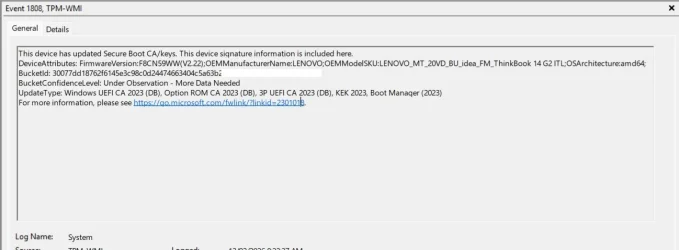
I saw someone saying something about event ID 1808 and in there it should tell you if all is good but I never saw a complete picture.
does this image look right?

Untitled.webp

Thanks Garlin.
 
Last edited:

My Computers My Computers

  • At a glance

    Windows 11 ProIntel Core i5-12600K 3.7 GHz 10-Core ProcessorCorsair Vengeance LPX 64 GB (2 x 32 GB) DDR4-...Integrated Intel UHD Graphics 770
    OS
    Windows 11 Pro
    Computer type
    PC/Desktop
    Manufacturer/Model
    Self built PC by me.
    CPU
    Intel Core i5-12600K 3.7 GHz 10-Core Processor
    Motherboard
    Gigabyte B760M H DDR4 Micro ATX LGA1700 Motherboard
    Memory
    Corsair Vengeance LPX 64 GB (2 x 32 GB) DDR4-3200 CL16 Memory
    Graphics Card(s)
    Integrated Intel UHD Graphics 770
    Sound Card
    Realtek
    Monitor(s) Displays
    LG
    Hard Drives
    Samsung 990 Pro 1 TB M.2-2280 PCIe 4.0 X4 NVME Solid State Drive
    Samsung 990 Pro 2 TB M.2-2280 PCIe 4.0 X4 NVME Solid State Drive
    PSU
    NZXT 850w ATX 3.1 Gold Fully Modular Power Supply
    Case
    Thermaltake Versa H25 ATX Mid Tower Case
    Cooling
    CPU Cooler Thermalright Assassin Spirit 120 EVO ARGB (ARGB Disabled) - Case Fans BlackThermalright TL-C12C-S X3 66.17 CFM 120 mm Fans 3-Pack (ARGB disabled)
    Internet Speed
    1 Gbps
    Other Info
    I hate ARGB.
  • At a glance

    Windows 11 Pro
    Operating System
    Windows 11 Pro
    Computer type
    Laptop
    Manufacturer/Model
    Lenovo ThinkBook 14 G2 ITL
I mentioned this on another thread.

MS is tracking the progress of Secure Boot updates by collecting telemetry on different PC model types (motherboard and current firmware). They've created different "confidence buckets" or pools of identical PC's, and averaging their success & failure rates.

Assuming MS gets enough samples, they can rate the expected chances of a PC in the same bucket as high or low confidence.

If you're in a high confidence bucket, MS feels like they can aggressively push updates out faster. And for low confidence, MS blocks your updates until someone figures why this combination is failing (does the OEM need to be involved?).

In the \Windows\System32\SecureBootUpdates folder, they're pushing bucket info in order to help large sites determine if they want to go ahead with mass deployments.

At this point most of the current data comes from enterprises who have hundreds or thousands of PC's, but probably most of them are the same models or only a small number of different models. If you don't have a more popular PC model (sold in large numbers to big companies), then your assigned bucket may not have enough samples to qualify for a confidence level ("More Data Needed").

The problem with a lot of Secure Boot event logging is it's technically correct, but open to misinterpretation because the details aren't intended for your eyes (as a normal user). It's for delivery upstream back to MS for telemetry purposes.
 

My Computer My Computer

At a glance

Windows 7
OS
Windows 7
You are truly a legend Garlin. Thank you.
 

My Computers My Computers

  • At a glance

    Windows 11 ProIntel Core i5-12600K 3.7 GHz 10-Core ProcessorCorsair Vengeance LPX 64 GB (2 x 32 GB) DDR4-...Integrated Intel UHD Graphics 770
    OS
    Windows 11 Pro
    Computer type
    PC/Desktop
    Manufacturer/Model
    Self built PC by me.
    CPU
    Intel Core i5-12600K 3.7 GHz 10-Core Processor
    Motherboard
    Gigabyte B760M H DDR4 Micro ATX LGA1700 Motherboard
    Memory
    Corsair Vengeance LPX 64 GB (2 x 32 GB) DDR4-3200 CL16 Memory
    Graphics Card(s)
    Integrated Intel UHD Graphics 770
    Sound Card
    Realtek
    Monitor(s) Displays
    LG
    Hard Drives
    Samsung 990 Pro 1 TB M.2-2280 PCIe 4.0 X4 NVME Solid State Drive
    Samsung 990 Pro 2 TB M.2-2280 PCIe 4.0 X4 NVME Solid State Drive
    PSU
    NZXT 850w ATX 3.1 Gold Fully Modular Power Supply
    Case
    Thermaltake Versa H25 ATX Mid Tower Case
    Cooling
    CPU Cooler Thermalright Assassin Spirit 120 EVO ARGB (ARGB Disabled) - Case Fans BlackThermalright TL-C12C-S X3 66.17 CFM 120 mm Fans 3-Pack (ARGB disabled)
    Internet Speed
    1 Gbps
    Other Info
    I hate ARGB.
  • At a glance

    Windows 11 Pro
    Operating System
    Windows 11 Pro
    Computer type
    Laptop
    Manufacturer/Model
    Lenovo ThinkBook 14 G2 ITL
@garlin I can't thank you enough for developing these scripts and for taking questions from so many people.

I have an old PC running Windows 10. The system board is a Gigabyte F2A88XM-D3HP with an AMI BIOS from 2014. It's been unsupported by Gigabyte for several years. Despite its age, it's reliable and works well enough for what I'm using it for, so my preference is to keep it. I installed Windows 11 on a spare drive using Rufus to bypass the unsupported processor and lack of TPM. It worked fine so my plan is to eventually upgrade it to Windows 11, possibly using FlyOOBE.

When I originally installed Windows 10, I didn't enable Secure Boot. I decided to try it in preparation for upgrading to Windows 11. After resetting the Secure Boot settings, I got it to work by enrolling the factory keys. The computer was stable for a few weeks, then for no obvious reason, it started having a bugcheck and rebooting every 6 minutes.

After checking the hardware, I noticed messages like this in the event log:

Updated Secure Boot certificates are available on this device but have not yet been applied to the firmware. Review the published guidance to complete the update and maintain full protection. This device signature information is included here.
DeviceAttributes: BaseBoardManufacturer:Gigabyte Technology Co., Ltd.;FirmwareManufacturer:American Megatrends Inc.;FirmwareVersion:A1;OEMModelNumber:To be filled by O.E.M.;OEMModelBaseBoard:F2A88XM-D3HP;OEMModelSystemFamily:To be filled by O.E.M.;OEMManufacturerName:Gigabyte Technology Co., Ltd.;OEMModelSKU:To be filled by O.E.M.;OSArchitecture:amd64;
BucketId: 52887718bd496aece0129556482a3c77e9290cff85440487d971be25ba7e0992
BucketConfidenceLevel:
UpdateType:
For more information, please see Windows Secure Boot certificate expiration and CA updates - Microsoft Support.

I searched about the message and found a link to cjee21 / Check-UEFISecureBootVariables. I downloaded it and found that I could cause the computer to bugcheck by running Apply 2023 KEK, DB and bootmgfw update.cmd. I turned Secure Boot off and the computer stopped bugchecking.

Here is output from Check Windows state.cmd:
Windows version: 22H2 (Build 19045.6809)

UEFISecureBootEnabled : 0
AvailableUpdates : 0x4106
UEFICA2023Status : InProgress
WindowsUEFICA2023Capable : Windows UEFI CA 2023 cert is in DB

bootmgfw version : 10.0.19041.4648 (WinBuild.160101.0800)
bootmgfw signature CA : Microsoft Windows Production PCA 2011
bootmgfw SVN : 1.0

bootmgr version : 10.0.19041.4648 (WinBuild.160101.0800)
bootmgr signature CA : Microsoft Windows Production PCA 2011
bootmgr SVN : 1.0

memtest version : 10.0.19041.1 (WinBuild.160101.0800)
memtest signature CA : Microsoft Windows Production PCA 2011

Here is output from Check UEFI PK, KEK, DB and DBX.cmd:

10 February 2026
Manufacturer: Gigabyte Technology Co., Ltd.
Model: To be filled by O.E.M.
BIOS: American Megatrends Inc., A1, A1, ALASKA - 1072009
Windows version: 22H2 (Build 19045.6809)

Secure Boot status: Disabled

Current UEFI PK
√ TestSub

Default UEFI PK
WARNING: Failed to query UEFI variable PKDefault

Current UEFI KEK
√ Microsoft Corporation KEK CA 2011 (revoked: False)
X Microsoft Corporation KEK 2K CA 2023

Default UEFI KEK
WARNING: Failed to query UEFI variable 'KEKDefault' for cert 'Microsoft Corporation KEK CA 2011'
WARNING: Failed to query UEFI variable 'KEKDefault' for cert 'Microsoft Corporation KEK 2K CA 2023'
WARNING: Failed to query UEFI variable 'KEKDefault'

Current UEFI DB
√ Microsoft Windows Production PCA 2011 (revoked: False)
√ Microsoft Corporation UEFI CA 2011 (revoked: False)
√ Windows UEFI CA 2023 (revoked: False)
X Microsoft UEFI CA 2023
√ Microsoft Option ROM UEFI CA 2023 (revoked: False)

Default UEFI DB
WARNING: Failed to query UEFI variable 'dbDefault' for cert 'Microsoft Windows Production PCA 2011'
WARNING: Failed to query UEFI variable 'dbDefault' for cert 'Microsoft Corporation UEFI CA 2011'
WARNING: Failed to query UEFI variable 'dbDefault' for cert 'Windows UEFI CA 2023'
WARNING: Failed to query UEFI variable 'dbDefault' for cert 'Microsoft UEFI CA 2023'
WARNING: Failed to query UEFI variable 'dbDefault' for cert 'Microsoft Option ROM UEFI CA 2023'
WARNING: Failed to query UEFI variable 'DBDefault'

Current UEFI DBX
2025-10-14 (v1.6.0) : SUCCESS: 431 successes detected
Windows Bootmgr SVN : None
Windows cdboot SVN : None
Windows wdsmgfw SVN : None

Here is output from Show UEFI PK, KEK, DB and DBX.cmd:

PK:

SignatureType : EFI_CERT_X509_GUID
SignatureList : @{SignatureOwner=26dc4851-195f-4ae1-9a19-fbf883bbb35e; SignatureData=[Subject]
CN=TestSub

[Issuer]
CN=tESTrOOT

[Serial Number]
43F0106C38A1659B456EDE340980CD61

[Not Before]
7/11/2013 1:10:11 AM

[Not After]
12/31/2039 3:59:59 PM

[Thumbprint]
947AB8A06ACA8879226A8EE3C3CA4F0E58AC6493
}

KEK:

SignatureType : EFI_CERT_X509_GUID
SignatureList : @{SignatureOwner=77fa9abd-0359-4d32-bd60-28f4e78f784b; SignatureData=[Subject]
CN=Microsoft Corporation KEK CA 2011, O=Microsoft Corporation, L=Redmond, S=Washington, C=US

[Issuer]
CN=Microsoft Corporation Third Party Marketplace Root, O=Microsoft Corporation, L=Redmond,
S=Washington, C=US

[Serial Number]
610AD188000000000003

[Not Before]
6/24/2011 1:41:29 PM

[Not After]
6/24/2026 1:51:29 PM

[Thumbprint]
31590BFD89C9D74ED087DFAC66334B3931254B30
}

DB:

SignatureType : EFI_CERT_X509_GUID
SignatureList : @{SignatureOwner=77fa9abd-0359-4d32-bd60-28f4e78f784b; SignatureData=[Subject]
CN=Microsoft Windows Production PCA 2011, O=Microsoft Corporation, L=Redmond, S=Washington, C=US

[Issuer]
CN=Microsoft Root Certificate Authority 2010, O=Microsoft Corporation, L=Redmond, S=Washington, C=US

[Serial Number]
61077656000000000008

[Not Before]
10/19/2011 11:41:42 AM

[Not After]
10/19/2026 11:51:42 AM

[Thumbprint]
580A6F4CC4E4B669B9EBDC1B2B3E087B80D0678D
}

SignatureType : EFI_CERT_X509_GUID
SignatureList : @{SignatureOwner=77fa9abd-0359-4d32-bd60-28f4e78f784b; SignatureData=[Subject]
CN=Microsoft Corporation UEFI CA 2011, O=Microsoft Corporation, L=Redmond, S=Washington, C=US

[Issuer]
CN=Microsoft Corporation Third Party Marketplace Root, O=Microsoft Corporation, L=Redmond,
S=Washington, C=US

[Serial Number]
6108D3C4000000000004

[Not Before]
6/27/2011 2:22:45 PM

[Not After]
6/27/2026 2:32:45 PM

[Thumbprint]
46DEF63B5CE61CF8BA0DE2E6639C1019D0ED14F3
}

SignatureType : EFI_CERT_X509_GUID
SignatureList : @{SignatureOwner=77fa9abd-0359-4d32-bd60-28f4e78f784b; SignatureData=[Subject]
CN=Windows UEFI CA 2023, O=Microsoft Corporation, C=US

[Issuer]
CN=Microsoft Root Certificate Authority 2010, O=Microsoft Corporation, L=Redmond, S=Washington, C=US

[Serial Number]
330000001A888B9800562284C100000000001A

[Not Before]
6/13/2023 11:58:29 AM

[Not After]
6/13/2035 12:08:29 PM

[Thumbprint]
45A0FA32604773C82433C3B7D59E7466B3AC0C67
}

SignatureType : EFI_CERT_X509_GUID
SignatureList : @{SignatureOwner=77fa9abd-0359-4d32-bd60-28f4e78f784b; SignatureData=[Subject]
CN=Microsoft Option ROM UEFI CA 2023, O=Microsoft Corporation, C=US

[Issuer]
CN=Microsoft RSA Devices Root CA 2021, O=Microsoft Corporation, C=US

[Serial Number]
3300000017B3EC4D8F01E27005000000000017

[Not Before]
10/26/2023 12:02:20 PM

[Not After]
10/26/2038 12:12:20 PM

[Thumbprint]
3FB39E2B8BD183BF9E4594E72183CA60AFCD4277
}

DBX:

SignatureType : EFI_CERT_SHA256_GUID
SignatureList : @{SignatureOwner=26dc4851-195f-4ae1-9a19-fbf883bbb35e;
SignatureData=E3B0C44298FC1C149AFBF4C8996FB92427AE41E4649B934CA495991B7852B855}

SignatureType : EFI_CERT_SHA256_GUID
SignatureList : {@{SignatureOwner=77fa9abd-0359-4d32-bd60-28f4e78f784b;
SignatureData=80B4D96931BF0D02FD91A61E19D14F1DA452E66DB2408CA8604D411F92659F0A},
@{SignatureOwner=77fa9abd-0359-4d32-bd60-28f4e78f784b;
...
[signatures deleted for brevity]
...
@{SignatureOwner=77fa9abd-0359-4d32-bd60-28f4e78f784b;
SignatureData=E14C88DC48339C0555686849A4E3F8986D558E65C4FC863A1A4F1D40478BD47C}}

Here is the output from Check_UEFI-CA2023 -audit:

Secure Boot: OFF
Virtualization Based Security: ON
BitLocker on (C:) OFF

UEFI KEK Certs
--------------
Microsoft Corporation KEK CA 2011

UEFI DB Certs
-------------
Microsoft Corporation UEFI CA 2011
Microsoft Windows Production PCA 2011
Microsoft Option ROM UEFI CA 2023
Windows UEFI CA 2023

UEFI DBX Certs
--------------
(NONE)

EFI Files
---------
Disk 0: Windows Boot Manager [Production PCA 2011] is ALLOWED.

Registry: WindowsUEFICA2023Capable = 1
[Windows UEFI CA 2023] in UEFI DB.

Disk 0: SkuSiPolicy.p7b (for VBS) is NOT PRESENT.


REQUIRED ACTION
===============

Run the command:
Update_UEFI-CA2023.ps1 -Revoke

Finish the UEFI steps to manually add the [KEK CA 2023] cert, if the script provided instructions.

Here is the output from Check_UEFI-CA2023 -verbose:

Windows 10 22H2 (19045.6809)

Secure Boot: OFF
Virtualization Based Security: ON
BitLocker on (C:) OFF

BIOS Firmware
-------------
Gigabyte Technology Co. To be filled by O.E.M.
Version: A1
Date: 2017-03-29

Factory Default UEFI PK Cert
----------------------------
(NONE)

UEFI PK Cert
------------
(NONE)
Manual update of [KEK CA 2023] is REQUIRED.

Factory Default UEFI KEK Certs
------------------------------
(NONE)

UEFI KEK Certs
--------------
Microsoft Corporation KEK CA 2011

Factory Default UEFI DB Certs
-----------------------------
(NONE)

UEFI DB Certs
-------------
Microsoft Corporation UEFI CA 2011
Microsoft Windows Production PCA 2011
Microsoft Option ROM UEFI CA 2023
Windows UEFI CA 2023

Factory Default UEFI DBX Certs
------------------------------
(NONE)
Get-SecureBootUEFI : Variable is currently undefined: 0xC0000100
At C:\Users\VPN\Downloads\SecureBoot-CA-2023-Updates\Check_UEFI-CA2023.ps1:1115 char:62
+ ... gnatures: {1}' -f $Tab4, (Get-SecureBootUEFI -Name dbxDefault | Get-U ...
+ ~~~~~~~~~~~~~~~~~~~~~~~~~~~~~~~~~~~
+ CategoryInfo : ResourceUnavailable: (Microsoft.Secur...BootUefiCommand:GetSecureBootUefiCommand) [Get-S
ecureBootUEFI], StatusException
+ FullyQualifiedErrorId : GetFWVarFailed,Microsoft.SecureBoot.Commands.GetSecureBootUefiCommand


UEFI DBX Certs
--------------
(NONE)
Windows BootMgr SVN is MISSING.
EFI_CERT_SHA256_GUID Signatures: 432

EFI Files
---------
Disk 0: Windows Boot Manager [Production PCA 2011] is ALLOWED.
bootmgfw.efi File version: 19041.4648

Registry: WindowsUEFICA2023Capable = 1
[Windows UEFI CA 2023] in UEFI DB.

Disk 0: SkuSiPolicy.p7b (for VBS) is NOT PRESENT.


REQUIRED ACTION
===============

Run the command:
Update_UEFI-CA2023.ps1 -Revoke

Finish the UEFI steps to manually add the [KEK CA 2023] cert, if the script provided instructions.

Here is the output from WhatsMyPK.ps1:

Subject : CN=TestSub
Issuer : CN=tESTrOOT
Thumbprint : 947AB8A06ACA8879226A8EE3C3CA4F0E58AC6493
FriendlyName :
NotBefore : 7/11/2013 1:10:11 AM
NotAfter : 12/31/2039 3:59:59 PM
Extensions : {System.Security.Cryptography.Oid}

The PK certificate is obviously garbage. (Thanks Gigabyte / AMI.) It's also strange that it's failing to query the default keys.

I'm not clear what step to take next.

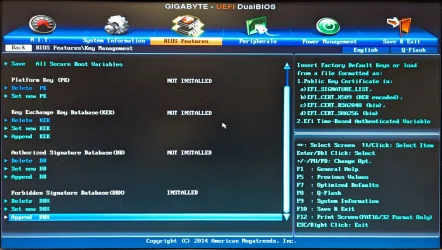
At first, I wasn't clear how to force setup mode, but that can be done by using Delete PK.

PXL_20260102_023125924.MP.webp

I'm interested to hear what you suggest.

Thank you.
 

My Computer My Computer

At a glance

Windows 11 Professional
OS
Windows 11 Professional
Computer type
PC/Desktop
Wow. I think your UEFI entries are suspect, maybe you need to perform a factory reset (or possibly reflash the BIOS).

1. This event log message is normally populated by your PC's exact model info (because that what MS needs for telemetry). Notice where it's "To be filled by OEM" (Windows can't read this from the motherboard).
Code:
Updated Secure Boot certificates are available on this device but have not yet been applied to the firmware. Review the published guidance to complete the update and maintain full protection. This device signature information is included here.
DeviceAttributes: BaseBoardManufacturer:Gigabyte Technology Co., Ltd.;FirmwareManufacturer:American Megatrends Inc.;FirmwareVersion:A1;OEMModelNumber:To be filled by O.E.M.;OEMModelBaseBoard:F2A88XM-D3HP;OEMModelSystemFamily:To be filled by O.E.M.;OEMManufacturerName:Gigabyte Technology Co., Ltd.;OEMModelSKU:To be filled by O.E.M.;OSArchitecture:amd64;

2. You have a hand-crafted PK. This isn't a factory cert (just for fun, I did confirm "tESTrOOT" doesn't exist in the official KEK list on MS's GitHub.
Code:
SignatureType : EFI_CERT_X509_GUID
SignatureList : @{SignatureOwner=26dc4851-195f-4ae1-9a19-fbf883bbb35e; SignatureData=[Subject]
                 CN=TestSub

               [Issuer]
                 CN=tESTrOOT

               [Serial Number]
                 43F0106C38A1659B456EDE340980CD61

               [Not Before]
                 7/11/2013 1:10:11 AM

               [Not After]
                 12/31/2039 3:59:59 PM

At this point, I'm not sure what happened to this PC. But we should try this:

1. Secure Boot and BitLocker is already OFF. That's fine, we don't have to worry about getting blocked on boot in case we perform a factory reset.

2. You need to figure what setting is factory reset of the keys (I don't have an owner's guide for this BIOS). It's mostly to get it back to a known good state. Maybe there's a global reset all keys, or you have to reset each key (PK, KEK, DB, DBX) one at a time (?)

3. The good news is you have manual KEK enrollment! After you restore it back to the defaults, the upgrade script can copy the KEK CA 2023 cert in file format to the EFI partition, and you can use the screen menu (as you have there) to Append the KEK CA 2023.

4. When the KEK manual enrollment is done, you can run the update script from Windows it will finish the rest of the process.

But we have to reset to the original factory values, so Windows can boot normally. Figure that out, and then only run the check script from post #1. Please don't run all the other cjee21 scripts or other "test scripts" which you found online. The check and update scripts will do.

Code:
Check_DBXUpdate.bin.ps1 -Verbose

 

My Computer My Computer

At a glance

Windows 7
OS
Windows 7
Wow. I think your UEFI entries are suspect, maybe you need to perform a factory reset (or possibly reflash the BIOS).

1. This event log message is normally populated by your PC's exact model info (because that what MS needs for telemetry). Notice where it's "To be filled by OEM" (Windows can't read this from the motherboard).
Code:
Updated Secure Boot certificates are available on this device but have not yet been applied to the firmware. Review the published guidance to complete the update and maintain full protection. This device signature information is included here.
DeviceAttributes: BaseBoardManufacturer:Gigabyte Technology Co., Ltd.;FirmwareManufacturer:American Megatrends Inc.;FirmwareVersion:A1;OEMModelNumber:To be filled by O.E.M.;OEMModelBaseBoard:F2A88XM-D3HP;OEMModelSystemFamily:To be filled by O.E.M.;OEMManufacturerName:Gigabyte Technology Co., Ltd.;OEMModelSKU:To be filled by O.E.M.;OSArchitecture:amd64;

2. You have a hand-crafted PK. This isn't a factory cert (just for fun, I did confirm "tESTrOOT" doesn't exist in the official KEK list on MS's GitHub.
Code:
SignatureType : EFI_CERT_X509_GUID
SignatureList : @{SignatureOwner=26dc4851-195f-4ae1-9a19-fbf883bbb35e; SignatureData=[Subject]
                 CN=TestSub

               [Issuer]
                 CN=tESTrOOT

               [Serial Number]
                 43F0106C38A1659B456EDE340980CD61

               [Not Before]
                 7/11/2013 1:10:11 AM

               [Not After]
                 12/31/2039 3:59:59 PM

At this point, I'm not sure what happened to this PC. But we should try this:

1. Secure Boot and BitLocker is already OFF. That's fine, we don't have to worry about getting blocked on boot in case we perform a factory reset.

2. You need to figure what setting is factory reset of the keys (I don't have an owner's guide for this BIOS). It's mostly to get it back to a known good state. Maybe there's a global reset all keys, or you have to reset each key (PK, KEK, DB, DBX) one at a time (?)

3. The good news is you have manual KEK enrollment! After you restore it back to the defaults, the upgrade script can copy the KEK CA 2023 cert in file format to the EFI partition, and you can use the screen menu (as you have there) to Append the KEK CA 2023.

4. When the KEK manual enrollment is done, you can run the update script from Windows it will finish the rest of the process.

But we have to reset to the original factory values, so Windows can boot normally. Figure that out, and then only run the check script from post #1. Please don't run all the other cjee21 scripts or other "test scripts" which you found online. The check and update scripts will do.

Code:
Check_DBXUpdate.bin.ps1 -Verbose

Thank you very much for your reply. It's interesting, all right.

1. The "To be filled by O.E.M." garbage is actually in the BIOS. When I go into the BIOS, I can see it. I found DMI Edit via Windows or EFI for AMI BIOS, which can be used to dump and edit all of these fields.

Here is a dump of all the fields:

Name R/W Status Information
-------------------------- --- ------ ----------------------------------
(/IVN)BIOS vendor name. R Done "American Megatrends Inc."
(/IV)BIOS version R Done "A1"
(/ID)BIOS release date R Done "03/30/2017"
(/SM)System manufacture R Done "Gigabyte Technology Co., Ltd."
(/SP)System product R Done "To be filled by O.E.M."
(/SV)System version R Done "To be filled by O.E.M."
(/SS)System Serial number R Done "To be filled by O.E.M."
(/SU)System UUID R Done "00020003000400050006000700080009h"
(/SK)System SKU number R Done "To be filled by O.E.M."
(/SF)System Family R Done "To be filled by O.E.M."
(/BM)Baseboard manufacture R Done "Gigabyte Technology Co., Ltd."
(/BP)Baseboard product R Done "F2A88XM-D3HP"
(/BV)Baseboard version R Done "x.x"
(/BS)Baseboard Serial number R Done "To be filled by O.E.M."
(/BT)Baseboard Asset Tag R Done "To be filled by O.E.M."
(/BLC)BB. Loc. in Chassis R Done "To be filled by O.E.M."
BaseBoardHandle = "0002h"
(/BMH)Baseboard manufacture R Done "Gigabyte Technology Co., Ltd."
(/BPH)Baseboard product R Done "F2A88XM-D3HP"
(/BVH)Baseboard version R Done "x.x"
(/BSH)Baseboard Serial numberR Done "To be filled by O.E.M."
(/BTH)Baseboard Asset Tag R Done "To be filled by O.E.M."
(/BLCH)BB. Loc. in Chassis R Done "To be filled by O.E.M."
(/CM)Chassis manufacture R Done "Gigabyte Technology Co., Ltd."
(/CT)Chassis type R Done "03h"
(/CV)Chassis version R Done "To Be Filled By O.E.M."
(/CS)Chassis Serial number R Done "To Be Filled By O.E.M."
(/CA)Chassis Tag number R Done "To Be Filled By O.E.M."
(/CO)Chassis OEM value R Done "00000000h"
(/CH)Chassis Height R Done "00h"
(/CPC)Chassis Power cords R Done "01h"
(/CSK)Chassis SKU Number R Done "To be filled by O.E.M."
ChassishHandle = "0003h"
(/CMH)Chassis manufacture R Done "Gigabyte Technology Co., Ltd."
(/CTH)Chassis type R Done "03h"
(/CVH)Chassis version R Done "To Be Filled By O.E.M."
(/CSH)Chassis Serial number R Done "To Be Filled By O.E.M."
(/CAH)Chassis Tag number R Done "To Be Filled By O.E.M."
(/COH)Chassis OEM value R Done "00000000h"
(/CHH)Chassis Height R Done "00h"
(/CPCH)Chassis Power cords R Done "01h"
(/CSKH)Chassis SKU Number R Done "To be filled by O.E.M."
(/PSN)Processor Serial Num. R Done ""
(/PAT)Processor Asset Tag R Done ""
(/PPN)Processor Part Num. R Done ""
ProcessorHandle = "0039h"
(/PSNH)Processor Serial Num. R Done ""
(/PATH)Processor Asset Tag R Done ""
(/PPNH)Processor Part Num. R Done ""
(/OS)OEM string #1 R Done "To Be Filled By O.E.M."
(/OS)OEM string #2 R Done "To Be Filled By O.E.M."
(/OS)OEM string #3 R Done "To Be Filled By O.E.M."
(/OS)OEM string #4 R Done "To Be Filled By O.E.M."
(/OS)OEM string #5 R Done "To Be Filled By O.E.M."
(/SCO)System Conf. Op. #1 R Done "To Be Filled By O.E.M."

After I get the secure boot mess sorted out, I will edit the fields that Windows can see. (I can see some of them in the registry.)

2. When I originally bought the system board, I also bought 4X 4 GB sticks of DRAM based on a recommendation from Gigabyte. The original BIOS wouldn't display the settings, so Gigabyte provided me the BIOS that's installed, which works properly with the DRAM. The BIOS was never formally released, so it was probably thrown together without any QA that a release BIOS would receive. In retrospect, I wish I would have returned it. Oh well.

The strange PK may be related to the BIOS not being a release version. This might explain in part why the Windows update is failing, but perhaps not the bugcheck.

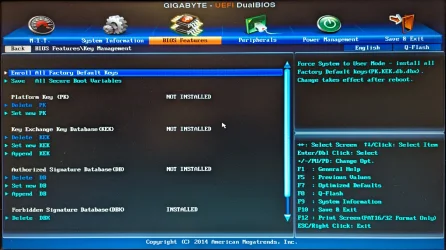
The BIOS has a method to factory reset the keys, Enroll All Factory Default Keys.

PXL_20260102_023053691.MP.webp

I originally used it to get Secure Boot "working" in the first place. I'll try it again and then take another look at the keys.

In case my explanation wasn't clear, Secure Boot was working. It's just that the computer would bugcheck when Windows tried to update the keys.

What if I used the BIOS to delete all of the keys and force it into setup mode. Would your script repopulate the keys?
 

My Computer My Computer

At a glance

Windows 11 Professional
OS
Windows 11 Professional
Computer type
PC/Desktop
The new certs came with Windows Update yesterday, but there are still a couple of "REQUIRED ACTIONs" left per Check-UEFI. Is it expected that Microsoft will get to them in time?

Code:
T>check-uefi
PowerShell 7.5.0

   A new PowerShell stable release is available: v7.5.4
   Upgrade now, or check out the release page at:
     https://aka.ms/PowerShell-Release?tag=v7.5.4

Secure Boot: ON
Virtualization Based Security: ON
BitLocker on (C:) ON

UEFI KEK Certs
--------------
    Microsoft Corporation KEK CA 2011
    Microsoft Corporation KEK 2K CA 2023

UEFI DB Certs
-------------
    Microsoft Corporation UEFI CA 2011
    Microsoft Windows Production PCA 2011
    Microsoft Option ROM UEFI CA 2023
    Microsoft UEFI CA 2023
    Windows UEFI CA 2023

UEFI DBX Certs
--------------
    (NONE)

EFI Files
---------
    Disk 3: Windows Boot Manager [Windows UEFI CA 2023] is ALLOWED.

    Registry: WindowsUEFICA2023Capable = 2
        [Windows UEFI CA 2023] in UEFI DB, and Windows starting from CA 2023 Boot Manager.

    Disk 3: SkuSiPolicy.p7b (for VBS) is NOT PRESENT.


REQUIRED ACTION
===============

To revoke the [PCA 2011] cert, run the commands, run the commands:

    manage-bde -Protectors -Disable C: -RebootCount 1
    reg add HKEY_LOCAL_MACHINE\SYSTEM\CurrentControlSet\Control\Secureboot /v AvailableUpdates /t REG_DWORD /d 0x280 /f
    powershell Start-ScheduledTask -TaskName "\Microsoft\Windows\PI\Secure-Boot-Update"

To install SkuSiPolicy.p7b, run the command:
    Update_UEFI-CA2023.ps1 -SkuSiPolicy
 

My Computer My Computer

At a glance

Windows 11
OS
Windows 11
2. When I originally bought the system board, I also bought 4X 4 GB sticks of DRAM based on a recommendation from Gigabyte. The original BIOS wouldn't display the settings, so Gigabyte provided me the BIOS that's installed, which works properly with the DRAM. The BIOS was never formally released, so it was probably thrown together without any QA that a release BIOS would receive. In retrospect, I wish I would have returned it. Oh well.
Someone from Gigabyte gave you a private BIOS build? :facepalm:

What if I used the BIOS to delete all of the keys and force it into setup mode. Would your script repopulate the keys?
Assuming the rest of your BIOS is "normal", one option is to put it into Setup Mode (clear all certs).

The update script will detect everything is in Setup Mode, and download the reference "Windows OEM Device" default files. MS created a set of replacement files just in case your vendor was lazy, and wanted someone else (MS) to make their UEFI problem go away.

Since you have a dodgy "tESTrOOT" PK, you're a perfect candidate.

The PK gets replaced by a "Windows OEM Devices PK" file issued by MS. The KEK CA 2023 is a matching signed file (MS created their own PK, so they can self-sign the KEK without help). After that the update script should be able to work fine.

But a bugcheck does hint maybe there's some instability in your BIOS's firmware. You can give it a try.
 

My Computer My Computer

At a glance

Windows 7
OS
Windows 7
Someone from Gigabyte gave you a private BIOS build? :facepalm:


Assuming the rest of your BIOS is "normal", one option is to put it into Setup Mode (clear all certs).

The update script will detect everything is in Setup Mode, and download the reference "Windows OEM Device" default files. MS created a set of replacement files just in case your vendor was lazy, and wanted someone else (MS) to make their UEFI problem go away.

Since you have a dodgy "tESTrOOT" PK, you're a perfect candidate.

The PK gets replaced by a "Windows OEM Devices PK" file issued by MS. The KEK CA 2023 is a matching signed file (MS created their own PK, so they can self-sign the KEK without help). After that the update script should be able to work fine.

But a bugcheck does hint maybe there's some instability in your BIOS's firmware. You can give it a try.
They didn't call it a "private BIOS". I think they referred to it as a pre-release or beta or something. I would have to see if the messages are still in the support website to be sure. I guess it doesn't matter.

I like the idea of wiping all of the keys and installing the Microsoft keys from scratch.

I will be going away for a while, so I won't be able to try this until I get back. I'll restart this conversation than.

Thanks again.
 

My Computer My Computer

At a glance

Windows 11 Professional
OS
Windows 11 Professional
Computer type
PC/Desktop
Hi garlin
I think I've got myself into a bit of a pickle. Perhaps if it's something obvious you might be able to point me in the right direction.
I have a 2014 Alienware R1 17 laptop with an unsupported BIOS.
This is what I did to the best of my recollection:
After reading the first post of this thread, I ran Check_UEFI-CA2023.ps1. The required action was "MANUAL UPDATE of the BIOS is required."
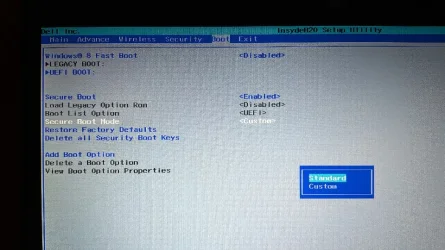
I understood the instructions to mean that I needed to change Secure Boot Mode to Custom before proceeding, which I did.

bios.webp
I then ran Update_UEFI-CA2023.ps1 (without revoking) which appeared to complete succesfully. After rebooting I ran the check script again and saw that the KEK cert hadn't updated, and thought this might be because I hadn't deleted all certs, per the instructions (my BIOS doesn't appear to support management of individual keys), so I went back into the BIOS and did that.
I'm afraid I'm a bit hazy here, but after that I couldn't boot back into Windows: "Windows Boot Manager has been blocked by the current security policy".
I tried Restore Factory Defaults but this didn't help. I can now only load Windows with Secure Boot disabled.

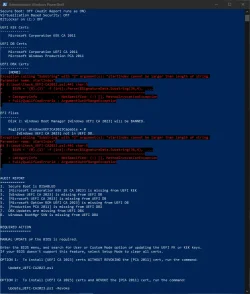
Any advice would be appreciated. This is where things stand after running the check script again:

1770912273707.webp
 

My Computer My Computer

At a glance

Windows 10
OS
Windows 10
Computer type
Laptop
Manufacturer/Model
Dell/Alienware
after update of 10-feb. win 11 25H2 to version 26.200 7840 I share the SecureBoot UEFI CA-2023 audit results
PowerShell 7.5.4
PS C:\Users\asimo> Get-SecureBootUEFI -Name SecureBoot
Name Bytes Attributes
---- ----- ----------
SecureBoot {1} BOOTSERVICE ACCESS…

PS C:\Users\asimo> Get-SecureBootUEFI -Name PK
Name Bytes Attributes
---- ----- ----------
PK {161, 89, 192, 165…} NON VOLATILE…

PS C:\Users\asimo> Get-SecureBootUEFI -Name KEK
Name Bytes Attributes
---- ----- ----------
KEK {161, 89, 192, 165…} NON VOLATILE…

PS C:\Users\asimo> Get-SecureBootUEFI -Name db
Name Bytes Attributes
---- ----- ----------
db {161, 89, 192, 165…} NON VOLATILE…

PS C:\Users\asimo> Get-SecureBootUEFI -Name dbx
Name Bytes Attributes
---- ----- ----------
dbx {38, 22, 196, 193…} NON VOLATILE…
 

My Computer My Computer

At a glance

Windows 11 Home x64 Version 25H2 Build 26200....Intel® Core™ i7-4750HQ CPU @ 2.00GHz16 GBNVIDIA GeForce GTX 950M (2 GB); Intel(R) Iris...
OS
Windows 11 Home x64 Version 25H2 Build 26200.8655
Computer type
Laptop
Manufacturer/Model
ASUSTeK COMPUTER INC./N751JX
CPU
Intel® Core™ i7-4750HQ CPU @ 2.00GHz
Motherboard
ASUSTeK Computer INC., BIOS version AMI N751JX.211
Memory
16 GB
Graphics Card(s)
NVIDIA GeForce GTX 950M (2 GB); Intel(R) Iris(TM) Pro Graphics 5200 (113 MB)
Sound Card
Realtek High Definition Audio
Internet Speed
250 Mbps
Antivirus
Safe Online (F-Secure)
after update of 10-feb. win 11 25H2 to version 26.200 7840 I share the SecureBoot UEFI CA-2023 audit results
Please run the Check_UEFI-CA2023.ps1 script.

Nobody reads the raw byte values from the UEFI variables, because they need to be interpreted as real signing certificates. The script does the correct reporting for you.
 
Last edited:

My Computer My Computer

At a glance

Windows 7
OS
Windows 7
Hi garlin
I think I've got myself into a bit of a pickle. Perhaps if it's something obvious you might be able to point me in the right direction.
I have a 2014 Alienware R1 17 laptop with an unsupported BIOS.
This is what I did to the best of my recollection:
After reading the first post of this thread, I ran Check_UEFI-CA2023.ps1. The required action was "MANUAL UPDATE of the BIOS is required."
I understood the instructions to mean that I needed to change Secure Boot Mode to Custom before proceeding, which I did.
In your case, it looks like after a factory reset (we only have CA 2011 certs).
If you tried running the update script, it wasn't able to add/append any CA 2023 certs at all.

Right now, your boot manager is the CA 2023 version but you don't have any CA 2023 certs to authorize it. To revert boot files:
Code:
mountvol S: /s
copy \Windows\Boot\EFI\bootmgfw.efi S:\EFI\Microsoft\Boot\bootmgfw.efi
mountvol S: /d

I would use the "Delete all Security Boot Keys" which puts you in Setup Mode (no certs). The upgrade script will detect it's in Setup Mode and install the reference "Windows OEM Device" set of default keys (provided for OEM's). This replaces the Dell PK with a MS branded one, and the rest of the certs will install fine.
 

My Computer My Computer

At a glance

Windows 7
OS
Windows 7

Latest Support Threads

Back
Top Bottom