PS C:\Windows\system32> cd c:\Temp
PS C:\Temp> cmd
Microsoft Windows [Version 10.0.19044.7291]
(c) Microsoft Corporation. All rights reserved.

C:\Temp>Check-UEFI -verbose
Windows PowerShell
Copyright (C) Microsoft Corporation. All rights reserved.

Try the new cross-platform PowerShell https://aka.ms/pscore6

Windows 10 21H2 (19044.7291)

Secure Boot: ON
Virtualization Based Security: OFF
BitLocker on (C:) OFF

BIOS Firmware
-------------
    Acer Aspire E5-571
    Version: V1.32
    Date: 2015-09-15

Factory Default UEFI PK Cert
----------------------------
    Acer Platform Key

UEFI PK Cert
------------
    Acer Platform Key
        Manual update of [KEK CA 2023] is REQUIRED.

Factory Default UEFI KEK Certs
------------------------------
    Microsoft Corporation KEK CA 2011
    Acer Key Exchange Key

UEFI KEK Certs
--------------
    Microsoft Corporation KEK CA 2011
    Acer Key Exchange Key

Factory Default UEFI DB Certs
-----------------------------
    Microsoft Corporation UEFI CA 2011
    Microsoft Windows Production PCA 2011
    ABO
    Acer Database
    DisablePW

UEFI DB Certs
-------------
    Microsoft Corporation UEFI CA 2011
    Microsoft Windows Production PCA 2011
    ABO
    Acer Database
    DisablePW

Factory Default UEFI DBX Certs
------------------------------
    (NONE)
    EFI_CERT_SHA256_GUID Signatures:

UEFI DBX Certs
--------------
    (NONE)
    Windows BootMgr SVN is MISSING.
    EFI_CERT_SHA256_GUID Signatures: 433

UEFI Variables
--------------
    SBAT (Linux only): sbat,1,2024010900 / shim,4 / grub,3 / grub.debian,4

EFI Files
---------
    Windows Boot Manager [Production PCA 2011] is ALLOWED.
        \\.\HarddiskVolume1\EFI\Microsoft\Boot\bootmgfw.efi
        File Version: 19041.7291, SVN 1.0

    Registry: "WindowsUEFICA2023Capable" = 0
        [Windows UEFI CA 2023] not in UEFI DB.


REQUIRED ACTION
===============

MANUAL UPDATE of the BIOS is required.

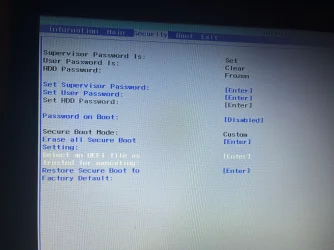
Enter the BIOS menu, and search for User or Custom Mode option of updating the UEFI PK or KEK keys.
If your BIOS doesn't support this feature, select Setup Mode to clear all certs.

OPTION 1:  To install [UEFI CA 2023] certs

        Update_UEFI-CA2023.ps1


OPTION 2:  To install [UEFI CA 2023] certs and REVOKE the [PCA 2011] cert

        Update_UEFI-CA2023.ps1 -Revoke

PS C:\Temp> Check-UEFI

Windows PowerShell
Copyright (C) Microsoft Corporation. All rights reserved.

Try the new cross-platform PowerShell https://aka.ms/pscore6

PS C:\Windows\system32> cd c:\Temp
PS C:\Temp> cmd
Microsoft Windows [Version 10.0.19044.7291]
(c) Microsoft Corporation. All rights reserved.

C:\Temp>Update-UEFI
Windows PowerShell
Copyright (C) Microsoft Corporation. All rights reserved.

Try the new cross-platform PowerShell https://aka.ms/pscore6

Exception calling "Substring" with "2" argument(s): "startIndex cannot be larger than length of string.
Parameter name: startIndex"
At C:\Temp\Update_UEFI-CA2023.ps1:527 char:5
+     $SVN = '{0}.{1}' -f [System.Convert]::ToUInt16($SignatureData.Sub ...
+     ~~~~~~~~~~~~~~~~~~~~~~~~~~~~~~~~~~~~~~~~~~~~~~~~~~~~~~~~~~~~~~~~~
    + CategoryInfo          : NotSpecified: (:) [], MethodInvocationException
    + FullyQualifiedErrorId : ArgumentOutOfRangeException

Downloading "edk2-x64-secureboot-binaries.zip" from GitHub.
Successfully wrote "Default3PDb.bin" to UEFI db.
Successfully wrote "DefaultKek.bin" to UEFI KEK.
Successfully wrote "DefaultPk.bin" to UEFI PK.
Downloading "WindowsOEMDevicesPK.der" from GitHub.
Copying "WindowsOEMDevicesPK.der" to EFI.
Copying EFI boot files.
Boot files successfully created.

REQUIRED ACTION
---------------
Please follow the README_UEFI.TXT instructions, for installing the PK cert from BIOS.

Restart Windows, for UEFI updates to take effect.

PS C:\Temp> Update-UEFI


C:\Temp>Check-UEFI -verbose
Windows PowerShell
Copyright (C) Microsoft Corporation. All rights reserved.

Try the new cross-platform PowerShell https://aka.ms/pscore6

Windows 10 21H2 (19044.7291)

Secure Boot: ON
Virtualization Based Security: OFF
BitLocker on (C:) OFF

BIOS Firmware
-------------
    Acer Aspire E5-571
    Version: V1.32
    Date: 2015-09-15

Factory Default UEFI PK Cert
----------------------------
    Acer Platform Key

UEFI PK Cert
------------
    Windows OEM Devices PK

Factory Default UEFI KEK Certs
------------------------------
    Microsoft Corporation KEK CA 2011
    Acer Key Exchange Key

UEFI KEK Certs
--------------
    Microsoft Corporation KEK CA 2011
    Microsoft Corporation KEK 2K CA 2023

Factory Default UEFI DB Certs
-----------------------------
    Microsoft Corporation UEFI CA 2011
    Microsoft Windows Production PCA 2011
    ABO
    Acer Database
    DisablePW

UEFI DB Certs
-------------
    Microsoft Corporation UEFI CA 2011
    Microsoft Windows Production PCA 2011
    Microsoft Option ROM UEFI CA 2023
    Microsoft UEFI CA 2023
    Windows UEFI CA 2023

Factory Default UEFI DBX Certs
------------------------------
    (NONE)
    EFI_CERT_SHA256_GUID Signatures:

UEFI DBX Certs
--------------
    (NONE)
Exception calling "Substring" with "2" argument(s): "startIndex cannot be larger than length of string.
Parameter name: startIndex"
At C:\Temp\Check_UEFI-CA2023.ps1:770 char:5
+     $SVN = '{0}.{1}' -f [System.Convert]::ToUInt16($SignatureData.Sub ...
+     ~~~~~~~~~~~~~~~~~~~~~~~~~~~~~~~~~~~~~~~~~~~~~~~~~~~~~~~~~~~~~~~~~
    + CategoryInfo          : NotSpecified: (:) [], MethodInvocationException
    + FullyQualifiedErrorId : ArgumentOutOfRangeException

    Windows BootMgr SVN is MISSING.
    EFI_CERT_SHA256_GUID Signatures:

UEFI Variables
--------------
    SBAT (Linux only): sbat,1,2024010900 / shim,4 / grub,3 / grub.debian,4

EFI Files
---------
    Windows Boot Manager [Windows UEFI CA 2023] is ALLOWED.
        \\.\HarddiskVolume1\EFI\Microsoft\Boot\bootmgfw.efi
        File Version: 28000.322, SVN 8.0

    Registry: "WindowsUEFICA2023Capable" = 2
        [Windows UEFI CA 2023] in UEFI DB, and Windows starting from CA 2023 Boot Manager.


REQUIRED ACTION
===============
To REVOKE the [PCA 2011] cert, run the commands:

    reg add HKEY_LOCAL_MACHINE\SYSTEM\CurrentControlSet\Control\Secureboot /v AvailableUpdates /t REG_DWORD /d 0x282 /f
    powershell Start-ScheduledTask -TaskName "\Microsoft\Windows\PI\Secure-Boot-Update"

PS C:\Temp>