Solved garlin's PowerShell scripts for updating Secure Boot CA 2023


I've heard stories like this. Some BIOS'es you have to change the Secure Boot mode, reboot Windows, shutdown and come back before the BIOS acts differently. When you reboot with Secure Boot disabled twice in a row, Windows can clear some hidden UEFI "locks" or settings.

That's a seriously weird process! Who thought of that and is it supposed to be common knowledge?
 

My Computer

System One

  • OS
    Windows 11
There's actually some logic behind it. When Secure Boot is enabled, Windows will behave differently at boot time. Some features are restricted and locked from tampering, so you know the end-to-end process is secure.

As soon as you disable Secure Boot, Windows will boot with some protections disabled (because they only work in an "all or nothing" mode). With those protections disabled, you're free to tamper with key system settings. Windows can't trust itself, so certain UEFI-based settings are cleared since the trust model has been interrupted.

It's like you're asked to guard a room door. But you decide to take a 5 minute break and walk away. When you return, how do you know nobody opened the door while you were gone? You'd have to re-inspect the room before declaring everything was secure. All lot of Secure Boot features depend on rebooting, because a reset of the starting conditions is all you can trust.
 

My Computer

System One

  • OS
    Windows 7
I do not know if this will help you but I today updated an Acer 4thGen from 2015 by doing 1. using Garlin's Update script 2 Delete all factory certs via the Bios 3 reboot and immediately re-entered the Bios. I had an option in he Bios to select a new cert folder HD0 ->> cert - it did not show the files but after that I enabled SB and rebooted then I ran the Update script twice - the first time with -verbose. If you think it may help you I can get the copy I made from the script output..
Thanks but TBH I am totally confused by your description and the subsequent discussion. I think before moving ahead I need to spend time studying the scripts and garlin's detailed notes but it would also help if you could post your copy of the script output. One question, does your BIOS have an option to enroll KEK certs or is it the same InsydeH20 as mine (which Acer seem to have been using for years).
 

My Computer

System One

  • OS
    Windows 11
    Computer type
    Laptop
    Manufacturer/Model
    Acer
I've heard stories like this. Some BIOS'es you have to change the Secure Boot mode, reboot Windows, shutdown and come back before the BIOS acts differently. When you reboot with Secure Boot disabled twice in a row, Windows can clear some hidden UEFI "locks" or settings.

It may be the update process is blocked while the "locks" are in place, because they're written as authenticated variables. To authenticate a variable, you need to have a matching cert in place to confirm the variable's contents are legitimate.
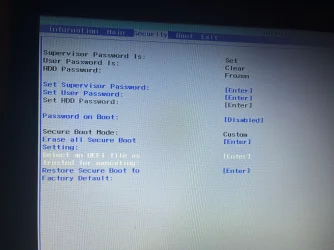
Yes almost the same - I only rebooted the 1st time with SB disabled the 2nd time is was (and stayed enabled). Importantly it only needed to be shown? where the cert folder are without choosing any files. I will get the laptop up and get the script output. The bios had an option to replace SB variables but not to replace them individually. The Bios option I used is in the photo at the end of this post as the white option - "Select an UEFI file as trusted for executing" and then I browsed the the cert folder - but even though no files then showed to be selected , I escaped there and switched on SB and rebooted- SB stayed on and I ran the update twice. I did not make notes of the process I followed - this is what i remembered doing.

Code:
PS C:\Windows\system32> cd c:\Temp
PS C:\Temp> cmd
Microsoft Windows [Version 10.0.19044.7291]
(c) Microsoft Corporation. All rights reserved.

C:\Temp>Check-UEFI -verbose
Windows PowerShell
Copyright (C) Microsoft Corporation. All rights reserved.

Try the new cross-platform PowerShell https://aka.ms/pscore6

Windows 10 21H2 (19044.7291)

Secure Boot: ON
Virtualization Based Security: OFF
BitLocker on (C:) OFF

BIOS Firmware
-------------
    Acer Aspire E5-571
    Version: V1.32
    Date: 2015-09-15

Factory Default UEFI PK Cert
----------------------------
    Acer Platform Key

UEFI PK Cert
------------
    Acer Platform Key
        Manual update of [KEK CA 2023] is REQUIRED.

Factory Default UEFI KEK Certs
------------------------------
    Microsoft Corporation KEK CA 2011
    Acer Key Exchange Key

UEFI KEK Certs
--------------
    Microsoft Corporation KEK CA 2011
    Acer Key Exchange Key

Factory Default UEFI DB Certs
-----------------------------
    Microsoft Corporation UEFI CA 2011
    Microsoft Windows Production PCA 2011
    ABO
    Acer Database
    DisablePW

UEFI DB Certs
-------------
    Microsoft Corporation UEFI CA 2011
    Microsoft Windows Production PCA 2011
    ABO
    Acer Database
    DisablePW

Factory Default UEFI DBX Certs
------------------------------
    (NONE)
    EFI_CERT_SHA256_GUID Signatures:

UEFI DBX Certs
--------------
    (NONE)
    Windows BootMgr SVN is MISSING.
    EFI_CERT_SHA256_GUID Signatures: 433

UEFI Variables
--------------
    SBAT (Linux only): sbat,1,2024010900 / shim,4 / grub,3 / grub.debian,4

EFI Files
---------
    Windows Boot Manager [Production PCA 2011] is ALLOWED.
        \\.\HarddiskVolume1\EFI\Microsoft\Boot\bootmgfw.efi
        File Version: 19041.7291, SVN 1.0

    Registry: "WindowsUEFICA2023Capable" = 0
        [Windows UEFI CA 2023] not in UEFI DB.


REQUIRED ACTION
===============

MANUAL UPDATE of the BIOS is required.

Enter the BIOS menu, and search for User or Custom Mode option of updating the UEFI PK or KEK keys.
If your BIOS doesn't support this feature, select Setup Mode to clear all certs.

OPTION 1:  To install [UEFI CA 2023] certs

        Update_UEFI-CA2023.ps1


OPTION 2:  To install [UEFI CA 2023] certs and REVOKE the [PCA 2011] cert

        Update_UEFI-CA2023.ps1 -Revoke

PS C:\Temp> Check-UEFI

Windows PowerShell
Copyright (C) Microsoft Corporation. All rights reserved.

Try the new cross-platform PowerShell https://aka.ms/pscore6

PS C:\Windows\system32> cd c:\Temp
PS C:\Temp> cmd
Microsoft Windows [Version 10.0.19044.7291]
(c) Microsoft Corporation. All rights reserved.

C:\Temp>Update-UEFI
Windows PowerShell
Copyright (C) Microsoft Corporation. All rights reserved.

Try the new cross-platform PowerShell https://aka.ms/pscore6

Exception calling "Substring" with "2" argument(s): "startIndex cannot be larger than length of string.
Parameter name: startIndex"
At C:\Temp\Update_UEFI-CA2023.ps1:527 char:5
+     $SVN = '{0}.{1}' -f [System.Convert]::ToUInt16($SignatureData.Sub ...
+     ~~~~~~~~~~~~~~~~~~~~~~~~~~~~~~~~~~~~~~~~~~~~~~~~~~~~~~~~~~~~~~~~~
    + CategoryInfo          : NotSpecified: (:) [], MethodInvocationException
    + FullyQualifiedErrorId : ArgumentOutOfRangeException

Downloading "edk2-x64-secureboot-binaries.zip" from GitHub.
Successfully wrote "Default3PDb.bin" to UEFI db.
Successfully wrote "DefaultKek.bin" to UEFI KEK.
Successfully wrote "DefaultPk.bin" to UEFI PK.
Downloading "WindowsOEMDevicesPK.der" from GitHub.
Copying "WindowsOEMDevicesPK.der" to EFI.
Copying EFI boot files.
Boot files successfully created.

REQUIRED ACTION
---------------
Please follow the README_UEFI.TXT instructions, for installing the PK cert from BIOS.

Restart Windows, for UEFI updates to take effect.

PS C:\Temp> Update-UEFI


C:\Temp>Check-UEFI -verbose
Windows PowerShell
Copyright (C) Microsoft Corporation. All rights reserved.

Try the new cross-platform PowerShell https://aka.ms/pscore6

Windows 10 21H2 (19044.7291)

Secure Boot: ON
Virtualization Based Security: OFF
BitLocker on (C:) OFF

BIOS Firmware
-------------
    Acer Aspire E5-571
    Version: V1.32
    Date: 2015-09-15

Factory Default UEFI PK Cert
----------------------------
    Acer Platform Key

UEFI PK Cert
------------
    Windows OEM Devices PK

Factory Default UEFI KEK Certs
------------------------------
    Microsoft Corporation KEK CA 2011
    Acer Key Exchange Key

UEFI KEK Certs
--------------
    Microsoft Corporation KEK CA 2011
    Microsoft Corporation KEK 2K CA 2023

Factory Default UEFI DB Certs
-----------------------------
    Microsoft Corporation UEFI CA 2011
    Microsoft Windows Production PCA 2011
    ABO
    Acer Database
    DisablePW

UEFI DB Certs
-------------
    Microsoft Corporation UEFI CA 2011
    Microsoft Windows Production PCA 2011
    Microsoft Option ROM UEFI CA 2023
    Microsoft UEFI CA 2023
    Windows UEFI CA 2023

Factory Default UEFI DBX Certs
------------------------------
    (NONE)
    EFI_CERT_SHA256_GUID Signatures:

UEFI DBX Certs
--------------
    (NONE)
Exception calling "Substring" with "2" argument(s): "startIndex cannot be larger than length of string.
Parameter name: startIndex"
At C:\Temp\Check_UEFI-CA2023.ps1:770 char:5
+     $SVN = '{0}.{1}' -f [System.Convert]::ToUInt16($SignatureData.Sub ...
+     ~~~~~~~~~~~~~~~~~~~~~~~~~~~~~~~~~~~~~~~~~~~~~~~~~~~~~~~~~~~~~~~~~
    + CategoryInfo          : NotSpecified: (:) [], MethodInvocationException
    + FullyQualifiedErrorId : ArgumentOutOfRangeException

    Windows BootMgr SVN is MISSING.
    EFI_CERT_SHA256_GUID Signatures:

UEFI Variables
--------------
    SBAT (Linux only): sbat,1,2024010900 / shim,4 / grub,3 / grub.debian,4

EFI Files
---------
    Windows Boot Manager [Windows UEFI CA 2023] is ALLOWED.
        \\.\HarddiskVolume1\EFI\Microsoft\Boot\bootmgfw.efi
        File Version: 28000.322, SVN 8.0

    Registry: "WindowsUEFICA2023Capable" = 2
        [Windows UEFI CA 2023] in UEFI DB, and Windows starting from CA 2023 Boot Manager.


REQUIRED ACTION
===============
To REVOKE the [PCA 2011] cert, run the commands:

    reg add HKEY_LOCAL_MACHINE\SYSTEM\CurrentControlSet\Control\Secureboot /v AvailableUpdates /t REG_DWORD /d 0x282 /f
    powershell Start-ScheduledTask -TaskName "\Microsoft\Windows\PI\Secure-Boot-Update"

PS C:\Temp>

 

Attachments

  • Bios.webp
    Bios.webp
    929.9 KB · Views: 1
Last edited:

My Computers

System One System Two

  • OS
    Win 10 > Win 11 > Linux Mint 22.3
    Computer type
    PC/Desktop
    Manufacturer/Model
    Custom
    CPU
    i5-11400
    Motherboard
    Gigabyte B560M DS3H
    Memory
    64GB Crucial RAM DDR4
    Graphics Card(s)
    none
    Sound Card
    Custom USB 24-bit 96kHz DAC (PCM5102A + STM32F411)
    Monitor(s) Displays
    31.5" LG 1440p
    Screen Resolution
    2560x1440
    Hard Drives
    4 TB WD HDD
    1 TB WD SSD
    500 GB WD NVME
    500 GB Crucial P5 (main OS Win10)
    PSU
    Corsair 550W
    Case
    ATX
    Cooling
    Fan
    Keyboard
    Genius
    Mouse
    Logitech
    Internet Speed
    4G/5G
    Browser
    Firefox
    Antivirus
    Defender
  • Operating System
    Win 10 more than Win 11 more than Linux Mint 22.1
    Computer type
    PC/Desktop
    Manufacturer/Model
    Home
    CPU
    i5-14400
    Motherboard
    Gigabyte B760M D3H
    Memory
    48 GB DDR5
    Graphics card(s)
    none
    Sound Card
    Custom USB 24-bit 96kHz DAC (PCM5102A + STM32F411)
    Monitor(s) Displays
    27" FHD Gaming IPS LCD 144Hz
    Screen Resolution
    1920x1080
    Hard Drives
    4 TB WD HDD
    1TB + 2TB WD NVME
    PSU
    Corsair 550W
    Case
    Cooler Master
    Cooling
    Fan
    Keyboard
    Genius
    Mouse
    Logitec
    Internet Speed
    4G/5G
    Browser
    Firefox
    Antivirus
    Defender
When you run the update script, several results can happen:

1. You already have an installed KEK CA 2023, so it moves on to the other certs.

2. Your BIOS's thumbprint matches one listed on the MS GitHub repo. The script downloads the matching KEK file and tries to apply it. That KEK may succeed or fail (non-applicable).

3. None of the previous conditions apply, so it will copy the KEK CA 2023 as a both a .der and .crt file to the EFI partition, under folder "\EFI\Certs". The script creates a separate folder so you don't get confused about other subfolders.

You will be given instructions to manually add the cert file from the copied file. The file is copied to the EFI, so you don't need to find a spare USB drive that is formatted as FAT32.
 

My Computer

System One

  • OS
    Windows 7
Event ID 26 Wininit message
Boot App Anti-Rollback: Boot.stl Enforcement completed with status:

HRESULT: The operation completed successfully.
Boot Stl Enforced Successfully: true
WNF Published with result: STATUS_SUCCESS

Is this something to do with all the work on updating certs ?
 

My Computer

System One

  • OS
    Windows 11 Intel i5 10400 HD630 graphics chip
    Computer type
    PC/Desktop
    Manufacturer/Model
    HP
    CPU
    i5-10400
    Memory
    12 gb
    Graphics Card(s)
    HD630 chipset
    Monitor(s) Displays
    LG 24inch
    Hard Drives
    SSD, external usb drive 1tb for files/backups
    Keyboard
    wireless Logi
    Mouse
    ms 4000 wireless mouse
    Internet Speed
    10meg
    Browser
    Firefox
    Antivirus
    Defender
    Other Info
    Win11 Home 25h2 26200.8524 05/26/2026
Event ID 26 Wininit message
Boot App Anti-Rollback: Boot.stl Enforcement completed with status:

HRESULT: The operation completed successfully.
Boot Stl Enforced Successfully: true
WNF Published with result: STATUS_SUCCESS

Is this something to do with all the work on updating certs ?
Not directly. Anti-rollback measures are to prevent attackers from using an older version of the boot file(s). Older versions may have known vulnerabilities which could be exploited. Windows can't deploy boot.stl until the newer boot files are already in place, which means you would have to first complete the CA 2023 migration.

MS is taking this opportunity to close many security doors after Secure Boot updates. The other changes add to a layered defense, but don't having anything to do with the Secure Boot certs. The boot manager already has a SVN number which restricts rollback.
 

My Computer

System One

  • OS
    Windows 7
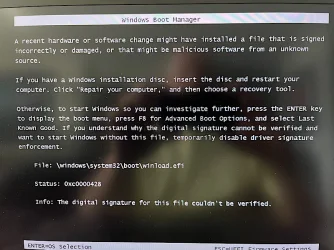
So I decided to test my bootable USB drives for the first time in several months. They were working perfectly before. Macrium is OK, but MiniTool PW won't boot. It gives me this error screen on both my laptops.

Windows and MiniTool are current. I did have to run the Update UEFI on the USB. The Check UEFI says the USB is Allowed.

Does this mean I have to turn off Secure Boot if I need to run MiniTool from USB? Or is there a way to fix the USB?
 

Attachments

  • ~MTPW_Boot_Error.webp
    ~MTPW_Boot_Error.webp
    83.1 KB · Views: 1

My Computers

System One System Two

  • OS
    Windows 11 Pro 24H2
    Computer type
    Laptop
    Manufacturer/Model
    Lenovo P16s Workstation
    CPU
    Intel i7-1260P 12th Gen 4.7GHz
    Memory
    32GB DDR4-3200
    Graphics Card(s)
    NVIDIA T550 Laptop GPU
    Sound Card
    Realtek Audio
    Monitor(s) Displays
    16" Laptop Display
    Screen Resolution
    2560x1600
    Hard Drives
    2TB Samsung M.2 2280 SSD PCIe 4.0 x 4 NVMe
    Mouse
    Logitech MX Anywhere 2s
    Internet Speed
    1000 Mb
    Browser
    Firefox
    Antivirus
    Avast
  • Operating System
    Windows 11 Pro 24H2
    Computer type
    Laptop
    Manufacturer/Model
    Lenovo P50 Workstation
    CPU
    i7-6820HQ 6th Gen 3.6 GHz
    Memory
    32GB DDR4-2133
    Graphics card(s)
    NVIDIA Quadro M2000M Laptop GPU
    Sound Card
    Realtek Audio
    Monitor(s) Displays
    15.6" Laptop Display
    Screen Resolution
    1920x1080
    Hard Drives
    2 x 1TB Samsung M.2 2280 SSD PCIe 3.0 x 4 NVMe
    Cooling
    Dual Fan System
    Mouse
    Logitech MX Anywhere 2s
    Internet Speed
    1000 Mb
    Browser
    Firefox
    Antivirus
    Avast
MiniTool wont boot for me neither with the 2023 certificate's. tried several way's to update it but no go.
 

My Computer

System One

  • OS
    Win11 24H2 IOT LTSC / Win11 Pro 25H2
    Computer type
    PC/Desktop
    Manufacturer/Model
    Gigabyte / Asus Home build
    CPU
    AMD Ryzen 7 8700G / AMD Ryzen 7 8700G
    Motherboard
    Gigabyte B650 AORUS ELITE AX V2 / ASUS TUF GAMING B650-PLUS
    Memory
    F5-6000J3636F16GX2-FX5 32GB / Lexar Ares RGB LD5BU016G-R6000GDLA 32GB
    Graphics Card(s)
    internal
    Sound Card
    Realtec
    Monitor(s) Displays
    BenQ 27 L EW2780
    Screen Resolution
    1920x1080
    Hard Drives
    Many M.2's
    Internet Speed
    400 mbs
    Browser
    Vivaldi
    Antivirus
    Eset
So I decided to test my bootable USB drives for the first time in several months. They were working perfectly before. Macrium is OK, but MiniTool PW won't boot. It gives me this error screen on both my laptops.

Windows and MiniTool are current. I did have to run the Update UEFI on the USB. The Check UEFI says the USB is Allowed.

Does this mean I have to turn off Secure Boot if I need to run MiniTool from USB? Or is there a way to fix the USB?
Run the check script and see if you have a SkuSiPolicy.p7b file present.

SkuSiPolicy is a separate security policy for other boot files. The boot manager in turn loads winload.efi, to actually start up Windows. Having a SkuSiPolicy may be blocking MiniTool's version of the boot.wim.

You have two options:
1. Find an updated version of boot.wim to base MiniTool's bootable USB from.

2. Delete the SkuSiPolicy.p7b. It's a "nice to have" security feature, but can block bootable devices because you're using a winload.efi version that's been banned.
Code:
mountvol S: /s
del S:\EFI\Microsoft\Boot\SkuSiPolicy.p7b
mountvol S: /d

The policy file can always been copied to the EFI partition again, assuming you find a newer boot.wim. An example might be an ISO downloaded by Media Creation Tool (which is refreshed every month). The direct download of 25H2 doesn't help because it tends to get outdated.
 

My Computer

System One

  • OS
    Windows 7
I'm going to repeat an important point:

The Secure Boot migration is strictly limited to certs which authenticate the boot manager files. But MS is taking advantage of the situation to encourage other security features be deployed, to build a defense-in-depth strategy.

Secure Boot certs
-> validate EFI boot manager
SkuSiPolicy.p7b -> validate winload.efi
Secure Boot mode enables VBS / CoreIntegrity which allows securing of kernel drivers -> banning vulnerable drivers (like Macrium 8's image mounter)
CoreIntegrity allows other high-level app restrictions

The idea is if you can confirm Windows booted in a secure manner, the system can trust turning on more security features that run at higher levels. Otherwise an attacker can just burrow underneath your security layers and corrupt the system from the ground up (boot vulnerabilities). It's easier to attack from the inside, than from the outside.
 

My Computer

System One

  • OS
    Windows 7
  • Great Support
Reactions: x_1
Run the check script and see if you have a SkuSiPolicy.p7b file present.

SkuSiPolicy is a separate security policy for other boot files. The boot manager in turn loads winload.efi, to actually start up Windows. Having a SkuSiPolicy may be blocking MiniTool's version of the boot.wim.

You have two options:
1. Find an updated version of boot.wim to base MiniTool's bootable USB from.

2. Delete the SkuSiPolicy.p7b. It's a "nice to have" security feature, but can block bootable devices because you're using a winload.efi version that's been banned.
Code:
mountvol S: /s
del S:\EFI\Microsoft\Boot\SkuSiPolicy.p7b
mountvol S: /d

The policy file can always been copied to the EFI partition again, assuming you find a newer boot.wim. An example might be an ISO downloaded by Media Creation Tool (which is refreshed every month). The direct download of 25H2 doesn't help because it tends to get outdated.
I understand the SkuSiPolicy.p7b suggestion. Thank you.

I do not understand the boot.wim idea. (Sorry -- a lack of knowledge in that department!) Doesn't boot.wim contain the actual program? How could that be adjusted when MiniTool creates the USB? Curious now. (Ignore if this question is too off-topic here.)
 

My Computers

System One System Two

  • OS
    Windows 11 Pro 24H2
    Computer type
    Laptop
    Manufacturer/Model
    Lenovo P16s Workstation
    CPU
    Intel i7-1260P 12th Gen 4.7GHz
    Memory
    32GB DDR4-3200
    Graphics Card(s)
    NVIDIA T550 Laptop GPU
    Sound Card
    Realtek Audio
    Monitor(s) Displays
    16" Laptop Display
    Screen Resolution
    2560x1600
    Hard Drives
    2TB Samsung M.2 2280 SSD PCIe 4.0 x 4 NVMe
    Mouse
    Logitech MX Anywhere 2s
    Internet Speed
    1000 Mb
    Browser
    Firefox
    Antivirus
    Avast
  • Operating System
    Windows 11 Pro 24H2
    Computer type
    Laptop
    Manufacturer/Model
    Lenovo P50 Workstation
    CPU
    i7-6820HQ 6th Gen 3.6 GHz
    Memory
    32GB DDR4-2133
    Graphics card(s)
    NVIDIA Quadro M2000M Laptop GPU
    Sound Card
    Realtek Audio
    Monitor(s) Displays
    15.6" Laptop Display
    Screen Resolution
    1920x1080
    Hard Drives
    2 x 1TB Samsung M.2 2280 SSD PCIe 3.0 x 4 NVMe
    Cooling
    Dual Fan System
    Mouse
    Logitech MX Anywhere 2s
    Internet Speed
    1000 Mb
    Browser
    Firefox
    Antivirus
    Avast
Try the instructions here, to replace MiniTool's PE image:
 

My Computer

System One

  • OS
    Windows 7
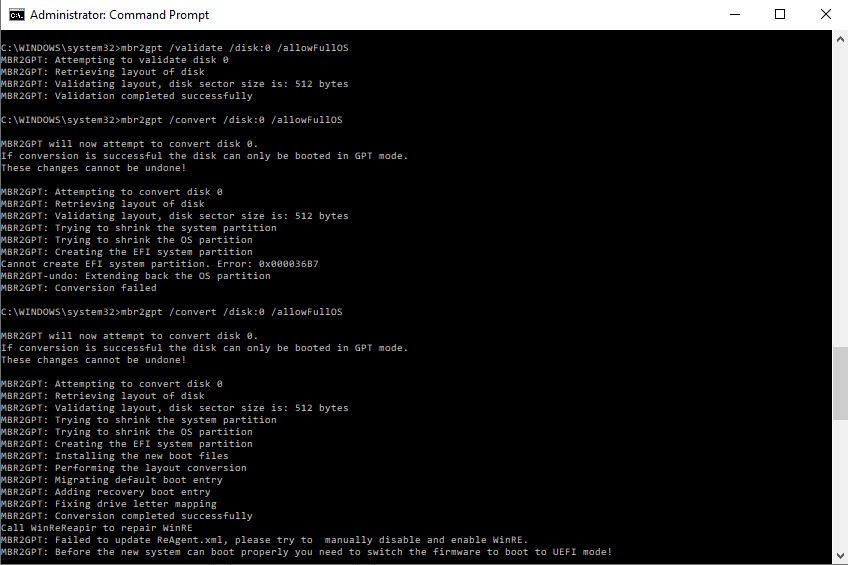
Hi, fumbling about confused and can't seem to enable secure boot

eventually discovered these scripts (if I'm not mistaken) can't run on an MBR partitioned drive
- ought to add a check for MBR and report why it doesn't run?

then had fun using

mbr2gpt /convert /disk:*enter previously noted disk number here* /allowFullOS

but second attempt after total doom, got windows to cope (just)


Scary-failure.jpg
 

My Computer

System One

  • OS
    Win11
My new 2025 Asus Strix G16 is currently stuck in "Microsoft Cert Jail" with Secure Boot Event 1801. Secure boot is on, but your device is using an older boot trust configuration that should be updated. My certs are 'updated' to 2023 and my 2011 certs have NOT been revoked yet. I have the latest bios installed ver 335 installed. I can't get rid of the 1801. I even forced a clear of secure boot. This inconsistency prevents me for finishing installing the 2023 certs but my laptop is still usable.

I found something on Tom's Hardware I wanted to bring to everyone's attention. It's a good explanation but why didn't I get it from Microsoft?
Here's the Microsoft official employee respond to anyone that is confused and is in same situation :

"The low - level checks (Powershell verification of DB/DB Default/KeK and Windows2023capable =2 ) confirm that the 2023 certificates are already present and actively used at boot, but the security app is still showing " Older boot trust" because Microsoft's cloud side validation of your specific device model, firmware version and update stage has not yet been finalized. When the classification data is incomplete, the app intentionally reports a conservative warning rather than "up to date" even though the actual Secure Boot trust chain is correct.
This is why you also see "Event ID 1801" 'Certificates available,but not yet applied' it reflects a transitional reporting state, not the real enforcement state in firmware.
Once Microsoft completes backend validation and updates the device's classification , the security app status will automatically align with what your checks are already showing, without any action required from you. The message you are seeing is about status synchronization and reporting, not about missing protection. As long as your checks continue to confirm DB/KEK and WindowsUefica2023Capable = 2 you are already in good and safe state - The UI will catch up automatically.
Since the 2023 Secure Boot keys are already present and being used, a BIOS update is not required to resolve the message you are seeing in Windows Security.
BIOS updates are generally only needed if the OEM explicitly states they are required to add missing secure boot certificates or fix a firmware bug.
The reason Windows security app shows "Old boot trust" is a known and expected mismatch not an actual regression in your secure boot configuration.
The Windows security app message and the Even ID 1801 "Certificates available, but not yet applied" reflect Microsoft's phased validation and telemetry - based classification process, not a missing certificate or misconfiguration."
 

My Computer

System One

  • OS
    Windows 11 & Zorin Pro
    Computer type
    Laptop
    Manufacturer/Model
    Asus Rog Strix G16
    CPU
    Intel® Core™ Ultra 9 Processor 275HX 2.7 GHz
    Motherboard
    AsusteK Computer
    Memory
    32 gb
    Graphics Card(s)
    NVIDIA® GeForce RTX™ 5060 Laptop GPU
    Sound Card
    Realtek High Definition Audio
    Monitor(s) Displays
    Laptop 16 inch
    Screen Resolution
    2560 X 1600
    Hard Drives
    Boot: Samsung 9100 NVME 2 TB Microsoft Storage Controller: Standard NVM Express Driver: Microsoft 6/21/2006. No SATA/AHCI on my motherboard or in bios
    Mouse
    Pad
    Browser
    Google Chrome
    Antivirus
    Microsoft
    Other Info
    Printer: HP Color LaserJet MFP M477dw
Hi, fumbling about confused and can't seem to enable secure boot

eventually discovered these scripts (if I'm not mistaken) can't run on an MBR partitioned drive
- ought to add a check for MBR and report why it doesn't run?
To boot from a MBR drive, your BIOS must be in CSM mode.

The script has a Confirm-SecureBootUEFI check which can determine UEFI vs CSM. Does your BIOS have an UEFI + CSM (hybrid) mode?
 

My Computer

System One

  • OS
    Windows 7
My new 2025 Asus Strix G16 is currently stuck in "Microsoft Cert Jail" with Secure Boot Event 1801. Secure boot is on, but your device is using an older boot trust configuration that should be updated. My certs are 'updated' to 2023 and my 2011 certs have NOT been revoked yet. I have the latest bios installed ver 335 installed. I can't get rid of the 1801. I even forced a clear of secure boot. This inconsistency prevents me for finishing installing the 2023 certs but my laptop is still usable.

I found something on Tom's Hardware I wanted to bring to everyone's attention. It's a good explanation but why didn't I get it from Microsoft?
Here's the Microsoft official employee respond to anyone that is confused and is in same situation :

"The low - level checks (Powershell verification of DB/DB Default/KeK and Windows2023capable =2 ) confirm that the 2023 certificates are already present and actively used at boot, but the security app is still showing " Older boot trust" because Microsoft's cloud side validation of your specific device model, firmware version and update stage has not yet been finalized. When the classification data is incomplete, the app intentionally reports a conservative warning rather than "up to date" even though the actual Secure Boot trust chain is correct.
This is why you also see "Event ID 1801" 'Certificates available,but not yet applied' it reflects a transitional reporting state, not the real enforcement state in firmware.
Once Microsoft completes backend validation and updates the device's classification , the security app status will automatically align with what your checks are already showing, without any action required from you. The message you are seeing is about status synchronization and reporting, not about missing protection. As long as your checks continue to confirm DB/KEK and WindowsUefica2023Capable = 2 you are already in good and safe state - The UI will catch up automatically.
Since the 2023 Secure Boot keys are already present and being used, a BIOS update is not required to resolve the message you are seeing in Windows Security.
BIOS updates are generally only needed if the OEM explicitly states they are required to add missing secure boot certificates or fix a firmware bug.
The reason Windows security app shows "Old boot trust" is a known and expected mismatch not an actual regression in your secure boot configuration.
The Windows security app message and the Even ID 1801 "Certificates available, but not yet applied" reflect Microsoft's phased validation and telemetry - based classification process, not a missing certificate or misconfiguration."
This explanation is correct, but here's a much better version:

1. If you haven't rebooted once or twice, Windows won't give you credit for making Secure Boot changes. MS uses a validation method called "attestation", where if you boot Windows in Secure Boot mode, then specific CPU hardware registers are populated. These registers confirm ("attest") that system security is being enforced by every step of the boot process.

After Windows reaches a certain startup point, the registers are checked and TPM-WMI messages are written to the event log. This is how you can positively confirm Secure Boot was in effect. The Secure Boot task and Windows Security Center both use this higher standard.

2. Different PC models are "gated" or held back based on their BucketID, which is hash of their motherboard model + BIOS version. Everyone who owns the same motherboard and stuck at the same BIOS will be grouped in the same BucketID pool. If MS thinks it's got telemetry evidence that updates worked on this combination, then it assigns your PC to the "High Confidence" status.

Unless manually forced by other methods, most PC's will obey the Confidence Level indicator before starting automatic updates. It doesn't mean an update will succeed or fail, it means MS is trying to perform a gradual rollout.

Currently, there's something like 1.5 million BucketID's identified by MS (they're available as CSV files on the MS Secure Boot GitHub). A large portion of them are not categorized at this point time as "High Confidence". So the rest are stuck in limbo. Until MS gathers enough data to confirm updates work, your BucketID group won't be cleared for automatic updates.

What happens to the rest? Some pools might be blocked from known compatibility issues (only the OEM can fix). But the rest? Who knows, MS might have to YOLO (You Only Live Once) and just force it. In the worse case, updates will fail but Windows should still be working.
 

My Computer

System One

  • OS
    Windows 7
Hi Garlin
I used Mosby but did not work although the log file shows successful result:
[Mosby session started: 2026-05-01 10:59:39]
Mosby v3.1 x64
UEFI v2.40 (American Megatrends, 0x0005000B)
Dell Inc. 1.25.0
Dell Inc. Inspiron 7573
System SBAT is 2024010900, Embedded SBAT is 2025051000
Generating Secure Boot DB signing credentials...
Saved Secure Boot DB signing credentials as 'MosbyKey'
Generating PK certificate...
Installing SBAT: 'SbatLevel.txt [2025.05.10]'
Installing DBX: 'DBX for x86 (64 bit) [2025.10.16]'
Installing DBX: 'Windows Bootmgr SVN 7.0 DBX update [2025-06-06]'
Installing DB: 'Microsoft Windows Production PCA 2011'
Installing DB: 'Microsoft Corporation UEFI CA 2011'
Installing DB: 'Windows UEFI CA 2023'
Installing DB: 'Microsoft UEFI CA 2023'
Installing DB: 'Microsoft Option ROM UEFI CA 2023'
Installing DB: 'MosbyKey [2026.05.01]'
Installing KEK: 'Microsoft Corporation KEK CA 2011'
Installing KEK: 'Microsoft Corporation KEK 2K CA 2023'
Installing PK: 'Mosby Generated PK [2026.05.01]'
[Mosby session ended: 2026-05-01 11:03:50]

----

I have a Dell laptop with the following specifications:
Model: Dell Inspiron 7573 2-in-1 15.6-inch 4K UHD convertible laptop.
RAM: 32GB DDR4 Dual
Processor: Intel(R) Core(TM) i7-8550U CPU @ 1.80GHz, 1992 Mhz, 4 Core(s), 8 Logical Processor(s).
System Type 64-Bit Technology: Intel EM64T x64-based PC
Manufacture Date: 29-08-2018
ePSA: Build 4306.13 UEFI ROM
BIOS Version/Date: Dell Inc. 1.25.0, 7/13/2022
BIOS Mode: UEFI
SMBIOS Version: 3.0
Embedded Controller Version: 255.255
BaseBoard Version: A00
BaseBoard Manufacturer: Dell Inc.
BaseBoard Product 0X1X3N
Motherboard Chipset: Intel Sunrise Point-LP, Intel Kaby Lake-R
Service Tag: CX6LXN2
Express Service code: 28127872910
DMI Motherboard Serial Number: /CX6LXN2/CNWSC0088P0039/
Graphics Card: NVIDIA GeForce MX130 (2 GB), Intel(R) UHD Graphics 620 (128 MB)
Pen and touch: Pen and touch support with 10 touch points
Monitor: Sharp LQ156D1 (Dell 4N59J) [15.6" LCD] {2017}
Storage: SSD NVMe WD Blue SN570 1T
Storage Controller: Intel Chipset SATA AHCI Controller
Factory OS Edition: Windows 10 Home x86
Current OS Edition: Windows 11 IoT Enterprise LTSC 24H2 64-bit - OS Build: 26100.8457

----
Windows update did not fully work and I am working with secure boot OFF. Also, Dell will not update my Bios for this model.

Secure Boot: OFF
Virtualization Based Security: ON
BitLocker on (C:) OFF

UEFI KEK Certs
--------------
Microsoft Corporation KEK CA 2011

UEFI DB Certs
-------------
Microsoft Corporation UEFI CA 2011
Microsoft Windows Production PCA 2011

UEFI DBX Certs
--------------
Microsoft Windows PCA 2010

EFI Files
---------
Windows Boot Manager [Windows UEFI CA 2023] is ALLOWED.
Registry: "WindowsUEFICA2023Capable" = 0
[Windows UEFI CA 2023] not in UEFI DB.

[OPTIONAL] SkuSiPolicy.p7b (for VBS) is MISSING.
 

My Computer

System One

  • OS
    Windows 11 IoT Enterprise LTSC 2024 24H2 (En-US)
    Computer type
    Laptop
    Manufacturer/Model
    Dell Inspiron 7573 2-in-1 15.6-inch 4K UHD convertible laptop CX6LXN2 (Bios v. Dell Inc. 1.25.0, 7/13/2022)
    CPU
    Intel(R) Core(TM) i7-8550U CPU @ 1.80GHz, 1992 Mhz, 4 C
    Motherboard
    Intel Sunrise Point-LP, Intel Kaby Lake-R (BaseBoard 0X1X3N)
    Memory
    32GB DDR4 Dual
    Graphics Card(s)
    NVIDIA GeForce MX130 (2 GB), Intel(R) UHD Graphics 620 (128 MB)
    Sound Card
    Realtek Semiconductor Corp.
    Monitor(s) Displays
    Sharp LQ156D1 (Dell 4N59J) [15.6" LCD] {2017}
    Screen Resolution
    3840 x 2160 4K UHD
    Hard Drives
    SSD NVMe WD Blue SN570 1T
    Browser
    Firefox 151.0.2 (64-bit)
    Antivirus
    Windows Defender & Hitman Pro Alert
    Other Info
    Secure Boot stops working after trying to fix windows new 2023 certificates update issue. The OS works fine but no secure boot.
Hi Garlin
I used Mosby but did not work although the log file shows successful result:
Windows update did not fully work and I am working with secure boot OFF. Also, Dell will not update my Bios for this model.

Secure Boot: OFF
Virtualization Based Security: ON
BitLocker on (C:) OFF

UEFI KEK Certs
--------------
Microsoft Corporation KEK CA 2011

UEFI DB Certs
-------------
Microsoft Corporation UEFI CA 2011
Microsoft Windows Production PCA 2011

UEFI DBX Certs
--------------
Microsoft Windows PCA 2010

EFI Files
---------
Windows Boot Manager [Windows UEFI CA 2023] is ALLOWED.
Registry: "WindowsUEFICA2023Capable" = 0
[Windows UEFI CA 2023] not in UEFI DB.

[OPTIONAL] SkuSiPolicy.p7b (for VBS) is MISSING.
The last BIOS update was 2022, it's probably unsupported for automatic updates.

Can you run the check script with the -Verbose option? I don't see the recent changes from Mosby.

The update script can't do anything that Mosby can't do; they both assume you're in Setup Mode (no certs) because that's the only way to overwrite the UEFI variables and install a KEK CA 2023.
 

My Computer

System One

  • OS
    Windows 7
Back
Top Bottom