Solved garlin's PowerShell scripts for updating Secure Boot CA 2023


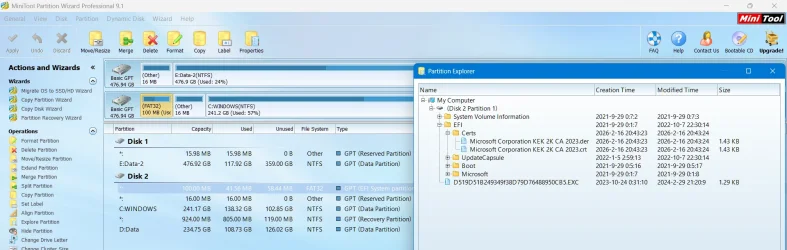
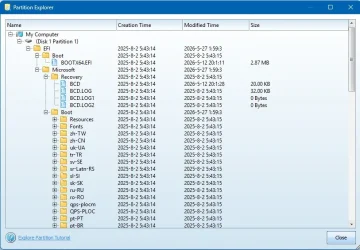
I'm wondering if that's left over from my script. It creates an \EFI\Certs folder, so it's easier to manually find a cert file than browsing through multiple subfolders and scrolling past other random filenames.

After you're done installing the CA 2023 certs, \EFI\Certs and its files can be safely removed. They're not part of the normal EFI filesystem.
 

My Computer

System One

  • OS
    Windows 7
I'm wondering if that's left over from my script. It creates an \EFI\Certs folder, so it's easier to manually find a cert file than browsing through multiple subfolders and scrolling past other random filenames....
That seems likely. I've only ever run your script to try and update one laptop, my System One below. For my others I've only needed to run the Check-UEFI script, they all say that they don't need a manual update, I can just let Microsoft handle it for me. None of them have that \EFI\Certs folder.

I've subsequently retired my System One from active duty due to a broken hinge, and restored its system image to my System Seven (in Other Info). That too won't need a manual update, it's already at the stage where all that's left it to revoke PCA 2011 (I'm in no hurry, I'll leave that to MS). It has however inherited that \EFI\Certs folder from the system image of System One. Should I delete it, or will it do no harm to leave it?

1780533463179.webp
 

My Computers

System One System Two

  • OS
    Windows 11 Home
    Computer type
    Laptop
    Manufacturer/Model
    Acer Aspire 3 A315-23-R9VY
    CPU
    AMD Athlon Silver 3050U
    Memory
    8GB
    Graphics Card(s)
    Radeon Graphics
    Monitor(s) Displays
    laptop screen
    Screen Resolution
    1366x768 native resolution, up to 2560x1440 with Radeon Virtual Super Resolution
    Hard Drives
    1TB Samsung EVO 870 SSD (from April 2026: 250GB EVO 850)
    Internet Speed
    150 Mbps
    Browser
    Edge, Firefox
    Antivirus
    Defender
    Other Info
    fully 'Windows 11 ready' laptop. Windows 10 C: partition migrated from my old unsupported 'main machine' then upgraded to 11. A test migration ran Insider builds for 2 months. When 11 was released on 5th October 2021 it was re-imaged back to 10 and was offered the upgrade in Windows Update on 20th October. Windows Update offered the 22H2 Feature Update on 20th September 2022. It got the 23H2 Feature Update on 4th November 2023 through Windows Update, 24H2 on 3rd October 2024 through Windows Update by setting the Target Release Version for 24H2, and 25H2 on 30th September 2025 through Windows Update by setting the Target Release Version for 25H2.

    UPDATE - 11 April 2026: due to mechanical deterioration this PC has been retired from active duty. The OS with all software and files has been migrated to my System Seven below to carry on as my general purpose 'main machine'.

    My SYSTEM THREE is a Dell Latitude 5410, i7-10610U, 32GB RAM, 512GB NVMe ssd, supported device running Windows 11 Pro.

    My SYSTEM FOUR is a 2-in-1 convertible Lenovo Yoga 11e 20DA, Celeron N2930, 8GB RAM, 256GB ssd. Unsupported device: currently running Win10 Pro, plus Win11 Pro RTM and Insider Dev, Beta, and RP 24H2 as native boot vhdx.

    My SYSTEM FIVE is a Dell Latitude 3190 2-in-1, Pentium Silver N5030, 8GB RAM, 1TB NVMe ssd, supported device running Windows 11 Pro, plus Insider Beta, Dev, and Canary builds (and a few others) as a native boot .vhdx.

    My SYSTEM SIX is a Dell Latitude 5550, Core Ultra 7 165H, 64GB RAM, 1TB NVMe SSD, supported device, Windows 11 Pro 24H2, Hyper-V host machine. Updated to 25H2 on 30th September 2025.

    My SYSTEM SEVEN is a Lenovo Thinkpad T580, Intel Core i7-8650U, 16GB RAM, 512GB NVMe SSD + 2nd 512GB NVMe SSD, a supported device for Windows 11. This is my current general purpose 'main machine'. The installed Windows 11 Home from my System One has been migrated to this machine.
  • Operating System
    Windows 11 Pro
    Computer type
    Laptop
    Manufacturer/Model
    Dell Latitude E4310
    CPU
    Intel® Core™ i5-520M
    Motherboard
    0T6M8G
    Memory
    8GB
    Graphics card(s)
    (integrated graphics) Intel HD Graphics
    Screen Resolution
    1366x768
    Hard Drives
    500GB Crucial MX500 SSD
    Browser
    Firefox, Edge
    Antivirus
    Defender
    Other Info
    unsupported machine: Legacy bios, MBR, TPM 1.2, upgraded from W10 to W11 using W10/W11 hybrid install media workaround. In-place upgrade to 22H2 using ISO and a workaround. Feature Update to 23H2 by manually installing the Enablement Package. In-place upgrade to 24H2 using hybrid 23H2/24H2 install media. Upgraded to 25H2 by Enablement Package. Also running Insider Dev, and Canary builds and Windows 10 as native boot .vhdx.

    My SYSTEM THREE is a Dell Latitude 5410, i7-10610U, 32GB RAM, 512GB NVMe ssd, supported device running Windows 11 Pro.

    My SYSTEM FOUR is a 2-in-1 convertible Lenovo Yoga 11e 20DA, Celeron N2930, 8GB RAM, 256GB ssd. Unsupported device: currently running Win10 Pro, plus Win11 Pro RTM and Insider Dev, Beta, and RP 24H2 as native boot vhdx.

    My SYSTEM FIVE is a Dell Latitude 3190 2-in-1, Pentium Silver N5030, 8GB RAM, 1TB NVMe ssd, supported device running Windows 11 Pro, plus Insider Beta, Dev, and Canary builds (and a few others) as a native boot .vhdx.

    My SYSTEM SIX is a Dell Latitude 5550, Core Ultra 7 165H, 64GB RAM, 1TB NVMe SSD, supported device, Windows 11 Pro 24H2, Hyper-V host machine. Updated to 25H2 on 30th September 2025.

    My SYSTEM SEVEN is a Lenovo Thinkpad T580, Intel Core i7-8650U, 16GB RAM, 512GB NVMe SSD + 2nd 512GB NVMe SSD, a supported device for Windows 11. This is my current general purpose 'main machine'. The installed Windows 11 Home from my System One has been migrated to this machine.
I dont have "Certs" on 2 machines that I used Garlin' script on to update c2023

D519D51B249349f38D79D76488950CB5.EXC = Hasleo so it seems, I deleted it.

OddOne.webp
 

My Computer

System One

  • OS
    Win11 24H2 IOT LTSC / Win11 Pro 25H2
    Computer type
    PC/Desktop
    Manufacturer/Model
    Gigabyte / Asus Home build
    CPU
    AMD Ryzen 7 8700G / AMD Ryzen 7 8700G
    Motherboard
    Gigabyte B650 AORUS ELITE AX V2 / ASUS TUF GAMING B650-PLUS
    Memory
    F5-6000J3636F16GX2-FX5 32GB / Lexar Ares RGB LD5BU016G-R6000GDLA 32GB
    Graphics Card(s)
    internal
    Sound Card
    Realtec
    Monitor(s) Displays
    BenQ 27 L EW2780
    Screen Resolution
    1920x1080
    Hard Drives
    Many M.2's
    Internet Speed
    400 mbs
    Browser
    Vivaldi
    Antivirus
    Eset
That seems likely. I've only ever run your script to try and update one laptop, my System One below. For my others I've only needed to run the Check-UEFI script, they all say that they don't need a manual update, I can just let Microsoft handle it for me. None of them have that \EFI\Certs folder.

I've subsequently retired my System One from active duty due to a broken hinge, and restored its system image to my System Seven (in Other Info). That too won't need a manual update, it's already at the stage where all that's left it to revoke PCA 2011 (I'm in no hurry, I'll leave that to MS). It has however inherited that \EFI\Certs folder from the system image of System One. Should I delete it, or will it do no harm to leave it?
I dont have "Certs" on 2 machines that I used Garlin' script on to update c2023
Not everyone gets a "Certs" folder created on the EFI partition.

In the best case, you already have the KEK CA 2023 installed from a recent BIOS update. Then we don't need to copy any certs to the EFI partition, everything can be updated directly from Windows. When no KEK CA 2023 is found, we can try matching your PK's thumbprint against the list of vendor-submitted KEK bin files on the MS GitHub repo. If there's a match, we can try applying the submitted KEK file from Windows.

If the previous attempt fails, the fallback is to ask the user to try manual enrollment.

Now the script creates "\EFI\Certs" (to keep the certs organized in one place, instead of randomly copying them to \EFI\Microsoft\Boot), and copies the cert files to make this task easier for the user. Normally, you're asked to copy files to a writeable FAT32 volume (because most EFI's can only natively read FAT32). By copying the files to the EFI partition, I'm saving you the time of finding a spare USB drive.

In some cases, manual enrollment is unsuccessful and we have to proceed to the nuclear option of wiping all keys. For Setup Mode, we don't need to copy files to the EFI since any UEFI without a working PK doesn't have security restrictions. We can perform the update from Windows.

Why doesn't the script clean up the folder? I figured just in case you have a situation where you needed to reset the UEFI for something, retaining the files there would make it easier to repeat the process.

Both cert files consume less than 8 KB, so they're not taking up too much disk space. You can delete them if you like. They don't interfere with the EFI's functions, which is why I created a "Certs" folder so you don't have to worry about deleting the wrong folder of files.
 

My Computer

System One

  • OS
    Windows 7
Back
Top Bottom