Solved garlin's PowerShell scripts for updating Secure Boot CA 2023


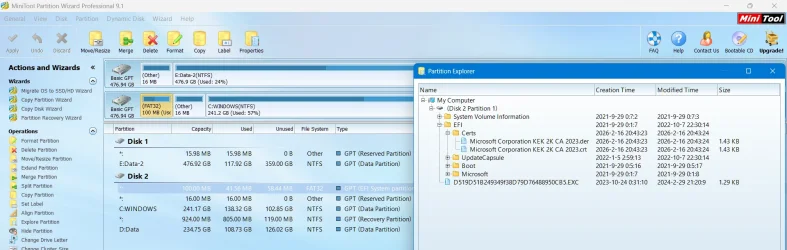
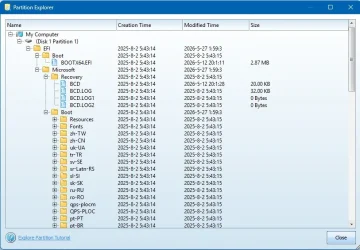
I'm wondering if that's left over from my script. It creates an \EFI\Certs folder, so it's easier to manually find a cert file than browsing through multiple subfolders and scrolling past other random filenames.

After you're done installing the CA 2023 certs, \EFI\Certs and its files can be safely removed. They're not part of the normal EFI filesystem.
 

My Computer

System One

  • OS
    Windows 7
I'm wondering if that's left over from my script. It creates an \EFI\Certs folder, so it's easier to manually find a cert file than browsing through multiple subfolders and scrolling past other random filenames....
That seems likely. I've only ever run your script to try and update one laptop, my System One below. For my others I've only needed to run the Check-UEFI script, they all say that they don't need a manual update, I can just let Microsoft handle it for me. None of them have that \EFI\Certs folder.

I've subsequently retired my System One from active duty due to a broken hinge, and restored its system image to my System Seven (in Other Info). That too won't need a manual update, it's already at the stage where all that's left it to revoke PCA 2011 (I'm in no hurry, I'll leave that to MS). It has however inherited that \EFI\Certs folder from the system image of System One. Should I delete it, or will it do no harm to leave it?

1780533463179.webp
 

My Computers

System One System Two

  • OS
    Windows 11 Home
    Computer type
    Laptop
    Manufacturer/Model
    Acer Aspire 3 A315-23-R9VY
    CPU
    AMD Athlon Silver 3050U
    Memory
    8GB
    Graphics Card(s)
    Radeon Graphics
    Monitor(s) Displays
    laptop screen
    Screen Resolution
    1366x768 native resolution, up to 2560x1440 with Radeon Virtual Super Resolution
    Hard Drives
    1TB Samsung EVO 870 SSD (from April 2026: 250GB EVO 850)
    Internet Speed
    150 Mbps
    Browser
    Edge, Firefox
    Antivirus
    Defender
    Other Info
    fully 'Windows 11 ready' laptop. Windows 10 C: partition migrated from my old unsupported 'main machine' then upgraded to 11. A test migration ran Insider builds for 2 months. When 11 was released on 5th October 2021 it was re-imaged back to 10 and was offered the upgrade in Windows Update on 20th October. Windows Update offered the 22H2 Feature Update on 20th September 2022. It got the 23H2 Feature Update on 4th November 2023 through Windows Update, 24H2 on 3rd October 2024 through Windows Update by setting the Target Release Version for 24H2, and 25H2 on 30th September 2025 through Windows Update by setting the Target Release Version for 25H2.

    UPDATE - 11 April 2026: due to mechanical deterioration this PC has been retired from active duty. The OS with all software and files has been migrated to my System Seven below to carry on as my general purpose 'main machine'.

    My SYSTEM THREE is a Dell Latitude 5410, i7-10610U, 32GB RAM, 512GB NVMe ssd, supported device running Windows 11 Pro.

    My SYSTEM FOUR is a 2-in-1 convertible Lenovo Yoga 11e 20DA, Celeron N2930, 8GB RAM, 256GB ssd. Unsupported device: currently running Win10 Pro, plus Win11 Pro RTM and Insider Dev, Beta, and RP 24H2 as native boot vhdx.

    My SYSTEM FIVE is a Dell Latitude 3190 2-in-1, Pentium Silver N5030, 8GB RAM, 1TB NVMe ssd, supported device running Windows 11 Pro, plus Insider Beta, Dev, and Canary builds (and a few others) as a native boot .vhdx.

    My SYSTEM SIX is a Dell Latitude 5550, Core Ultra 7 165H, 64GB RAM, 1TB NVMe SSD, supported device, Windows 11 Pro 24H2, Hyper-V host machine. Updated to 25H2 on 30th September 2025.

    My SYSTEM SEVEN is a Lenovo Thinkpad T580, Intel Core i7-8650U, 16GB RAM, 512GB NVMe SSD + 2nd 512GB NVMe SSD, a supported device for Windows 11. This is my current general purpose 'main machine'. The installed Windows 11 Home from my System One has been migrated to this machine.
  • Operating System
    Windows 11 Pro
    Computer type
    Laptop
    Manufacturer/Model
    Dell Latitude E4310
    CPU
    Intel® Core™ i5-520M
    Motherboard
    0T6M8G
    Memory
    8GB
    Graphics card(s)
    (integrated graphics) Intel HD Graphics
    Screen Resolution
    1366x768
    Hard Drives
    500GB Crucial MX500 SSD
    Browser
    Firefox, Edge
    Antivirus
    Defender
    Other Info
    unsupported machine: Legacy bios, MBR, TPM 1.2, upgraded from W10 to W11 using W10/W11 hybrid install media workaround. In-place upgrade to 22H2 using ISO and a workaround. Feature Update to 23H2 by manually installing the Enablement Package. In-place upgrade to 24H2 using hybrid 23H2/24H2 install media. Upgraded to 25H2 by Enablement Package. Also running Insider Dev, and Canary builds and Windows 10 as native boot .vhdx.

    My SYSTEM THREE is a Dell Latitude 5410, i7-10610U, 32GB RAM, 512GB NVMe ssd, supported device running Windows 11 Pro.

    My SYSTEM FOUR is a 2-in-1 convertible Lenovo Yoga 11e 20DA, Celeron N2930, 8GB RAM, 256GB ssd. Unsupported device: currently running Win10 Pro, plus Win11 Pro RTM and Insider Dev, Beta, and RP 24H2 as native boot vhdx.

    My SYSTEM FIVE is a Dell Latitude 3190 2-in-1, Pentium Silver N5030, 8GB RAM, 1TB NVMe ssd, supported device running Windows 11 Pro, plus Insider Beta, Dev, and Canary builds (and a few others) as a native boot .vhdx.

    My SYSTEM SIX is a Dell Latitude 5550, Core Ultra 7 165H, 64GB RAM, 1TB NVMe SSD, supported device, Windows 11 Pro 24H2, Hyper-V host machine. Updated to 25H2 on 30th September 2025.

    My SYSTEM SEVEN is a Lenovo Thinkpad T580, Intel Core i7-8650U, 16GB RAM, 512GB NVMe SSD + 2nd 512GB NVMe SSD, a supported device for Windows 11. This is my current general purpose 'main machine'. The installed Windows 11 Home from my System One has been migrated to this machine.
I dont have "Certs" on 2 machines that I used Garlin' script on to update c2023

D519D51B249349f38D79D76488950CB5.EXC = Hasleo so it seems, I deleted it.

OddOne.webp
 

My Computer

System One

  • OS
    Win11 24H2 IOT LTSC / Win11 Pro 25H2
    Computer type
    PC/Desktop
    Manufacturer/Model
    Gigabyte / Asus Home build
    CPU
    AMD Ryzen 7 8700G / AMD Ryzen 7 8700G
    Motherboard
    Gigabyte B650 AORUS ELITE AX V2 / ASUS TUF GAMING B650-PLUS
    Memory
    F5-6000J3636F16GX2-FX5 32GB / Lexar Ares RGB LD5BU016G-R6000GDLA 32GB
    Graphics Card(s)
    internal
    Sound Card
    Realtec
    Monitor(s) Displays
    BenQ 27 L EW2780
    Screen Resolution
    1920x1080
    Hard Drives
    Many M.2's
    Internet Speed
    400 mbs
    Browser
    Vivaldi
    Antivirus
    Eset
That seems likely. I've only ever run your script to try and update one laptop, my System One below. For my others I've only needed to run the Check-UEFI script, they all say that they don't need a manual update, I can just let Microsoft handle it for me. None of them have that \EFI\Certs folder.

I've subsequently retired my System One from active duty due to a broken hinge, and restored its system image to my System Seven (in Other Info). That too won't need a manual update, it's already at the stage where all that's left it to revoke PCA 2011 (I'm in no hurry, I'll leave that to MS). It has however inherited that \EFI\Certs folder from the system image of System One. Should I delete it, or will it do no harm to leave it?
I dont have "Certs" on 2 machines that I used Garlin' script on to update c2023
Not everyone gets a "Certs" folder created on the EFI partition.

In the best case, you already have the KEK CA 2023 installed from a recent BIOS update. Then we don't need to copy any certs to the EFI partition, everything can be updated directly from Windows. When no KEK CA 2023 is found, we can try matching your PK's thumbprint against the list of vendor-submitted KEK bin files on the MS GitHub repo. If there's a match, we can try applying the submitted KEK file from Windows.

If the previous attempt fails, the fallback is to ask the user to try manual enrollment.

Now the script creates "\EFI\Certs" (to keep the certs organized in one place, instead of randomly copying them to \EFI\Microsoft\Boot), and copies the cert files to make this task easier for the user. Normally, you're asked to copy files to a writeable FAT32 volume (because most EFI's can only natively read FAT32). By copying the files to the EFI partition, I'm saving you the time of finding a spare USB drive.

In some cases, manual enrollment is unsuccessful and we have to proceed to the nuclear option of wiping all keys. For Setup Mode, we don't need to copy files to the EFI since any UEFI without a working PK doesn't have security restrictions. We can perform the update from Windows.

Why doesn't the script clean up the folder? I figured just in case you have a situation where you needed to reset the UEFI for something, retaining the files there would make it easier to repeat the process.

Both cert files consume less than 8 KB, so they're not taking up too much disk space. You can delete them if you like. They don't interfere with the EFI's functions, which is why I created a "Certs" folder so you don't have to worry about deleting the wrong folder of files.
 

My Computer

System One

  • OS
    Windows 7
Just a quick question for you Garlin I did this on my Wifes laptop (system2 in my pc specs)
Code:
mountvol S: /s
del S:\EFI\Microsoft\Boot\SkuSiPolicy.p7b
mountvol S: /d

Because I was just curious and after I rebooted I got stuck where it said the boot manager was banned and it asked me to insert media to boot from. I can't remember exactly what it said but it mentioned " detected changes in configuration to boot" or something like that. I was stuck in a loop because every time I restarted the laptop it wanted me to provide a bootable drive. Wouldn't boot from the SSD or any usb I had.

Anyway so I was able to quickly go into the BIOS and turn Secure Boot off then I was able to load Windows. I restarted again went into BIOS turned secure boot ON and was able to boot back into windows like nothing had happened.

Strange. All is good now. I have run all your scripts and they came back perfect. I wonder what the heck happened there.
 

My Computers

System One System Two

  • OS
    Windows 11 Pro
    Computer type
    PC/Desktop
    Manufacturer/Model
    Me
    CPU
    Intel Core i5-12600K 3.7 GHz 10-Core Processor
    Motherboard
    Gigabyte B760M H DDR4 Micro ATX LGA1700 Motherboard
    Memory
    Corsair Vengeance LPX 64 GB (2 x 32 GB) DDR4-3200 CL16 Memory
    Graphics Card(s)
    Integrated Intel UHD Graphics 770
    Sound Card
    Realtek
    Monitor(s) Displays
    LG
    Hard Drives
    Samsung 990 Pro 1 TB M.2-2280 PCIe 4.0 X4 NVME Solid State Drive
    Samsung 990 Pro 2 TB M.2-2280 PCIe 4.0 X4 NVME Solid State Drive
    PSU
    NZXT 850w ATX 3.1 Gold Fully Modular Power Supply
    Case
    Thermaltake Versa H25 ATX Mid Tower Case
    Cooling
    CPU Cooler Thermalright Assassin Spirit 120 EVO ARGB (ARGB Disabled) - Case Fans BlackThermalright TL-C12C-S X3 66.17 CFM 120 mm Fans 3-Pack (ARGB disabled)
    Internet Speed
    1 Gbps
    Other Info
    I hate ARGB.
  • Operating System
    Windows 11 Pro
    Computer type
    Laptop
    Manufacturer/Model
    Lenovo ThinkBook 14 G2 ITL
This is known as an UEFI lock. If you have a deployed SkuSiPolicy.p7b, there is a set of reg keys in Windows which controls whether enforcement is enabled. One of the risks is the reg keys can be modified by anyone with Admin privileges, so an attacker could disable enforcement by modding values.

To prevent this scenario, Windows can write authenticated variables to the UEFI (which are hidden from normal Windows) which declares enforcement will happen, regardless of what the registry calls for. When the UEFI lock is in place, deleting the SkuSiPolicy file from the EFI confuses Windows, since it's expecting to enforce policy by reading rules from a policy file that no longer exists.

This is why the script now has the UEFI Variables section to report whether DeviceGuard (SkuSiPolicy) or CredentialGuard (LSASS) are "UEFI locked".

The current guidelines instruct to you disable Secure Boot, reboot, and then delete the SkuSiPolicy. After you've removed SkuSiPolicy, shutdown and re-enable Secure Boot. I should probably expand the instructions for removing SkuSiPolicy so it's more clear.

Guidance for blocking rollback of Virtualization-based Security (VBS) related security updates - Microsoft Support
 

My Computer

System One

  • OS
    Windows 7
This is known as an UEFI lock. If you have a deployed SkuSiPolicy.p7b, there is a set of reg keys in Windows which controls whether enforcement is enabled. One of the risks is the reg keys can be modified by anyone with Admin privileges, so an attacker could disable enforcement by modding values.

To prevent this scenario, Windows can write authenticated variables to the UEFI (which are hidden from normal Windows) which declares enforcement will happen, regardless of what the registry calls for. When the UEFI lock is in place, deleting the SkuSiPolicy file from the EFI confuses Windows, since it's expecting to enforce policy by reading rules from a policy file that no longer exists.

This is why the script now has the UEFI Variables section to report whether DeviceGuard (SkuSiPolicy) or CredentialGuard (LSASS) are "UEFI locked".

The current guidelines instruct to you disable Secure Boot, reboot, and then delete the SkuSiPolicy. After you've removed SkuSiPolicy, shutdown and re-enable Secure Boot. I should probably expand the instructions for removing SkuSiPolicy so it's more clear.

Guidance for blocking rollback of Virtualization-based Security (VBS) related security updates - Microsoft Support

Thanks for the explanation. I wasn't expecting the UEFI lock. Thanks it makes sense now.

I also ran your script and re added SkuSiPolicy policy back onto the laptop.
Script comes back clean.

I hope there's no issues from what I did.

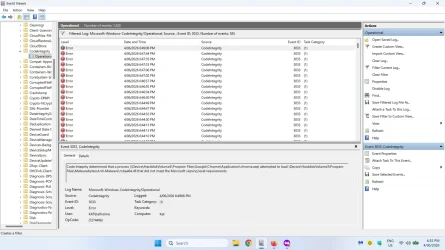
*EDIT* I am seeing a million error logs

"Code Integrity determined that a process (\Device\HarddiskVolume3\Windows\System32\svchost.exe) attempted to load \Device\HarddiskVolume3\Program Files\Malwarebytes\Anti-Malware\mbamsi64.dll that did not meet the Windows signing level requirements."

Chrome, Firefox a lot of applications showing this exactly around the time I removed SkuSiPolicy

Scroll down to Devices that use Secure Boot and UEFI

When I googled how to fix this issues it says disable Added LSA protection. (not a good idea)

I think I broke something. :(

lss.webp

Could this be a result of removing SkuSiPolicy with Secure Boot on? It seems to be a conflict with (LSASS)
?
 
Last edited:

My Computers

System One System Two

  • OS
    Windows 11 Pro
    Computer type
    PC/Desktop
    Manufacturer/Model
    Me
    CPU
    Intel Core i5-12600K 3.7 GHz 10-Core Processor
    Motherboard
    Gigabyte B760M H DDR4 Micro ATX LGA1700 Motherboard
    Memory
    Corsair Vengeance LPX 64 GB (2 x 32 GB) DDR4-3200 CL16 Memory
    Graphics Card(s)
    Integrated Intel UHD Graphics 770
    Sound Card
    Realtek
    Monitor(s) Displays
    LG
    Hard Drives
    Samsung 990 Pro 1 TB M.2-2280 PCIe 4.0 X4 NVME Solid State Drive
    Samsung 990 Pro 2 TB M.2-2280 PCIe 4.0 X4 NVME Solid State Drive
    PSU
    NZXT 850w ATX 3.1 Gold Fully Modular Power Supply
    Case
    Thermaltake Versa H25 ATX Mid Tower Case
    Cooling
    CPU Cooler Thermalright Assassin Spirit 120 EVO ARGB (ARGB Disabled) - Case Fans BlackThermalright TL-C12C-S X3 66.17 CFM 120 mm Fans 3-Pack (ARGB disabled)
    Internet Speed
    1 Gbps
    Other Info
    I hate ARGB.
  • Operating System
    Windows 11 Pro
    Computer type
    Laptop
    Manufacturer/Model
    Lenovo ThinkBook 14 G2 ITL
Normally, flashing the BIOS should not change the current certs (which are stored in NVRAM).

A new BIOS can have a different set of factory default certs. But it can only go in one direction (factory certs added to NVRAM), but not in the other direction. If updating the BIOS corrupts the NVRAM, you can always reset to factory defaults and repeat the same update process you successfully performed the first time.
Thank you Garlin,
Updated the BIOS, just the usual hassles with resetting the Windows PIN, also I hate how this Gigabyte Board goes back to Factory Defaults.
Certificates were good just had to re enter a reg command in terminal.
 

My Computer

System One

  • OS
    Windows 11
    Computer type
    PC/Desktop
    Manufacturer/Model
    Generic
    CPU
    AMD Ryzen 8700G
    Motherboard
    Gigabyte B650 UD AC
    Memory
    64 GB
    Graphics Card(s)
    Onboard
    Sound Card
    Onboard
    Monitor(s) Displays
    Del U2723QE
    Screen Resolution
    3840 x 2160
    Hard Drives
    Corsiar MP600 1TB
    PSU
    Silverstone 750 GOLD
    Case
    Silverstone FARA 513
hello i have my certificates updated and all is fine but i wanted to report that newer versions of the check-UEFI script after 2026.05.08.01 do not work for me, even latest 2026.05.31 do not work but it give a different error, i think i have something to do with me having 2ssd with windows installs plugged in and the partition used for bootmanager.

SecureBoot-CA-2023-Updates2026.05.08.01
Code:
PowerShell 7.6.2
Secure Boot: ON
Virtualization Based Security: ON
BitLocker on (C:) ON
UEFI KEK Certs
--------------
    Microsoft Corporation KEK CA 2011
    Microsoft Corporation KEK 2K CA 2023
UEFI DB Certs
-------------
    Microsoft Corporation UEFI CA 2011
    Microsoft Windows Production PCA 2011
    Microsoft Option ROM UEFI CA 2023
    Microsoft UEFI CA 2023
    Windows UEFI CA 2023
UEFI DBX Certs
--------------
    Microsoft Windows Production PCA 2011
    Windows BootMgr SVN 8.0
EFI Files
---------
    Windows Boot Manager [Windows UEFI CA 2023] is ALLOWED.
    Registry: WindowsUEFICA2023Capable = 2
        [Windows UEFI CA 2023] in UEFI DB, and Windows starting from CA 2023 Boot Manager.
    [OPTIONAL] SkuSiPolicy.p7b (for VBS) is MISSING.
STATUS REPORT
-------------
    Registry: UEFICA2023Status = Updated
    SUCCESS: UPDATES ARE FINISHED.
    UEFI CA 2023 certs are present, PCA 2011 cert is revoked.
PS C:\Windows\System32>
SecureBoot-CA-2023-Updates2026.05.11
Code:
PowerShell 7.6.2
Secure Boot: ON
Virtualization Based Security: ON
BitLocker on (C:) ON
UEFI KEK Certs
--------------
    Microsoft Corporation KEK CA 2011
    Microsoft Corporation KEK 2K CA 2023
UEFI DB Certs
-------------
    Microsoft Corporation UEFI CA 2011
    Microsoft Windows Production PCA 2011
    Microsoft Option ROM UEFI CA 2023
    Microsoft UEFI CA 2023
    Windows UEFI CA 2023
UEFI DBX Certs
--------------
    Microsoft Windows Production PCA 2011
    Windows BootMgr SVN 8.0
Command cannot find any of the specified files.
PS C:\Windows\System32>
SecureBoot-CA-2023-Updates.2026.05.31
Code:
PowerShell 7.6.2
Secure Boot: ON
Virtualization Based Security: ON
BitLocker on (C:) ON
UEFI KEK Certs
--------------
    Microsoft Corporation KEK CA 2011
    Microsoft Corporation KEK 2K CA 2023
UEFI DB Certs
-------------
    Microsoft Corporation UEFI CA 2011
    Microsoft Windows Production PCA 2011
    Microsoft Option ROM UEFI CA 2023
    Microsoft UEFI CA 2023
    Windows UEFI CA 2023
UEFI DBX Certs
--------------
    Microsoft Windows Production PCA 2011
    Windows BootMgr SVN 8.0
ERROR: EFI folder "$EFI_Path" cannot be found.
PS C:\Windows\System32>

Code:
PS C:\Windows\System32> bcdedit
Windows Boot Manager
--------------------
identifier              {bootmgr}
device                  partition=\Device\Harddisk1\Partition2
path                    \EFI\MICROSOFT\BOOT\BOOTMGFW.EFI
description             Windows Boot Manager
locale                  en-US
inherit                 {globalsettings}
default                 {current}
resumeobject            {4444***********************}}
displayorder            {current}
toolsdisplayorder       {memdiag}
timeout                 30
Windows Boot Loader
-------------------
identifier              {current}
device                  partition=C:
path                    \WINDOWS\system32\winload.efi
description             Windows 10
locale                  en-US
inherit                 {bootloadersettings}
recoverysequence        {eeee***********************}
displaymessageoverride  Recovery
recoveryenabled         Yes
isolatedcontext         Yes
allowedinmemorysettings 0x15000075
osdevice                partition=C:
systemroot              \WINDOWS
resumeobject            {4444***********************}
nx                      OptOut
bootmenupolicy          Standard
hypervisorlaunchtype    Auto
Code:
DISKPART> sel dis 1
Disk 1 is now the selected disk.
DISKPART> lis par
  Partition ###  Type              Size     Offset
  -------------  ----------------  -------  -------
  Partition 1    Recovery           499 MB  1024 KB
  Partition 2    System             100 MB   500 MB
  Partition 3    Reserved            16 MB   600 MB
  Partition 4    Primary            225 GB   616 MB
  Partition 5    Recovery           866 MB   233 GB

DISKPART> sel dis 3
Disk 3 is now the selected disk.
DISKPART> lis par
  Partition ###  Type              Size     Offset
  -------------  ----------------  -------  -------
  Partition 1    System              99 MB   530 MB
  Partition 2    Reserved            16 MB   629 MB
  Partition 3    Primary            838 GB   645 MB
  Partition 4    Recovery          1024 MB   839 GB

Disk 1 is my older PC windows OS disk that i don't really use or ever tried to boot from, disk 3 my newer PC windows install, pc still boot correctly when i remove disk 1
 
Last edited:

My Computer

System One

  • OS
    windows 10 22H2 ENT ESU
    Computer type
    PC/Desktop
Code:
PS C:\Windows\System32> bcdedit
Windows Boot Manager
--------------------
identifier              {bootmgr}
device                  partition=\Device\Harddisk1\Partition2
path                    \EFI\MICROSOFT\BOOT\BOOTMGFW.EFI
description             Windows Boot Manager
Disk 1 is my older PC windows OS disk that i don't really use or ever tried to boot from, disk 3 my newer PC windows install, pc still boot correctly when i remove disk 1
If there are multiple boot disks, the script has to carefully determine which EFI partition is the active one.

Your BCD store is pointing to Disk 1, instead of Disk 3. We need to correct this config.
Code:
select disk 3
select part 1
assign letter=s
exit
Code:
bcdedit /set {bootmgr} device partition=S:
Code:
select disk 3
select part 1
remove letter=S
exit

Now run the check script.
 

My Computer

System One

  • OS
    Windows 7
"Code Integrity determined that a process (\Device\HarddiskVolume3\Windows\System32\svchost.exe) attempted to load \Device\HarddiskVolume3\Program Files\Malwarebytes\Anti-Malware\mbamsi64.dll that did not meet the Windows signing level requirements."
Code Integrity (or VBS) is running, and has invoked the stricter driver signing requirements. Older drivers may now fail the security, where they passed before. Typically it means you need to upgrade MBAM.

Chrome, Firefox a lot of applications showing this exactly around the time I removed SkuSiPolicy

Scroll down to Devices that use Secure Boot and UEFI

When I googled how to fix this issues it says disable Added LSA protection. (not a good idea)

I think I broke something. :(
SkuSiPolicy strictly enforces the version of winload.efi. There are no other rules in the policy file (other than another Windows file) to prevent 3rd-party apps from running. LSASS prevents sophisticated credential stealing from previously known hacking methods.

Neither of them relate to normal user apps. It's most likely your MalwareBytes is conflicting with VBS, and all your browsers have to pass through MBAM before they're allowed to do anything. Check if you have the latest version of the security software.
 

My Computer

System One

  • OS
    Windows 7
I dont have "Certs" on 2 machines that I used Garlin' script on to update c2023

D519D51B249349f38D79D76488950CB5.EXC = Hasleo so it seems, I deleted it.

View attachment 173348
What program is this you're using to display the partitions?
 

My Computers

System One System Two

  • OS
    Win 11 Pro 25H2, Build 26200.8524
    Computer type
    PC/Desktop
    Manufacturer/Model
    Home Brew
    CPU
    Intel Core i5 14500
    Motherboard
    Gigabyte B760M G P WIFI
    Memory
    64GB DDR4
    Graphics Card(s)
    GeForce RTX 4060
    Sound Card
    Chipset Realtek
    Monitor(s) Displays
    LG 45" Ultragear, Acer 24" 1080p
    Screen Resolution
    5120x1440, 1920x1080
    Hard Drives
    Crucial P310 2TB 2280 PCIe Gen4 3D NAND NVMe M.2 SSD (O/S)
    Silicon Power 2TB US75 NVMe PCIe Gen4 M.2 2280 SSD (backup)
    Crucial BX500 2TB 3D NAND (2nd backup)
    Seagate 4TB Ironwolf, rotating HDD archive files
    External off-line backup Drives: 2 NVMe 4TB drives in external enclosures
    PSU
    Thermaltake Toughpower GF3 750W
    Case
    LIAN LI LANCOOL 216 E-ATX PC Case
    Cooling
    Lots of fans!
    Keyboard
    Microsoft Comfort Curve 2000
    Mouse
    Logitech G305
    Internet Speed
    Verizon FiOS 1GB
    Browser
    Firefox
    Antivirus
    Malware Bytes & Windows Defender Security
  • Operating System
    Win 11 Pro 25H2, Build 26200.8524
    Computer type
    PC/Desktop
    Manufacturer/Model
    Home Brew
    CPU
    Intel Core i5 14400
    Motherboard
    Gigabyte B760M DS3H AX
    Memory
    32GB DDR5
    Graphics card(s)
    Intel 700 Embedded GPU
    Sound Card
    Realtek Embedded
    Monitor(s) Displays
    27" HP 1080p
    Screen Resolution
    1920x1080
    Hard Drives
    Crucial P310 2TB 2280 PCIe Gen4 eD NAND PCIe SSD
    Samsung EVO 990 2TB NVMe Gen4 SSD
    Samsung 2TB SATA SSD
    PSU
    Thermaltake Smart BM3 650W
    Case
    Okinos Micro ATX Case
    Cooling
    Fans
    Keyboard
    Microsoft Comfort Curve 2000
    Mouse
    Logitech G305
    Internet Speed
    Verizon FiOS 1GB
    Browser
    Firefox
    Antivirus
    Malware Bytes & Windows Defender Security
MiniTool Partition Wizard
 

My Computer

System One

  • OS
    Win11 24H2 IOT LTSC / Win11 Pro 25H2
    Computer type
    PC/Desktop
    Manufacturer/Model
    Gigabyte / Asus Home build
    CPU
    AMD Ryzen 7 8700G / AMD Ryzen 7 8700G
    Motherboard
    Gigabyte B650 AORUS ELITE AX V2 / ASUS TUF GAMING B650-PLUS
    Memory
    F5-6000J3636F16GX2-FX5 32GB / Lexar Ares RGB LD5BU016G-R6000GDLA 32GB
    Graphics Card(s)
    internal
    Sound Card
    Realtec
    Monitor(s) Displays
    BenQ 27 L EW2780
    Screen Resolution
    1920x1080
    Hard Drives
    Many M.2's
    Internet Speed
    400 mbs
    Browser
    Vivaldi
    Antivirus
    Eset

Latest Support Threads

Back
Top Bottom