Solved garlin's PowerShell scripts for updating Secure Boot CA 2023


Some BIOS will require you to set an Admin password, before unlocking Secure Boot menus.

If you have to delete all keys, please temporarily disable BitLocker and Windows Hello PIN before making any BIOS changes. TPM will see those unrelated changes to certs, and be concerned that a security problem has occurred. To avoid Windows asking for a BitLocker recovery password, you can disable it and then enable it again after fixing the Secure Boot.
 

My Computer My Computer

At a glance

Windows 7
OS
Windows 7
hello, garlin
now that the forum it´s "calm and quiet", i´d like to thank you again for your awesome work and help us to resolve the complicated issue of the Secure Boot CA 2023 certs.,
gracias y saludos desde España,(y)(y)
fernando
 

My Computer My Computer

At a glance

windows 10 Enterprise IoT LTSCIntel(R) Core(TM) i5-6400 CPU @ 2.70GHz16GBNVIDIA GeForce GT 720 2GB
OS
windows 10 Enterprise IoT LTSC
Computer type
PC/Desktop
Manufacturer/Model
ASUS/ K31CD
CPU
Intel(R) Core(TM) i5-6400 CPU @ 2.70GHz
Memory
16GB
Graphics Card(s)
NVIDIA GeForce GT 720 2GB
Other Info
BIOS: American Megatrends Inc.
v. 1102 (12-2018)
@garlin
Hello,
I have an old Lenovo M700 Tiny with latest BIOS from 2022 with no KEK CA 2023 inside.
I downloaded the zip file and executed the Update_UEFI-CA2023.ps1 -Revoke as script suggested and after downloading all the certs and keys I did a restart.

I was in Setup mode and Secure Boot disabled.

Unfortunately after restart the PC is not giving signal to monitor, I have a completely black screen, I can not boot even in BIOS.

I can see the light on, it's not an issue of power.

What happened ?
 

My Computer My Computer

At a glance

Windows 11 Pro 25H2
OS
Windows 11 Pro 25H2
Sorry to hear you're having problems after applying the new certs. It sounds like the NVRAM is corrupted, and needs to be reset.

Can you try powering off the PC, unplugging the power cord, and opening the case? You should be able to remove the CMOS battery from the motherboard for 15-20 min. and then insert it back in. This should reset the BIOS settings.
 

My Computer My Computer

At a glance

Windows 7
OS
Windows 7
@garlin

No, unfortunately not.

I removed the battery for more than 30 minutes, I also used the CLR_CMOS jumper changing the position in order to clear BIOS settings according to instructions from Lenovo and I also tried to boot and reflash from a FAT32 formatted USB 8GB stick with the extracted USB drive command-line latest BIOS version from Lenovo, but with no positive results.

The board has power, the green light is on, the fan is spinning, all the USB ports have power. The hardware has no issues.

I have also removed the battery, RAM sticks, SSD and all the keyboard, mouse leaving only a direct DisplayPort monitor connected to the board, again with no result.

It looks like the scripts are too powerful (!) and potentially dangerous (!!) and somehow managed to brick deep and permanently the board/BIOS.

Probably the -Revoke switch removed the 2011 certs and the 2023 certs are not compatible (?) with my M700 tiny or something else happened that I'm missing right now.

If you have any ideas that I haven't tried so far, I'm all ears because although it seems impossible, I think the machine has become completely unusable and unrecoverable.

BR,
Nikos
 

My Computer My Computer

At a glance

Windows 11 Pro 25H2
OS
Windows 11 Pro 25H2
The scripts are not "too powerful", they follow a documented process (from MS) for applying Secure Boot cert files from Windows. They don't reflash your BIOS, or use special tricks to change the settings which are stored in the CMOS.

In Secure Boot, the revoke operation simply adds the PCA 2011 cert to the DBX variable. For some PC's, this step might block older GPU's with legacy firmware that is signed by CA 2011. Do you get a beeping noise after powering up?

But I have heard of two other cases where the BIOS is "bricked" after clearing the keys, and applying a new set of certs. Usually that is caused by a HW issue with the existing BIOS image.

I would try the different steps people have reported on this Reddit thread (scroll down to the middle of the discussion):
 

My Computer My Computer

At a glance

Windows 7
OS
Windows 7
Do you have another monitor to plug the machine to? Try another port or monitor... it's weird you have no signal after using the script, because it just works with the certs area, the worst thing you should be getting is secure boot violation screens... or having no signal until you reach Windows (this is a known issue with GPUs that have older VBIOS that don't support the 2023 Certs, and is most likely to happen with nVIdia cards for some reason.)

I'm inclined to think your PC is not really dead or bricked, but more likely your current display port might be borked / damaged, or just having a loose contact to your monitor. I'd try to rule out cable / port / monitor before assuming the whole thing is bricked. Personally, I just ran the script on my old Acer Aspire E5-553-1786 (2016... Ooooooooold), it's really older than your system, and works fine... of course it has no support not default updated certs nor a new BIOS update since 2018... but the thing still boots and even shows the BIOS if I enter setup screen.

I'm really inclined to think your issue is unrelated to the script, and might even be just a loose connection that casually kicked in after you updated something.
 

My Computers My Computers

  • At a glance

    Windows 11 Pro 25H2AMD Ryzen 5 5600G @ 3.9/4.4Ghz2 x 16 GB DDR4 Kingston Fury Beast 3200 MhzAMD Radeon RX 6600 XT MSI Mech 2X OC Edition ...
    OS
    Windows 11 Pro 25H2
    Computer type
    PC/Desktop
    Manufacturer/Model
    Built PC
    CPU
    AMD Ryzen 5 5600G @ 3.9/4.4Ghz
    Motherboard
    MSI B550M-PRO-WiFi Ver. 1.4
    Memory
    2 x 16 GB DDR4 Kingston Fury Beast 3200 Mhz
    Graphics Card(s)
    AMD Radeon RX 6600 XT MSI Mech 2X OC Edition 8 GB
    Sound Card
    Realtek High Definition Audio (Integrated)
    Monitor(s) Displays
    Samsung C50Rx 27" LED / HP S2031 20" LCD
    Screen Resolution
    1920 x 1080 px / 1600 x 900 px
    Hard Drives
    WD Blue SN570 NVME M.2 SSD [1 TB] -- External Drives: - WD Scorpion Blue 250 GB 5400 RPM (Data Backup) - Hitachi 500 GB 5400 RPM (Software / ISOs Backup) - Toshiba MQ01ABD100 1 TB 5400 RPM (OS Images) - HGST TravelStar 7K1000 1 TB, 7200 RPM USB 3.0 - ADATA SU800 2TB SSD USB 3.0
    PSU
    Corsair RM750e 750W Fully Modular
    Case
    Naceb Hydra NA-1602
    Cooling
    Naceb Orpheus x 3 (Front) + Naceb Cepheus 1200 RPM Max (Rear) + ThemalRight Assasin X 90 SE (CPU)
    Keyboard
    Logitech MK470 Wireless
    Mouse
    Logitech MK470 Wireless
    Internet Speed
    120 MB Symetrical
    Browser
    Firefox / Brave / Edge
    Antivirus
    Windows Defender
    Other Info
    - VMs: WMware Player - Windows 8.1 Pro x64 / Windows 11 Pro
    - Wacom Intuos Pro Small Tablet PTH-460
  • At a glance

    Windows 11 Pro 25H2AMD Ryzen 7 7730U @ 2.0/4.5 Ghz2 x 16 GB Kingston Fury Impact DDR4 3200 MhzRadeon (tm) Graphics Vega 8 (512 MB)
    Operating System
    Windows 11 Pro 25H2
    Computer type
    Laptop
    Manufacturer/Model
    HP Pavilion 15-eh3000la (80M53LA)
    CPU
    AMD Ryzen 7 7730U @ 2.0/4.5 Ghz
    Motherboard
    HP 8BC7
    Memory
    2 x 16 GB Kingston Fury Impact DDR4 3200 Mhz
    Graphics card(s)
    Radeon (tm) Graphics Vega 8 (512 MB)
    Sound Card
    Realtek High Definition Audio (Integrated)
    Monitor(s) Displays
    AU Optronics
    Screen Resolution
    1920 x 1080 px (125% size)
    Hard Drives
    WD Blue SN570 1TB NVME M.2 Drive
    PSU
    45 Watt Charger
    Cooling
    Laptop Cooling Pad
    Keyboard
    Free Wolf Foldable Portable Keyboard
    Mouse
    Free Wolf Wireless Mouse
    Internet Speed
    120 MB Symetrical
    Browser
    Firefox / Brave / Edge
    Antivirus
    Windows Defender
    Other Info
    - 41mWh battery.
    - Wacom Intuos Pro Small Tablet PTH-460
Hey great work @garlin , thank you very much and it worked flawlessly for me (using Insyde BIOS dated 2022). I am using VBS, but check command tells me that:

Powershell:
Registry: "WindowsUEFICA2023Capable" = 2
        [Windows UEFI CA 2023] in UEFI DB, and Windows starting from CA 2023 Boot Manager.

    [OPTIONAL] SkuSiPolicy.p7b (for VBS) is MISSING.

STATUS REPORT
-------------
    Registry: "UEFICA2023Status" = Updated

    SUCCESS: UPDATES ARE FINISHED.
    UEFI CA 2023 certs are present, PCA 2011 cert is revoked.

Apparently, 2023 certs are added and working fine, however SkuSiPolicy.p7b is missing, however, msinfo and Windows Security tells me that the VBS is working just fine. How do I add SkuSiPolicy.p7b? Or is it something I need to manually add? Some sources on the internet recommended disabling the secure boot, removing windows hello passwords and fingerprints, turn the secure boot back on, but I'm confused.

Edit: I used this script to forcefully put the SkuSiPolicy.p7b into the place (restart required), and everything seems fine now. SkuSiPolicy is now CURRENT.

Powershell:
$PolicyBinary = $env:windir+"\System32\SecureBootUpdates\SkuSiPolicy.p7b"; $MountPoint = 's:'; $EFIDestinationFolder = "$MountPoint\EFI\Microsoft\Boot"; mountvol $MountPoint /S; if (-Not (Test-Path $EFIDestinationFolder)) { New-Item -Path $EFIDestinationFolder -Type Directory -Force }; Copy-Item -Path $PolicyBinary -Destination $EFIDestinationFolder -Force; mountvol $MountPoint /D
 
Last edited:

My Computer My Computer

At a glance

Windows 11 25H2 Build 26200.8737Intel i7-11800HCrucial 64GB DDR4 3200M/TNvidia Geforce RTX 3050Ti (Laptop) 4GB
OS
Windows 11 25H2 Build 26200.8737
Computer type
Laptop
Manufacturer/Model
Monster
CPU
Intel i7-11800H
Memory
Crucial 64GB DDR4 3200M/T
Graphics Card(s)
Nvidia Geforce RTX 3050Ti (Laptop) 4GB
Sound Card
Realtek ALC256
Screen Resolution
1080p
Internet Speed
1Gbit
@garlin
@DarkShadowMD

Thank you both for your replies.

I have been following and executing every workaround or official solution for M700 Tiny recovered BIOS procedure, without success.

Apparently Lenovo ThinkCentre M700 Tiny is a very old machine of January 2016, my specific configuration is:

Core i3 6100T - 2x4GB DDR4 SO-DIMM with iGPU only and two DisplayPort ports.

I have tried both ports with both monitors (one directly with DisplayPort cable and the other with adapter)

I'm starting to believe that the damage is somehow permanent probably at the VBIOS of the iGPU.

More and more I see everyday my PC as a beautiful 1L b r i c k.

TY
 

My Computer My Computer

At a glance

Windows 11 Pro 25H2
OS
Windows 11 Pro 25H2

My Computer My Computer

At a glance

Windows 11 & Zorin ProIntel® Core™ Ultra 9 Processor 275HX 2.7 GHz32 gbNVIDIA® GeForce RTX™ 5060 Laptop GPU
OS
Windows 11 & Zorin Pro
Computer type
Laptop
Manufacturer/Model
Asus Rog Strix G16
CPU
Intel® Core™ Ultra 9 Processor 275HX 2.7 GHz
Motherboard
AsusteK Computer
Memory
32 gb
Graphics Card(s)
NVIDIA® GeForce RTX™ 5060 Laptop GPU
Sound Card
Realtek High Definition Audio
Monitor(s) Displays
Laptop 16 inch
Screen Resolution
2560 X 1600
Hard Drives
Boot: Samsung 9100 NVME 2 TB Microsoft Storage Controller: Standard NVM Express Driver: Microsoft 6/21/2006. No SATA/AHCI on my motherboard or in bios
Mouse
Pad
Browser
Google Chrome
Antivirus
Microsoft
Other Info
Printer: HP Color LaserJet MFP M477dw
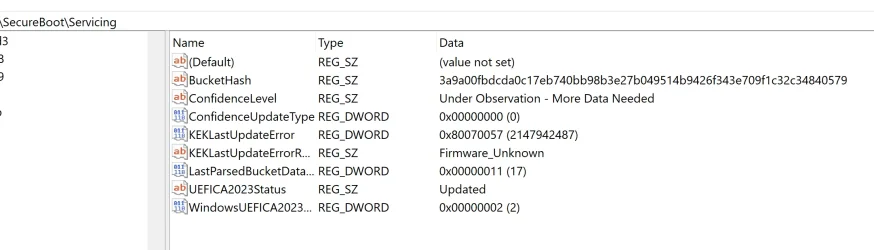
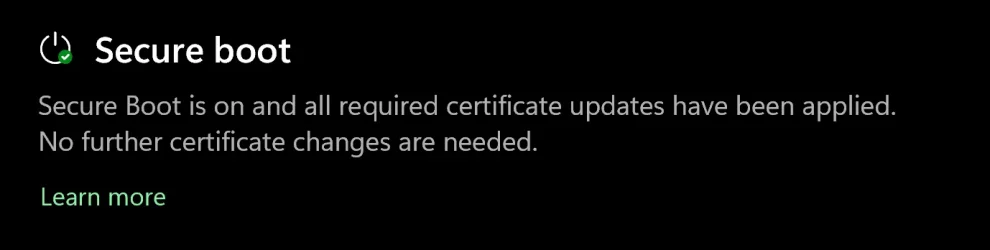
I managed to update the Bios in my Dell Inspiron 7573 2-in-1 laptop to new SecureBoot certificate 2023 more than a month ago, using Garlin's script method and still have the registry key SecureBoot servicing status not complete (see attached image). Why?? I have updated windows 11 24H2 to the latest available updates version 26100.8655 and it works great. Why the registry key is still showing error (Under Observation - More Data Needed)? (HKEY_LOCAL_MACHINE\SYSTEM\CurrentControlSet\Control\SecureBoot\Servicing)
 

Attachments

  • SecureBoot Registry Status.webp
    SecureBoot Registry Status.webp
    86.4 KB · Views: 1
  • sercure boot updated.webp
    sercure boot updated.webp
    18.4 KB · Views: 1

My Computer My Computer

At a glance

Windows 11 IoT Enterprise LTSC 2024 24H2 (En-US)Intel(R) Core(TM) i7-8550U CPU @ 1.80GHz, 199...32GB DDR4 DualNVIDIA GeForce MX130 (2 GB), Intel(R) UHD Gra...
OS
Windows 11 IoT Enterprise LTSC 2024 24H2 (En-US)
Computer type
Laptop
Manufacturer/Model
Dell Inspiron 7573 2-in-1 15.6-inch 4K UHD convertible laptop CX6LXN2 (Bios v. Dell Inc. 1.25.0, 7/13/2022)
CPU
Intel(R) Core(TM) i7-8550U CPU @ 1.80GHz, 1992 Mhz, 4 C
Motherboard
Intel Sunrise Point-LP, Intel Kaby Lake-R (BaseBoard 0X1X3N)
Memory
32GB DDR4 Dual
Graphics Card(s)
NVIDIA GeForce MX130 (2 GB), Intel(R) UHD Graphics 620 (128 MB)
Sound Card
Realtek Semiconductor Corp.
Monitor(s) Displays
Sharp LQ156D1 (Dell 4N59J) [15.6" LCD] {2017}
Screen Resolution
3840 x 2160 4K UHD
Hard Drives
SSD NVMe WD Blue SN570 1T
Browser
Firefox 151.0.2 (64-bit)
Antivirus
Windows Defender & Hitman Pro Alert
Other Info
Secure Boot stops working after trying to fix windows new 2023 certificates update issue. The OS works fine but no secure boot.
I managed to update the Bios in my Dell Inspiron 7573 2-in-1 laptop to new SecureBoot certificate 2023 more than a month ago, using Garlin's script method and still have the registry key SecureBoot servicing status not complete (see attached image). Why?? I have updated windows 11 24H2 to the latest available updates version 26100.8655 and it works great. Why the registry key is still showing error (Under Observation - More Data Needed)? (HKEY_LOCAL_MACHINE\SYSTEM\CurrentControlSet\Control\SecureBoot\Servicing)
Hi

Garlin previously explained that the only key that matters is the following:

1783433950884.webp

Microsoft might not update all other keys.
The only one that matters is the one stating "Updated"
 

My Computer My Computer

At a glance

Windows 11
OS
Windows 11
I'm starting to believe that the damage is somehow permanent probably at the VBIOS of the iGPU.

More and more I see everyday my PC as a beautiful 1L b r i c k.
You wouldn't change the vbios of the iGPU by this procedure, it's an integrated part of the main firmware.

It seems the only way to find out (and repair) is using a programmer like one of those
https://www.aliexpress.com/w/wholesale-CH341.html

Most firmware from these times can quite easily get repaired, winraid or badcaps are often used addresses.

Read the firmware until you at least get to 100% identical dumps. These dumps should have a firmware structure in UEFIToolNE, not only the same checksum!
You'll need the original firmware for the machine data like serial, and the Lenovo bios updates often only contain the bios region of the firmware.

Didn't check the linked programmers against your hardware, it might be Lenovo used a SOIC16 chip for these models. And maybe you should start a separate thread.
 

My Computer My Computer

At a glance

W10
OS
W10
Apparently, 2023 certs are added and working fine, however SkuSiPolicy.p7b is missing, however, msinfo and Windows Security tells me that the VBS is working just fine. How do I add SkuSiPolicy.p7b? Or is it something I need to manually add? Some sources on the internet recommended disabling the secure boot, removing windows hello passwords and fingerprints, turn the secure boot back on, but I'm confused.

Edit: I used this script to forcefully put the SkuSiPolicy.p7b into the place (restart required), and everything seems fine now. SkuSiPolicy is now CURRENT.
SkuSiPolicy.p7b is an optional policy file which can be copied to the EFI volume, if you have Virtualization Based Security (VBS) enabled.

The update script no longer automatically applies it, because a SkuSiPolicy can conflict when you have a dual-boot setup (because the other Windows doesn't match in file versions), or you're making an USB recovery drive. Both cases can be fixed by updating Windows or rebuilding the USB drive. Not everyone understands this before the policy file is applied.

The update script can add the SkuSiPolicy for you with the "-SkuSiPolicy" option on the command line.
 

My Computer My Computer

At a glance

Windows 7
OS
Windows 7
Why the registry key is still showing error (Under Observation - More Data Needed)
The reason you shouldn't trust the Confidence data is it's arbitrary. It's not derived from any current Secure Boot status.

MS assigned everyone who has the exact same combination of PC motherboard/BIOS revision to an unique BucketID. The idea was that if updates successfully worked on a majority of PC's of the same type, it should work on all of them. For the past half-year, MS collected telemetry data and grouped the results by BucketID's.

Based on fixed data files pushed out by Windows, your PC will report it's in the "High Confidence" or "More Data Needed" bucket. This result is done by looking up your PC's BucketID against a JSON file. So a fully updated PC can still report "More Data Needed" because MS never decided to re-classify your bucket based on telemetry data.

This is why I never use the Confidence data in my scripts. It's kinda of an useless indicator in real life. I directly check the presence of each required cert from the Secure Boot variables to determine if you have completed the update process.
 

My Computer My Computer

At a glance

Windows 7
OS
Windows 7
@garlin
@DarkShadowMD
@Asus272
@t2s50

I'm not an expert in this field but it seems that the Update powershell script doesn't reflash the BIOS — it writes to UEFI authenticated variables (KEK/DB/DBX) that live in a small NVRAM partition inside the SPI flash chip, separate from the main firmware volume.

That write is what CMOS-battery-pull and the CLR_CMOS jumper can't touch — those only reset the CMOS settings block (boot order, dates, fan curves), not the Secure Boot variable store.

The firmware's own sanity-check on boot sees a malformed Secure Boot variable and halts very early — before it even gets to POST code that would normally trigger video output or the recovery-USB key combo detection.

The BIOS Recovery via USB feature depends on a small recovery boot-block actually executing to detect and read the USB stick — if that path itself is gated behind the corrupted variable store (or if the initial POST hangs before reaching it), the recovery flow never triggers, even though you've formatted the stick and named the file correctly.

This is different from a normal "bad BIOS update" brick, where the recovery boot-block is generally safe because it's stored in a protected/write-locked region.

A raw NVRAM corruption from a botched variable write can sit outside that protected region and just wedge everything before recovery logic runs.

The corruption is inside the flash chip's variable store, not the settings CMOS keeps.
 
Last edited:

My Computer My Computer

At a glance

Windows 11 Pro 25H2
OS
Windows 11 Pro 25H2
Back
Top Bottom