Getting a BSOD while playing specific games.


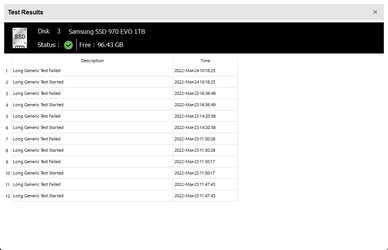
Ok I don't think it is the drive failing cause it passes all the tests.
 

Attachments

  • SeaTools_n3LetPun0L.png
    SeaTools_n3LetPun0L.png
    9.1 KB · Views: 2

My Computer My Computer

At a glance

Windows 11 ProAMD RYZEN 9 5950XG.Skill Trident Z RGB 32GB (2x16GB) DDR4-3200ASUS ROG Strix RTX 2080 Ti
OS
Windows 11 Pro
Computer type
PC/Desktop
CPU
AMD RYZEN 9 5950X
Motherboard
GIGABYTE X570 AORUS ELITE
Memory
G.Skill Trident Z RGB 32GB (2x16GB) DDR4-3200
Graphics Card(s)
ASUS ROG Strix RTX 2080 Ti
Monitor(s) Displays
ASUS ROG Swift PG279QZ 27" ASUS PB238Q 23"
Screen Resolution
2560x1440 1920x1080
Hard Drives
Samsung 970 EVO 1TB
Samsung 980 Pro 2TB
Samsung 870 EVO 1TB
Seagate Desktop HDD 4TB
Seagate IronWolf 10TB
PSU
Corsair RM 750W
Case
NZXT H710i Black
Cooling
NZXT Kraken Z63
Keyboard
Corsair K70 LUX RGB Blue
Mouse
Corsair Scimitar PRO RGB
Internet Speed
75 Mbps Up/Down
Browser
Mozilla Firefox
Antivirus
Windows Defender

My Computer My Computer

At a glance

Windows 11 ProAMD RYZEN 9 5950XG.Skill Trident Z RGB 32GB (2x16GB) DDR4-3200ASUS ROG Strix RTX 2080 Ti
OS
Windows 11 Pro
Computer type
PC/Desktop
CPU
AMD RYZEN 9 5950X
Motherboard
GIGABYTE X570 AORUS ELITE
Memory
G.Skill Trident Z RGB 32GB (2x16GB) DDR4-3200
Graphics Card(s)
ASUS ROG Strix RTX 2080 Ti
Monitor(s) Displays
ASUS ROG Swift PG279QZ 27" ASUS PB238Q 23"
Screen Resolution
2560x1440 1920x1080
Hard Drives
Samsung 970 EVO 1TB
Samsung 980 Pro 2TB
Samsung 870 EVO 1TB
Seagate Desktop HDD 4TB
Seagate IronWolf 10TB
PSU
Corsair RM 750W
Case
NZXT H710i Black
Cooling
NZXT Kraken Z63
Keyboard
Corsair K70 LUX RGB Blue
Mouse
Corsair Scimitar PRO RGB
Internet Speed
75 Mbps Up/Down
Browser
Mozilla Firefox
Antivirus
Windows Defender
The C: drive is selected
 

My Computer My Computer

At a glance

Windows 11 ProAMD RYZEN 9 5950XG.Skill Trident Z RGB 32GB (2x16GB) DDR4-3200ASUS ROG Strix RTX 2080 Ti
OS
Windows 11 Pro
Computer type
PC/Desktop
CPU
AMD RYZEN 9 5950X
Motherboard
GIGABYTE X570 AORUS ELITE
Memory
G.Skill Trident Z RGB 32GB (2x16GB) DDR4-3200
Graphics Card(s)
ASUS ROG Strix RTX 2080 Ti
Monitor(s) Displays
ASUS ROG Swift PG279QZ 27" ASUS PB238Q 23"
Screen Resolution
2560x1440 1920x1080
Hard Drives
Samsung 970 EVO 1TB
Samsung 980 Pro 2TB
Samsung 870 EVO 1TB
Seagate Desktop HDD 4TB
Seagate IronWolf 10TB
PSU
Corsair RM 750W
Case
NZXT H710i Black
Cooling
NZXT Kraken Z63
Keyboard
Corsair K70 LUX RGB Blue
Mouse
Corsair Scimitar PRO RGB
Internet Speed
75 Mbps Up/Down
Browser
Mozilla Firefox
Antivirus
Windows Defender
Ok I don't think it is the drive failing cause it passes all the tests.

It post #21 it displayed multiple long generic fails whereas the other drives all displayed pass.


Please comment on each statement/step in post #20.


Post a share link with a new V2.


Run Memtest86 (free version) for two tests of four passes each. (total eight passes)


Please make sure that images are posted into this thread.

Memtest86 also has a feature to create a text report.

Please include the text reports with the images in share links.
 

My Computer My Computer

At a glance

Windows 10Intel(R) Core(TM) i7-4800MQ CPU @ 2.70GHz16 GB Total: Manufacturer : Samsung MemoryTyp...NVIDIA Quadro K3100M; Intel(R) HD Graphics 4600
OS
Windows 10
Computer type
Laptop
Manufacturer/Model
HP
CPU
Intel(R) Core(TM) i7-4800MQ CPU @ 2.70GHz
Motherboard
Product : 190A Version : KBC Version 94.56
Memory
16 GB Total: Manufacturer : Samsung MemoryType : DDR3 FormFactor : SODIMM Capacity : 8GB Speed : 1600
Graphics Card(s)
NVIDIA Quadro K3100M; Intel(R) HD Graphics 4600
Sound Card
IDT High Definition Audio CODEC; PNP Device ID HDAUDIO\FUNC_01&VEN_111D&DEV_76E0
Hard Drives
Model Hitachi HTS727575A9E364
Antivirus
Microsoft Defender
Other Info
Mobile Workstation
I have solved my issue. So I had two sticks of memory in slots 2 4 I moved them to 1 3 which my motherboard has labeled as FIRST. My issues are completely gone.
 

My Computer My Computer

At a glance

Windows 11 ProAMD RYZEN 9 5950XG.Skill Trident Z RGB 32GB (2x16GB) DDR4-3200ASUS ROG Strix RTX 2080 Ti
OS
Windows 11 Pro
Computer type
PC/Desktop
CPU
AMD RYZEN 9 5950X
Motherboard
GIGABYTE X570 AORUS ELITE
Memory
G.Skill Trident Z RGB 32GB (2x16GB) DDR4-3200
Graphics Card(s)
ASUS ROG Strix RTX 2080 Ti
Monitor(s) Displays
ASUS ROG Swift PG279QZ 27" ASUS PB238Q 23"
Screen Resolution
2560x1440 1920x1080
Hard Drives
Samsung 970 EVO 1TB
Samsung 980 Pro 2TB
Samsung 870 EVO 1TB
Seagate Desktop HDD 4TB
Seagate IronWolf 10TB
PSU
Corsair RM 750W
Case
NZXT H710i Black
Cooling
NZXT Kraken Z63
Keyboard
Corsair K70 LUX RGB Blue
Mouse
Corsair Scimitar PRO RGB
Internet Speed
75 Mbps Up/Down
Browser
Mozilla Firefox
Antivirus
Windows Defender
That's great news.

You can mark the thread solved.

Consider monitoring the computer using Reliability Monitor for a week and post a V2 as needed.


My Computer My Computer

At a glance

Windows 10Intel(R) Core(TM) i7-4800MQ CPU @ 2.70GHz16 GB Total: Manufacturer : Samsung MemoryTyp...NVIDIA Quadro K3100M; Intel(R) HD Graphics 4600
OS
Windows 10
Computer type
Laptop
Manufacturer/Model
HP
CPU
Intel(R) Core(TM) i7-4800MQ CPU @ 2.70GHz
Motherboard
Product : 190A Version : KBC Version 94.56
Memory
16 GB Total: Manufacturer : Samsung MemoryType : DDR3 FormFactor : SODIMM Capacity : 8GB Speed : 1600
Graphics Card(s)
NVIDIA Quadro K3100M; Intel(R) HD Graphics 4600
Sound Card
IDT High Definition Audio CODEC; PNP Device ID HDAUDIO\FUNC_01&VEN_111D&DEV_76E0
Hard Drives
Model Hitachi HTS727575A9E364
Antivirus
Microsoft Defender
Other Info
Mobile Workstation

Latest Support Threads

Back
Top Bottom