

Thestrals
New member
- Local time
- 7:33 PM
- Posts
- 2
- OS
- Win 11 Home
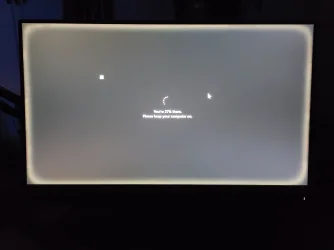
Dell 5477 AIO. I upgraded the Win 10 to Win 11 Home through Dell. I got this ghost overlay, small square, and that halo around the edge, which comes and goes. I also did a fresh install using MSWin 11 creation on a new SSD with the same issues. I ran a script and it lools like it is some overlay , but, I am stuck and not sure what to do next. See attached image and here is the log I got this am:
HWND: 131260 | Class: XamlExplorerHostIslandWindow | Title: '' | PID: 7644 (explorer) | Flags: LAYERED, TRANSPARENT, TOPMOST ?? Untitled window
HWND: 65884 | Class: Shell_TrayWnd | Title: '' | PID: 7644 (explorer) | Flags: TOPMOST ?? Suspicious class, Untitled window
HWND: 65844 | Class: ConsoleWindowClass | Title: 'Administrator: C:\WINDOWS\System32\WindowsPowerShell\v1.0\powershell.exe' | PID: 7188 (powershell) | Flags: LAYERED
HWND: 66020 | Class: DummyDWMListenerWindow | Title: '' | PID: 7644 (explorer) | Flags: ?? Suspicious class, Untitled window
HWND: 66012 | Class: EdgeUiInputTopWndClass | Title: '' | PID: 7644 (explorer) | Flags: ?? Suspicious class, Untitled window
HWND: 65996 | Class: DummyDWMListenerWindow | Title: '' | PID: 7644 (explorer) | Flags: ?? Suspicious class, Untitled window
HWND: 65994 | Class: DummyDWMListenerWindow | Title: '' | PID: 7644 (explorer) | Flags: ?? Suspicious class, Untitled window
HWND: 65992 | Class: DummyDWMListenerWindow | Title: '' | PID: 7644 (explorer) | Flags: ?? Suspicious class, Untitled window
HWND: 65990 | Class: DummyDWMListenerWindow | Title: '' | PID: 7644 (explorer) | Flags: ?? Suspicious class, Untitled window
HWND: 65942 | Class: Progman | Title: 'Program Manager' | PID: 7644 (explorer) | Flags: ?? Suspicious class
Any ideas? Thanks.
HWND: 131260 | Class: XamlExplorerHostIslandWindow | Title: '' | PID: 7644 (explorer) | Flags: LAYERED, TRANSPARENT, TOPMOST ?? Untitled window
HWND: 65884 | Class: Shell_TrayWnd | Title: '' | PID: 7644 (explorer) | Flags: TOPMOST ?? Suspicious class, Untitled window
HWND: 65844 | Class: ConsoleWindowClass | Title: 'Administrator: C:\WINDOWS\System32\WindowsPowerShell\v1.0\powershell.exe' | PID: 7188 (powershell) | Flags: LAYERED
HWND: 66020 | Class: DummyDWMListenerWindow | Title: '' | PID: 7644 (explorer) | Flags: ?? Suspicious class, Untitled window
HWND: 66012 | Class: EdgeUiInputTopWndClass | Title: '' | PID: 7644 (explorer) | Flags: ?? Suspicious class, Untitled window
HWND: 65996 | Class: DummyDWMListenerWindow | Title: '' | PID: 7644 (explorer) | Flags: ?? Suspicious class, Untitled window
HWND: 65994 | Class: DummyDWMListenerWindow | Title: '' | PID: 7644 (explorer) | Flags: ?? Suspicious class, Untitled window
HWND: 65992 | Class: DummyDWMListenerWindow | Title: '' | PID: 7644 (explorer) | Flags: ?? Suspicious class, Untitled window
HWND: 65990 | Class: DummyDWMListenerWindow | Title: '' | PID: 7644 (explorer) | Flags: ?? Suspicious class, Untitled window
HWND: 65942 | Class: Progman | Title: 'Program Manager' | PID: 7644 (explorer) | Flags: ?? Suspicious class
Any ideas? Thanks.
Attachments
My Computer
At a glance
Win 11 Homei3-8100T 3.1mhz8GB
- OS
- Win 11 Home
- Computer type
- PC/Desktop
- Manufacturer/Model
- Dell 5477 AIO
- CPU
- i3-8100T 3.1mhz
- Motherboard
- Dell
- Memory
- 8GB
- Hard Drives
- Intel SSDSC2KW480H6
- Internet Speed
- 1gig
- Browser
- Chrome
- Antivirus
- Norton 360






