Has anyone found a way to disable Windows Defender in Windows 11 ?


It disabled Microsoft Defender Antivirus in the Windows Security app at the time the tutorial was created.
Ok. That doesn't work for me. The two applications that remain continuously running in the background in W11 Home 21H2 are:
MsMpEng.exe
MsMpEngCP.exe

Additionally, I don't want to have to go to the Group Policy Editor (which doesn't natively exist in Windows Home) each time I want to enable it. This is why I liked using Defender Control v2.0. You can enable and disable it completely on demand, until it became broken after reinstalling Windows.
 

My Computer My Computer

At a glance

Windows 11NVIDA 1650 Ti
OS
Windows 11
Computer type
Laptop
Manufacturer/Model
Lenovo
Graphics Card(s)
NVIDA 1650 Ti
Monitor(s) Displays
Lenovo C32q-20
I just disabled it :ROFLMAO:
 

My Computer My Computer

At a glance

Windows 11 Pro Beta, 11 Dev, W11 CanaryAMD Ryzen™ 9 5900HX32GBNVIDIA® GeForce RTX™ 3070 8GB GDDR6
OS
Windows 11 Pro Beta, 11 Dev, W11 Canary
Computer type
Laptop
Manufacturer/Model
Dell Alienware M15 Ryzen Edition R6
CPU
AMD Ryzen™ 9 5900HX
Memory
32GB
Graphics Card(s)
NVIDIA® GeForce RTX™ 3070 8GB GDDR6
Hard Drives
1 x Samsung 980 Pro 1TB
1 x Samsung 970 Evo Plus 1TB
I am running Windows 11 Version 21H2 Build 22000.527.
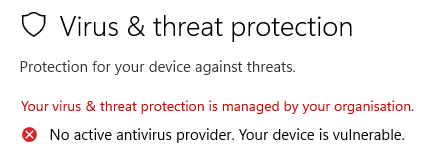
This is what I get when I disable Windows Defender using Sordum Defender Control.

Virus & Threat Protection.png

It appears to completely disable it for me and never bothers me anymore and no more intensive resource usage.
I am baffled why some of you are saying that it doesn't work.

In the past I've used registry edits and removing services and files, but this is such a simple and effective fix.

If you have Sordum Defender Control sitting on your C: Drive, you have to ensure that it has full control permissions.
Save it in a sub-folder and the give the sub-folder full control permissions. Make sure there isn't another copy in another location.
 

My Computers My Computers

  • At a glance

    Windows 11 ProIntel Core i9-10900XCorsair 64 GB (4 x 16 GB) CMW64GX4M4C3000C15 ...GIGABYTE GeForce GTX 1660 Super Mini ITX 6 GB OC
    OS
    Windows 11 Pro
    Computer type
    PC/Desktop
    Manufacturer/Model
    Stigg's Build
    CPU
    Intel Core i9-10900X
    Motherboard
    GIGABYTE X299X DESIGNARE 10G
    Memory
    Corsair 64 GB (4 x 16 GB) CMW64GX4M4C3000C15 Vengeance RGB Pro 3000Mhz DDR4
    Graphics Card(s)
    GIGABYTE GeForce GTX 1660 Super Mini ITX 6 GB OC
    Sound Card
    Realtek ALC1220
    Monitor(s) Displays
    Samsung 27" FHD LED FreeSync Gaming Monitor (LS27F350FHEXXY)
    Screen Resolution
    1920 x 1080
    Hard Drives
    Samsung 970 Pro Series 1TB M.2 2280 NVMe SSD
    Western Digital Red Pro WD8003FFBX-68B9AN0 8 TB, 7200 RPM, SATA-III
    Western Digital Red Pro WD8003FFBX-68B9AN0 8 TB, 7200 RPM, SATA-III
    PSU
    Corsair HX1200 1200W 80 Plus Platinum
    Case
    Fractal Design Define 7 Black Solid Case
    Cooling
    Noctua NH-D15 Chromax Black
    Keyboard
    Razer Ornata V2
    Mouse
    Razer DeathAdder Essential
    Internet Speed
    FTTN 100Mbps / 40Mbps
    Browser
    Mozilla Firefox
    Antivirus
    N/A
    Other Info
    Logitech BRIO 4k Ultra HD USB-C Webcam
  • At a glance

    Windows 10 ProCore i7-8750HSK Hynix 32 GB (2 x 16 GB) HMA82GS6CJR8N-VK 1...NVIDIA GeForce GTX 1070
    Operating System
    Windows 10 Pro
    Computer type
    Laptop
    Manufacturer/Model
    ASUS ROG Zephyrus M GM501GS
    CPU
    Core i7-8750H
    Motherboard
    Zephyrus M GM501GS
    Memory
    SK Hynix 32 GB (2 x 16 GB) HMA82GS6CJR8N-VK 16 GB DDR4-2666 DDR4 SDRAM
    Graphics card(s)
    NVIDIA GeForce GTX 1070
    Sound Card
    Realtek ALC294
    Monitor(s) Displays
    AU Optronics B156HAN07.1 [15.6" LCD]
    Screen Resolution
    1920 x 1080
    Hard Drives
    Samsung MZVKW512HMJP-00000 512 GB, PCI-E 3.0 x4
    Samsung SSD 860 QVO 4TB 4 TB, SATA-III
    PSU
    N/A
    Case
    N/A
    Cooling
    N/A
    Keyboard
    PC/AT Enhanced PS2 Keyboard (101/102-Key)
    Mouse
    Razer DeathAdder Essential
    Internet Speed
    FTTN 100Mbps / 40Mbps
    Browser
    Mozilla Firefox
    Antivirus
    N/A
    Other Info
    USB2.0 HD UVC Webcam
Is there a bat file for this and a reversal too?

Could it be because your're using Windows 11 Pro and not Home?

I noticed that many existing features (mods) continue to work after upgrading from W10 to W11 but won't necessarily work with a clean installation of W11?
I'm using a fresh install of Windows 11 Pro
 

My Computers My Computers

  • At a glance

    Windows 11 Pro x64 24H2 v26200.5074AMD Ryzen 9 3600X 12-Core @ 3.80GHzCorsair 32GB DDR4EVGA GeForce gtx 1660 Super
    OS
    Windows 11 Pro x64 24H2 v26200.5074
    Computer type
    PC/Desktop
    Manufacturer/Model
    Built Myself in 2025
    CPU
    AMD Ryzen 9 3600X 12-Core @ 3.80GHz
    Motherboard
    MSI X570 Gaming Plus
    Memory
    Corsair 32GB DDR4
    Graphics Card(s)
    EVGA GeForce gtx 1660 Super
    Sound Card
    On Board
    Monitor(s) Displays
    2 X AOC 27" , Dell 27"
    Screen Resolution
    1920 X 1080
    Hard Drives
    ~~~~~~~~~~~~~~~~~~~~~~~~~~
    ~ P34A60 512GB NVMe PCIe Gen3x4 M.2
    ~ 6TB Toshiba HDD
    ~ 6TB HDD (Backup)
    ~ SanDisk 250GB SSD
    ~ 2 X 1TB HDD
    ~~~~~~~~~~
    PSU
    eVGA 750w G+
    Case
    GAMDIAS White ATX Mid Tower Gaming Computer PC Case w/Tempered Glass
    Cooling
    AMD Wraith Prism
    Keyboard
    Nulea RT05 Wireless Ergonomic
    Mouse
    Nulea MD280 Wireless Vertical Mouse
    Internet Speed
    761Mbps (Download) / 692Mbps (Upload)
    Browser
    Firefox
    Antivirus
    Malwarebytes
    Other Info
    *This is my Main Computer That I use*
  • At a glance

    Windows 11 Pro x64 24H2 v26100.2894AMD Ryzen 7 1800X @ 3.60Ghz16GBAMD RX580
    Operating System
    Windows 11 Pro x64 24H2 v26100.2894
    Computer type
    PC/Desktop
    CPU
    AMD Ryzen 7 1800X @ 3.60Ghz
    Motherboard
    Asus Crosshair VI Hero
    Memory
    16GB
    Graphics card(s)
    AMD RX580
    Sound Card
    onBoard
    Monitor(s) Displays
    LG 27UK650-W 27", eMachine 22"
    Screen Resolution
    1920 X 1080
    Hard Drives
    250GB SSD
    PSU
    CORSAIR RM850
    Case
    GAMDIAS Black ATX Mid Tower Gaming Computer PC Case w/Tempered Glass
    Cooling
    Liquid
    Keyboard
    Nulea RT05 Wireless Ergonomic
    Mouse
    Nulea MD280 Wireless Vertical Mouse
    Internet Speed
    752Mbps (Download) / 537Mbps (Upload)
    Browser
    Firefox
    Antivirus
    Malwarebytes
    Other Info
    I use this computer for photo/video editing and to track severe weather
Sordum Defender Control is still working for me.
You can turn off Windows Defender by using the Group Policy Editor (Windows Pro). I don't think Windows Home as GPEditor
 

My Computers My Computers

  • At a glance

    Windows 11 Pro x64 24H2 v26200.5074AMD Ryzen 9 3600X 12-Core @ 3.80GHzCorsair 32GB DDR4EVGA GeForce gtx 1660 Super
    OS
    Windows 11 Pro x64 24H2 v26200.5074
    Computer type
    PC/Desktop
    Manufacturer/Model
    Built Myself in 2025
    CPU
    AMD Ryzen 9 3600X 12-Core @ 3.80GHz
    Motherboard
    MSI X570 Gaming Plus
    Memory
    Corsair 32GB DDR4
    Graphics Card(s)
    EVGA GeForce gtx 1660 Super
    Sound Card
    On Board
    Monitor(s) Displays
    2 X AOC 27" , Dell 27"
    Screen Resolution
    1920 X 1080
    Hard Drives
    ~~~~~~~~~~~~~~~~~~~~~~~~~~
    ~ P34A60 512GB NVMe PCIe Gen3x4 M.2
    ~ 6TB Toshiba HDD
    ~ 6TB HDD (Backup)
    ~ SanDisk 250GB SSD
    ~ 2 X 1TB HDD
    ~~~~~~~~~~
    PSU
    eVGA 750w G+
    Case
    GAMDIAS White ATX Mid Tower Gaming Computer PC Case w/Tempered Glass
    Cooling
    AMD Wraith Prism
    Keyboard
    Nulea RT05 Wireless Ergonomic
    Mouse
    Nulea MD280 Wireless Vertical Mouse
    Internet Speed
    761Mbps (Download) / 692Mbps (Upload)
    Browser
    Firefox
    Antivirus
    Malwarebytes
    Other Info
    *This is my Main Computer That I use*
  • At a glance

    Windows 11 Pro x64 24H2 v26100.2894AMD Ryzen 7 1800X @ 3.60Ghz16GBAMD RX580
    Operating System
    Windows 11 Pro x64 24H2 v26100.2894
    Computer type
    PC/Desktop
    CPU
    AMD Ryzen 7 1800X @ 3.60Ghz
    Motherboard
    Asus Crosshair VI Hero
    Memory
    16GB
    Graphics card(s)
    AMD RX580
    Sound Card
    onBoard
    Monitor(s) Displays
    LG 27UK650-W 27", eMachine 22"
    Screen Resolution
    1920 X 1080
    Hard Drives
    250GB SSD
    PSU
    CORSAIR RM850
    Case
    GAMDIAS Black ATX Mid Tower Gaming Computer PC Case w/Tempered Glass
    Cooling
    Liquid
    Keyboard
    Nulea RT05 Wireless Ergonomic
    Mouse
    Nulea MD280 Wireless Vertical Mouse
    Internet Speed
    752Mbps (Download) / 537Mbps (Upload)
    Browser
    Firefox
    Antivirus
    Malwarebytes
    Other Info
    I use this computer for photo/video editing and to track severe weather
I am running Windows 11 Version 21H2 Build 22000.527.
I am baffled why some of you are saying that it doesn't work.

I have the same build and the same Sordum Defender Control, and it no longer works. Maybe I have a newer version of Defender than you. Here's what the Sordum site has to say (and this appeared after the last Defender update):
warning.png
 

My Computers My Computers

  • At a glance

    11 Pro 24H2 26100.2454i7-9700 @ 3.00GHz32GBDDR4 @ 2666MHzIntel HD 630 Graphics onboard
    OS
    11 Pro 24H2 26100.2454
    Computer type
    PC/Desktop
    Manufacturer/Model
    Lenovo ThinkCentre M920S SFF
    CPU
    i7-9700 @ 3.00GHz
    Motherboard
    Lenovo 3132
    Memory
    32GBDDR4 @ 2666MHz
    Graphics Card(s)
    Intel HD 630 Graphics onboard
    Sound Card
    Realtek HD Audio
    Monitor(s) Displays
    LG E2442
    Screen Resolution
    1920x1080
    Hard Drives
    1 x Samsung 970 EVO PLUS 500GB NVMe SSD, 1 x WD_BLACK SN770
    250GB NVMe SSD (OS and programs), 1 x WD_BLACK SN770
    500GB NVMe SSD (Data)
    Case
    Lenovo SFF
    Keyboard
    Cherry Stream TKL JK-8600US-2 Wired
    Mouse
    LogiTech M510 wireless
    Internet Speed
    Fast (for fixed wireless!)
    Browser
    Chrome, sometimes Firefox
    Antivirus
    Malwarebytes Premium & Defender (working together beautifully!)
  • At a glance

    11 Pro 24H2 26100.2454i5-8400 @ 2.80GHz32GB DDR4 @ 2600MHzIntel HD 630 Graphics onboard
    Operating System
    11 Pro 24H2 26100.2454
    Computer type
    PC/Desktop
    Manufacturer/Model
    Lenovo ThinkCentre M920S SFF
    CPU
    i5-8400 @ 2.80GHz
    Motherboard
    Lenovo 3132
    Memory
    32GB DDR4 @ 2600MHz
    Graphics card(s)
    Intel HD 630 Graphics onboard
    Sound Card
    Realtek High Definition Audio onboard
    Monitor(s) Displays
    LG FULL HD (1920x1080@59Hz)
    Screen Resolution
    1920 x 1080
    Hard Drives
    1 x Samsung 970 EVO PLUS NVMe; 1 x Samsung 980 NVMe SSD
    Case
    Lenovo Think Centre SFF
    Keyboard
    Cherry Stream TKL JK-8600US-2 Wired
    Mouse
    LogiTech M510 wireless
    Internet Speed
    Fast (for fixed wireless!)
    Browser
    Chrome
    Antivirus
    Malwarebytes Premium and MS Defender, beautiful together
I have the same build and the same Sordum Defender Control, and it no longer works. Maybe I have a newer version of Defender than you. Here's what the Sordum site has to say (and this appeared after the last Defender update):
View attachment 22848
Hi Wisewiz.

Mine is still working.
Did you try what danrevella posted in the comments section? 👇
For me it does work in this fashion:
1) Go to settings windows defender and turn off potentially unwanted application (PUA).
2) Restart your computer and run defender control, it will disable Windows defender.
 

My Computers My Computers

  • At a glance

    Windows 11 ProIntel Core i9-10900XCorsair 64 GB (4 x 16 GB) CMW64GX4M4C3000C15 ...GIGABYTE GeForce GTX 1660 Super Mini ITX 6 GB OC
    OS
    Windows 11 Pro
    Computer type
    PC/Desktop
    Manufacturer/Model
    Stigg's Build
    CPU
    Intel Core i9-10900X
    Motherboard
    GIGABYTE X299X DESIGNARE 10G
    Memory
    Corsair 64 GB (4 x 16 GB) CMW64GX4M4C3000C15 Vengeance RGB Pro 3000Mhz DDR4
    Graphics Card(s)
    GIGABYTE GeForce GTX 1660 Super Mini ITX 6 GB OC
    Sound Card
    Realtek ALC1220
    Monitor(s) Displays
    Samsung 27" FHD LED FreeSync Gaming Monitor (LS27F350FHEXXY)
    Screen Resolution
    1920 x 1080
    Hard Drives
    Samsung 970 Pro Series 1TB M.2 2280 NVMe SSD
    Western Digital Red Pro WD8003FFBX-68B9AN0 8 TB, 7200 RPM, SATA-III
    Western Digital Red Pro WD8003FFBX-68B9AN0 8 TB, 7200 RPM, SATA-III
    PSU
    Corsair HX1200 1200W 80 Plus Platinum
    Case
    Fractal Design Define 7 Black Solid Case
    Cooling
    Noctua NH-D15 Chromax Black
    Keyboard
    Razer Ornata V2
    Mouse
    Razer DeathAdder Essential
    Internet Speed
    FTTN 100Mbps / 40Mbps
    Browser
    Mozilla Firefox
    Antivirus
    N/A
    Other Info
    Logitech BRIO 4k Ultra HD USB-C Webcam
  • At a glance

    Windows 10 ProCore i7-8750HSK Hynix 32 GB (2 x 16 GB) HMA82GS6CJR8N-VK 1...NVIDIA GeForce GTX 1070
    Operating System
    Windows 10 Pro
    Computer type
    Laptop
    Manufacturer/Model
    ASUS ROG Zephyrus M GM501GS
    CPU
    Core i7-8750H
    Motherboard
    Zephyrus M GM501GS
    Memory
    SK Hynix 32 GB (2 x 16 GB) HMA82GS6CJR8N-VK 16 GB DDR4-2666 DDR4 SDRAM
    Graphics card(s)
    NVIDIA GeForce GTX 1070
    Sound Card
    Realtek ALC294
    Monitor(s) Displays
    AU Optronics B156HAN07.1 [15.6" LCD]
    Screen Resolution
    1920 x 1080
    Hard Drives
    Samsung MZVKW512HMJP-00000 512 GB, PCI-E 3.0 x4
    Samsung SSD 860 QVO 4TB 4 TB, SATA-III
    PSU
    N/A
    Case
    N/A
    Cooling
    N/A
    Keyboard
    PC/AT Enhanced PS2 Keyboard (101/102-Key)
    Mouse
    Razer DeathAdder Essential
    Internet Speed
    FTTN 100Mbps / 40Mbps
    Browser
    Mozilla Firefox
    Antivirus
    N/A
    Other Info
    USB2.0 HD UVC Webcam
I have permanently disabled Defender in both win 10 and 11 with the use of Take Ownership utility, safe boot and in Win 11 pro gpedit.msc.
It has never ever come back and I have deleted all the folders too other than c\program files\windows defender where only 2 dll's would not go but I have renamed them also used autorun organiser excellent program.
 

My Computer My Computer

At a glance

Windows 11
OS
Windows 11
It was just pure experimentation and general there must be away it does involve repetition but it has not let me down but in all honesty I will be typing for ever if I fully run through it and life a bit short at 70plus for that guys !!
It has worked as I said in both Win 10 and 11 and to be fair that last folder can be deleted again in Safe Mode but yawn there's more to life !!
Bye............

Thanks.
 

My Computer My Computer

At a glance

Windows 11
OS
Windows 11
Hi Wisewiz.

Mine is still working.
Did you try what danrevella posted in the comments section? 👇
@Stigg : No need. The Sordum people in Germany re-worked it and released v 2.1 yesterday. Once you get through all of the unzipping and use the password Sordum has provided on the site to get to the final naked files, you can replace the exe and ini in your Program Files (x86)\Defender Control folder with those for 2.1, and it's all joy from there on out.

I did find that I had to restart Windows to get the Defender icon back in the tray after using the utility to disable and then re-enable Defender, but no hiccups aside from that.

Works perfectly, and lets me use Disk Cleanup to wipe the ever-growing pile of files Defender stores.

Clipboard01.jpg
 

My Computers My Computers

  • At a glance

    11 Pro 24H2 26100.2454i7-9700 @ 3.00GHz32GBDDR4 @ 2666MHzIntel HD 630 Graphics onboard
    OS
    11 Pro 24H2 26100.2454
    Computer type
    PC/Desktop
    Manufacturer/Model
    Lenovo ThinkCentre M920S SFF
    CPU
    i7-9700 @ 3.00GHz
    Motherboard
    Lenovo 3132
    Memory
    32GBDDR4 @ 2666MHz
    Graphics Card(s)
    Intel HD 630 Graphics onboard
    Sound Card
    Realtek HD Audio
    Monitor(s) Displays
    LG E2442
    Screen Resolution
    1920x1080
    Hard Drives
    1 x Samsung 970 EVO PLUS 500GB NVMe SSD, 1 x WD_BLACK SN770
    250GB NVMe SSD (OS and programs), 1 x WD_BLACK SN770
    500GB NVMe SSD (Data)
    Case
    Lenovo SFF
    Keyboard
    Cherry Stream TKL JK-8600US-2 Wired
    Mouse
    LogiTech M510 wireless
    Internet Speed
    Fast (for fixed wireless!)
    Browser
    Chrome, sometimes Firefox
    Antivirus
    Malwarebytes Premium & Defender (working together beautifully!)
  • At a glance

    11 Pro 24H2 26100.2454i5-8400 @ 2.80GHz32GB DDR4 @ 2600MHzIntel HD 630 Graphics onboard
    Operating System
    11 Pro 24H2 26100.2454
    Computer type
    PC/Desktop
    Manufacturer/Model
    Lenovo ThinkCentre M920S SFF
    CPU
    i5-8400 @ 2.80GHz
    Motherboard
    Lenovo 3132
    Memory
    32GB DDR4 @ 2600MHz
    Graphics card(s)
    Intel HD 630 Graphics onboard
    Sound Card
    Realtek High Definition Audio onboard
    Monitor(s) Displays
    LG FULL HD (1920x1080@59Hz)
    Screen Resolution
    1920 x 1080
    Hard Drives
    1 x Samsung 970 EVO PLUS NVMe; 1 x Samsung 980 NVMe SSD
    Case
    Lenovo Think Centre SFF
    Keyboard
    Cherry Stream TKL JK-8600US-2 Wired
    Mouse
    LogiTech M510 wireless
    Internet Speed
    Fast (for fixed wireless!)
    Browser
    Chrome
    Antivirus
    Malwarebytes Premium and MS Defender, beautiful together
No need to use any proprietary software.
Restart in safe mode and rename the files within these folders:
%Programfiles%\windows defender
%Programfiles%\Windows Defender Advanced Threat Protection
%Programfiles% (x86)\Windows Defender
%ProgramData%\Microsoft\Windows Defender
%ProgramData%\Microsoft\Windows Defender\Platform
%ProgramData%\Microsoft\Windows Defender Advanced Threat Protection

regedit, set the key "Start" to 4 in all these:
SYSTEM\CurrentControlSet\Services\WdBoot
SYSTEM\CurrentControlSet\Services\WdFilter
SYSTEM\CurrentControlSet\Services\WdNisDrv
SYSTEM\CurrentControlSet\Services\WdNisSvc
SYSTEM\CurrentControlSet\Services\WinDefend
SYSTEM\CurrentControlSet\Services\wscsvc
SYSTEM\CurrentControlSet\Services\SecurityHealthService
SYSTEM\CurrentControlSet\Services\Sense
SYSTEM\ControlSet001\Services\WinDefend

some may require take you take ownership of the registry, i think it only this one:
SYSTEM\CurrentControlSet\Services\WinDefend

Restart the pc in safe mode - AGAIN
do everything again
 

My Computer My Computer

At a glance

W11I7 6700K2X 8GB FURYXRTX 2060 SUPER
OS
W11
Computer type
PC/Desktop
CPU
I7 6700K
Motherboard
ASUS Z170
Memory
2X 8GB FURYX
Graphics Card(s)
RTX 2060 SUPER
Monitor(s) Displays
ACER X34
PSU
CORSAIR RM 750X
Cooling
GENERIC TOWER
Keyboard
RAZER ORNATA CHROMA
Mouse
LOGITEC PRO WIRELESS
No need to use any proprietary software.
Restart in safe mode and rename the files within these folders:
%Programfiles%\windows defender
%Programfiles%\Windows Defender Advanced Threat Protection
%Programfiles% (x86)\Windows Defender
%ProgramData%\Microsoft\Windows Defender
%ProgramData%\Microsoft\Windows Defender\Platform
%ProgramData%\Microsoft\Windows Defender Advanced Threat Protection
That's a lot of file renaming to do inside those folders.
Could you not simply just rename the folders?
 

My Computers My Computers

  • At a glance

    Windows 11 ProIntel Core i9-10900XCorsair 64 GB (4 x 16 GB) CMW64GX4M4C3000C15 ...GIGABYTE GeForce GTX 1660 Super Mini ITX 6 GB OC
    OS
    Windows 11 Pro
    Computer type
    PC/Desktop
    Manufacturer/Model
    Stigg's Build
    CPU
    Intel Core i9-10900X
    Motherboard
    GIGABYTE X299X DESIGNARE 10G
    Memory
    Corsair 64 GB (4 x 16 GB) CMW64GX4M4C3000C15 Vengeance RGB Pro 3000Mhz DDR4
    Graphics Card(s)
    GIGABYTE GeForce GTX 1660 Super Mini ITX 6 GB OC
    Sound Card
    Realtek ALC1220
    Monitor(s) Displays
    Samsung 27" FHD LED FreeSync Gaming Monitor (LS27F350FHEXXY)
    Screen Resolution
    1920 x 1080
    Hard Drives
    Samsung 970 Pro Series 1TB M.2 2280 NVMe SSD
    Western Digital Red Pro WD8003FFBX-68B9AN0 8 TB, 7200 RPM, SATA-III
    Western Digital Red Pro WD8003FFBX-68B9AN0 8 TB, 7200 RPM, SATA-III
    PSU
    Corsair HX1200 1200W 80 Plus Platinum
    Case
    Fractal Design Define 7 Black Solid Case
    Cooling
    Noctua NH-D15 Chromax Black
    Keyboard
    Razer Ornata V2
    Mouse
    Razer DeathAdder Essential
    Internet Speed
    FTTN 100Mbps / 40Mbps
    Browser
    Mozilla Firefox
    Antivirus
    N/A
    Other Info
    Logitech BRIO 4k Ultra HD USB-C Webcam
  • At a glance

    Windows 10 ProCore i7-8750HSK Hynix 32 GB (2 x 16 GB) HMA82GS6CJR8N-VK 1...NVIDIA GeForce GTX 1070
    Operating System
    Windows 10 Pro
    Computer type
    Laptop
    Manufacturer/Model
    ASUS ROG Zephyrus M GM501GS
    CPU
    Core i7-8750H
    Motherboard
    Zephyrus M GM501GS
    Memory
    SK Hynix 32 GB (2 x 16 GB) HMA82GS6CJR8N-VK 16 GB DDR4-2666 DDR4 SDRAM
    Graphics card(s)
    NVIDIA GeForce GTX 1070
    Sound Card
    Realtek ALC294
    Monitor(s) Displays
    AU Optronics B156HAN07.1 [15.6" LCD]
    Screen Resolution
    1920 x 1080
    Hard Drives
    Samsung MZVKW512HMJP-00000 512 GB, PCI-E 3.0 x4
    Samsung SSD 860 QVO 4TB 4 TB, SATA-III
    PSU
    N/A
    Case
    N/A
    Cooling
    N/A
    Keyboard
    PC/AT Enhanced PS2 Keyboard (101/102-Key)
    Mouse
    Razer DeathAdder Essential
    Internet Speed
    FTTN 100Mbps / 40Mbps
    Browser
    Mozilla Firefox
    Antivirus
    N/A
    Other Info
    USB2.0 HD UVC Webcam
That's a lot of file renaming to do inside those folders.
Could you not simply just rename the folders?
No, specially on the first pass there will always be some files locking most folders. Renaming the files will break several defender modules and kernel-level drivers until it wont work anymore but will not break the OS. Microsoft design it to be impossible for the user to disable, even with another AV running, the defender will still consume several cpu and disk cycles.
My method is probably the only one that complete removes defender, even the kernel-level drivers.
 

My Computer My Computer

At a glance

W11I7 6700K2X 8GB FURYXRTX 2060 SUPER
OS
W11
Computer type
PC/Desktop
CPU
I7 6700K
Motherboard
ASUS Z170
Memory
2X 8GB FURYX
Graphics Card(s)
RTX 2060 SUPER
Monitor(s) Displays
ACER X34
PSU
CORSAIR RM 750X
Cooling
GENERIC TOWER
Keyboard
RAZER ORNATA CHROMA
Mouse
LOGITEC PRO WIRELESS
No, specially on the first pass there will always be some files locking most folders. Renaming the files will break several defender modules and kernel-level drivers until it wont work anymore but will not break the OS. Microsoft design it to be impossible for the user to disable, even with another AV running, the defender will still consume several cpu and disk cycles.
My method is probably the only one that complete removes defender, even the kernel-level drivers.
I used to manually disable it a while back.

I'd delete all the Services and loading points in the Registry and scheduled tasks.
I think I may have even documented it myself on the Windows 10 Forums, but Sordum Defender Control made me lazy.

Where I really found the need to disable it was on older computers that I used to work on.
For some reason, it can be a HUGE resource hog on some older computers.
The only solution I found to make them usable was to disable it.
 

My Computers My Computers

  • At a glance

    Windows 11 ProIntel Core i9-10900XCorsair 64 GB (4 x 16 GB) CMW64GX4M4C3000C15 ...GIGABYTE GeForce GTX 1660 Super Mini ITX 6 GB OC
    OS
    Windows 11 Pro
    Computer type
    PC/Desktop
    Manufacturer/Model
    Stigg's Build
    CPU
    Intel Core i9-10900X
    Motherboard
    GIGABYTE X299X DESIGNARE 10G
    Memory
    Corsair 64 GB (4 x 16 GB) CMW64GX4M4C3000C15 Vengeance RGB Pro 3000Mhz DDR4
    Graphics Card(s)
    GIGABYTE GeForce GTX 1660 Super Mini ITX 6 GB OC
    Sound Card
    Realtek ALC1220
    Monitor(s) Displays
    Samsung 27" FHD LED FreeSync Gaming Monitor (LS27F350FHEXXY)
    Screen Resolution
    1920 x 1080
    Hard Drives
    Samsung 970 Pro Series 1TB M.2 2280 NVMe SSD
    Western Digital Red Pro WD8003FFBX-68B9AN0 8 TB, 7200 RPM, SATA-III
    Western Digital Red Pro WD8003FFBX-68B9AN0 8 TB, 7200 RPM, SATA-III
    PSU
    Corsair HX1200 1200W 80 Plus Platinum
    Case
    Fractal Design Define 7 Black Solid Case
    Cooling
    Noctua NH-D15 Chromax Black
    Keyboard
    Razer Ornata V2
    Mouse
    Razer DeathAdder Essential
    Internet Speed
    FTTN 100Mbps / 40Mbps
    Browser
    Mozilla Firefox
    Antivirus
    N/A
    Other Info
    Logitech BRIO 4k Ultra HD USB-C Webcam
  • At a glance

    Windows 10 ProCore i7-8750HSK Hynix 32 GB (2 x 16 GB) HMA82GS6CJR8N-VK 1...NVIDIA GeForce GTX 1070
    Operating System
    Windows 10 Pro
    Computer type
    Laptop
    Manufacturer/Model
    ASUS ROG Zephyrus M GM501GS
    CPU
    Core i7-8750H
    Motherboard
    Zephyrus M GM501GS
    Memory
    SK Hynix 32 GB (2 x 16 GB) HMA82GS6CJR8N-VK 16 GB DDR4-2666 DDR4 SDRAM
    Graphics card(s)
    NVIDIA GeForce GTX 1070
    Sound Card
    Realtek ALC294
    Monitor(s) Displays
    AU Optronics B156HAN07.1 [15.6" LCD]
    Screen Resolution
    1920 x 1080
    Hard Drives
    Samsung MZVKW512HMJP-00000 512 GB, PCI-E 3.0 x4
    Samsung SSD 860 QVO 4TB 4 TB, SATA-III
    PSU
    N/A
    Case
    N/A
    Cooling
    N/A
    Keyboard
    PC/AT Enhanced PS2 Keyboard (101/102-Key)
    Mouse
    Razer DeathAdder Essential
    Internet Speed
    FTTN 100Mbps / 40Mbps
    Browser
    Mozilla Firefox
    Antivirus
    N/A
    Other Info
    USB2.0 HD UVC Webcam
@Stigg : No need. The Sordum people in Germany re-worked it and released v 2.1 yesterday. Once you get through all of the unzipping and use the password Sordum has provided on the site to get to the final naked files, you can replace the exe and ini in your Program Files (x86)\Defender Control folder with those for 2.1, and it's all joy from there on out.

I did find that I had to restart Windows to get the Defender icon back in the tray after using the utility to disable and then re-enable Defender, but no hiccups aside from that.

Works perfectly, and lets me use Disk Cleanup to wipe the ever-growing pile of files Defender stores.

View attachment 23391
I can confirm this works; however, my PC randomly behaves "weird" after I enabled it.

For instance, when I restarted my PC, I had an odd screen come up instead of my desktop after I entered my PIN. It took a long time to appear when normally it's almost instant to get to my desktip. The screen can be described similar to the old W10 widget screen showing apps like Office, Edge, and more. In my case, I have those Windows Store apps uninstalled and the icon shouldn't appear. I went ahead and disabled and uninstalled WD 2.1 and performed a restore point which seemed to fix the problem.

I installed it again earlier today and my PC lost it's Ethernet connection, and it returned on its own after I disabled WD 2.1 (enabled Windows Defender).

I suspect Windows Defender in W11 is similar to Microsoft Edge WebView2, and it needs to be enabled and running all the time.
 

My Computer My Computer

At a glance

Windows 11NVIDA 1650 Ti
OS
Windows 11
Computer type
Laptop
Manufacturer/Model
Lenovo
Graphics Card(s)
NVIDA 1650 Ti
Monitor(s) Displays
Lenovo C32q-20
Restart in safe mode and rename the files within these folders:
That is a bit streching it, it might result in BSOD Critical Process/Service died.
SYSTEM\CurrentControlSet\Services\Sense
This service no longer exists on 11.
SYSTEM\CurrentControlSet\Services\wscsvc
SYSTEM\CurrentControlSet\Services\SecurityHealthService
This will disable security center and notification center. It has nothing to do with Defender.
SYSTEM\CurrentControlSet\Services\WdBoot
Disabling WdBoot.sys and WdFilter.sys is not necessary, they will stop automatically, Windows is touchy if drivers are disabled.
 
Last edited:

My Computer My Computer

At a glance

Home26H2CanAMD Ryzen 5 8600G (07/24)2x32GB Kingston FURY DDR5 5600 MHz CL36 @5200...ASROCK Radeon RX 6600 Challenger D 8G @48FPS ...
OS
Home26H2Can
Computer type
PC/Desktop
CPU
AMD Ryzen 5 8600G (07/24)
Motherboard
ASROCK B650M-HDV/M.2 (07/24) BIOS 4.21 AGESA ComboAM5 1.3.0.1 (04/26)
Memory
2x32GB Kingston FURY DDR5 5600 MHz CL36 @5200 CL36 (07/24)
Graphics Card(s)
ASROCK Radeon RX 6600 Challenger D 8G @48FPS (08/24)
Sound Card
Creative Sound BlasterX AE-5 Plus (05/24)
Monitor(s) Displays
24" Philips 24M1N3200ZS/00 (05/24)
Screen Resolution
1920×1080@165Hz via DP1.4
Hard Drives
Kingston KC3000 NVMe 2TB (05/24)
ADATA XPG GAMMIX S11 Pro 512GB (07/19)
PSU
Seasonic Core GM 550 Gold (04/24)
Case
Fractal Design Define 7 Mini with 3x Noctua NF-P14s/12@555rpm (04/24)
Cooling
Noctua NH-U12S with Noctua NF-P12 (04/24)
Keyboard
HP Pavilion Wired Keyboard 300 (07/24) + Rabalux 76017 Parker (01/24)
Mouse
Logitech M330 Silent Plus (01/26)
Internet Speed
500/100 Mbps via RouterOS (05/21) & TCP Optimizer
Browser
Edge, Brave for YouTube, LibreWolf for FB
Antivirus
NextDNS blocking 1/3 Traffic
Other Info
Phone: Motorola Moto G86 (02/26)
Backup: Hasleo Backup Suite (PreOS)
Headphones: Sennheiser RS170 (09/10)
Chair: Huzaro Force 4.4 Grey Mesh (05/24)
Notifier: Xiaomi Mi Band 9 Milanese (10/24)
FlexCore USB-C 3.2 Gen 1 (M) to LAN (F) (08/25)
No need to use any proprietary software.
Restart in safe mode and rename the files within these folders:
%Programfiles%\windows defender
%Programfiles%\Windows Defender Advanced Threat Protection
%Programfiles% (x86)\Windows Defender
%ProgramData%\Microsoft\Windows Defender
%ProgramData%\Microsoft\Windows Defender\Platform
%ProgramData%\Microsoft\Windows Defender Advanced Threat Protection

regedit, set the key "Start" to 4 in all these:
SYSTEM\CurrentControlSet\Services\WdBoot
SYSTEM\CurrentControlSet\Services\WdFilter
SYSTEM\CurrentControlSet\Services\WdNisDrv
SYSTEM\CurrentControlSet\Services\WdNisSvc
SYSTEM\CurrentControlSet\Services\WinDefend
SYSTEM\CurrentControlSet\Services\wscsvc
SYSTEM\CurrentControlSet\Services\SecurityHealthService
SYSTEM\CurrentControlSet\Services\Sense
SYSTEM\ControlSet001\Services\WinDefend

some may require take you take ownership of the registry, i think it only this one:
SYSTEM\CurrentControlSet\Services\WinDefend

Restart the pc in safe mode - AGAIN
do everything again
This actually works, but I did not rename anything just set the regedit keys to 4.
Finally no more windows defender uselessly slamming my hard drives. I actually got a popup in the notification center telling me to turn defender back on so you know it works. I wish I would have screenshotted it.
 

My Computer My Computer

At a glance

Windows 11AMD 7800X3D32GB DDR5 Gskill 6000Gigabyte RTX 4090 Gaming OC
OS
Windows 11
Computer type
PC/Desktop
Manufacturer/Model
Myself
CPU
AMD 7800X3D
Motherboard
Aorus Master X670E
Memory
32GB DDR5 Gskill 6000
Graphics Card(s)
Gigabyte RTX 4090 Gaming OC
Sound Card
what is this 1995?
Monitor(s) Displays
ASUS XG27UQ
Screen Resolution
4k
Hard Drives
14 of them
PSU
EVGA 1600w Gold G+
Cooling
Arctic Liquid Freezer II 360
This actually works, but I did not rename anything just set the regedit keys to 4.
Finally no more windows defender uselessly slamming my hard drives. I actually got a popup in the notification center telling me to turn defender back on so you know it works. I wish I would have screenshotted it.
Great, i would keep monitoring because i think that if you dont rename the files, some defender applications may be called in a very specific situations like after a browser download.
 

My Computer My Computer

At a glance

W11I7 6700K2X 8GB FURYXRTX 2060 SUPER
OS
W11
Computer type
PC/Desktop
CPU
I7 6700K
Motherboard
ASUS Z170
Memory
2X 8GB FURYX
Graphics Card(s)
RTX 2060 SUPER
Monitor(s) Displays
ACER X34
PSU
CORSAIR RM 750X
Cooling
GENERIC TOWER
Keyboard
RAZER ORNATA CHROMA
Mouse
LOGITEC PRO WIRELESS
Back
Top Bottom