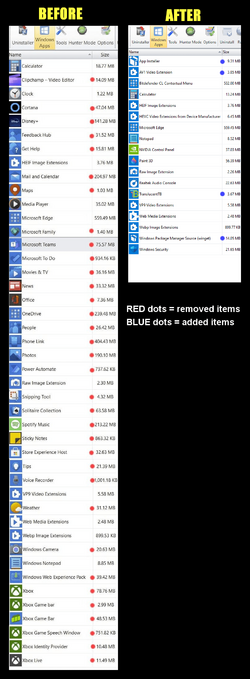
Has anyone looked at C:\Program Files\WindowsApps?


Birk

Well-known member
Member
VIP
Local time
2:36 AM
Posts
333
OS
Win11 Pro
On my system it's taking up 3.9 GB of actual space and contains loads of things I don't use and would like to delete. I'm talking about things like "Advertising", "Bing News", "Xbox", "Zune", etc. etc.

Can I delete stuff and not end up with endless BSOD's? Or do I have to leave it as is and back it up every time I make an image copy?
 

My Computer My Computer

At a glance

Win11 ProAMD Ryzen 5 5500U16 GBRadeon 2100
OS
Win11 Pro
Computer type
PC/Desktop
Manufacturer/Model
BeeLink SER Mini
CPU
AMD Ryzen 5 5500U
Motherboard
BeeLink SER
Memory
16 GB
Graphics Card(s)
Radeon 2100
Sound Card
none
Monitor(s) Displays
Primary: Phillips 4K; Secondary: LG 4K
Screen Resolution
Both 3860 x 2160
Hard Drives
C: NVme 500 GB Windows only
D: 128 GB NVme User data + Windows Temp via Junction Link
PSU
External
Case
Mini
Cooling
Internal fan
Keyboard
Logitech Wireless Lighted
Mouse
Kensington ExpertMouse wireless trackball
Internet Speed
500/500
Browser
Brave
Antivirus
Windows Defender
There are scripts you can use and instructions on how to remove plenty of those items from the WindowsApps folder using DISM, Command & PowerShell.
The issue is that no two people need the same items from that folder and some, like Zune, are used by certain media elements of Windows although the names of some items don't exactly give many clues as to where they apply.

There are probably a few good guides on what each entry relates to (Titustech comes to mind) but the majority of 'debloat Windows' resources tend to just claim it is all junk and needs to be removed for more fps, less tracking, will make you popular and help your clear your mortgage early....
There are guides on these forums on how to remove items from the WindowsApps folder, check the tutorials section at the top of every page.

So the short answer is yes you can clean out the ones you don't use/ need but I suggest making an image before removing items so you can go back if something breaks, and maybe only remove a couple of items at a time over an extended period of testing so that you are aware of any particular Windows breaking items, for your use case.

On a personal note I have removed a few items from WindowsApps without causing myself any issues but I tend to use DISM & PowerShell rather than 3rd party scripts/ utilities and I heavily research/ test the items before and after removal.
 

My Computer My Computer

At a glance

Windows 11 Pro 22H2, build: 22621.521Intel i7-12700K 3.6GHz Base (5.0GHz Turbo)64GB DDR 3600MhzAsus Tuff RTX 3080 10GB OC
OS
Windows 11 Pro 22H2, build: 22621.521
Computer type
PC/Desktop
Manufacturer/Model
Scan 3XS Custom 1700
CPU
Intel i7-12700K 3.6GHz Base (5.0GHz Turbo)
Motherboard
Asus ProArt Creator B660 D4
Memory
64GB DDR 3600Mhz
Graphics Card(s)
Asus Tuff RTX 3080 10GB OC
Sound Card
Onboard Realtek
Monitor(s) Displays
Gigabyte G32QC 32inch 16:9 curved @2560 x 1440p 165Hz Freesync Premium Pro/ Dell SE2422H 24inch 16:9 1920 x 1080p 75Hz Freesync
Screen Resolution
2560 x 1440p & 1920 x 1080p
Hard Drives
WD SN570 1TB NVME (Boot), Samsung 870QVO 1TB (SSD), SanDisk 3D Ultra 500Gb (SSD) x2, Seagate 3Tb Expansion Desk (Ext HDD), 2x Toshiba 1Tb P300 (Ext HDD)
PSU
Corsair RM1000X Modular
Case
Corsair 4000D Airflow Desktop
Cooling
Corsair Hydro H150i RGB Pro XT 360mm Liquid Cooler, 3 x 120mm fans, 1x Exhaust
Keyboard
Microsoft Ergonomic
Mouse
Logitech G402
Internet Speed
800Mbs
Browser
Edge Chromium
Antivirus
Defender, Malwarebytes
On my system it's taking up 3.9 GB of actual space and contains loads of things I don't use and would like to delete. I'm talking about things like "Advertising", "Bing News", "Xbox", "Zune", etc. etc.

Can I delete stuff and not end up with endless BSOD's? Or do I have to leave it as is and back it up every time I make an image copy?


Just use REVO Uninstaller to trim that down. My WindowsApps folder is 2.17GB.
When you uninstall something with REVO, make sure to do the "scan for leftovers" to get all the... leftovers.


00000 REVO Junk Removal.png
 

My Computers My Computers

  • At a glance

    Win 11 Home ♦♦♦26200.9168 ♦♦♦♦♦♦♦25H2AMD Ryzen 7 3700XG.Skill (F4-3200C14D-16GTZKW)EVGA RTX 2070 (08G-P4-2171-KR)
    OS
    Win 11 Home ♦♦♦26200.9168 ♦♦♦♦♦♦♦25H2
    Computer type
    PC/Desktop
    Manufacturer/Model
    Built by Ghot® [May 2020]
    CPU
    AMD Ryzen 7 3700X
    Motherboard
    Asus Pro WS X570-ACE (BIOS 5302)
    Memory
    G.Skill (F4-3200C14D-16GTZKW)
    Graphics Card(s)
    EVGA RTX 2070 (08G-P4-2171-KR)
    Sound Card
    Realtek ALC1220P / ALC S1220A
    Monitor(s) Displays
    Dell U3011 30"
    Screen Resolution
    2560 x 1600
    Hard Drives
    2x Samsung 860 EVO 500GB,
    WD 4TB Black FZBX - SATA III,
    WD 8TB Black FZBX - SATA III,
    DRW-24B1ST CD/DVD Burner
    PSU
    PC Power & Cooling 750W Quad EPS12V
    Case
    Cooler Master ATCS 840 Tower
    Cooling
    CM Hyper 212 EVO (push/pull)
    Keyboard
    Ducky DK9008 Shine II Blue LED
    Mouse
    Logitech Optical M-100
    Internet Speed
    300/300
    Browser
    Firefox (latest)
    Antivirus
    Bitdefender Total Security
    Other Info
    Speakers: Klipsch Pro Media 2.1
  • At a glance

    Windows XP Pro 32bit w/SP3AMD Athlon 64 X2 5000+ (OC'd @ 3.2Ghz)TWIN2X2048-6400C4DHX (2 x 1GB, DDR2 800)EVGA 256-P2-N758-TR GeForce 8600GT SSC
    Operating System
    Windows XP Pro 32bit w/SP3
    Computer type
    PC/Desktop
    Manufacturer/Model
    Built by Ghot® (not in use)
    CPU
    AMD Athlon 64 X2 5000+ (OC'd @ 3.2Ghz)
    Motherboard
    ASUS M2N32-SLI Deluxe Wireless Edition
    Memory
    TWIN2X2048-6400C4DHX (2 x 1GB, DDR2 800)
    Graphics card(s)
    EVGA 256-P2-N758-TR GeForce 8600GT SSC
    Sound Card
    Onboard
    Monitor(s) Displays
    ViewSonic G90FB Black 19" Professional (CRT)
    Screen Resolution
    up to 2048 x 1536
    Hard Drives
    WD 36GB 10,000rpm Raptor SATA
    Seagate 80GB 7200rpm SATA
    Lite-On LTR-52246S CD/RW
    Lite-On LH-18A1P CD/DVD Burner
    PSU
    PC Power & Cooling Silencer 750 Quad EPS12V
    Case
    Generic Beige case, 80mm fans
    Cooling
    ZALMAN 9500A 92mm CPU Cooler
    Keyboard
    Logitech Classic Keybooard 200
    Mouse
    Logitech Optical M-BT96a
    Internet Speed
    300/300
    Browser
    Firefox 3.x ??
    Antivirus
    Symantec (Norton)
    Other Info
    Still assembled, still runs. Haven't turned it on for 15 years?
3.6gb for me, Id do what ghot said and use revo, Also treefree is helpful for finding out where some weight lies. Personally it could have 10gb in there and i wouldn't bother, Not like i need the space!
 

My Computer My Computer

At a glance

11[email protected]Viper Steelseries 32gb@ 3600mhzGigabyte 2070 Super 8GB, +200 core + 600 memory
OS
11
Computer type
PC/Desktop
Manufacturer/Model
Custom
CPU
[email protected]
Motherboard
Gigabyte Gaming X Z490
Memory
Viper Steelseries 32gb@ 3600mhz
Graphics Card(s)
Gigabyte 2070 Super 8GB, +200 core + 600 memory
Monitor(s) Displays
ASUS 4k HDR, Two 1080p Benq and Samsung
Screen Resolution
3840x2160/2560x1440/1920x1080
Hard Drives
Adata XPG SX8200 PRO 1tb
Samsung EVO 870 500GB
PSU
Corsair RX 650
Case
NZXT h510
Cooling
CM HYPER 212 RGB
Keyboard
Razer Ornata Chroma
Mouse
Steelseries Rival 710
Just use REVO Uninstaller to trim that down. My WindowsApps folder is 2.17GB.
When you uninstall something with REVO, make sure to do the "scan for leftovers" to get all the... leftovers.


View attachment 69178
Thanks, @Ghot. I had it on my PC earlier but when I clean installed, I forgot about it.
 

My Computers My Computers

  • At a glance

    Windows 11 23H2 22631.2861Intel(R) Core(TM) i7-10700 CPU @ 2.90GHz 2.90...16384 MBytesIntel UHD Graphics 630
    OS
    Windows 11 23H2 22631.2861
    Computer type
    PC/Desktop
    Manufacturer/Model
    HP Envy TE01-1xxx
    CPU
    Intel(R) Core(TM) i7-10700 CPU @ 2.90GHz 2.90 GHz
    Motherboard
    16.0GB Dual-Channel Unknown @ 1463MHz (21-21-21-47)
    Memory
    16384 MBytes
    Graphics Card(s)
    Intel UHD Graphics 630
    Sound Card
    Realtek High Definition Audio
    Monitor(s) Displays
    Monitor 1 - Acer 27" Monitor 2 - Acer 27"
    Screen Resolution
    1920 x 1080
    Hard Drives
    WDC PC SN530 SDBPNPZ-512G-1006 (SSD)
    Seagate ST1000DM003-1SB102
    Seagate BUP Slim SCSI Disk Device (SSD)
    PSU
    HP
    Case
    HP
    Cooling
    Standard
    Keyboard
    Logitech Wave K350
    Mouse
    Logitech M705
    Internet Speed
    500 mbps
    Browser
    Firefox
    Antivirus
    Windows Defender
    Other Info
    That's all Folks!
  • At a glance

    Windows 11Intel Core i7 (10th gen) 1070016 GBIntel UHD Graphics 630
    Operating System
    Windows 11
    Computer type
    PC/Desktop
    Manufacturer/Model
    HP
    CPU
    Intel Core i7 (10th gen) 10700
    Motherboard
    Intel
    Memory
    16 GB
    Graphics card(s)
    Intel UHD Graphics 630
    Sound Card
    Built-in
    Monitor(s) Displays
    Acer 27" & Samsung 24"
    Screen Resolution
    1920 x
    Hard Drives
    SSD (512 GB)
    HDD (1 TB)
    Seagate
    PSU
    Intel i7 10th Generation
    Case
    HP
    Cooling
    HP/Intel?
    Keyboard
    Logitech Wave K350
    Mouse
    Logitech M705
    Internet Speed
    50 mbps
    Browser
    Firefox 90.2
    Antivirus
    Windows Defender
    Other Info
    Headphone/Microphone Combo
    SuperSpeed USB Type-A (4 on front)
    HP 3-in-One Card Readr
    SuperSpeed USB Type-C
    DVD Writer
Am I missing something here? Not that I need to recover any space, but on all 3 of my PCs the WindowsApps directory is empty.
 

My Computers My Computers

  • At a glance

    Windows 11 Home 24H2 RPIntel I3-1010016 GBNvidia GT 1030
    OS
    Windows 11 Home 24H2 RP
    Computer type
    PC/Desktop
    Manufacturer/Model
    Self-build
    CPU
    Intel I3-10100
    Motherboard
    MSI H410M-PRO
    Memory
    16 GB
    Graphics Card(s)
    Nvidia GT 1030
    Sound Card
    Motherboard default
    Monitor(s) Displays
    Philips 27 inch
    Screen Resolution
    1920x1080
    Hard Drives
    Samsung EVO 970 NVMe SSD 256 Gb
    Samsung QVO 870 SATA SSD 2 Tb
    PSU
    ATX 450W
    Keyboard
    Logitech
    Mouse
    Logitech Wireless
    Internet Speed
    930 Mb down / 120 Mb up
    Browser
    Edge
    Antivirus
    Windows Defender
    Other Info
    Microsoft Office 2021 Plus
  • At a glance

    Windows 11 HomeIntel i3-810016 GbNvidia GT 720
    Operating System
    Windows 11 Home
    Computer type
    PC/Desktop
    Manufacturer/Model
    Self-build
    CPU
    Intel i3-8100
    Motherboard
    Gigabyte Z370 D3
    Memory
    16 Gb
    Graphics card(s)
    Nvidia GT 720
    Sound Card
    Motherboard default
    Monitor(s) Displays
    Philips 27-inch
    Screen Resolution
    1920x1080
    Hard Drives
    Samsung 960 NVMe SSD 256 Gb
    Seagate 2 Tb HDD
    PSU
    ATX 450W
    Keyboard
    Microsoft
    Mouse
    Logitech Wireless
    Internet Speed
    930 Mb down / 120 Mb up
    Browser
    Edge
    Antivirus
    Windows Defender
Am I missing something here? Not that I need to recover any space, but on all 3 of my PCs the WindowsApps directory is empty.
It's a protected folder so will show as empty unless you have access permissions
 

My Computer My Computer

At a glance

Windows 11 Pro 25H2 (RP channel)AMD Ryzen 7 9800X3D 8-core64GB Corsair Titanium 6000/CL30MSI Suprim 5080 SOC
OS
Windows 11 Pro 25H2 (RP channel)
Computer type
PC/Desktop
Manufacturer/Model
MSI
CPU
AMD Ryzen 7 9800X3D 8-core
Motherboard
MEG X870E Godlike
Memory
64GB Corsair Titanium 6000/CL30
Graphics Card(s)
MSI Suprim 5080 SOC
Sound Card
Soundblaster AE-9
Monitor(s) Displays
ASUS TUF Gaming VG289Q
Screen Resolution
3840x2160
Hard Drives
Samsung 9100 Pro 4TB (gen 5 x4, system drive/games)
Samsung 990 Pro 2TB
Samsung 980 Pro 2TB
Samsung 870 Evo 4TB
Samsung 870 Evo 2TB
Samsung T9 4TB
PSU
Seasonic PX-2200
Case
Bequiet! Dark Base Pro 901
Cooling
Noctua NH-D15S Chromax black
Keyboard
Logitech G915 X (wired)
Mouse
Logitech G903 with PowerPlay charger
Internet Speed
900Mb/sec
Browser
Microsoft Edge
Antivirus
Windows Defender
...on all 3 of my PCs the WindowsApps directory is empty.
On my PC it is exactly the same.
I changed permissions on my test-environment (W11 home 22H2 on Virtual-Box):
- Without permissions it was indeed 0 kB
- With permissions changed it was 1.23 GB
Of course I left it unchanged, put back the last snapshot.
 

My Computer My Computer

At a glance

Windows 11 Pro 25H2AMD Ryzen 7 5700GKingston FURY Beast 2x16GB DIMM DDR4 2666 CL16MSI GeForce GT 730 2GB LP V1
OS
Windows 11 Pro 25H2
Computer type
PC/Desktop
Manufacturer/Model
Build by vendor to my specs
CPU
AMD Ryzen 7 5700G
Motherboard
MSI PRO B550M-P Gen3
Memory
Kingston FURY Beast 2x16GB DIMM DDR4 2666 CL16
Graphics Card(s)
MSI GeForce GT 730 2GB LP V1
Sound Card
Creative Sound Blaster Audigy FX
Monitor(s) Displays
Samsung S24E450F 24"
Screen Resolution
1920 x 1080
Hard Drives
1. SSD Crucial P5 Plus 500GB PCIe M.2
2. SSD-SATA Crucial MX500-2TB
PSU
Corsair CV650W
Case
Cooler Master Silencio S400
Cooling
Cooler Master Hyper H412R with Be Quiet Pure Wings 2 PWM BL038 fan
Keyboard
Cherry Stream (wired, scissor keys)
Mouse
Asus WT465 (wireless)
Internet Speed
70 Mbps down / 80 Mbps up
Browser
Firefox 130.0
Antivirus
F-Secure (Internetprovider version)
Other Info
Router: FRITZBox 7490
Oracle VirtualBox 7 for testing software on Win 10 or 11
Thanks for all the feedback - it basically said what I was expecting. I do use DISM on a fairly regular basis ( Dism.exe /online /Cleanup-Image /StartComponentCleanup /ResetBase) but that does not find or delete the things I don't use or want. For uninstalling apps I use IOBit Uninstaller Pro, but that doesn't show any of the stuff I'm interested in deleting. I'll give Revo a try - although I did that about a year or so ago and it ended up taking out some stuff my system needed and I had to do a Windows reinstall. Maybe I made a mistake with Revo, so I'll be careful when I try again.
 

My Computer My Computer

At a glance

Win11 ProAMD Ryzen 5 5500U16 GBRadeon 2100
OS
Win11 Pro
Computer type
PC/Desktop
Manufacturer/Model
BeeLink SER Mini
CPU
AMD Ryzen 5 5500U
Motherboard
BeeLink SER
Memory
16 GB
Graphics Card(s)
Radeon 2100
Sound Card
none
Monitor(s) Displays
Primary: Phillips 4K; Secondary: LG 4K
Screen Resolution
Both 3860 x 2160
Hard Drives
C: NVme 500 GB Windows only
D: 128 GB NVme User data + Windows Temp via Junction Link
PSU
External
Case
Mini
Cooling
Internal fan
Keyboard
Logitech Wireless Lighted
Mouse
Kensington ExpertMouse wireless trackball
Internet Speed
500/500
Browser
Brave
Antivirus
Windows Defender
Just for grins I thought I'd take a look at that folder and was surprised to find 7.74 GB of files !
This dates back to the original install Dec 10 2022. The 1st one a MS NET native frame work and then a bunch for drop box OEM (don't know what that is) and many of windows feed back and OneDrive which I do not use.
I've only used the App uninstaller in windows thinking it was the best way to go, now I'm not so sure. Like Birk I also am afraid about taking out some stuff my system needs. So Revo (I have it) is a better way to delete unwanted items?

I will do a Macrium file folder B/U before any thing else.

I'm not a tech type user so I'm asking for input from knowledgeable forum users that can help.

TIA
 

My Computer My Computer

At a glance

Win 11 Pro 23H3 Oct 31 202312th Gen Intel(R) Core(TM) i9-12900K32GBRTX 3060 12GB
OS
Win 11 Pro 23H3 Oct 31 2023
Computer type
PC/Desktop
Manufacturer/Model
HP Omen 45L
CPU
12th Gen Intel(R) Core(TM) i9-12900K
Motherboard
HP U3E1 8917
Memory
32GB
Graphics Card(s)
RTX 3060 12GB
Monitor(s) Displays
HP V28 4K (3840x2160@60Hz) HP 2511 (1920x1080@60Hz)
Screen Resolution
3840x2160 1920x1080
Hard Drives
2 SSD
PSU
800
Cooling
Liquid Cryo Chamber
Keyboard
LogiTech
Mouse
LogiTech
Internet Speed
1GB 45
Browser
Firefox
Antivirus
Widows Defender
Other Info
Malewarebytes
...and I had to do a Windows reinstall.
If you make images of your system drive, you don't need to reinstall Windows, but you just can restore the last image made before doing things with any de-installer (or any other program that has deep influence on the system).

There are many programs to make an image with. I use the freeware Clonezilla, but that's a rather user-unfriendly program if you're not used to it. Elsewhere in this forum many other programs to make images with are described and discussed. You can find a useful discussion here:
 

My Computer My Computer

At a glance

Windows 11 Pro 25H2AMD Ryzen 7 5700GKingston FURY Beast 2x16GB DIMM DDR4 2666 CL16MSI GeForce GT 730 2GB LP V1
OS
Windows 11 Pro 25H2
Computer type
PC/Desktop
Manufacturer/Model
Build by vendor to my specs
CPU
AMD Ryzen 7 5700G
Motherboard
MSI PRO B550M-P Gen3
Memory
Kingston FURY Beast 2x16GB DIMM DDR4 2666 CL16
Graphics Card(s)
MSI GeForce GT 730 2GB LP V1
Sound Card
Creative Sound Blaster Audigy FX
Monitor(s) Displays
Samsung S24E450F 24"
Screen Resolution
1920 x 1080
Hard Drives
1. SSD Crucial P5 Plus 500GB PCIe M.2
2. SSD-SATA Crucial MX500-2TB
PSU
Corsair CV650W
Case
Cooler Master Silencio S400
Cooling
Cooler Master Hyper H412R with Be Quiet Pure Wings 2 PWM BL038 fan
Keyboard
Cherry Stream (wired, scissor keys)
Mouse
Asus WT465 (wireless)
Internet Speed
70 Mbps down / 80 Mbps up
Browser
Firefox 130.0
Antivirus
F-Secure (Internetprovider version)
Other Info
Router: FRITZBox 7490
Oracle VirtualBox 7 for testing software on Win 10 or 11
If you make images of your system drive, you don't need to reinstall Windows

Yes, I am well aware. I use Macrium to image my boot drive on a pretty regular basis, but in that instance I figured why not do a complete Windows refresh. It didn't take that much longer that a Macrium restore.
 

My Computer My Computer

At a glance

Win11 ProAMD Ryzen 5 5500U16 GBRadeon 2100
OS
Win11 Pro
Computer type
PC/Desktop
Manufacturer/Model
BeeLink SER Mini
CPU
AMD Ryzen 5 5500U
Motherboard
BeeLink SER
Memory
16 GB
Graphics Card(s)
Radeon 2100
Sound Card
none
Monitor(s) Displays
Primary: Phillips 4K; Secondary: LG 4K
Screen Resolution
Both 3860 x 2160
Hard Drives
C: NVme 500 GB Windows only
D: 128 GB NVme User data + Windows Temp via Junction Link
PSU
External
Case
Mini
Cooling
Internal fan
Keyboard
Logitech Wireless Lighted
Mouse
Kensington ExpertMouse wireless trackball
Internet Speed
500/500
Browser
Brave
Antivirus
Windows Defender
Just for grins I thought I'd take a look at that folder and was surprised to find 7.74 GB of files !
This dates back to the original install Dec 10 2022. The 1st one a MS NET native frame work and then a bunch for drop box OEM (don't know what that is) and many of windows feed back and OneDrive which I do not use.
I've only used the App uninstaller in windows thinking it was the best way to go, now I'm not so sure. Like Birk I also am afraid about taking out some stuff my system needs. So Revo (I have it) is a better way to delete unwanted items?

I will do a Macrium file folder B/U before any thing else.

I'm not a tech type user so I'm asking for input from knowledgeable forum users that can help.

TIA
 

My Computer My Computer

At a glance

Win11 ProAMD Ryzen 5 5500U16 GBRadeon 2100
OS
Win11 Pro
Computer type
PC/Desktop
Manufacturer/Model
BeeLink SER Mini
CPU
AMD Ryzen 5 5500U
Motherboard
BeeLink SER
Memory
16 GB
Graphics Card(s)
Radeon 2100
Sound Card
none
Monitor(s) Displays
Primary: Phillips 4K; Secondary: LG 4K
Screen Resolution
Both 3860 x 2160
Hard Drives
C: NVme 500 GB Windows only
D: 128 GB NVme User data + Windows Temp via Junction Link
PSU
External
Case
Mini
Cooling
Internal fan
Keyboard
Logitech Wireless Lighted
Mouse
Kensington ExpertMouse wireless trackball
Internet Speed
500/500
Browser
Brave
Antivirus
Windows Defender
Just

I'm not a tech type user so I'm asking for input from knowledgeable forum users that can help.

TIA

It is always important to have a backup of your boot drive because you never know when something bad can happen that will make your boot drive unbootable. A system Restore Point is an easy way to have a pretty reliable backup of Windows, but it only backs up Windows and nothing else. Restoring from a Restore Point is easy and fairly quick and it has never failed for me.

The most robust backup is called an Image backup and it contains everything on your boot drive. It's literally a complete image of the drive. There are a number of backup programs that make image backups. The most common on is Macrium Backup. It does a lot more than just make image backups, but I only use it for that because an image gets everything. There's no question about what you've got after you do a restore from an image backup.
 

My Computer My Computer

At a glance

Win11 ProAMD Ryzen 5 5500U16 GBRadeon 2100
OS
Win11 Pro
Computer type
PC/Desktop
Manufacturer/Model
BeeLink SER Mini
CPU
AMD Ryzen 5 5500U
Motherboard
BeeLink SER
Memory
16 GB
Graphics Card(s)
Radeon 2100
Sound Card
none
Monitor(s) Displays
Primary: Phillips 4K; Secondary: LG 4K
Screen Resolution
Both 3860 x 2160
Hard Drives
C: NVme 500 GB Windows only
D: 128 GB NVme User data + Windows Temp via Junction Link
PSU
External
Case
Mini
Cooling
Internal fan
Keyboard
Logitech Wireless Lighted
Mouse
Kensington ExpertMouse wireless trackball
Internet Speed
500/500
Browser
Brave
Antivirus
Windows Defender
Thanks Birk and Kees - I do have a Macrium B/U of my Boot drive and images of both drives on my PC and image on a daily basis. It's saved my old fat a*s a number of times.
What gets me about the OP's topic is that when you try to delete a line like bing news / weather or zune I run into an error saying I don't have permission(s) I'm not a tech type and when I try to understand what to do it scares the hell out of me. ( I did try)
DigitalGoat says there are tutorials for this but after searching I can't find one about Windows Apps folder.

Maybe I'm just to stupid for this type of stuff ....... 🤬
 

My Computer My Computer

At a glance

Win 11 Pro 23H3 Oct 31 202312th Gen Intel(R) Core(TM) i9-12900K32GBRTX 3060 12GB
OS
Win 11 Pro 23H3 Oct 31 2023
Computer type
PC/Desktop
Manufacturer/Model
HP Omen 45L
CPU
12th Gen Intel(R) Core(TM) i9-12900K
Motherboard
HP U3E1 8917
Memory
32GB
Graphics Card(s)
RTX 3060 12GB
Monitor(s) Displays
HP V28 4K (3840x2160@60Hz) HP 2511 (1920x1080@60Hz)
Screen Resolution
3840x2160 1920x1080
Hard Drives
2 SSD
PSU
800
Cooling
Liquid Cryo Chamber
Keyboard
LogiTech
Mouse
LogiTech
Internet Speed
1GB 45
Browser
Firefox
Antivirus
Widows Defender
Other Info
Malewarebytes
Over the years, I've heard the old dodge "I don't need the space, so why delete those files?".
It's not just the space though, it's the internal bookkeeping that Windows has to go through, registering all those files in the registry, putting them all in directories, so they can be found, by Windows Explorer. Etc, etc, etc!
And if you do any scans at all, like AV or AS scans, every one of those files has to be accessed and scanned, over and over.
And what about backups. Those who never do backups are not affected, but for those like myself who do backups of the entire C: drive on a regular schedule, every extra file hurts. Backups can become bloated by unnecessary files.
So, my own feeling is, "if I don't absolutely need it, OUT it goes!"

Revo Uninstalled is a great way to clean house of unneeded apps, etc.
It even has a separate section, just for removing unwanted apps.

TM :cool:
 
Thanks for your input and wisdom Techno, much appreciated. I'll agree with everything you said except "Revo Uninstalled has a separate section, just for removing unwanted apps"

It cannot find C:\Program Files\WindowsApps\Microsoft.BingWeather_4.53.51922.0_x64__8wekyb3d8bbwe - one of the ones I'd like to get rid of of the 7.74 GB

I'm not a techie type user so maybe cause it's (the link) is not an app so it can't find it. (Post # 10) 🤬
 

My Computer My Computer

At a glance

Win 11 Pro 23H3 Oct 31 202312th Gen Intel(R) Core(TM) i9-12900K32GBRTX 3060 12GB
OS
Win 11 Pro 23H3 Oct 31 2023
Computer type
PC/Desktop
Manufacturer/Model
HP Omen 45L
CPU
12th Gen Intel(R) Core(TM) i9-12900K
Motherboard
HP U3E1 8917
Memory
32GB
Graphics Card(s)
RTX 3060 12GB
Monitor(s) Displays
HP V28 4K (3840x2160@60Hz) HP 2511 (1920x1080@60Hz)
Screen Resolution
3840x2160 1920x1080
Hard Drives
2 SSD
PSU
800
Cooling
Liquid Cryo Chamber
Keyboard
LogiTech
Mouse
LogiTech
Internet Speed
1GB 45
Browser
Firefox
Antivirus
Widows Defender
Other Info
Malewarebytes
I used the "Take Ownership" tweak posted here to get control of Program Files/Windows Apps. After doing that I was able to delete things just like they were regular files.
 

My Computer My Computer

At a glance

Win11 ProAMD Ryzen 5 5500U16 GBRadeon 2100
OS
Win11 Pro
Computer type
PC/Desktop
Manufacturer/Model
BeeLink SER Mini
CPU
AMD Ryzen 5 5500U
Motherboard
BeeLink SER
Memory
16 GB
Graphics Card(s)
Radeon 2100
Sound Card
none
Monitor(s) Displays
Primary: Phillips 4K; Secondary: LG 4K
Screen Resolution
Both 3860 x 2160
Hard Drives
C: NVme 500 GB Windows only
D: 128 GB NVme User data + Windows Temp via Junction Link
PSU
External
Case
Mini
Cooling
Internal fan
Keyboard
Logitech Wireless Lighted
Mouse
Kensington ExpertMouse wireless trackball
Internet Speed
500/500
Browser
Brave
Antivirus
Windows Defender
  • Choosing to manually delete items from the WindowsApps folder is asking for trouble.
  • Even if it appears to be fine, it can still wreak all sorts of havoc later on.
  • Removing certain built-in apps with PowerShell may cause unintended consequences or system instability also.
 

My Computers My Computers

  • At a glance

    11 Homei7 13650HX16GB DDR5GeForce RTX 4060 Mobile
    OS
    11 Home
    Computer type
    Laptop
    Manufacturer/Model
    Asus TUF Gaming F16 (2024)
    CPU
    i7 13650HX
    Memory
    16GB DDR5
    Graphics Card(s)
    GeForce RTX 4060 Mobile
    Sound Card
    Eastern Electric MiniMax DAC Supreme; Emotiva UMC-200; Astell & Kern AK240
    Monitor(s) Displays
    Sony Bravia XR-55X90J
    Screen Resolution
    3840×2160
    Hard Drives
    512GB SSD internal
    37TB external
    PSU
    Li-ion
    Cooling
    2× Arc Flow Fans, 4× exhaust vents, 5× heatpipes
    Keyboard
    Logitech K800
    Mouse
    Logitech G402
    Internet Speed
    30Mbit/s up, 500Mbit/s down
    Browser
    FF
    Antivirus
    What's an antivirus?
  • At a glance

    11 Homei5 1135G716GB DDR4Intel Iris Xe
    Operating System
    11 Home
    Computer type
    Laptop
    Manufacturer/Model
    Medion S15450
    CPU
    i5 1135G7
    Memory
    16GB DDR4
    Graphics card(s)
    Intel Iris Xe
    Sound Card
    Eastern Electric MiniMax DAC Supreme; Emotiva UMC-200; Astell & Kern AK240
    Monitor(s) Displays
    Sony Bravia XR-55X90J
    Screen Resolution
    3840×2160
    Hard Drives
    2TB SSD internal
    37TB external
    PSU
    Li-ion
    Keyboard
    Logitech K800
    Mouse
    Logitech G402
    Internet Speed
    30Mbit/s up, 500Mbit/s down
    Browser
    FF
Open a cmd.exe as admin and type in the follow:

winget source reset --force
winget source update
winget list

now you can remove all you want with

winget uninstall "package name"
 

My Computer My Computer

At a glance

Windows 11
OS
Windows 11

Latest Support Threads

Back
Top Bottom