Has right-clicking of taskbar icons and tasks been disabled in Windows 11?


classic35mm

Member
Local time
5:14 PM
Posts
57
OS
Windows 11 23H2 22631.3527
I just realized that right-clicking on taskbar icons/tasks no longer does anything; previously, it would bring up a context menu.

Has anyone else experienced this? I did install September's second Tuesday patch (KB5043076), but I'm not sure if this loss of taskbar context menus occurred after I installed the update. I'm currently running Windows 11 Enterprise, 23H2, build 22631.4169. (Note: I haven't yet installed October's second Tuesday patch (KB5044285), but I will soon.)

The only exceptions I have found to this new, unwanted loss of functionality are the system tray icons. The system tray icons still show a context menu when right-clicked. For example:
  • Right-clicking the microphone system tray icon tray_microphone.png gives this context menu: context_microphone.png
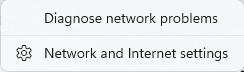
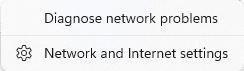
  • Right-clicking the wireless/networking system tray icon tray_networking.png gives this context menu: context_networkonly.png
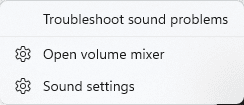
  • Right-clicking the speaker system tray icon tray_speakeronly.png gives this context menu: context_speakeronly.png
  • Right-clicking the clock system tray icon tray_newclock.png gives this context menu: context_clock.png
 
Windows Build/Version
Enterprise, 23H2, build 22631.4169

Attachments

  • tray_speaker.png
    tray_speaker.png
    399 bytes · Views: 1
  • context_speaker.png
    context_speaker.png
    5.2 KB · Views: 1
  • tray_clock.png
    tray_clock.png
    1.2 KB · Views: 1

My Computer My Computer

At a glance

Windows 11 23H2 22631.3527
OS
Windows 11 23H2 22631.3527
Computer type
PC/Desktop
Manufacturer/Model
Lenovo ThinkStation P3

These are the default settings in Windows 11
 

My Computer My Computer

At a glance

Windows 11 Pro Insider 64 bit 25H2 26200.5742Intel Core i7 9700K 3.6016 GBnVidia GEForce RTX 2060 Super
OS
Windows 11 Pro Insider 64 bit 25H2 26200.5742
Computer type
PC/Desktop
Manufacturer/Model
Gigabyte Z390 UD
CPU
Intel Core i7 9700K 3.60
Motherboard
Gigabyte Z390 UD
Memory
16 GB
Graphics Card(s)
nVidia GEForce RTX 2060 Super
Sound Card
onboard
Monitor(s) Displays
Two 27" Dell 4K monitors
Screen Resolution
3840 x 2160
Hard Drives
M.2 NVME SSD, 500 GB; Two 2TB Mechanical HDD's
PSU
850w PSU
Case
Cyberpower PC
Cooling
Water cooled
Keyboard
Backlit Cyberpower gaming keyboard
Mouse
Backlit Cyberpower gaming mouse
Internet Speed
1 GB mbps
Browser
Brave
Antivirus
Windows Security

My Computers My Computers

  • At a glance

    Windows 11 Home 25H2 26200.8875AMD Ryzen 3 5300G8gbRadeon Graphics 4.00GHZ
    OS
    Windows 11 Home 25H2 26200.8875
    Computer type
    PC/Desktop
    Manufacturer/Model
    HP Pavilion TP01-2xxx
    CPU
    AMD Ryzen 3 5300G
    Memory
    8gb
    Graphics Card(s)
    Radeon Graphics 4.00GHZ
    Monitor(s) Displays
    ViewSonic
    Keyboard
    HP
    Mouse
    wireless Microsoft
    Browser
    FireFox
    Antivirus
    Avira
  • At a glance

    Updated Windows 10 to 11 25H2 26200.8875Intel Core i3 8100 @3.60 GHz8.GBIntel UHD 360 (HP)
    Operating System
    Updated Windows 10 to 11 25H2 26200.8875
    Computer type
    PC/Desktop
    Manufacturer/Model
    HP
    CPU
    Intel Core i3 8100 @3.60 GHz
    Motherboard
    HP 8653 (U3E1)
    Memory
    8.GB
    Graphics card(s)
    Intel UHD 360 (HP)
    Sound Card
    Realtek High Def
    Monitor(s) Displays
    ViewSonic
    Other Info
    #3 System: HP laptop Windows 25H2 11Pro 26200.8524
  • HP Omni laptop Windows 11 home
    11 25H2 26200.8737
    Intel Core 5 120U
No issue on my Win10 and Win11 computers with the mouse functions. I use Wired/USB mice on Desktops and Bluetooth mice on most Notebooks [latest a Lenovo Ideapad I got Wed], USB Wireless on others.
 

My Computers My Computers

  • At a glance

    Win11 Pro RTM Version 24H2 Build 26100.4202Intel Core i5 11th Gen. 2.40GHz12GB
    OS
    Win11 Pro RTM Version 24H2 Build 26100.4202
    Computer type
    Laptop
    Manufacturer/Model
    Dell Vostro 3400
    CPU
    Intel Core i5 11th Gen. 2.40GHz
    Memory
    12GB
    Hard Drives
    256GB SSD NVMe M.2
  • At a glance

    Win11 Pro RTM Version 24H2 Build 26100.4202Intel Core i5 10th Gen. 2.90GHz16GBOnboard, no VGA, using a DisplayPort-to-VGA a...
    Operating System
    Win11 Pro RTM Version 24H2 Build 26100.4202
    Computer type
    PC/Desktop
    Manufacturer/Model
    Dell Vostro 5890
    CPU
    Intel Core i5 10th Gen. 2.90GHz
    Memory
    16GB
    Graphics card(s)
    Onboard, no VGA, using a DisplayPort-to-VGA adapter
    Monitor(s) Displays
    24" Dell
    Hard Drives
    512GB SSD NVMe, 4TB Seagate HDD
    Browser
    Firefox, Edge
    Antivirus
    Windows Defender/Microsoft Security
No issue on my Win10 and Win11 computers with the mouse functions. I use Wired/USB mice on Desktops and Bluetooth mice on most Notebooks [latest a Lenovo Ideapad I got Wed], USB Wireless on others.

@Berton So you get context menus when you right-click tasks on the taskbar?
 

My Computer My Computer

At a glance

Windows 11 23H2 22631.3527
OS
Windows 11 23H2 22631.3527
Computer type
PC/Desktop
Manufacturer/Model
Lenovo ThinkStation P3

These are the default settings in Windows 11

@Spunk Do you know if it's possible to enable context menus in Windows 11 without resorting to thrid-party software such as WinaeroTweaker?
 

My Computer My Computer

At a glance

Windows 11 23H2 22631.3527
OS
Windows 11 23H2 22631.3527
Computer type
PC/Desktop
Manufacturer/Model
Lenovo ThinkStation P3
Windows 11 21H1 and 22H2 right-clicking on the taskbar would show only taskbar properties. After complaints from many users they added Task Manager in 23H2. I am not sure if this is true for newer builds of 21H2 and 22H2. If you want the full taskbar menu of Windows 10 you can install Explorer Patcher or other suitable utility.
 

My Computers My Computers

  • At a glance

    Windows 11 Pro 23H2 (5699), 25H2 (8875)Mobile DualCore Intel Core 2 Duo T7250, 2000 MHz4GBMobile Intel(R) GMA 4500M (Mobile 4 series)
    OS
    Windows 11 Pro 23H2 (5699), 25H2 (8875)
    Computer type
    Laptop
    Manufacturer/Model
    Acer Extensa 5630EZ
    CPU
    Mobile DualCore Intel Core 2 Duo T7250, 2000 MHz
    Motherboard
    Acer Extensa 5630
    Memory
    4GB
    Graphics Card(s)
    Mobile Intel(R) GMA 4500M (Mobile 4 series)
    Sound Card
    Realtek ALC268 @ Intel 82801IB ICH9 - High Definition Audio Controller
    Monitor(s) Displays
    1
    Screen Resolution
    1280x800
    Hard Drives
    Samsung SSD 850 EVO 250GB SATA Device (250 GB, SATA-III)
    Internet Speed
    VDSL 50 Mbps
    Browser
    MICROSOFT EDGE
    Antivirus
    WINDOWS DEFENDER
    Other Info
    Legacy MBR installation, no TPM, no Secure Boot, no WDDM 2.0 graphics drivers, no SSE4.2, cannot get more unsupported ;) This is only my test laptop. I had installed Windows 11 here before upgrading my main PC. For my main PC I use everyday see my 2nd system specs.
  • At a glance

    Windows 11 Pro v25H2 (build 26200.8875)Intel Core-i7 3770 3.40GHz s1155 (3rd generat...2x Kingston Hyper-X Blu 8GB DDR3-1600GIGABYTE GeForce RTX 3050 WINDFORCE OC V2 6GB...
    Operating System
    Windows 11 Pro v25H2 (build 26200.8875)
    Computer type
    PC/Desktop
    Manufacturer/Model
    Custom-built PC
    CPU
    Intel Core-i7 3770 3.40GHz s1155 (3rd generation)
    Motherboard
    Asus P8H61 s1155 ATX
    Memory
    2x Kingston Hyper-X Blu 8GB DDR3-1600
    Graphics card(s)
    GIGABYTE GeForce RTX 3050 WINDFORCE OC V2 6GB (GV-N3050WF2OCV2-6GD)
    Sound Card
    Realtek HD audio (ALC887)
    Monitor(s) Displays
    Sony Bravia KDL-19L4000 19" LCD TV via VGA
    Screen Resolution
    1440x900 32-bit 60Hz
    Hard Drives
    WD Blue SA510 2.5 1000GB SSD as system disk, Western Digital Caviar Purple 4TB SATA III (WD40PURZ) as second
    PSU
    Thermaltake Litepower RGB 550W Full Wired
    Case
    SUPERCASE MIDI-TOWER
    Cooling
    Deepcool Gamma Archer CPU cooler, 1x 8cm fan at the back
    Keyboard
    Mitsumi 101-key PS/2
    Mouse
    Sunnyline OptiEye PS/2
    Internet Speed
    100Mbps
    Browser
    Microsoft Edge, Mozilla Firefox
    Antivirus
    Microsoft Windows Defender
    Other Info
    Legacy BIOS (MBR) installation, no TPM, no Secure Boot, WDDM 3.0 graphics drivers, WEI score 7.4

My Computers My Computers

  • At a glance

    Windows 11 Home 25H2 26200.8875AMD Ryzen 3 5300G8gbRadeon Graphics 4.00GHZ
    OS
    Windows 11 Home 25H2 26200.8875
    Computer type
    PC/Desktop
    Manufacturer/Model
    HP Pavilion TP01-2xxx
    CPU
    AMD Ryzen 3 5300G
    Memory
    8gb
    Graphics Card(s)
    Radeon Graphics 4.00GHZ
    Monitor(s) Displays
    ViewSonic
    Keyboard
    HP
    Mouse
    wireless Microsoft
    Browser
    FireFox
    Antivirus
    Avira
  • At a glance

    Updated Windows 10 to 11 25H2 26200.8875Intel Core i3 8100 @3.60 GHz8.GBIntel UHD 360 (HP)
    Operating System
    Updated Windows 10 to 11 25H2 26200.8875
    Computer type
    PC/Desktop
    Manufacturer/Model
    HP
    CPU
    Intel Core i3 8100 @3.60 GHz
    Motherboard
    HP 8653 (U3E1)
    Memory
    8.GB
    Graphics card(s)
    Intel UHD 360 (HP)
    Sound Card
    Realtek High Def
    Monitor(s) Displays
    ViewSonic
    Other Info
    #3 System: HP laptop Windows 25H2 11Pro 26200.8524
  • HP Omni laptop Windows 11 home
    11 25H2 26200.8737
    Intel Core 5 120U
Back
Top Bottom