classic35mm
Member
- Local time
- 8:50 AM
- Posts
- 57
- OS
- Windows 11 23H2 22631.3527
I just realized that right-clicking on taskbar icons/tasks no longer does anything; previously, it would bring up a context menu.
Has anyone else experienced this? I did install September's second Tuesday patch (KB5043076), but I'm not sure if this loss of taskbar context menus occurred after I installed the update. I'm currently running Windows 11 Enterprise, 23H2, build 22631.4169. (Note: I haven't yet installed October's second Tuesday patch (KB5044285), but I will soon.)
The only exceptions I have found to this new, unwanted loss of functionality are the system tray icons. The system tray icons still show a context menu when right-clicked. For example:
Has anyone else experienced this? I did install September's second Tuesday patch (KB5043076), but I'm not sure if this loss of taskbar context menus occurred after I installed the update. I'm currently running Windows 11 Enterprise, 23H2, build 22631.4169. (Note: I haven't yet installed October's second Tuesday patch (KB5044285), but I will soon.)
The only exceptions I have found to this new, unwanted loss of functionality are the system tray icons. The system tray icons still show a context menu when right-clicked. For example:
- Right-clicking the microphone system tray icon
 gives this context menu:
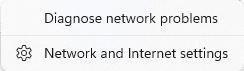
- Right-clicking the wireless/networking system tray icon
 gives this context menu: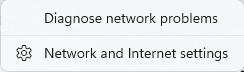
- Right-clicking the speaker system tray icon
 gives this context menu: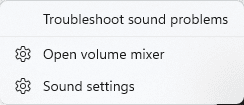
- Right-clicking the clock system tray icon
 gives this context menu:
- Windows Build/Version
- Enterprise, 23H2, build 22631.4169
Attachments


My Computer
At a glance
Windows 11 23H2 22631.3527
- OS
- Windows 11 23H2 22631.3527
- Computer type
- PC/Desktop
- Manufacturer/Model
- Lenovo ThinkStation P3