HELP!!! Unable to boot win after efi partition resizing


booted via macrium rescue the partition is formated or what idk while i didnt format it before at any point, 950gb free out of 952gb but in properities it shows 1.65gb used space free 950gb while its a 1tb ssd drive ?!
 

My Computer

System One

  • OS
    11
    Computer type
    Laptop
    Manufacturer/Model
    HP
looks like something went wrong during easeus attempt.

Presumably if you had made image backups you would have said.

In that situation I would:

1. run diskgenius boot media and see what it says, it might offer to fix partition eror

2. Try partion recovery program for example the older free aomei v7 has that function.

3. Try data recovery program if there is anything on there you absolutely need
no i didnt make a backup
 

My Computer

System One

  • OS
    11
    Computer type
    Laptop
    Manufacturer/Model
    HP
booted via macrium rescue the partition is formated or what idk while i didnt format it before at any point, 950gb free out of 952gb but in properities it shows 1.65gb used space free 950gb while its a 1tb ssd drive ?!

have a look with diskgenius. check the partition table for errors. If you are very lucky it might offer to fix it . Also click the Files tab and hope it sees things there.

you would need to have some way of downloading diskgenius and getting it to make its boot media. Are you able to do that?
 
Last edited:

My Computers

System One System Two

  • OS
    Win7,Win11
    Computer type
    PC/Desktop
    CPU
    i7-9700
    Motherboard
    gigabyte b365m ds3h
    Memory
    2x16gb 3600mhz
    Monitor(s) Displays
    benq gw2480
    PSU
    bequiet pure power 11 400CM
    Cooling
    cryorig m9i
  • Operating System
    win7,win11
    Computer type
    PC/Desktop
    CPU
    i5-8400
    Motherboard
    gigabyte b365m ds3h
    Memory
    2x8gb 3200
    PSU
    xfx pro 450
have a look with diskgenius. check the partition table for errors. If you are very lucky it might offer to fix it . Also click the Files tab and hope it sees things there.
how to use diskgenius when i cant boot to a windows environment ? above i booted to macrium rescue and got this info
 

My Computer

System One

  • OS
    11
    Computer type
    Laptop
    Manufacturer/Model
    HP
above i booted to macrium rescue and got this info
What info are you referring to? Since you booted into the Macrium reflect rescue disk can you run "Fix Boot Problems" or is that not doing anything for you?
 

My Computers

System One System Two

  • OS
    Windows 11 Home, ver 25H2 build 26200.8246
    Computer type
    Laptop
    Manufacturer/Model
    Hewlett-Packard Spectre 13-4001 x360 convertable
    CPU
    Intel Core i5 5200U @ 2.20GH
    Motherboard
    Hewlett-Packard 802D
    Memory
    4 GB
    Graphics Card(s)
    Intel HD Graphics 5500 on board
    Sound Card
    Intel Smart Sound Technology (Intel SST)
    Hard Drives
    Micron 256GB M.2 2280 NGFF SSD MTFDDAV256TBN, (SATA 6.0 Gb/s)
    Keyboard
    Model # G01KB
    Antivirus
    Microsoft Defender
    Other Info
    born on date: 25 Feb 2016
  • Operating System
    Win 11 Home 25H2 build 26200.7922
    Computer type
    PC/Desktop
    Manufacturer/Model
    Asus Desktop model M32AD-US019S (DOM: 6/9/2014 )
    CPU
    Intel Core i7 4th Gen 4790 (3.60GHz), Haswell 22nm Technology, SOCKET 1150
    Motherboard
    H81M-E/M51AD/DP_MB
    Memory
    Samsung 16 GB DDR3 (8GB in 2 modules)
    Graphics card(s)
    NVIDIA GeForce GTX 760, 3GB, and on-board Intel HD Graphics 4600 Rev 6
    Monitor(s) Displays
    HP EliteDisplay E241i LED; HP EliteDisplay E243
    Hard Drives
    Samsung 500GB SSD, 870 EVO (SATA 6.0 )
    Micron 250GB SSD, CT250MX500
    Toshiba HDD, 3GB (original drive w/PC)
    Case
    ASUS
    Keyboard
    ASUS-------------------------
    Antivirus
    MS Defender
    Other Info
    Additional Laptops:

    HEWLETT PACKARD
    HP OmniBook X Flip NGAI (Next Gen AI),
    Model: 16-as0023dx
    PT# B5UH1UA#ABA Product #: B5UH1UA
    delivered and setup 7/25/25
    16" 2K Touch-Screen Laptop
    Intel Core Ultra 7 256V '24 Series 2 - CPU
    Boost Clock Frequency 4.8 gigahertz; Neural Processing Unit (NPU) Yes;
    16GB Memory, LPDDR5X
    1TB SSD PCIe 4.0
    Graphics: Intel Arc 140V
    1 x HDMI 2.1
    1 x Thunderbolt 4
    2K Touch-Screen display, LED, IPS; 1920 x 1200 (Full HD+)
    USB Ports: 1 x USB-C 3.1, 2 x USB-A 3.1
    Wi-Fi 6E
    weight 4.15 pounds

    DELL
    Model:I7591-7483BLK-PUS 2-in-1 (7000 Series)
    purchased 12/3/2019,
    15.6 inch 2-IN-1;
    4K Ultra HD Touch-Screen, 3840 x 2160,
    Intel Core i7 10510U CPU 1.80GHz,
    16GB RAM DDR4 SDRAM 2400 megahert (2 slots),
    dedicated graphics Nvidia GeForce MX250 2 GB Graphics,
    PCIe 512GB Intel SSD + 32GB Optane Memory (Intel Optane Memory H10 with solid-state storage),
    wireless-AX & Bluetooth
    Battery: 68wh, Type 4VGMP 4 cell

My Computer

System One

  • OS
    Windows 11
    Computer type
    PC/Desktop
    Manufacturer/Model
    HP Pavilion
    CPU
    AMD Ryzen 7 5700G
    Motherboard
    Erica6
    Memory
    Micron Technology DDR4-3200 16GB
    Graphics Card(s)
    NVIDIA GeForce RTX 3060
    Sound Card
    Realtek ALC671
    Monitor(s) Displays
    Samsung SyncMaster U28E590
    Screen Resolution
    3840 x 2160
    Hard Drives
    SAMSUNG MZVLQ1T0HALB-000H1
how to use diskgenius when i cant boot to a windows environment ?

you would need to have some way of downloading diskgenius ( or anything else that might be useful ) and getting it to make its boot media.

Are you able to do that? Have you got another machine?

 
Last edited:

My Computers

System One System Two

  • OS
    Win7,Win11
    Computer type
    PC/Desktop
    CPU
    i7-9700
    Motherboard
    gigabyte b365m ds3h
    Memory
    2x16gb 3600mhz
    Monitor(s) Displays
    benq gw2480
    PSU
    bequiet pure power 11 400CM
    Cooling
    cryorig m9i
  • Operating System
    win7,win11
    Computer type
    PC/Desktop
    CPU
    i5-8400
    Motherboard
    gigabyte b365m ds3h
    Memory
    2x8gb 3200
    PSU
    xfx pro 450
you would need to have some way of downloading diskgenius ( or anything else that might be useful ) and getting it to make its boot media.

Are you able to do that? Have you got another machine?

yes i can do it, above i said 1.65gb i meant 1.65tb (dont think it differs in anything)
 

My Computer

System One

  • OS
    11
    Computer type
    Laptop
    Manufacturer/Model
    HP
What info are you referring to? Since you booted into the Macrium reflect rescue disk can you run "Fix Boot Problems" or is that not doing anything for you?
it does nothing the fix boot problems, it reboots and goes to advanced startup options screen, with info i meant in macrium it shows storage space free and used and when i go to properties it shows different used and free storage info like i said above
 

My Computer

System One

  • OS
    11
    Computer type
    Laptop
    Manufacturer/Model
    HP
booted via macrium rescue the partition is formated or what idk while i didnt format it before at any point, 950gb free out of 952gb

Since you booted into the Macrium reflect rescue disk can you run "Fix Boot Problems" or is that not doing anything for you?

What are you expecting macrium fix boot problems to do in that situation? Most likely the partition table got borked when easues crapped out. Running chkdsk might have made things worse.
 

My Computers

System One System Two

  • OS
    Win7,Win11
    Computer type
    PC/Desktop
    CPU
    i7-9700
    Motherboard
    gigabyte b365m ds3h
    Memory
    2x16gb 3600mhz
    Monitor(s) Displays
    benq gw2480
    PSU
    bequiet pure power 11 400CM
    Cooling
    cryorig m9i
  • Operating System
    win7,win11
    Computer type
    PC/Desktop
    CPU
    i5-8400
    Motherboard
    gigabyte b365m ds3h
    Memory
    2x8gb 3200
    PSU
    xfx pro 450
What are you expecting macrium fix boot problems to do in that situation? Most likely the partition table got borked when easues crapped out. Running chkdsk might have made things worse.
Idk really, i thought chkdsk sosmehow helped as after it the partition got back fs from unknown to ntfs
 

My Computer

System One

  • OS
    11
    Computer type
    Laptop
    Manufacturer/Model
    HP
Even before executing chkdsk, i tried macrium rescue fix boot problems, it still didnt do anything, now i just want to get a snapshot of some of my data and then i will clean install windows again :(
 

My Computer

System One

  • OS
    11
    Computer type
    Laptop
    Manufacturer/Model
    HP
Will try tomorrow diskgenius, pray it works & will report back
 

My Computer

System One

  • OS
    11
    Computer type
    Laptop
    Manufacturer/Model
    HP
i dont understand?, option 7 reboots laptop to advanced reboot options screen


What were you able to perform?

a) create a bootable Windows 11 MCT/iso?

b) boot to the Windows 11 MCT/iso?

c) open Windows RE?
 

My Computer

System One

  • OS
    Windows 10
    Computer type
    Laptop
    Manufacturer/Model
    HP
    CPU
    Intel(R) Core(TM) i7-4800MQ CPU @ 2.70GHz
    Motherboard
    Product : 190A Version : KBC Version 94.56
    Memory
    16 GB Total: Manufacturer : Samsung MemoryType : DDR3 FormFactor : SODIMM Capacity : 8GB Speed : 1600
    Graphics Card(s)
    NVIDIA Quadro K3100M; Intel(R) HD Graphics 4600
    Sound Card
    IDT High Definition Audio CODEC; PNP Device ID HDAUDIO\FUNC_01&VEN_111D&DEV_76E0
    Hard Drives
    Model Hitachi HTS727575A9E364
    Antivirus
    Microsoft Defender
    Other Info
    Mobile Workstation
What were you able to perform?

a) create a bootable Windows 11 MCT/iso?

b) boot to the Windows 11 MCT/iso?

c) open Windows RE?
It looks like they were able to boot into Windows RE. They never confirmed if they tried running the boot repair option.
 

My Computer

System One

  • OS
    Windows 11 25H2
    Computer type
    PC/Desktop
    Manufacturer/Model
    EVGA home brew
    CPU
    Broadwell-e 6850K 4.5ghz @1.36v
    Motherboard
    EVGA X99 FTW K
    Memory
    32GB Corsair LPM 3600 C16
    Graphics Card(s)
    EVGA RTX 3080Ti FTW
    Sound Card
    Asus Centurion true 7.1 headset. (5 speakers in each earpeice)
    Monitor(s) Displays
    LG C4 55"
    Screen Resolution
    4K 144hz
    Hard Drives
    Various models of SSDs ~10TB No HDDs installed.
    PSU
    be quiet! BN516 Straight Power 12-1000w 80 Plus Platinum
    Case
    Corsair 780T modified to dual 200mm intake fans
    Cooling
    Corsair H110i
    Keyboard
    Corsair K95 Platinum
    Mouse
    Corsair M65 RGB Elite
    Internet Speed
    50Mbs
have a look with diskgenius. check the partition table for errors. If you are very lucky it might offer to fix it . Also click the Files tab and hope it sees things there.

you would need to have some way of downloading diskgenius and getting it to make its boot media. Are you able to do that?
It says it didnt find any erorrs in the partition table, anything else to do within diskgenius? Or what else can i do?
 

My Computer

System One

  • OS
    11
    Computer type
    Laptop
    Manufacturer/Model
    HP
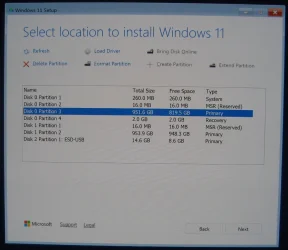
Can you post a screenshot of the "Select location to install Windows 11" screen from the Windows 11 installation media?

It should show how much free space is available on the Windows partition.

Below is an example of the "Select location to install Windows 11" screen from a working Windows 11 laptop.

Select location to install Windows 11.webp
 

My Computers

System One System Two

  • OS
    Windows 11 Pro
    Computer type
    PC/Desktop
    CPU
    AMD Ryzen 9 9950X3D
    Motherboard
    ASRock B650E Taichi Lite
    Memory
    Kingston FURY Beast 64GB (2x32GB) DDR5 6000MT/s
    Graphics Card(s)
    ASUS TUF Gaming Radeon RX 9070 OC Edition 16GB GDDR6
    Hard Drives
    Solidigm P44 Pro 2TB M.2 NVMe SSD
  • Operating System
    Windows 11 Home
    Computer type
    Laptop
    Manufacturer/Model
    Lenovo Legion Pro 7i Gen 10 16"
    CPU
    Intel Core Ultra 9 275HX
    Memory
    64GB (2x 32GB) DDR5-6400
    Graphics card(s)
    NVIDIA GeForce RTX 5080 16GB GDDR7 Laptop GPU
    Hard Drives
    2x 1TB M.2 NVMe SSD (SK Hynix)
Can you post a screenshot of the "Select location to install Windows 11" screen from the Windows 11 installation media?

It should show how much free space is available on the Windows partition.

Below is an example of the "Select location to install Windows 11" screen from a working Windows 11 laptop.

View attachment 158114
Ok will post it when i get back home, also forgot to mention bitlocker is on, think its on since i bought the laptop

Is there any hope to get any of my files back or should i go to the last resort & format & reinstall windows?
 

My Computer

System One

  • OS
    11
    Computer type
    Laptop
    Manufacturer/Model
    HP
It says it didnt find any erorrs in the partition table, anything else to do within diskgenius? Or what else can i do?

What partitions, if any, did it find or display? Did you click the FILES tab ?

You could also get it to scan for lost files just to see if it finds any. The free version won't recover them but it might indicate if recovery is possible. In which case you could try some free file recovery tools like recuva, testdisk, puran etc
 

My Computers

System One System Two

  • OS
    Win7,Win11
    Computer type
    PC/Desktop
    CPU
    i7-9700
    Motherboard
    gigabyte b365m ds3h
    Memory
    2x16gb 3600mhz
    Monitor(s) Displays
    benq gw2480
    PSU
    bequiet pure power 11 400CM
    Cooling
    cryorig m9i
  • Operating System
    win7,win11
    Computer type
    PC/Desktop
    CPU
    i5-8400
    Motherboard
    gigabyte b365m ds3h
    Memory
    2x8gb 3200
    PSU
    xfx pro 450
If you want to troubleshoot the failure to boot then boot to the newly created Windows 11 MCT / iso.


My Computer

System One

  • OS
    Windows 10
    Computer type
    Laptop
    Manufacturer/Model
    HP
    CPU
    Intel(R) Core(TM) i7-4800MQ CPU @ 2.70GHz
    Motherboard
    Product : 190A Version : KBC Version 94.56
    Memory
    16 GB Total: Manufacturer : Samsung MemoryType : DDR3 FormFactor : SODIMM Capacity : 8GB Speed : 1600
    Graphics Card(s)
    NVIDIA Quadro K3100M; Intel(R) HD Graphics 4600
    Sound Card
    IDT High Definition Audio CODEC; PNP Device ID HDAUDIO\FUNC_01&VEN_111D&DEV_76E0
    Hard Drives
    Model Hitachi HTS727575A9E364
    Antivirus
    Microsoft Defender
    Other Info
    Mobile Workstation
Back
Top Bottom