HEVC Codec Windows 11 build 22621.2361 causing Explorer.exe Crash


HHH03

Well-known member
Member
Local time
12:14 PM
Posts
97
OS
Windows 11 Pro
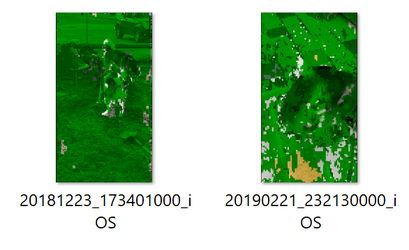
After I updated my computer to Win 11 22621.2361 I noticed some of my iPhone HEVC .MOV files had a green pixelization on the thumbnails. They played normally, but the thumbnail was corrupted. I tried to repair these images online using the EASEUS fixo site. When I downloaded the repaired images, they wouldn't load, nor could I delete them. I could only delete them in safe mode... something very drastic for that to occur I'd say. I experimented uninstalling the HEVC codec and used the Shark 007 codec and see what would happen. These files thumbnails were now normal and without any pixelation. I installed the HEVC codec again and immediately the green pixelation was back. Windows 11 22621.2361 doesn't like the current HEVC codec apparently. I found an older version of the codec... I don't like getting codecs from non Microsoft sources, but I needed to check if older versions work... and they do. I found HEVC 2-0-60962-0 is the newest codec that doesn't generate the green pixelization.
If anyone could get this old version from the Microsoft Store it would be appreciated. I know there's a way of getting older versions of Apps from Microsoft, but I'm not sure how to do this.
Feedback is appreciated
 
Windows Build/Version
Windows 11 Pro 22H2 (OS Build 22621.2361)

My Computer My Computer

At a glance

Windows 11 ProThreadripper Pro 3945WX32 GB DDR4 3200/EEC HynixNvidia RTX 2070 Super FE
OS
Windows 11 Pro
Computer type
PC/Desktop
Manufacturer/Model
Lenovo P620
CPU
Threadripper Pro 3945WX
Motherboard
Lenovo 1046
Memory
32 GB DDR4 3200/EEC Hynix
Graphics Card(s)
Nvidia RTX 2070 Super FE
Sound Card
N/A
Monitor(s) Displays
Samsung CRG5
Screen Resolution
1920X1080 240mHz
Hard Drives
Samsung PM9A1 1TB NVMe
Samsung 970 EVO Plus 500 GB NVMe
Samsung 850 EVO 1 TB
Samsung 850 PRO 256 GB
PSU
1000 Watt Lenovo 80 plus Platinum
Keyboard
Corsair K95 Platinum XT
Mouse
M65 Pro RGB
MS should answer users for CODECS, for decades that have been flaky and not including enough, or the correct ones, maybe through licensing, or they just suck. I know many of us have had to use 3rd party codecs for decades. Often we had to use 3rd party hardware for video and or audio and 3rd party. MS just made it hard to decode so many of these. Meanwhile MS dithers in making little things most people don't care about like different color calendars in update as an example.
 

My Computer My Computer

At a glance

Win11i9-1390064 GBNvidia RTX 5070 TI OC
OS
Win11
Computer type
PC/Desktop
Manufacturer/Model
Asus Home built
CPU
i9-13900
Motherboard
ASUS Strix Z790-H
Memory
64 GB
Graphics Card(s)
Nvidia RTX 5070 TI OC
Monitor(s) Displays
Sony 55"
Hard Drives
SSD
PSU
850 watt EVGA
Case
Cooler Master Haf 932
Cooling
CoolerMaster
Keyboard
RedDragon
Mouse
CoolerMaster
Internet Speed
300/300
Antivirus
Defender
Other Info
VR, Virtual Reality
Microsoft removed the support for HEVC a longtime ago requiring a separate HEVC codec from the Microsoft store.
Having a “green pixelation” on the thumbnail made me think my file was corrupted in some way… it’s not. I even bought software to fix these files… can’t fix something that’s not broken.
I installed K-Lite basic codec pack to fix the issue. K-Lite did fix the explorer.exe thumbnails but doesn’t work for the Photo App… you still need Microsoft’s codecs for it to work correctly. OneDrive too is showing extremely pixelated images inside its App for H265 videos.
IMG_4627.jpeg
 

My Computer My Computer

At a glance

Windows 11 ProThreadripper Pro 3945WX32 GB DDR4 3200/EEC HynixNvidia RTX 2070 Super FE
OS
Windows 11 Pro
Computer type
PC/Desktop
Manufacturer/Model
Lenovo P620
CPU
Threadripper Pro 3945WX
Motherboard
Lenovo 1046
Memory
32 GB DDR4 3200/EEC Hynix
Graphics Card(s)
Nvidia RTX 2070 Super FE
Sound Card
N/A
Monitor(s) Displays
Samsung CRG5
Screen Resolution
1920X1080 240mHz
Hard Drives
Samsung PM9A1 1TB NVMe
Samsung 970 EVO Plus 500 GB NVMe
Samsung 850 EVO 1 TB
Samsung 850 PRO 256 GB
PSU
1000 Watt Lenovo 80 plus Platinum
Keyboard
Corsair K95 Platinum XT
Mouse
M65 Pro RGB

My Computer My Computer

At a glance

Windows 11Intel Core i7-12700H16GB DDR4-3200NVIDIA® GeForce RTX™ 3070 Ti 8GB
OS
Windows 11
Computer type
Laptop
Manufacturer/Model
MSI Crosshair 15 B12UGSZ-418NL
CPU
Intel Core i7-12700H
Motherboard
Located in my laptop ;)
Memory
16GB DDR4-3200
Graphics Card(s)
NVIDIA® GeForce RTX™ 3070 Ti 8GB
Sound Card
Realtek(R) Audio
Monitor(s) Displays
15.6" QHD, 165Hz, IPS-Level
Screen Resolution
2560x1440
Hard Drives
Micron 3400 1TB nvme
PSU
Yes built in
Case
Laptop
Cooling
Yes built in
Keyboard
Yes built in
Mouse
Yes built in, external GXT 165
Internet Speed
Fast
Browser
Firefox
Antivirus
Built in Windows 11
Did you try using HEVC Video Extensions from Device Manufacturer ? it works great under Windows 11 (although microsoft only supports windows 10 for it)
Yes I did… there’s something different with the latest HEVC codec as some of the thumbnails within OneDrive on my iPhone are corrupted… just like the image above. So far the K-lite codec fixed the issue on my PC by handling thumbnail generation in a different way. One of my iPhone videos was created using iMovie… I didn’t know it created a special thumbnail like when you get a rented movie… it shows up with the K-Lite codec. The current HEVC codec is a paid for App… it should work just like a third party codec.
Microsoft’s decision to remove native support for H265 videos was a mistake… I remember when Windows 10 boasted about not needing any 3rd party Codecs for playing media files.
Bad habits often have a way of returning…
 

My Computer My Computer

At a glance

Windows 11 ProThreadripper Pro 3945WX32 GB DDR4 3200/EEC HynixNvidia RTX 2070 Super FE
OS
Windows 11 Pro
Computer type
PC/Desktop
Manufacturer/Model
Lenovo P620
CPU
Threadripper Pro 3945WX
Motherboard
Lenovo 1046
Memory
32 GB DDR4 3200/EEC Hynix
Graphics Card(s)
Nvidia RTX 2070 Super FE
Sound Card
N/A
Monitor(s) Displays
Samsung CRG5
Screen Resolution
1920X1080 240mHz
Hard Drives
Samsung PM9A1 1TB NVMe
Samsung 970 EVO Plus 500 GB NVMe
Samsung 850 EVO 1 TB
Samsung 850 PRO 256 GB
PSU
1000 Watt Lenovo 80 plus Platinum
Keyboard
Corsair K95 Platinum XT
Mouse
M65 Pro RGB
Did you try using HEVC Video Extensions from Device Manufacturer ? it works great under Windows 11 (although microsoft only supports windows 10 for it)
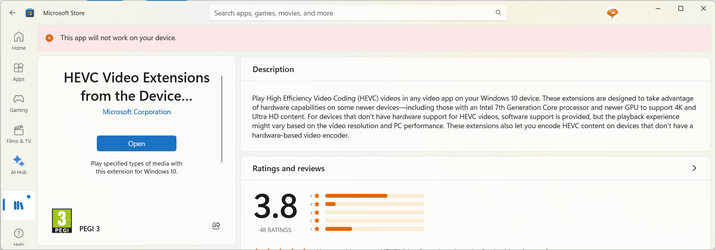
Your link gives me this.....

1696611705442.png

The current HEVC codec is a paid for App…
There was (and still is) a second identical version that was free. Those of us who installed it while still available can still get updates, and can even install it on our new devices as it's listed as an 'owned app' when we sign in to the Store.

https://www.microsoft.com/store/productid/9N4WGH0Z6VHQ?ocid=pdpshare
 

My Computers My Computers

  • At a glance

    Windows 11 HomeAMD Athlon Silver 3050U8GBRadeon Graphics
    OS
    Windows 11 Home
    Computer type
    Laptop
    Manufacturer/Model
    Acer Aspire 3 A315-23-R9VY
    CPU
    AMD Athlon Silver 3050U
    Memory
    8GB
    Graphics Card(s)
    Radeon Graphics
    Monitor(s) Displays
    laptop screen
    Screen Resolution
    1366x768 native resolution, up to 2560x1440 with Radeon Virtual Super Resolution
    Hard Drives
    1TB Samsung EVO 870 SSD (from April 2026: 250GB EVO 850)
    Internet Speed
    150 Mbps
    Browser
    Edge, Firefox
    Antivirus
    Defender
    Other Info
    fully 'Windows 11 ready' laptop. Windows 10 C: partition migrated from my old unsupported 'main machine' then upgraded to 11. A test migration ran Insider builds for 2 months. When 11 was released on 5th October 2021 it was re-imaged back to 10 and was offered the upgrade in Windows Update on 20th October. Windows Update offered the 22H2 Feature Update on 20th September 2022. It got the 23H2 Feature Update on 4th November 2023 through Windows Update, 24H2 on 3rd October 2024 through Windows Update by setting the Target Release Version for 24H2, and 25H2 on 30th September 2025 through Windows Update by setting the Target Release Version for 25H2.

    UPDATE - 11 April 2026: due to mechanical deterioration this PC has been retired from active duty. The OS with all software and files has been migrated to my System Seven in 'Other systems' to carry on as my general purpose 'main machine'.
  • At a glance

    Windows 11 ProIntel® Core™ i5-520M8GB(integrated graphics) Intel HD Graphics
    Operating System
    Windows 11 Pro
    Computer type
    Laptop
    Manufacturer/Model
    Dell Latitude E4310
    CPU
    Intel® Core™ i5-520M
    Motherboard
    0T6M8G
    Memory
    8GB
    Graphics card(s)
    (integrated graphics) Intel HD Graphics
    Screen Resolution
    1366x768
    Hard Drives
    500GB Crucial MX500 SSD
    Browser
    Firefox, Edge
    Antivirus
    Defender
    Other Info
    unsupported machine: Legacy bios, MBR, TPM 1.2, upgraded from W10 to W11 using W10/W11 hybrid install media workaround.

    In-place upgrade to 22H2 using ISO and a workaround.
    Feature Update to 23H2 by manually installing the Enablement Package.
    In-place upgrade to 24H2 using hybrid 23H2/24H2 install media.
    Upgraded to 25H2 by Enablement Package.

    Also running Insider Dev, and Canary builds and Windows 10 as native boot .vhdx.
  • My SYSTEM THREE is a Dell Latitude 5410, i7-10610U, 32GB RAM, 512GB NVMe ssd, supported device running Windows 11 Pro.

    My SYSTEM FOUR is a 2-in-1 convertible Lenovo Yoga 11e 20DA, Celeron N2930, 8GB RAM, 256GB ssd. Unsupported device: currently running Win10 Pro, plus Win11 Pro RTM and Insider Dev, Beta, and RP 24H2 as native boot vhdx.

    My SYSTEM FIVE is a Dell Latitude 3190 2-in-1, Pentium Silver N5030, 8GB RAM, 1TB NVMe ssd, supported device running Windows 11 Pro, plus Insider Beta, Dev, and Canary builds (and a few others) as a native boot .vhdx.

    My SYSTEM SIX is a Dell Latitude 5550, Core Ultra 7 165H, 64GB RAM, 1TB NVMe SSD, supported device, Windows 11 Pro 24H2, Hyper-V host machine. Updated to 25H2 on 30th September 2025.

    My SYSTEM SEVEN is a Lenovo Thinkpad T580, Intel Core i7-8650U, 16GB RAM, 512GB NVMe SSD + 2nd 512GB NVMe SSD, a supported device for Windows 11. This is my current general purpose 'main machine'. The installed Windows 11 Home from my System One has been migrated to this machine.
Your link gives me this.....

View attachment 73248


There was (and still is) a second identical version that was free. Those of us who installed it while still available can still get updates, and can even install it on our new devices as it's listed as an 'owned app' when we sign in to the Store.

https://www.microsoft.com/store/productid/9N4WGH0Z6VHQ?ocid=pdpshare
The Microsoft Store is blocking this version of the App... I was able to get older versions of the App from third party sources which do work pre April of this year. Can't remember the build numbers now.
 

Attachments

  • Screenshot 2023-10-06 142418.png
    Screenshot 2023-10-06 142418.png
    44.9 KB · Views: 2

My Computer My Computer

At a glance

Windows 11 ProThreadripper Pro 3945WX32 GB DDR4 3200/EEC HynixNvidia RTX 2070 Super FE
OS
Windows 11 Pro
Computer type
PC/Desktop
Manufacturer/Model
Lenovo P620
CPU
Threadripper Pro 3945WX
Motherboard
Lenovo 1046
Memory
32 GB DDR4 3200/EEC Hynix
Graphics Card(s)
Nvidia RTX 2070 Super FE
Sound Card
N/A
Monitor(s) Displays
Samsung CRG5
Screen Resolution
1920X1080 240mHz
Hard Drives
Samsung PM9A1 1TB NVMe
Samsung 970 EVO Plus 500 GB NVMe
Samsung 850 EVO 1 TB
Samsung 850 PRO 256 GB
PSU
1000 Watt Lenovo 80 plus Platinum
Keyboard
Corsair K95 Platinum XT
Mouse
M65 Pro RGB
The Microsoft Store is blocking this version of the App...
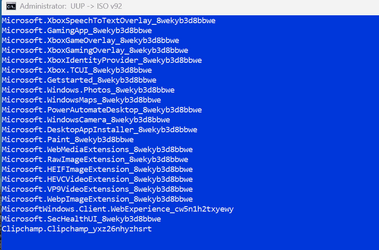
To be strictly accurate, the Microsoft Store is blocking you from installing it for the first time. It is identical in all respects except the name to the one you can buy for $0.99, but it was at one time free to install. And because I installed it on one of my machines back then, it counts as a 'purchased app' for me. That means I can still install it on any new machine, and I still get updates.

1696617655461.png
1696617690338.png
 

My Computers My Computers

  • At a glance

    Windows 11 HomeAMD Athlon Silver 3050U8GBRadeon Graphics
    OS
    Windows 11 Home
    Computer type
    Laptop
    Manufacturer/Model
    Acer Aspire 3 A315-23-R9VY
    CPU
    AMD Athlon Silver 3050U
    Memory
    8GB
    Graphics Card(s)
    Radeon Graphics
    Monitor(s) Displays
    laptop screen
    Screen Resolution
    1366x768 native resolution, up to 2560x1440 with Radeon Virtual Super Resolution
    Hard Drives
    1TB Samsung EVO 870 SSD (from April 2026: 250GB EVO 850)
    Internet Speed
    150 Mbps
    Browser
    Edge, Firefox
    Antivirus
    Defender
    Other Info
    fully 'Windows 11 ready' laptop. Windows 10 C: partition migrated from my old unsupported 'main machine' then upgraded to 11. A test migration ran Insider builds for 2 months. When 11 was released on 5th October 2021 it was re-imaged back to 10 and was offered the upgrade in Windows Update on 20th October. Windows Update offered the 22H2 Feature Update on 20th September 2022. It got the 23H2 Feature Update on 4th November 2023 through Windows Update, 24H2 on 3rd October 2024 through Windows Update by setting the Target Release Version for 24H2, and 25H2 on 30th September 2025 through Windows Update by setting the Target Release Version for 25H2.

    UPDATE - 11 April 2026: due to mechanical deterioration this PC has been retired from active duty. The OS with all software and files has been migrated to my System Seven in 'Other systems' to carry on as my general purpose 'main machine'.
  • At a glance

    Windows 11 ProIntel® Core™ i5-520M8GB(integrated graphics) Intel HD Graphics
    Operating System
    Windows 11 Pro
    Computer type
    Laptop
    Manufacturer/Model
    Dell Latitude E4310
    CPU
    Intel® Core™ i5-520M
    Motherboard
    0T6M8G
    Memory
    8GB
    Graphics card(s)
    (integrated graphics) Intel HD Graphics
    Screen Resolution
    1366x768
    Hard Drives
    500GB Crucial MX500 SSD
    Browser
    Firefox, Edge
    Antivirus
    Defender
    Other Info
    unsupported machine: Legacy bios, MBR, TPM 1.2, upgraded from W10 to W11 using W10/W11 hybrid install media workaround.

    In-place upgrade to 22H2 using ISO and a workaround.
    Feature Update to 23H2 by manually installing the Enablement Package.
    In-place upgrade to 24H2 using hybrid 23H2/24H2 install media.
    Upgraded to 25H2 by Enablement Package.

    Also running Insider Dev, and Canary builds and Windows 10 as native boot .vhdx.
  • My SYSTEM THREE is a Dell Latitude 5410, i7-10610U, 32GB RAM, 512GB NVMe ssd, supported device running Windows 11 Pro.

    My SYSTEM FOUR is a 2-in-1 convertible Lenovo Yoga 11e 20DA, Celeron N2930, 8GB RAM, 256GB ssd. Unsupported device: currently running Win10 Pro, plus Win11 Pro RTM and Insider Dev, Beta, and RP 24H2 as native boot vhdx.

    My SYSTEM FIVE is a Dell Latitude 3190 2-in-1, Pentium Silver N5030, 8GB RAM, 1TB NVMe ssd, supported device running Windows 11 Pro, plus Insider Beta, Dev, and Canary builds (and a few others) as a native boot .vhdx.

    My SYSTEM SIX is a Dell Latitude 5550, Core Ultra 7 165H, 64GB RAM, 1TB NVMe SSD, supported device, Windows 11 Pro 24H2, Hyper-V host machine. Updated to 25H2 on 30th September 2025.

    My SYSTEM SEVEN is a Lenovo Thinkpad T580, Intel Core i7-8650U, 16GB RAM, 512GB NVMe SSD + 2nd 512GB NVMe SSD, a supported device for Windows 11. This is my current general purpose 'main machine'. The installed Windows 11 Home from my System One has been migrated to this machine.
To be strictly accurate, the Microsoft Store is blocking you from installing it for the first time. It is identical in all respects except the name to the one you can buy for $0.99, but it was at one time free to install. And because I installed it on one of my machines back then, it counts as a 'purchased app' for me. That means I can still install it on any new machine, and I still get updates
I have both versions actually... you need the HEVC and HEIF codecs for the Photo App to show my iPhone Media from OneDrive. I'm just using the K-Lite codec pack, so my thumbnails don't have the "Green Pixelation" or image corruption. The K-Lite codecs don't work with the Photo App, but they do work with the Windows Media Player and the new Photo Gallery View inside File Explorer.
 

My Computer My Computer

At a glance

Windows 11 ProThreadripper Pro 3945WX32 GB DDR4 3200/EEC HynixNvidia RTX 2070 Super FE
OS
Windows 11 Pro
Computer type
PC/Desktop
Manufacturer/Model
Lenovo P620
CPU
Threadripper Pro 3945WX
Motherboard
Lenovo 1046
Memory
32 GB DDR4 3200/EEC Hynix
Graphics Card(s)
Nvidia RTX 2070 Super FE
Sound Card
N/A
Monitor(s) Displays
Samsung CRG5
Screen Resolution
1920X1080 240mHz
Hard Drives
Samsung PM9A1 1TB NVMe
Samsung 970 EVO Plus 500 GB NVMe
Samsung 850 EVO 1 TB
Samsung 850 PRO 256 GB
PSU
1000 Watt Lenovo 80 plus Platinum
Keyboard
Corsair K95 Platinum XT
Mouse
M65 Pro RGB
Not sure what the problem is here -- VLC plays HEVC codec with zero issues (and no charge) so what have I mis-understood here. You also can install VLC on android and play remote HEVC codecs (plus a load of others). KODI also plays nearly everything under the sun and can browse through photo collections etc - works on Windows and Android. (and on amazon firestick for playing remote content on a TV). Maybe on Iphones too --I don't have one of those so unable to try it.

The CANARY build seems to have these codecs built in :

Skjámynd 2023-10-07 101826.png


Cheers
jimbo
 
Last edited:

My Computer My Computer

At a glance

Windows XP,11 Linux Fedora Rawhide pre-releas...2 X Intel i7
OS
Windows XP,11 Linux Fedora Rawhide pre-release 45
Computer type
PC/Desktop
CPU
2 X Intel i7
Screen Resolution
4KUHD X 2
Not sure what the problem is here -- VLC plays HEVC codec with zero issues (and no charge) so what have I mis-understood here.
The problem is the latest Microsoft HEVC codec isn’t totally compatible with Win 11 22621.2361 and later builds with the new Explorer.exe with Gallery View for H265 files. I’ve tried older versions of the HEVC Codec and the problem goes away immediately. Unfortunately, it will update soon enough and the “green mist” returns.
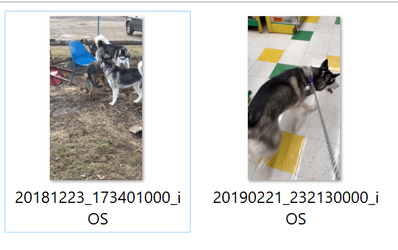
Playback isn’t the issue here… it’s the thumbnails being created by the codec is the issue… here’s the proof. Before K-lite codec and after.
I tried the VLC Player as suggested… the results are identical to the below images.
 

Attachments

  • Screenshot 2023-10-07 122239.png
    Screenshot 2023-10-07 122239.png
    50.9 KB · Views: 1
  • Screenshot 2023-10-07 122457.png
    Screenshot 2023-10-07 122457.png
    41.9 KB · Views: 2

My Computer My Computer

At a glance

Windows 11 ProThreadripper Pro 3945WX32 GB DDR4 3200/EEC HynixNvidia RTX 2070 Super FE
OS
Windows 11 Pro
Computer type
PC/Desktop
Manufacturer/Model
Lenovo P620
CPU
Threadripper Pro 3945WX
Motherboard
Lenovo 1046
Memory
32 GB DDR4 3200/EEC Hynix
Graphics Card(s)
Nvidia RTX 2070 Super FE
Sound Card
N/A
Monitor(s) Displays
Samsung CRG5
Screen Resolution
1920X1080 240mHz
Hard Drives
Samsung PM9A1 1TB NVMe
Samsung 970 EVO Plus 500 GB NVMe
Samsung 850 EVO 1 TB
Samsung 850 PRO 256 GB
PSU
1000 Watt Lenovo 80 plus Platinum
Keyboard
Corsair K95 Platinum XT
Mouse
M65 Pro RGB
I need to make an update to this issue… it seems the HEVC Codec isn’t the core problem. I installed Icaros and use it to generate the MOV H265 thumbnails and that seems to fix the issue with “green mist” and “pixelation.” Unfortunately, the “pixelated” thumbnails still exist for HEVC files inside of OneDrive.
Just an observation… Windows 11 23H2 really isn’t ready… this new File Explorer with Photo Gallery needs work.
 

My Computer My Computer

At a glance

Windows 11 ProThreadripper Pro 3945WX32 GB DDR4 3200/EEC HynixNvidia RTX 2070 Super FE
OS
Windows 11 Pro
Computer type
PC/Desktop
Manufacturer/Model
Lenovo P620
CPU
Threadripper Pro 3945WX
Motherboard
Lenovo 1046
Memory
32 GB DDR4 3200/EEC Hynix
Graphics Card(s)
Nvidia RTX 2070 Super FE
Sound Card
N/A
Monitor(s) Displays
Samsung CRG5
Screen Resolution
1920X1080 240mHz
Hard Drives
Samsung PM9A1 1TB NVMe
Samsung 970 EVO Plus 500 GB NVMe
Samsung 850 EVO 1 TB
Samsung 850 PRO 256 GB
PSU
1000 Watt Lenovo 80 plus Platinum
Keyboard
Corsair K95 Platinum XT
Mouse
M65 Pro RGB
I have the same issue. I think I have it isolated to movies I recorded on my iPhone from September 2019 and earlier. I don't recall what version of iPhone I was on then (maybe a 6S?), but in September 2019 I got an iPhone XS. Movies recorded after getting that phone don't have the green thumbnail issue for me. Maybe people smarter than me can figure out what those earlier versions of iPhone were using for codecs, and go from there. This only happened to me after the most recent Windows 11 updates in October 2023. And like the original poster, the movies play just fine, it's only the thumbnails that appear green. I already cleared all thumbnails and let windows make them again... didn't change anything.
 

My Computer My Computer

At a glance

Win 11 Pro 64-bitRyzen 9 5950X 16-Core64 GBNVIDIA GeForce RTX 2060
OS
Win 11 Pro 64-bit
Computer type
PC/Desktop
Manufacturer/Model
Self Built
CPU
Ryzen 9 5950X 16-Core
Motherboard
ASUS ROG Crosshair VIII Dark Hero
Memory
64 GB
Graphics Card(s)
NVIDIA GeForce RTX 2060
Monitor(s) Displays
Acer Predator 28"
Screen Resolution
4k
Hard Drives
C: Samsung SSD 980 (1 TB)
8 Others: 4x 4TB HGST; Seagate Archive (8TB); Seagate Barracuda Pro (10 TB); Toshiba MG07ACA Series (14TB); Seagate Exos X20 (20TB)
Internet Speed
Verizon FiOS 1gb/s
I have the same issue. I think I have it isolated to movies I recorded on my iPhone from September 2019 and earlier. I don't recall what version of iPhone I was on then (maybe a 6S?), but in September 2019 I got an iPhone XS. Movies recorded after getting that phone don't have the green thumbnail issue for me. Maybe people smarter than me can figure out what those earlier versions of iPhone were using for codecs, and go from there. This only happened to me after the most recent Windows 11 updates in October 2023. And like the original poster, the movies play just fine, it's only the thumbnails that appear green. I already cleared all thumbnails and let windows make them again... didn't change anything.
Did some further digging. It seems only iPhone videos created between November 2018 and September 2019 have green thumbnails for me. Hope this helps out the troubleshooting.
 

My Computer My Computer

At a glance

Win 11 Pro 64-bitRyzen 9 5950X 16-Core64 GBNVIDIA GeForce RTX 2060
OS
Win 11 Pro 64-bit
Computer type
PC/Desktop
Manufacturer/Model
Self Built
CPU
Ryzen 9 5950X 16-Core
Motherboard
ASUS ROG Crosshair VIII Dark Hero
Memory
64 GB
Graphics Card(s)
NVIDIA GeForce RTX 2060
Monitor(s) Displays
Acer Predator 28"
Screen Resolution
4k
Hard Drives
C: Samsung SSD 980 (1 TB)
8 Others: 4x 4TB HGST; Seagate Archive (8TB); Seagate Barracuda Pro (10 TB); Toshiba MG07ACA Series (14TB); Seagate Exos X20 (20TB)
Internet Speed
Verizon FiOS 1gb/s
I have the same issue. I think I have it isolated to movies I recorded on my iPhone from September 2019 and earlier.
My first “green pixelated thumbnail” MOV HEVC H265 was taken around October 2018. The last one was taken around September of 2019. Before and after that timeframe, I’ve had no issues with “green pixelization.” The problem seems to be related to MOV HEVC movies taken with iOS 12. My HEVC MOV videos with iOS 11 and 13 are perfect and produce nice thumbnails.

That’s probably the cause then… iOS 12 had something odd about the HEVC H265 codec causing the “green mist” thumbnails in Windows 11. This problem affects OneDrive too… no “green mist” but heavily pixelated and ghost images within the thumbnails. You could re-upload these images using the iPhone most compatible setting. The downside is the file is much bigger in size…

At least I know someone else is experiencing this problem and these files aren’t corrupted…

I’m using Icaros thumbnail handler to fix the problem… and it does fix the “green mist.” Make sure to limit the file types to MOV and MP4. If you use the default file types, it will screw up the Settings App producing strange behavior of the desktop backgrounds only showing black and show grey in the Lock Screen page with red X’s for the calendar, mail and weather.
 

My Computer My Computer

At a glance

Windows 11 ProThreadripper Pro 3945WX32 GB DDR4 3200/EEC HynixNvidia RTX 2070 Super FE
OS
Windows 11 Pro
Computer type
PC/Desktop
Manufacturer/Model
Lenovo P620
CPU
Threadripper Pro 3945WX
Motherboard
Lenovo 1046
Memory
32 GB DDR4 3200/EEC Hynix
Graphics Card(s)
Nvidia RTX 2070 Super FE
Sound Card
N/A
Monitor(s) Displays
Samsung CRG5
Screen Resolution
1920X1080 240mHz
Hard Drives
Samsung PM9A1 1TB NVMe
Samsung 970 EVO Plus 500 GB NVMe
Samsung 850 EVO 1 TB
Samsung 850 PRO 256 GB
PSU
1000 Watt Lenovo 80 plus Platinum
Keyboard
Corsair K95 Platinum XT
Mouse
M65 Pro RGB
Back
Top Bottom