Hibernate missing


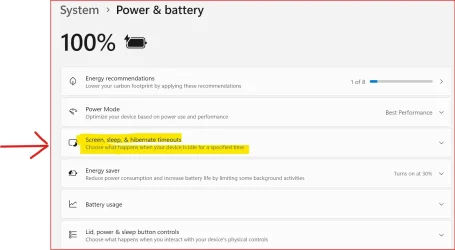
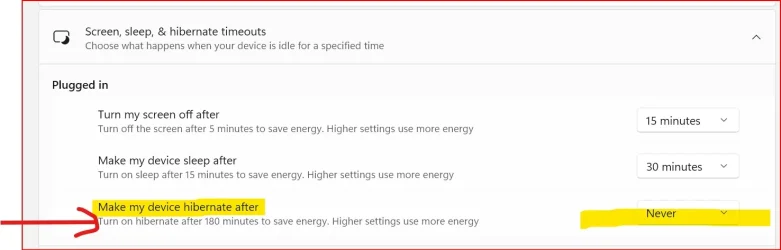
Yes, exactly what has been happening. What I really want is the option to Hibernate Never on the new Dell laptop like I could on the old HP laptop. The screen on the old HP laptop looked like this:
View attachment 143155

Yes, I understand that. I am just suggesting that if you disable Hibernate, then never isn’t needed.
 

My Computers

System One System Two

  • OS
    Windows 11 Pro 25H2 Build 26200.8524
    Computer type
    PC/Desktop
    Manufacturer/Model
    Sin-built 2013
    CPU
    Intel(R) Core(TM) i7-4770K CPU @ 3.50GHz
    Motherboard
    ASUS ROG Maximus VI Formula
    Memory
    32.0 GB of I forget and the box is in storage.
    Graphics Card(s)
    Gigabyte nVidia GeForce GTX 1660 Super OC 6GB
    Sound Card
    Onboard thingy
    Monitor(s) Displays
    5 x LG 25MS500-B - 1 x 24MK430H-B - 1 x Wacom Pro 22" Touch Screen Tablet
    Screen Resolution
    All over the place
    Hard Drives
    Too many to list.
    OS on Samsung 1TB 870 QVO SATA
    PSU
    Silverstone 1500
    Case
    NZXT Phantom 820 Full-Tower Case
    Cooling
    Noctua NH-D15 Elite Class Dual Tower CPU Cooler / 6 x EziDIY 120mm / 2 x Corsair 140mm somethings / 1 x 140mm Thermaltake something / 2 x 200mm Corsair.
    Keyboard
    Corsair K95 / Logitech diNovo Edge Wireless
    Mouse
    Logitech: G402 / G502 / Mx Masters / Mx Air Cordless
    Internet Speed
    2000/500Mbps
    Browser
    All sorts
    Antivirus
    Kaspersky Premium
    Other Info
    ㅤㅤㅤㅤㅤㅤㅤㅤㅤㅤㅤㅤㅤㅤㅤㅤㅤㅤㅤㅤㅤㅤㅤㅤㅤㅤㅤㅤㅤㅤㅤㅤㅤㅤㅤㅤㅤㅤㅤㅤ⠀⠀⠀⠀⠀⠀⠀⠀⠀⠀
    TP-Link BE9300 WiFi 7 Bluetooth 5.4 (Archer TBE550E)
    TP-Link TX201 V1 2.5GB Lan

    Grandstream HT812 - VoIP
    ASUS DSL-AX82U - Mesh
    ASUS RT-AC68U - Mesh
    ASUS RT-BE88U Router

    Brother MFC-L2880DW Printer

    I’m on a horse.
  • Operating System
    Windows 11 Pro 25H2 Build 26200.8524
    Computer type
    Laptop
    Manufacturer/Model
    LENOVO Yoga 7 14IRL8 - 7i EVO OLED 14" Touchscreen i5 12 Core 16GB/512GB
    CPU
    Intel Core 12th Gen i5-1240P Processor (1.7 - 4.4GHz)
    Memory
    16GB LPDDR5 RAM
    Graphics card(s)
    Intel Iris Xe Graphics Processor
    Sound Card
    Optimized with Dolby Atmos®
    Screen Resolution
    QHD 2880 x 1800 OLED
    Hard Drives
    M.2 512GB
    Antivirus
    Defender / Malwarebytes
    Other Info
    …still on a horse.
After you turn Hibernation off using the Command Prompt you will see that it is no longer available if you run
powercfg /a

Code:
The following sleep states are available on this system:
    Standby (S0 Low Power Idle) Network Connected

The following sleep states are not available on this system:
    Standby (S1)
    The system firmware does not support this standby state.
    This standby state is disabled when S0 low power idle is supported.

    Standby (S2)
    The system firmware does not support this standby state.
    This standby state is disabled when S0 low power idle is supported.

    Standby (S3)
    The system firmware does not support this standby state.
    This standby state is disabled when S0 low power idle is supported.

    Hibernate
    Hibernation has not been enabled.

    Hybrid Sleep
    Standby (S3) is not available.
    Hibernation is not available.
    The hypervisor does not support this standby state.

    Fast Startup
    Hibernation is not available.
 

My Computers

System One System Two

  • OS
    Windows 11 Pro 25H2 (26200.6901)
    Computer type
    Laptop
    Manufacturer/Model
    ASUS TUF Gaming A15 (2022)
    CPU
    AMD Ryzen 7 6800H with Radeon 680M GPU (486MB RAM)
    Memory
    Crucial DDR5-4800 (2400MHz) 32GB (2 x 16GB)
    Graphics Card(s)
    NVIDIA RTX 3060 Laptop (6GB RAM)
    Sound Card
    n/a
    Monitor(s) Displays
    15.6-inch
    Screen Resolution
    1920x1080 300Hz
    Hard Drives
    2 x Samsung 990 Evo Plus (2TB M.2 NVME SSD)
    PSU
    n/a
    Mouse
    Wireless Mouse M510
    Internet Speed
    2100Mbps/300Mbps
    Browser
    Firefox
    Antivirus
    Malwarebytes
  • Operating System
    Windows 11 Pro 25H2 (26200.8246)
    Computer type
    PC/Desktop
    Manufacturer/Model
    Custom build
    CPU
    AMD Ryzen 7 5700X3D
    Motherboard
    ASUS ROG Strix B550-F Gaming WiFi II
    Memory
    G.SKILL Flare X 32GB (2x16GB) DDR4
    Graphics card(s)
    ASUS ROG-STRIX-RTX3060TI-08G-V2-GAMING (RTX 3060-Ti, 8GB RAM)
    Monitor(s) Displays
    Samsung G50D IPS 27"
    Screen Resolution
    1440p/180Hz
    Hard Drives
    SAMSUNG 990 EVO Plus (2TB] M.2 NVME SSD
    SAMSUNG 990 EVO Plus (4TB) M.2 NVME SSD
    PSU
    Corsair RM750x (750 watts)
    Case
    Cooler Master MasterCase 5
    Cooling
    Scythe Mugen 6
    Keyboard
    Logitech K520 (MK540 keyboard/mouse combo)
    Mouse
    Logitech M310 (MK540 keyboard/mouse combo)
    Internet Speed
    2100 Mbps down / 300 Mbps up
    Browser
    Firefox, Edge, Chrome
    Antivirus
    Malwarebytes (Premium)
    Other Info
    ASUS Blu-ray Burner BW-16D1HT (SATA) || Western Digital Easystore 20TB USB 3.0 external hard drive used with Acronis True Image 2025 backup software || HP OfficeJet Pro 6975 Printer/Scanner
Yep, getting frustrated with this. I have it set to "Make my device sleep after NEVER" so we will see what happens in the morning. If the BackUPS is still connected then I'll be fine with that. Thanks for all the suggestions. My fingers got a good workout at the command prompt.

I’m following your post, I hope to read good news 🙏
 

My Computers

System One System Two

  • OS
    Windows 11 Pro 25H2 Build 26200.8524
    Computer type
    PC/Desktop
    Manufacturer/Model
    Sin-built 2013
    CPU
    Intel(R) Core(TM) i7-4770K CPU @ 3.50GHz
    Motherboard
    ASUS ROG Maximus VI Formula
    Memory
    32.0 GB of I forget and the box is in storage.
    Graphics Card(s)
    Gigabyte nVidia GeForce GTX 1660 Super OC 6GB
    Sound Card
    Onboard thingy
    Monitor(s) Displays
    5 x LG 25MS500-B - 1 x 24MK430H-B - 1 x Wacom Pro 22" Touch Screen Tablet
    Screen Resolution
    All over the place
    Hard Drives
    Too many to list.
    OS on Samsung 1TB 870 QVO SATA
    PSU
    Silverstone 1500
    Case
    NZXT Phantom 820 Full-Tower Case
    Cooling
    Noctua NH-D15 Elite Class Dual Tower CPU Cooler / 6 x EziDIY 120mm / 2 x Corsair 140mm somethings / 1 x 140mm Thermaltake something / 2 x 200mm Corsair.
    Keyboard
    Corsair K95 / Logitech diNovo Edge Wireless
    Mouse
    Logitech: G402 / G502 / Mx Masters / Mx Air Cordless
    Internet Speed
    2000/500Mbps
    Browser
    All sorts
    Antivirus
    Kaspersky Premium
    Other Info
    ㅤㅤㅤㅤㅤㅤㅤㅤㅤㅤㅤㅤㅤㅤㅤㅤㅤㅤㅤㅤㅤㅤㅤㅤㅤㅤㅤㅤㅤㅤㅤㅤㅤㅤㅤㅤㅤㅤㅤㅤ⠀⠀⠀⠀⠀⠀⠀⠀⠀⠀
    TP-Link BE9300 WiFi 7 Bluetooth 5.4 (Archer TBE550E)
    TP-Link TX201 V1 2.5GB Lan

    Grandstream HT812 - VoIP
    ASUS DSL-AX82U - Mesh
    ASUS RT-AC68U - Mesh
    ASUS RT-BE88U Router

    Brother MFC-L2880DW Printer

    I’m on a horse.
  • Operating System
    Windows 11 Pro 25H2 Build 26200.8524
    Computer type
    Laptop
    Manufacturer/Model
    LENOVO Yoga 7 14IRL8 - 7i EVO OLED 14" Touchscreen i5 12 Core 16GB/512GB
    CPU
    Intel Core 12th Gen i5-1240P Processor (1.7 - 4.4GHz)
    Memory
    16GB LPDDR5 RAM
    Graphics card(s)
    Intel Iris Xe Graphics Processor
    Sound Card
    Optimized with Dolby Atmos®
    Screen Resolution
    QHD 2880 x 1800 OLED
    Hard Drives
    M.2 512GB
    Antivirus
    Defender / Malwarebytes
    Other Info
    …still on a horse.
I’m obviously on someones ignore list. I’ll leave you with them to repeat everything I have said and check back when you have good(?) news.
 

My Computers

System One System Two

  • OS
    Windows 11 Pro 25H2 Build 26200.8524
    Computer type
    PC/Desktop
    Manufacturer/Model
    Sin-built 2013
    CPU
    Intel(R) Core(TM) i7-4770K CPU @ 3.50GHz
    Motherboard
    ASUS ROG Maximus VI Formula
    Memory
    32.0 GB of I forget and the box is in storage.
    Graphics Card(s)
    Gigabyte nVidia GeForce GTX 1660 Super OC 6GB
    Sound Card
    Onboard thingy
    Monitor(s) Displays
    5 x LG 25MS500-B - 1 x 24MK430H-B - 1 x Wacom Pro 22" Touch Screen Tablet
    Screen Resolution
    All over the place
    Hard Drives
    Too many to list.
    OS on Samsung 1TB 870 QVO SATA
    PSU
    Silverstone 1500
    Case
    NZXT Phantom 820 Full-Tower Case
    Cooling
    Noctua NH-D15 Elite Class Dual Tower CPU Cooler / 6 x EziDIY 120mm / 2 x Corsair 140mm somethings / 1 x 140mm Thermaltake something / 2 x 200mm Corsair.
    Keyboard
    Corsair K95 / Logitech diNovo Edge Wireless
    Mouse
    Logitech: G402 / G502 / Mx Masters / Mx Air Cordless
    Internet Speed
    2000/500Mbps
    Browser
    All sorts
    Antivirus
    Kaspersky Premium
    Other Info
    ㅤㅤㅤㅤㅤㅤㅤㅤㅤㅤㅤㅤㅤㅤㅤㅤㅤㅤㅤㅤㅤㅤㅤㅤㅤㅤㅤㅤㅤㅤㅤㅤㅤㅤㅤㅤㅤㅤㅤㅤ⠀⠀⠀⠀⠀⠀⠀⠀⠀⠀
    TP-Link BE9300 WiFi 7 Bluetooth 5.4 (Archer TBE550E)
    TP-Link TX201 V1 2.5GB Lan

    Grandstream HT812 - VoIP
    ASUS DSL-AX82U - Mesh
    ASUS RT-AC68U - Mesh
    ASUS RT-BE88U Router

    Brother MFC-L2880DW Printer

    I’m on a horse.
  • Operating System
    Windows 11 Pro 25H2 Build 26200.8524
    Computer type
    Laptop
    Manufacturer/Model
    LENOVO Yoga 7 14IRL8 - 7i EVO OLED 14" Touchscreen i5 12 Core 16GB/512GB
    CPU
    Intel Core 12th Gen i5-1240P Processor (1.7 - 4.4GHz)
    Memory
    16GB LPDDR5 RAM
    Graphics card(s)
    Intel Iris Xe Graphics Processor
    Sound Card
    Optimized with Dolby Atmos®
    Screen Resolution
    QHD 2880 x 1800 OLED
    Hard Drives
    M.2 512GB
    Antivirus
    Defender / Malwarebytes
    Other Info
    …still on a horse.
Yep, getting frustrated with this. I have it set to "Make my device sleep after NEVER" so we will see what happens in the morning. If the BackUPS is still connected then I'll be fine with that. Thanks for all the suggestions. My fingers got a good workout at the command prompt.
Did you disable Hibernation as I suggested? If you do that then hibernation is impossible.

Note Hibernation is independent of Sleep so you have can one without the other. I have Hibernation disabled but Sleep works fine.
 

My Computers

System One System Two

  • OS
    Windows 11 Pro 25H2 (26200.6901)
    Computer type
    Laptop
    Manufacturer/Model
    ASUS TUF Gaming A15 (2022)
    CPU
    AMD Ryzen 7 6800H with Radeon 680M GPU (486MB RAM)
    Memory
    Crucial DDR5-4800 (2400MHz) 32GB (2 x 16GB)
    Graphics Card(s)
    NVIDIA RTX 3060 Laptop (6GB RAM)
    Sound Card
    n/a
    Monitor(s) Displays
    15.6-inch
    Screen Resolution
    1920x1080 300Hz
    Hard Drives
    2 x Samsung 990 Evo Plus (2TB M.2 NVME SSD)
    PSU
    n/a
    Mouse
    Wireless Mouse M510
    Internet Speed
    2100Mbps/300Mbps
    Browser
    Firefox
    Antivirus
    Malwarebytes
  • Operating System
    Windows 11 Pro 25H2 (26200.8246)
    Computer type
    PC/Desktop
    Manufacturer/Model
    Custom build
    CPU
    AMD Ryzen 7 5700X3D
    Motherboard
    ASUS ROG Strix B550-F Gaming WiFi II
    Memory
    G.SKILL Flare X 32GB (2x16GB) DDR4
    Graphics card(s)
    ASUS ROG-STRIX-RTX3060TI-08G-V2-GAMING (RTX 3060-Ti, 8GB RAM)
    Monitor(s) Displays
    Samsung G50D IPS 27"
    Screen Resolution
    1440p/180Hz
    Hard Drives
    SAMSUNG 990 EVO Plus (2TB] M.2 NVME SSD
    SAMSUNG 990 EVO Plus (4TB) M.2 NVME SSD
    PSU
    Corsair RM750x (750 watts)
    Case
    Cooler Master MasterCase 5
    Cooling
    Scythe Mugen 6
    Keyboard
    Logitech K520 (MK540 keyboard/mouse combo)
    Mouse
    Logitech M310 (MK540 keyboard/mouse combo)
    Internet Speed
    2100 Mbps down / 300 Mbps up
    Browser
    Firefox, Edge, Chrome
    Antivirus
    Malwarebytes (Premium)
    Other Info
    ASUS Blu-ray Burner BW-16D1HT (SATA) || Western Digital Easystore 20TB USB 3.0 external hard drive used with Acronis True Image 2025 backup software || HP OfficeJet Pro 6975 Printer/Scanner
Did you disable Hibernation as I suggested? If you do that then hibernation is impossible.

Note Hibernation is independent of Sleep so you have can one without the other. I have Hibernation disabled but Sleep works fine.
Yes, I disabled Hibernate and set it to Sleep Never. It worked fine and did not disable the USB port that controls the Cyberpower Backups.
 

My Computers

System One System Two

  • OS
    Windows 11 Home, Ver 24H2, Build 26100.4946
    Computer type
    Laptop
    Manufacturer/Model
    HP Pavilion Gaming Laptop 15-dk1082nr
    CPU
    Intel(R) Core(TM) i5-10300H CPU @ 2.50GHz (2.50 GHz)
    Memory
    16 GB
    Graphics Card(s)
    NVIDIA GeForce GTX 1660 Ti with Max-Q Design
    Sound Card
    Realtek Audio
    Monitor(s) Displays
    15.6-inch diagonal FHD, 144 Hz, IPS, anti-glare, micro-edge, WLED-backlit
    Screen Resolution
    1920x1080
    Hard Drives
    1 TB
    Keyboard
    Full-size, island-style, acid green backlit, shadow black keyboard with numeric keypad
    Internet Speed
    571.84 Mbps
    Browser
    Firefox, DuckDuckGo, Chrome
    Antivirus
    Norton 360
  • Operating System
    Windows 11 Home, Ver 24H2, Build 26100.4946
    Computer type
    Laptop
    Manufacturer/Model
    Dell Alienware 16X Aurora AC16251
    CPU
    Intel® Core™ Ultra 7 Processor 255HX (30MB cache, 20 cores, 1.8 to 5.2 GHz P-Core)
    Memory
    16GB, 2x8GB, DDR5, 5600 MT/s
    Graphics card(s)
    NVIDIA® GeForce RTX™ 5060, 8 GB GDDR7
    Sound Card
    Stereo speakers, Realtek AL3204 Audio Controller, 2 W x 2 = 4 W total
    Monitor(s) Displays
    16", WQXGA, 240Hz, 100% DCI-P3, ComfortView Plus, G-SYNC
    Hard Drives
    NVMe P0527 Phison 1024GB
    Keyboard
    1-Zone AlienFX RGB Keyboard, English US and external wireless Logitech K270
    Mouse
    Wireless Logitech M705
    Internet Speed
    571.84 Mbps
    Browser
    Firefox, DuckDuckGo, and Chrome
    Antivirus
    Norton 360
I’m obviously on someones ignore list. I’ll leave you with them to repeat everything I have said and check back when you have good(?) news.
Hibernate was turned off and Sleep was set to NEVER and the USB port did not go to sleep and the Cyberpower Backup UPS stayed on all night. I think we are good. Still don't understand why that setting is missing from new Dell but available on old HP. Whatever. Microsoft.
 

My Computers

System One System Two

  • OS
    Windows 11 Home, Ver 24H2, Build 26100.4946
    Computer type
    Laptop
    Manufacturer/Model
    HP Pavilion Gaming Laptop 15-dk1082nr
    CPU
    Intel(R) Core(TM) i5-10300H CPU @ 2.50GHz (2.50 GHz)
    Memory
    16 GB
    Graphics Card(s)
    NVIDIA GeForce GTX 1660 Ti with Max-Q Design
    Sound Card
    Realtek Audio
    Monitor(s) Displays
    15.6-inch diagonal FHD, 144 Hz, IPS, anti-glare, micro-edge, WLED-backlit
    Screen Resolution
    1920x1080
    Hard Drives
    1 TB
    Keyboard
    Full-size, island-style, acid green backlit, shadow black keyboard with numeric keypad
    Internet Speed
    571.84 Mbps
    Browser
    Firefox, DuckDuckGo, Chrome
    Antivirus
    Norton 360
  • Operating System
    Windows 11 Home, Ver 24H2, Build 26100.4946
    Computer type
    Laptop
    Manufacturer/Model
    Dell Alienware 16X Aurora AC16251
    CPU
    Intel® Core™ Ultra 7 Processor 255HX (30MB cache, 20 cores, 1.8 to 5.2 GHz P-Core)
    Memory
    16GB, 2x8GB, DDR5, 5600 MT/s
    Graphics card(s)
    NVIDIA® GeForce RTX™ 5060, 8 GB GDDR7
    Sound Card
    Stereo speakers, Realtek AL3204 Audio Controller, 2 W x 2 = 4 W total
    Monitor(s) Displays
    16", WQXGA, 240Hz, 100% DCI-P3, ComfortView Plus, G-SYNC
    Hard Drives
    NVMe P0527 Phison 1024GB
    Keyboard
    1-Zone AlienFX RGB Keyboard, English US and external wireless Logitech K270
    Mouse
    Wireless Logitech M705
    Internet Speed
    571.84 Mbps
    Browser
    Firefox, DuckDuckGo, and Chrome
    Antivirus
    Norton 360
Hibernate was turned off and Sleep was set to NEVER and the USB port did not go to sleep and the Cyberpower Backup UPS stayed on all night. I think we are good. Still don't understand why that setting is missing from new Dell but available on old HP. Whatever. Microsoft.
I’m glad your stuff is working though.
 

My Computers

System One System Two

  • OS
    Windows 11 Pro 25H2 Build 26200.8524
    Computer type
    PC/Desktop
    Manufacturer/Model
    Sin-built 2013
    CPU
    Intel(R) Core(TM) i7-4770K CPU @ 3.50GHz
    Motherboard
    ASUS ROG Maximus VI Formula
    Memory
    32.0 GB of I forget and the box is in storage.
    Graphics Card(s)
    Gigabyte nVidia GeForce GTX 1660 Super OC 6GB
    Sound Card
    Onboard thingy
    Monitor(s) Displays
    5 x LG 25MS500-B - 1 x 24MK430H-B - 1 x Wacom Pro 22" Touch Screen Tablet
    Screen Resolution
    All over the place
    Hard Drives
    Too many to list.
    OS on Samsung 1TB 870 QVO SATA
    PSU
    Silverstone 1500
    Case
    NZXT Phantom 820 Full-Tower Case
    Cooling
    Noctua NH-D15 Elite Class Dual Tower CPU Cooler / 6 x EziDIY 120mm / 2 x Corsair 140mm somethings / 1 x 140mm Thermaltake something / 2 x 200mm Corsair.
    Keyboard
    Corsair K95 / Logitech diNovo Edge Wireless
    Mouse
    Logitech: G402 / G502 / Mx Masters / Mx Air Cordless
    Internet Speed
    2000/500Mbps
    Browser
    All sorts
    Antivirus
    Kaspersky Premium
    Other Info
    ㅤㅤㅤㅤㅤㅤㅤㅤㅤㅤㅤㅤㅤㅤㅤㅤㅤㅤㅤㅤㅤㅤㅤㅤㅤㅤㅤㅤㅤㅤㅤㅤㅤㅤㅤㅤㅤㅤㅤㅤ⠀⠀⠀⠀⠀⠀⠀⠀⠀⠀
    TP-Link BE9300 WiFi 7 Bluetooth 5.4 (Archer TBE550E)
    TP-Link TX201 V1 2.5GB Lan

    Grandstream HT812 - VoIP
    ASUS DSL-AX82U - Mesh
    ASUS RT-AC68U - Mesh
    ASUS RT-BE88U Router

    Brother MFC-L2880DW Printer

    I’m on a horse.
  • Operating System
    Windows 11 Pro 25H2 Build 26200.8524
    Computer type
    Laptop
    Manufacturer/Model
    LENOVO Yoga 7 14IRL8 - 7i EVO OLED 14" Touchscreen i5 12 Core 16GB/512GB
    CPU
    Intel Core 12th Gen i5-1240P Processor (1.7 - 4.4GHz)
    Memory
    16GB LPDDR5 RAM
    Graphics card(s)
    Intel Iris Xe Graphics Processor
    Sound Card
    Optimized with Dolby Atmos®
    Screen Resolution
    QHD 2880 x 1800 OLED
    Hard Drives
    M.2 512GB
    Antivirus
    Defender / Malwarebytes
    Other Info
    …still on a horse.
OK, so the Hibernate option is available as shown in your screenshot. It is unchecked but even checking it and rebooting does not give me the option to "Make my device hibernate after..." under the Power & battery settings. If that option was there I would set it to NEVER like it is on my old HP laptop.
I'm not understanding why you want the Hibernate option if you're going to set it to never. Without it being activated it's in a sense, already set to never.
 

My Computers

System One System Two

  • OS
    Windows 11 Pro 25H2
    Computer type
    PC/Desktop
    Manufacturer/Model
    PowerSpec B746
    CPU
    Intel Core i7-10700K
    Motherboard
    ASRock Z490 Phantom Gaming 4/ax
    Memory
    16GB (8GB PC4-19200 DDR4 SDRAM x2)
    Graphics Card(s)
    NVIDIA GeForce GTX 1050 TI
    Sound Card
    Realtek Audio
    Monitor(s) Displays
    #1. LG ULTRAWIDE 34" #2. AOC Q32G2WG3 32"
    Screen Resolution
    #1. 3440 X 1440 #2. 1920 x 1080
    Hard Drives
    NVMe WDC WDS100T2B0C-00PXH0 1TB
    Samsung SSD 860 EVO 1TB
    PSU
    750 Watts (62.5A)
    Case
    PowerSpec/Lian Li ATX 205
    Keyboard
    Logitech K270
    Mouse
    Logitech M185
    Browser
    Microsoft Edge and Firefox
    Antivirus
    Webroot SecureAnywhere CE 26.1
  • Operating System
    Windows 11 Canary Channel
    Computer type
    PC/Desktop
    Manufacturer/Model
    PowerSpec G156
    CPU
    Intel Core i5-8400 CPU @ 2.80GHz
    Motherboard
    AsusTeK Prime B360M-A
    Memory
    16 MB DDR 4-2666
    Monitor(s) Displays
    23" Speptre HDMI 75Hz
    Screen Resolution
    1920x1080
    Hard Drives
    Samsung 970 EVO 500GB NVMe
    Keyboard
    Logitek K270
    Mouse
    Logitek M185
    Browser
    Firefox, Edge and Edge Canary
    Antivirus
    Windows Defender
I'm not understanding why you want the Hibernate option if you're going to set it to never. Without it being activated it's in a sense, already set to never.
OK, so on the old laptop, it was set to sleep after 30 minutes and it never disconnected the USB ports so the power to my Cyberpower UPS would always stay connected. That laptop had another setting for "make my device hibernate never." This new laptop doesn't have that "make my device hibernate never" setting so I assumed the new was hibernating overnight and disconnecting the USB port and the power to my Cyberpower UPS. In order to make the new laptop stay on 24/7 and not turn off the USB ports, I now have to set the sleep setting to never. I guess I just don't understand why the options/choices are not the same on both laptops since they both have the same version and build of Windows 11. But... I'm tired of trying to figure it out. Hibernate is turned off but the USB ports still disconnect overnight unless I set sleep to never. I hope that made sense. The old laptop has an extra setting under System>Power & battery. See screenshots. My new laptop does not have that option for "make my device hibernate" so I have to set it to sleep never in order to keep the USB ports active.
1756126019978.webp

1756126033674.webp
 

My Computers

System One System Two

  • OS
    Windows 11 Home, Ver 24H2, Build 26100.4946
    Computer type
    Laptop
    Manufacturer/Model
    HP Pavilion Gaming Laptop 15-dk1082nr
    CPU
    Intel(R) Core(TM) i5-10300H CPU @ 2.50GHz (2.50 GHz)
    Memory
    16 GB
    Graphics Card(s)
    NVIDIA GeForce GTX 1660 Ti with Max-Q Design
    Sound Card
    Realtek Audio
    Monitor(s) Displays
    15.6-inch diagonal FHD, 144 Hz, IPS, anti-glare, micro-edge, WLED-backlit
    Screen Resolution
    1920x1080
    Hard Drives
    1 TB
    Keyboard
    Full-size, island-style, acid green backlit, shadow black keyboard with numeric keypad
    Internet Speed
    571.84 Mbps
    Browser
    Firefox, DuckDuckGo, Chrome
    Antivirus
    Norton 360
  • Operating System
    Windows 11 Home, Ver 24H2, Build 26100.4946
    Computer type
    Laptop
    Manufacturer/Model
    Dell Alienware 16X Aurora AC16251
    CPU
    Intel® Core™ Ultra 7 Processor 255HX (30MB cache, 20 cores, 1.8 to 5.2 GHz P-Core)
    Memory
    16GB, 2x8GB, DDR5, 5600 MT/s
    Graphics card(s)
    NVIDIA® GeForce RTX™ 5060, 8 GB GDDR7
    Sound Card
    Stereo speakers, Realtek AL3204 Audio Controller, 2 W x 2 = 4 W total
    Monitor(s) Displays
    16", WQXGA, 240Hz, 100% DCI-P3, ComfortView Plus, G-SYNC
    Hard Drives
    NVMe P0527 Phison 1024GB
    Keyboard
    1-Zone AlienFX RGB Keyboard, English US and external wireless Logitech K270
    Mouse
    Wireless Logitech M705
    Internet Speed
    571.84 Mbps
    Browser
    Firefox, DuckDuckGo, and Chrome
    Antivirus
    Norton 360
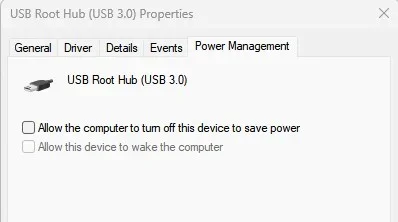
You have power management setting for the USB hubs in device manager.

Screenshot 2025-08-25 060123.webp

Also in old control panel power options for your power scheme.

Start > run > control

t.webp
 

My Computer

System One

  • OS
    Windows 11 Pro
You have power management setting for the USB hubs in device manager.

View attachment 143320

Also in old control panel power options for your power scheme.

Start > run > control

View attachment 143321
I just checked, both laptops have the same settings under Device Manager for the USB settings, the boxes are checked on both laptops. The ONLY difference I can find between the 2 laptops is that the old one has an extra setting under Power & battery for "Make my device hibernate..." and it seems like the new laptop is hibernating even though hibernate is disabled via "powercfg /h off". I've only had the new laptop for a few days but the only thing that keeps the USB ports powered is by setting the laptop to Sleep NEVER. The problem is solved by keeping the new laptop set to sleep never. I'm just curious why that setting for "make my device hibernate..." is missing on the new laptop.
 

My Computers

System One System Two

  • OS
    Windows 11 Home, Ver 24H2, Build 26100.4946
    Computer type
    Laptop
    Manufacturer/Model
    HP Pavilion Gaming Laptop 15-dk1082nr
    CPU
    Intel(R) Core(TM) i5-10300H CPU @ 2.50GHz (2.50 GHz)
    Memory
    16 GB
    Graphics Card(s)
    NVIDIA GeForce GTX 1660 Ti with Max-Q Design
    Sound Card
    Realtek Audio
    Monitor(s) Displays
    15.6-inch diagonal FHD, 144 Hz, IPS, anti-glare, micro-edge, WLED-backlit
    Screen Resolution
    1920x1080
    Hard Drives
    1 TB
    Keyboard
    Full-size, island-style, acid green backlit, shadow black keyboard with numeric keypad
    Internet Speed
    571.84 Mbps
    Browser
    Firefox, DuckDuckGo, Chrome
    Antivirus
    Norton 360
  • Operating System
    Windows 11 Home, Ver 24H2, Build 26100.4946
    Computer type
    Laptop
    Manufacturer/Model
    Dell Alienware 16X Aurora AC16251
    CPU
    Intel® Core™ Ultra 7 Processor 255HX (30MB cache, 20 cores, 1.8 to 5.2 GHz P-Core)
    Memory
    16GB, 2x8GB, DDR5, 5600 MT/s
    Graphics card(s)
    NVIDIA® GeForce RTX™ 5060, 8 GB GDDR7
    Sound Card
    Stereo speakers, Realtek AL3204 Audio Controller, 2 W x 2 = 4 W total
    Monitor(s) Displays
    16", WQXGA, 240Hz, 100% DCI-P3, ComfortView Plus, G-SYNC
    Hard Drives
    NVMe P0527 Phison 1024GB
    Keyboard
    1-Zone AlienFX RGB Keyboard, English US and external wireless Logitech K270
    Mouse
    Wireless Logitech M705
    Internet Speed
    571.84 Mbps
    Browser
    Firefox, DuckDuckGo, and Chrome
    Antivirus
    Norton 360
You can also have setting in the bios that affects USB ports.

In advanced power management if ErP Ready is set to enabled then all USB ports will power down during sleep or hibernate.

Screenshot 2025-08-25 073852.webp
 

My Computer

System One

  • OS
    Windows 11 Pro
You can also have setting in the bios that affects USB ports.

In advanced power management if ErP Ready is set to enabled then all USB ports will power down during sleep or hibernate.

View attachment 143326Thank you. I didn't check there. I will do that.
 

My Computers

System One System Two

  • OS
    Windows 11 Home, Ver 24H2, Build 26100.4946
    Computer type
    Laptop
    Manufacturer/Model
    HP Pavilion Gaming Laptop 15-dk1082nr
    CPU
    Intel(R) Core(TM) i5-10300H CPU @ 2.50GHz (2.50 GHz)
    Memory
    16 GB
    Graphics Card(s)
    NVIDIA GeForce GTX 1660 Ti with Max-Q Design
    Sound Card
    Realtek Audio
    Monitor(s) Displays
    15.6-inch diagonal FHD, 144 Hz, IPS, anti-glare, micro-edge, WLED-backlit
    Screen Resolution
    1920x1080
    Hard Drives
    1 TB
    Keyboard
    Full-size, island-style, acid green backlit, shadow black keyboard with numeric keypad
    Internet Speed
    571.84 Mbps
    Browser
    Firefox, DuckDuckGo, Chrome
    Antivirus
    Norton 360
  • Operating System
    Windows 11 Home, Ver 24H2, Build 26100.4946
    Computer type
    Laptop
    Manufacturer/Model
    Dell Alienware 16X Aurora AC16251
    CPU
    Intel® Core™ Ultra 7 Processor 255HX (30MB cache, 20 cores, 1.8 to 5.2 GHz P-Core)
    Memory
    16GB, 2x8GB, DDR5, 5600 MT/s
    Graphics card(s)
    NVIDIA® GeForce RTX™ 5060, 8 GB GDDR7
    Sound Card
    Stereo speakers, Realtek AL3204 Audio Controller, 2 W x 2 = 4 W total
    Monitor(s) Displays
    16", WQXGA, 240Hz, 100% DCI-P3, ComfortView Plus, G-SYNC
    Hard Drives
    NVMe P0527 Phison 1024GB
    Keyboard
    1-Zone AlienFX RGB Keyboard, English US and external wireless Logitech K270
    Mouse
    Wireless Logitech M705
    Internet Speed
    571.84 Mbps
    Browser
    Firefox, DuckDuckGo, and Chrome
    Antivirus
    Norton 360
Back
Top Bottom