Hitting Enter Key Twice on Lock Screen Sign in, Opens Edge Browser?


pacificSurf

Well-known member
Member
Local time
2:21 PM
Posts
172
OS
windwos 11 pro
I frequently just hit the enter key twice on accident (because i mistype the password then have to hit enter again to clear it and make another attempt, and im doing it quickly).
But Why is Edge opening up?

Yes, I could try to just hit it once instead, or not use the start menu to put my computer to sleep. But this is just my personal usage case that may not apply to you, but still dont understand why its doing this.

To replicate:
1) open start menu and press lock from the start menu. You have to do it from start menu so that start menu is open when you log back in.
2) type password
3) Hit Enter, Enter (fast)

I see my desktop now but edge browser opens up. But if you just open the start menu and hit enter key, nothing happens. Its only when your coming from the lock screen.
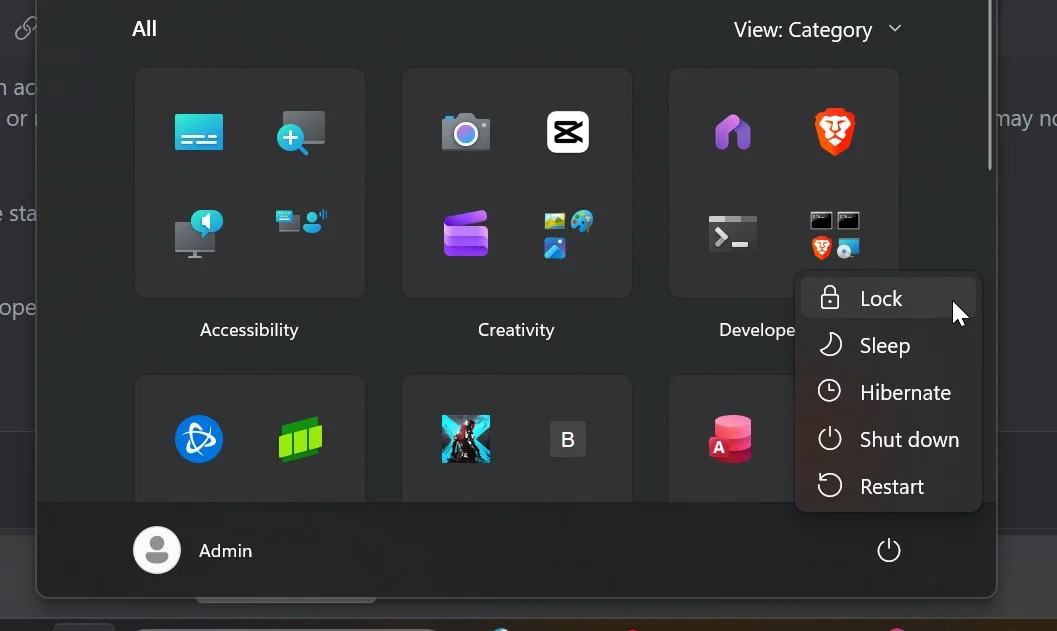
CNZdzIZXOe.webp
1)
 
Windows Build/Version
Windows 11 Pro Version 25H2 Installed on OS build 26200.8246

My Computer My Computer

At a glance

windwos 11 pro
OS
windwos 11 pro
open start menu and press lock from the start menu.

I normally just hold down the Windows key then press L to lock the computer.

I tried what you wrote but pressing enter twice on the lock screen just showed my password hint.
 

My Computer My Computer

At a glance

Windows 11 Pro
OS
Windows 11 Pro
I normally just hold down the Windows key then press L to lock the computer.

I tried what you wrote but pressing enter twice on the lock screen just showed my password hint.
Even when you type the password into the field box and hit enter, and enter again? Because the first enter should automatically register it as correct password and log you in

Well I'm not actually just locking it, I'm doing a sleep. So I put it into sleep and then when it wakes up it's on that lock screen so I always do that sleep function from the start menu
 

My Computer My Computer

At a glance

windwos 11 pro
OS
windwos 11 pro
Could that be a shortcut to open the default browser and search for something? Similarly on my Xiaomi Android phone if I long press on the dot button the search or Ask Gemini opens.
 

My Computers My Computers

  • At a glance

    Windows 11 Pro 23H2 (5699), 25H2 (8875)Mobile DualCore Intel Core 2 Duo T7250, 2000 MHz4GBMobile Intel(R) GMA 4500M (Mobile 4 series)
    OS
    Windows 11 Pro 23H2 (5699), 25H2 (8875)
    Computer type
    Laptop
    Manufacturer/Model
    Acer Extensa 5630EZ
    CPU
    Mobile DualCore Intel Core 2 Duo T7250, 2000 MHz
    Motherboard
    Acer Extensa 5630
    Memory
    4GB
    Graphics Card(s)
    Mobile Intel(R) GMA 4500M (Mobile 4 series)
    Sound Card
    Realtek ALC268 @ Intel 82801IB ICH9 - High Definition Audio Controller
    Monitor(s) Displays
    1
    Screen Resolution
    1280x800
    Hard Drives
    Samsung SSD 850 EVO 250GB SATA Device (250 GB, SATA-III)
    Internet Speed
    VDSL 50 Mbps
    Browser
    MICROSOFT EDGE
    Antivirus
    WINDOWS DEFENDER
    Other Info
    Legacy MBR installation, no TPM, no Secure Boot, no WDDM 2.0 graphics drivers, no SSE4.2, cannot get more unsupported ;) This is only my test laptop. I had installed Windows 11 here before upgrading my main PC. For my main PC I use everyday see my 2nd system specs.
  • At a glance

    Windows 11 Pro v25H2 (build 26200.8875)Intel Core-i7 3770 3.40GHz s1155 (3rd generat...2x Kingston Hyper-X Blu 8GB DDR3-1600GIGABYTE GeForce RTX 3050 WINDFORCE OC V2 6GB...
    Operating System
    Windows 11 Pro v25H2 (build 26200.8875)
    Computer type
    PC/Desktop
    Manufacturer/Model
    Custom-built PC
    CPU
    Intel Core-i7 3770 3.40GHz s1155 (3rd generation)
    Motherboard
    Asus P8H61 s1155 ATX
    Memory
    2x Kingston Hyper-X Blu 8GB DDR3-1600
    Graphics card(s)
    GIGABYTE GeForce RTX 3050 WINDFORCE OC V2 6GB (GV-N3050WF2OCV2-6GD)
    Sound Card
    Realtek HD audio (ALC887)
    Monitor(s) Displays
    Sony Bravia KDL-19L4000 19" LCD TV via VGA
    Screen Resolution
    1440x900 32-bit 60Hz
    Hard Drives
    WD Blue SA510 2.5 1000GB SSD as system disk, Western Digital Caviar Purple 4TB SATA III (WD40PURZ) as second
    PSU
    Thermaltake Litepower RGB 550W Full Wired
    Case
    SUPERCASE MIDI-TOWER
    Cooling
    Deepcool Gamma Archer CPU cooler, 1x 8cm fan at the back
    Keyboard
    Mitsumi 101-key PS/2
    Mouse
    Sunnyline OptiEye PS/2
    Internet Speed
    100Mbps
    Browser
    Microsoft Edge, Mozilla Firefox
    Antivirus
    Microsoft Windows Defender
    Other Info
    Legacy BIOS (MBR) installation, no TPM, no Secure Boot, WDDM 3.0 graphics drivers, WEI score 7.4
But Why is Edge opening up?
Is Edge the first shortcut pinned to your Start Menu?
If you left the Start Menu open, then hit Enter twice, it'll highlight and execute the first pinned shortcut...

13478.webp
 

My Computers My Computers

  • At a glance

    Windows 11 Pro
    OS
    Windows 11 Pro
    Computer type
    PC/Desktop
    Manufacturer/Model
    ASUS ROG Strix
  • At a glance

    Windows 11 Pro
    Operating System
    Windows 11 Pro
    Computer type
    Laptop
    Manufacturer/Model
    ASUS VivoBook
  • ASUS VivoBook 'Lite' ~ Windows 11 Home
To replicate:
1) open start menu and press lock from the start menu. You have to do it from start menu so that start menu is open when you log back in.
2) type password
3) Hit Enter, Enter (fast)

and what happens if you....

1) open start menu and press lock from the start menu. You have to do it from start menu so that start menu is open when you log back in.
2) type password
3) Hit Enter and wait a few seconds (without touching the mouse or anything between step 3) and 4) ..)
4) then hit enter again the second time.

If this does the same, then its probibly that the edge shortcut on the desktop or on the taskbar that is "highlighted" so it start edge up on enter.
 

My Computers My Computers

  • At a glance

    Linux: Debian, Kali-linux, Alma, Win:7,10IoT,...i3, i5 and i7 From 2gen to 9th gen... Server ...
    OS
    Linux: Debian, Kali-linux, Alma, Win:7,10IoT,2012R
    Manufacturer/Model
    HP Elitebook 840, AsusX53, Aspire E1-572. AsusUX32A, HP Pro3130mt+3010mt, HP Proliant ML150, 3xCustom-PC, i3, i5, i7
    CPU
    i3, i5 and i7 From 2gen to 9th gen... Server dual Xenon
    Hard Drives
    Sata, M.2, SAS
  • At a glance

    Retro: 2003server.XPpro, Win2000, Win98SE, Wi...Oldest intel 8088 up to P4 dual core
    Operating System
    Retro: 2003server.XPpro, Win2000, Win98SE, Win95, Win3.11, MS-DOS, IBM-DOS
    Manufacturer/Model
    Commodore, AST, Fujitsu, Compaq, etc etc. etc Around 15 desktops and 20 laptops in the collection
    CPU
    Oldest intel 8088 up to P4 dual core
    Hard Drives
    MFM, IDE, SCSI
Don’t press enter 2x…

If it’s a recoil/ key sensitivity issue, either:

click the button after typing the password
Or
press tab, space after typing the password
Or
create a scheduled task to terminate Edge at user unlock and delay it for a few seconds (so edge can launch then terminate)

Start Menu
This. The start menu opening at unlock has been either a glitch or failed design by Microsoft for a long while now. It annoys tf out of me.
 

My Computer My Computer

At a glance

Windows 11 Pro
OS
Windows 11 Pro
... a failed design by Microsoft for a long while now. It annoys tf out of me.
I think it is by design..., the whole 'return to the state you left it' thing.
The SAB Menu doesn't behave that way though.
 

My Computers My Computers

  • At a glance

    Windows 11 Pro
    OS
    Windows 11 Pro
    Computer type
    PC/Desktop
    Manufacturer/Model
    ASUS ROG Strix
  • At a glance

    Windows 11 Pro
    Operating System
    Windows 11 Pro
    Computer type
    Laptop
    Manufacturer/Model
    ASUS VivoBook
  • ASUS VivoBook 'Lite' ~ Windows 11 Home
I think it is by design..., the whole 'return to the state you left it' thing.
The SAB Menu doesn't behave that way though.
But the prior state was not with Edge open?
and what happens if you....

1) open start menu and press lock from the start menu. You have to do it from start menu so that start menu is open when you log back in.
2) type password
3) Hit Enter and wait a few seconds (without touching the mouse or anything between step 3) and 4) ..)
4) then hit enter again the second time.

If this does the same, then its probibly that the edge shortcut on the desktop or on the taskbar that is "highlighted" so it start edge up on enter.
Tried that, nothing happens. See 2nd video below.


Is Edge the first shortcut pinned to your Start Menu?
If you left the Start Menu open, then hit Enter twice, it'll highlight and execute the first pinned shortcut...
Yes it is. I could try unpinning it. But if being pinned there in 1st position is the cause, i would think edge would also open when I open start menu and hit enter. Or when I do what's shown in the 2nd video below.

Could that be a shortcut to open the default browser and search for something? Similarly on my Xiaomi Android phone if I long press on the dot button the search or Ask Gemini opens.
Possibly, I dont know what shortcut or where that is being controlled.

Pressing it twice. Opens Edge:

Pressing it once, the waiting and pressing it again. Does NOT open Edge:
 

My Computer My Computer

At a glance

windwos 11 pro
OS
windwos 11 pro
Update:
@Edwin 's theory on being pinned was the cause of it.
Still strange though that when I hit enter after logging in (in the 2nd video above), or just opening the start menu and hit enter, it does NOT open edge. Only when coming in from the lock screen doing a 2X enter......:unsure:

I unpinned edge, and then the next pinned app auto opened from the lock screen. So I unpinned Everything now! That should solve it hopefully.
 

My Computer My Computer

At a glance

windwos 11 pro
OS
windwos 11 pro
Simple question: Why don't just press ENTER once? Why twice? Accidentally?
 

My Computers My Computers

  • At a glance

    Windows 11 Pro 23H2 (5699), 25H2 (8875)Mobile DualCore Intel Core 2 Duo T7250, 2000 MHz4GBMobile Intel(R) GMA 4500M (Mobile 4 series)
    OS
    Windows 11 Pro 23H2 (5699), 25H2 (8875)
    Computer type
    Laptop
    Manufacturer/Model
    Acer Extensa 5630EZ
    CPU
    Mobile DualCore Intel Core 2 Duo T7250, 2000 MHz
    Motherboard
    Acer Extensa 5630
    Memory
    4GB
    Graphics Card(s)
    Mobile Intel(R) GMA 4500M (Mobile 4 series)
    Sound Card
    Realtek ALC268 @ Intel 82801IB ICH9 - High Definition Audio Controller
    Monitor(s) Displays
    1
    Screen Resolution
    1280x800
    Hard Drives
    Samsung SSD 850 EVO 250GB SATA Device (250 GB, SATA-III)
    Internet Speed
    VDSL 50 Mbps
    Browser
    MICROSOFT EDGE
    Antivirus
    WINDOWS DEFENDER
    Other Info
    Legacy MBR installation, no TPM, no Secure Boot, no WDDM 2.0 graphics drivers, no SSE4.2, cannot get more unsupported ;) This is only my test laptop. I had installed Windows 11 here before upgrading my main PC. For my main PC I use everyday see my 2nd system specs.
  • At a glance

    Windows 11 Pro v25H2 (build 26200.8875)Intel Core-i7 3770 3.40GHz s1155 (3rd generat...2x Kingston Hyper-X Blu 8GB DDR3-1600GIGABYTE GeForce RTX 3050 WINDFORCE OC V2 6GB...
    Operating System
    Windows 11 Pro v25H2 (build 26200.8875)
    Computer type
    PC/Desktop
    Manufacturer/Model
    Custom-built PC
    CPU
    Intel Core-i7 3770 3.40GHz s1155 (3rd generation)
    Motherboard
    Asus P8H61 s1155 ATX
    Memory
    2x Kingston Hyper-X Blu 8GB DDR3-1600
    Graphics card(s)
    GIGABYTE GeForce RTX 3050 WINDFORCE OC V2 6GB (GV-N3050WF2OCV2-6GD)
    Sound Card
    Realtek HD audio (ALC887)
    Monitor(s) Displays
    Sony Bravia KDL-19L4000 19" LCD TV via VGA
    Screen Resolution
    1440x900 32-bit 60Hz
    Hard Drives
    WD Blue SA510 2.5 1000GB SSD as system disk, Western Digital Caviar Purple 4TB SATA III (WD40PURZ) as second
    PSU
    Thermaltake Litepower RGB 550W Full Wired
    Case
    SUPERCASE MIDI-TOWER
    Cooling
    Deepcool Gamma Archer CPU cooler, 1x 8cm fan at the back
    Keyboard
    Mitsumi 101-key PS/2
    Mouse
    Sunnyline OptiEye PS/2
    Internet Speed
    100Mbps
    Browser
    Microsoft Edge, Mozilla Firefox
    Antivirus
    Microsoft Windows Defender
    Other Info
    Legacy BIOS (MBR) installation, no TPM, no Secure Boot, WDDM 3.0 graphics drivers, WEI score 7.4
Tried that, nothing happens. See 2nd video below.
Then you might have found a bug.... or... as they say when they dont want to admit bugs.. its a feature. *lol* 😅
 

My Computers My Computers

  • At a glance

    Linux: Debian, Kali-linux, Alma, Win:7,10IoT,...i3, i5 and i7 From 2gen to 9th gen... Server ...
    OS
    Linux: Debian, Kali-linux, Alma, Win:7,10IoT,2012R
    Manufacturer/Model
    HP Elitebook 840, AsusX53, Aspire E1-572. AsusUX32A, HP Pro3130mt+3010mt, HP Proliant ML150, 3xCustom-PC, i3, i5, i7
    CPU
    i3, i5 and i7 From 2gen to 9th gen... Server dual Xenon
    Hard Drives
    Sata, M.2, SAS
  • At a glance

    Retro: 2003server.XPpro, Win2000, Win98SE, Wi...Oldest intel 8088 up to P4 dual core
    Operating System
    Retro: 2003server.XPpro, Win2000, Win98SE, Win95, Win3.11, MS-DOS, IBM-DOS
    Manufacturer/Model
    Commodore, AST, Fujitsu, Compaq, etc etc. etc Around 15 desktops and 20 laptops in the collection
    CPU
    Oldest intel 8088 up to P4 dual core
    Hard Drives
    MFM, IDE, SCSI
You could create a PIN and configure it to automatically login when the last digit is pressed without having to press ENTER.

See this Google AI reply:
 

My Computers My Computers

  • At a glance

    Windows 11 Pro 23H2 (5699), 25H2 (8875)Mobile DualCore Intel Core 2 Duo T7250, 2000 MHz4GBMobile Intel(R) GMA 4500M (Mobile 4 series)
    OS
    Windows 11 Pro 23H2 (5699), 25H2 (8875)
    Computer type
    Laptop
    Manufacturer/Model
    Acer Extensa 5630EZ
    CPU
    Mobile DualCore Intel Core 2 Duo T7250, 2000 MHz
    Motherboard
    Acer Extensa 5630
    Memory
    4GB
    Graphics Card(s)
    Mobile Intel(R) GMA 4500M (Mobile 4 series)
    Sound Card
    Realtek ALC268 @ Intel 82801IB ICH9 - High Definition Audio Controller
    Monitor(s) Displays
    1
    Screen Resolution
    1280x800
    Hard Drives
    Samsung SSD 850 EVO 250GB SATA Device (250 GB, SATA-III)
    Internet Speed
    VDSL 50 Mbps
    Browser
    MICROSOFT EDGE
    Antivirus
    WINDOWS DEFENDER
    Other Info
    Legacy MBR installation, no TPM, no Secure Boot, no WDDM 2.0 graphics drivers, no SSE4.2, cannot get more unsupported ;) This is only my test laptop. I had installed Windows 11 here before upgrading my main PC. For my main PC I use everyday see my 2nd system specs.
  • At a glance

    Windows 11 Pro v25H2 (build 26200.8875)Intel Core-i7 3770 3.40GHz s1155 (3rd generat...2x Kingston Hyper-X Blu 8GB DDR3-1600GIGABYTE GeForce RTX 3050 WINDFORCE OC V2 6GB...
    Operating System
    Windows 11 Pro v25H2 (build 26200.8875)
    Computer type
    PC/Desktop
    Manufacturer/Model
    Custom-built PC
    CPU
    Intel Core-i7 3770 3.40GHz s1155 (3rd generation)
    Motherboard
    Asus P8H61 s1155 ATX
    Memory
    2x Kingston Hyper-X Blu 8GB DDR3-1600
    Graphics card(s)
    GIGABYTE GeForce RTX 3050 WINDFORCE OC V2 6GB (GV-N3050WF2OCV2-6GD)
    Sound Card
    Realtek HD audio (ALC887)
    Monitor(s) Displays
    Sony Bravia KDL-19L4000 19" LCD TV via VGA
    Screen Resolution
    1440x900 32-bit 60Hz
    Hard Drives
    WD Blue SA510 2.5 1000GB SSD as system disk, Western Digital Caviar Purple 4TB SATA III (WD40PURZ) as second
    PSU
    Thermaltake Litepower RGB 550W Full Wired
    Case
    SUPERCASE MIDI-TOWER
    Cooling
    Deepcool Gamma Archer CPU cooler, 1x 8cm fan at the back
    Keyboard
    Mitsumi 101-key PS/2
    Mouse
    Sunnyline OptiEye PS/2
    Internet Speed
    100Mbps
    Browser
    Microsoft Edge, Mozilla Firefox
    Antivirus
    Microsoft Windows Defender
    Other Info
    Legacy BIOS (MBR) installation, no TPM, no Secure Boot, WDDM 3.0 graphics drivers, WEI score 7.4
It does this because the start menu is a process so since you put it to sleep via the start menu, it restores it to the open state at unlock. Aside from the options I mentioned above, you can also:

Use a batch or ahk to sleep the pc and pin it to the taskbar,
or
if you really want it on the start menu, you can script it to send ESC to close the start menu and then execute sleep.. that will also prevent it from being opened at unlock
 

My Computer My Computer

At a glance

Windows 11 Pro
OS
Windows 11 Pro
Back
Top Bottom