Solved How do I fix Group Policy Editor not following my settings?


Alicia J

Well-known member
Member
Local time
1:44 PM
Posts
206
OS
Windows 11 Pro
I have gone thru the Group Policy Editor and set it up to delay updates for 20 days. It doesn't go ahead with updates after that time frame, even if updates are available. I have to change the settings to not configured or disabled, depending on what policy it is, in order for the updates to be offered. Perhaps it needs to be reset to default and start over? If so, how do I do this?

I have this issue with both my PC and Laptop. I might have things set up wrong.
 
Windows Build/Version
24H2 Build 26000.4061

My Computers

System One System Two

  • OS
    Windows 11 Pro
    Computer type
    Laptop
    Manufacturer/Model
    Acer Aspire 7 A715-55EP GTX1050
    CPU
    Intel Core i5 @ 2.30GHz 38 °C Coffee Lake 14nm Tech.
    Motherboard
    CFL Charmeleon_CFS (U3E1)
    Memory
    8.0 GB
    Graphics Card(s)
    Intel UHD Graphics 630. 4095MB NVIDIA GeForce GTX 1050
    Sound Card
    Realtek High Definition Audio
    Monitor(s) Displays
    Generic PnP Monitor (1920x1080@60Hz)
    Screen Resolution
    1536x824 pixels
    Hard Drives
    119GB Hitachi HFS128G39TND-N210A (SATA (SSD)) 31 °C 931GB Western Digital WDC WD10SPZX-21Z10T0 (SATA (SSD)) 24 °C
    Mouse
    Touchpad, Wireless Logetech M325
    Internet Speed
    Telus Smart Hub (15 to 25)
    Browser
    Chrome
    Antivirus
    Windows Security. Malwarebytes Premium

  • Operating System
    Windows 11 Pro
    Computer type
    PC/Desktop
    Manufacturer/Model
    MEMORY EXPRESS
    CPU
    13th Gen Intel Core i7-13700
    Motherboard
    PRIME B760M-A AX, ASUSTeK COMPUTER INC.
    Memory
    32MB
    Graphics card(s)
    Intel(R) UHD Graphics 770 (1.00 GB)
    Sound Card
    Realtek High Definition Audio.
    Monitor(s) Displays
    BenQ GW2480
    Screen Resolution
    1920x1080 pixels
    Hard Drives
    MSI M371 1TB, 931 GB (1,000,202,273,280 byte) SSD
    Keyboard
    Wave Keyboard K350 Logetech
    Mouse
    Wireless Logetech M510
    Internet Speed
    1 GB
    Browser
    Chrome
    Antivirus
    Malwarebytes Premium

Hello Alicia, :alien:

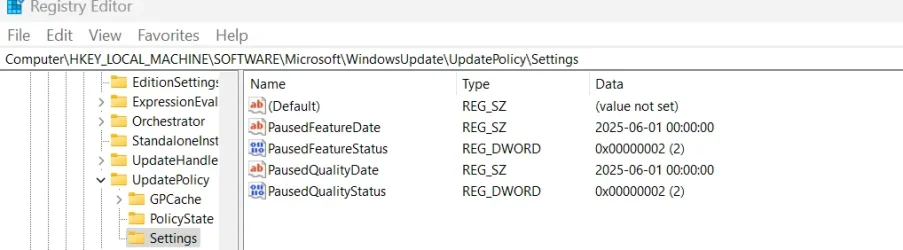
You might consider pausing updates for that long instead to see if that may work better for you. It will auto resume updates after the set time.


My Computers

System One System Two

  • OS
    Windows 11 Pro for Workstations
    Computer type
    PC/Desktop
    Manufacturer/Model
    Custom self build
    CPU
    Intel i7-8700K 5 GHz
    Motherboard
    ASUS ROG Maximus XI Formula Z390
    Memory
    64 GB (4x16GB) G.SKILL TridentZ RGB DDR4 3600 MHz (F4-3600C18D-32GTZR)
    Graphics Card(s)
    ASUS ROG-STRIX-GTX1080TI-O11G-GAMING (11GB GDDR5X)
    Sound Card
    Integrated Digital Audio (S/PDIF)
    Monitor(s) Displays
    2 x Samsung Odyssey G75 27"
    Screen Resolution
    2560x1440
    Hard Drives
    1TB Samsung 990 PRO M.2,
    4TB Samsung 990 PRO M.2,
    TerraMaster F8 SSD Plus NAS
    PSU
    Seasonic Prime Titanium 850W
    Case
    Thermaltake Core P3 wall mounted
    Cooling
    Corsair Hydro H115i
    Keyboard
    Amazon Basics Wired Full Keyboard MD005
    Mouse
    Logitech MX Master 4
    Internet Speed
    2 Gbps Download and 100 Mbps Upload
    Browser
    Chrome and Edge
    Antivirus
    Microsoft Defender
    Other Info
    Logitech Z625 speaker system,
    Logitech BRIO 4K Pro webcam,
    HP Color LaserJet Pro MFP M477fdn,
    CyberPower CP1500PFCLCD
    Galaxy S23 Plus phone
  • Operating System
    Windows 11 Pro
    Computer type
    Laptop
    Manufacturer/Model
    Surface Laptop 7 Copilot+ PC
    CPU
    Snapdragon X Elite (12 core) 3.42 GHz
    Memory
    16 GB LPDDR5x-7467 MHz
    Monitor(s) Displays
    15" HDR
    Screen Resolution
    2496 x 1664
    Hard Drives
    1 TB SSD
    Internet Speed
    Wi-Fi 7 and Bluetooth 5.4
    Browser
    Chrome and Edge
    Antivirus
    Microsoft Defender
I have gone thru the Group Policy Editor and set it up to delay updates for 20 days
This is too vague. So that people can help you you need to state in detail what you done. Include screen shots of the Policy Editor screens.

This will prevent helpers suggesting things you have already done.
 

My Computers

System One System Two

  • OS
    Windows 11 Pro
    Computer type
    PC/Desktop
    Manufacturer/Model
    GMKtec K11
    CPU
    AMD Ryzen 9 8945HS
    Memory
    32GB DDR5 SO-DIMM
    Graphics Card(s)
    Integrated AMD Radeon 780M (4.00 GHz)
    Monitor(s) Displays
    Benq 2250HM
    Screen Resolution
    1920 x 1080
    Hard Drives
    1 TB PCIe 4.0 NVMe M.2 SSD
  • Operating System
    Windows 11 Home
    Computer type
    Laptop
    Manufacturer/Model
    ASUS Zenbook 14 OLED 14" Laptop - UX3405CA-QL192W
    CPU
    Intel® Core™ Ultra 7 - 255H processor
    Memory
    16 GB LPDDR5 SDRAM
    Graphics card(s)
    Intel Arc 140T onboard graphics
    Screen Resolution
    1920 x 1200 (16:10 WUXGA resolution) OLED Touchscreen
    Hard Drives
    1TB SSD
Can you run these commands (as Admin) to export your current registry settings?
Code:
reg export HKEY_LOCAL_MACHINE\SOFTWARE\Microsoft\WindowsUpdate\UX\Settings UXSettings.reg
reg export HKEY_LOCAL_MACHINE\SOFTWARE\Microsoft\WindowsUpdate\UpdatePolicy\Settings UpdatePolicy.reg

Copy and paste the results of each file. This will help us see if there's settings you're not looking at in GPE.
 

My Computer

System One

  • OS
    Windows 7
Brink today I see updates ready to install. Before today it showed a message about updates being controlled by an organization. I don't remember the exact wording. This is a personal computer and it was signed in to admin.
 

My Computers

System One System Two

  • OS
    Windows 11 Pro
    Computer type
    Laptop
    Manufacturer/Model
    Acer Aspire 7 A715-55EP GTX1050
    CPU
    Intel Core i5 @ 2.30GHz 38 °C Coffee Lake 14nm Tech.
    Motherboard
    CFL Charmeleon_CFS (U3E1)
    Memory
    8.0 GB
    Graphics Card(s)
    Intel UHD Graphics 630. 4095MB NVIDIA GeForce GTX 1050
    Sound Card
    Realtek High Definition Audio
    Monitor(s) Displays
    Generic PnP Monitor (1920x1080@60Hz)
    Screen Resolution
    1536x824 pixels
    Hard Drives
    119GB Hitachi HFS128G39TND-N210A (SATA (SSD)) 31 °C 931GB Western Digital WDC WD10SPZX-21Z10T0 (SATA (SSD)) 24 °C
    Mouse
    Touchpad, Wireless Logetech M325
    Internet Speed
    Telus Smart Hub (15 to 25)
    Browser
    Chrome
    Antivirus
    Windows Security. Malwarebytes Premium
  • Operating System
    Windows 11 Pro
    Computer type
    PC/Desktop
    Manufacturer/Model
    MEMORY EXPRESS
    CPU
    13th Gen Intel Core i7-13700
    Motherboard
    PRIME B760M-A AX, ASUSTeK COMPUTER INC.
    Memory
    32MB
    Graphics card(s)
    Intel(R) UHD Graphics 770 (1.00 GB)
    Sound Card
    Realtek High Definition Audio.
    Monitor(s) Displays
    BenQ GW2480
    Screen Resolution
    1920x1080 pixels
    Hard Drives
    MSI M371 1TB, 931 GB (1,000,202,273,280 byte) SSD
    Keyboard
    Wave Keyboard K350 Logetech
    Mouse
    Wireless Logetech M510
    Internet Speed
    1 GB
    Browser
    Chrome
    Antivirus
    Malwarebytes Premium
This is too vague. So that people can help you you need to state in detail what you done. Include screen shots of the Policy Editor screens.

This will prevent helpers suggesting things you have already done.
I will keep that in mind next time.
 

My Computers

System One System Two

  • OS
    Windows 11 Pro
    Computer type
    Laptop
    Manufacturer/Model
    Acer Aspire 7 A715-55EP GTX1050
    CPU
    Intel Core i5 @ 2.30GHz 38 °C Coffee Lake 14nm Tech.
    Motherboard
    CFL Charmeleon_CFS (U3E1)
    Memory
    8.0 GB
    Graphics Card(s)
    Intel UHD Graphics 630. 4095MB NVIDIA GeForce GTX 1050
    Sound Card
    Realtek High Definition Audio
    Monitor(s) Displays
    Generic PnP Monitor (1920x1080@60Hz)
    Screen Resolution
    1536x824 pixels
    Hard Drives
    119GB Hitachi HFS128G39TND-N210A (SATA (SSD)) 31 °C 931GB Western Digital WDC WD10SPZX-21Z10T0 (SATA (SSD)) 24 °C
    Mouse
    Touchpad, Wireless Logetech M325
    Internet Speed
    Telus Smart Hub (15 to 25)
    Browser
    Chrome
    Antivirus
    Windows Security. Malwarebytes Premium
  • Operating System
    Windows 11 Pro
    Computer type
    PC/Desktop
    Manufacturer/Model
    MEMORY EXPRESS
    CPU
    13th Gen Intel Core i7-13700
    Motherboard
    PRIME B760M-A AX, ASUSTeK COMPUTER INC.
    Memory
    32MB
    Graphics card(s)
    Intel(R) UHD Graphics 770 (1.00 GB)
    Sound Card
    Realtek High Definition Audio.
    Monitor(s) Displays
    BenQ GW2480
    Screen Resolution
    1920x1080 pixels
    Hard Drives
    MSI M371 1TB, 931 GB (1,000,202,273,280 byte) SSD
    Keyboard
    Wave Keyboard K350 Logetech
    Mouse
    Wireless Logetech M510
    Internet Speed
    1 GB
    Browser
    Chrome
    Antivirus
    Malwarebytes Premium
Can you run these commands (as Admin) to export your current registry settings?
Code:
reg export HKEY_LOCAL_MACHINE\SOFTWARE\Microsoft\WindowsUpdate\UX\Settings UXSettings.reg
reg export HKEY_LOCAL_MACHINE\SOFTWARE\Microsoft\WindowsUpdate\UpdatePolicy\Settings UpdatePolicy.reg

Copy and paste the results of each file. This will help us see if there's settings you're not looking at in GPE.
 

My Computers

System One System Two

  • OS
    Windows 11 Pro
    Computer type
    Laptop
    Manufacturer/Model
    Acer Aspire 7 A715-55EP GTX1050
    CPU
    Intel Core i5 @ 2.30GHz 38 °C Coffee Lake 14nm Tech.
    Motherboard
    CFL Charmeleon_CFS (U3E1)
    Memory
    8.0 GB
    Graphics Card(s)
    Intel UHD Graphics 630. 4095MB NVIDIA GeForce GTX 1050
    Sound Card
    Realtek High Definition Audio
    Monitor(s) Displays
    Generic PnP Monitor (1920x1080@60Hz)
    Screen Resolution
    1536x824 pixels
    Hard Drives
    119GB Hitachi HFS128G39TND-N210A (SATA (SSD)) 31 °C 931GB Western Digital WDC WD10SPZX-21Z10T0 (SATA (SSD)) 24 °C
    Mouse
    Touchpad, Wireless Logetech M325
    Internet Speed
    Telus Smart Hub (15 to 25)
    Browser
    Chrome
    Antivirus
    Windows Security. Malwarebytes Premium
  • Operating System
    Windows 11 Pro
    Computer type
    PC/Desktop
    Manufacturer/Model
    MEMORY EXPRESS
    CPU
    13th Gen Intel Core i7-13700
    Motherboard
    PRIME B760M-A AX, ASUSTeK COMPUTER INC.
    Memory
    32MB
    Graphics card(s)
    Intel(R) UHD Graphics 770 (1.00 GB)
    Sound Card
    Realtek High Definition Audio.
    Monitor(s) Displays
    BenQ GW2480
    Screen Resolution
    1920x1080 pixels
    Hard Drives
    MSI M371 1TB, 931 GB (1,000,202,273,280 byte) SSD
    Keyboard
    Wave Keyboard K350 Logetech
    Mouse
    Wireless Logetech M510
    Internet Speed
    1 GB
    Browser
    Chrome
    Antivirus
    Malwarebytes Premium
I don't know where the reg file got exported to. There is a very big list with *.reg search
 

My Computers

System One System Two

  • OS
    Windows 11 Pro
    Computer type
    Laptop
    Manufacturer/Model
    Acer Aspire 7 A715-55EP GTX1050
    CPU
    Intel Core i5 @ 2.30GHz 38 °C Coffee Lake 14nm Tech.
    Motherboard
    CFL Charmeleon_CFS (U3E1)
    Memory
    8.0 GB
    Graphics Card(s)
    Intel UHD Graphics 630. 4095MB NVIDIA GeForce GTX 1050
    Sound Card
    Realtek High Definition Audio
    Monitor(s) Displays
    Generic PnP Monitor (1920x1080@60Hz)
    Screen Resolution
    1536x824 pixels
    Hard Drives
    119GB Hitachi HFS128G39TND-N210A (SATA (SSD)) 31 °C 931GB Western Digital WDC WD10SPZX-21Z10T0 (SATA (SSD)) 24 °C
    Mouse
    Touchpad, Wireless Logetech M325
    Internet Speed
    Telus Smart Hub (15 to 25)
    Browser
    Chrome
    Antivirus
    Windows Security. Malwarebytes Premium
  • Operating System
    Windows 11 Pro
    Computer type
    PC/Desktop
    Manufacturer/Model
    MEMORY EXPRESS
    CPU
    13th Gen Intel Core i7-13700
    Motherboard
    PRIME B760M-A AX, ASUSTeK COMPUTER INC.
    Memory
    32MB
    Graphics card(s)
    Intel(R) UHD Graphics 770 (1.00 GB)
    Sound Card
    Realtek High Definition Audio.
    Monitor(s) Displays
    BenQ GW2480
    Screen Resolution
    1920x1080 pixels
    Hard Drives
    MSI M371 1TB, 931 GB (1,000,202,273,280 byte) SSD
    Keyboard
    Wave Keyboard K350 Logetech
    Mouse
    Wireless Logetech M510
    Internet Speed
    1 GB
    Browser
    Chrome
    Antivirus
    Malwarebytes Premium
The exported files should be in the same folder path as where your command prompt is.

If your prompt is "\Users\Alicia", the files would also be in "\Users\Alicia".
 

My Computer

System One

  • OS
    Windows 7
The exported files should be in the same folder path as where your command prompt is.

If your prompt is "\Users\Alicia", the files would also be in "\Users\Alicia".
I can run a reg file but I don't know where \Users\Alicia goes in the cmd prompt
 

My Computers

System One System Two

  • OS
    Windows 11 Pro
    Computer type
    Laptop
    Manufacturer/Model
    Acer Aspire 7 A715-55EP GTX1050
    CPU
    Intel Core i5 @ 2.30GHz 38 °C Coffee Lake 14nm Tech.
    Motherboard
    CFL Charmeleon_CFS (U3E1)
    Memory
    8.0 GB
    Graphics Card(s)
    Intel UHD Graphics 630. 4095MB NVIDIA GeForce GTX 1050
    Sound Card
    Realtek High Definition Audio
    Monitor(s) Displays
    Generic PnP Monitor (1920x1080@60Hz)
    Screen Resolution
    1536x824 pixels
    Hard Drives
    119GB Hitachi HFS128G39TND-N210A (SATA (SSD)) 31 °C 931GB Western Digital WDC WD10SPZX-21Z10T0 (SATA (SSD)) 24 °C
    Mouse
    Touchpad, Wireless Logetech M325
    Internet Speed
    Telus Smart Hub (15 to 25)
    Browser
    Chrome
    Antivirus
    Windows Security. Malwarebytes Premium
  • Operating System
    Windows 11 Pro
    Computer type
    PC/Desktop
    Manufacturer/Model
    MEMORY EXPRESS
    CPU
    13th Gen Intel Core i7-13700
    Motherboard
    PRIME B760M-A AX, ASUSTeK COMPUTER INC.
    Memory
    32MB
    Graphics card(s)
    Intel(R) UHD Graphics 770 (1.00 GB)
    Sound Card
    Realtek High Definition Audio.
    Monitor(s) Displays
    BenQ GW2480
    Screen Resolution
    1920x1080 pixels
    Hard Drives
    MSI M371 1TB, 931 GB (1,000,202,273,280 byte) SSD
    Keyboard
    Wave Keyboard K350 Logetech
    Mouse
    Wireless Logetech M510
    Internet Speed
    1 GB
    Browser
    Chrome
    Antivirus
    Malwarebytes Premium
If you opened an Administrator session in either CMD or PowerShell (it doesn't matter which one), and you copied the two commands then "reg export" will create a new file dumping out part of the registry. The files are in the same folder as your command prompt.

CMD prompt -> C:\Users\GARLIN
PowerShell prompt -> PS C:\Users\GARLIN

The prompt indicates the current folder you're in ("C:\Users\GARLIN" for me), and the saved files will be in the same path.
 

My Computer

System One

  • OS
    Windows 7
Brink today I see updates ready to install. Before today it showed a message about updates being controlled by an organization. I don't remember the exact wording. This is a personal computer and it was signed in to admin.

Editing Group Policy settings (like Windows Update settings) - will show that message. Since Group Policy is an Admin tool (not intended for Home users).
 

My Computer

System One

  • OS
    WinDOS 25H2
    Computer type
    Laptop
    CPU
    Intel & AMD
    Memory
    SO-DIMM SK Hynix 15.8 GB Dual-Channel DDR4-2666 (2 x 8 GB) 1329MHz (19-19-19-43)
    Graphics Card(s)
    nVidia RTX 2060 6GB Mobile GPU (TU106M)
    Sound Card
    Onbord Realtek ALC1220
    Screen Resolution
    1920 x 1080
    Hard Drives
    1x Samsung PM981 NVMe PCIe M.2 512GB / 1x Seagate Expansion ST1000LM035 1TB
If you opened an Administrator session in either CMD or PowerShell (it doesn't matter which one), and you copied the two commands then "reg export" will create a new file dumping out part of the registry. The files are in the same folder as your command prompt.

CMD prompt -> C:\Users\GARLIN
PowerShell prompt -> PS C:\Users\GARLIN

The prompt indicates the current folder you're in ("C:\Users\GARLIN" for me), and the saved files will be in the same pat

Editing Group Policy settings (like Windows Update settings) - will show that message. Since Group Policy is an Admin tool (not intended for Home users).
Oh ok.
 

My Computers

System One System Two

  • OS
    Windows 11 Pro
    Computer type
    Laptop
    Manufacturer/Model
    Acer Aspire 7 A715-55EP GTX1050
    CPU
    Intel Core i5 @ 2.30GHz 38 °C Coffee Lake 14nm Tech.
    Motherboard
    CFL Charmeleon_CFS (U3E1)
    Memory
    8.0 GB
    Graphics Card(s)
    Intel UHD Graphics 630. 4095MB NVIDIA GeForce GTX 1050
    Sound Card
    Realtek High Definition Audio
    Monitor(s) Displays
    Generic PnP Monitor (1920x1080@60Hz)
    Screen Resolution
    1536x824 pixels
    Hard Drives
    119GB Hitachi HFS128G39TND-N210A (SATA (SSD)) 31 °C 931GB Western Digital WDC WD10SPZX-21Z10T0 (SATA (SSD)) 24 °C
    Mouse
    Touchpad, Wireless Logetech M325
    Internet Speed
    Telus Smart Hub (15 to 25)
    Browser
    Chrome
    Antivirus
    Windows Security. Malwarebytes Premium
  • Operating System
    Windows 11 Pro
    Computer type
    PC/Desktop
    Manufacturer/Model
    MEMORY EXPRESS
    CPU
    13th Gen Intel Core i7-13700
    Motherboard
    PRIME B760M-A AX, ASUSTeK COMPUTER INC.
    Memory
    32MB
    Graphics card(s)
    Intel(R) UHD Graphics 770 (1.00 GB)
    Sound Card
    Realtek High Definition Audio.
    Monitor(s) Displays
    BenQ GW2480
    Screen Resolution
    1920x1080 pixels
    Hard Drives
    MSI M371 1TB, 931 GB (1,000,202,273,280 byte) SSD
    Keyboard
    Wave Keyboard K350 Logetech
    Mouse
    Wireless Logetech M510
    Internet Speed
    1 GB
    Browser
    Chrome
    Antivirus
    Malwarebytes Premium

My Computers

System One System Two

  • OS
    Windows 11 Pro
    Computer type
    Laptop
    Manufacturer/Model
    Acer Aspire 7 A715-55EP GTX1050
    CPU
    Intel Core i5 @ 2.30GHz 38 °C Coffee Lake 14nm Tech.
    Motherboard
    CFL Charmeleon_CFS (U3E1)
    Memory
    8.0 GB
    Graphics Card(s)
    Intel UHD Graphics 630. 4095MB NVIDIA GeForce GTX 1050
    Sound Card
    Realtek High Definition Audio
    Monitor(s) Displays
    Generic PnP Monitor (1920x1080@60Hz)
    Screen Resolution
    1536x824 pixels
    Hard Drives
    119GB Hitachi HFS128G39TND-N210A (SATA (SSD)) 31 °C 931GB Western Digital WDC WD10SPZX-21Z10T0 (SATA (SSD)) 24 °C
    Mouse
    Touchpad, Wireless Logetech M325
    Internet Speed
    Telus Smart Hub (15 to 25)
    Browser
    Chrome
    Antivirus
    Windows Security. Malwarebytes Premium
  • Operating System
    Windows 11 Pro
    Computer type
    PC/Desktop
    Manufacturer/Model
    MEMORY EXPRESS
    CPU
    13th Gen Intel Core i7-13700
    Motherboard
    PRIME B760M-A AX, ASUSTeK COMPUTER INC.
    Memory
    32MB
    Graphics card(s)
    Intel(R) UHD Graphics 770 (1.00 GB)
    Sound Card
    Realtek High Definition Audio.
    Monitor(s) Displays
    BenQ GW2480
    Screen Resolution
    1920x1080 pixels
    Hard Drives
    MSI M371 1TB, 931 GB (1,000,202,273,280 byte) SSD
    Keyboard
    Wave Keyboard K350 Logetech
    Mouse
    Wireless Logetech M510
    Internet Speed
    1 GB
    Browser
    Chrome
    Antivirus
    Malwarebytes Premium
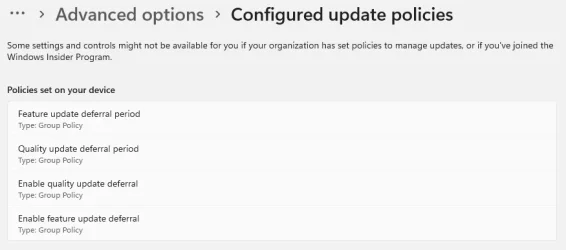
If you applied the Group Policy for deferring (delaying) Quality and Feature updates, your registry should look something like:

Code:
[HKEY_LOCAL_MACHINE\SOFTWARE\Policies\Microsoft\Windows\WindowsUpdate]
"DeferQualityUpdates"=dword:00000001
"DeferQualityUpdatesPeriodInDays"=dword:00000014
"PauseQualityUpdatesStartTime"=""
"DeferFeatureUpdates"=dword:00000001
"DeferFeatureUpdatesPeriodInDays"=dword:0000016d
"PauseFeatureUpdatesStartTime"=""

From Settings / Windows Updates

1753943184458.webp
 

My Computer

System One

  • OS
    Windows 7
This month it seemed to work ok the way I set it. Usually I put 20 days from the beginning of the month. I’ll see what happens next month.
 

My Computers

System One System Two

  • OS
    Windows 11 Pro
    Computer type
    Laptop
    Manufacturer/Model
    Acer Aspire 7 A715-55EP GTX1050
    CPU
    Intel Core i5 @ 2.30GHz 38 °C Coffee Lake 14nm Tech.
    Motherboard
    CFL Charmeleon_CFS (U3E1)
    Memory
    8.0 GB
    Graphics Card(s)
    Intel UHD Graphics 630. 4095MB NVIDIA GeForce GTX 1050
    Sound Card
    Realtek High Definition Audio
    Monitor(s) Displays
    Generic PnP Monitor (1920x1080@60Hz)
    Screen Resolution
    1536x824 pixels
    Hard Drives
    119GB Hitachi HFS128G39TND-N210A (SATA (SSD)) 31 °C 931GB Western Digital WDC WD10SPZX-21Z10T0 (SATA (SSD)) 24 °C
    Mouse
    Touchpad, Wireless Logetech M325
    Internet Speed
    Telus Smart Hub (15 to 25)
    Browser
    Chrome
    Antivirus
    Windows Security. Malwarebytes Premium
  • Operating System
    Windows 11 Pro
    Computer type
    PC/Desktop
    Manufacturer/Model
    MEMORY EXPRESS
    CPU
    13th Gen Intel Core i7-13700
    Motherboard
    PRIME B760M-A AX, ASUSTeK COMPUTER INC.
    Memory
    32MB
    Graphics card(s)
    Intel(R) UHD Graphics 770 (1.00 GB)
    Sound Card
    Realtek High Definition Audio.
    Monitor(s) Displays
    BenQ GW2480
    Screen Resolution
    1920x1080 pixels
    Hard Drives
    MSI M371 1TB, 931 GB (1,000,202,273,280 byte) SSD
    Keyboard
    Wave Keyboard K350 Logetech
    Mouse
    Wireless Logetech M510
    Internet Speed
    1 GB
    Browser
    Chrome
    Antivirus
    Malwarebytes Premium
Back
Top Bottom