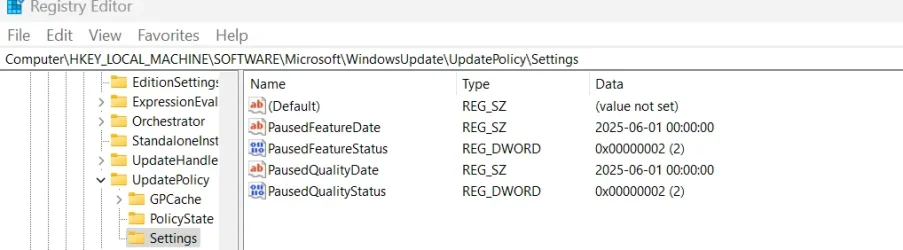
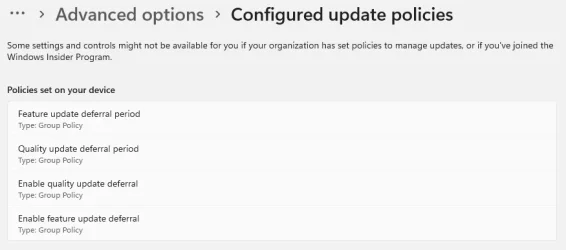
I have gone thru the Group Policy Editor and set it up to delay updates for 20 days. It doesn't go ahead with updates after that time frame, even if updates are available. I have to change the settings to not configured or disabled, depending on what policy it is, in order for the updates to be offered. Perhaps it needs to be reset to default and start over? If so, how do I do this?
I have this issue with both my PC and Laptop. I might have things set up wrong.
I have this issue with both my PC and Laptop. I might have things set up wrong.
- Windows Build/Version
- 24H2 Build 26000.4061
My Computers
-
At a glance
Windows 11 ProIntel Core i5 @ 2.30GHz 38 °C Coffee Lake 14n...8.0 GBIntel UHD Graphics 630. 4095MB NVIDIA GeForce...- OS
- Windows 11 Pro
- Computer type
- Laptop
- Manufacturer/Model
- Acer Aspire 7 A715-55EP GTX1050
- CPU
- Intel Core i5 @ 2.30GHz 38 °C Coffee Lake 14nm Tech.
- Motherboard
- CFL Charmeleon_CFS (U3E1)
- Memory
- 8.0 GB
- Graphics Card(s)
- Intel UHD Graphics 630. 4095MB NVIDIA GeForce GTX 1050
- Sound Card
- Realtek High Definition Audio
- Monitor(s) Displays
- Generic PnP Monitor (1920x1080@60Hz)
- Screen Resolution
- 1536x824 pixels
- Hard Drives
- 119GB Hitachi HFS128G39TND-N210A (SATA (SSD)) 31 °C 931GB Western Digital WDC WD10SPZX-21Z10T0 (SATA (SSD)) 24 °C
- Mouse
- Touchpad, Wireless Logetech M325
- Internet Speed
- Telus Smart Hub (15 to 25)
- Browser
- Chrome
- Antivirus
- Windows Security. Malwarebytes Premium
-
At a glance
Windows 11 Pro13th Gen Intel Core i7-1370032MBIntel(R) UHD Graphics 770 (1.00 GB)- Operating System
- Windows 11 Pro
- Computer type
- PC/Desktop
- Manufacturer/Model
- MEMORY EXPRESS
- CPU
- 13th Gen Intel Core i7-13700
- Motherboard
- PRIME B760M-A AX, ASUSTeK COMPUTER INC.
- Memory
- 32MB
- Graphics card(s)
- Intel(R) UHD Graphics 770 (1.00 GB)
- Sound Card
- Realtek High Definition Audio.
- Monitor(s) Displays
- BenQ GW2480
- Screen Resolution
- 1920x1080 pixels
- Hard Drives
- MSI M371 1TB, 931 GB (1,000,202,273,280 byte) SSD
- Keyboard
- Wave Keyboard K350 Logetech
- Mouse
- Wireless Logetech M510
- Internet Speed
- 1 GB
- Browser
- Chrome
- Antivirus
- Malwarebytes Premium