- Local time
- 6:40 PM
- Posts
- 58
- OS
- Windows 11
My Windows 11 version is 23H2 (OS Build 22631.4890). This is a new custom built PC, Windows installed yesterday.
I have tried everything I found on the web and CoPilot is still active.
CoPilot still on the task bar.

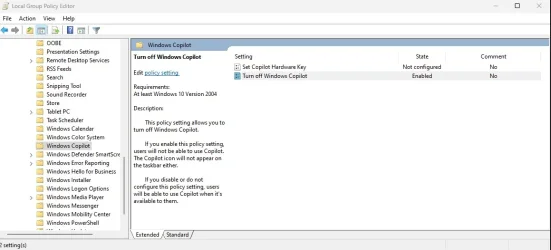
Group Policy changed to turn off CoPilot.
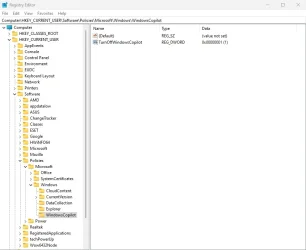
Registry keys found on Eleven Forums added to registry to turn off CoPilot.
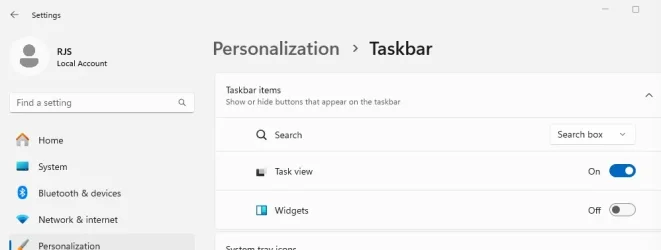
CoPilot not listed under Settings>Personalization>Task Bar, but after all this I still have the CoPilot icon on the task bar. How do I get rid of it?
I have tried everything I found on the web and CoPilot is still active.
CoPilot still on the task bar.
Group Policy changed to turn off CoPilot.
Registry keys found on Eleven Forums added to registry to turn off CoPilot.
CoPilot not listed under Settings>Personalization>Task Bar, but after all this I still have the CoPilot icon on the task bar. How do I get rid of it?
My Computer
At a glance
Windows 119800X3DGSkill Flare DDR5 64GB @ 30-40-40-96 @ 6000 MHzAsus TUF OC Edition RTX 5080
- OS
- Windows 11
- Computer type
- PC/Desktop
- Manufacturer/Model
- Custom
- CPU
- 9800X3D
- Motherboard
- Asus Crosshair X870E Hero
- Memory
- GSkill Flare DDR5 64GB @ 30-40-40-96 @ 6000 MHz
- Graphics Card(s)
- Asus TUF OC Edition RTX 5080
- Monitor(s) Displays
- Samsung Odyessy G9 49" DQHD (VA Panel)
- Screen Resolution
- 5120 * 1440
- Hard Drives
- Samsung 990Pro M.2 2280
- PSU
- Corsair HX 1000i
- Case
- Fractal Design Meshify 2XL
- Cooling
- Thermalright Peerless Assassin 140 Black
- Keyboard
- Corsair K100RGB
- Mouse
- Logitech G703
- Internet Speed
- 1 GB
- Browser
- Firefox
- Antivirus
- ESET NOD32