
How do I make ChatGPT listen and execute commands and reply immediately by using voice commands?


William654

Well-known member
Member
VIP
Local time
8:55 PM
Posts
863
OS
Windows 11
Hi

Currently, I installed ChatGPT as a Windows app but when I press on the mic icon it starts to record voice, and then I must press on the mic icon again to convert into text but I want it to listen and replay or execute commands once I finish speaking. How can I do that ?
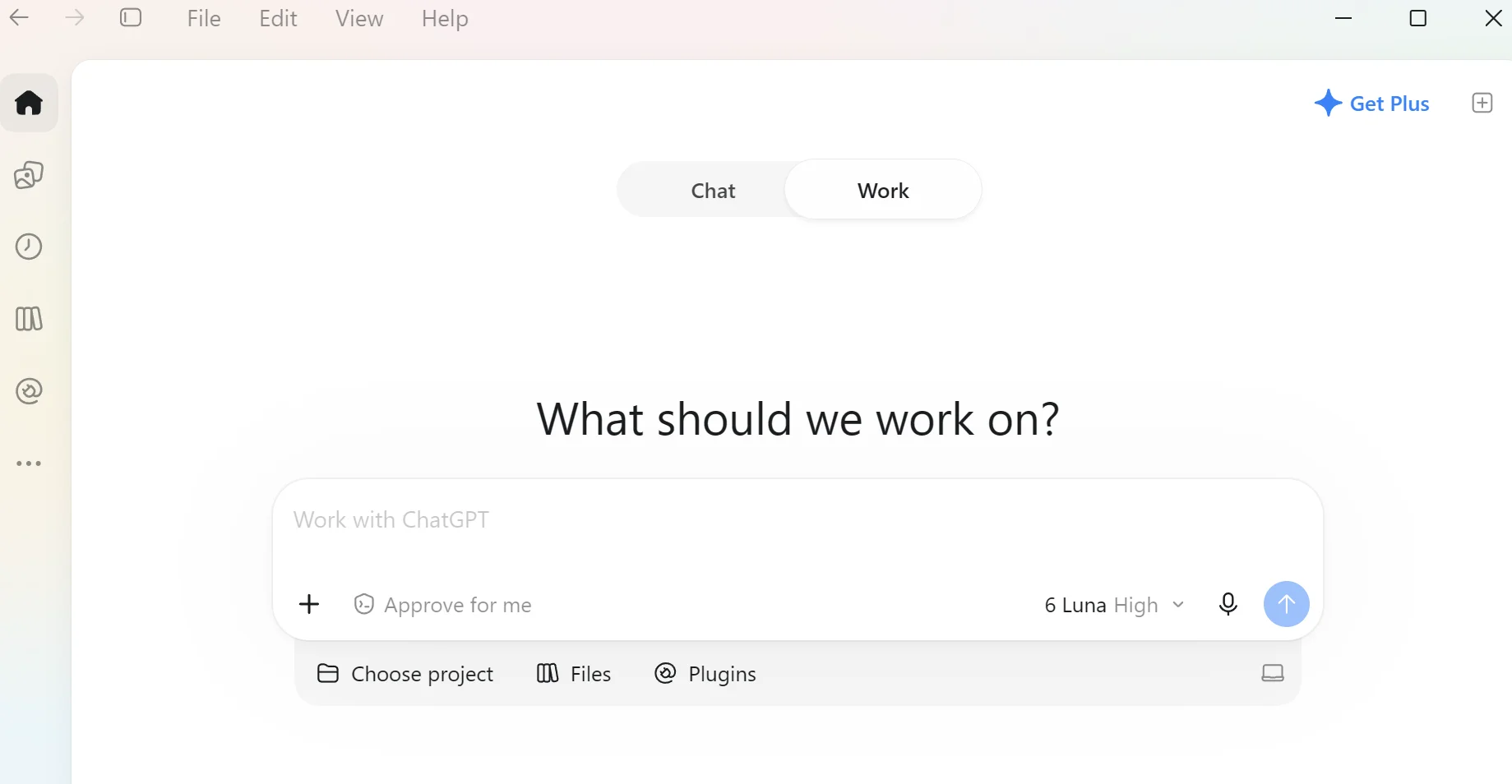
1792958775714.webp


Download link: https://chatgpt.com/download
 
Last edited:

My Computer My Computer

At a glance

Windows 115900x32 GB G.SkillRX 9070 XT
OS
Windows 11
Computer type
PC/Desktop
CPU
5900x
Motherboard
Asus TUF GAMING B550 PLUS WIFI II
Memory
32 GB G.Skill
Graphics Card(s)
RX 9070 XT
Sound Card
Creative Sound Blaster Z
Monitor(s) Displays
BENQ and AOC QHD 120Hz
Screen Resolution
QHD
Hard Drives
2TB Intel 660p and 2TB Sabrent Rokect 4 plus nvme, 4TB HDD HGST
PSU
Corsair RM750
Case
Bloody rage
Cooling
Water cooling gamdias 240
Keyboard
razer ornata
Mouse
razer da v2
Browser
FF and Chrome
Antivirus
Malwarebytes
Search result -

To make ChatGPT listen, execute commands, and reply immediately using voice commands, you need to use the Live Voice mode (Advanced Voice) or set up hands-free shortcuts. Unlike basic dictation, Live Voice supports natural turn-taking, real-time interruptions, and immediate spoken responses. [1, 2]

Step 1: Open ChatGPT Live Voice Mode

  • On iOS and Android: Open the ChatGPT App and tap the Voice icon (resembling a sound wave) in the message bar.
  • On Web: Go to ChatGPT.com, sign in, and select the Voice icon in the prompt window.
  • Microphone Access: Allow microphone permissions if prompted by your device or browser.
  • Verify Live Mode: Look for the small Live label or animated orb at the top of the screen to confirm you are in real-time conversational mode rather than simple voice-to-text dictation. [1, 2]
Step 2: Enable "Start with Voice" for Instant Access

To skip tapping buttons and have ChatGPT start listening immediately upon opening:

  1. Open Settings in the ChatGPT mobile app.
  2. Go to Voice.
  3. Toggle on Start with Voice (and Start automatically in CarPlay if you use Apple CarPlay). [1]
Step 3: Speak Naturally and Intersect

  • No wake word needed: Just start speaking once the Voice interface opens.
  • Immediate replies & interruptions: Live Voice listens and speaks simultaneously. You do not need to wait for it to finish or press a stop button—you can interrupt ChatGPT mid-sentence to change topics or ask it to speed up, slow down, or keep answers brief.
  • Ending the session: Tap the X button when you are done. Your full conversation transcript will remain saved in your chat history. [1, 2, 3]
 

My Computer My Computer

At a glance

Windows 11 Pro 26H2
OS
Windows 11 Pro 26H2
Computer type
Laptop
Manufacturer/Model
Toshiba
Antivirus
Defender
Search result -
I already did this but all the steps are wrong. No Toggle on Start with Voice and no Live Mode. Start with voice is in copilot not chatgpt
 

My Computer My Computer

At a glance

Windows 115900x32 GB G.SkillRX 9070 XT
OS
Windows 11
Computer type
PC/Desktop
CPU
5900x
Motherboard
Asus TUF GAMING B550 PLUS WIFI II
Memory
32 GB G.Skill
Graphics Card(s)
RX 9070 XT
Sound Card
Creative Sound Blaster Z
Monitor(s) Displays
BENQ and AOC QHD 120Hz
Screen Resolution
QHD
Hard Drives
2TB Intel 660p and 2TB Sabrent Rokect 4 plus nvme, 4TB HDD HGST
PSU
Corsair RM750
Case
Bloody rage
Cooling
Water cooling gamdias 240
Keyboard
razer ornata
Mouse
razer da v2
Browser
FF and Chrome
Antivirus
Malwarebytes
So. create a search argument with the exact text of your thread topic, and include in Windows.

Not difficult.
 

My Computer My Computer

At a glance

Windows 11 Pro 26H2
OS
Windows 11 Pro 26H2
Computer type
Laptop
Manufacturer/Model
Toshiba
Antivirus
Defender
So. create a search argument with the exact text of your thread topic, and include in Windows.

Not difficult.
I did not find a solution
 

My Computer My Computer

At a glance

Windows 115900x32 GB G.SkillRX 9070 XT
OS
Windows 11
Computer type
PC/Desktop
CPU
5900x
Motherboard
Asus TUF GAMING B550 PLUS WIFI II
Memory
32 GB G.Skill
Graphics Card(s)
RX 9070 XT
Sound Card
Creative Sound Blaster Z
Monitor(s) Displays
BENQ and AOC QHD 120Hz
Screen Resolution
QHD
Hard Drives
2TB Intel 660p and 2TB Sabrent Rokect 4 plus nvme, 4TB HDD HGST
PSU
Corsair RM750
Case
Bloody rage
Cooling
Water cooling gamdias 240
Keyboard
razer ornata
Mouse
razer da v2
Browser
FF and Chrome
Antivirus
Malwarebytes
I am assuming you put your question to Chatgpt iself. Correct? I did and in this link is Chatgpt's answer. The link is shared so you can continue the chat I started. Check out this chat
 

My Computers My Computers

  • At a glance

    Windows 11 Pro 26H2 26300.9457i9-10900 10 core 20 threads32 gbnone-Intel UHD Graphics 630
    OS
    Windows 11 Pro 26H2 26300.9457
    Computer type
    PC/Desktop
    Manufacturer/Model
    Dell Optiplex 7080
    CPU
    i9-10900 10 core 20 threads
    Motherboard
    DELL 0J37VM
    Memory
    32 gb
    Graphics Card(s)
    none-Intel UHD Graphics 630
    Sound Card
    Integrated Realtek
    Monitor(s) Displays
    Benq 27
    Screen Resolution
    2560x1440
    Hard Drives
    2x1tb Solidigm m.2 nvme /External drives 512gb Samsung m.2 sata+2tb Kingston m2.nvme
    PSU
    500w
    Case
    MT
    Cooling
    Dell Premium
    Keyboard
    Logitech wired
    Mouse
    Logitech wireless
    Internet Speed
    so slow I'm too embarrassed to tell
    Browser
    #1 Edge #2 Firefox
    Antivirus
    Defender+MWB Premium
  • At a glance

    Windows 11 Pro 24H2 26200.9457AMD Ryzen 7 6800U32 gbintegrated
    Operating System
    Windows 11 Pro 24H2 26200.9457
    Computer type
    PC/Desktop
    Manufacturer/Model
    Beelink Mini PC SER5
    CPU
    AMD Ryzen 7 6800U
    Memory
    32 gb
    Graphics card(s)
    integrated
    Sound Card
    integrated
    Monitor(s) Displays
    Benq 27
    Screen Resolution
    2560x1440
    Hard Drives
    1TB Crucial nvme
    Keyboard
    Logitech wired
    Mouse
    Logitech wireless
    Internet Speed
    still too embarrassed to tell
    Browser
    Firefox
    Antivirus
    Defender
  • System 3 is non compliant Dell 9020 i7-4770/24gb ram Win11 PRO 26200.9457

My Computer My Computer

At a glance

Windows 115900x32 GB G.SkillRX 9070 XT
OS
Windows 11
Computer type
PC/Desktop
CPU
5900x
Motherboard
Asus TUF GAMING B550 PLUS WIFI II
Memory
32 GB G.Skill
Graphics Card(s)
RX 9070 XT
Sound Card
Creative Sound Blaster Z
Monitor(s) Displays
BENQ and AOC QHD 120Hz
Screen Resolution
QHD
Hard Drives
2TB Intel 660p and 2TB Sabrent Rokect 4 plus nvme, 4TB HDD HGST
PSU
Corsair RM750
Case
Bloody rage
Cooling
Water cooling gamdias 240
Keyboard
razer ornata
Mouse
razer da v2
Browser
FF and Chrome
Antivirus
Malwarebytes
Only thing I know to answer would be to uninstall Chatgpt (preferably using Revo Uninstaller), restart, and then download the new Chatgpt app from the Microsoft store.
 

My Computers My Computers

  • At a glance

    Windows 11 Pro 26H2 26300.9457i9-10900 10 core 20 threads32 gbnone-Intel UHD Graphics 630
    OS
    Windows 11 Pro 26H2 26300.9457
    Computer type
    PC/Desktop
    Manufacturer/Model
    Dell Optiplex 7080
    CPU
    i9-10900 10 core 20 threads
    Motherboard
    DELL 0J37VM
    Memory
    32 gb
    Graphics Card(s)
    none-Intel UHD Graphics 630
    Sound Card
    Integrated Realtek
    Monitor(s) Displays
    Benq 27
    Screen Resolution
    2560x1440
    Hard Drives
    2x1tb Solidigm m.2 nvme /External drives 512gb Samsung m.2 sata+2tb Kingston m2.nvme
    PSU
    500w
    Case
    MT
    Cooling
    Dell Premium
    Keyboard
    Logitech wired
    Mouse
    Logitech wireless
    Internet Speed
    so slow I'm too embarrassed to tell
    Browser
    #1 Edge #2 Firefox
    Antivirus
    Defender+MWB Premium
  • At a glance

    Windows 11 Pro 24H2 26200.9457AMD Ryzen 7 6800U32 gbintegrated
    Operating System
    Windows 11 Pro 24H2 26200.9457
    Computer type
    PC/Desktop
    Manufacturer/Model
    Beelink Mini PC SER5
    CPU
    AMD Ryzen 7 6800U
    Memory
    32 gb
    Graphics card(s)
    integrated
    Sound Card
    integrated
    Monitor(s) Displays
    Benq 27
    Screen Resolution
    2560x1440
    Hard Drives
    1TB Crucial nvme
    Keyboard
    Logitech wired
    Mouse
    Logitech wireless
    Internet Speed
    still too embarrassed to tell
    Browser
    Firefox
    Antivirus
    Defender
  • System 3 is non compliant Dell 9020 i7-4770/24gb ram Win11 PRO 26200.9457
This icon does not exist

ChatGPT Plus:

The OP has a valid point. The screenshot shows the Voice conversation button (the white circular icon with the sound-wave symbol), but that doesn't mean the button is available in every version of the ChatGPT Windows application.

There are two different features:
  • Dictation (microphone icon): Records speech, converts it to text, and requires the user to submit the message.
  • Voice conversation: Allows the user to speak naturally, receive spoken responses, and continue talking without pressing the microphone button after every sentence.
OpenAI supports voice conversations, but their availability and controls differ between the web, mobile, and Windows desktop applications.

Importantly, there have been recent reports of missing Voice functionality in the newer ChatGPT Windows application, including an issue filed on October 23, 2026. So the OP may genuinely be missing the feature rather than overlooking a setting.

What I would suggest to the OP
  1. Open Microsoft Edge or Google Chrome.
  2. Visit chatgpt.com and sign in.
  3. Look for the Voice icon at the right side of the message entry box.
  4. Click it, grant microphone permission if requested, and begin speaking.
  5. ChatGPT should respond verbally and continue the conversation without requiring the user to manually transcribe and submit each message.
This is documented by OpenAI as a supported way to use Voice.

For the installed Windows application, the OP can check Settings > Voice, if that section is present, and make sure the application is updated. However, I would not tell them that a particular Voice button or toggle must exist in their version.

Also, the earlier advice about Start with Voice is misleading in this context. OpenAI documents that setting for supported mobile versions, not as a general Windows desktop setting.

Finally, if the OP means controlling Windows itself rather than simply talking to ChatGPT, Windows 11 includes a separate feature called Voice Access, available under Settings > Accessibility > Speech. That can open applications and perform certain Windows operations using spoken commands.

Bottom line: I would recommend testing Voice at chatgpt.com first. If it works there but the icon is absent from the installed Windows application, that strongly suggests a difference in app functionality or availability, rather than a problem with the ASUS motherboard, Windows 11 26H2, or the microphone.
 

My Computers My Computers

  • At a glance

    Windows 11 ProAMD Ryzen 9 9950X3DKingston FURY Beast 64GB (2x32GB) DDR5 6000MT/sASUS TUF Gaming Radeon RX 9070 OC Edition 16G...
    OS
    Windows 11 Pro
    Computer type
    PC/Desktop
    CPU
    AMD Ryzen 9 9950X3D
    Motherboard
    ASRock B650E Taichi Lite
    Memory
    Kingston FURY Beast 64GB (2x32GB) DDR5 6000MT/s
    Graphics Card(s)
    ASUS TUF Gaming Radeon RX 9070 OC Edition 16GB GDDR6
    Hard Drives
    Solidigm P44 Pro 2TB M.2 NVMe SSD
  • At a glance

    Windows 11 HomeIntel Core Ultra 9 275HX64GB (2x 32GB) DDR5-6400NVIDIA GeForce RTX 5080 16GB GDDR7 Laptop GPU
    Operating System
    Windows 11 Home
    Computer type
    Laptop
    Manufacturer/Model
    Lenovo Legion Pro 7i Gen 10 16"
    CPU
    Intel Core Ultra 9 275HX
    Memory
    64GB (2x 32GB) DDR5-6400
    Graphics card(s)
    NVIDIA GeForce RTX 5080 16GB GDDR7 Laptop GPU
    Hard Drives
    2x 1TB M.2 NVMe SSD (SK Hynix)
@Celery
Settings > Accessibility doesnot exist. On the web the listen icon exists, but I want it in Windows for control and also to reply to my questions. This is the video that inspired me:


My Computer My Computer

At a glance

Windows 115900x32 GB G.SkillRX 9070 XT
OS
Windows 11
Computer type
PC/Desktop
CPU
5900x
Motherboard
Asus TUF GAMING B550 PLUS WIFI II
Memory
32 GB G.Skill
Graphics Card(s)
RX 9070 XT
Sound Card
Creative Sound Blaster Z
Monitor(s) Displays
BENQ and AOC QHD 120Hz
Screen Resolution
QHD
Hard Drives
2TB Intel 660p and 2TB Sabrent Rokect 4 plus nvme, 4TB HDD HGST
PSU
Corsair RM750
Case
Bloody rage
Cooling
Water cooling gamdias 240
Keyboard
razer ornata
Mouse
razer da v2
Browser
FF and Chrome
Antivirus
Malwarebytes
Settings > Accessibility doesnot exist. On the web the listen icon exists, but I want it in Windows for control and also to reply to my questions. This is the video that inspired me:

ChatGPT Plus:

Thanks for posting the video. That makes it much clearer what you're trying to accomplish.

First, Settings > Accessibility > Speech refers to Windows 11 Settings, not ChatGPT Settings. Press Win + U to open Windows Accessibility settings. However, that is for Microsoft's Voice Access, not the GPT-6 Astra functionality shown in your video.

The video is an official OpenAI demonstration, and the functionality you're looking for involves the newer ChatGPT desktop app with Work, Codex, and Voice.

OpenAI introduced a new Windows desktop application in July 2026. The previous application may still be installed under the name ChatGPT Classic, and some newer agent features are not available in that older version.

I'd suggest trying the following:
  1. Download the latest ChatGPT Windows desktop application from https://chatgpt.com/download/ and sign in.
  2. Check whether you have ChatGPT and ChatGPT Classic installed. If both are present, open the newer ChatGPT application.
  3. In the new application, select ChatGPT > Work, or select Codex for coding-related tasks.
  4. Start a new task and look for Start new voice chat or the Voice control. Allow microphone access when prompted.
  5. Check the model selector for GPT-6 Astra, if your subscription includes access.
  6. If the options are missing, use Menu > Check for Updates, install any available updates, and restart the application.
OpenAI confirms that Voice is supported in Work and Codex on the Windows desktop application. It can accept spoken instructions, respond verbally, and coordinate supported tasks.

Official instructions:

https://help.openai.com/en/articles/20001276-moving-to-the-new-chatgpt-desktop-app

https://help.openai.com/en/articles/20001275-chatgpt-work-and-codex

ChatGPT Voice | ChatGPT Learn

One thing worth checking: Are you using the newer ChatGPT application or ChatGPT Classic, and which ChatGPT subscription do you have? Those details should help explain why the Voice and Work controls are missing.
 

My Computers My Computers

  • At a glance

    Windows 11 ProAMD Ryzen 9 9950X3DKingston FURY Beast 64GB (2x32GB) DDR5 6000MT/sASUS TUF Gaming Radeon RX 9070 OC Edition 16G...
    OS
    Windows 11 Pro
    Computer type
    PC/Desktop
    CPU
    AMD Ryzen 9 9950X3D
    Motherboard
    ASRock B650E Taichi Lite
    Memory
    Kingston FURY Beast 64GB (2x32GB) DDR5 6000MT/s
    Graphics Card(s)
    ASUS TUF Gaming Radeon RX 9070 OC Edition 16GB GDDR6
    Hard Drives
    Solidigm P44 Pro 2TB M.2 NVMe SSD
  • At a glance

    Windows 11 HomeIntel Core Ultra 9 275HX64GB (2x 32GB) DDR5-6400NVIDIA GeForce RTX 5080 16GB GDDR7 Laptop GPU
    Operating System
    Windows 11 Home
    Computer type
    Laptop
    Manufacturer/Model
    Lenovo Legion Pro 7i Gen 10 16"
    CPU
    Intel Core Ultra 9 275HX
    Memory
    64GB (2x 32GB) DDR5-6400
    Graphics card(s)
    NVIDIA GeForce RTX 5080 16GB GDDR7 Laptop GPU
    Hard Drives
    2x 1TB M.2 NVMe SSD (SK Hynix)
ChatGPT application
ChatGPT subscription is free so it looks like I must have a paid plan
 

My Computer My Computer

At a glance

Windows 115900x32 GB G.SkillRX 9070 XT
OS
Windows 11
Computer type
PC/Desktop
CPU
5900x
Motherboard
Asus TUF GAMING B550 PLUS WIFI II
Memory
32 GB G.Skill
Graphics Card(s)
RX 9070 XT
Sound Card
Creative Sound Blaster Z
Monitor(s) Displays
BENQ and AOC QHD 120Hz
Screen Resolution
QHD
Hard Drives
2TB Intel 660p and 2TB Sabrent Rokect 4 plus nvme, 4TB HDD HGST
PSU
Corsair RM750
Case
Bloody rage
Cooling
Water cooling gamdias 240
Keyboard
razer ornata
Mouse
razer da v2
Browser
FF and Chrome
Antivirus
Malwarebytes
ChatGPT application
ChatGPT subscription is free so it looks like I must have a paid plan

ChatGPT Plus:

Yes, that appears to be the explanation.

I checked OpenAI's official documentation, and ChatGPT Voice in the Windows desktop application is available with Plus, Pro, Business, Edu, and Enterprise subscriptions, but not the Free plan.

The good news is that ChatGPT Plus ($20/month in the US) is the lowest-priced plan listed for desktop Voice access. Plus also includes GPT-6 Astra in ChatGPT Work and Codex, subject to usage limits.

That explains why the Voice icon appears when you use ChatGPT in your browser but is missing from the Windows application.

One distinction worth mentioning: ChatGPT Voice allows natural spoken conversations, while Work and Codex provide the ability to carry out supported computer tasks. It isn't necessarily a replacement for all Windows voice-control functions.

Official documentation:

ChatGPT Voice | ChatGPT Learn

https://help.openai.com/en/articles/20001354-gpt-6-and-other-models-in-chatgpt

So, yes, it looks like your Free subscription is the reason you're not seeing the desktop Voice feature.

One important qualification: Upgrading to Plus gives access to the supported desktop Voice functionality, but it does not guarantee that every action demonstrated in the GPT-6 Astra promotional video can be performed on the OP's Windows computer. Capabilities also depend on rollout, permissions, and application support.
 

My Computers My Computers

  • At a glance

    Windows 11 ProAMD Ryzen 9 9950X3DKingston FURY Beast 64GB (2x32GB) DDR5 6000MT/sASUS TUF Gaming Radeon RX 9070 OC Edition 16G...
    OS
    Windows 11 Pro
    Computer type
    PC/Desktop
    CPU
    AMD Ryzen 9 9950X3D
    Motherboard
    ASRock B650E Taichi Lite
    Memory
    Kingston FURY Beast 64GB (2x32GB) DDR5 6000MT/s
    Graphics Card(s)
    ASUS TUF Gaming Radeon RX 9070 OC Edition 16GB GDDR6
    Hard Drives
    Solidigm P44 Pro 2TB M.2 NVMe SSD
  • At a glance

    Windows 11 HomeIntel Core Ultra 9 275HX64GB (2x 32GB) DDR5-6400NVIDIA GeForce RTX 5080 16GB GDDR7 Laptop GPU
    Operating System
    Windows 11 Home
    Computer type
    Laptop
    Manufacturer/Model
    Lenovo Legion Pro 7i Gen 10 16"
    CPU
    Intel Core Ultra 9 275HX
    Memory
    64GB (2x 32GB) DDR5-6400
    Graphics card(s)
    NVIDIA GeForce RTX 5080 16GB GDDR7 Laptop GPU
    Hard Drives
    2x 1TB M.2 NVMe SSD (SK Hynix)

Latest Support Threads

Back
Top Bottom




