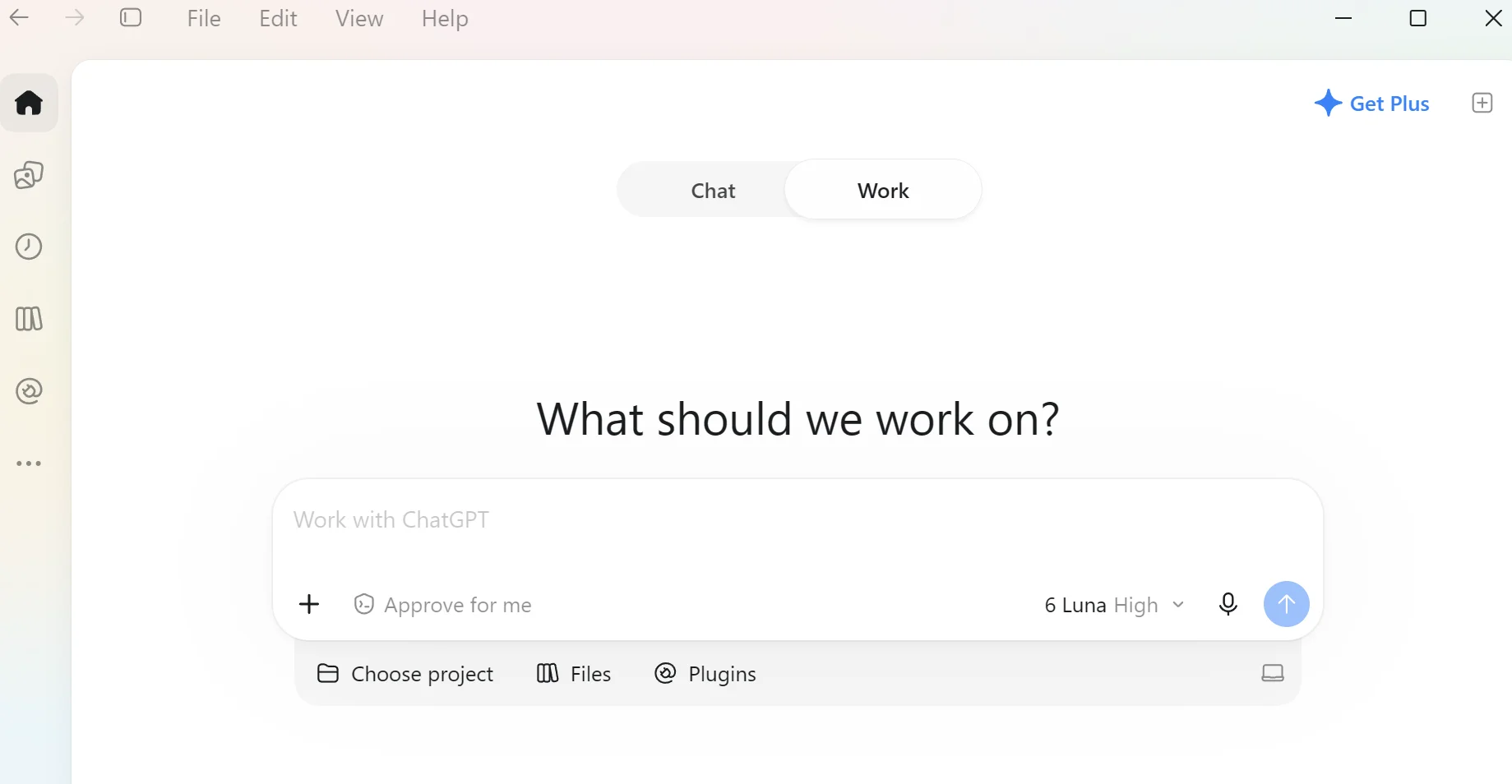
How do I make ChatGPT listen and execute commands and reply immediately by using voice commands?


William654

Well-known member
Member
VIP
Local time
1:07 AM
Posts
861
OS
Windows 11
Hi

Currently, I installed ChatGPT as a Windows app but when I press on the mic icon it starts to record voice, and then I must press on the mic icon again to convert into text but I want it to listen and replay or execute commands once I finish speaking. How can I do that ?

1792958775714.webp


Download link: https://chatgpt.com/download
 
Last edited:

My Computer My Computer

At a glance

Windows 115900x32 GB G.SkillRX 9070 XT
OS
Windows 11
Computer type
PC/Desktop
CPU
5900x
Motherboard
Asus TUF GAMING B550 PLUS WIFI II
Memory
32 GB G.Skill
Graphics Card(s)
RX 9070 XT
Sound Card
Creative Sound Blaster Z
Monitor(s) Displays
BENQ and AOC QHD 120Hz
Screen Resolution
QHD
Hard Drives
2TB Intel 660p and 2TB Sabrent Rokect 4 plus nvme, 4TB HDD HGST
PSU
Corsair RM750
Case
Bloody rage
Cooling
Water cooling gamdias 240
Keyboard
razer ornata
Mouse
razer da v2
Browser
FF and Chrome
Antivirus
Malwarebytes
Search result -

To make ChatGPT listen, execute commands, and reply immediately using voice commands, you need to use the Live Voice mode (Advanced Voice) or set up hands-free shortcuts. Unlike basic dictation, Live Voice supports natural turn-taking, real-time interruptions, and immediate spoken responses. [1, 2]

Step 1: Open ChatGPT Live Voice Mode

  • On iOS and Android: Open the ChatGPT App and tap the Voice icon (resembling a sound wave) in the message bar.
  • On Web: Go to ChatGPT.com, sign in, and select the Voice icon in the prompt window.
  • Microphone Access: Allow microphone permissions if prompted by your device or browser.
  • Verify Live Mode: Look for the small Live label or animated orb at the top of the screen to confirm you are in real-time conversational mode rather than simple voice-to-text dictation. [1, 2]
Step 2: Enable "Start with Voice" for Instant Access

To skip tapping buttons and have ChatGPT start listening immediately upon opening:

  1. Open Settings in the ChatGPT mobile app.
  2. Go to Voice.
  3. Toggle on Start with Voice (and Start automatically in CarPlay if you use Apple CarPlay). [1]
Step 3: Speak Naturally and Intersect

  • No wake word needed: Just start speaking once the Voice interface opens.
  • Immediate replies & interruptions: Live Voice listens and speaks simultaneously. You do not need to wait for it to finish or press a stop button—you can interrupt ChatGPT mid-sentence to change topics or ask it to speed up, slow down, or keep answers brief.
  • Ending the session: Tap the X button when you are done. Your full conversation transcript will remain saved in your chat history. [1, 2, 3]
 

My Computer My Computer

At a glance

Windows 11 Pro 26H2
OS
Windows 11 Pro 26H2
Computer type
Laptop
Manufacturer/Model
Toshiba
Antivirus
Defender
Search result -
I already did this but all the steps are wrong. No Toggle on Start with Voice and no Live Mode. Start with voice is in copilot not chatgpt
 

My Computer My Computer

At a glance

Windows 115900x32 GB G.SkillRX 9070 XT
OS
Windows 11
Computer type
PC/Desktop
CPU
5900x
Motherboard
Asus TUF GAMING B550 PLUS WIFI II
Memory
32 GB G.Skill
Graphics Card(s)
RX 9070 XT
Sound Card
Creative Sound Blaster Z
Monitor(s) Displays
BENQ and AOC QHD 120Hz
Screen Resolution
QHD
Hard Drives
2TB Intel 660p and 2TB Sabrent Rokect 4 plus nvme, 4TB HDD HGST
PSU
Corsair RM750
Case
Bloody rage
Cooling
Water cooling gamdias 240
Keyboard
razer ornata
Mouse
razer da v2
Browser
FF and Chrome
Antivirus
Malwarebytes
So. create a search argument with the exact text of your thread topic, and include in Windows.

Not difficult.
 

My Computer My Computer

At a glance

Windows 11 Pro 26H2
OS
Windows 11 Pro 26H2
Computer type
Laptop
Manufacturer/Model
Toshiba
Antivirus
Defender
So. create a search argument with the exact text of your thread topic, and include in Windows.

Not difficult.
I did not find a solution
 

My Computer My Computer

At a glance

Windows 115900x32 GB G.SkillRX 9070 XT
OS
Windows 11
Computer type
PC/Desktop
CPU
5900x
Motherboard
Asus TUF GAMING B550 PLUS WIFI II
Memory
32 GB G.Skill
Graphics Card(s)
RX 9070 XT
Sound Card
Creative Sound Blaster Z
Monitor(s) Displays
BENQ and AOC QHD 120Hz
Screen Resolution
QHD
Hard Drives
2TB Intel 660p and 2TB Sabrent Rokect 4 plus nvme, 4TB HDD HGST
PSU
Corsair RM750
Case
Bloody rage
Cooling
Water cooling gamdias 240
Keyboard
razer ornata
Mouse
razer da v2
Browser
FF and Chrome
Antivirus
Malwarebytes
I am assuming you put your question to Chatgpt iself. Correct? I did and in this link is Chatgpt's answer. The link is shared so you can continue the chat I started. Check out this chat
 

My Computers My Computers

  • At a glance

    Windows 11 Pro 26H2 26300.9457i9-10900 10 core 20 threads32 gbnone-Intel UHD Graphics 630
    OS
    Windows 11 Pro 26H2 26300.9457
    Computer type
    PC/Desktop
    Manufacturer/Model
    Dell Optiplex 7080
    CPU
    i9-10900 10 core 20 threads
    Motherboard
    DELL 0J37VM
    Memory
    32 gb
    Graphics Card(s)
    none-Intel UHD Graphics 630
    Sound Card
    Integrated Realtek
    Monitor(s) Displays
    Benq 27
    Screen Resolution
    2560x1440
    Hard Drives
    2x1tb Solidigm m.2 nvme /External drives 512gb Samsung m.2 sata+2tb Kingston m2.nvme
    PSU
    500w
    Case
    MT
    Cooling
    Dell Premium
    Keyboard
    Logitech wired
    Mouse
    Logitech wireless
    Internet Speed
    so slow I'm too embarrassed to tell
    Browser
    #1 Edge #2 Firefox
    Antivirus
    Defender+MWB Premium
  • At a glance

    Windows 11 Pro 24H2 26200.9457AMD Ryzen 7 6800U32 gbintegrated
    Operating System
    Windows 11 Pro 24H2 26200.9457
    Computer type
    PC/Desktop
    Manufacturer/Model
    Beelink Mini PC SER5
    CPU
    AMD Ryzen 7 6800U
    Memory
    32 gb
    Graphics card(s)
    integrated
    Sound Card
    integrated
    Monitor(s) Displays
    Benq 27
    Screen Resolution
    2560x1440
    Hard Drives
    1TB Crucial nvme
    Keyboard
    Logitech wired
    Mouse
    Logitech wireless
    Internet Speed
    still too embarrassed to tell
    Browser
    Firefox
    Antivirus
    Defender
  • System 3 is non compliant Dell 9020 i7-4770/24gb ram Win11 PRO 26200.9457

My Computer My Computer

At a glance

Windows 115900x32 GB G.SkillRX 9070 XT
OS
Windows 11
Computer type
PC/Desktop
CPU
5900x
Motherboard
Asus TUF GAMING B550 PLUS WIFI II
Memory
32 GB G.Skill
Graphics Card(s)
RX 9070 XT
Sound Card
Creative Sound Blaster Z
Monitor(s) Displays
BENQ and AOC QHD 120Hz
Screen Resolution
QHD
Hard Drives
2TB Intel 660p and 2TB Sabrent Rokect 4 plus nvme, 4TB HDD HGST
PSU
Corsair RM750
Case
Bloody rage
Cooling
Water cooling gamdias 240
Keyboard
razer ornata
Mouse
razer da v2
Browser
FF and Chrome
Antivirus
Malwarebytes
Only thing I know to answer would be to uninstall Chatgpt (preferably using Revo Uninstaller), restart, and then download the new Chatgpt app from the Microsoft store.

 

My Computers My Computers

  • At a glance

    Windows 11 Pro 26H2 26300.9457i9-10900 10 core 20 threads32 gbnone-Intel UHD Graphics 630
    OS
    Windows 11 Pro 26H2 26300.9457
    Computer type
    PC/Desktop
    Manufacturer/Model
    Dell Optiplex 7080
    CPU
    i9-10900 10 core 20 threads
    Motherboard
    DELL 0J37VM
    Memory
    32 gb
    Graphics Card(s)
    none-Intel UHD Graphics 630
    Sound Card
    Integrated Realtek
    Monitor(s) Displays
    Benq 27
    Screen Resolution
    2560x1440
    Hard Drives
    2x1tb Solidigm m.2 nvme /External drives 512gb Samsung m.2 sata+2tb Kingston m2.nvme
    PSU
    500w
    Case
    MT
    Cooling
    Dell Premium
    Keyboard
    Logitech wired
    Mouse
    Logitech wireless
    Internet Speed
    so slow I'm too embarrassed to tell
    Browser
    #1 Edge #2 Firefox
    Antivirus
    Defender+MWB Premium
  • At a glance

    Windows 11 Pro 24H2 26200.9457AMD Ryzen 7 6800U32 gbintegrated
    Operating System
    Windows 11 Pro 24H2 26200.9457
    Computer type
    PC/Desktop
    Manufacturer/Model
    Beelink Mini PC SER5
    CPU
    AMD Ryzen 7 6800U
    Memory
    32 gb
    Graphics card(s)
    integrated
    Sound Card
    integrated
    Monitor(s) Displays
    Benq 27
    Screen Resolution
    2560x1440
    Hard Drives
    1TB Crucial nvme
    Keyboard
    Logitech wired
    Mouse
    Logitech wireless
    Internet Speed
    still too embarrassed to tell
    Browser
    Firefox
    Antivirus
    Defender
  • System 3 is non compliant Dell 9020 i7-4770/24gb ram Win11 PRO 26200.9457

Latest Support Threads

Back
Top Bottom