How Do I Move The Windows 11 Boot Folder?


Kamryn

New member
Local time
11:46 PM
Posts
1
OS
Windows 11; Ubuntu 24.04.3
Awhile ago, I installed Windows on a separate drive, and I already had Ubuntu on another. M.2 are cumbersome to take out, so I left it in there.
Windows will put the boot drive on another drive if one is on there, at least if it is Linux. I'm replacing the Linux drive and I really don't want to have to reinstall Windows and reload and set everything up again.

If it possible to just move the folder somewhere on the Windows drive? Right now it's located in the EFI folder for Ubuntu and it won't boot without it.
I tried taking out the Ubuntu drive, it can't boot without it. I tried rebuilding the boot, but I can't complete the whole process as it says Access is denied. If I just copy and paste the folder where it should go, will it work?
 

My Computer

System One

  • OS
    Windows 11; Ubuntu 24.04.3
    Computer type
    PC/Desktop
    Manufacturer/Model
    ASUS
You can create it on the windows disk. By m2 do you mean nvme ? Posting a screenshot of disk management would help.
 

My Computers

System One System Two

  • OS
    Win7,Win11
    Computer type
    PC/Desktop
    CPU
    i7-9700
    Motherboard
    gigabyte b365m ds3h
    Memory
    2x16gb 3600mhz
    Monitor(s) Displays
    benq gw2480
    PSU
    bequiet pure power 11 400CM
    Cooling
    cryorig m9i
  • Operating System
    win7,win11
    Computer type
    PC/Desktop
    CPU
    i5-8400
    Motherboard
    gigabyte b365m ds3h
    Memory
    2x8gb 3200
    PSU
    xfx pro 450
you can use a live Linux USB and then copy and paste the boot files from the boot partition on the Linux install and then transfer the windows boot file to the Windows EFI partition on the Windows drive.
#####
you may need to be in a root nautilus to do this .. terminal > sudo nautilus
#####

but first check that the boot files are already still on the Windows drive as Ubuntu may just have a copy in its boot manager
for GRUB to be able to boot both via the Linux boot loader.

any new install of Linux should pick up the Windows installation and enable duel boot via the Linux boot menu.
best of luck Steve ..
 

My Computers

System One System Two

  • OS
    Windows 11 Home
    Computer type
    PC/Desktop
    Manufacturer/Model
    HP 24" AiO
    CPU
    Ryzen 7 5825u
    Motherboard
    HP
    Memory
    64GB DDR4 3200
    Graphics Card(s)
    Ryzen 7 5825u
    Sound Card
    RealTek
    Monitor(s) Displays
    24" HP AiO
    Screen Resolution
    1920 x 1080 @60 Hz
    Hard Drives
    1TB WD Blue SN580 M2 SSD Partitioned.
    2x 1TB USB HDD External Backup/Storage.
    PSU
    90W external power brick
    Case
    24" All in One
    Cooling
    Default Air Cooling
    Keyboard
    HP WiFi UK extended
    Mouse
    HP WiFi 3 Button
    Internet Speed
    1GB full fibre
    Browser
    Edge & Firefox
    Antivirus
    AVG Internet Security/Windows Defender
    Other Info
    Mainly Open Source Software
  • Operating System
    Ubuntu 22.04.5 LTS
    Computer type
    Laptop
    Manufacturer/Model
    Dell 13" Latitude 2017
    CPU
    i5 7200u
    Motherboard
    Dell
    Memory
    16GB DDR4
    Graphics card(s)
    Intel
    Sound Card
    Intel
    Monitor(s) Displays
    13" Dell Laptop
    Hard Drives
    250GB Crucial 2.5" SSD
    Mouse
    Generic WiFi 3 button
    Internet Speed
    WiFi only
    Browser
    Firefox
    Antivirus
    ClamAV TK
    Other Info
    Mainly Open Source Software
I have done it with EasyBCD with succes and very easy. There is a free version

EasyBCD
 

My Computer

System One

  • OS
    Windows 11 Pro
    Computer type
    PC/Desktop
    Manufacturer/Model
    Homemade by me
    CPU
    Intel i5 12600K
    Motherboard
    MSI PRO Z690-A DDR4
    Memory
    G.Skill Ripjaws V DDR4 3600 MHz / PC4-28800 CL16 2x8 GB
    Graphics Card(s)
    Intel® UHD Graphics 770 (iGPU)
    Sound Card
    8-Channel (7.1) HD Audio
    Monitor(s) Displays
    Legion/Lenovo Y25-25
    Screen Resolution
    Full HD 1920 x 1080
    Hard Drives
    WD Black NVMe M.2 500 GB (system drive)
    Case
    Lian-Li
    Keyboard
    Old solid and heavy IBM🙂
    Mouse
    Logitech
    Internet Speed
    1000 mbit
    Antivirus
    Avast free
We dont know the partitioning situation on the windows disk until the OP posts a screenshot
 

My Computers

System One System Two

  • OS
    Win7,Win11
    Computer type
    PC/Desktop
    CPU
    i7-9700
    Motherboard
    gigabyte b365m ds3h
    Memory
    2x16gb 3600mhz
    Monitor(s) Displays
    benq gw2480
    PSU
    bequiet pure power 11 400CM
    Cooling
    cryorig m9i
  • Operating System
    win7,win11
    Computer type
    PC/Desktop
    CPU
    i5-8400
    Motherboard
    gigabyte b365m ds3h
    Memory
    2x8gb 3200
    PSU
    xfx pro 450
Awhile ago, I installed Windows on a separate drive, and I already had Ubuntu on another. M.2 are cumbersome to take out, so I left it in there.
Windows will put the boot drive on another drive if one is on there, at least if it is Linux. I'm replacing the Linux drive and I really don't want to have to reinstall Windows and reload and set everything up again.

You should have deleted the existing EFI system partition during Windows Setup; Windows Setup would then have created a new EFI system partition on the disk you selected for installation.

I tried rebuilding the boot, but I can't complete the whole process as it says Access is denied.

Many of the instructions provided are incorrect and include unnecessary commands that are not applicable to UEFI systems.

If it possible to just move the folder somewhere on the Windows drive?

Run the command shrink desired=300 to shrink the Windows or data partition. This will free unallocated space, which can then be used to create a new EFI system partition. You can resize the EFI system partition, but note that for disks with 4K sector size, the minimum size is 260 MB.

The physical location of the EFI system partition on the disk does not matter. However, if a recovery partition and a data partition are located after the Windows partition, it is recommended to shrink the data partition. This ensures that the location of the recovery partition remains unchanged.

If there is no data partition after the recovery partition, first run the following command:

reagentc /disable

And then after the bcdboot command run the following command:

reagentc /enable


Run the following commands at an administrator command prompt:

diskpart
list volume
select volume # (select the volume you want to shrink)
shrink desired=300
create partition efi size=300
format quick fs=fat32
assign letter=z
list volume (check the volume letter of your Windows partition)
exit

bcdboot x:\windows /s z:

- replace "x" with the volume letter of your Windows partition
- /s z: means your new EFI system partition

The bcdboot command copies the required UEFI boot files from the Windows partition to the new EFI system partition, and creates a Boot Configuration Data (BCD) store on that partition.
 

My Computers

System One System Two

  • OS
    Windows 11 Pro
    Computer type
    PC/Desktop
    CPU
    AMD Ryzen 9 9950X3D
    Motherboard
    ASRock B650E Taichi Lite
    Memory
    Kingston FURY Beast 64GB (2x32GB) DDR5 6000MT/s
    Graphics Card(s)
    ASUS TUF Gaming Radeon RX 9070 OC Edition 16GB GDDR6
    Hard Drives
    Solidigm P44 Pro 2TB M.2 NVMe SSD
  • Operating System
    Windows 11 Home
    Computer type
    Laptop
    Manufacturer/Model
    Lenovo Legion Pro 7i Gen 10 16"
    CPU
    Intel Core Ultra 9 275HX
    Memory
    64GB (2x 32GB) DDR5-6400
    Graphics card(s)
    NVIDIA GeForce RTX 5080 16GB GDDR7 Laptop GPU
    Hard Drives
    2x 1TB M.2 NVMe SSD (SK Hynix)

My Computers

System One System Two

  • OS
    Windows 11 Pro - Windows 7 HP 64 - Lubuntu
    Computer type
    PC/Desktop
    Manufacturer/Model
    custom build
    CPU
    i5 6600K - 800MHz to 4400MHz
    Motherboard
    GA-Z170-HD3P
    Memory
    4+4G GSkill DDR4 3000
    Graphics Card(s)
    IG - Intel 530
    Monitor(s) Displays
    Samsung 226BW
    Screen Resolution
    1680x1050
    Hard Drives
    (1) -1 SM951 – 128GB M.2 AHCI PCIe SSD drive for Win 11
    (2) -1 WD SATA 3 - 1T for Data
    (3) -1 WD SATA 3 - 1T for backup
    (4) -1 BX500 SSD - 256G for Windows 7 and Lubuntu
    PSU
    Thermaltake 450W TR2 gold
    Keyboard
    Old and good Chicony mechanical keyboard
    Mouse
    Logitech mX performance - 9 buttons (had to disable some)
    Internet Speed
    500 Mb/s
    Browser
    Firefox 64
  • Operating System
    Windows 11 Pro
    Computer type
    Laptop
    Manufacturer/Model
    Asus Q550LF
    CPU
    i7-4500U 800- 3000MHz
    Motherboard
    Asus Q550LF
    Memory
    (4+4)G DDR3 1600
    Graphics card(s)
    IG intel 4400 + NVIDIA GeForce GT 745M
    Sound Card
    Realtek
    Monitor(s) Displays
    LG Display LP156WF4-SPH1
    Screen Resolution
    1920 x 1080
    Hard Drives
    BX500 120G SSD for Windows and programs
    & 1T HDD for data
    Internet Speed
    500 Mb/s
    Browser
    Firefox 64
I hope this is not hijacking the thread
I have a *similar* (sort of) situation . . .
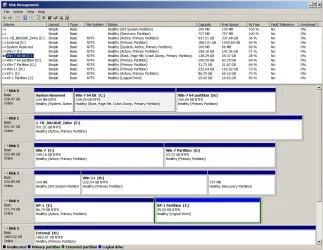
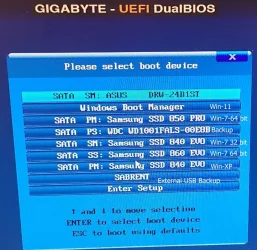
I pick my operating system from the BIOS boot menu. Each disk drive has it's own operating system but Win-11 (was Win-10) shows the Windows Boot Manager and selecting the Windows Boot Manager does not open the boot manager but it launches Win-11. It's not a big deal because it's been like this a few years but I would rather it show the drives.

In the pic . . .

* * * SS: Samsung SSD 860 is actually the Win-11 drive
but when I selecte it from the BIOS it launches Win-7 64 bit

This just seems wrong and I would like to fix it and know why it's doing this

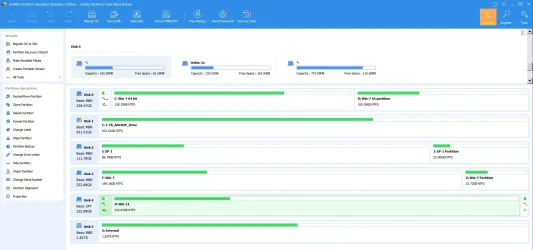
I also dont think I need that recovery partition on Disk 4 but that's not a big issue but I like simplicity
 

Attachments

  • Disk Management.webp
    Disk Management.webp
    147.2 KB · Views: 1
  • Bios Boot.webp
    Bios Boot.webp
    232 KB · Views: 1
  • AOMEI.webp
    AOMEI.webp
    69.9 KB · Views: 1

My Computers

System One System Two

  • OS
    Windows 11 (up to date)
    Computer type
    PC/Desktop
    Manufacturer/Model
    Custom
    CPU
    Intel i5 12400
    Motherboard
    Gigabyte Z690 UA
    Memory
    Corsair Vengeance LPX 16GB
    Graphics Card(s)
    On Board the Z690
    Sound Card
    On Board
    Monitor(s) Displays
    43" Samsung tu7000
    Screen Resolution
    2560 x 1440
    Hard Drives
    SAMSUNG SSD 1TB NVMe M.2
    PSU
    Thermaltake smart 500w 80+
    Case
    LIAN LANCOOL_205M
    Cooling
    Bunch of fans . . . :o) (lights dont work)
    Keyboard
    Unicomp: Ultra Classic White Buckling Spring USB
    Mouse
    M510
    Internet Speed
    50mbps on Ethernet
    Browser
    Fire Fox
    Antivirus
    Windows
    Other Info
    Love this computer but I still prefer Win-7 like I love my old Lazy Boy Recliner . . . it just feels better.
  • Operating System
    WIN-7-64BIT and Win-11 pro for testing on unsupported hardware
    Computer type
    PC/Desktop
    Manufacturer/Model
    Home built
    CPU
    i5-3570K CPU @ 3.40GHz, 3801 Mhz, 4 Core(s), 4 Logical Processor(s)
    Motherboard
    GA-Z77-HD3
    Memory
    16 GB - Crucial Ballistick 4GB PC3-14900 DDR3-1333 MHz
    Graphics card(s)
    NVIDIA GeForce GTX 1050
    Sound Card
    On Board
    Monitor(s) Displays
    ASUS VP278
    Screen Resolution
    1920 x 1080
    Hard Drives
    4 - internal Samsung 2.5" SSD, 1 WD HDD 7200 and some external drives
    PSU
    EVGA 550w
    Case
    Old Gygabyte Tower
    Cooling
    Yes
    Keyboard
    Unicomp - UNIOP4A USB (like the old IBM Model H that I started with)
    Mouse
    M510
    Internet Speed
    50mbps
    Browser
    Firefox
    Antivirus
    Windows
    Other Info
    The only thing it lack is USB-3.2 on the front face but it has 3.0 on the back
@john1955
From the partition Manager screen. Both Windows 7 (x86 bit and x64) are running in MBR Mode, each has its own System Reserve partition marked as Active to boot from via Boot Menu. Only Windows 11 is running in GPT mode and boot from the EFI System partition and shown as Windows Boot Manager.
In Modern MB, You can only select either Legacy(MBR) or UEFI(GPT).

For example: If you have 2 Windows OS installed using GPT, you would have 2 entries of Windows Boot Manager. Only case you have only one Windows Boot Manager is when you set up as Dual Boot and select from the Graphical Menu.

So if you want to rename "Windows Boot Manager" to something else, the only Partition Manager that I know of, is DiskGenius which has a tool to do so.
 
Last edited:

My Computers

System One System Two

  • OS
    Windows 11 Pro 25H2, Linux Mint 21.3
    Computer type
    PC/Desktop
    Manufacturer/Model
    Self Build Feb.2024
    CPU
    Intel Core i9-14900K @5.8GHZ
    Motherboard
    MSI MAG Z790 Tomahawk Max WiFi 7
    Memory
    64GB (2XG Skill F5-6400J3239G32G) @6800
    Graphics Card(s)
    Radeon (TM) RX 480 Graphics (8 GB)
    Sound Card
    Intergrated Realtek
    Monitor(s) Displays
    Samsung
    Screen Resolution
    3840x2160
    Hard Drives
    1 - Crucial 705 1TB GEN5
    1 - Crucial 705 2TB GEN5
    2 - Crucial T500 2TB Gen4
    PSU
    750W EVGA-G3
    Case
    Antec NX410
    Cooling
    H2O Thermalright
    Keyboard
    Logitech K800
    Mouse
    Logitech Master 2S
    Internet Speed
    600 Mbps
    Browser
    Chrome
    Antivirus
    WD
  • Operating System
    Windows 11 Pro & Linux Mint X64
    Computer type
    PC/Desktop
    Manufacturer/Model
    MSI Z77 MPower (MS-7751)
    CPU
    Intel(R) Core(TM) i7-3770K CPU @ 4.20 GHz
    Motherboard
    Z77 MPower (MS-7751)
    Memory
    32.0GB Dual-Channel CMY16GX3M2A1600C9
    Graphics card(s)
    NVIDIA GeForce GT 740
    Monitor(s) Displays
    40" Samsung
    Screen Resolution
    1920X1080
    Hard Drives
    WIN10 - 111GB Samsung SSD 840 Series
    WIN11 - 223GB Crucial CT240BX500SSD
    2X931GB Crucial CT1000BX500SSD1
    PSU
    Antec 850W
    Case
    Antec 900
    Cooling
    H20
    Keyboard
    Logitech K800 Wireless
    Mouse
    Logitech MX Master 2S
    Internet Speed
    100 Mbps
    Browser
    Chrome
    Antivirus
    Windows Defender
selecting the Windows Boot Manager does not open the boot manager but it launches Win-11
Samsung SSD 860 is actually the Win-11 drive
I would rather it show the drives

I presume you mean the win11 disk
when booted into it you could
bcdedit -set {bootmgr} description "boomgfw SSD 860"


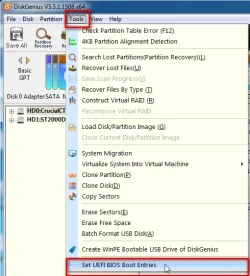
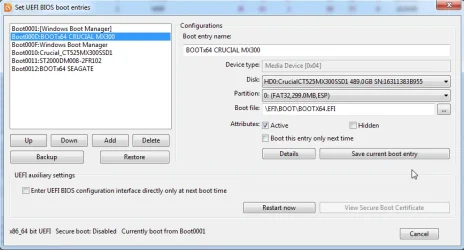
or as topgun said, a useful module can be found in diskgenius free version


dg-set-uefi1.webp


dg-set-uefi2.webp


When I played with it a while ago, the motherboard clung onto the old names . So I deleted the offending entry and rebooted into a different entry which cleared it and then set it up the with new name. That might not be the case with your motherboard.
 
Last edited:

My Computers

System One System Two

  • OS
    Win7,Win11
    Computer type
    PC/Desktop
    CPU
    i7-9700
    Motherboard
    gigabyte b365m ds3h
    Memory
    2x16gb 3600mhz
    Monitor(s) Displays
    benq gw2480
    PSU
    bequiet pure power 11 400CM
    Cooling
    cryorig m9i
  • Operating System
    win7,win11
    Computer type
    PC/Desktop
    CPU
    i5-8400
    Motherboard
    gigabyte b365m ds3h
    Memory
    2x8gb 3200
    PSU
    xfx pro 450
Does it matter which operating system I install DiskGenius in?
 

My Computers

System One System Two

  • OS
    Windows 11 (up to date)
    Computer type
    PC/Desktop
    Manufacturer/Model
    Custom
    CPU
    Intel i5 12400
    Motherboard
    Gigabyte Z690 UA
    Memory
    Corsair Vengeance LPX 16GB
    Graphics Card(s)
    On Board the Z690
    Sound Card
    On Board
    Monitor(s) Displays
    43" Samsung tu7000
    Screen Resolution
    2560 x 1440
    Hard Drives
    SAMSUNG SSD 1TB NVMe M.2
    PSU
    Thermaltake smart 500w 80+
    Case
    LIAN LANCOOL_205M
    Cooling
    Bunch of fans . . . :o) (lights dont work)
    Keyboard
    Unicomp: Ultra Classic White Buckling Spring USB
    Mouse
    M510
    Internet Speed
    50mbps on Ethernet
    Browser
    Fire Fox
    Antivirus
    Windows
    Other Info
    Love this computer but I still prefer Win-7 like I love my old Lazy Boy Recliner . . . it just feels better.
  • Operating System
    WIN-7-64BIT and Win-11 pro for testing on unsupported hardware
    Computer type
    PC/Desktop
    Manufacturer/Model
    Home built
    CPU
    i5-3570K CPU @ 3.40GHz, 3801 Mhz, 4 Core(s), 4 Logical Processor(s)
    Motherboard
    GA-Z77-HD3
    Memory
    16 GB - Crucial Ballistick 4GB PC3-14900 DDR3-1333 MHz
    Graphics card(s)
    NVIDIA GeForce GTX 1050
    Sound Card
    On Board
    Monitor(s) Displays
    ASUS VP278
    Screen Resolution
    1920 x 1080
    Hard Drives
    4 - internal Samsung 2.5" SSD, 1 WD HDD 7200 and some external drives
    PSU
    EVGA 550w
    Case
    Old Gygabyte Tower
    Cooling
    Yes
    Keyboard
    Unicomp - UNIOP4A USB (like the old IBM Model H that I started with)
    Mouse
    M510
    Internet Speed
    50mbps
    Browser
    Firefox
    Antivirus
    Windows
    Other Info
    The only thing it lack is USB-3.2 on the front face but it has 3.0 on the back
No. Also you could use the portable version

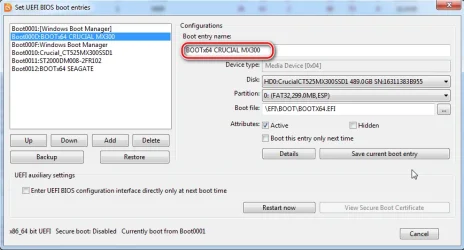
You might want to add the fallback bootx64.efi and give it a name. Makes it easier if you have to delete the original entry if your motherboard clings tenaciously to the old description. My motherboard is stubborn.


DG-SET-UEFI-BOOTX64.webp
 
Last edited:

My Computers

System One System Two

  • OS
    Win7,Win11
    Computer type
    PC/Desktop
    CPU
    i7-9700
    Motherboard
    gigabyte b365m ds3h
    Memory
    2x16gb 3600mhz
    Monitor(s) Displays
    benq gw2480
    PSU
    bequiet pure power 11 400CM
    Cooling
    cryorig m9i
  • Operating System
    win7,win11
    Computer type
    PC/Desktop
    CPU
    i5-8400
    Motherboard
    gigabyte b365m ds3h
    Memory
    2x8gb 3200
    PSU
    xfx pro 450
Your PC is setup correctly and running fine. You should leave it alone.
As shown below, I renamed all my other WinPE boot devices so I can differentiate which one is which to boot from.
except Windows Boot Manager.
Renaming Windows Boot Manager will stay for a while but will reverse back to its name and worse, it will create a duplicate entry.
Trust me, been there done that.

2025-12-22_112901.webp
 

My Computers

System One System Two

  • OS
    Windows 11 Pro 25H2, Linux Mint 21.3
    Computer type
    PC/Desktop
    Manufacturer/Model
    Self Build Feb.2024
    CPU
    Intel Core i9-14900K @5.8GHZ
    Motherboard
    MSI MAG Z790 Tomahawk Max WiFi 7
    Memory
    64GB (2XG Skill F5-6400J3239G32G) @6800
    Graphics Card(s)
    Radeon (TM) RX 480 Graphics (8 GB)
    Sound Card
    Intergrated Realtek
    Monitor(s) Displays
    Samsung
    Screen Resolution
    3840x2160
    Hard Drives
    1 - Crucial 705 1TB GEN5
    1 - Crucial 705 2TB GEN5
    2 - Crucial T500 2TB Gen4
    PSU
    750W EVGA-G3
    Case
    Antec NX410
    Cooling
    H2O Thermalright
    Keyboard
    Logitech K800
    Mouse
    Logitech Master 2S
    Internet Speed
    600 Mbps
    Browser
    Chrome
    Antivirus
    WD
  • Operating System
    Windows 11 Pro & Linux Mint X64
    Computer type
    PC/Desktop
    Manufacturer/Model
    MSI Z77 MPower (MS-7751)
    CPU
    Intel(R) Core(TM) i7-3770K CPU @ 4.20 GHz
    Motherboard
    Z77 MPower (MS-7751)
    Memory
    32.0GB Dual-Channel CMY16GX3M2A1600C9
    Graphics card(s)
    NVIDIA GeForce GT 740
    Monitor(s) Displays
    40" Samsung
    Screen Resolution
    1920X1080
    Hard Drives
    WIN10 - 111GB Samsung SSD 840 Series
    WIN11 - 223GB Crucial CT240BX500SSD
    2X931GB Crucial CT1000BX500SSD1
    PSU
    Antec 850W
    Case
    Antec 900
    Cooling
    H20
    Keyboard
    Logitech K800 Wireless
    Mouse
    Logitech MX Master 2S
    Internet Speed
    100 Mbps
    Browser
    Chrome
    Antivirus
    Windows Defender
I presume you mean the win11 disk
when booted into it you could
bcdedit -set {bootmgr} description "boomgfw SSD 860"


or as topgun said, a useful module can be found in diskgenius free version


View attachment 157771


When I played with it a while ago, the motherboard clung onto the old names . So I deleted the offending entry and rebooted into a different entry which cleared it and then set it up the with new name. That might not be the case with your motherboard.

The option for Set UEFI Bios Boot Entries is greyed out in the one I just downloaded

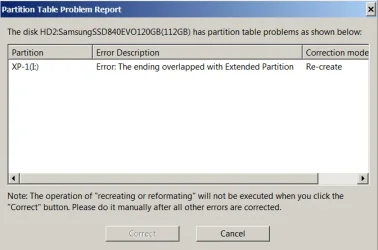
Also while I was there I checked partition tables for errors and my Win-XP disk showed this.

1766433856025.webp
 

My Computers

System One System Two

  • OS
    Windows 11 (up to date)
    Computer type
    PC/Desktop
    Manufacturer/Model
    Custom
    CPU
    Intel i5 12400
    Motherboard
    Gigabyte Z690 UA
    Memory
    Corsair Vengeance LPX 16GB
    Graphics Card(s)
    On Board the Z690
    Sound Card
    On Board
    Monitor(s) Displays
    43" Samsung tu7000
    Screen Resolution
    2560 x 1440
    Hard Drives
    SAMSUNG SSD 1TB NVMe M.2
    PSU
    Thermaltake smart 500w 80+
    Case
    LIAN LANCOOL_205M
    Cooling
    Bunch of fans . . . :o) (lights dont work)
    Keyboard
    Unicomp: Ultra Classic White Buckling Spring USB
    Mouse
    M510
    Internet Speed
    50mbps on Ethernet
    Browser
    Fire Fox
    Antivirus
    Windows
    Other Info
    Love this computer but I still prefer Win-7 like I love my old Lazy Boy Recliner . . . it just feels better.
  • Operating System
    WIN-7-64BIT and Win-11 pro for testing on unsupported hardware
    Computer type
    PC/Desktop
    Manufacturer/Model
    Home built
    CPU
    i5-3570K CPU @ 3.40GHz, 3801 Mhz, 4 Core(s), 4 Logical Processor(s)
    Motherboard
    GA-Z77-HD3
    Memory
    16 GB - Crucial Ballistick 4GB PC3-14900 DDR3-1333 MHz
    Graphics card(s)
    NVIDIA GeForce GTX 1050
    Sound Card
    On Board
    Monitor(s) Displays
    ASUS VP278
    Screen Resolution
    1920 x 1080
    Hard Drives
    4 - internal Samsung 2.5" SSD, 1 WD HDD 7200 and some external drives
    PSU
    EVGA 550w
    Case
    Old Gygabyte Tower
    Cooling
    Yes
    Keyboard
    Unicomp - UNIOP4A USB (like the old IBM Model H that I started with)
    Mouse
    M510
    Internet Speed
    50mbps
    Browser
    Firefox
    Antivirus
    Windows
    Other Info
    The only thing it lack is USB-3.2 on the front face but it has 3.0 on the back
bootx64 entry

DG-SET-UEFI-BOOTX64.webp

changed the entry name for windows boot manager

DG-SET-UEFI-CHANGENAME1.webp


DG-SET-UEFI-CHANGENAME2.webp
 
Last edited:

My Computers

System One System Two

  • OS
    Win7,Win11
    Computer type
    PC/Desktop
    CPU
    i7-9700
    Motherboard
    gigabyte b365m ds3h
    Memory
    2x16gb 3600mhz
    Monitor(s) Displays
    benq gw2480
    PSU
    bequiet pure power 11 400CM
    Cooling
    cryorig m9i
  • Operating System
    win7,win11
    Computer type
    PC/Desktop
    CPU
    i5-8400
    Motherboard
    gigabyte b365m ds3h
    Memory
    2x8gb 3200
    PSU
    xfx pro 450
Your PC is setup correctly and running fine. You should leave it alone.
As shown below, I renamed all my other WinPE boot devices so I can differentiate which one is which to boot from.
except Windows Boot Manager.
Renaming Windows Boot Manager will stay for a while but will reverse back to its name and worse, it will create a duplicate entry.
Trust me, been there done that.

View attachment 157778

Maybe I'll do just that and leave it alone. Plus the option is greyed out in Disk Genius
 

My Computers

System One System Two

  • OS
    Windows 11 (up to date)
    Computer type
    PC/Desktop
    Manufacturer/Model
    Custom
    CPU
    Intel i5 12400
    Motherboard
    Gigabyte Z690 UA
    Memory
    Corsair Vengeance LPX 16GB
    Graphics Card(s)
    On Board the Z690
    Sound Card
    On Board
    Monitor(s) Displays
    43" Samsung tu7000
    Screen Resolution
    2560 x 1440
    Hard Drives
    SAMSUNG SSD 1TB NVMe M.2
    PSU
    Thermaltake smart 500w 80+
    Case
    LIAN LANCOOL_205M
    Cooling
    Bunch of fans . . . :o) (lights dont work)
    Keyboard
    Unicomp: Ultra Classic White Buckling Spring USB
    Mouse
    M510
    Internet Speed
    50mbps on Ethernet
    Browser
    Fire Fox
    Antivirus
    Windows
    Other Info
    Love this computer but I still prefer Win-7 like I love my old Lazy Boy Recliner . . . it just feels better.
  • Operating System
    WIN-7-64BIT and Win-11 pro for testing on unsupported hardware
    Computer type
    PC/Desktop
    Manufacturer/Model
    Home built
    CPU
    i5-3570K CPU @ 3.40GHz, 3801 Mhz, 4 Core(s), 4 Logical Processor(s)
    Motherboard
    GA-Z77-HD3
    Memory
    16 GB - Crucial Ballistick 4GB PC3-14900 DDR3-1333 MHz
    Graphics card(s)
    NVIDIA GeForce GTX 1050
    Sound Card
    On Board
    Monitor(s) Displays
    ASUS VP278
    Screen Resolution
    1920 x 1080
    Hard Drives
    4 - internal Samsung 2.5" SSD, 1 WD HDD 7200 and some external drives
    PSU
    EVGA 550w
    Case
    Old Gygabyte Tower
    Cooling
    Yes
    Keyboard
    Unicomp - UNIOP4A USB (like the old IBM Model H that I started with)
    Mouse
    M510
    Internet Speed
    50mbps
    Browser
    Firefox
    Antivirus
    Windows
    Other Info
    The only thing it lack is USB-3.2 on the front face but it has 3.0 on the back
The option for Set UEFI Bios Boot Entries is greyed out in the one I just downloaded

Also while I was there I checked artition tables for errors and my Win-XP disk showed this.

View attachment 157787


The option for Set UEFI Bios Boot Entries is greyed out

You obviously need to be booted in efi mode for that to show up. So boot into one of your other os that is running in efi mode

It is not difficult. I have just done it and supplied screenshots in post#15

Also while I was there I checked artition tables for errors and my Win-XP disk showed this.

If there is partition table error, better correct it. cant remember if need to click save all after, it will tell you if so
 

My Computers

System One System Two

  • OS
    Win7,Win11
    Computer type
    PC/Desktop
    CPU
    i7-9700
    Motherboard
    gigabyte b365m ds3h
    Memory
    2x16gb 3600mhz
    Monitor(s) Displays
    benq gw2480
    PSU
    bequiet pure power 11 400CM
    Cooling
    cryorig m9i
  • Operating System
    win7,win11
    Computer type
    PC/Desktop
    CPU
    i5-8400
    Motherboard
    gigabyte b365m ds3h
    Memory
    2x8gb 3200
    PSU
    xfx pro 450
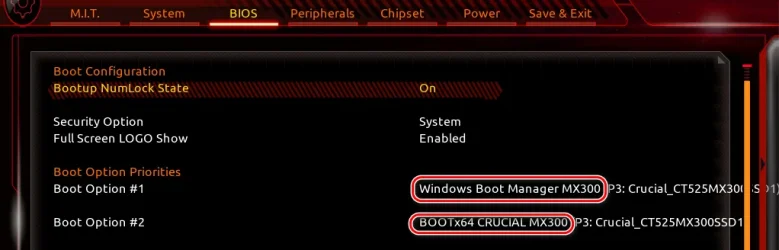
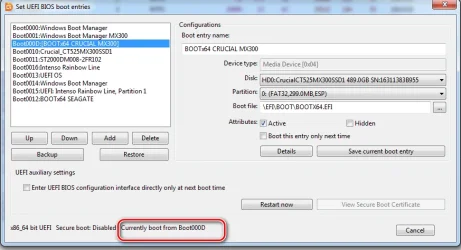
bootx64.efi works fine as expected

dg-set-uefi-currently.webp
 

My Computers

System One System Two

  • OS
    Win7,Win11
    Computer type
    PC/Desktop
    CPU
    i7-9700
    Motherboard
    gigabyte b365m ds3h
    Memory
    2x16gb 3600mhz
    Monitor(s) Displays
    benq gw2480
    PSU
    bequiet pure power 11 400CM
    Cooling
    cryorig m9i
  • Operating System
    win7,win11
    Computer type
    PC/Desktop
    CPU
    i5-8400
    Motherboard
    gigabyte b365m ds3h
    Memory
    2x8gb 3200
    PSU
    xfx pro 450
Back
Top Bottom