Solved How do you get text to show at top of explorer window?


bob3d

Just Some Guy
Member
VIP
Local time
5:45 AM
Posts
157
Location
San Antonio, Florida
OS
Windows 11 Professional (x64)
How do you get text to show at top of explorer window? It can't be that hard, because I did it on two other Windows 11 PCs at home but I can't seem to figure out how I did it on my replacement laptop. Please help me out. See attached screenshot of what I want.
 

Attachments
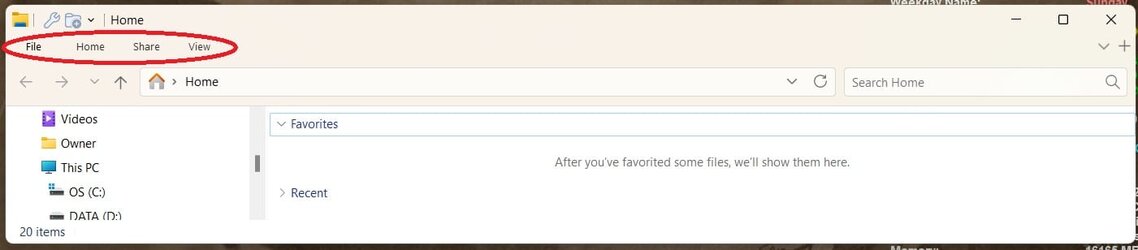
  • file explorer with text.jpg
    file explorer with text.jpg
    28.6 KB · Views: 4

My Computers My Computers

  • At a glance

    Windows 11 Professional (x64)Intel Core i916 GBNVIDIA GeForce RTX
    OS
    Windows 11 Professional (x64)
    Computer type
    Laptop
    Manufacturer/Model
    Dell Inc. G16
    CPU
    Intel Core i9
    Motherboard
    Dell Inc. 0FDMYT A00
    Memory
    16 GB
    Graphics Card(s)
    NVIDIA GeForce RTX
    Sound Card
    Realtek(R) Audio
    Monitor(s) Displays
    Generic PnP Monitor (15.3"vis)
    Screen Resolution
    2560 x 1600
    Hard Drives
    4TB SSD
    PSU
    Dell
    Case
    Laptop
    Cooling
    Air
    Keyboard
    Dell
    Mouse
    Logitech
    Internet Speed
    10 Mbps (Dismal, slow DSL over phone line)
    Browser
    Google Chrome
    Antivirus
    Webroot SecureAnywhere
  • At a glance

    Windows 11 Pro
    Operating System
    Windows 11 Pro
    Computer type
    PC/Desktop
    Manufacturer/Model
    Dell
Appearantly you are using some kind of app to change the user interface of the file explorer, as this is not the standard interface of Windows 11 file explorer. May be you are using StartAllBack or Explorer Patcher to archieve this and for better help you better mention what program you'r using for that.

Anyway: When I set the UI of File Explorer (via StartAllBack) to Windows 10, I can change the behaviour of that bar below or above by right clicking the bar itself on an empty peace and enabling or disabling "Display toolbar above the ribbon". The last sentence I translated from Dutch: "Werkbalk Snelle toegang boven het lint weergeven".
 

My Computer My Computer

At a glance

Windows 11 Pro 25H2AMD Ryzen 7 5700GKingston FURY Beast 2x16GB DIMM DDR4 2666 CL16MSI GeForce GT 730 2GB LP V1
OS
Windows 11 Pro 25H2
Computer type
PC/Desktop
Manufacturer/Model
Build by vendor to my specs
CPU
AMD Ryzen 7 5700G
Motherboard
MSI PRO B550M-P Gen3
Memory
Kingston FURY Beast 2x16GB DIMM DDR4 2666 CL16
Graphics Card(s)
MSI GeForce GT 730 2GB LP V1
Sound Card
Creative Sound Blaster Audigy FX
Monitor(s) Displays
Samsung S24E450F 24"
Screen Resolution
1920 x 1080
Hard Drives
1. SSD Crucial P5 Plus 500GB PCIe M.2
2. SSD-SATA Crucial MX500-2TB
PSU
Corsair CV650W
Case
Cooler Master Silencio S400
Cooling
Cooler Master Hyper H412R with Be Quiet Pure Wings 2 PWM BL038 fan
Keyboard
Cherry Stream (wired, scissor keys)
Mouse
Asus WT465 (wireless)
Internet Speed
70 Mbps down / 80 Mbps up
Browser
Firefox 130.0
Antivirus
F-Secure (Internetprovider version)
Other Info
Router: FRITZBox 7490
Oracle VirtualBox 7 for testing software on Win 10 or 11
How do you get text to show at top of explorer window?
 

My Computers My Computers

  • At a glance

    Windows 11 Pro
    OS
    Windows 11 Pro
    Computer type
    PC/Desktop
    Manufacturer/Model
    ASUS ROG Strix
  • At a glance

    Windows 11 Pro
    Operating System
    Windows 11 Pro
    Computer type
    Laptop
    Manufacturer/Model
    ASUS VivoBook
  • ASUS VivoBook 'Lite' ~ Windows 11 Home
Appearantly you are using some kind of app to change the user interface of the file explorer, as this is not the standard interface of Windows 11 file explorer. May be you are using StartAllBack or Explorer Patcher to archieve this and for better help you better mention what program you'r using for that.

Anyway: When I set the UI of File Explorer (via StartAllBack) to Windows 10, I can change the behaviour of that bar below or above by right clicking the bar itself on an empty peace and enabling or disabling "Display toolbar above the ribbon". The last sentence I translated from Dutch: "Werkbalk Snelle toegang boven het lint weergeven".
I used StartAllBack to change the Start menu and that is all I did. I did not touch the explorer windows whatso ever. And in the past where I had the text on the top of the explorer windows on other machines, I strongly believe that I did not use StartAllBack for that function. I wish it did that function, because I have that app installed. I just want to know how to accomplish this feature by any way possible, registry change (s) included. Thanks!
 

My Computers My Computers

  • At a glance

    Windows 11 Professional (x64)Intel Core i916 GBNVIDIA GeForce RTX
    OS
    Windows 11 Professional (x64)
    Computer type
    Laptop
    Manufacturer/Model
    Dell Inc. G16
    CPU
    Intel Core i9
    Motherboard
    Dell Inc. 0FDMYT A00
    Memory
    16 GB
    Graphics Card(s)
    NVIDIA GeForce RTX
    Sound Card
    Realtek(R) Audio
    Monitor(s) Displays
    Generic PnP Monitor (15.3"vis)
    Screen Resolution
    2560 x 1600
    Hard Drives
    4TB SSD
    PSU
    Dell
    Case
    Laptop
    Cooling
    Air
    Keyboard
    Dell
    Mouse
    Logitech
    Internet Speed
    10 Mbps (Dismal, slow DSL over phone line)
    Browser
    Google Chrome
    Antivirus
    Webroot SecureAnywhere
  • At a glance

    Windows 11 Pro
    Operating System
    Windows 11 Pro
    Computer type
    PC/Desktop
    Manufacturer/Model
    Dell
As I said before, you should only need to right-click the text in that bar and disable "Show bar on top" (or something like that, I have a Dutch system).

You can't change it in StartAllBack and I would not know any registry-edit for that.

Edit: on the Internet I found a site where it is explained:

The bar appears to be called Quick Access Toolbar in English.
 

My Computer My Computer

At a glance

Windows 11 Pro 25H2AMD Ryzen 7 5700GKingston FURY Beast 2x16GB DIMM DDR4 2666 CL16MSI GeForce GT 730 2GB LP V1
OS
Windows 11 Pro 25H2
Computer type
PC/Desktop
Manufacturer/Model
Build by vendor to my specs
CPU
AMD Ryzen 7 5700G
Motherboard
MSI PRO B550M-P Gen3
Memory
Kingston FURY Beast 2x16GB DIMM DDR4 2666 CL16
Graphics Card(s)
MSI GeForce GT 730 2GB LP V1
Sound Card
Creative Sound Blaster Audigy FX
Monitor(s) Displays
Samsung S24E450F 24"
Screen Resolution
1920 x 1080
Hard Drives
1. SSD Crucial P5 Plus 500GB PCIe M.2
2. SSD-SATA Crucial MX500-2TB
PSU
Corsair CV650W
Case
Cooler Master Silencio S400
Cooling
Cooler Master Hyper H412R with Be Quiet Pure Wings 2 PWM BL038 fan
Keyboard
Cherry Stream (wired, scissor keys)
Mouse
Asus WT465 (wireless)
Internet Speed
70 Mbps down / 80 Mbps up
Browser
Firefox 130.0
Antivirus
F-Secure (Internetprovider version)
Other Info
Router: FRITZBox 7490
Oracle VirtualBox 7 for testing software on Win 10 or 11
I had the text on the top of the explorer windows
What text are you talkin about? The text you have circled in your screenshot or something else?

6000.jpg
 

My Computers My Computers

  • At a glance

    Windows 11 Pro
    OS
    Windows 11 Pro
    Computer type
    PC/Desktop
    Manufacturer/Model
    ASUS ROG Strix
  • At a glance

    Windows 11 Pro
    Operating System
    Windows 11 Pro
    Computer type
    Laptop
    Manufacturer/Model
    ASUS VivoBook
  • ASUS VivoBook 'Lite' ~ Windows 11 Home
Thanks! That worked. I have my text at the top and I eliminated the icons in explorer which I never use.
 

My Computers My Computers

  • At a glance

    Windows 11 Professional (x64)Intel Core i916 GBNVIDIA GeForce RTX
    OS
    Windows 11 Professional (x64)
    Computer type
    Laptop
    Manufacturer/Model
    Dell Inc. G16
    CPU
    Intel Core i9
    Motherboard
    Dell Inc. 0FDMYT A00
    Memory
    16 GB
    Graphics Card(s)
    NVIDIA GeForce RTX
    Sound Card
    Realtek(R) Audio
    Monitor(s) Displays
    Generic PnP Monitor (15.3"vis)
    Screen Resolution
    2560 x 1600
    Hard Drives
    4TB SSD
    PSU
    Dell
    Case
    Laptop
    Cooling
    Air
    Keyboard
    Dell
    Mouse
    Logitech
    Internet Speed
    10 Mbps (Dismal, slow DSL over phone line)
    Browser
    Google Chrome
    Antivirus
    Webroot SecureAnywhere
  • At a glance

    Windows 11 Pro
    Operating System
    Windows 11 Pro
    Computer type
    PC/Desktop
    Manufacturer/Model
    Dell
Back
Top Bottom